Top 10 Otter Alternatives for Startups [2025]
Rodoshi
Growth Content Editor
![Top 10 Otter Alternatives for Startups [2025]](/api/media/payload/Top_10_Otter_Alternatives_for_Startups_2025-mm43lh.png)
Startups run on meetings.
Not just the big ones like investor calls or user interviews, but also the daily check-ins, demos, and strategy huddles that move things forward.
When you’re managing all that with a lean team, the last thing you want is to forget action items or wade through clunky transcripts.
Otter has been a go-to for many, but it’s not always built for startup speed.
From real-time bots that can raise privacy flags to bloated transcripts and inconsistent summaries, Otter often leaves teams doing more cleanup than execution.
If you're looking for tools that match how you work: async-friendly, clean summaries, reliable integrations, and privacy that holds up, this list is for you.
I’ve rounded up 10 Otter alternatives for startups that help you go from meeting to action faster. Let’s explore.
Why Are Startups Looking for Otter Alternative?
You probably started with Otter because it’s easy to pick up. But as your usage expanded, you started noticing the cracks.
Here are some of the key reasons startups are seeking alternatives to Otter AI:
1. Inaccurate transcripts and summaries
“The transcription was poor. I had no confidence in the summaries.”
For startups that move fast and deal with diverse clients, poor transcription accuracy and formatting glitches make Otter unreliable. Instead of saving time, teams have to spend time cleaning up errors.
2. Meeting bot feels intrusive
An AI bot dropping into private meetings without clear consent creates privacy risks and awkward interruptions...something startups can’t afford when building client trust.
3. Pricing issues
The free plan quickly feels limiting. With core collaboration features locked behind higher tiers, Otter’s pricing doesn’t align well with the lean budgets most startups operate on.
What Are the Best Otter Alternatives for Startups?
Based on my research and experience, these are the best alternatives to Otter AI startups can rely on:
Jamie – For structured, bot-free meeting summaries built for founders
Fireflies – For sales teams and CRM-integrated meeting notes
Supernormal – For Google Meet users who want fast, shareable recaps
Grain – For clipping and sharing key meeting moments with your team or stakeholders
Avoma – For sales and customer success teams needing call intelligence and coaching
Circleback – For teams looking for a lightweight note-taker
Notta – For multilingual transcription and teams working across global markets
Bluedot – For affordable transcription and CRM sync for growing sales teams
Colibri – For teams that want keyword search, sales insights, and basic coaching
MeetGeek – For automated summaries, speaker tagging, and internal meeting intelligence
1. Jamie
Best for: Accurate, bot-free meeting transcription and notes in 100+ languages
Explore Jamie with this interactive demo below 👇
If Otter feels bloated or too clunky for your pace, Jamie might be the faster alternative your startup needs.
Built for startup founders and lean teams, Jamie handles meeting notes without any visible bots. It’s private, fast, and easy to use, so you spend less time sorting through transcripts and more time shipping, hiring, or fundraising.
Jamie's features
Get meeting notes without bots joining your calls

Jamie doesn't send awkward bots or extra participants to your meetings.
It runs as a desktop app on Mac or Windows, and records audio directly from your device. You can also use the mobile app on your iOS devices to conduct meetings on the go.
All you have to do is hit record when the meeting starts.
When you’re done, Jamie’s AI gets to work, and delivers a clean summary in just minutes.
Because it records system audio, it works with any platform: Zoom, Google Meet, Teams, or whichever video conferencing software your team prefers.
Best part is, it works for in-person meetings as well!
Get accurate transcripts, every time
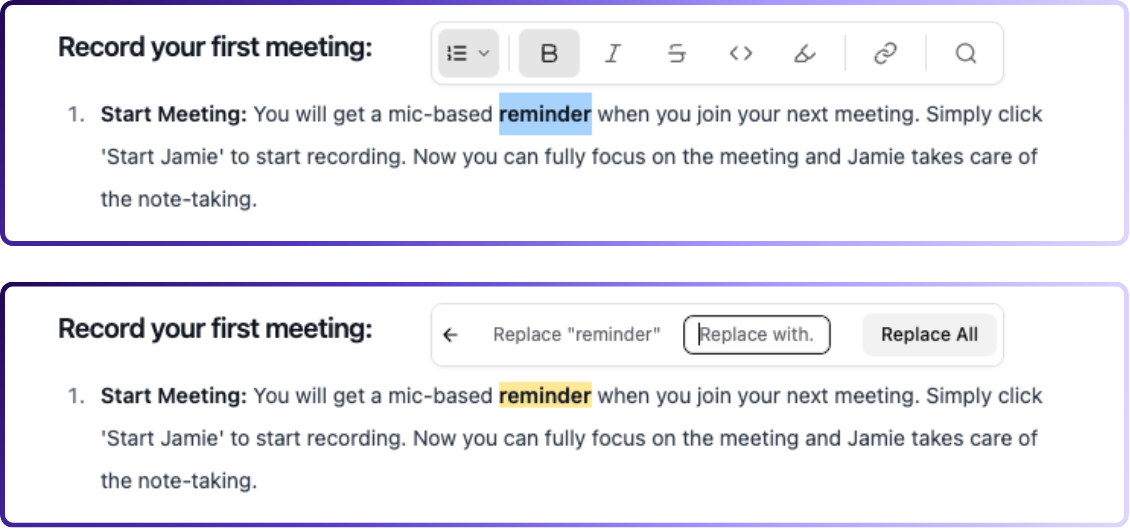
With meeting summary, Jamie also provides a full transcript with timestamps.
You can quickly fix any misheard words, search for exact quotes, or surface key phrases in seconds.
Over time, Jamie becomes a searchable library of every conversation your team has had.
Capture tasks and decisions automatically
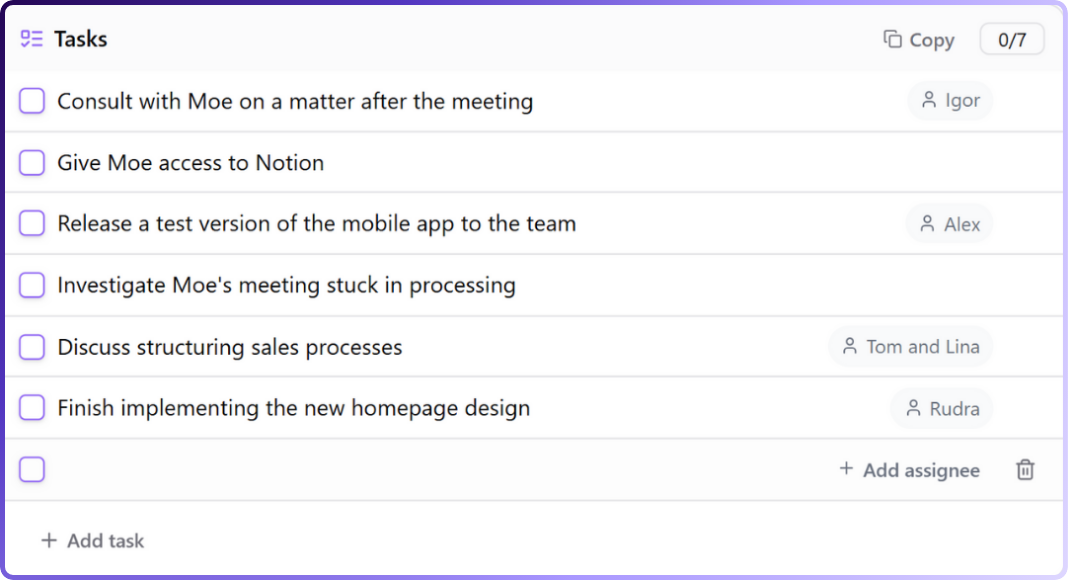
You don’t have to scribble notes or circle back later asking who owns what.
Jamie follows your conversation, catching every task, decision, and next step. In just a few minutes after the meeting ends, it lays out a simple checklist of tasks with owners.
Need clarity on something? Click once and you’re right back at that exact moment in the transcript.
And when new action items pop up, just type “/” to add them on the spot.
Transcribe and summarize meetings in 100+ languages
Wherever your team’s based, Jamie understands the conversation.
It automatically detects the language, transcribes in real time, and delivers summaries in that language (or in English if you prefer!).
Switching between accents, dialects, or languages mid-call? Jamie keeps up without losing context.
Organize meeting notes with tags and filters
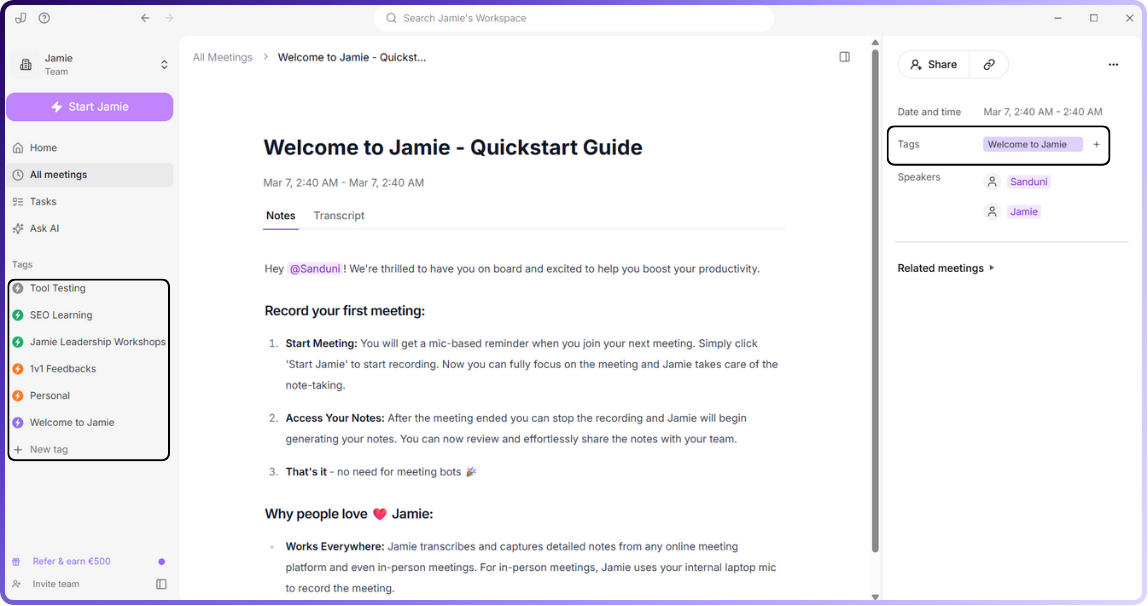
Forget digging through endless folders. Jamie lets you tag meetings your way: #Marketing, #Q4Strategy, or whatever makes sense for your team.
Later, a quick filter pulls up exactly what you need in seconds.
And since each summary can have multiple tags, your notes stay flexible, organized, and easy to find.
Send notes straight to your favorite tools
Jamie fits into the tools you already rely on.
It connects with Google Calendar and Outlook and reminds you to hit record the moment your meeting starts.
Your meeting documentation ends up exactly where you need it:
Notes/Docs
Notion: Connect directly from your Integration settings and Jamie will create a dedicated notes database in your workspace. You can choose between automatic sync (right after a summary finishes) or manual sync (triggered through the Share card)
OneNote: Jamie sets up a My Jamie Notes notebook with a Meeting Notes section inside. Each meeting gets its own page, and you can pick automatic or manual sync
Tasking / PM (via copy-paste with formatting preserved)
Linear: Pasted tasks appear as clean bullet points
Todoist: Detects multiple tasks and splits them automatically
Bear: Converts pasted tasks into bullet lists
Typora: Keeps bullet-list format and original styling
Ulysses: Shows tasks in Markdown with clear done/not-done status (use “Paste from HTML” for best results)
Extract instant meeting insights with Ask AI
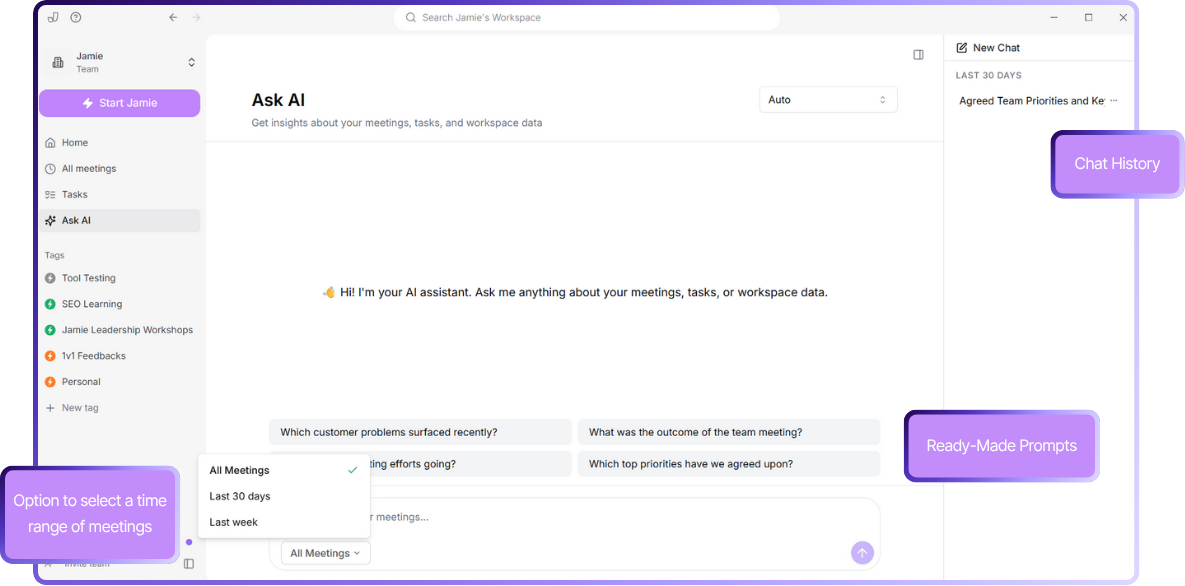
Need a recap or trying to confirm a decision from an old meeting? Just ask.
With Jamie’s Ask AI, you can search your meeting history like a conversation.
Whether it’s the outcome of last week’s launch sync or a comment from a month back, the right moment appears instantly.
You’ll also see the AI’s reasoning in real time, so you know exactly how it got to the answer.
Keep your meeting data secure and private
Jamie’s built for teams that put privacy first.
Every recording is encrypted, processed on secure servers in Frankfurt, and deleted as soon as your notes are ready.
What stays in your account is just the text transcript, and you can remove that anytime you want.
Your data is never used to train third-party models. While Jamie works with providers like OpenAI and Anthropic for processing, your information always stays private.
On top of that, regular security audits and full GDPR compliance ensure your conversations are protected from start to finish.
Jamie’s pricing
FREE Plan (€0/month)
10 meeting credits per month
30-minute meeting duration limit
AI-generated meeting notes
Automatic action item extraction
Complete meeting transcripts
Speaker identification
Calendar integration (Google & Outlook)
Tag system
Task management
Advanced text editing
Copy-paste integration
Team workspace sharing
No meeting bots required
100+ languages support
PLUS Plan (€25/month)
20 meeting credits per month
2-hour meeting duration limit
Includes everything in FREE plan
PRO Plan (€47/month)
Unlimited meeting credits
3-hour meeting duration limit
Includes everything in PLUS plan
Team & Enterprise Plans
Custom pricing
Custom solutions
Contact required for details
Pros
✅ AI chat makes it easy to quickly find information from past meetings
✅ Built-in reminders help you remember to start recording
✅ Works with any virtual meeting platform
✅ Available on both Mac and Windows, and as a mobile app
✅ Works for in-person and offline meetings, not just online calls
✅ Generous free plan with all premium features available
Cons
❌ No real-time transcription (summaries and transcripts are available after the meeting ends)
❌ Doesn’t store audio or video files to maintain privacy
2. Fireflies
Best for: Sales teams and CRM-integrated meeting notes
Source: Fireflies
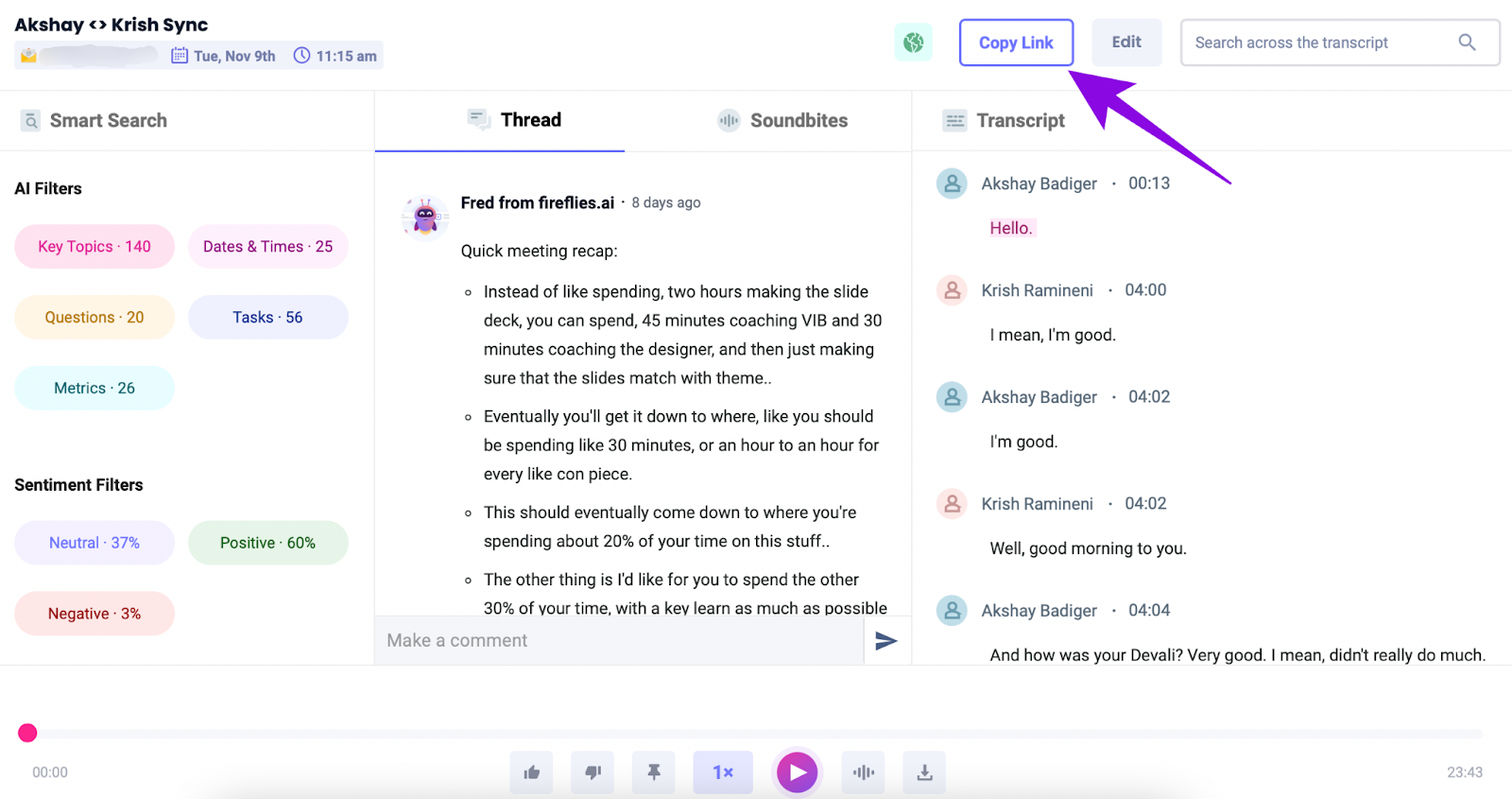
Think of Fireflies as your silent sales ops assistant: it auto‑joins every Zoom, Meet, or Teams call and captures the full transcript.
Then it pushes key moments straight into HubSpot, Salesforce, or Pipedrive, so reps can focus on closing deals instead of scrambling for notes.
It’s ideal for busy sales teams that need consistent, searchable records of every prospect conversation.
Fireflies' key features
Get timestamped call summaries
Filter across all calls by keyword, speaker, or sentiment to prep for renewals and pipeline reviews
Transcribe pre-recorded video and audio files
Access dashboard metrics on talk/listen ratios, question rates, and engagement trends
Fireflies' pricing
Free
Pro: $10/month per user
Business: $19/month per user
Enterprise: $39/month per user
Pros
✅ Ensures high accuracy
✅ Searchable meeting repository keeps teams aligned
✅ Transparent, startup‑friendly pricing
✅ Compliant with GDPR, SOC 2 Type II, with Enterprise plan offering HIPAA and SSO support
Cons
❌ Processing speed can lag for long meetings
❌ Effectiveness relies on meeting audio quality and stable internet
Also read: Otter AI vs. Fireflies AI vs. Jamie: Which One Is Better in 2025?
3. Supernormal
Best for: Google Meet users who want fast, shareable recaps
Source: Supernormal
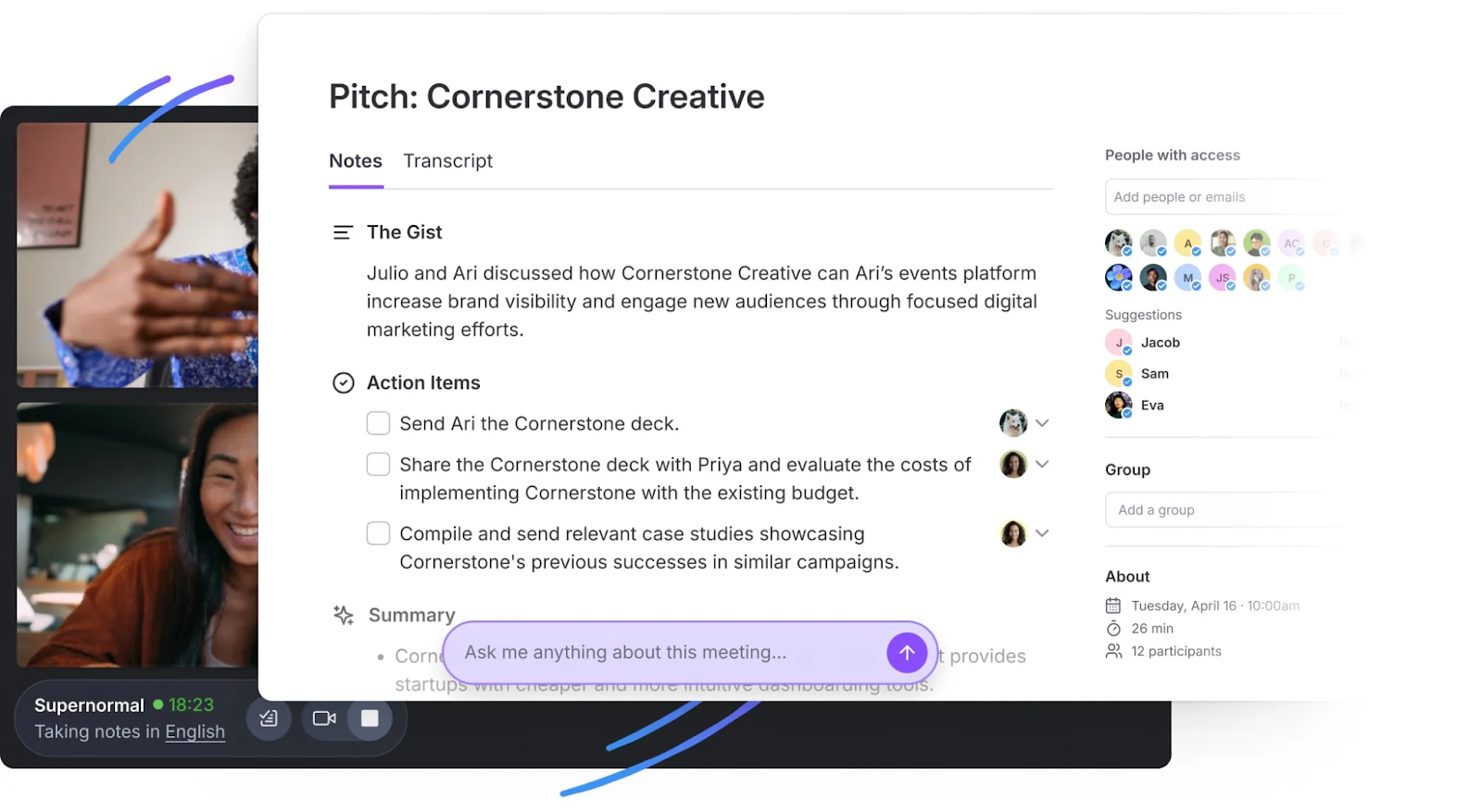
Supernormal turns your meetings into bullet-pointed, task-ready notes and sends them to your inbox before you’ve even left the tab. It doesn’t join meetings with a bot.
If you’re running sprint reviews, hiring calls, or back-to-back team check-ins on Google Meet, Supernormal keeps up. It listens, pulls out key points, and auto-tags who said what.
You don’t need to rewatch anything or dig for takeaways; your follow-ups are already in Notion, HubSpot, or Gmail by the time your next meeting starts.
Supernormal's key features
Auto-records Google Meet and Zoom (calendar-based)
Highlights action items, decisions, and next steps
Organizes everything in a shared workspace, ready to search or send
Unlimited recordings on paid plans
Supernormal's pricing
Free
Pro: $10/month per user
Business: $19/month per user
Enterprise: Custom pricing
Pros
✅ Zero-wait recaps
✅ Intuitive interface with almost no learning curve
✅ Reliable customer support
Cons
❌ Best if you’re already deep in Google’s ecosystem
❌ Not ideal for teams looking for real-time transcripts or advanced analytics
4. Grain
Best for: Clipping and sharing key meeting moments with your team or stakeholders
Source: Grain
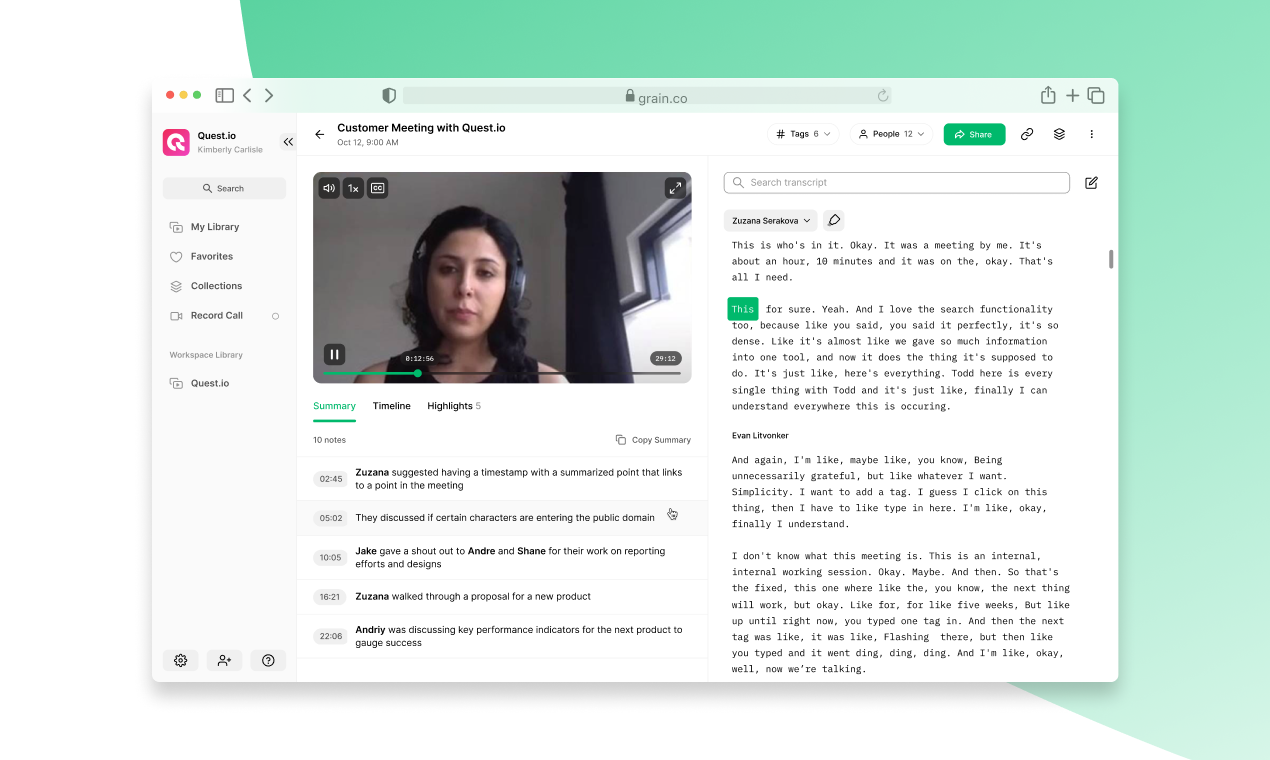
Grain records your calls and lets you clip, annotate, and share the key moments that matter most.
Whether you're running user interviews, onboarding sessions, or internal reviews, Grain turns your meetings into a searchable knowledge base.
Instead of forcing your team to dig through transcripts or rewatch entire calls, you can create short video snippets, generate summaries, and push everything into tools like Slack, Notion, or HubSpot.
Grain is ideal for fast-moving startups that want to document insights, share decisions, and keep stakeholders aligned, without adding more tasks to their to-do lists.
Grain's key features
Auto-records Zoom, Google Meet, and Teams calls
Create and share video highlights and reels
AI-generated summaries and action items
Slack, HubSpot, Notion, and CRM integrations
Shared workspace with search and replay
Grain's pricing
Free
Starter: $15/month per user
Business: $29/month per user
Enterprise: Custom pricing
Pros
✅ Users love the ability to create reusable video snippets for onboarding or research
✅ Intuitive user interface
✅ Smooth onboarding and integrations
Cons
❌ Accuracy drops with accents or overlapping audio
❌ Some users report occasional bugs when editing transcripts or sharing clips
5. Avoma
Best for: Sales and customer success teams that need call intelligence and coaching
Source: Avoma
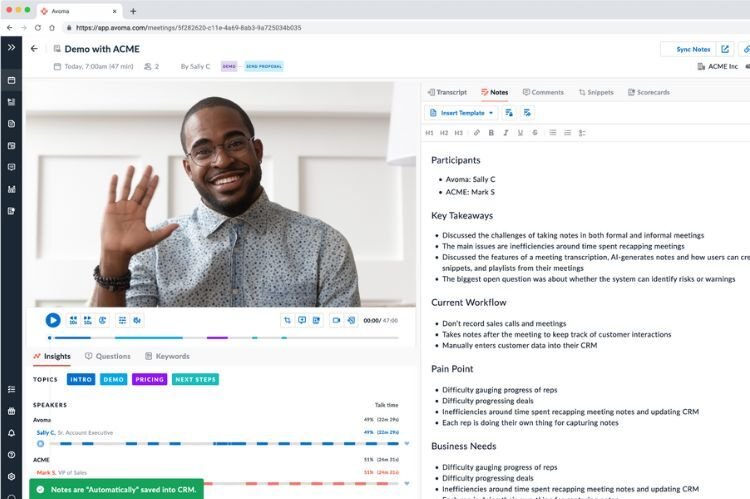
Avoma helps startups turn meetings into repeatable systems, whether you're managing sales, onboarding reps, or tracking customer feedback.
It records and summarizes every call, but also goes deeper with searchable insights across your pipeline.
Avoma breaks conversations into themes like objections, next steps, or pricing questions.
Founders and team leads can use these insights to coach, analyze patterns, and improve how the team talks to customers.
Avoma's key features
Auto-recording and automatic transcription for internal and external meetings
AI-powered notes categorized by topics like goals, concerns, and follow-ups
Conversation trends, talk-time breakdowns, and keyword alerts
Pipeline and deal intelligence through CRM integration
Avoma's pricing
Free trial
Startup: $19/month per user
Organization: $29/month per user
Enterprise: $39/month per user
Pros
✅ Categorizes meeting content for faster review and team coaching
✅ Helpful for ramping new hires with searchable past calls
✅ Combines note-taking and deal insights in one platform
Cons
❌ Takes time to customize templates and set up effective tagging
❌ UI can feel complex for teams that don’t need full analytics
Also read: Avoma vs Fireflies vs Jamie: Which One is Better? [2025]
6. Circleback
Best for: Teams looking for a lightweight note-taker
Source: Circleback
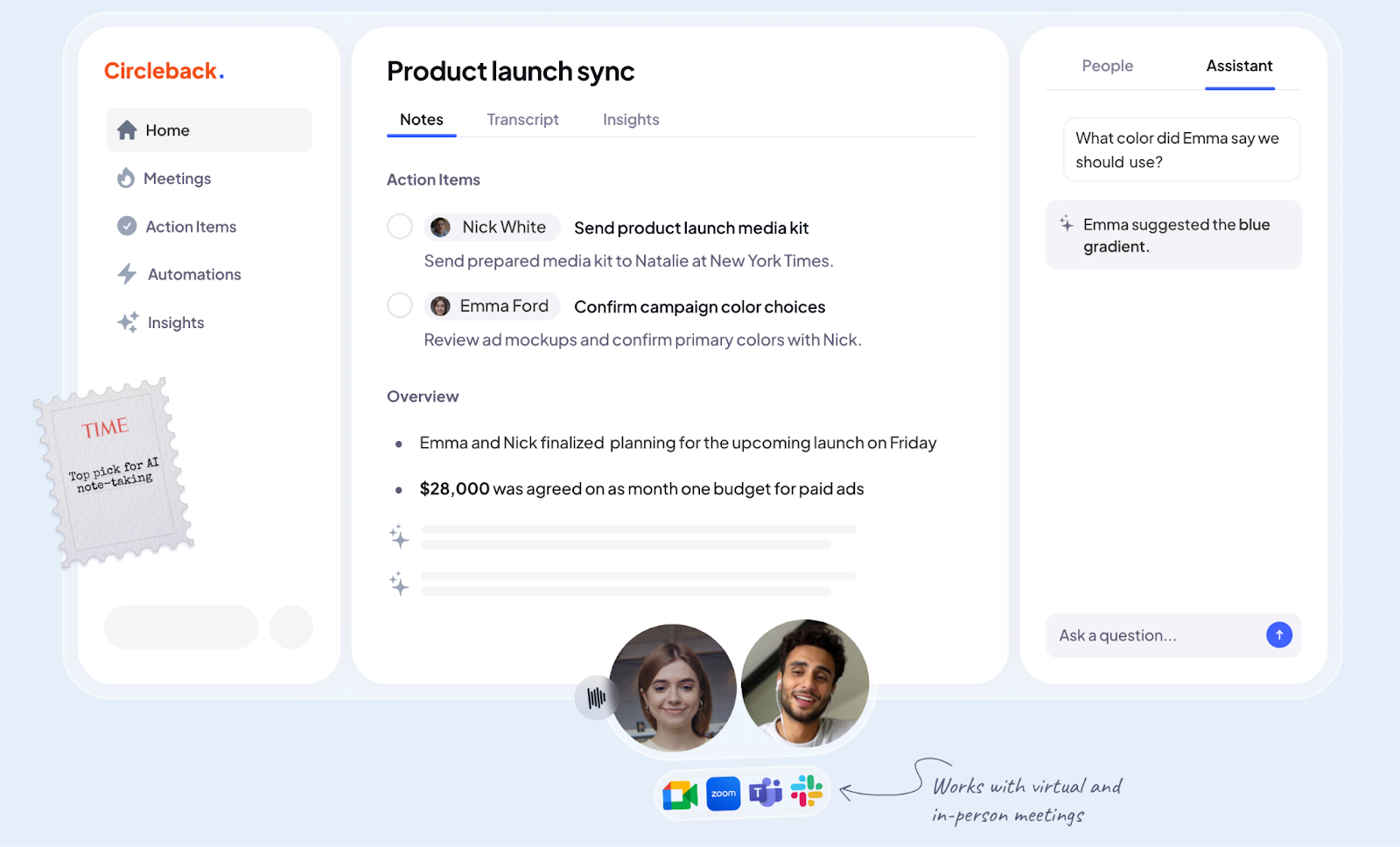
Circleback is for teams that don’t want a bot joining every call.
It quietly captures meetings and turns them into clear, structured summaries with next steps, speaker tags, and key topics.
What makes it stand out is its flexibility. You can drop in recordings from anywhere (Zoom, Meet, Teams, or even your phone mic), and Circleback will break down the conversation, tag what matters, and sync it to the tools your team already uses.
Circleback's key features
AI summaries with action items, speaker tracking, and topic mapping
Works across platforms: Zoom, Google Meet, Teams, and offline
Native integrations with Notion, Slack, HubSpot, and CRMs
Supports 100+ languages and dialects
Circleback's pricing
Free trial available
Individual: $20.83/month per user
Team: $25/month per user
Enterprise: Custom pricing
Pros
✅ Get assigned action items
✅ Summaries feel clean and curated, not machine-dumped
✅ Flexible enough for hybrid, offline, and cross-platform workflows
✅ Built-in automations save follow-up time
Cons
❌ Speaker identification can be inaccurate in group or noisy calls
❌ Mobile app has occasional bugs and limited export formats
7. Notta
Best for: Multilingual transcription and teams working across global markets
Source: Notta
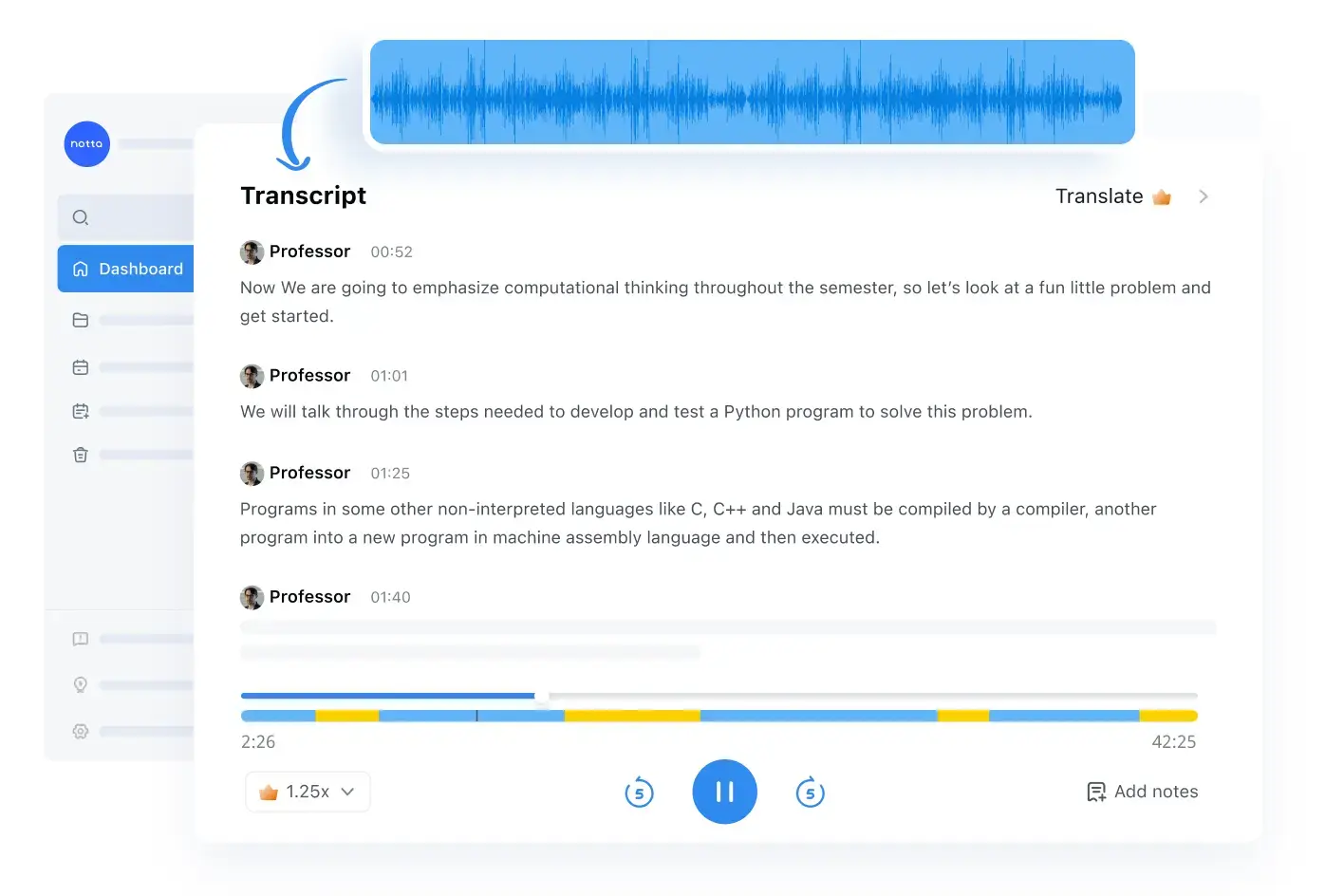
Notta is an AI meeting assistant designed for startups working across multiple languages and time zones.
It auto-transcribes meetings and files in real time with strong multilingual accuracy, then translates them instantly.
For teams handling interviews, partner calls, or research in diverse markets, Notta reduces friction and speeds up insight sharing.
Notta's key features
Real-time transcription and translation across languages
Searchable transcripts and export options for collaboration
Mobile and desktop support for live calls and uploaded audio and video files
Notta's pricing
Free
Pro: $8.17/month per user
Business: $16.67/month per user
Enterprise: Custom pricing
Pros
✅ Excellent accuracy even with technical vocabulary or imperfect audio
✅ Built-in translation makes it easy to share globally across languages
✅ Transcript search and export features support team collaboration
Cons
❌ UI can be confusing to new users
❌ Support for dialects/less common languages is spotty
Also read: Otter AI vs Notta vs Jamie: Which one is better in 2025?
8. Bluedot
Best for: Affordable transcription and CRM sync for growing sales teams
Source: Bluedot
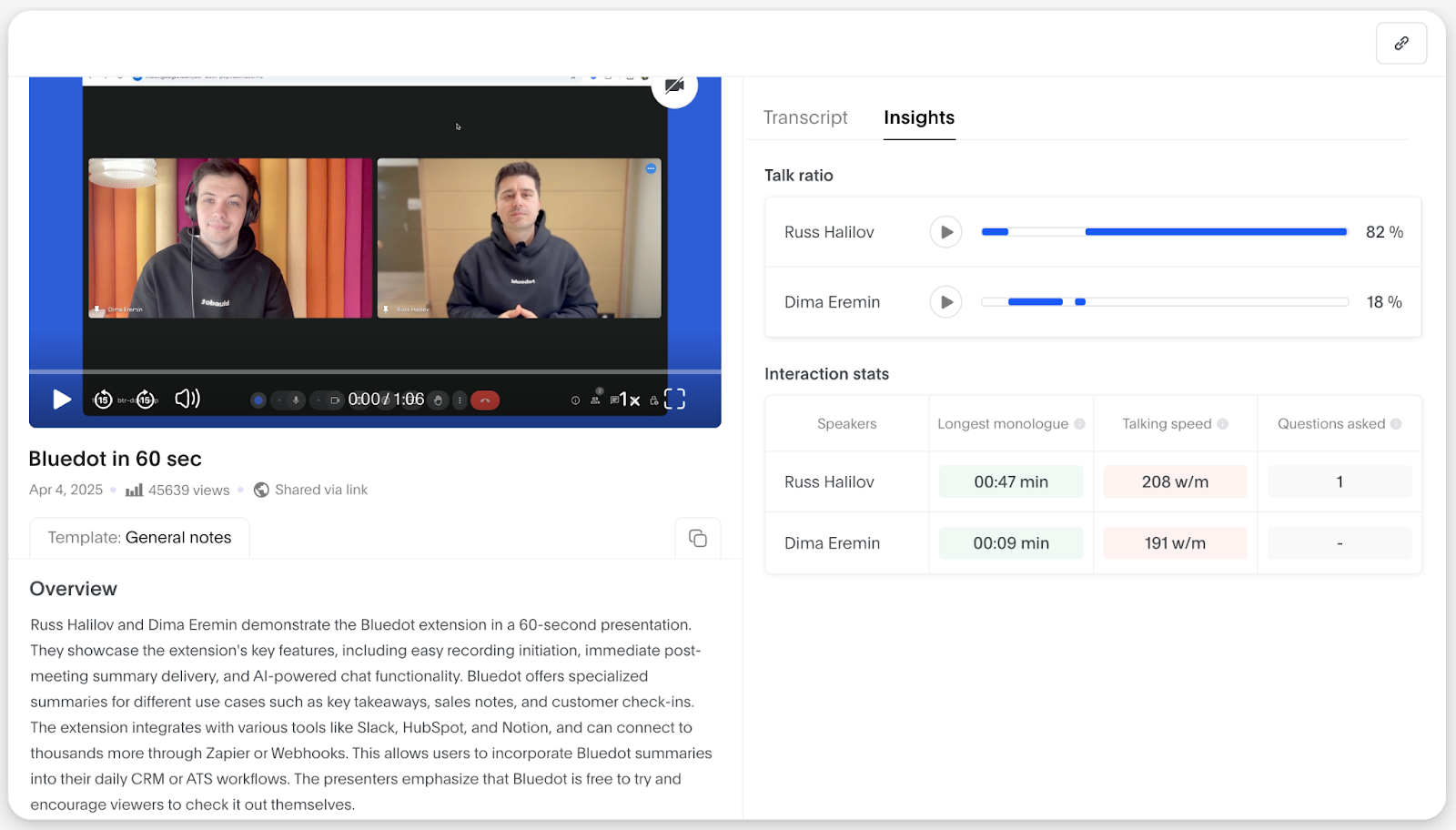
Bluedot works across meeting platforms without bots, which makes it ideal for sales teams conducting sensitive or multilingual calls.
It transcribes accurately, generates email-style summaries, and integrates smoothly with CRMs like HubSpot, while respecting GDPR and data ownership by default.
Bluedot's key features
No‑bot recording; chrome extension-based
Transcription in 100+ languages
Auto-generated summaries and follow-up email templates
Deep CRM and API integrations
Bluedot's pricing
Free
Basic: $14/month per user
Pro: $20/month per user
Business: $32/month per user
Enterprise: Custom pricing
Pros
✅ Transcriptions and summaries are accurate across languages
✅ Reliable speaker identification
✅ No-bot recording ensures clean, professional customer interactions
Cons
❌ Free plan is extremely limited
❌ Summary customization is restricted
Also read: 7 Best Bluedot Alternatives for AI Note-Taking [2025]
9. Colibri
Best for: Teams that want keyword search, sales insights, and basic coaching
Source: Colibri
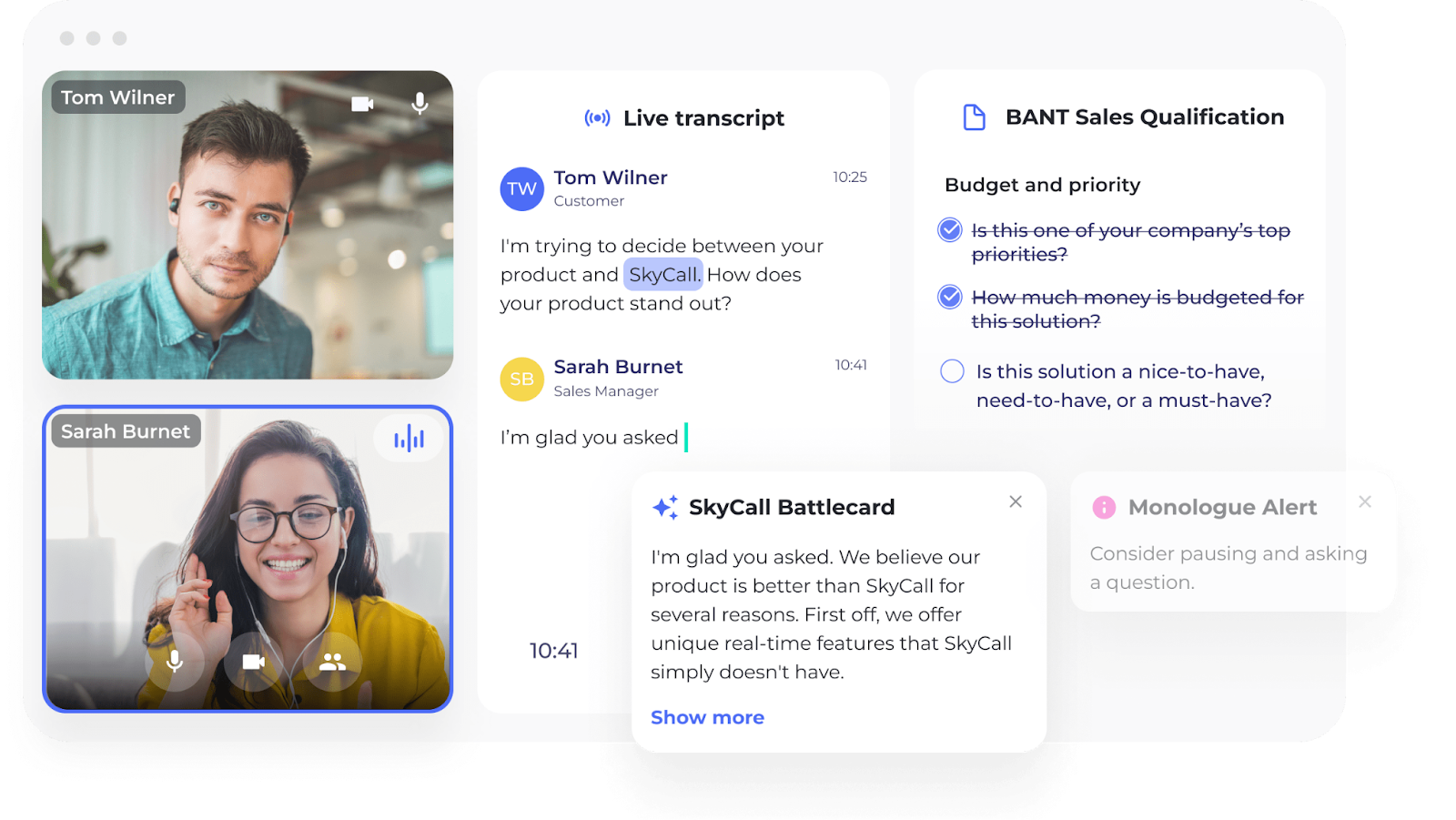
Colibri records and transcribes live meetings, offers real-time coaching cues, tracks talk-to-listen ratio, and pushes structured summaries to your CRM.
It helps reps close faster and managers get actionable insights without replaying calls.
Colibri's key features
Real-time AI guidance and coaching during calls
Automated summaries with follow-up tasks
Analytics on engagement, objections, speaker ratio
Salesforce and CRM integration
Colibri's pricing
Free
Starter: $16/month per user
Pro: $40/month per user
Enterprise: Custom pricing
Pros
✅ Significantly improves sales calls with real-time prompts and post-call next steps
✅ Users can search past transcripts easily
✅ Helpful support team and quick onboarding
Cons
❌ Speaker labels can misfire with overlapping dialogue or accents
❌ The UI can feel cluttered
10. MeetGeek
Best for: Automated summaries, speaker tagging, and internal meeting intelligence
Source: MeetGeek
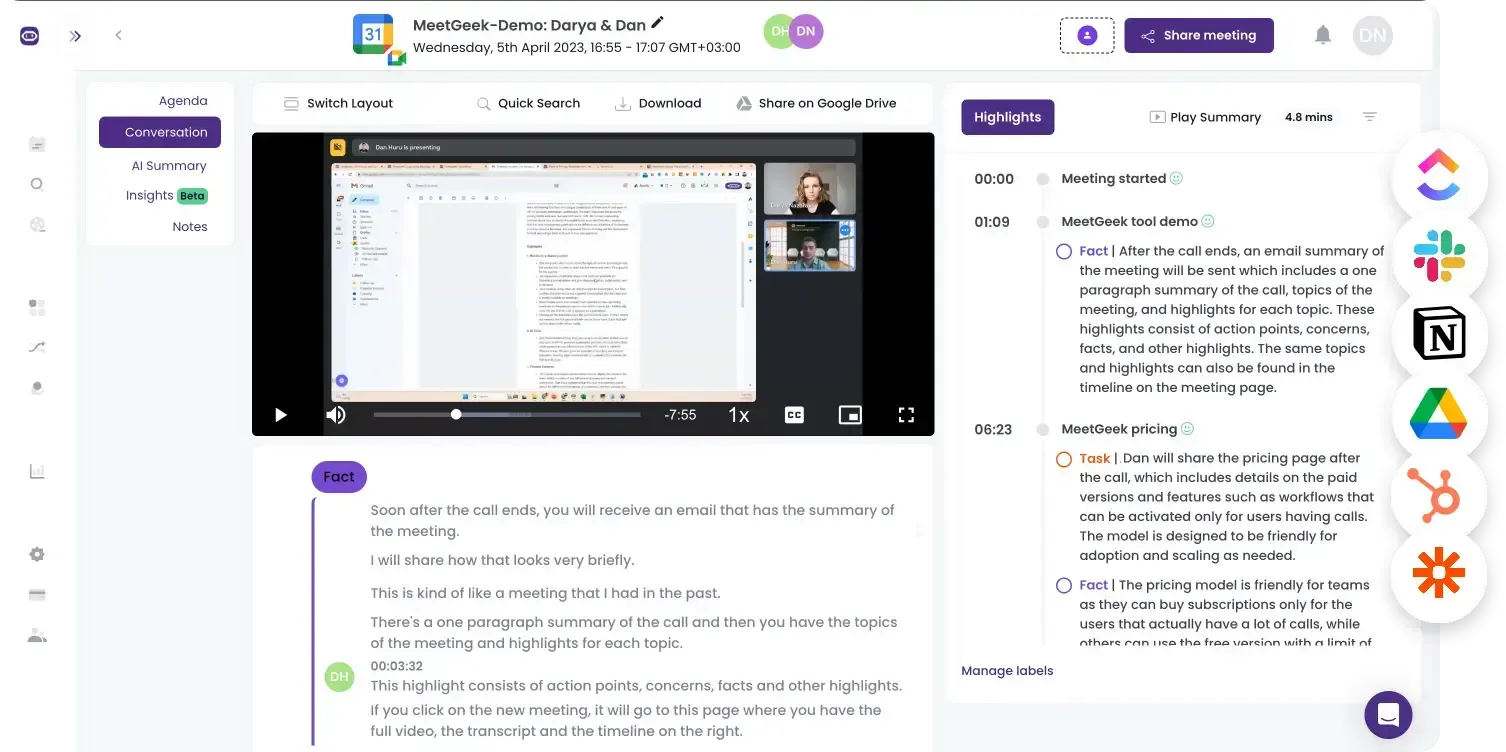
MeetGeek is a meeting management platform that adapts your summary style to fit the call, be it a sales pitch, interview, or team sync.
It auto-joins via calendar, captures calls on Zoom, Teams, or Meet, and sends tailored recaps with decisions, speaker highlights, and next steps.
Templates make sure your notes feel purposeful.
MeetGeek's key features
Auto-join meetings via major platforms
AI-powered meeting notes tailored to call context
Analytics on participation, sentiment, and engagement
Integrations with CRM, Notion, Slack, Zapier (2,000+ apps)
MeetGeek's pricing
Free
Pro: $15/month per user
Business: $29/month per user
Enterprise: $59/month per user
Pros
✅ High-quality AI summaries
✅ Useful templates for meeting notes
✅ Easy onboarding and integrations make it popular with small teams
Cons
❌ Summary or transcript accuracy can falter without clean audio or structure
❌ Limited language support and storage caps in Pro plan frustrate growing teams
Make Your Meetings More Action-Focused with Jamie
In startups, picking the right tools is as important as your first few hires. Which meeting software you should go for depends on how your team works:
Running product interviews and want to share clips with your team? Grain makes that easy
Handling multilingual customer calls across time zones? Notta handles transcription and translation on the fly
Need to sync recorded calls into your CRM without bots? Bluedot keeps it clean and compliant
Want real-time coaching and analytics for sales reps? Colibri brings in-call guidance and post-call insights
And if you’re looking for advanced meeting notes with insights, action items, and summaries; built-in AI chat to speed up your work; bot-free experience; and offline capability, Jamie is in a league of its own.
It’s your trusted meeting assistant that never misses a detail, stays out of the way, and keeps your data secure.
Sign up for a free trial to experience it yourself!
Or if you’d like to see the tool in action before making a move, book a free demo.
Read More
FAQs
What are the best Otter AI alternatives for video conferencing tools in 2025?
If your startup runs video meetings on Zoom, Google Meet, or Microsoft Teams, top Otter AI alternatives include Jamie, Fireflies.ai, Supernormal, Avoma, and Bluedot. These tools offer stronger transcription services, accurate meeting summaries, and integrations that fit lean teams.
What should I look for in a meeting transcription software?
When choosing a transcription tool, look for something that goes beyond basic transcription features. It should offer extract action items from meeting details, allow you to tag your meetings, offer smooth integrations with your tech stack, and come with a usable free plan. Take Jamie for example: even on its free plan, Jamie offers advanced features like task extraction, speaker identification, multi-language support, and searchable meeting notes.
How do AI-powered transcription tools compare to traditional human transcription services?
AI powered transcription tools like Jamie, Fireflies.ai, and Supernormal are built for speed and automation, turning around transcripts and meeting notes almost instantly. Human transcription services remain more accurate for nuanced conversations but they're slower and costly, making them less practical for startups that run frequent online meetings.
Are there free Otter AI alternatives for virtual meetings?
Several Otter AI alternatives come with a free plan, though the value varies. Jamie offers one of the most generous free plans, with AI-powered meeting notes, task extraction, speaker identification, multi language support, and searchable transcripts, and it captures meetings without bots. Fireflies provides 800 minutes of transcription per user, Supernormal allows 20 meetings a month, Bluedot has about 5 free meetings, and MeetGeek includes a capped free tier. While most free options are restrictive, Jamie stands out by including advanced features even at €0.
How does Jamie ensure data security while transcribing meetings?
Jamie is designed for teams that value data security. All audio and video files are encrypted, processed on secure servers in Frankfurt, and deleted once AI generated meeting reports are ready. Only the transcript remains in your account, and you can delete it anytime for full control over your meeting data.