The topic of “bot-free Fireflies AI alternatives” has been on my radar lately. Why? Because I keep hearing the same frustrations from teams.
Fireflies AI’s visible meeting bot can feel awkward. It’s tricky to remove mid-call and sometimes joins late.
Add in occasional transcription errors with accents or crosstalk, and it’s clear why many are looking elsewhere.
After talking to founders, managers, and remote teams (and digging through plenty of reviews), I’ve put together this list of tools that skip the bot hassle and still deliver accurate and shareable meeting notes.
Why Teams Are Looking for Bot-Free Fireflies AI Alternatives
Awkward bot presence in meetings
When you’re pitching to investors, negotiating a deal, or running a sensitive client call, a visible bot can feel intrusive. It draws attention to the recording process and can shift the tone of the meeting: not ideal when you’re trying to build rapport or maintain focus.
Hard to remove once it’s joined
Sometimes you realise mid-meeting that recording isn’t the right call; maybe the discussion has shifted to something confidential. But with Fireflies, stopping the bot isn’t straightforward. You’re left fumbling through settings or risking a disruptive interruption.
Joining delays or manual invites in Teams and Zoom
If the bot is delayed or needs a manual invite, you could miss the first few minutes, often when critical updates or decisions are made. In Teams especially, certain permissions can slow the whole process down.
Transcription accuracy dips in tricky audio conditions
Global teams bring a mix of accents and speaking styles. There might be occasional background noise too. Fireflies stumbles here. It confuses speaker labels or mishears key points at times, which means you have to spend extra time editing transcripts before you can share them.
Advanced features behind a paywall
Features like richer analytics or deeper CRM integrations are useful, but in Fireflies, they’re only available on more expensive plans. For budget-conscious teams, that’s a tough trade-off.
Now that you know why so many teams are moving away from Fireflies, let’s explore the best bot-free Fireflies AI alternatives you can try today.
But first, here’s what one of our users had to say👇
saved every week


What Are the Top Bot-Free Fireflies AI Alternatives?
Jamie: Best for accurate, secure meeting transcription and notes in 100+ languages
Krisp: Best for meeting transcription in noisy environments
Bluedot: Best for bot-free meeting transcription with CRM integration
Circleback: Best for uploading audio and video files in multiple formats
Granola: Best for human-first, AI-powered notes without bots
Superpowered: Best for on-demand, bot-free transcription you can launch instantly from your desktop
Sonix: Best for high-accuracy transcription and translation from uploaded recordings
AIDE: Best for invisible, privacy-focused meeting support on macOS
Quill Meetings: Best for bot-free, privacy-conscious post-meeting automation
Tactiq: Best for real-time meeting transcription and AI-driven post-call workflows, straight from your browser
1. Jamie
Best for: Accurate, secure meeting transcription and notes in 100+ languages
Here's Jamie in action 👇
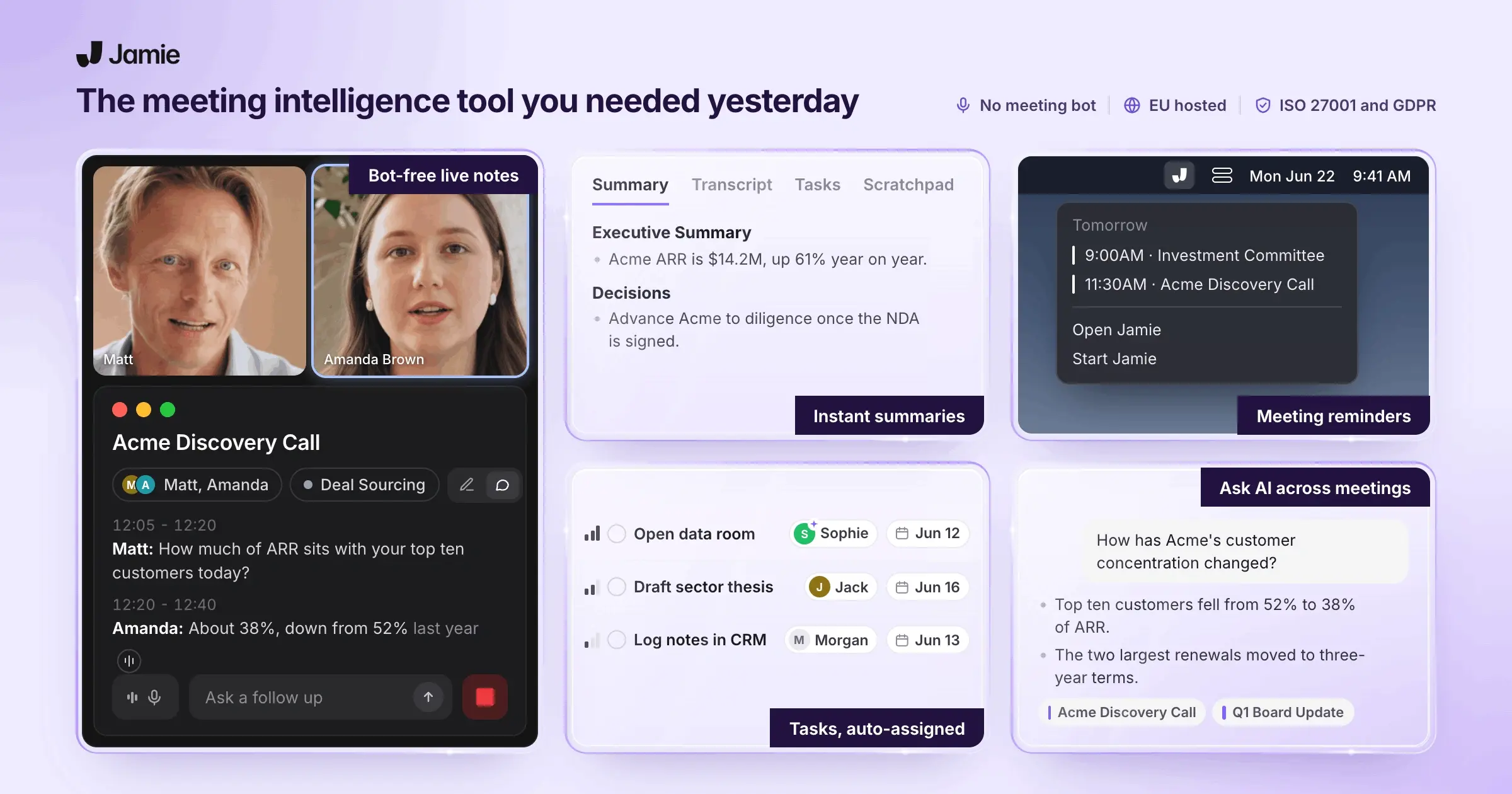
Jamie is a bot-free AI meeting assistant that captures your conversations (online or offline) and turns them into organized summaries with key points, action items, and full transcripts.
Designed for busy teams and founders, Jamie lets you stay fully engaged in the discussion without getting distracted by or trying to remember every detail.
It handles the documentation, so you and your team can focus on decisions, ideas, and next steps instead of scribbling notes.
Take AI meeting notes without bots joining your calls.

Jamie records and takes down your meeting notes without bringing along any awkward bots or extra participants.
It runs as a desktop app on Mac or Windows and captures your meeting audio directly from your device, so there’s no need to invite a “note-taking bot” into the call.
Just hit “record” when the meeting starts, and once you stop, Jamie’s AI gets to work, delivering a clean summary in just a few minutes.
Because it records your system audio, it works with any platform, whether that’s Zoom, Google Meet, Teams, or something else your team uses.
Automatically capture tasks and decisions from every meeting.
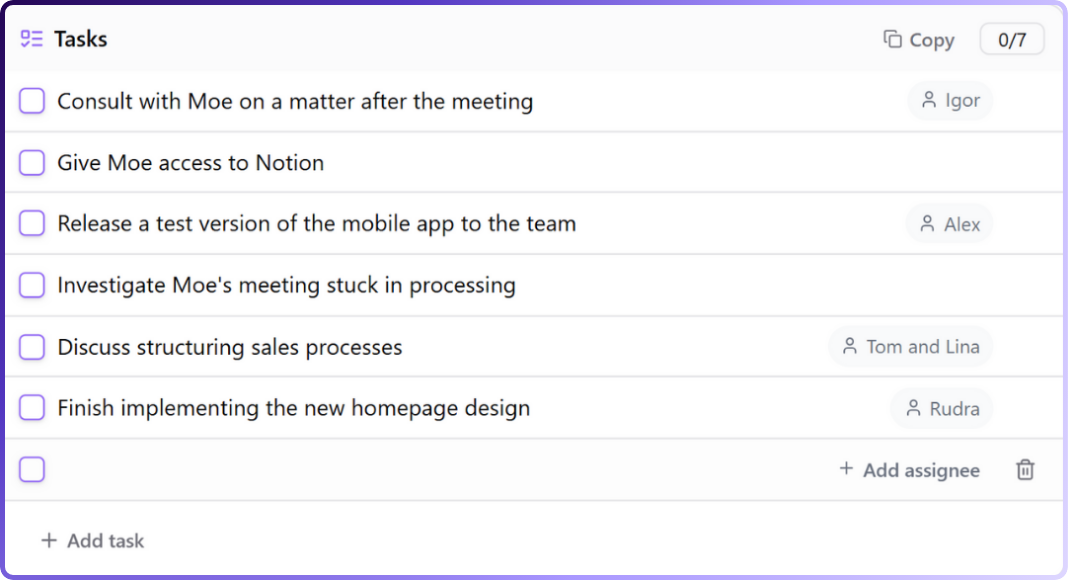
Jamie picks up every to-do and decision during your meetings so nothing slips through the cracks.
While the conversation is happening, Jamie’s AI listens carefully for action items and key decisions. When your summary is ready, you’ll also get a clear list of tasks and decisions pulled straight from the discussion.
These appear as checkboxes or bullet points in your notes, with assignees added if someone was given responsibility.
You can tick tasks off when they’re done, reassign them, or even click a link to jump back to the exact moment in the meeting where they came up.
And if something isn’t caught automatically, you can quickly add it yourself by typing “/” in the summary to create a new action item.
Get an instant transcript of the meeting.
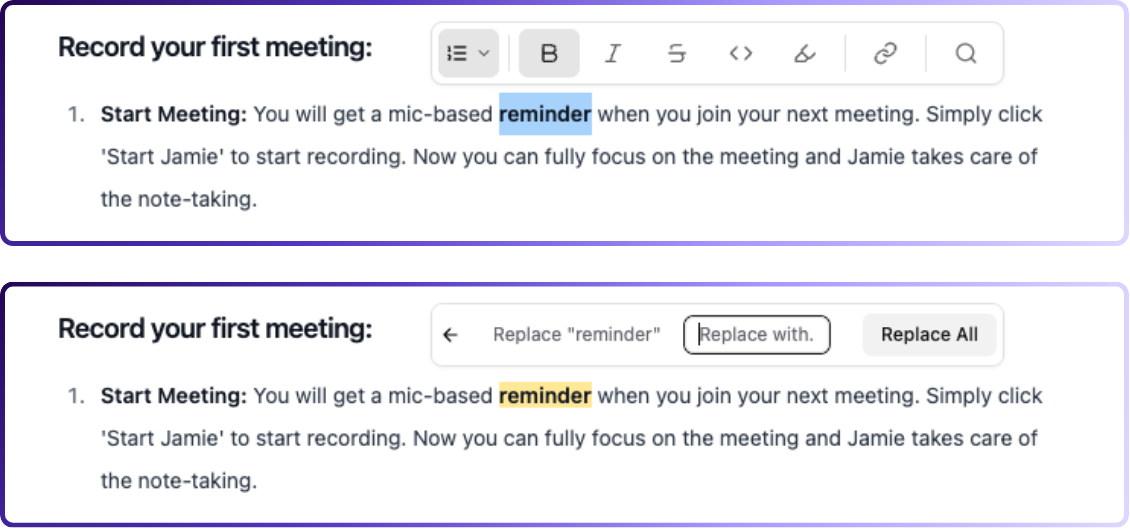
Jamie gives you a full transcript of your meeting, capturing every word alongside the summary.
As soon as the meeting ends, it turns everything that was said into text, so you have a complete record to refer back to.
You can edit the transcript if you spot any misheard words or jargon, and it’s easy to search for specific keywords or quotes.
That way, if you ever need to pull up an exact phrase or revisit a key discussion, you can find it in seconds.
Transcribe and summarize meetings in 100+ languages.
Jamie can transcribe and summarise meetings in over 100 languages, so it’s perfect if you work with international teams or clients.
Whether your meeting’s in Spanish, French, German, Japanese, English, or any other language, Jamie picks it up and creates a transcript and summary in that language, or translates it to English if that’s what you need.
It even understands many regional accents and dialects.
While a few rare languages have more limited support, it still handles them well enough to follow the conversation.
You don’t have to change any settings or do anything special.
Just hit record, and Jamie automatically detects the language being spoken.
Organize meeting notes with tags and filters.
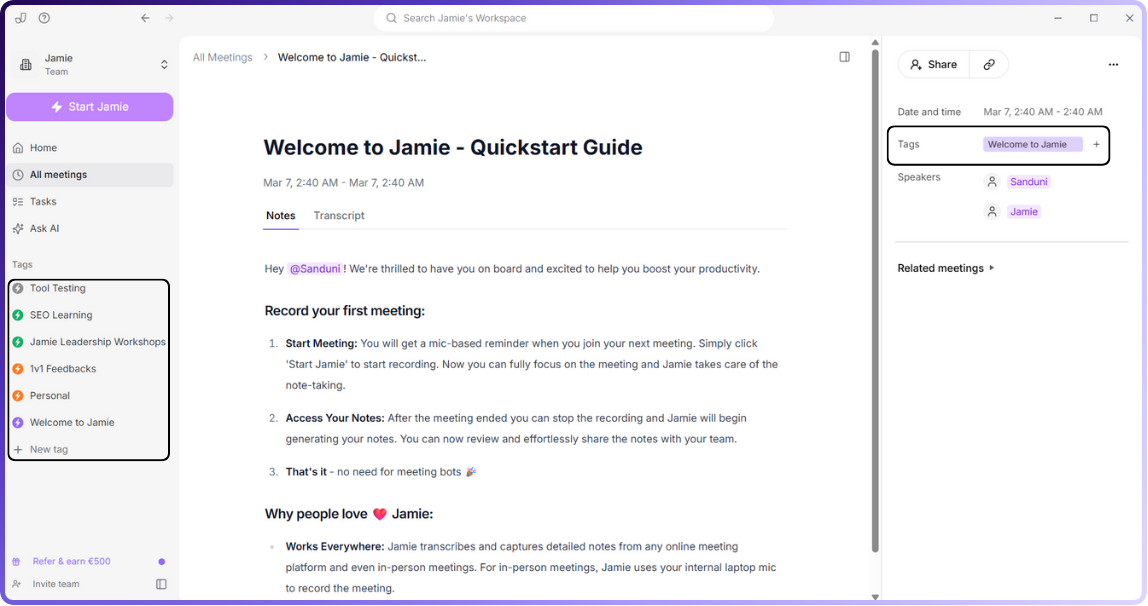
Jamie lets you tag your meeting notes by project, client, team, or any category you like, so that it’s easy to organize and find them later.
Once a meeting summary is ready, you can add as many tags as you need. Think of them like labels rather than folders, since one note can have multiple tags.
For example, a quarterly marketing strategy meeting might be tagged with both #Marketing and #Q1Strategy.
Tagging is simple: click “Add tag,” pick from your existing list, or create a new one on the spot.
Later, you can filter or search by tag and instantly pull up everything related to it.
Click “Marketing,” for instance, and every meeting tagged with Marketing appears right away.
Easily transfer notes and tasks to your favourite tools.
Jamie integrates with Google Calendar and Outlook to automatically pull in your meeting schedule and send you reminders to hit record.
Your notes can flow straight into Notion or OneNote for easy sharing and organization, and if you prefer working in Google Docs, you can export summaries and transcripts there in one click.
These integrations make sure you don’t have to juggle multiple apps or copy-paste notes across platforms.
Jamie slots right into your workflow so your meeting documentation is always where you need it.
Keep your meeting data secure and private.
Jamie treats your meeting data with the highest level of care.
All content is encrypted and handled in full compliance with GDPR, and audio recordings are deleted as soon as they’ve been turned into notes, so your sensitive information is safe.
When you record a meeting, the audio is sent to a secure server in Frankfurt, Germany, for transcription and summary generation.
Every transfer and storage step is protected with industry-standard AES encryption, ensuring no one outside can access your files.
Once the transcript and notes are ready, the audio is permanently deleted from the server. Your text notes remain securely stored in your account, and you can delete them anytime.
Jamie’s AI uses providers like OpenAI and Anthropic, but your data is never used to train their models and isn’t retained by them.
The Jamie team also runs regular security audits and training to stay ahead of best practices.
In short, your meeting content is used only to give you results, never for anyone else’s benefit.
Ask AI for meeting insights and decisions.
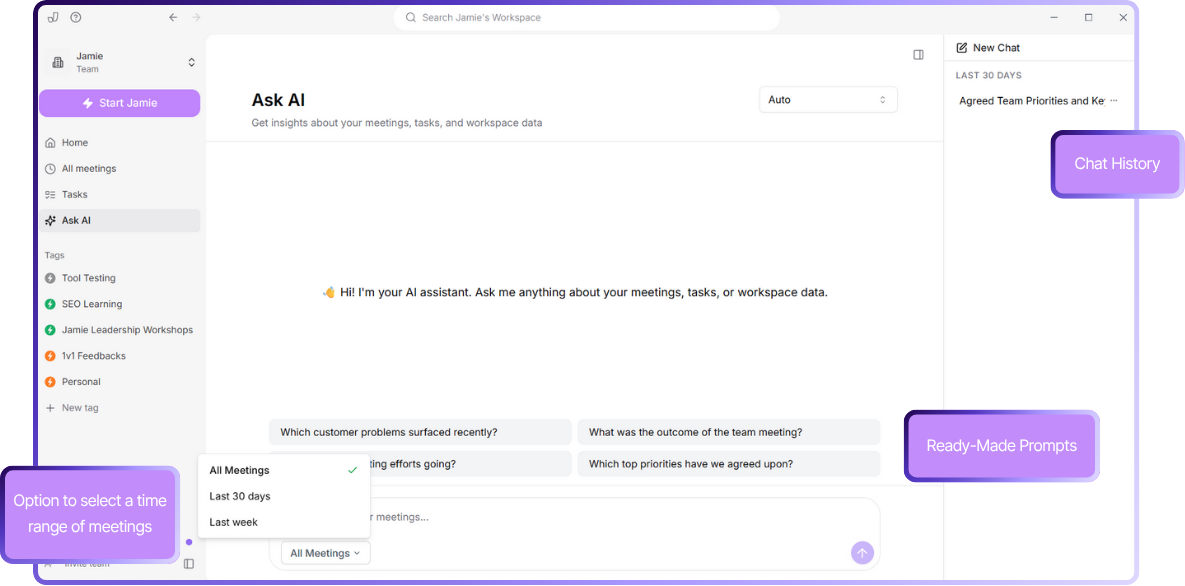
Jamie’s Ask AI feature lets you search your entire meeting history through a simple chat-style interface.
Need to know what was decided about the product launch last week? Just ask, and Jamie will scan your meeting notes to pull up the key decisions or action items.
You can also request a quick recap of multiple meetings, such as “Summarize all my meetings from this week,” and it will create a digest for you.
Ask AI searches through your transcripts for any timeframe you choose, whether it is the last 30 days or your full history, and finds the exact details or context you need.
It also shows you its reasoning and streams the answer in real time so you are never left waiting.
Jamie's pricing
FREE Plan (€0/month)
10 meeting credits per month
30-minute meeting duration limit
AI-generated meeting notes
Automatic action item extraction
Complete meeting transcripts
Speaker identification
Calendar integration (Google & Outlook)
Tag system
Task management
Advanced text editing
Copy-paste integration
Team workspace sharing
No meeting bots required
100+ languages support
PLUS Plan (€25/month)
20 meeting credits per month
2-hour meeting duration limit
Includes everything in FREE plan
PRO Plan (€47/month)
Unlimited meeting credits
3-hour meeting duration limit
Includes everything in PLUS plan
Team & Enterprise Plans
Custom pricing
Custom solutions
Contact required for details
Pros
✅ Works with any virtual meeting platform
✅ Can be used for in-person or offline meetings, not just online calls
✅ AI chat makes it easy to quickly find information from past meetings
✅ Built-in reminders help you remember to start recording
✅ Available on both Mac and Windows
✅ Generous free plan with all premium features available
Cons
❌ Doesn’t store audio or video files to maintain privacy
❌ No real-time transcription (summaries and transcripts are available after the meeting ends)
2. Krisp
Best for: Meeting transcription in noisy environments
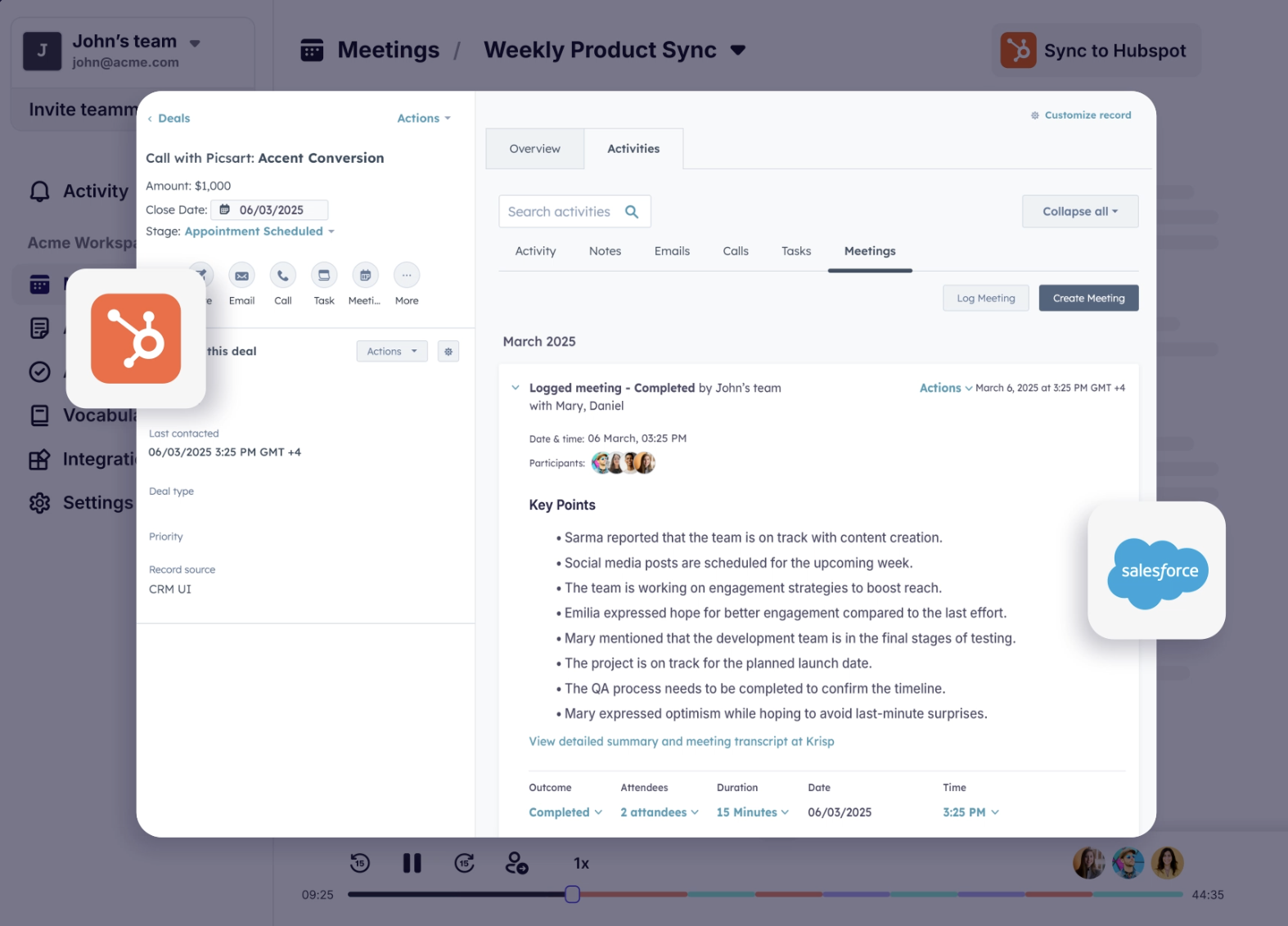
Krisp offers a sleek, bot-free meeting note‑taking experience that works whether your meeting is in-person, online, or pre-recorded. It transcribes conversations in real time, summarizes key points, and grabs action items automatically, with no plugins.
Who is it for?
Sales teams, consultants, recruiters, and hybrid or remote teams who deal with noisy environments, work with people from different language backgrounds, or want real-time transcription.
Krisp's key features
Delivers live transcription across Zoom, Google Meet, Teams, or in-person discussions, while filtering out distractions like background noise or echoes
Post-meeting, Krisp generates easy-to-read summaries, highlights key discussion points, and automatically lists decisions and tasks
Connects with CRMs like HubSpot and Salesforce, and productivity tools like Notion, Asana, and Jira
Krisp's pricing
Free trial: Free for 14 days
Pro: $8/month per user
Business: $15/month per user
Enterprise: Custom pricing
Pros
✅ Krisp won’t record without your permission
✅ Complies with industry standards like GDPR, SOC 2, HIPAA
✅ You can upload audio or video files and Krisp processes them into notes and summaries
Cons
❌ Some users complain that at times Krisp mutes the nuances of a voice
❌ Customer support is slow to respond
Also read: 10 Best Krisp AI Alternatives & Competitors in 2025
3. Bluedot
Best for: Bot-free meeting transcription with CRM integration
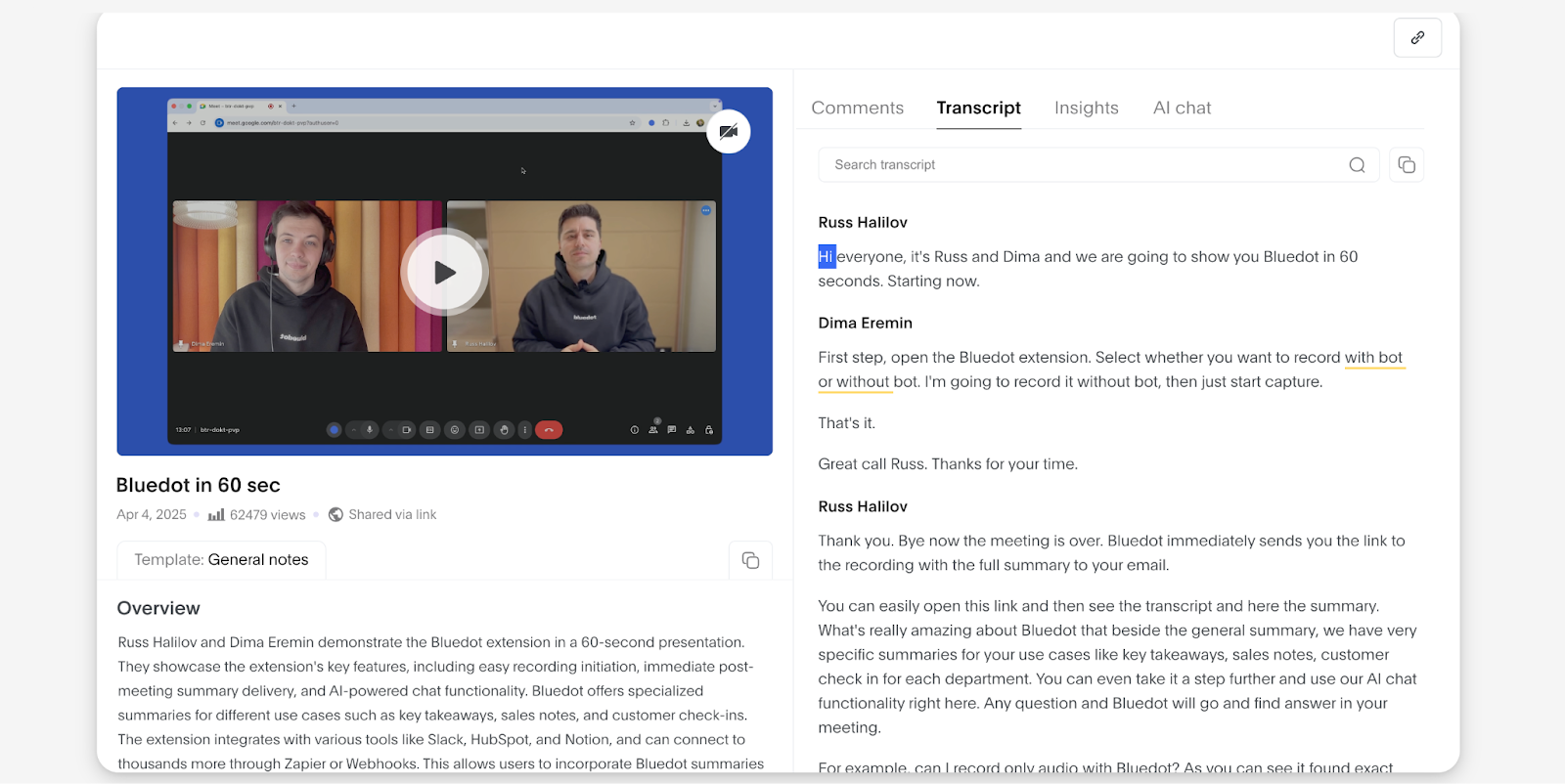
Bluedot is a Chrome-based meeting assistant that records, transcribes, and summarizes calls without showing up as a participant. It works across Zoom, Google Meet, Microsoft Teams, and Webex, and can also import recordings from other sources.
Who is it for?
Sales teams, client-facing professionals, and remote or hybrid teams who want accurate, discreet meeting notes that connect directly to their CRM and collaboration tools.
Bluedot's key features
Records, transcribes, and summarises meetings from Zoom, Google Meet, Teams, and Webex using a Chrome extension
Supports 100+ languages with strong accuracy
Customizable note templates and editable transcripts
Integrates with HubSpot, Salesforce, Notion, Slack, and more
Drafts follow-up emails automatically from meeting content
Bluedot's pricing
Free: Up to 5 meetings total, 1 hour max per recording
Basic: $14/month per user
Pro: $20/month per user
Business: $32/month per user
Enterprise: Custom pricing
Pros
✅ Bot-free recording across major meeting platforms
✅ High transcription accuracy for both general and technical content
✅ AI chat for querying past meeting notes and decisions
Cons
❌ Free plan is very limited
❌ Advanced features require higher-tier plans
4. Circleback
Best for: Uploading audio and video files in multiple formats
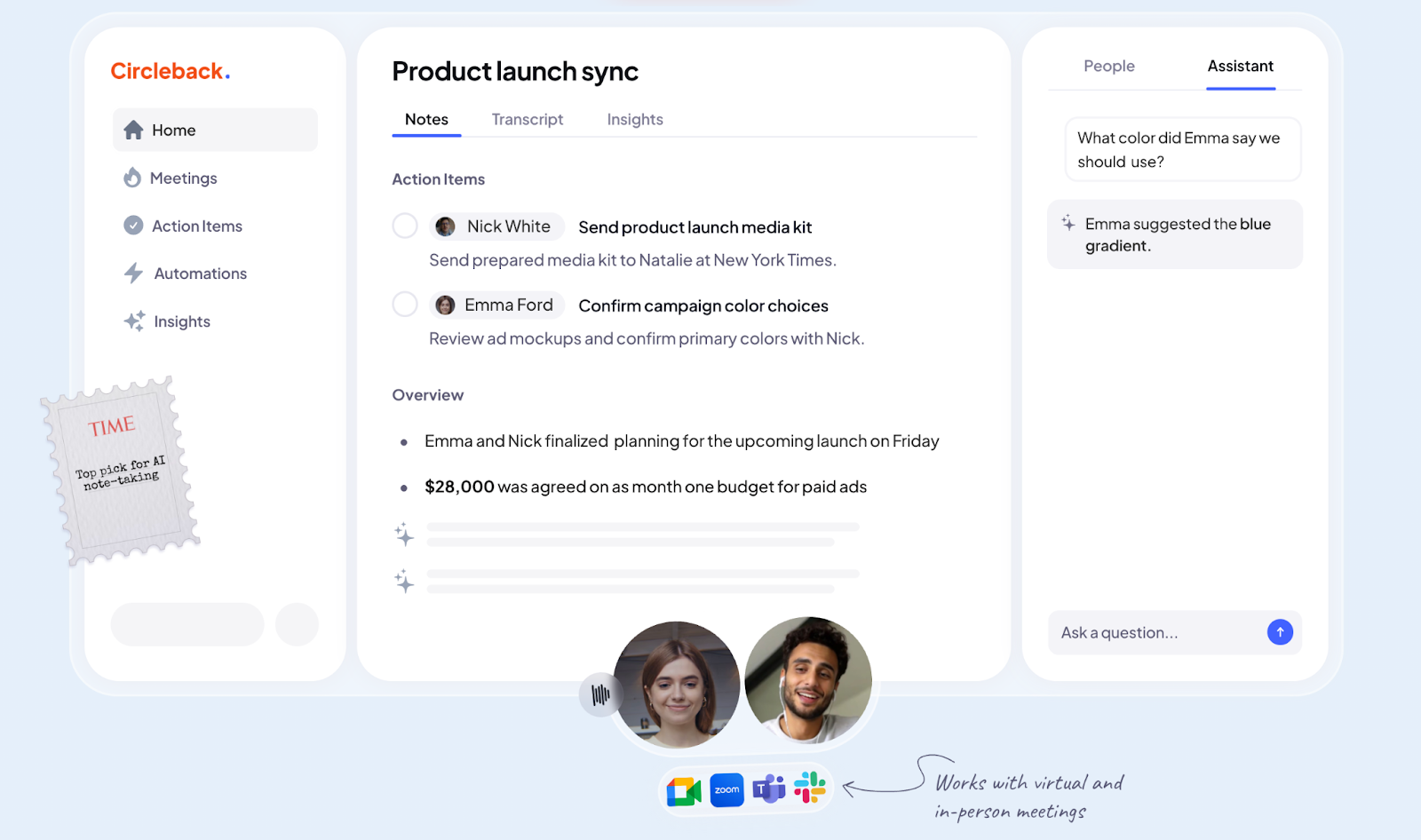
Circleback is built for teams that prefer to work from recordings rather than invite a bot into their calls. You can record meetings natively or upload files afterward, and Circleback will turn them into structured summaries, transcripts, and action items.
Who is it for?
Asynchronous teams, consultants, and professionals who rely on recorded or in-person meetings and want actionable notes.
Circleback's key features
Upload audio or video files in different formats like MP4, MP3, WAV, and more
Generate AI-powered summaries, transcripts, and task lists in over 100 languages
Search past transcripts and use AI chat to surface specific details or decisions
Connect with tools like Notion, Google Drive, Slack, and HubSpot for easy sharing and automation
Assign team roles and permissions for secure collaboration
Circleback's pricing
Individual: $20.83/month
Team: $25/month per user
Enterprise: Custom pricing
Pros
Works entirely from uploads, with complete control over what gets processed
Wide file format compatibility for maximum flexibility
Strong role-based permissions for secure, collaborative use
Cons
❌ No live transcription option
❌ Limited free trial before a paid plan is required
5. Granola
Best for: Human-first, AI-powered notes without bots
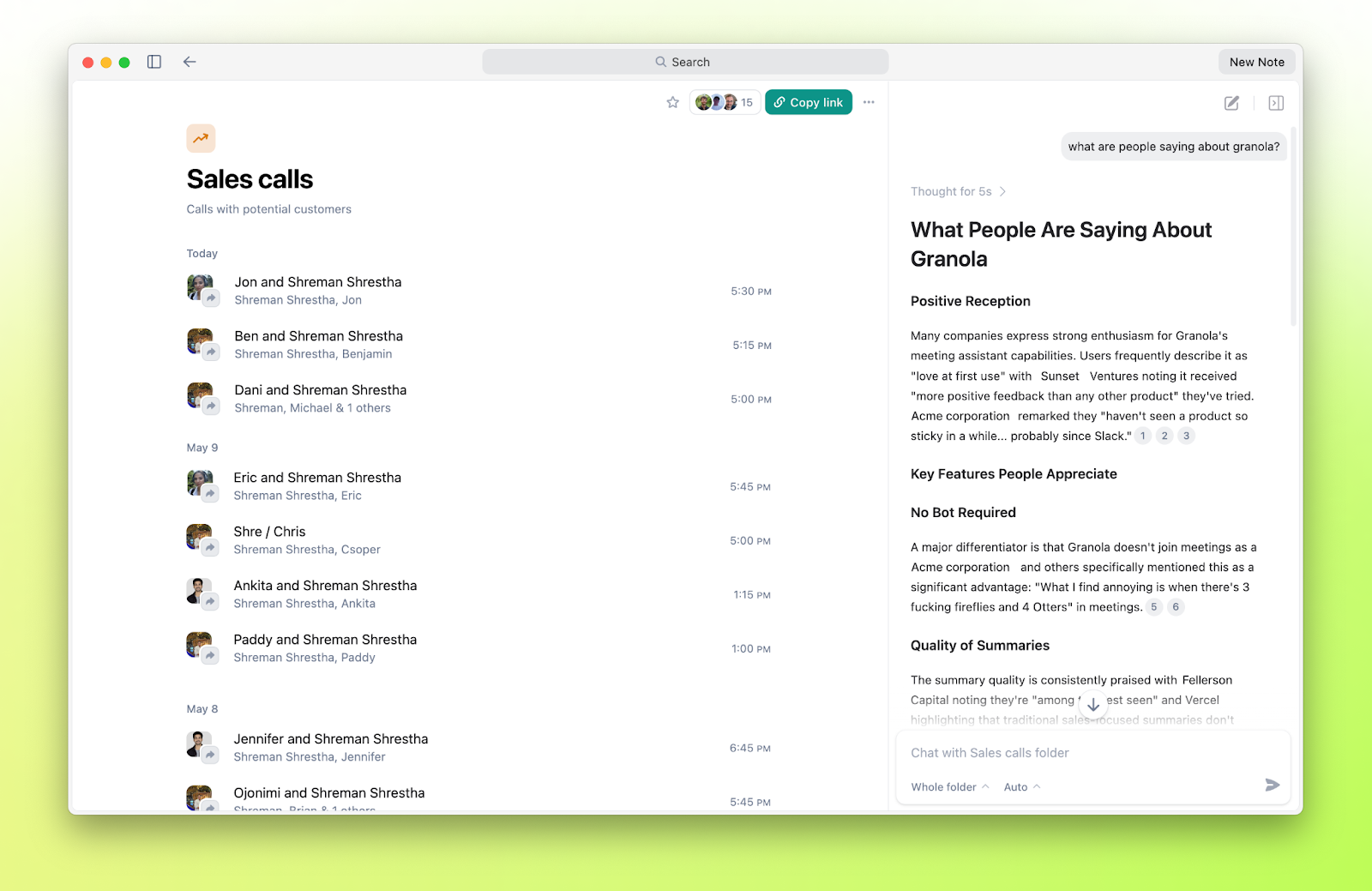
Granola is a sleek AI notepad that elevates your own meeting notes using smart summaries—no meeting bot required. You write key points or just stay engaged; when the meeting ends, Granola enhances your notes using context from the transcript. It helps you focus on the conversation, not note-taking.
Who is it for?
Executives, consultants, or anyone who prefers engaging in discussions without interruptions and wants clean, contextualized notes afterward.
Granola's key features
Compatible with Zoom, Teams, Meet, Webex, Slack Huddles, or phone calls played via speakers
Acts as a live notepad: you jot down quick points and Granola builds out polished summaries, bullets, and outlines afterward
Syncs with your calendar and reminds you to record
Offers templates for common meeting types like user interviews, standups, or pitches
Includes “Internal Jargon” feature to improve transcription of company-specific terms
Granola's pricing
Free trial
Individual: $18/month per user
Business: $14/month per user
Enterprise: $35/month per user
Pros
✅ Lets you focus on the conversation; the AI enhances rough notes into coherent summaries
✅ Minimal interface with templates and context-aware formatting
✅ Avoids audio storage altogether for faster note delivery and stronger privacy handling
Cons
❌ Doesn’t record audio, which can be a drawback if you need verbatim quotes
❌ May misattribute speakers occasionally, reducing reliability in speaker accuracy
Also read: Granola vs. Bluedot vs. Jamie: Which Meeting Tool Works Best for You?
6. Superpowered
Best for: On-demand, bot-free transcription you can launch instantly from your desktop
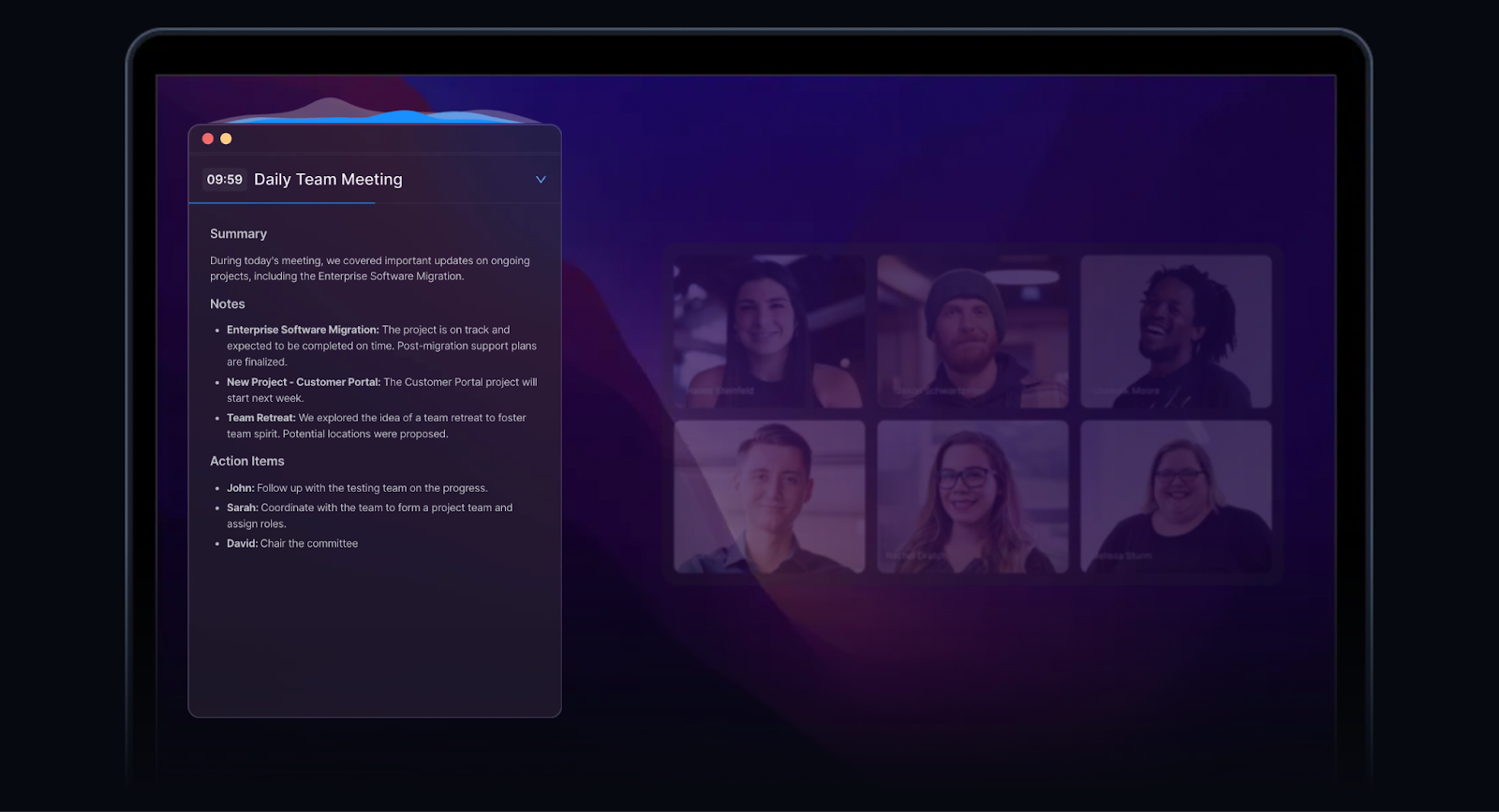
Superpowered is a lightweight desktop app built for speed. It sits in your menu bar, ready to start transcribing with a single keyboard shortcut. There’s no bot to join your calls: the app captures audio directly from your device, works across platforms, and delivers instant transcripts and summaries right after the meeting.
Who is it for?
Founders, product managers, and sales teams who want quick meeting transcription they can trigger on the fly without switching windows or inviting bots.
Key features
Desktop app for Mac and Windows that runs in the menu bar
Start transcription instantly with a custom keyboard shortcut
Real-time transcription with optional post-meeting summaries
Searchable transcript library with keyword filtering
Exports to Google Docs, Notion, or plain text for easy sharing
Pricing
Starter: $8/month per user
Pro: $16/month per user
Team: Custom pricing
Pros
✅ Extremely fast to start recording
✅ Works on any platform without special integrations
✅ Minimal interface keeps focus on the conversation
Cons
❌ No mobile app
❌ Lacks advanced analytics or coaching features
7. Sonix
Best for: High-accuracy transcription and translation from uploaded recordings
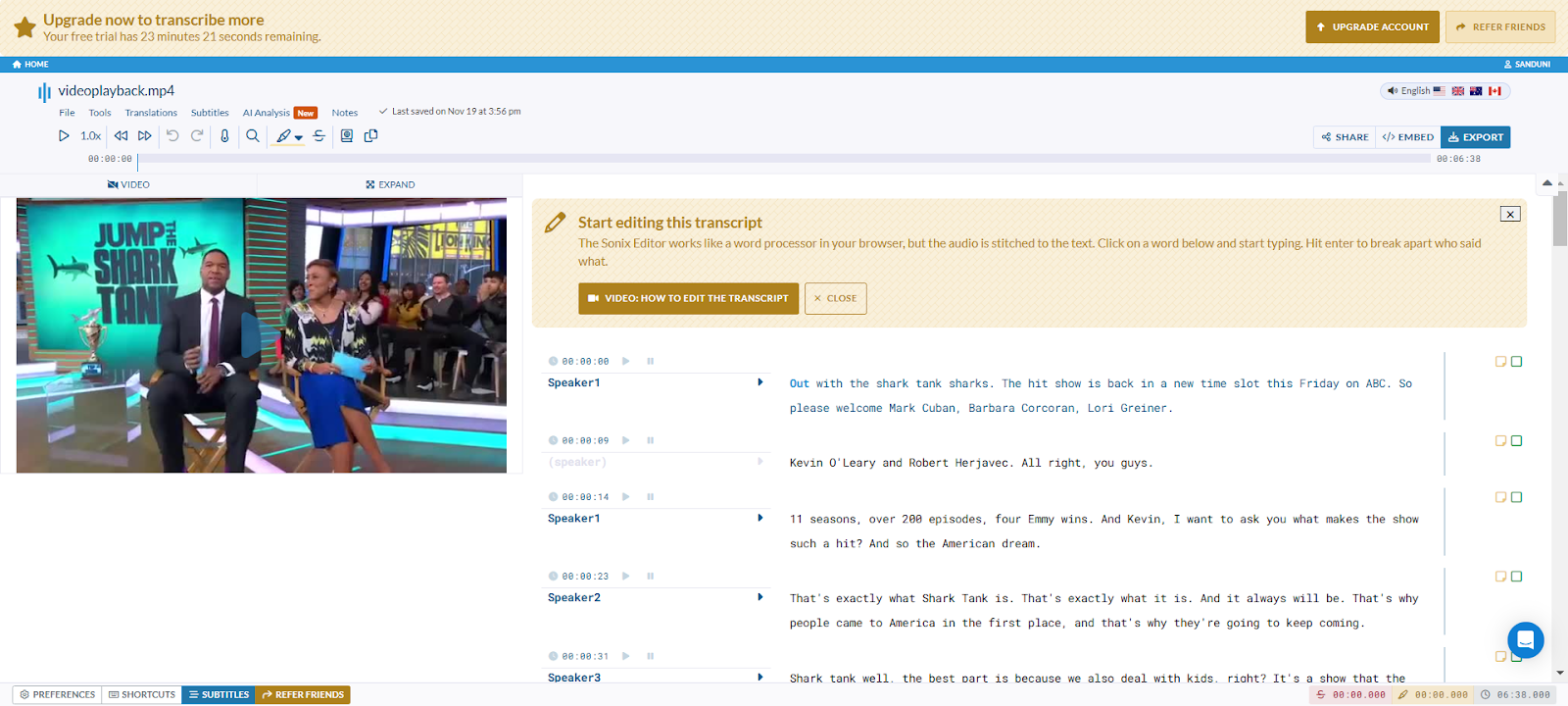
Sonix works entirely from uploaded audio or video files. You simply upload your recording, and Sonix processes it into a searchable transcript with timestamps, speaker labels, and optional translations.
Who is it for?
Content creators, researchers, and teams handling interviews, webinars, or conference recordings who want accurate transcripts in multiple languages.
Key features
Upload audio or video files in a wide range of formats (MP3, WAV, MP4, MOV, and more)
Automated transcription with speaker labeling and timestamps
40+ language transcription plus translation into over 30 languages
Built-in editor to review, correct, and highlight text directly in the transcript
Share transcripts via public or private links, or export to text, Word, PDF, or subtitles (SRT/VTT)
Pricing
Standard: $10/month per user
Premium: $15/month per user
Enterprise: Custom pricing
Pros
✅ Works entirely from uploads for full control over what gets transcribed
✅ Strong multi-language transcription and translation options
✅ Searchable transcript library with keyword navigation
Cons
❌ No real-time transcription
❌ Requires a recorded file; cannot capture live meetings directly
8. AIDE
Best for: Invisible, privacy-focused meeting support on macOS
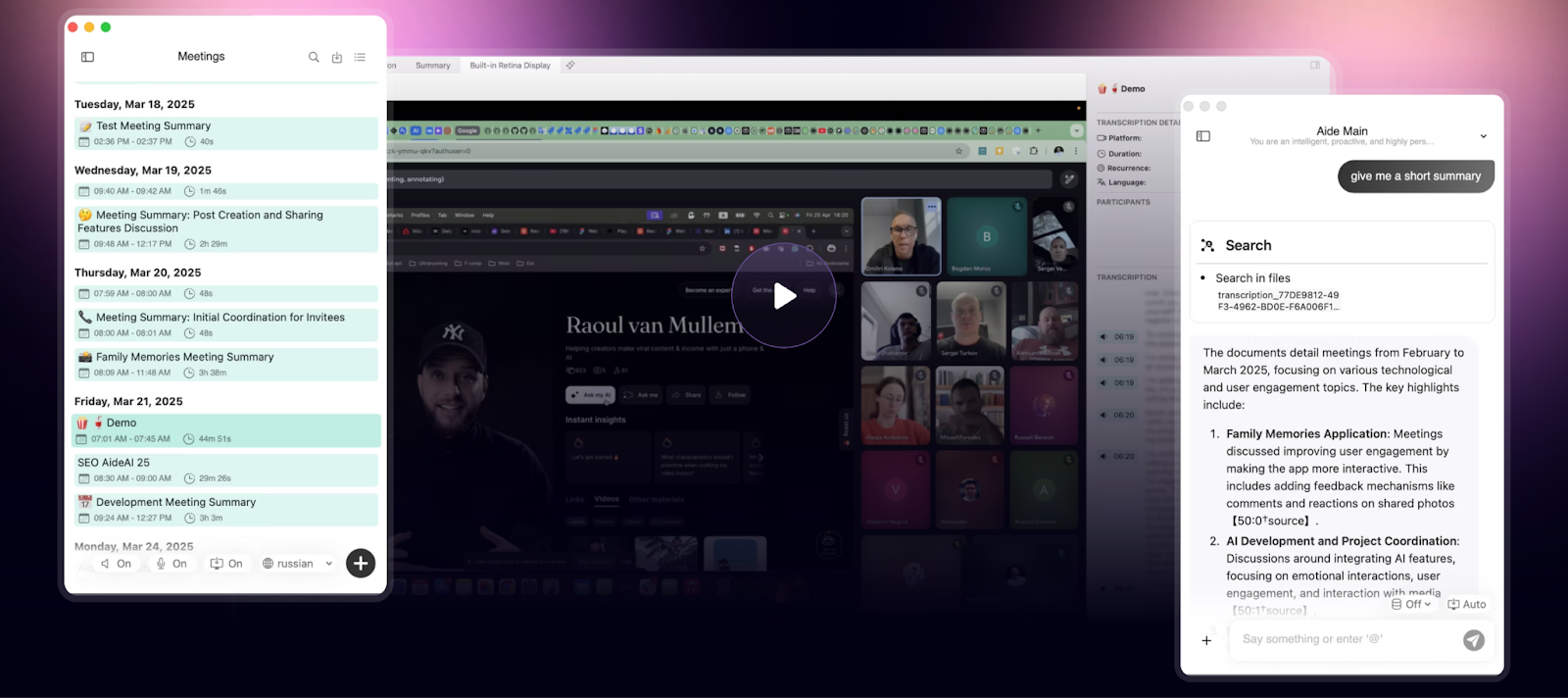
AIDE is a discreet AI assistant for Mac that listens to your meetings without appearing as a participant. It captures and transcribes audio in more than 100 languages, while also understanding what’s on your screen to provide instant, contextual insights. The app keeps your data local and secure, so you can stay laser-focused on the conversation.
Who is it for?
Mac users, especially founders, consultants, and privacy-minded teams, who need seamless, bot-free assistance with powerful transcription and screen awareness.
Key features
Operates incognito during meetings on Zoom, Teams, Webex, Slack, or anywhere, without disrupting the call
Delivers fast transcription
Offers contextual screen-aware assistance, recognizing what’s on display and adapting its responses accordingly
Launch or control with customizable hotkeys, and always know when it's recording with the persistent status widget
Processes audio and screen data locally on your device; only essential text is sent to the cloud
Pricing
Free
Premium: $9.99/month
Enterprise: Custom pricing
Pros
✅ Completely invisible to participants, which makes it perfect for formal or sensitive calls
✅ Delivers near-instant summaries with its ultra-fast transcription engine
✅ Screen-aware intelligence means smarter, more relevant assistance
Cons
❌ Only available on Mac
❌ Advanced features like GPT-4 AI support are limited to the paid tier
9. Quill Meetings
Best for: Bot-free, privacy-conscious post-meeting automation
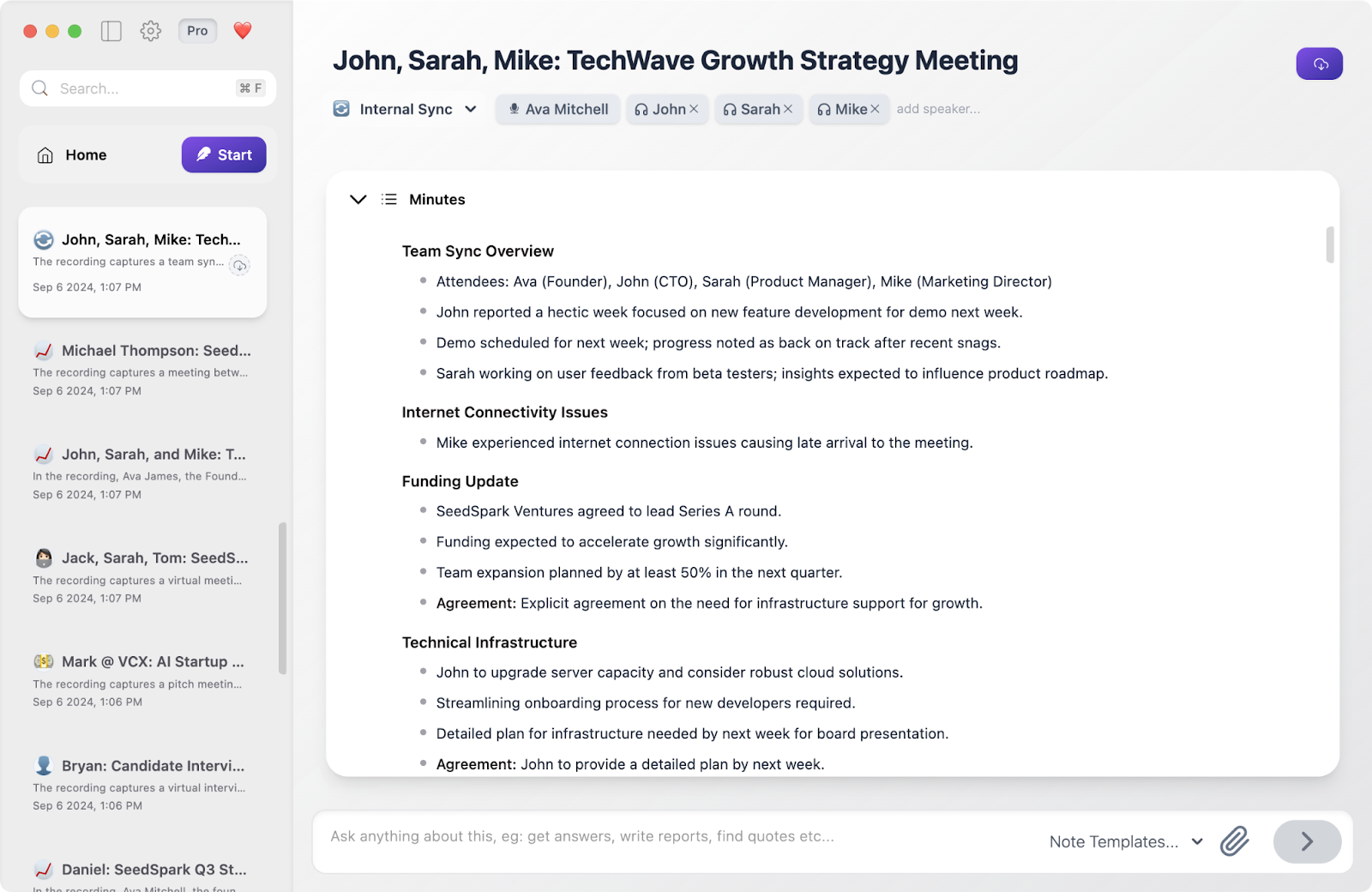
Quill Meetings is a desktop app (for Mac and Windows) that stays off the participant list and keeps your audio and notes local. It takes care of note-taking, along with follow-ups, email drafts, and CRM updates right after the meeting ends.
Who is it for?
Founder-led teams, managers, and client-facing professionals who need discreet, accurate meeting notes plus task and follow-up automation.
Key features
Your audio never leaves your device for added security and speed
Automates follow-up tasks such as drafting emails, creating tasks, updating CRMs, and generating tickets
Captures screenshots when others share their screen and embeds them into your meeting notes for richer context
Flexible and platform-agnostic; works across Zoom, Google Meet, Teams, and even in-person sessions via the mobile companion
Includes meeting templates and workflow automations tailored to roles and industries
Pricing
Free
Lite: $7.99/month
Unlimited: $19.99/month
Teams: $12/month per user
Pros
✅ Runs locally, so your meeting discussions remain private by default
✅ Automates post-meeting workflows so you can move forward while everything’s fresh
✅ Offline-friendly for sensitive or private discussions
Cons
❌ Full access to AI-enhanced features requires a paid Lite or Unlimited plan
❌ No browser extension
10. Tactiq
Best for: Real-time meeting transcription and AI-driven post-call workflows, straight from your browser
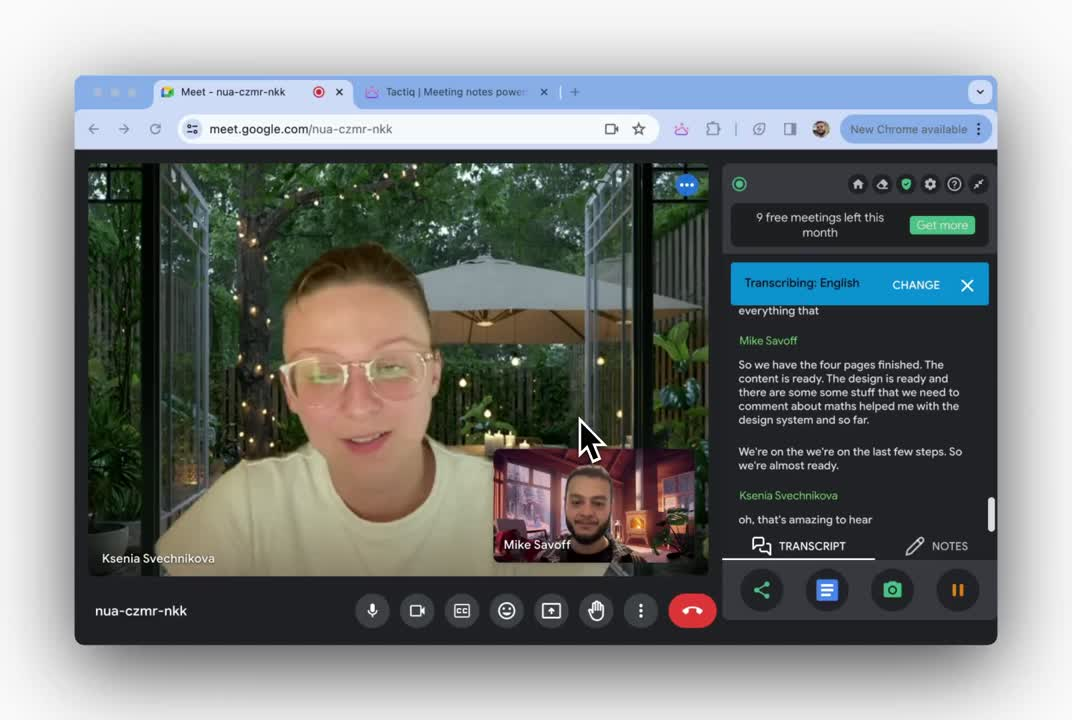
Tactiq runs as a lightweight Chrome extension and delivers live, speaker-aware transcripts and one-click AI summaries directly within Zoom, Google Meet, and Microsoft Teams; no bots required. It smoothens your workflow from meeting to follow-up with minimal setup.
Who is it for?
Distributed teams, project managers, and remote educators who want instant meeting notes and streamlined follow-through without installing bulky apps.
Key features
Live transcription with speaker detection in over 30 languages
One-click summaries, action items, and AI workflows that can integrate with tools like Jira, Linear, or Slack
Upload past recordings to generate transcripts and AI-generated insights later
Custom AI prompts and reusable actions like drafting emails or creating tasks
Export transcripts to Google Docs, Notion, Slack, PDF, or text formats; also supports screenshots and tags for rich context
Pricing
Free
Pro: $8/month per user
Team: $16.67/month per user
Business: $29.16/month per user
Enterprise: Custom pricing
Pros
✅ Deep AI customization with workflow templates and repeatable actions for efficiency
✅ No audio is stored or transmitted; only text gets captured to maintain privacy
✅ Installs in seconds and works seamlessly within browser meetings without disrupting the user experience
Cons
❌ Limited to Chrome/browser-based meetings; doesn’t support in-person or offline capture
❌ AI credit caps on lower tiers can restrict usage
Also read: Top Tactiq Alternatives for Marketers
Final Verdict: Choosing the Best Bot-free Fireflies Alternative
Let’s quickly recap the best bot-free Fireflies AI alternatives from this guide:
Jamie: Works across any platform, online or offline, no bots; post-meeting only; no coaching or analytics
Krisp: Real-time transcription services with noise cancellation; can flatten voice tone; support can be slow
Bluedot: Secure collaborative notes; limited integrations; no live transcription
Circleback: Upload and transcribe without bots; no real-time capture; editing tools are basic
Granola: Fast, keyboard-focused note-taking; primarily Mac-focused; no multi-language support
Superpowered: Instant desktop transcription; English-only; no offline support
Sonix: Multi-language transcription and translation; no AI summaries; pricing can add up
AIDE: Invisible Mac assistant; no Windows support
Quill Meetings: Privacy-first notes and tasks; limited analytics; Mac-only
Tactiq: Browser-based AI-powered transcription; limited free plan; no offline capture
Jamie eliminates the three biggest deal-breakers with Fireflies: intrusive bots, lack of precision in transcripts/summaries, and limited free plan.
Jamie records locally on your device, works with any meeting tool, and delivers accurate summaries, tasks, and transcripts without ever appearing in your participant list. Even on the free plan, you can access all of Jamie’s premium features, capped at 10 meetings/month.
You give up live transcription and advanced analytics, but if privacy, flexibility, and distraction-free calls matter most, Jamie is hard to beat.
Download Jamie for free to experience it yourself!
Or if you’d like to see the tool in action before making a move, book a free demo.
Also read
FAQs on Bot-Free Fireflies AI Alternatives
1. What is a bot-free note taker?
A bot-free note taker is an AI meeting assistant that records and transcribes your meeting conversations without showing up as a participant in video calls or virtual meetings. Instead of a visible bot joining your Microsoft Teams, Google Meet, or other video conferencing apps, it works silently in the background. It captures meeting audio, generates a meeting transcript, and delivers AI-powered meeting summaries with key points. Tools like Jamie do this by running locally on your device, so you never have to worry about an awkward bot popping into your call.
2. Why should I consider bot-free Fireflies AI alternatives?
Many teams switch to bot free Fireflies AI alternatives because visible bots can feel intrusive during sales calls, phone calls, or sensitive meeting recordings. With bot-free meting assistants, you still get detailed meeting notes, meeting transcriptions, and ai summaries, but without disrupting rapport. For example, Jamie captures in person meetings, offline meetings, and online meetings alike, giving you clean notes and summaries you can trust. That means you get the documentation benefits without compromising professionalism.
3. Do bot-free AI meeting assistants work for multiple meetings across different platforms?
Yes. Modern note-taking tools handle multiple meetings daily, across upcoming meetings scheduled in your calendar or spontaneous voice conversations. They’re platform-agnostic, so you can capture all your meetings, whether that’s team collaboration, collaborative meeting agendas, business plan reviews, or sales call coaching sessions. Some, like Jamie, even let you ask questions afterward through an AI chat, pulling up ai meeting notes or meeting summary insights across past calls. It gets easier for sales teams and customer success teams to keep track of follow-ups and analyze voice conversations without digging manually through transcripts.
4. Are there free plans available?
Most tools offer a free plan with completely free AI transcription but with limited usage. Jamie, for example, has a pricing free plan that gives you 10 meetings per month with all premium features unlocked, while its paid plans and enterprise plan scale up for founders, sales teams, or global teams that need heavier usage. Jamie's paid plans start at €25/month billed anually.
5. Do these tools support offline use?
Yes. Multiple AI meeting assistants we mentioned here work both online and offline. You can capture offline meetings without an internet connection, and most tools also offer supports multiple languages for multi language support, making them perfect for global teams. Whether you’re internal running meetings, sales calls, or customer calls, tools like Jamie can transcribe meetings, generate a meeting summary, and let you share meeting notes instantly in tools like Google Docs.
6. How do bot-free AI assistants fit into daily workflows?
Bot-free meeting tools integrate seamlessly into how people talk and work. Whether you’re in virtual meetings, sales calls, or team syncs, they generate meeting agendas, highlight key features, and export ai meeting notes into tools like Google Docs. Many also surface AI insights, automate follow-ups, and keep meeting transcript libraries searchable for team collaboration. This is where Jamie stands out: it not only creates summaries but also organizes them with tags, reminders, and integrations that ensure nothing slips through the cracks.