7 Best Chorus Alternatives & Competitors [Updated September 2025]
Rodoshi
Growth Content Editor
![7 Best Chorus Alternatives & Competitors [Updated September 2025]](/api/media/payload/7_Best_Chorus_Alternatives_Competitors_Updated_September_2025-2fo559.png)
Looking for the best Chorus alternatives to improve how your team captures and learns from meetings?
Chorus has built a strong reputation in the conversation intelligence space, especially for sales teams that want to analyze calls and coach reps more effectively. But as your team grows or your needs shift, you start wondering if there’s a better fit out there. Maybe the summaries could be more detailed, the interface a bit more intuitive, or the feature set better aligned with your daily workflow.
If that sounds familiar, you’re in good company.
After using Chorus across multiple teams, we started exploring alternatives that could offer more flexibility, sharper insights, or just a smoother experience overall. We weren’t looking for a drastic change—just something that felt more aligned with how we actually work.
Here’s the process we followed to identify the best Chorus competitors:
Tested each platform across real meetings to evaluate accuracy, usability, and key features
Spoke to users who made the switch from Chorus to understand what changed (for better or worse)
Analyzed user reviews across platforms like G2 and Capterra to get a broader perspective
Whether you’re focused on sales coaching, AI note-taking, or meeting insights for cross-functional teams, this guide will walk you through the best Chorus alternatives worth considering.
But before we dive into the list, let’s take a quick look at why teams start exploring other options in the first place.
TL;DR
Many teams want alternatives to Chorus. Its summaries can be too short, its notes may have mistakes, and its recordings don’t always work well.
People want transcripts that correctly show who said what, summaries with clear next steps, tools that work offline, protect privacy, and fit into daily work.
Jamie gives all this. It shows who spoke, understands special words, writes strong summaries with action items, works offline (even for in-person talks), follows GDPR (privacy law), and makes notes easy to find and share.
Gong, Clari Copilot, and Revenue.io help with sales planning and training. Salesloft and Jiminny focus on rating calls and giving team insights. Avoma helps with meeting scheduling, live tips, and team sharing.
Why You Might Look for Chorus Alternatives?
Reason #1: Meeting summaries lack depth

Source: G2
Chorus gives you a summary, sure—but it feels more like a rough outline rather than a comprehensive recap. Important context gets glossed over, key action items go missing, and follow-up points are barely touched. If you’re relying on its AI-generates notes to brief your team or plan next steps, you’ll find yourself digging into the full transcript more often than you'd like. That defeats the purpose of using an AI tool in the first place.
Reason #2: Notes aren't always reliable

Source: G2
When you're managing multiple deals or reviewing back-to-back calls, you need to trust what the notes say. The problem is, Chorus occasionally gets speaker attribution wrong or paraphrases in ways that water down nuance. And in B2B sales, nuance matters—especially when you're trying to tailor follow-ups or coach reps effectively.
Reason #3: Recordings fail without warning

Source: G2
One of the most frustrating things I’ve heard (and experienced) is Chorus failing to record a meeting—no alerts, and no scope of recovery. You assume it's running, only to find out later there's nothing to review or share. If you're talking to execs, pitching enterprise clients, or onboarding new hires, that kind of dropout is a big no-no.
These are some of the big reasons that pushed me to look for better options.
What Are The Best Alternatives to Chorus?
Based on my experience and research, the 10 best Chorus alternatives are:
Jamie — Best for all-in-one meeting intelligence across sales, internal, and in-person meetings
Gong — Best for deep conversation analytics and enterprise-grade revenue intelligence
Clari Copilot — Best for deal visibility and sales forecasting
Salesloft Conversations — Best for native conversation intelligence within a sales engagement platform
Avoma — Best for real-time guidance on calls and collaborative meeting workflows
Revenue.io — Best for real-time coaching and automated follow-ups
Jiminny — Best for revenue-focused teams needing call scoring and pipeline visibility
1. Jamie
Jamie is an AI-powered note-taker designed for people who run high-stakes meetings—founders, sales reps, team leads, and recruiters.
It works quietly in the background without any bots, turning your conversations into structured notes, actionable insights, and follow-ups.
Hosted in the EU and fully GDPR-compliant, Jamie keeps your data safe.
See how Jamie works:
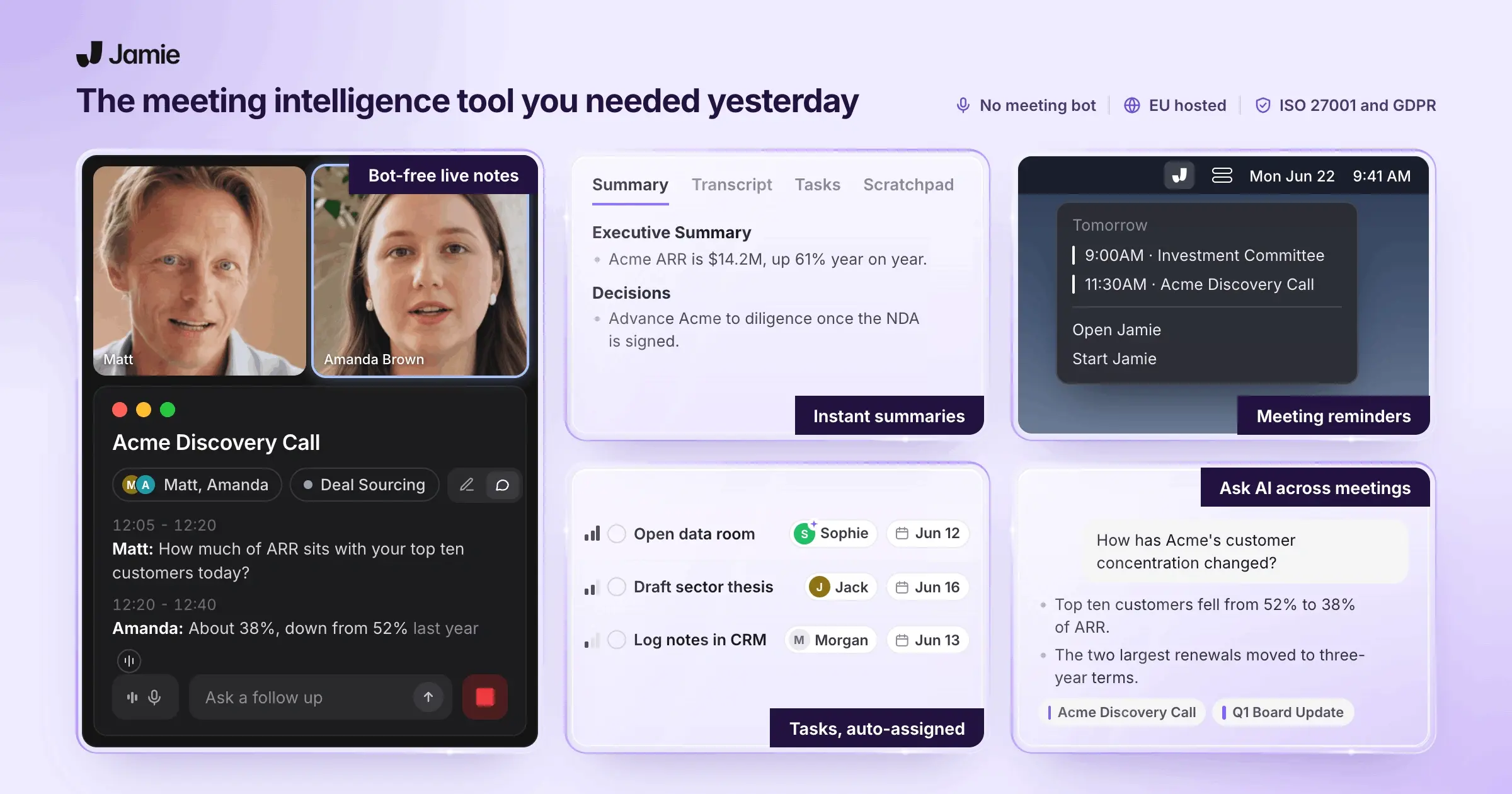
Jamie’s key features
a. Accurate transcription
Jamie doesn’t just capture what’s said—it understands how people talk. It keeps up with accents, fast speakers, industry jargon, even mid-sentence pivots. You can teach it your team's custom terms, and Jamie will pick them up every time. Whether you're in a boardroom or a breakout room, Jamie delivers clean, context-aware transcripts.

b. Actionable summary and insights
Jamie distills hour-long meetings into sharp, structured summaries. Not just a recap, but real insights with decisions, to-dos, follow-ups—all mapped out and ready to act on. In sales, it flags deal risks and new signals. In team meetings, it catches blockers and nudges for you to follow up on.

c. Executive Assistant Sidebar
When you want to access old notes, press Command+J or Ctrl+J to open Jamie’s Executive Assistant Sidebar. From there, you can:
Ask Jamie to find an important moment from any past meeting
Draft a follow-up using GPT-4
Get deeper insights via Claude
Sidebar is your meeting brain, on demand. Switch between models based on the job—context recall, writing help, or complex analysis.

d. Share notes easily
Right after your meeting, Jamie gives you a shareable summary link. Send it via email, Slack, or wherever your team works. You can also copy paste the notes at a convenient location, or email them directly to your teammates. Viewers don’t need Jamie accounts or logins. Clients, colleagues, and all stakeholders can get looped in without friction.

Jamie’s pricing
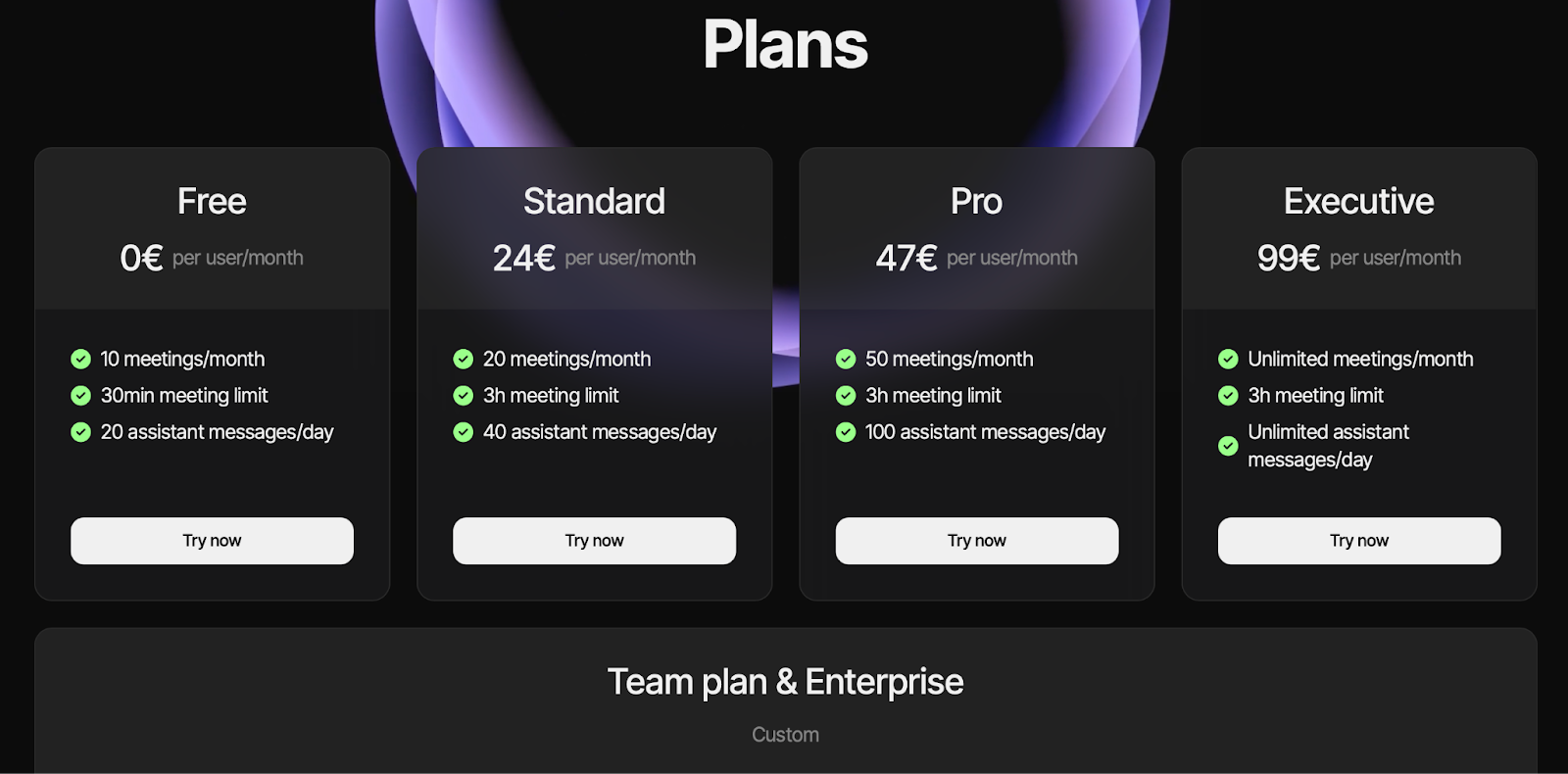
Jamie offers 4 pricing plans:
Free: Offers 10 meetings per month, with a recording duration limit of 30 minutes and 20 messages/day, along with transcription, speaker recognition, task and decision detection
Standard: 24€/month per user. It unlocks 20 meetings per month, 3-hour meeting limit, 40 assistant messages/day, and priority support
Pro: 47€/month per user. It upgrades you to 50 meetings/month and 100 assistant messages/day
Executive: 99€/month per user. You get unlimited meetings and unlimited assistant messages
Jamie also has a Team plan and Enterprise tier—you’ll get a custom quote based on your specific business requirements.
How does it compare to Chorus?
Jamie supports all types of meetings, including in-person and internal team discussions; Chorus is focused only on sales calls
Jamie has a generous free plan with summaries, action items, and speaker IDs; Chorus does not offer a free plan
Jamie works offline and can record in-person meetings; Chorus only supports online sales calls
Jamie provides detailed, context-aware summaries that feel human-written; Chorus summaries are often surface-level and sales-specific
Jamie pros and cons
Pros
✅ Works across all video conference platforms
✅ Supports 100+ languages
✅ Customizable meeting templates to structure conversations
✅ Simple user interface
Cons
❌ Costs more than entry-level AI meeting note-takers
❌ New to the market with a smaller user base
2. Gong
Best for: Enterprise-grade deep conversation intelligence, deal tracking, and performance coaching
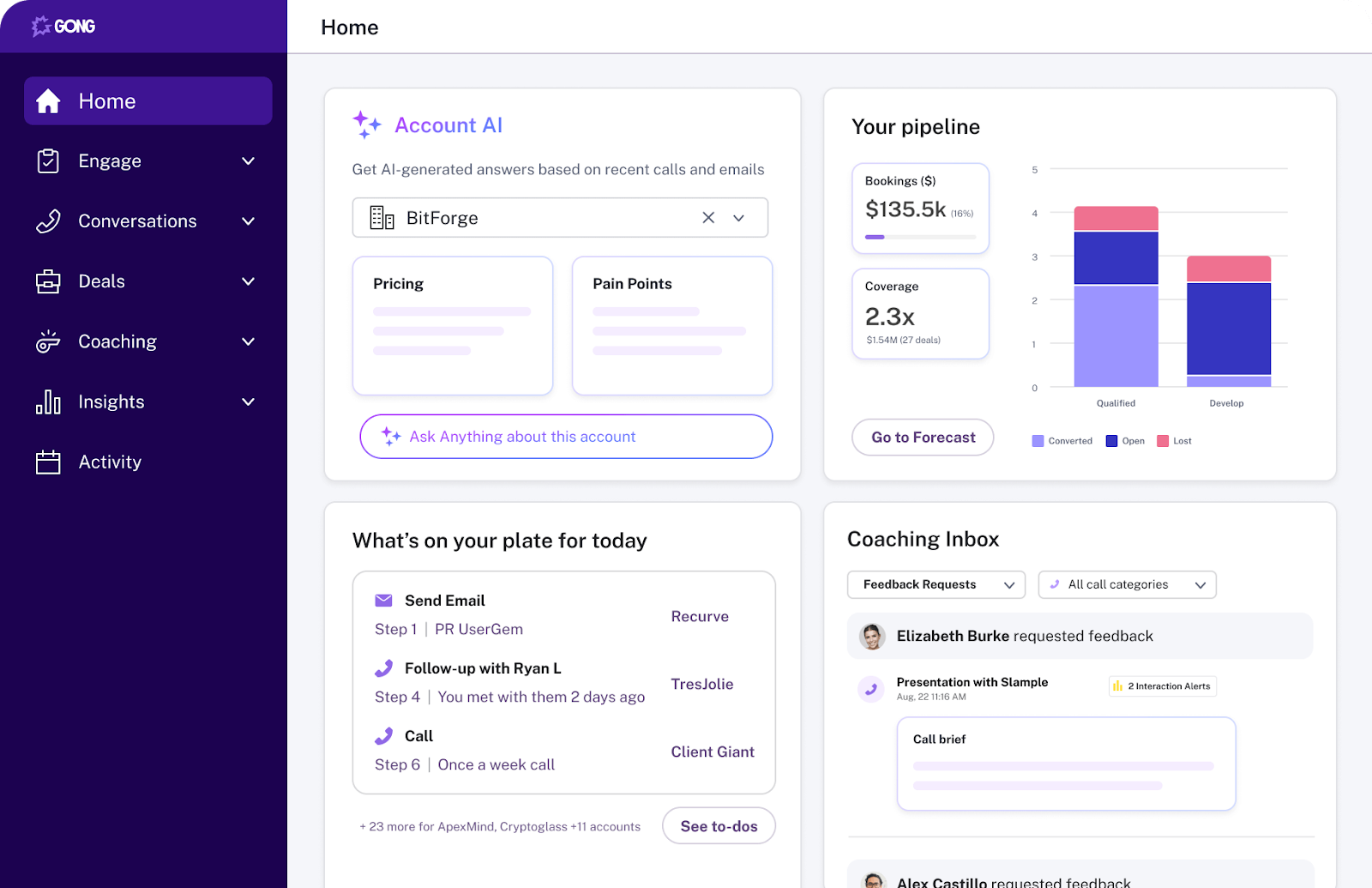
Source: Gong
Gong is a powerful revenue intelligence platform built to help sales teams win more deals. It captures and analyzes customer conversations, offers AI-driven insights, and features advanced analytics.
You get valuable insights into sales conversations, performance metrics, and sales enablement strategies. Gong also connects directly to your CRM system for real-time forecasting and coaching.
How it differs from Chorus
Chorus stands out for its ability to analyze emotional cues and sentiment during conversations. Gong, on the other hand, prioritizes capturing customer reality with detailed call insights, but places less emphasis on emotional analysis
Who is it for?
Sales leaders, revenue operations teams, and account executives at mid-market to large B2B companies.
Gong’s top features
Sales forecasting to predict revenue and monitor deal health
Sales coaching tools that highlight top-performer patterns and rep-specific feedback
AI-powered engagement insights with suggested next steps and conversation analysis
Automatic CRM syncing to eliminate manual data entry
Gong pricing
Gong doesn’t share its pricing structure publicly. But we did some deep digging and found that Gong has a base price (a.k.a. platform fee) of $5000/year, and it costs around $1400/year per user. But the exact prices vary depending on your team size. You can find detailed pricing information in our Gong pricing guide.
Gong pros and Cons
Pros
✅ Great for deal visibility and sales performance tracking
✅ Robust analytics and sales coaching capabilities
✅ Seamless CRM and conferencing integrations
Cons
❌ Expensive for smaller teams or early-stage startups
❌ Transcription accuracy and search function could be improved
Also read: 10 Best Gong Alternatives & Competitors in 2025
3. Clari Copilot (Formerly Wingman)
Best for: Deal cycle visibility
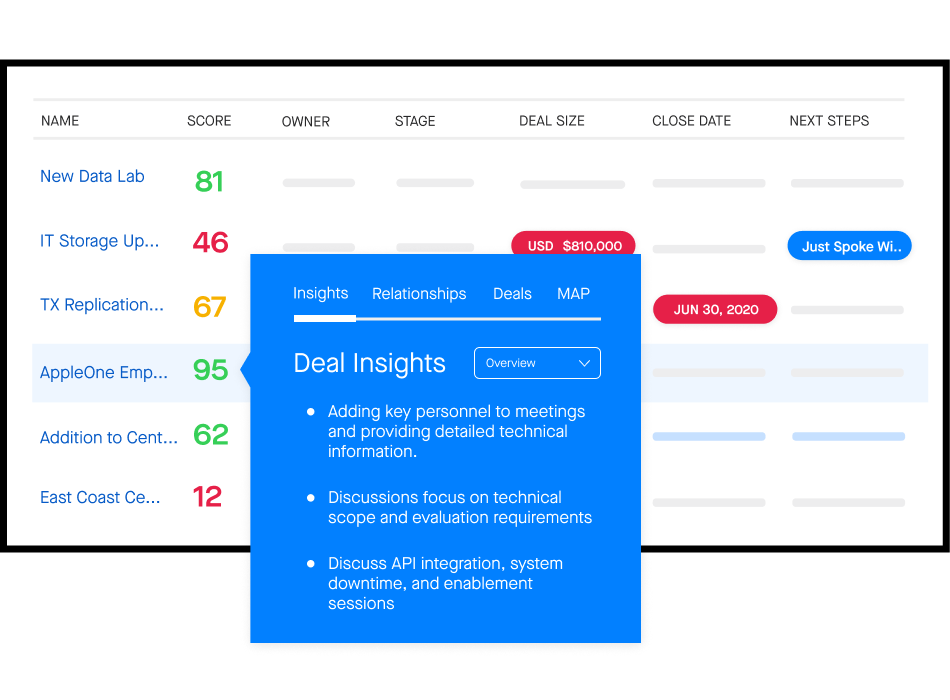
Source: Clari Copilot
Clari Copilot gives you a 360° view of the sales process behind every deal, from first touch to closing deals. It syncs insights across Clari and your CRM, blending key revenue data with call highlights. Clari Copilot also provides market intelligence to help teams stay ahead of industry trends. Your team gets clear visibility to spot opportunities, reduce risk, and forecast with confidence.
How it differs from Chorus
Clari’s conversation intelligence is more focused on revenue operations and forecasting than Chorus’
Clari offers advanced features like predictive analytics, but Chorus offers it in limited capacity
Who is it for?
Clari Copilot is for sales teams, revenue leaders, and GTM teams who want deeper visibility into deal progress and better forecasting accuracy.
Clari Copilot features
Auto-generates battlecards, call summaries, and next steps—replacing low-value admin work with high-ROI selling activities
Delivers real-time coaching during live calls, helping teams reinforce winning behaviors and accelerate rep onboarding
Uses AI to surface key moments, enrich notes with context, and automatically generate and organize call notes for easy reference
Clari Copilot pricing
Clari Copilot’s pricing details are not available publicly. You have to contact the team for a customized quote.
Clari Copilot pros and cons
Pros
✅ Integrates with all major tools revenue teams use, such as Google Workspace, Slack, and Salesloft
✅ Enables cross-functional collaboration by consolidating sales, marketing, and customer success metrics into unified dashboards
✅ Intuitive and easy-to-navigate interface
Cons
❌ New updates can sometimes make the platform feel clunky or less responsive
❌ Best suited for mid to large enterprises with complex sales cycles; may be too advanced or costly for smaller teams
4. Salesloft Conversations
Best for: Native conversation intelligence within Salesloft
Source: Salesloft Conversations
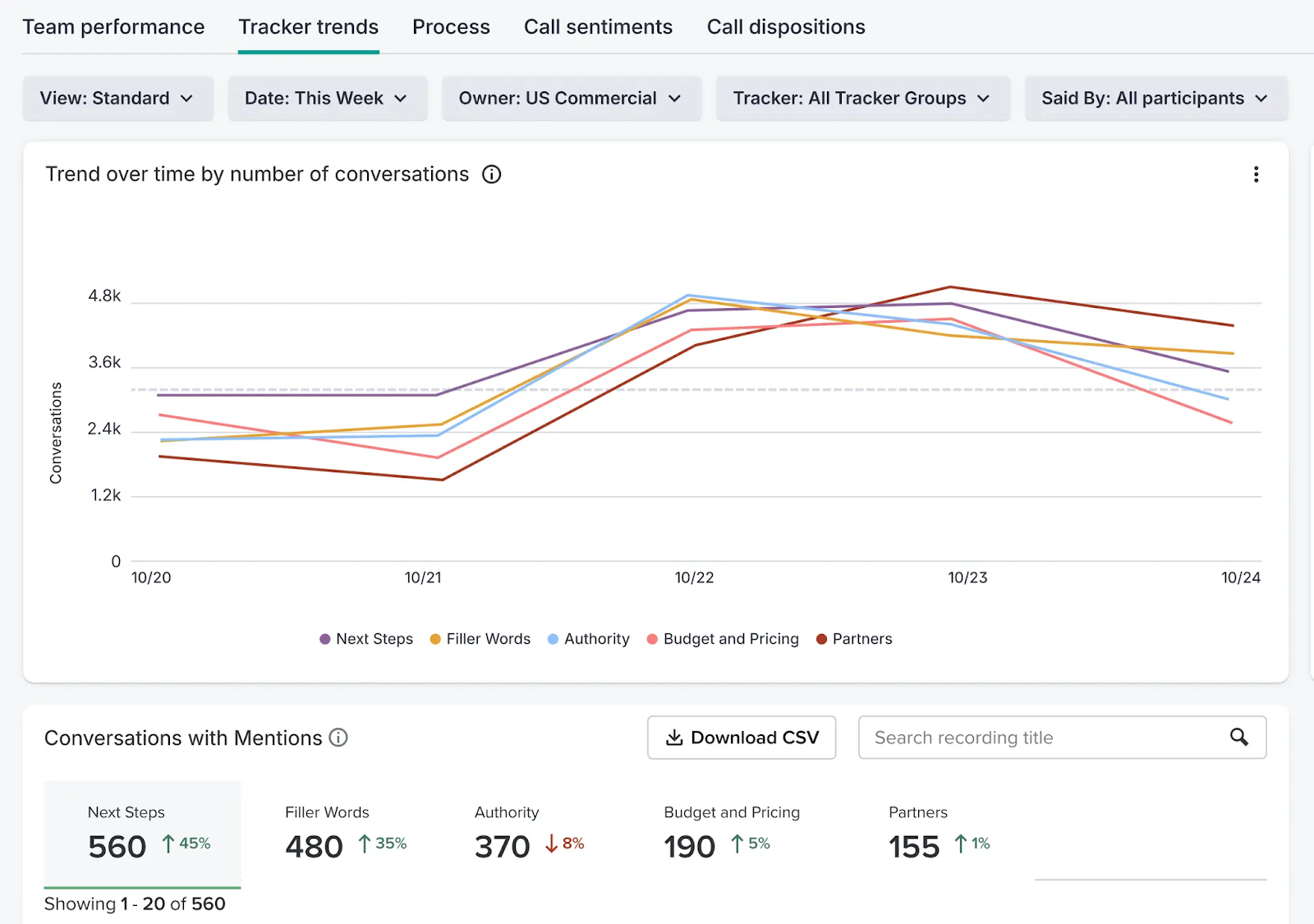
Salesloft Conversations is your built-in conversation intelligence solution within the Salesloft platform. It automatically records, transcribes, and analyzes sales calls to extract critical insights in real time. Sales leaders can identify exactly where reps need coaching, while teams get visibility into what top performers do differently.
How it differs from Chorus
Salesloft is ideal for integrated sales engagement with basic conversation intelligence, while Chorus focuses on advanced call analytics and coaching
Who is it for?
Sales managers, enablement leaders, and revenue teams who need to analyze calls and coach at scale.
Salesloft Conversations’ top features
The AI Scorecard agent analyzes conversation transcripts to pre-fill manager scorecards with performance assessments
The Conversation Summary agent auto-generates summaries and action items after each call
Salesloft Conversations supports sending no-show reminders to improve meeting attendance and follow-up
Highlights trends (like competitor mentions or pricing objections) across voice conversations to uncover opportunities and guide next steps
Salesloft Conversations pricing
Salesloft doesn’t share its pricing structure publicly. You have to contact sales for a personalized quote.
Salesloft Conversations pros and cons
Pros
✅ Conversation insights feed directly into Salesloft’s broader sales engagement and pipeline management tools
✅ Salesloft adheres to industry standards for data security and privacy, including GDPR and SOC 2 compliance
✅ By capturing the full context of each conversation, sellers can deliver more personalized interactions
Cons
❌ Has a learning curve
❌ The abundance of AI features and data can be overwhelming for smaller teams
5. Avoma
Best for: Meeting scheduling and real-time conversation intelligence
Source: Avoma
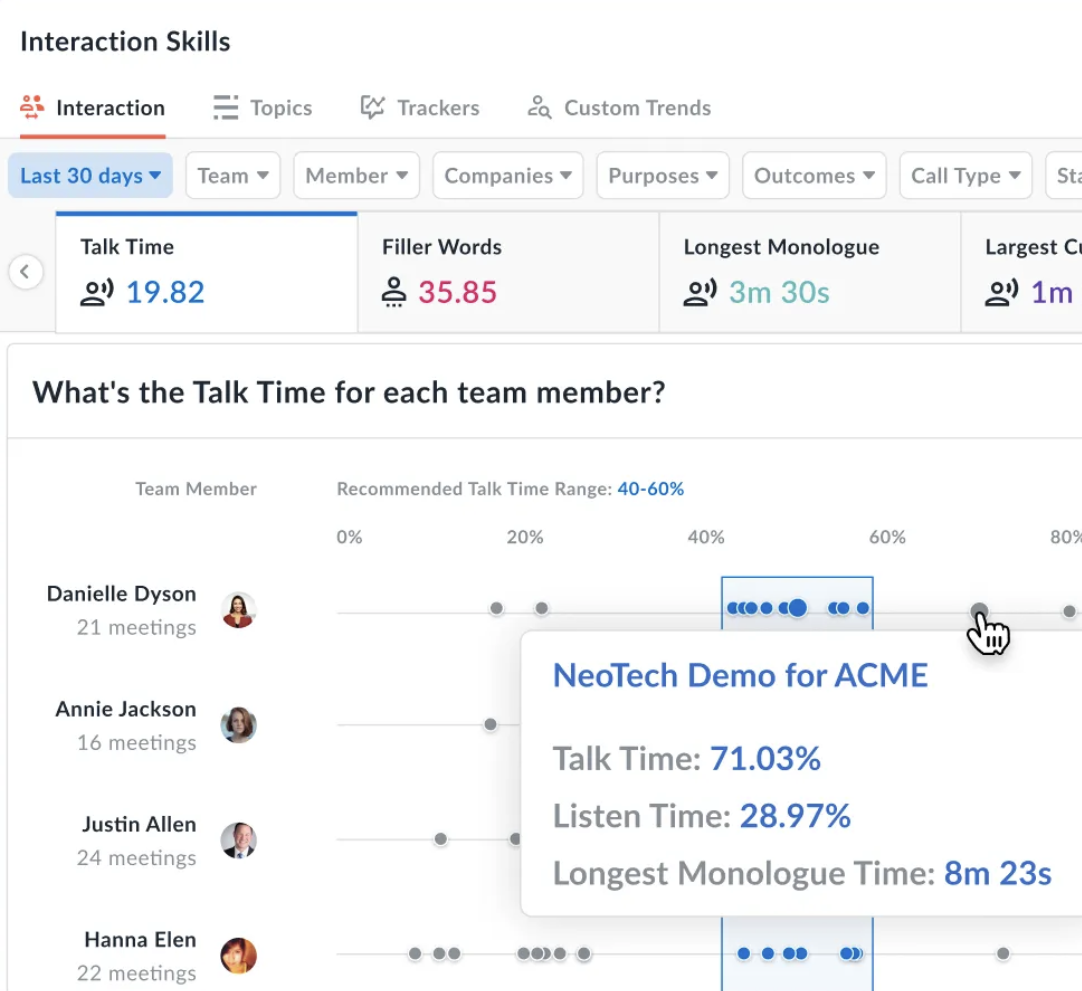
Avoma is more than a meeting assistant—it’s also a smart scheduler and coaching platform. Avoma offers seamless integration with Google Meet and Microsoft Teams, helping users save hours on meeting management and note taking.
What really stood out to me was the Answer Assistant. It gives reps real-time, contextual Answer Cards during calls, so they’re always ready to handle tough questions with confidence.
How it differs from Chorus
Avoma continues to evolve with new, robust features for collaboration across teams. But Chorus has seen slower updates since its ZoomInfo acquisition and remains focused on traditional enterprise sales
Avoma makes pricing simple and transparent—what you see is what you pay. Chorus, on the other hand, keeps its pricing behind a sales call, making it harder to compare or budget upfront
Who is it for?
Avoma works best for sales, support, and product teams, helping them turn meetings into actionable outcomes and make better decisions.
Avoma’s top features
Live transcription in 60+ languages
Automatic meeting reminders to reduce no-shows
AI-generated scorecards for hands-off coaching
Analyze talk patterns of your top-performing reps
Automation features that help teams in saving time on manual tasks
Avoma pricing
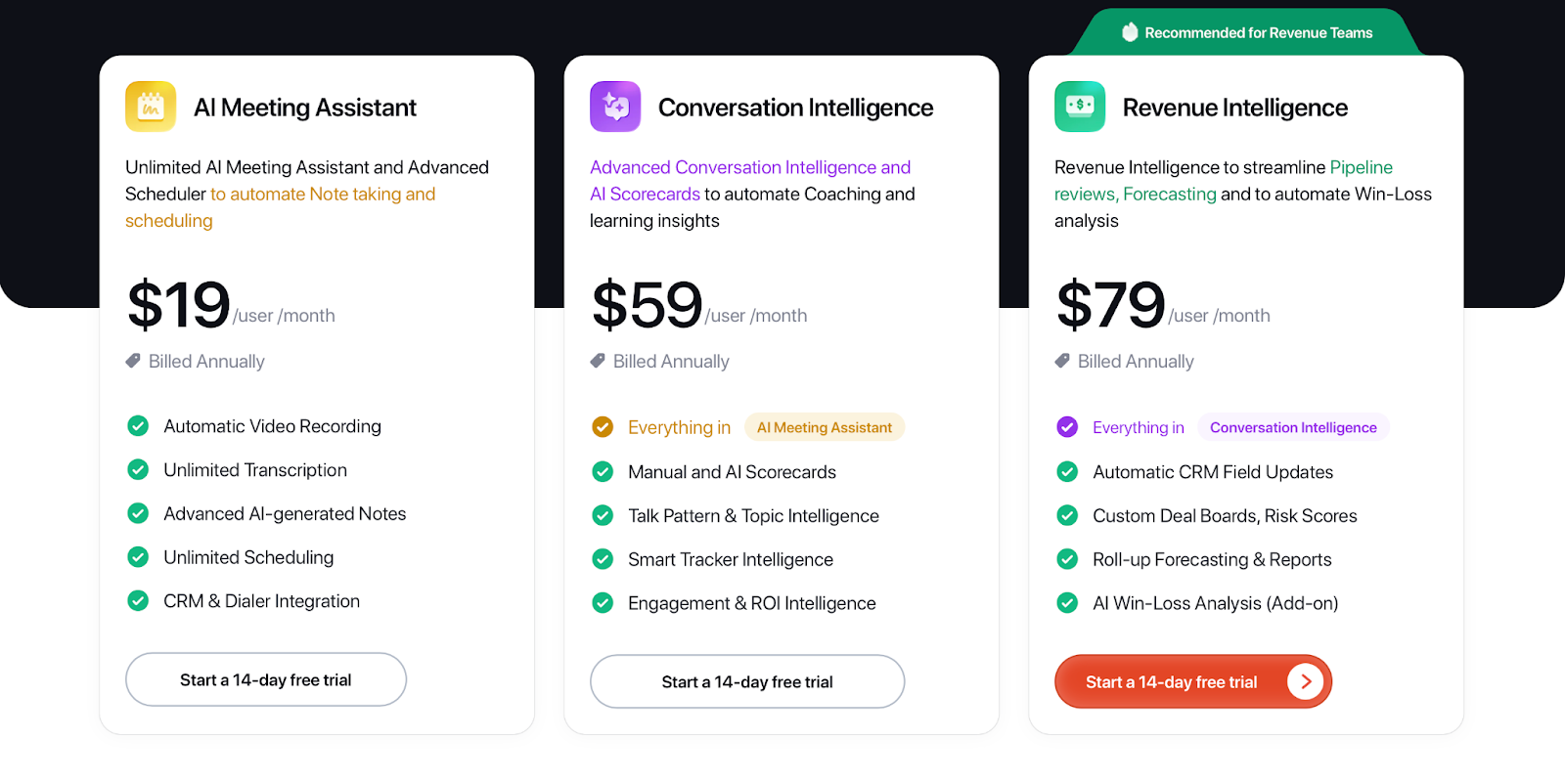
Avoma’s pricing tiers are:
AI Meeting Assistant: $19/month per user (billed annually). It offers unlimited transcription and scheduling
Conversation Intelligence: $59/month per user (billed annually). It comes with manual and AI Scorecards, and talk pattern and topic intelligence
Revenue Intelligence: $79/month per user (billed annually). It offers automatic CRM field updates and roll-up forecasting
Source: Avoma
Avoma Pros and Cons
Pros
✅ Strong integrations with conferencing, CRM, and dialer platforms
✅ Great onboarding resources and responsive support
✅ Reliable speaker detection in multi-person calls
Cons
❌ Limited tags for call recordings
❌ Transcripts can be inaccurate at times
6. Revenue.io Conversation AI
Best for: Real-time coaching and automation
Source: Conversation AI
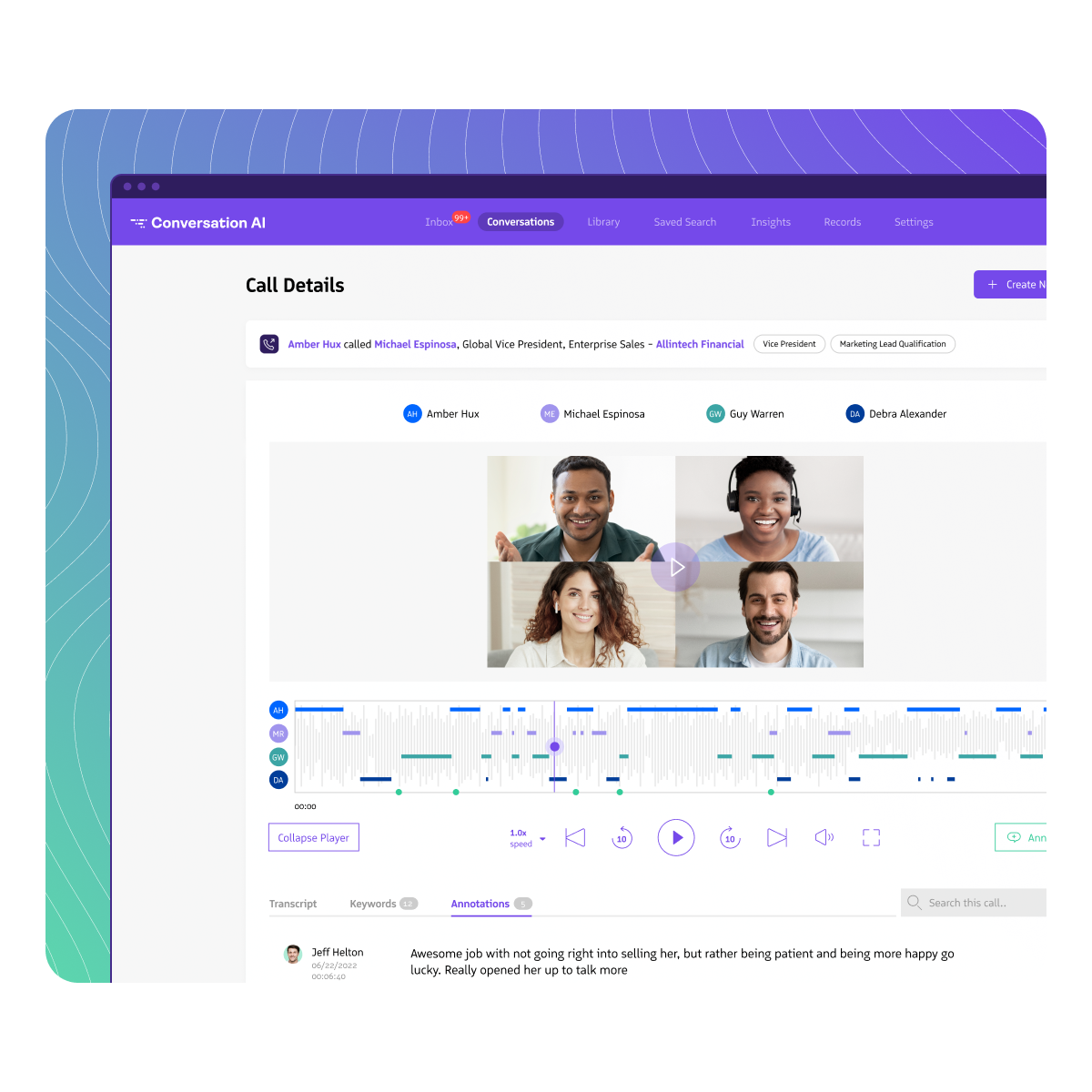
Conversation AI, built within the Revenue.io platform, gives sales teams the tools to automate call analysis, deliver tailored coaching, gain deep visibility into every conversation, and improve team performance.
How it differs from Chorus
Revenue.io summarizes critical points and next steps, lets reps edit them before sending, and generates personalized follow-up emails right after calls. Chorus also has this feature but with fewer customization options
Who is it for?
Sales enablement leaders and revenue teams aiming to improve sales reps’ performance.
Conversation AI’s top features
Automatically generates personalized follow-up emails with key topics, questions, and next steps
Gives reps access to a searchable library of coachable moments and conversation insights
Auto-captures video meetings and logs them directly into Salesforce for easy tracking and review
Offer insights into talk-to-listen ratios, conversation etiquette, and other key performance metrics from Teams and Zoom calls
Conversation AI pricing
Pricing details aren’t available publicly. You have to contact sales to get a quote.
Conversation AI pros and cons
Pros
✅ Intuitive interface ensures easy adoption
✅ Syncs automatically with major CRM platforms
✅ Offers mood and sentiment analysis
Cons
❌ Automated summaries and recommendations depend on AI accuracy, which may occasionally misinterpret context or miss nuances
❌ Organizations using highly customized or non-standard CRM setups may require extra configuration to ensure full compatibility
7. Jiminny
Best for: Revenue intelligence features
Source: Jiminny
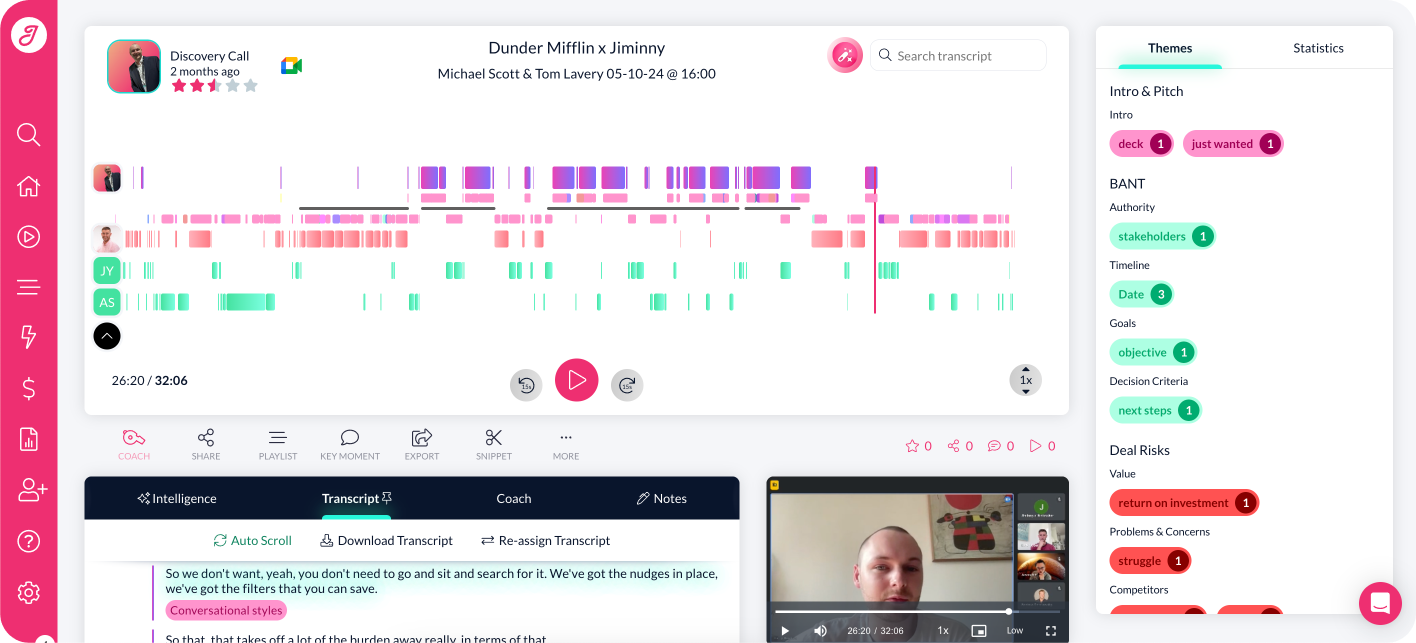
Jiminny is a revenue-focused platform offering advanced call capture and call scoring. It analyzes customer sentiment and rates calls based on outcomes and goal completion.
How it differs from Chorus
Jiminny is ideal for SMBs, mid-market, and collaborative teams, while Chorus is targeted toward mid-to-large enterprises
Jiminny offers a simple onboarding process and a user-friendly interface, whereas Chorus is enterprise-grade and requires more training
Who is it for?
Jiminny is ideal for growing teams that need call scoring and revenue tracking. Sales managers will love the pipeline visibility it offers.
Jiminny’s top features
Automate call scoring to spot what’s working and what’s not
Uncover blockers, engagement levels, deal risks, and get coaching insights with Ask Jiminny
Access high-quality video and audio recordings
Seamlessly integrates with Zoom, Salesloft, RingCentral, Outreach, and other tools in your stack
Jiminny pricing
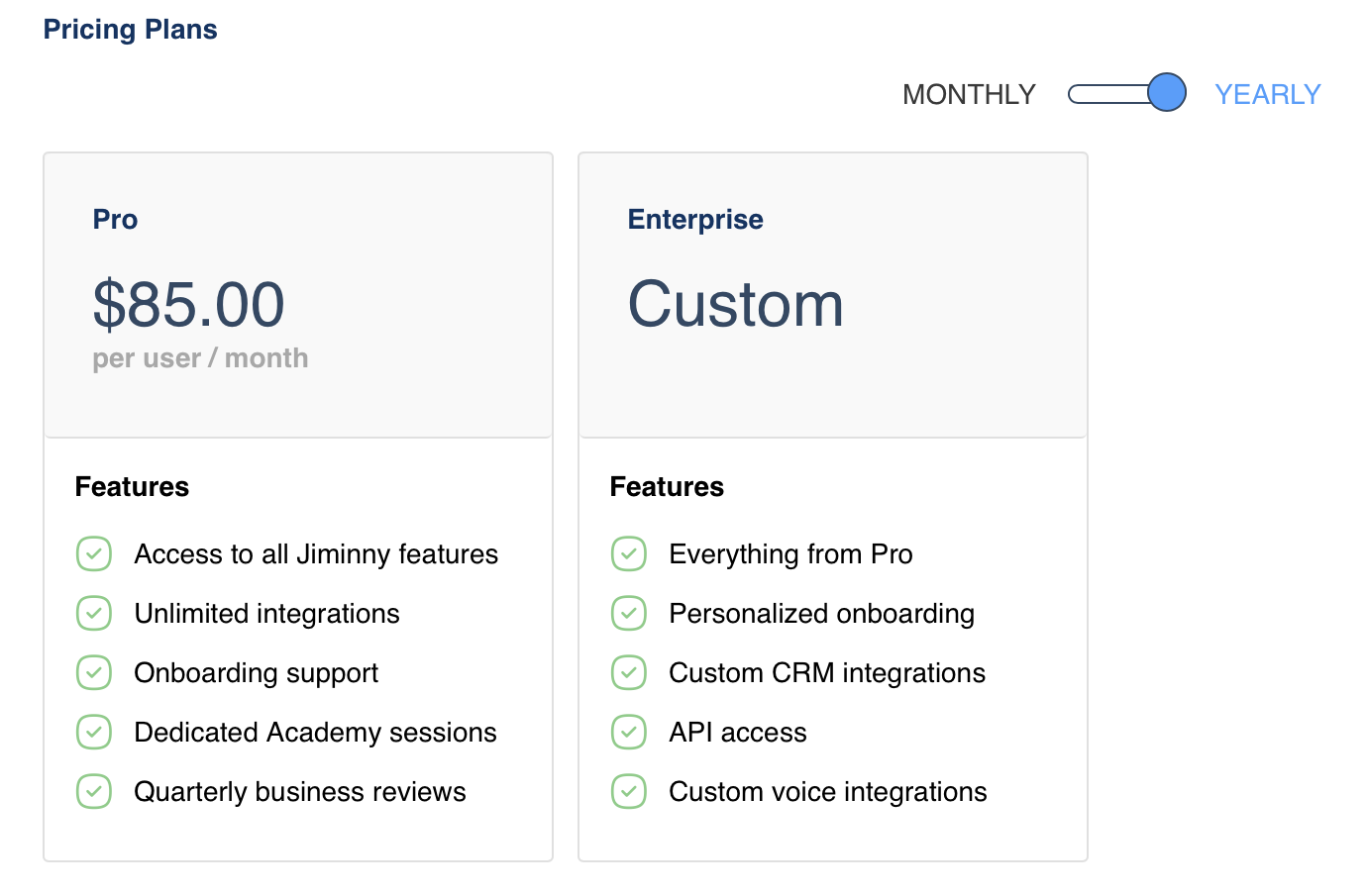
Jiminny’s pricing tiers are:
Pro: $85/month per user (billed annually). It offers unlimited integrations and onboarding support
Enterprise: Custom pricing. It includes all features of the Pro model, along with personalized onboarding custom CRM integrations
Jiminny pros and cons
Pros
✅ Creates action items for a custom follow-up after a call
✅ Saves meeting intelligence data directly to your CRM
✅ Summarizes critical deal information across your team
Cons
❌ Limited language support
❌ Takes time for a call to log
Looking for More Than Just Sales Call Insights? Jamie’s Here for You!
The best Chorus alternative comes down to what your team values most—better summaries, fewer recording failures, or a simple and reliable experience.
The conversation intelligence tools we’ve covered offer powerful conversation intelligence, eliminate manual note-taking, and surface insights that help you win more deals. While many overlap in core functionality, each one brings a different strength to the table.
For example, Clari Copilot is great for revenue forecasting, Avoma stands out with live scheduling and answer assistance, and Jiminny brings revenue-focused call scoring to growing teams.
But if you’re looking for a tool that combines accurate transcription, actionable summaries, bot-free simplicity, and fair pricing, Jamie is hard to beat. It works across all types of meetings—be it a customer interaction, an internal meeting, or something else (not just sales calls), delivers human-quality notes, and keeps your data private. No need for complex integrations. You get advanced meeting intelligence that boosts your bottom line.
Or if you’d like to see the tool in action before making a move, book a free demo today.