
I compared 5 AI note takers for private equity: Jamie, Fellow, Otter.ai, Fireflies.ai and Fathom.
I compared them for private equity on whether an additional bot joins your meeting call and whether the audio from that meeting is retained. I compared where the data is stored, too. I also compared the certifications of the different AI note takers and whether the notes they create connect with DealCloud or Affinity. And I compared how much each AI note taker costs per month.
We conducted our own test to determine accuracy for speaker identification and transcription. We compared Jamie with four other AI note takers: Otter.ai, Fireflies.ai, Fathom and Granola. The results for Jamie were 98 out of 100 for speaker identification and 90 out of 100 for transcription.
No matter the type of meetings you conduct, expert calls, management presentations or diligence calls, the question remains the same: what is the best AI note taker for private equity? In this article, we are going to show you 5 of them, free and paid.
In private equity, the quality of decisions depends on the quality of information. Jamie ensures that the insights generated in hundreds of deal conversations don’t disappear, but compound into institutional knowledge.

Investment Professional
NORD Holding
Private Equity · 10-50 employees
TL;DR
Jamie: Best Overall Bot Free AI Note Taker for Private Equity Firms
Fellow: Best AI Note Taker for Retention and Redaction Controls
Otter.ai: Best AI Note Taker for Free Live Transcription
Fireflies.ai: Best AI Note Taker for Sentiment and Talk Time Analytics
Fathom: Best AI Note Taker for Unlimited Free Recordings
What Are the Best Free and Paid AI Note Takers for Private Equity?
The 5 best free and paid AI note takers for private equity are Jamie, Fellow, Otter.ai, Fireflies.ai and Fathom. Here is how Jamie, Fellow, Otter.ai, Fireflies.ai, and Fathom compare, and you can click any row to expand the answer:
1. Jamie: Best Bot Free AI Note Taker for Private Equity Firms
Best for: Jamie is the best bot-free AI note taker for private equity deal teams who need GDPR compliant, ISO 27001-certified, and DORA-ready notes in CRMs like DealCloud and data in Europe.
Similar to: Fellow, Otter.ai, Fireflies.ai, and Fathom.
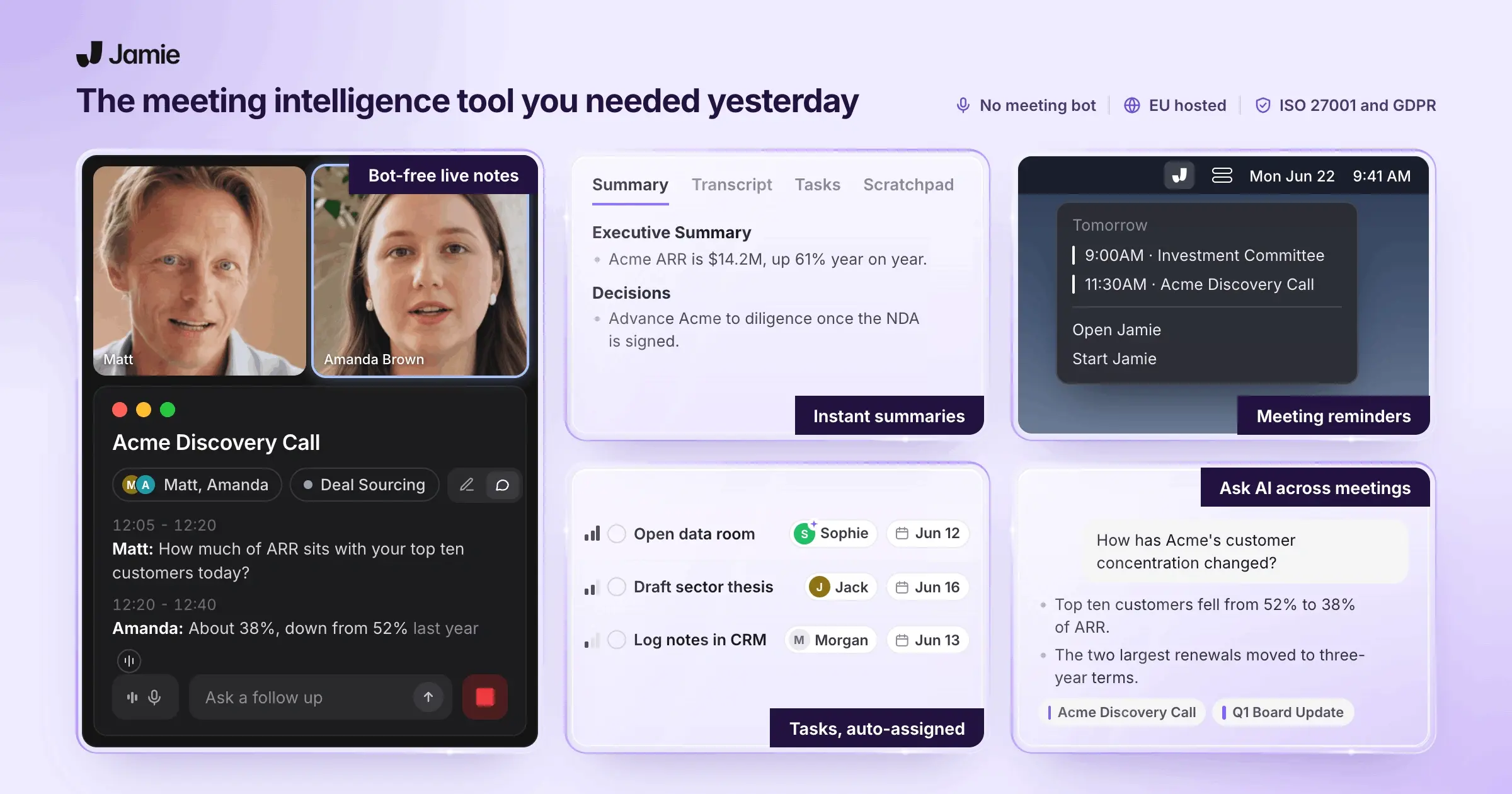
Jamie is a bot-free AI note taker for private equity firms. Jamie records your expert calls, LP calls, management presentations, and your due diligence calls using your computer or smartphone.
The notes also log into your firm's DealCloud and Affinity platforms on plans built specifically for deal teams. Because no bots join the call, you collect verbal consent for the recording in your own words.
You can also switch on the optional Recording notice email and the meeting chat notice.
Jamie is an AI meeting assistant built for deal teams, covering the entire client meeting lifecycle, from pre-meeting briefs to notes in DealCloud. We will begin with the features you use most often, beginning with the notes your partners read first:
Jamie Generates Meeting Notes With an Executive Summary and Action Items for Every Diligence Call
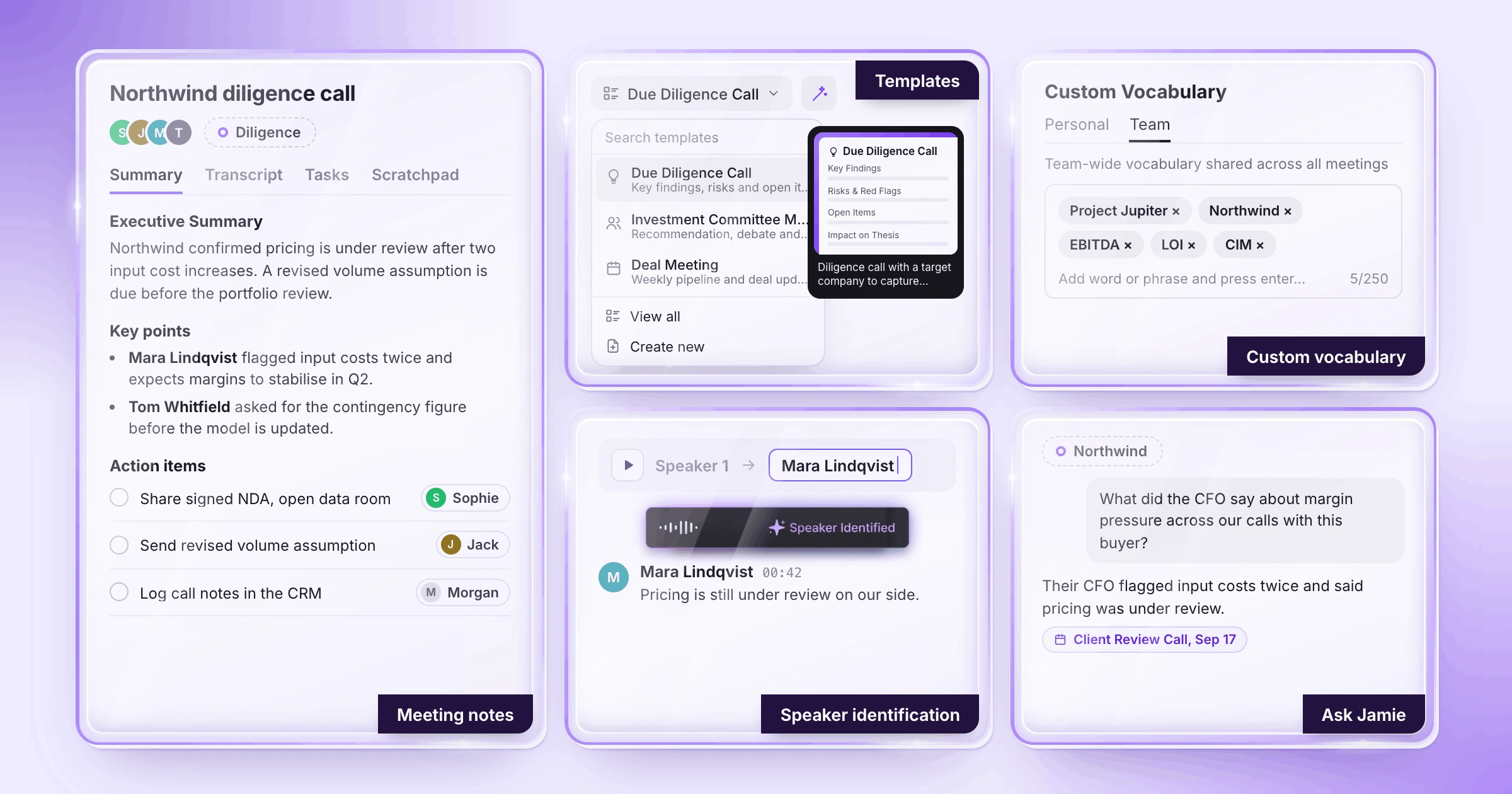
For every meeting, Jamie generates structured notes: an executive summary, a full summary and action items. Each speaker in the call is identified by name. You select from 8 built-in templates or 30 more in our template library, Due Diligence Call and Investment Committee Meeting among them. We regenerate the summary in that template's format.
For example, if four speakers present during a management presentation, you would want to know about meeting notes, templates, custom vocabulary, speaker identification, Speaker Memory and Ask Jamie:
Meeting notes | You receive an executive summary that covers the most important points of the whole meeting, which means you get up to speed on what happened fast. You receive a full summary for the associate needing all points. You also receive the action items, which Jamie automatically extracts and assigns to the speaker who took on each task. Before the call, Briefings gives you pre-meeting briefs for your pre-meeting prep. Jamie generates the notes in 100+ languages and on every plan, including the free plan. |
|---|---|
Templates | Every plan has 8 built-in templates to get you started, and our template library holds 30 more. These are industry-specific solutions for deal work, including Investment Committee Meeting, Due Diligence Call, Deal Meeting, Sourcing Call, Expert Call, and Board Meeting Minutes. You can also turn on Auto-apply, and Jamie selects the best template after each meeting, with no extra step in your meeting workflow. On Free, you will receive 1 custom template; on Plus, you will receive 3 custom templates; and on Pro, you will receive unlimited custom templates. A template you add from the library counts toward that custom template limit. |
Custom vocabulary | You may also use custom vocabulary with your deal code names, portfolio company names and acronyms (shortened forms of words). On the mobile app, custom vocabulary sits under Personalization in the Summary section, and it syncs with the rest of your account. For example, Project Jupiter is then spelled the way your team spells it. Each list contains 50 terms on Free, Plus and Pro, 100 on Team, and 250 on Enterprise. |
Speaker identification | Jamie will identify which person has spoken using their full name (if available from your connected calendar). However, when a new speaker shows up, they can still be referred to as Speaker 1 or Speaker 2 unless identified by the context of the meeting which Jamie excels at in-person meetings. If on the downside Jamie couldn't make out the voice, you play a short clip of the voice and type the name of the speaker once. |
Speaker Memory | Once you've identified a speaker (e.g. the CFO) within an initial meeting, Speaker Memory remembers that same speaker in future meetings. The CFO who was named during the first diligence call is automatically named again during the fifth. |
Ask Jamie | You type a question in plain words, and Ask Jamie answers from all relevant meetings, with links to the ones it used. With deal-based tagging, you narrow down a specific deal by filtering on its tag, then ask: "What did the CFO say about margin pressure across our calls with this buyer?" And finally, Ask Jamie also drafts follow-up emails and creates new tasks. Ask Jamie can perform internet searches too. Ask Jamie is unlimited on any of our plans (including our free one). |
Jamie Records Expert Calls and Diligence Calls From Your Own Laptop, With No Bot in the Call
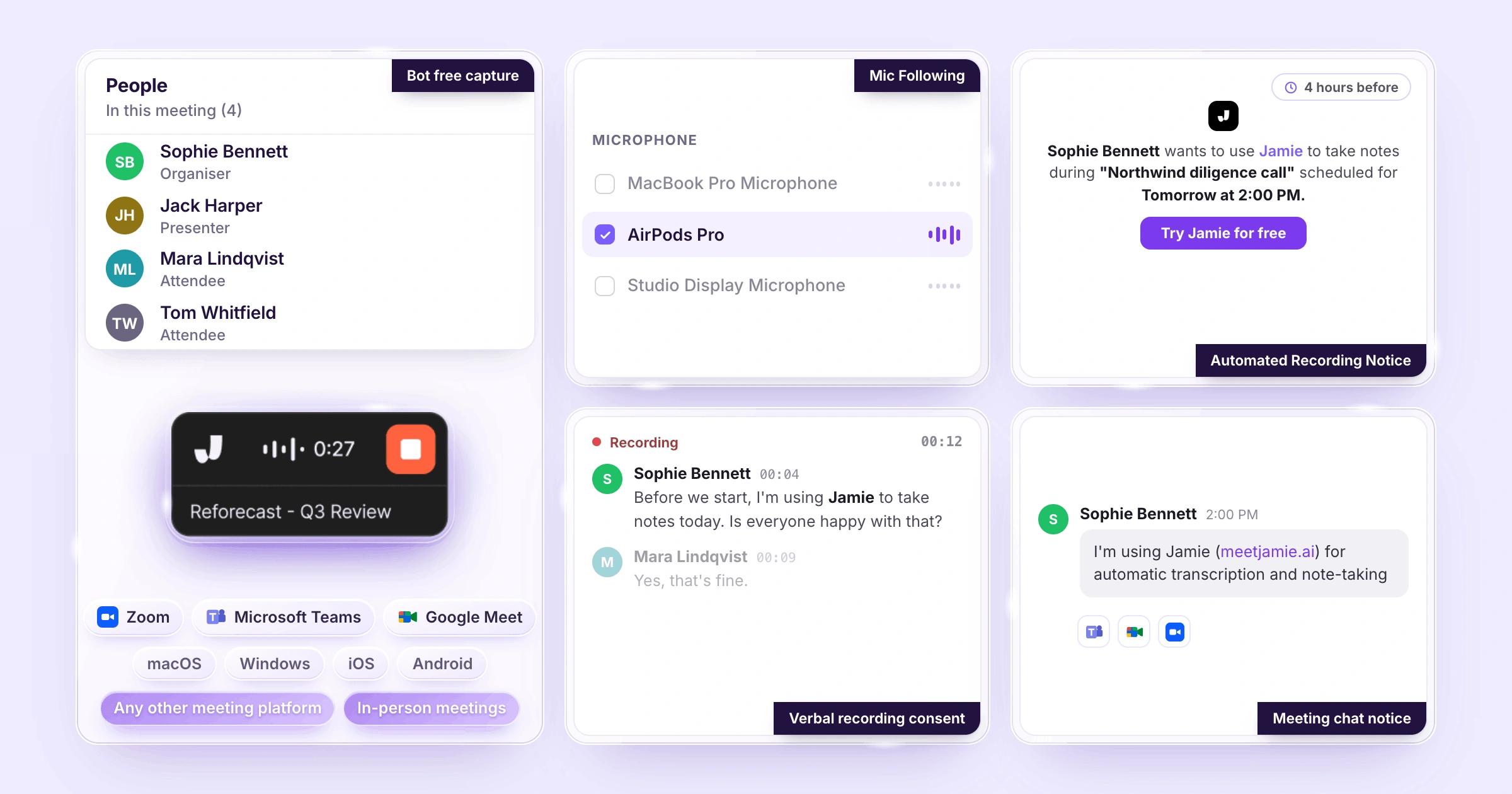
Jamie is a bot-free AI meeting note taker that captures the audio from your own laptop or phone. Jamie does not join the meeting as a participant. That's important because the target company may host the diligence call on their own Microsoft Teams (Teams).
Teams allows Administrators of the Team to set policies for how they manage guests (meeting participants). The policy (ExternalBotAccessMode) sets the access mode for detected bots in meetings. Its default is RequireApprovalWhenDetected. When a detected bot is identified in a meeting hosted by the target company, Teams puts the bot into "lobby" until an organizer approves it.
If you're a guest in a target company's meeting, you should understand bot-free capture, Mic Following, verbal consent, the optional Recording notice, and the meeting chat notice:
Bot-free capture | You can capture all virtual meetings, from client calls to internal meetings, on your computer with no bot. That covers Microsoft Teams, Zoom, Google Meet, and every other platform. You can also capture in-person meetings on a Mac, Windows, iOS, or Android. Live transcription also works on our mobile app. When Jamie starts or stops a recording on its own, a 20-second countdown runs first, and you can cancel it. You can extend the countdown to 30 seconds or 1 minute. No visible bot appears in the attendee list. In other words, there is no need for the host company's IT to approve or admit anything. This applies to both paid plans and free plans. |
|---|---|
Mic Following | You begin with Google Meet on your laptop mic, and later you put your AirPods in your ears. Jamie follows the mic you're currently speaking into. Your voice remains in the transcription, and you never open up an audio settings menu. |
Recording consent | You will get verbal consent from each attendee with your own wording at the beginning of each meeting; this is always your obligation. Recording another individual's private words is a criminal offense in Germany per § 201 StGB when done without authorization. Likewise, in California, California Penal Code 632 mandates that all parties involved in a confidential conversation provide their consent before being recorded. The federal 18 U.S.C. 2511 requires the consent of at least one party. Because of these requirements, we have implemented two additional pathways into Jamie: the optional Recording notice email and the meeting chat notice. |
Recording notice | The optional Recording notice email can be turned on and sent to invitees outside your workspace before the meeting. You select how far ahead (from 10 minutes to 48 hours) before the meeting you want the email notification to go out. To send an email notification, there must be a connection made to your calendar, and no notifications will be sent unless you activate this feature. |
Meeting chat notice | From within the desktop app, you may turn on the meeting chat notice. When activated, Jamie will post in the meeting chat window "Jamie (meetjamie.ai) is transcribing this meeting." It works in Microsoft Teams, Google Meet, and Zoom, and on a Mac it needs Accessibility access first. |
Jamie Stores Every Transcript From Your MNPI Calls in Europe Under GDPR, ISO 27001 Certified and DORA-Ready
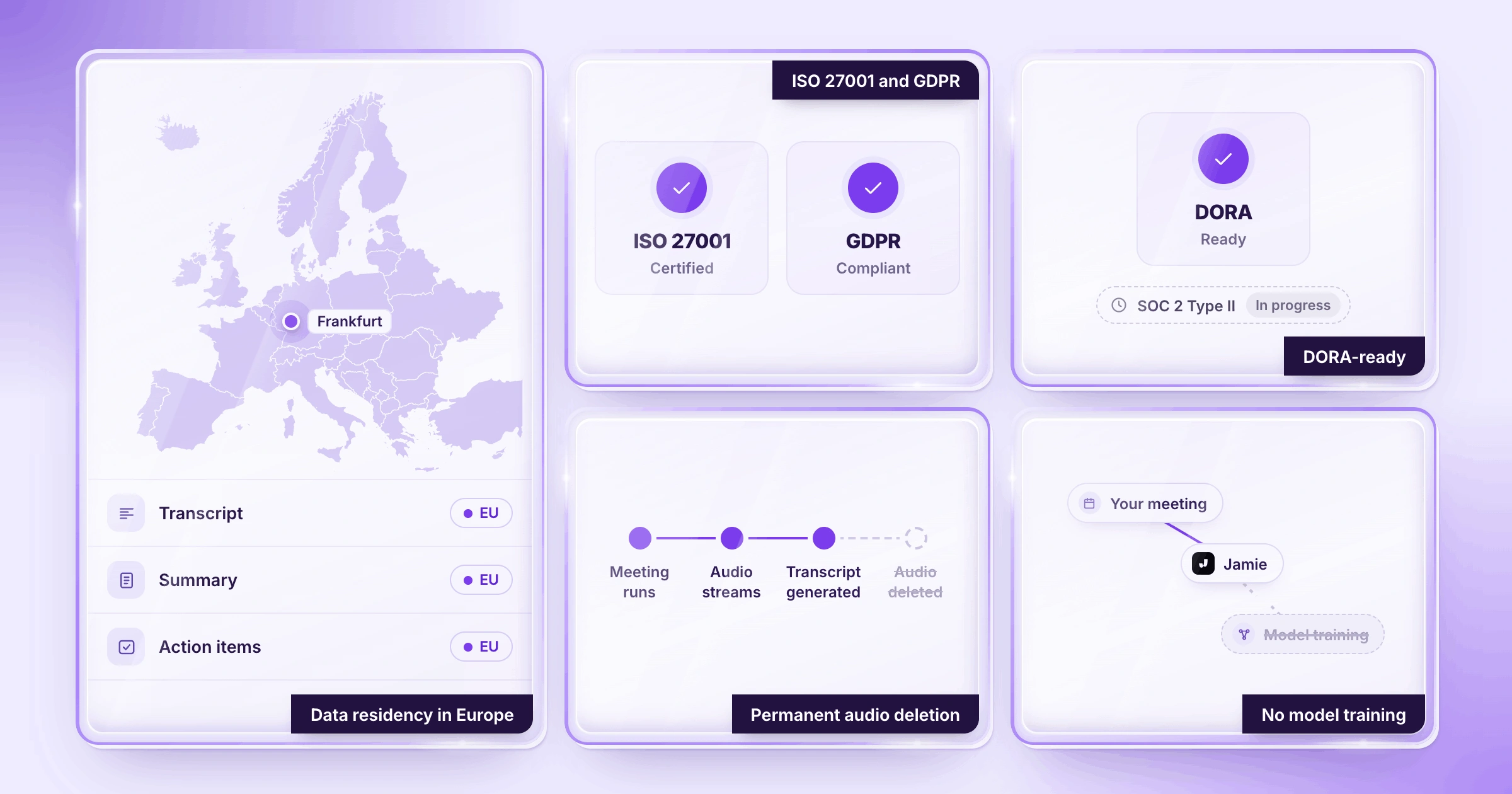
Jamie stores and processes all meeting data in Europe under GDPR. Jamie is GDPR compliant, ISO 27001 certified, and DORA-ready. We also delete the audio of your client conversations after the transcript exists. Before your compliance officer signs off on a transaction, you need to know where the data resides, which certifications Jamie holds, how audio is treated, and about model training:
Data residency in Europe | All of your meeting transcripts, summaries, and action items are stored and processed in Europe for all clients under GDPR. When your compliance officer asks where your client data is stored, there is a one-sentence answer. |
|---|---|
ISO 27001 and GDPR | Jamie is compliant with GDPR and holds ISO 27001 certification. Next to GDPR, the ISO 27001 certification means an independent auditor has examined Jamie's information security process against an internationally recognized standard. Jamie is also DORA-ready, which means a bank, a fund, or other finance teams subject to DORA regulations can use Jamie. Jamie currently has a SOC 2 Type II audit underway. |
Permanent audio deletion | You get to keep all the meeting notes and the whole transcript. Once the transcript of that conversation is complete, the recording gets deleted, which works like a transcription-only mode on every meeting. No recording of your counterparty's voice stays on a server after the call, on every plan. |
No model training | Your meeting data is never used to train AI models, not by us and not by any model provider. The financial data and portfolio data a chief financial officer (CFO) shares during due diligence stay in your notes. |
Jamie Runs on SAML SSO and Directory Sync, With Audit Logs, IP Allowlisting and Retention Rules on Enterprise
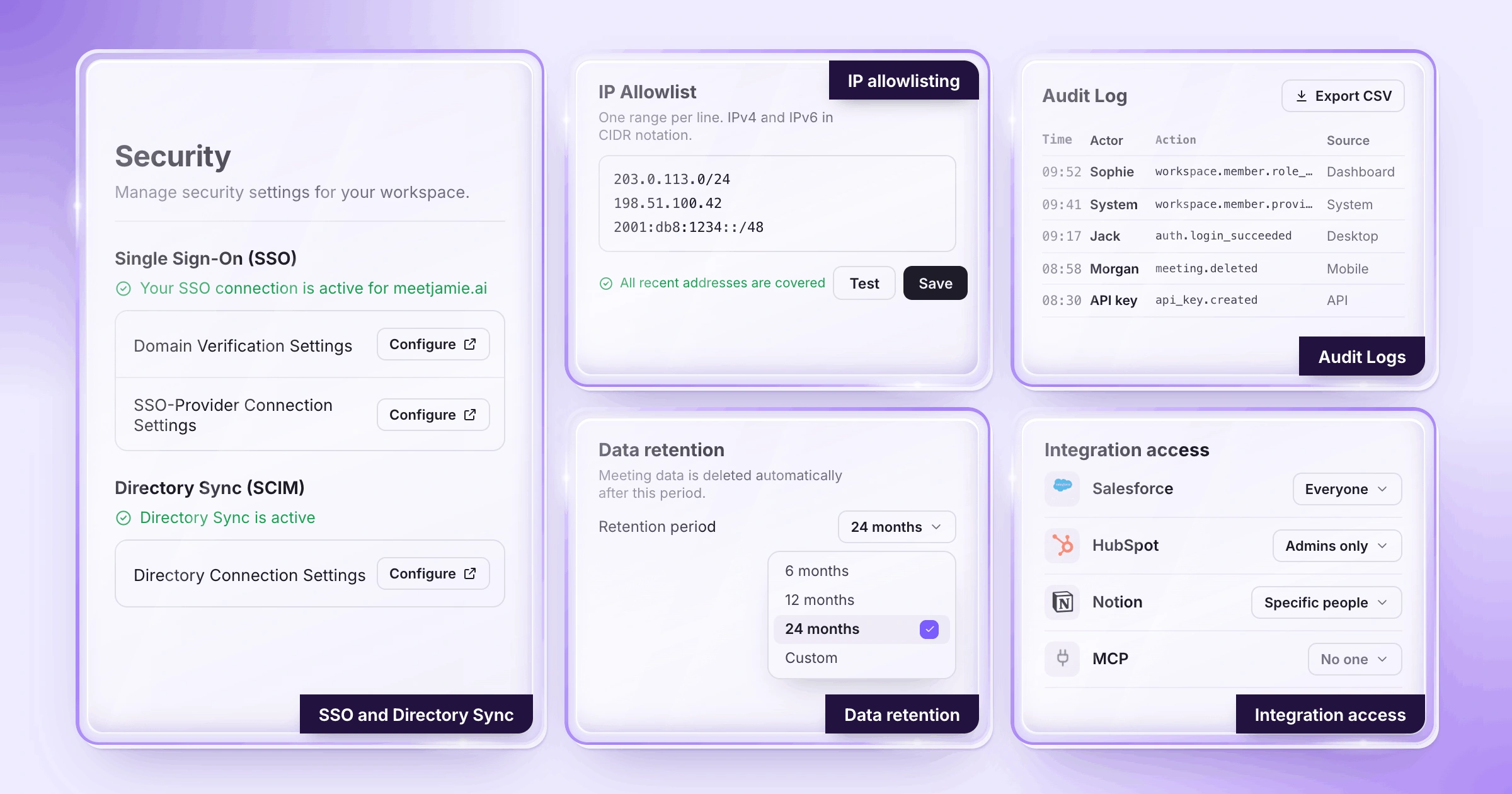
Jamie's Enterprise plan compliance features include single sign-on through SAML, Directory Sync, immutable audit logs, IP allowlisting, and retention periods based on customer requirements. Your IT team can set up all of these one time, and then each member will operate within them. If your IT head approves Jamie for the deal team, they will likely want to know about SSO, provisioning, audit logs, IP allowlisting, retention, and integration controls:
Single sign-on (SSO) | You and your organization use single sign-on (SSO) with your identity provider (Okta, Microsoft Entra ID, Google Workspace, etc.) using SAML 2.0. First, you will be required to verify that your company owns the domain in question. The Enterprise plan is required to enable SAML SSO. |
|---|---|
Directory Sync | Your identity provider becomes the definitive source of authority about who is in your workspace. On the Enterprise plan, Jamie can create accounts and update them when employees are hired or transferred into a different department. Jamie can also remove accounts when they leave the company. |
Audit Logs | Your administrators have access to an immutable audit trail of all activities within the workspace. This includes login attempts, invitations sent, role assignments and changes, deletion of meetings, and the creation and use of API keys. Each activity is timestamped and shows the individual involved and which account initiated each action, on the Enterprise plan. |
IP allowlisting | Workspace administrators may restrict access to approved IP address ranges in all of the web, desktop, and mobile applications with the IP allowlisting feature. The allowlist does not apply to API keys or MCP connections. IP allowlisting is on the Enterprise plan. Your meeting notes are logged against HubSpot contacts, companies, and deals. They appear in the Notes section of the record you choose, on the Pro, Team and Enterprise plans. |
Data retention | Enterprise plan customers also get data retention controls. These set company-wide retention policies for meeting data, based on internal compliance and record-keeping requirements. Your admin sets how long Jamie keeps meetings and transcripts, each on its own, from immediately up to 2 years. The setting then applies to every member's meetings across the workspace. |
Integration access controls | Workspace administrators may deactivate one integration for all users within a workspace simultaneously (e.g., Salesforce or the MCP connection), which keeps your meeting data inside the applications your compliance environment approves. Administrators will also be able to determine who has permission to use Ask Jamie, view transcripts, and share meetings. |
Jamie Logs Meeting Notes to DealCloud, Affinity, Salesforce, HubSpot, Dynamics 365 and Attio
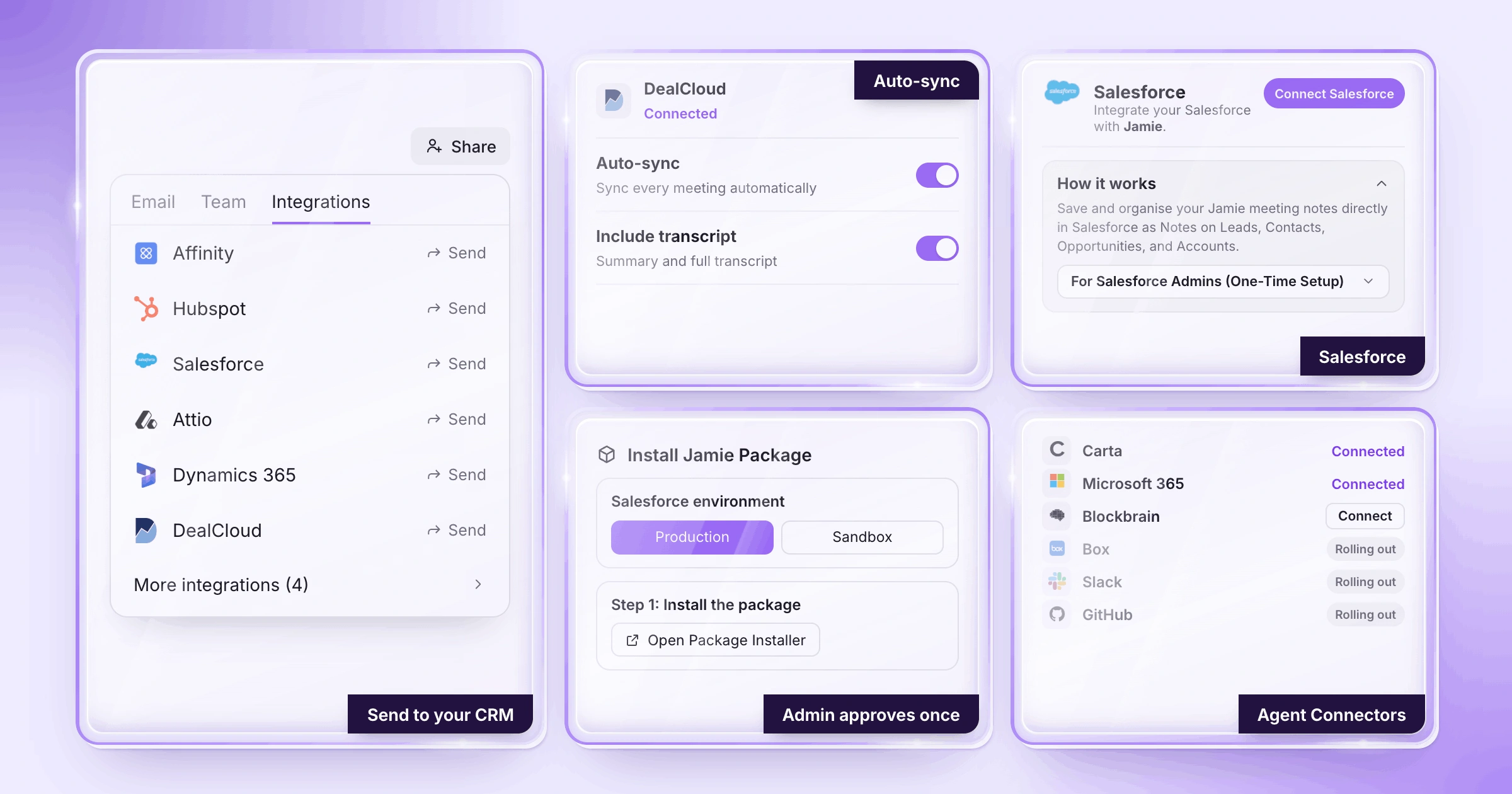
Jamie logs your meeting notes into DealCloud, Affinity, Salesforce, HubSpot, Dynamics 365 and Attio. You open a meeting, then press Share and send the notes to the record of your choice. In a sale process with twenty buyers, you will want to know how each CRM takes your notes, and if Jamie works inside Claude:
Salesforce | You can attach your meeting notes to a Lead, Contact, Opportunity or Account in Salesforce. Each note can include the summary, the transcript and the action items. On the Pro, Team and Enterprise plans, your Salesforce admin will approve Jamie once. |
|---|---|
Affinity | The notes created in Affinity are linked to people, companies and opportunities. Jamie matches the calendar participants of the meeting to Affinity people. A workspace administrator will need to connect Affinity once for the entire team, on the Enterprise plan. |
DealCloud | Your logged notes appear as a new interaction in DealCloud or are added to an existing one. Jamie matches the contacts by email address and can link the deal by company. Both the summary and full transcript of the meeting move over. On Team and Enterprise plans our support team will connect your DealCloud API credentials once. |
HubSpot | Your meeting notes are logged against HubSpot contacts, companies and deals. They appear in the Notes section of the record you choose, on the Pro, Team and Enterprise plans. |
Dynamics 365 | The meeting notes are saved as part of a Dynamics 365 Sales record or meeting along with their summary, transcript and tasks. Dynamics 365 is available on the Pro, Team and Enterprise plans. |
Attio | You send the summary, the transcript and the action items to your Attio workspace, on the Pro, Team and Enterprise plans. |
Jamie in Claude | Jamie is listed in Claude's directory, which means you can search past meetings, summaries and transcripts from inside Claude. During a meeting, Claude can also read the live transcript as Jamie records it. |
Jamie Starts Free With 10 Meetings a Month, Unlimited Ask Jamie and Unlimited Storage
Jamie has a free plan with 10 AI notes per month for meetings up to 30 minutes, and a longer meeting is still recorded in full, with its notes unlocked when you upgrade. Rather than a trial version, our generous free tier gives you the core product. That includes AI summaries, unlimited Ask Jamie, unlimited storage, speaker identification and memory, in-person meetings and one custom template. Our free plan is GDPR compliant and also ISO 27001 certified, using AES 256 encryption. Before you try out Jamie on actual calls, you probably want to know what features are included with the free plan and the cost of each paid plan:
The five plans
And once your needs exceed 10 meetings a month, you upgrade plans at these monthly prices.
Free: €0 per month
Plus: €25 per month
Pro: €47 per month
Team: €39 per seat per month
Enterprise: Custom pricing
Source: Jamie pricing, monthly prices.
What Jamie users love
No awkward bot on the call
"I like Jamie because it's a bot-free AI note-taker that can take notes without an awkward bot on the call." Verified User in Design, G2
Jamie tells voices apart through one microphone
"One standout feature is how effectively Jamie differentiates between speakers, identifying different voices speaking through the same microphone." Tom W., G2
What Jamie users flag
The free plan has a 30 minute meeting limit on its notes
"The 30min meeting limit, but I understand that's the business model ;)" Charlotte Z., G2
One reviewer is waiting on a ClickUp integration
"I feel Jamie could improve by offering more integrations with other software. I'm mainly missing a ClickUp integration." Alberto A., G2
2. Fellow: Best AI Note Taker for Retention and Redaction Controls
Best for: Fellow is the AI note taker for teams who want SOC 2 Type II, zero-day retention, and redaction on Enterprise.
Similar to: Jamie, Otter.ai and Fathom.
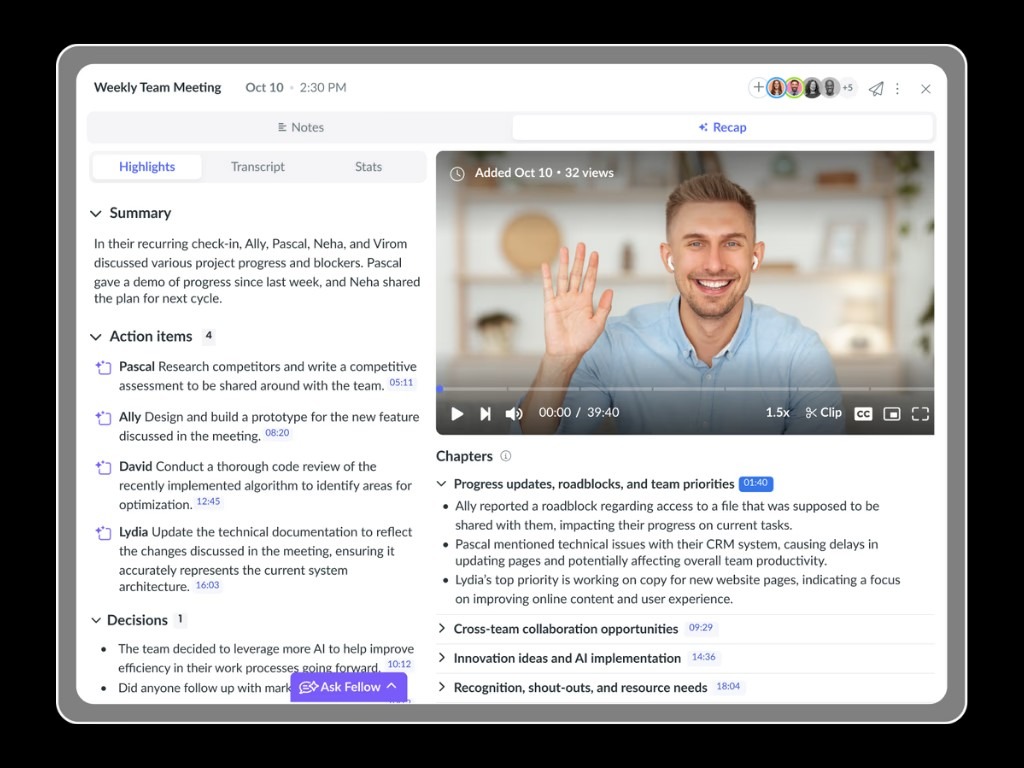
Fellow is an AI meeting assistant that records with or without a visible meeting bot. Fellow is SOC 2 Type II and GDPR compliant, with HIPAA on Enterprise.
Fellow's standout features
As soon as I started to look at Fellow, I realized that Fellow was developed with regulated industries, and specifically, financial services and legal firms in mind. You are able to pause a recording, then resume it from where you paused it. Each time you pause the recording, the pause will have its own timestamp logged in the log. Another aspect of Fellow that I found appealing is that the consent disclosure can be customized. And if your compliance department needs documentation or other papers related to due diligence, Fellow provides security documents for this purpose.
Fellow's key features
Botless recording: The desktop app records system audio on Mac and Windows, botless.
Zero-day retention: Recordings can be deleted automatically when AI processing finishes.
Transcript redaction: On Enterprise, you redact sensitive parts of a transcript before sharing it.
Ask Fellow: Ask Fellow searches across all your transcripts and meeting summaries at once.
100 languages: Fellow transcribes in 100 languages, with the language detected automatically.
SOC 2 Type II: Fellow is certified, with AES-256 encryption and GDPR compliance.
Consent capture: Attendees review the recording notice before meetings, on Microsoft 365 calendars.
Information barriers: Fellow applies barrier policies between business units in your organization.
Super Admin API: On Enterprise, exportable audit logs formatted for regulatory examinations.
No AI training: Fellow never trains its AI models on your meeting data.
Fellow's pricing
Free: 0 dollars per month
Solo: 29 dollars per month
Team: 11 dollars per user per month
Business: 23 dollars per user per month
Enterprise: 25 dollars per user per month, billed annually only
Source: Fellow pricing, monthly prices on the Individuals and Businesses & Teams tabs.
Already trying Fellow? Read our Fellow app review.
What Fellow users love
One reviewer finds the exact call where a decision was made
"I can ask fellow to provide me the call where I spoke to a specific company about a specific challenge and Fellow will find the exact conversation!" Warrick and Takicha R., G2
Meeting search makes past context quick to find
"The meeting search functionality is intuitive and helps me quickly find what I need." Gabe H., G2
What Fellow users flag
The bot takes up a seat on a group call
"That the bot has to join the meeting... I wish it didn't take up a whole persons space when on a group call." Chloe W., G2
Fellow sometimes misses the start of a call
"The main thing is that Fellow sometimes doesn't join a call automatically, though even then the Google Meet plugin gets it in within seconds" Lauren H., G2
3. Otter.ai: Best AI Note Taker for Free Live Transcription
Best for: Otter.ai is the AI note taker for teams who want live transcription and AI Chat across meetings on a free plan.
Similar to: Jamie, Fireflies.ai and Fathom.
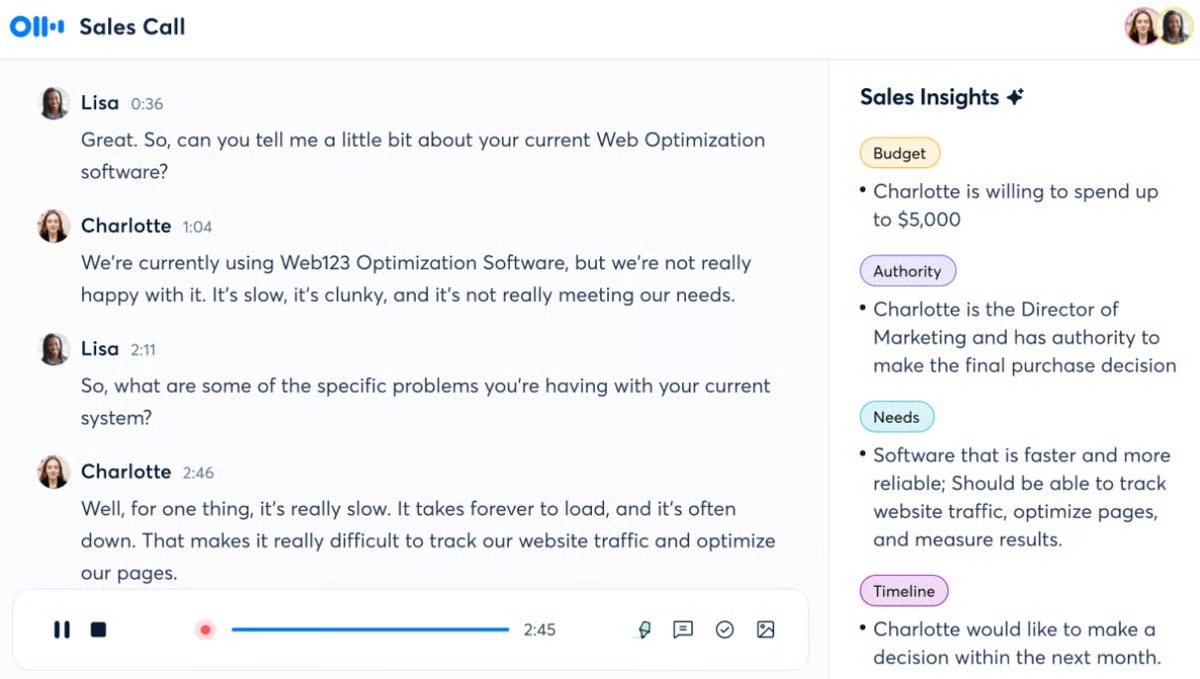
Otter.ai is an AI note taker that works with Zoom, Microsoft Teams and Google Meet. Otter has achieved a SOC 2 Type 2 report and follows GDPR and CCPA standards.
Otter.ai's standout features
There are some things that I would like for you to consider before placing your entire team onto Otter. The admin controls live on the Enterprise plan: custom data retention; remove audio from conversations; decide who records and who shares. I would also be cautious when budgeting because single sign-on (SSO) and SCIM will require a license with at least 100 users. And if you need HIPAA, it can be added as an add-on.
Otter.ai's key features
Live transcription: Otter transcribes Zoom, Microsoft Teams and Google Meet calls as they run.
AI Chat: You ask questions across all your meetings, 20 a month on Basic.
Team vocabulary: Pro adds team vocabulary and taggable speakers for your recurring names.
iOS and Android apps: Otter's mobile apps are included on the free Basic plan.
Otter MCP server: The MCP server connects your Otter meetings to other AI tools.
SOC 2 Type 2: Otter is compliant and uses industry-standard encryption for your data.
Recording consent: Enterprise adds a recording disclaimer email and Teams recording permission capture.
Bot-free desktop app: Record conversations from your Mac or Windows desktop without bots.
Training opt-out: Enterprise keeps your organization's data out of AI model training.
Audit logging: Enterprise audit trails support your compliance and regulatory reporting needs.
Otter.ai's pricing
Basic: 0 dollars per month
Pro: 16.99 dollars per user per month
Business: 30 dollars per user per month
Enterprise: Contact sales
Source: Otter.ai pricing, monthly prices.
Weighing Otter.ai against Jamie? See the two side by side in Otter AI vs Jamie.
What Otter.ai users love
AI Chat pulls answers from previous meetings
"Being able to query both the current conversation and previous meetings is particularly valuable on longer sales cycles, where important details end up scattered across several calls." Rostyslav M., G2
Real-time transcription keeps one reviewer engaged in client calls
"It allows me to stay fully engaged during client calls and meetings without having to worry about taking manual notes." Kayreal P., G2
What Otter.ai users flag
Fixing a ten minute transcript can take three times as long
"The transcriptions are pretty inaccurate, and a ten-minute audio can take three times as long to fix because so much of it is wrong." Alex T., G2
One reviewer finds multilingual meetings harder
"it operates almost exclusively in English, which makes it struggle with non-English conversations, code-switching, or multilingual team meetings." Khalid s., G2
4. Fireflies.ai: Best AI Note Taker for Sentiment and Talk Time Analytics
Best for: Fireflies.ai is the AI note taker for teams who want talk time, sentiment and topic analytics across 100+ languages.
Similar to: Jamie, Otter.ai and Fathom.
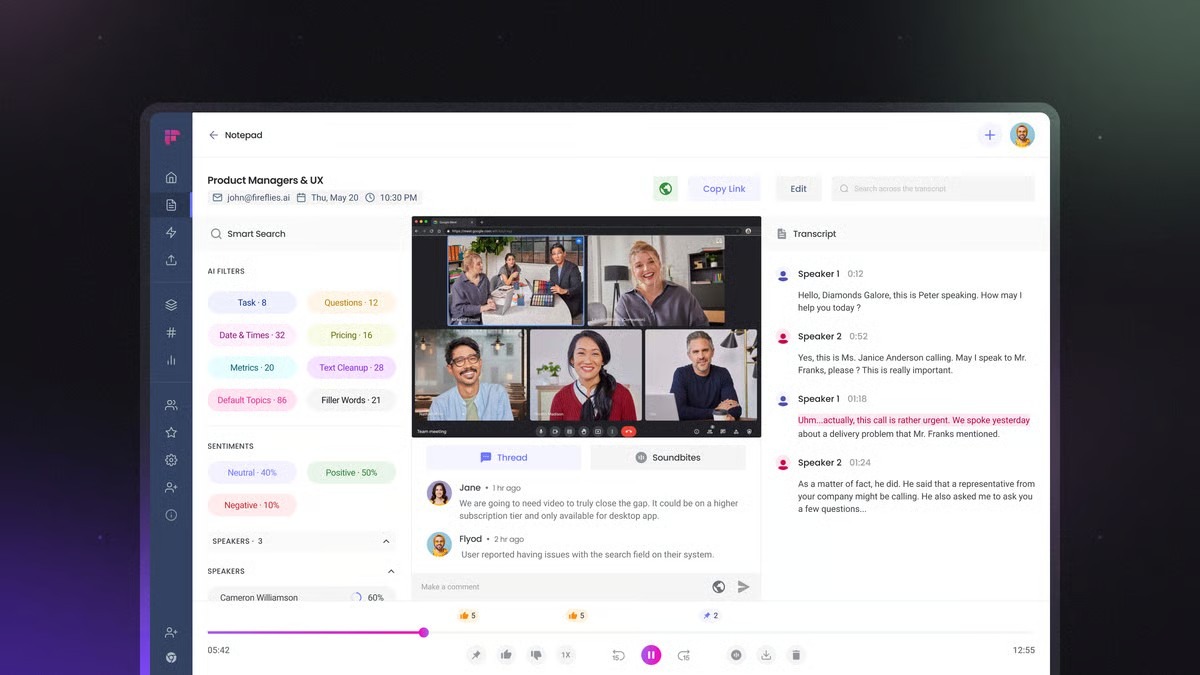
Fireflies.ai is an AI note taker that joins your calls as Fred, the Fireflies bot. Fireflies also offers a desktop app, a mobile app, and a Chrome extension that records without the bot on paid plans. Fireflies is SOC 2 Type II and GDPR compliant, with HIPAA compliance on Enterprise. Its Enterprise plan adds Private Storage, which keeps your meeting data at your preferred location.
Fireflies.ai's standout features
What stood out to me with Fireflies is how much it puts on the Enterprise plan for your IT team. You get a rules engine, SSO and SCIM, audit logs through the API, custom data retention, and a super admin role. I was also glad to see a 0-day data retention policy with all of its vendors and partners, because your compliance officer will likely ask about that early.
Fireflies.ai's key features
AskFred: AskFred reviews your meetings and answers any question you have about them.
100+ languages: Fireflies transcribes meetings in more than 100 languages, with automatic detection.
Conversation intelligence: The Business plan adds talk time, sentiment and topic trackers.
Mobile app: The Fireflies mobile app transcribes in-person conversations on Android and iOS.
Fireflies MCP: The MCP server brings your meeting insights into Claude and ChatGPT.
Certifications: Fireflies is GDPR and SOC 2 Type II certified, HIPAA on Enterprise.
Recording notices: An email one hour before and a meeting chat notification.
Bot-free desktop app: The Fireflies desktop app records your meetings without a bot.
Affinity and Attio: Fireflies syncs meeting notes and tasks to Affinity and Attio.
Zero data retention: Your meeting data is never used for AI training.
Fireflies.ai's pricing
Free: 0 dollars per month
Pro: 18 dollars per seat per month
Business: 29 dollars per seat per month
Enterprise: 39 dollars per seat per month, billed annually only
Source: Fireflies.ai pricing, monthly prices.
Comparing Fireflies.ai with Jamie? See Avoma vs Fireflies vs Jamie.
What Fireflies.ai users love
One reviewer stays fully present with the client
"Now, I can be 100% present in the conversation, which is honestly priceless to me." Pasi R., G2
AskFred answers questions about long projects
"On longer projects, I can ask what we agreed on about an integration, which risks the client raised, or who took ownership of a follow-up, without replaying an hour-long call." Samantha V., G2
What Fireflies.ai users flag
The bot can join private one to one meetings uninvited
"If you're not extremely careful with your calendar permissions and your Fireflies dashboard settings, it may end up joining private 1-on-1s meetings uninvited, which can be awkward." Denis M., G2
The bot asks permission to join the meeting
"I don't like that, when in a Google Meet or Zoom video meeting, the bot is asking permission to join the meetings." Çağrı P., G2
5. Fathom: Best AI Note Taker for Unlimited Free Recordings
Best for: Fathom is the AI note taker for teams who want unlimited free recordings and a choice of bot or bot free capture.
Similar to: Jamie, Fellow and Otter.ai.
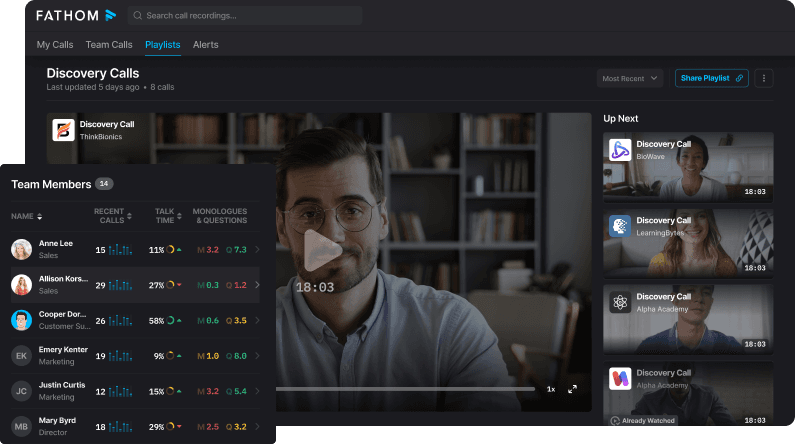
Fathom is an AI notetaker with a free plan for unlimited recordings and transcription. Fathom is SOC 2 Type II audited, HIPAA compliant and GDPR-aligned, with SSO and SCIM on Enterprise. Its Business plan adds coaching metrics and AI scorecards for performance coaching.
Fathom's standout features
I saw two things that really stood out. If your firm has multiple deal teams, an admin can control what calls and folders people can view through the View Access feature. When you ask Fathom a question, the response will take you directly to the exact point in the transcript where the information was provided.
Fathom's key features
Unlimited free recordings: The free plan includes unlimited recordings, transcription and AI call summaries.
Bot free capture: On Mac, Fathom records with no bot, in beta.
Transcription Dictionary: Team admins add up to 50 company terms for accurate transcripts.
Ask Fathom: Ask Fathom answers questions within one call or across all your meetings.
Claude and ChatGPT: Fathom's integrations bring your meeting context into Claude and ChatGPT.
SOC 2 Type II: Fathom is audited, HIPAA compliant and GDPR-aligned.
Recording consent: Fathom emails attendees before the meeting and posts a chat notice.
CRM sync: Team and Business plans sync call summaries to Salesforce and HubSpot.
iOS app: Record in-person meetings on your iPhone and review summaries on the go.
Retention rules: Enterprise permanently deletes recordings older than the period you set.
Fathom's pricing
Free: 0 dollars per month
Premium: 20 dollars per user per month
Team: 19 dollars per user per month
Business: 34 dollars per user per month
Enterprise: Contact sales
Source: Fathom pricing, monthly prices on the Individuals and Teams tabs.
Leaning toward Fathom? See the two side by side in Fathom vs Jamie AI.
What Fathom users love
Summaries good enough to forward to clients
"The summaries and action items are accurate enough that I forward them to clients with light edits." Tim L., G2
Auto-join takes detailed note taking off one reviewer's plate
"The auto-join feature and the transcripts I receive after each call mean I don't have to worry about remembering everything or taking detailed notes during meetings." Shreeyash G., G2
What Fathom users flag
Cross-talk lowers transcript accuracy for one reviewer
"Sometimes the transcript isn't completely accurate, especially when people talk over each other or the audio isn't clear." Mia C., G2
Speakers get mixed up when people talk fast
"Transcription is relatively accurate, but it can generate incorrect speaker assignments if you tend to talk fast or talk over each other." Kristen K., G2
Final Verdict on What's the Best 5 AI Note Takers for Private Equity?
Jamie is the best AI note taker for private equity if you record expert calls, management presentations, and diligence calls: each speaker is identified by name, the notes log into DealCloud and Affinity, and all meeting data is stored and processed in Europe under GDPR.
You can also pick a different tool when the job is different:
Choose Fellow Enterprise when transcripts must be redacted first.
Choose Otter.ai when you need to import recorded audio files.
Choose Fireflies.ai when your calls run through a sales dialer.
Choose Fathom when you want to rewatch the meeting video.
Our Picks for the Best AI Note Takers for Private Equity
Jamie is our pick for your deal calls, and we genuinely like Fellow and Fathom for the jobs they were built for, so you can see which one is yours.
Jamie, the meeting intelligence platform: you record expert calls and diligence calls on your own laptop or phone, consent first, and no bot joining. And you get meeting notes, Ask Jamie across every deal, the Agent in your tools, and meeting data in Europe under GDPR.
Fellow, the AI meeting assistant: on the Enterprise plan, recordings can be deleted automatically after AI processing. You can also redact a transcript before you share it, which suits a compliance team that wants raw content gone.
Fathom, the AI notetaker: you keep the full audio and video of a call, screen included. Reviewing a management presentation then feels like watching it again.
What actually makes a difference is that meeting notes from six months ago are still there when they become relevant
Fritz Simons
General Partner | Aven Capital Partners
Private Equity · 2-11 employees
Read More
Writing the memo after the meeting? See our AI tools for private equity investment memos.
Working with the sell side too? Compare the AI note takers for investment banks.
Do your calls run on Microsoft Teams? Read about bot free notetakers for Microsoft Teams.
Is your deal flow in Affinity? Look at the Affinity note taker alternatives.
Does your compliance team want everything under EU law? Read our guide to GDPR note takers in Europe.
Meeting founders in person? See the AI note takers for in-person meetings.
FAQs on Free and Paid AI Note Takers For Private Equity
What Is the Best AI Note Taker for Private Equity?
Jamie is the best AI note taker for private equity when your calls carry MNPI. Jamie will record the meeting audio either from your own laptop or phone, and the meeting audio will be deleted by Jamie once transcribed. Fellow, Otter.ai, Fireflies.ai and Fathom are good alternatives depending on what you do. All meeting information collected by Jamie is stored in Europe under GDPR, and Jamie is free for 10 meetings a month.
Are AI Note Takers Safe for Confidential Deal Calls?
Yes, an AI note taker is acceptable for a live confidential deal call if it does not store your meeting audio. It also must not train a model on your meetings. Your compliance department also needs to know where it is storing its data. Ask each vendor these three questions before you record sensitive discussions on a live deal. If a vendor fails even one, your compliance officer stops the tool, and you are back to typing every deal call by hand. Jamie deletes the meeting audio after transcription, never trains models on your meetings, and keeps all meeting data in Europe under GDPR.
Do AI Note Takers Need a Bot to Join the Call?
No, Jamie, Fellow, Fathom and Fireflies.ai can each record with no recording bot involved. The beta version of Fathom's bot-free capture is running on Macs, and on paid versions of their service, Fireflies also records without bots. Jamie records every meeting platform on your laptop, and your in-person meetings on your phone. You would obtain verbal consent from the attendees using your own wording. If you desire, you may also send the optional Recording notice email and post the meeting chat notice.
Can I Use an AI Note Taker on Expert Calls and Site Visits?
Yes, Jamie works on expert calls and site visits. Jamie does record at each meeting platform with whatever device you have, laptop or smartphone. A meeting platform developed by an expert network would also be recorded when it is run from your laptop. The exception is a voice telephone call, which is not recorded. You could walk through a factory recording audio from your phone, and it would sync to your desktop from one account.
Is SOC 2 Required for an AI Note Taker, or Is ISO 27001 Enough?
Your compliance team's vendor policy decides which certifications they accept. Two independently audited standards are worth looking for: ISO 27001 and SOC 2. All four vendors- Fellow, Otter.ai, Fireflies.ai, and Fathom, hold SOC 2 Type II. Jamie is GDPR-compliant, and Jamie is ISO 27001-certified, and Jamie is DORA-ready, and we currently are undergoing our SOC 2 Type II audit.
Which AI Note Takers Sync With DealCloud and Affinity?
Jamie logs meeting notes to DealCloud from the Team plan, and to Affinity on Enterprise only. Fellow and Otter.ai are integrated with Salesforce and HubSpot on their paid plans, with a user limit on Otter Pro. Jamie logs the summary of the meeting along with the full transcript as a new interaction within DealCloud. Jamie matches your contacts by email address.
Is There a Free AI Note Taker for Private Equity Associates?
Yes, Jamie, Fellow, Otter.ai, Fireflies.ai and Fathom all have a free plan; however they are limited in different ways. The free plan from Fellow allows for a maximum of 5 AI note entries in total, while Fathom's free plan offers unlimited recordings. Jamie's free plan covers 10 AI notes per month for meetings up to 30 minutes, with unlimited Ask Jamie and unlimited storage.
How Do I Get Consent to Record a Deal Call?
You obtain verbal consent at the beginning of each call. In Germany, § 201 StGB makes it a criminal offense to record another person's private words without permission. That is why we created two more routes into Jamie. One is the optional Recording notice email before a meeting, and the other is the meeting chat notice during the call. The obligation to inform all participants remains yours.