Best 8 AI Note Takers for Lawyers [2026]
Rodoshi
Growth Content Editor
![Best 8 AI Note Takers for Lawyers [2026]](/api/media/payload/ai-note-takers-for-lawyers-4786.png)
AI note takers for lawyers are becoming the new legal assistant in the room.
They sit in on client calls, capture every exchange during witness prep, organize hours of meeting notes into clear, case-ready summaries, and save a LOT of time.
Every word matters in a deposition or negotiation, and AI note takers ensure nothing gets lost between the discussion and the record.
But the real test lies in confidentiality. Legal professionals can’t afford tools that store data on third-party servers or risk non-compliance with GDPR or client-attorney privilege.
The right AI assistant handles transcription securely and lets you maintain full control of your files.
In this guide, I’ll explore the 8 best AI note takers for lawyers in 2026 that meet the standards of modern legal practice.
Key takeaways
AI note takers are becoming standard in legal practice.
Jamie leads the pack for lawyers who need bot-free recording, GDPR-aligned processing, and highly accurate transcripts that stay entirely under the firm’s ownership.
Amberscript and Sonix stand out for firms handling large volumes of recordings. Amberscript offers EU-hosted human transcription for precision, while Sonix delivers fast, cost-efficient turnaround for high-volume audio.
Rev and Harvey AI cater to litigation-focused teams. Rev excels in multi-file evidence review and privilege-safe workflows, while Harvey AI supports deeper tasks like document analysis and drafting inside enterprise environments.
Notigo and Plaud support lawyers who want lightweight, real-time capture. Notigo focuses on live summaries, while Plaud’s mini device helps solo or boutique firms stay hands-free during client conversations.
Relaw AI expands beyond transcription by linking meeting notes to intake, document automation, and drafting.
Across all eight tools, the deciding factors remain accuracy, security certifications, GDPR alignment, speaker handling, and how easily the tool integrates with a firm’s existing systems.
What are the features you should look for in an AI note taker for lawyers?
High transcription accuracy
Your AI assistant should capture every word correctly, even with overlapping speakers or complex terminology. Look for tools trained on legal vocabulary and capable of labelling speakers, timestamps, and context automatically.
Confidentiality and GDPR compliance
Choose tools that are fully GDPR-compliant and offer encryption in transit and at rest. It shouldn't use your recordings to train external AI models. Bonus points if the provider offers EU-based or firm-specific data hosting.
Secure storage and data control
You should own your data completely. The best tools let you control retention periods and delete files permanently, and manage who has access within your team.
Searchable, structured summaries
A good AI note taker for lawyers helps you work smarter. Look for features like keyword search, topic tagging, and structured summaries that highlight case details or next steps automatically.
Multi-speaker and meeting support
Legal discussions often involve several participants. The tool should handle multi-speaker audio seamlessly and organize the conversation clearly for quick reference.
Integration with your workflow
The ideal note taker should fit naturally into the tools you already use, like Zoom, Microsoft Teams, Google Meet, or your firm’s document-management system, so you don’t need extra steps to upload or sync recordings.
saved per week


What Are the Best 8 AI Note Takers for Lawyers?
💜 Gentle Reminder: Pricing may change; please double-check on each tool’s official site. Plans evolve, and enterprise tiers often require a quick chat with sales for accurate quotes.
1. Jamie
Best for: Lawyers who demand confidential, high-accuracy AI meeting notes with zero bots and full GDPR compliance
See how Jamie works:
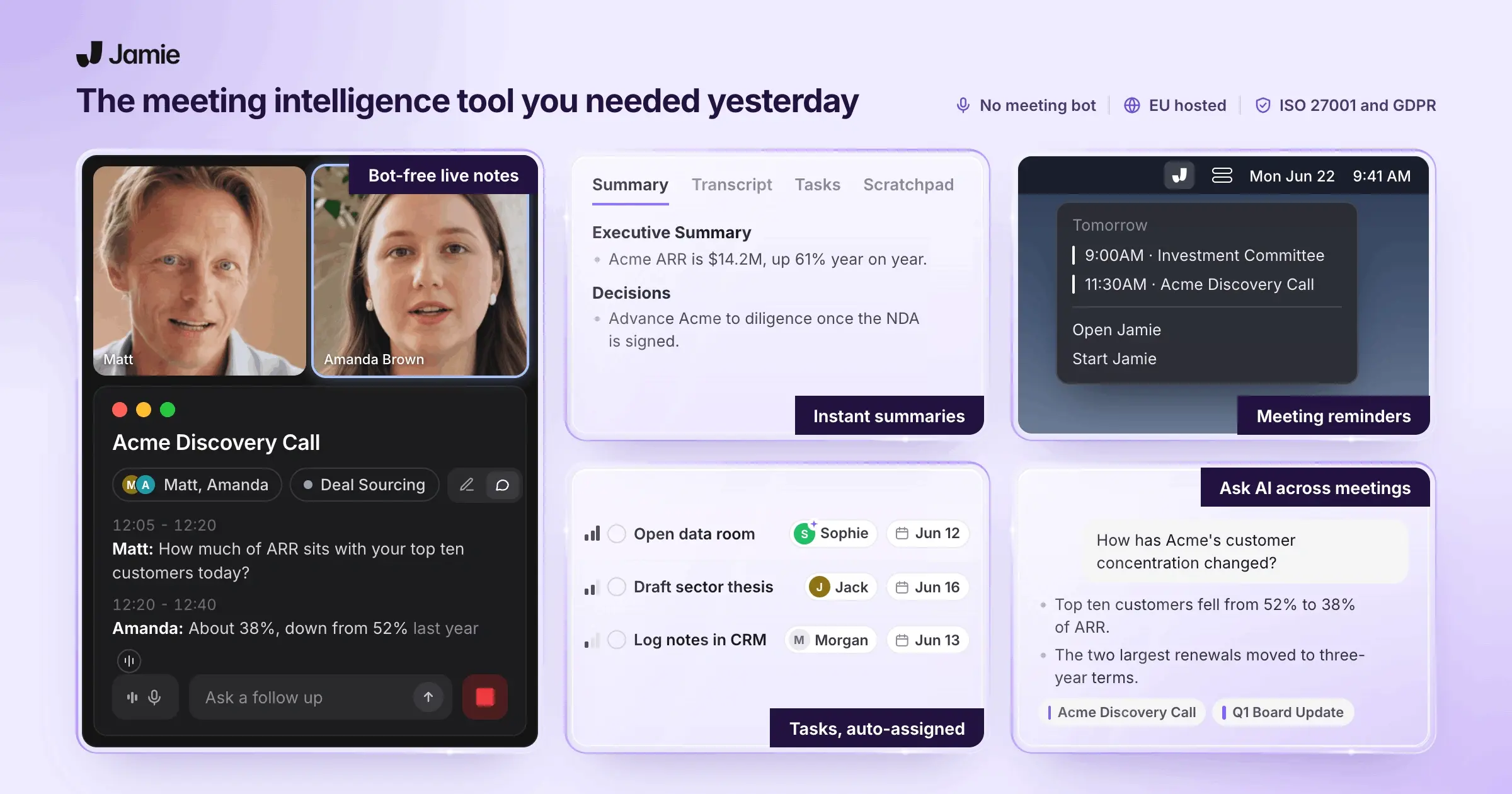
Jamie is an AI note taker designed for professionals who can’t compromise on discretion. It captures meetings privately: no visible bots and no risk of breaching confidentiality agreements.
Everything runs silently in the background, giving you accurate, searchable records without disrupting the flow of conversation.
Built on European infrastructure and strict GDPR principles, Jamie processes and deletes audio securely, leaving only your encrypted transcripts under your control.
For busy lawyers managing multiple cases or client calls, it delivers reliable documentation and instant recall of key details, without ever putting privileged information at risk.
Quick reminder: Always remember to inform your meeting participants that the conversation is being recorded!
Jamie’s key features
Bot-free recording, zero disruption
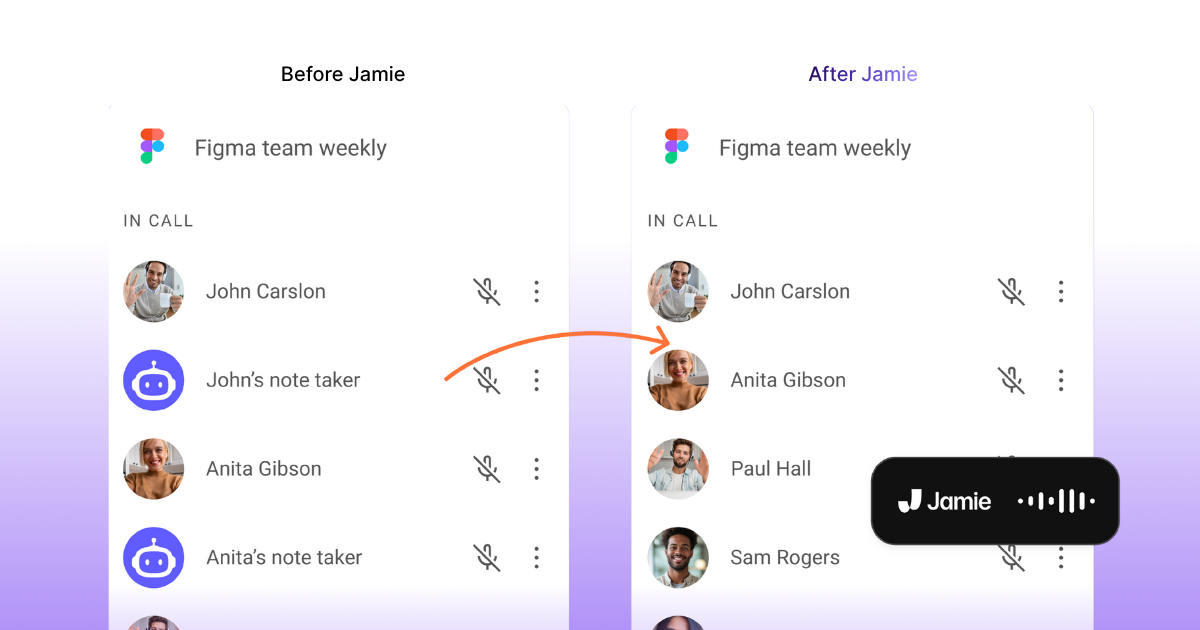
Jamie captures meetings silently at the system level, so it never shows up as a guest or bot on Zoom, Teams, or Meet.
High transcription accuracy
Legal language leaves no room for guesswork.
Jamie produces high-fidelity transcripts that catch every term, clause, and nuance, even in fast-paced discussions or hybrid meetings.
You can correct or annotate as needed, but you’ll rarely have to.
Detailed, structured summaries
Instead of a wall of text, Jamie distills discussions into structured summaries highlighting who said what, key arguments, agreements, and action items.
It's perfect for drafting follow-ups, documenting proceedings, or syncing notes with your case management software.
Ask AI: Instant recall for case context
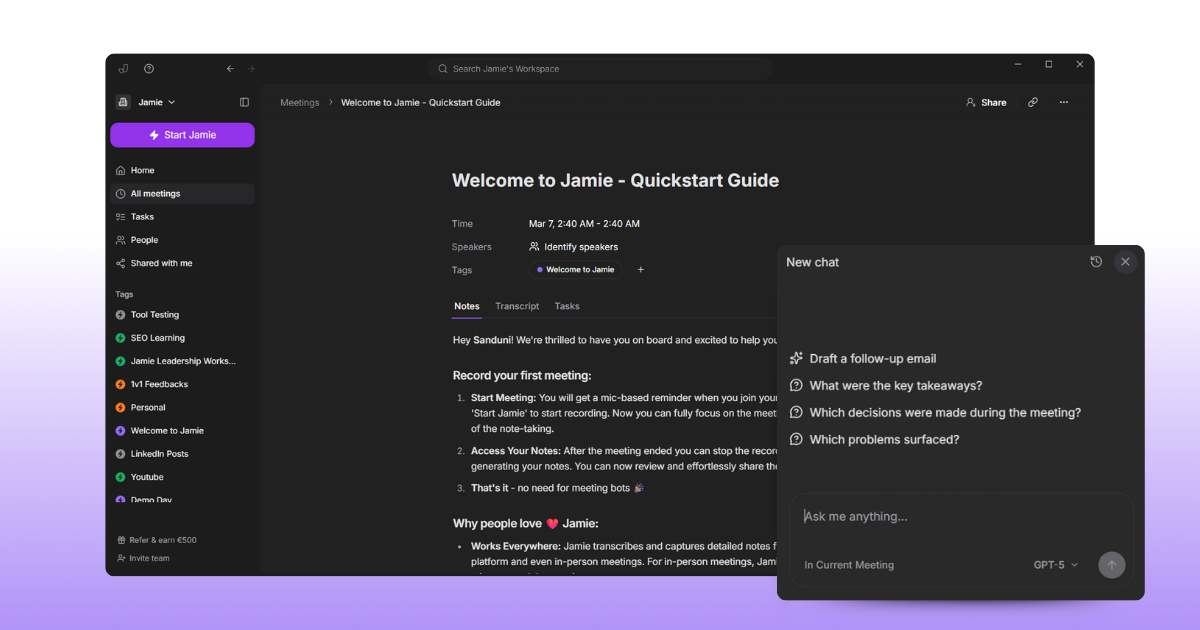
Jamie’s built-in AI assistant lets you query past meetings conversationally.
Ask “When did the client approve the settlement terms?” or “What was the reasoning in the October 5 arbitration prep?” and get direct, cited answers pulled from your transcripts.
Privacy and compliance, by design
Jamie’s architecture is built around GDPR and European data protection standards.
Recordings are processed through encrypted Frankfurt servers, then permanently deleted. Only your transcripts stay stored securely and they're never used to train third-party models.
External audits, strict access controls, and an independent Data Protection Officer keep every safeguard verifiable.
Jamie's pricing
FREE Plan (€0/month)
10 meeting credits per month
30-minute meeting duration limit
AI-generated meeting notes
Automatic action item extraction
Complete meeting transcripts
Speaker identification
Calendar integration (Google & Outlook)
Tag system
Task management
Advanced text editing
Copy-paste integration
Team workspace sharing
No meeting bots required
100+ languages support
PLUS Plan (€25/month)
20 meeting credits per month
2-hour meeting duration limit
Includes everything in the FREE plan
PRO Plan (€47/month)
Unlimited meeting credits
3-hour meeting duration limit
Includes everything in the PLUS plan
Team & Enterprise Plans
Custom pricing
Custom solutions
Contact required for details
Pros
✅ Supports 100+ languages and accents
✅ Extracts tasks, decisions, and timestamps automatically for quick follow-ups
✅ “Ask AI” makes searching across past meetings fast and precise
✅ Free tier offers full transcription and summaries for small teams
✅ Fully featured desktop and iOS apps
Cons
❌ No live captions; transcripts and summaries arrive post-call
❌ Raw recordings aren’t stored, so replay option is unavailable
2. Amberscript
Best for: Firms that need accurate transcripts with strong EU-data compliance
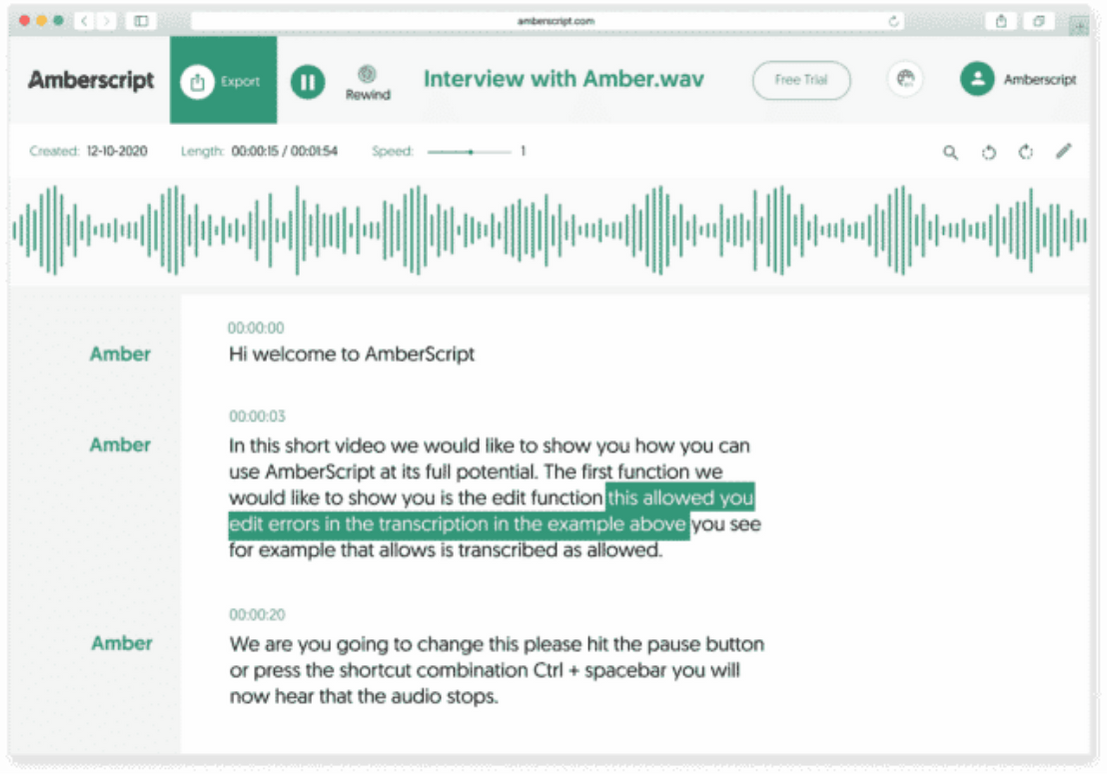
Amberscript offers both AI-powered and human-edited transcription services, giving legal teams the flexibility to choose between speed and precision.
It supports over 90 languages and includes features such as speaker identification and time-coding, which can be especially helpful during depositions or multi-party legal meetings.
Amberscript's key features
AI machine transcription (about 85% accuracy) with an online editor for corrections
Human-edited transcription for higher accuracy, suitable for critical legal recordings
Full GDPR-compliance, ISO 27001 & ISO 9001 certifications, data stored in EU (Frankfurt) servers
Legal-specific workflow: voice files, speaker tagging, export to formats like DOCX, JSON, SRT
Amberscript's pricing
Machine-made: €8/hour (yearly subscription)
Human-made: Custom pricing
Enterprise Solutions: Custom pricing
Pros
✅ Strong legal-industry readiness; human transcription available for exacting legal language
✅ Excellent data protection; fully EU-hosted with certified security standards
✅ Multi-language support
Cons
❌ AI output accuracy may require significant human cleanup; for legal use you’ll likely need the human tier
❌ Contract minimums and pricing structure may be less flexible for very low-volume users
3. Rev
Best for: Law firms that treat transcripts as strategic evidence rather than just meeting notes
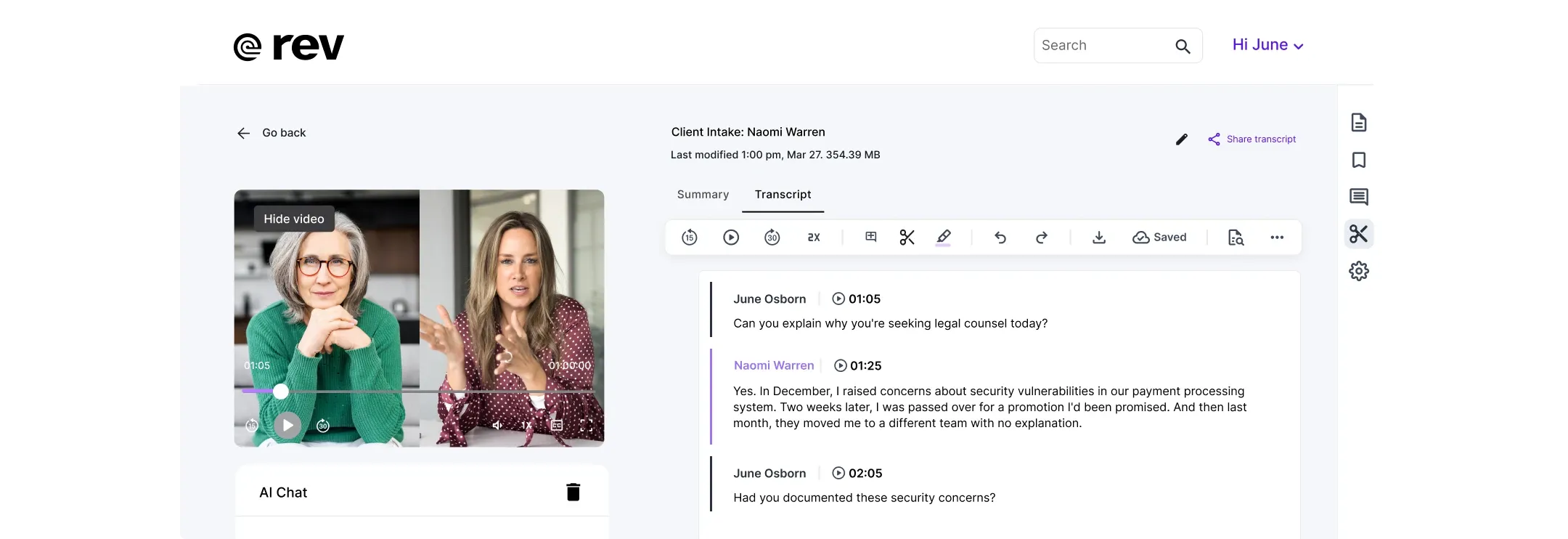
Rev is built around the idea that transcripts in a legal setting do more than document; they shape cases.
Whether it’s expert witness interviews or client calls, Rev offers tools designed for litigation-ready workflows and confidentiality.
Rev's key features
Upload audio, video or text files of depositions, witness interviews, and other case materials; organize across formats with tagging, search and color-coded workflows
AI-powered multi-file insights let you search across hundreds of files, spot contradictions, extract key statements, and build timelines for motions or trial prep
Securely record and transcribe internal client meetings or team calls with role-based access, attorney-client privilege protections, and encrypted storage
Meets stringent legal security standards: SOC 2 Type II protection, attorney-client privilege support, and a guarantee that your data will not be used to train third-party AIs
Rev's pricing
Free
Basic: $9.99/month
Pro: $20.99/month
Enterprise: Custom pricing
Pros
✅ Handles depositions, witness statements, and discovery materials
✅ Strong security and data-ownership policies; essential when you’re handling privileged or sensitive client communications
✅ Deep functionality for multi-file review and analytics; useful when you need to examine large volumes of evidence across multiple media
Cons
❌ Because it’s designed for litigation-grade use, lawyers looking for simple meeting notes may find it overly complex or heavy
❌ The full feature set (particularly multi-file insights) require enterprise or premium plans, thus increasing cost for smaller teams
4. Harvey AI
Best for: Large law firms and in-house legal departments that want deeper AI-driven workflows and document intelligence
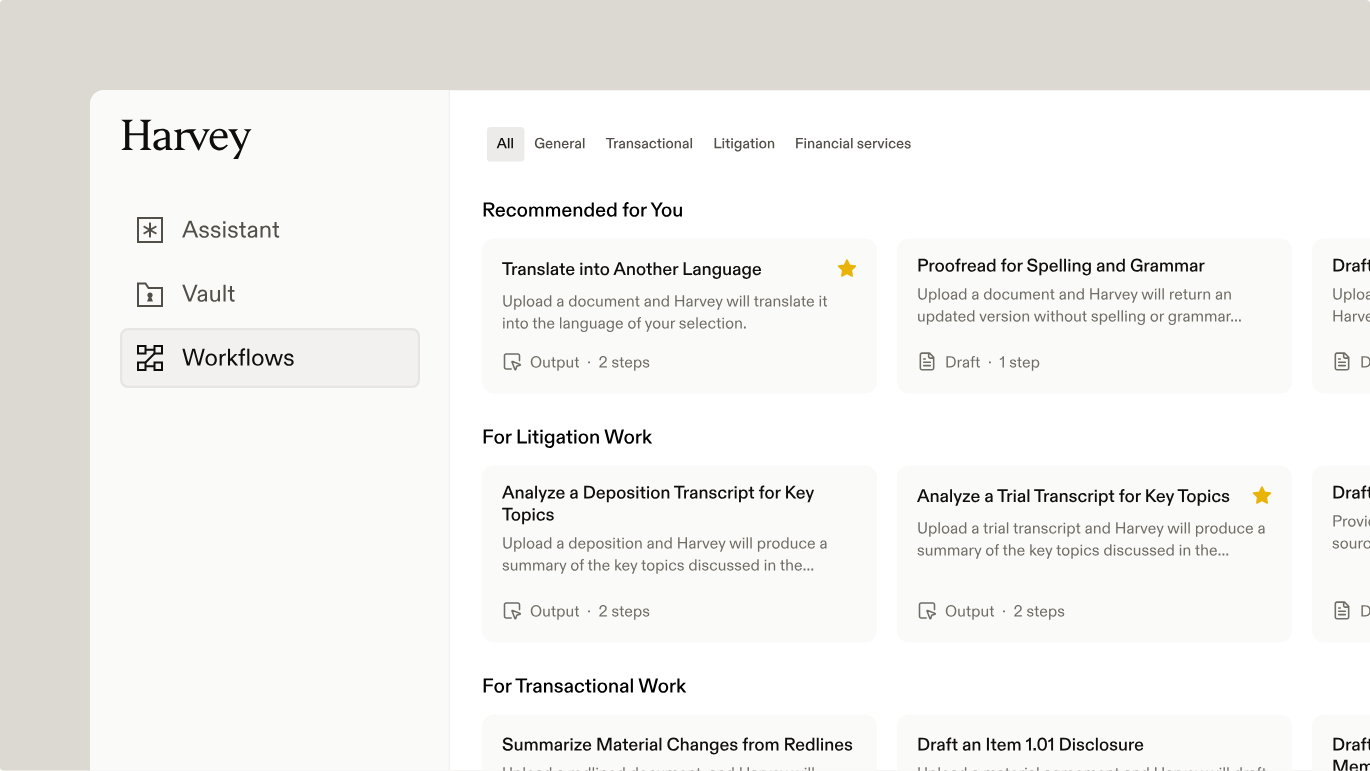
Harvey AI is built with the legal sector in mind from the ground up.
Rather than simply transcribing or summarizing meetings, it functions as a full-blown legal-grade assistant: ready to draft documents, conduct research, analyze portfolios of documents, and integrate into firm workflows.
Harvey AI's key features
Ask Harvey to summarize witness interviews, extract obligations from contracts, or map argument points across multiple files
Upload large batches of documents into “Vault” and let Harvey extract key terms, dates, renewal rights, responsibilities and highlight relevant text
Create or use ready-made workflows (e.g., “draft a motion to dismiss” or “compare multiple contracts”) that guide lawyers through structured, traceable steps
Designed for big firms; supports integration with Microsoft Azure; has the ability to build firm-specific agents and maintain data control
Harvey AI's pricing
Custom pricing
Pros
✅ Designed for legal workflows. It supports research, drafting, document analysis, and firm-level customization
✅ Handles large volumes of documents and complex tasks; useful when your firm is chasing efficiency across multiple matters
✅ Strong security and compliance features come in handy for handling privileged client data at scale
Cons
❌ Because it’s built for large firms, cost and complexity may be high for smaller practices or solo lawyers
❌ Implementation and integration may require dedicated resources rather than a simple plug-in
5. Notigo
Best for: Lawyers that want live-meeting capture and structured notes without the transcript overload
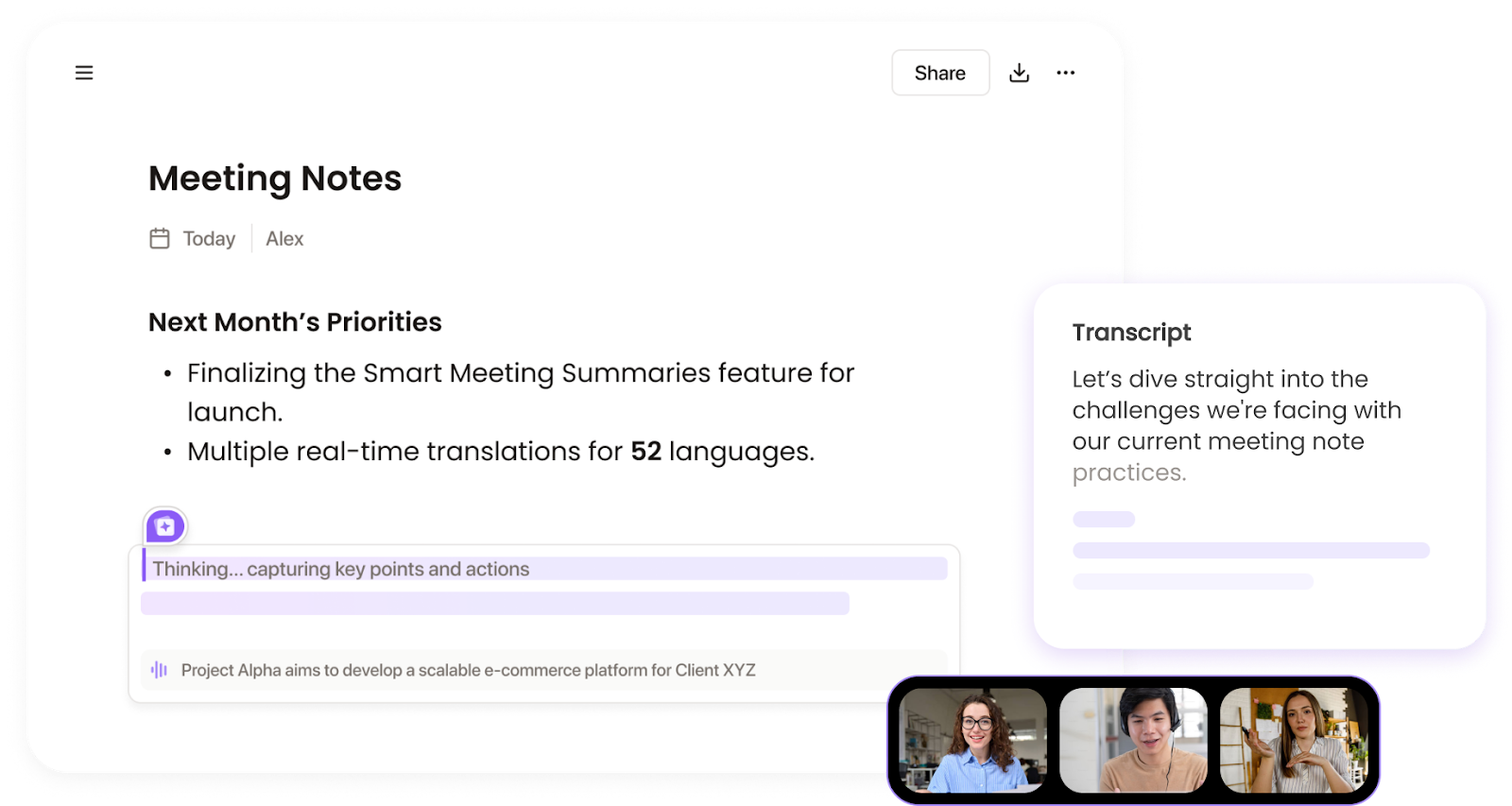
Notigo takes the traditional meeting note-taking problem and flips it for lawyers: instead of producing a long transcript that needs cleaning, it records in real time and delivers a structured, tailored summary built for legal-practice needs.
Notigo's key features
Real-time meeting notes that capture client consultations, strategy sessions, or internal briefings and turn them into summaries while the meeting is ongoing
The tool is trained to understand law-firm jargon or case-references and will tag key issues, decisions, and next-steps accordingly
Lawyers or associates can refine the summary live, so by the end of the meeting they have a polished record that’s ready for case files or client sharing
Offers integration with calendar/meeting platforms and export-capability for client/firm use
Notigo's pricing
Free
Pro: $7.9/month per seat
Business: $18.9/month per seat
Pros
✅ You finish the call with a usable summary rather than a raw transcript that needs heavy clean up
✅ Notigo’s emphasis on legal-terminology ensures better relevance for lawyers
✅ Relatively low cost and live summary feature add strong ROI in solo or boutique settings
Cons
❌ While tailored to legal meetings, it may not include specialized legal workflow features like certified transcripts or e-discovery export out of the box
❌ If your practice relies heavily on multi-channel audio or full document analysis alongside meeting capture, Notigo may lack the depth of more litigation-centric tools
6. Plaud
Best for: Solo or boutique law firms that want a lightweight, always-ready assistant for capturing conversations and turning them into usable meeting notes

Plaud Note takes a different path from larger transcription services.
It’s a pocket-sized device (and accompanying app) designed for real-time capture and summarization.
Plaud is ideal when you need to stay focused on the conversation and let the tool handle the note-taking.
Plaud's key features
Dual-mode recording: the device can record ambient meetings and direct phone calls via a magnetic case
Supports transcription in 112 languages, speaker labels, and legal-industry glossaries, plus templates to pull out action items, responsibilities, and next-steps
Ensures GDPR, SOC 2, HIPAA compliance
Because it’s a physical device and app combo, it reduces setup friction compared to full-platform tools and is useful when you’re moving between client locations
Plaud's pricing
Plaud Note/NotePin device: $159
Pros
✅ Helps you stay present in client meetings; you don’t have to worry about capturing notes while you’re talking
✅ Useful for lawyers on the move
✅ Built-in legal glossary support and templates make the output more relevant for legal workflows
Cons
❌ For full-scale law firm workflows it may fall short of a full platform built for litigation
❌ Device dependency is there, so you must carry it and have the app ecosystem working. If it’s missing or the battery’s down, you lose the benefit
7. Relaw AI
Best for: Law firms that want to combine meeting capture, document automation, and client intake into a unified workflow
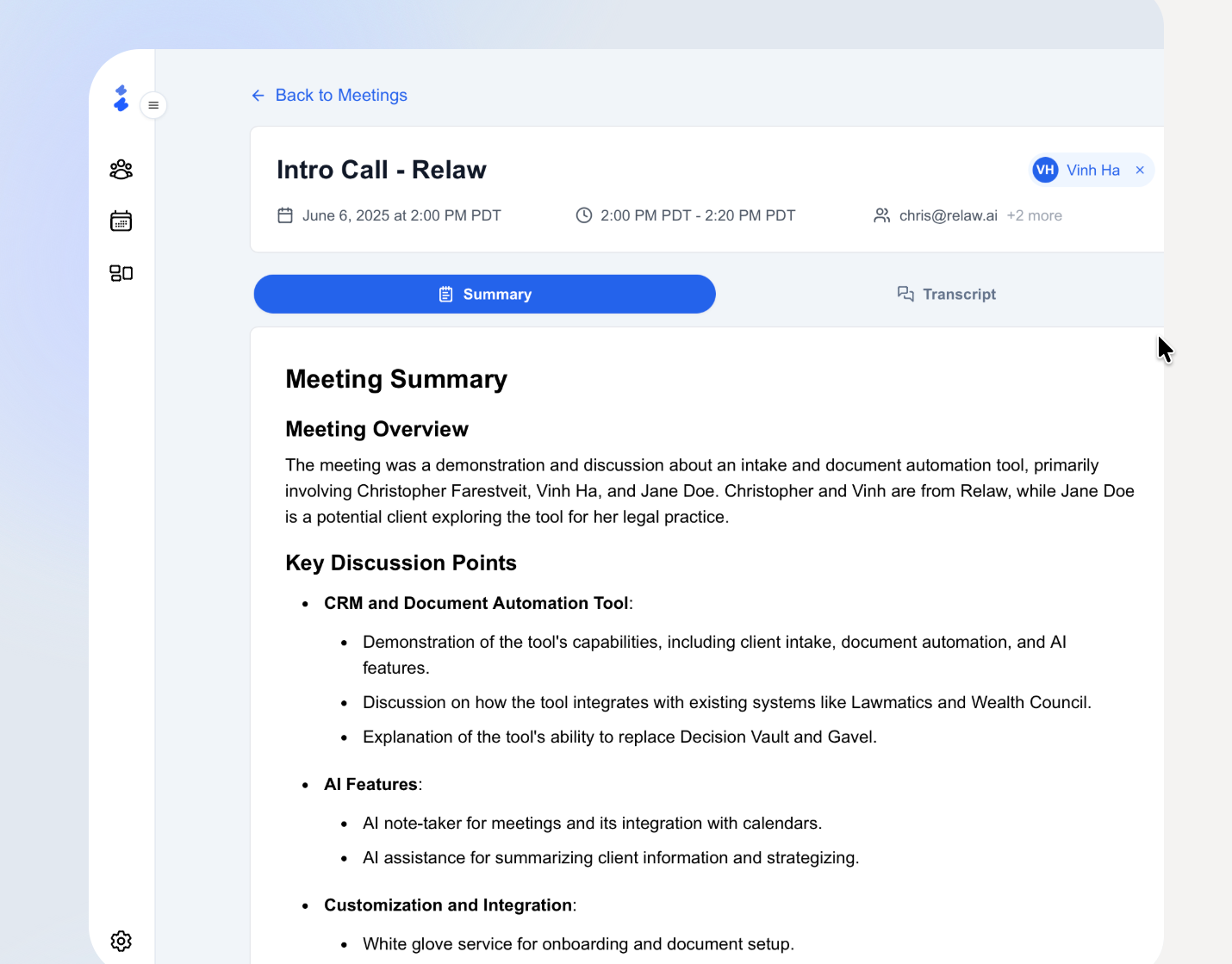
Relaw takes a broader view than tools focused solely on transcription.
It’s built for firms looking not just to record meetings, but to smoothen entire process flows, from client onboarding to document generation to capturing actionable summaries from discussions.
Relaw AI's key features
AI notetaker with meeting transcripts, summaries, and action items, designed for legal team conversations
No-code document automation combined with intake: intake forms feed directly into document generation (contracts, wills, client agreements) so that your meeting output can link to drafted docs
Enterprise-grade security and data control: SOC 2 Type II infrastructure, AES-256 encryption, GDPR/CCPA-ready hosting
Relaw AI's pricing
Custom pricing
Pros
✅ One platform covers multiple workflow needs (intake, notes, documents) which reduces tool-stack complexity
✅ Strong legal-context design; meeting notes tie directly into drafting rather than being isolated transcripts
✅ Robust security; built for law-firm requirements around confidentiality and data control
Cons
❌ If your primary need is simply meeting transcription/note-taking, you may be paying for many extra features you don’t yet use
❌ Implementation may require some change management (shifting intake and document workflows) which takes time
8. Sonix
Best for: Legal teams that want ultra-fast, cost-efficient transcription
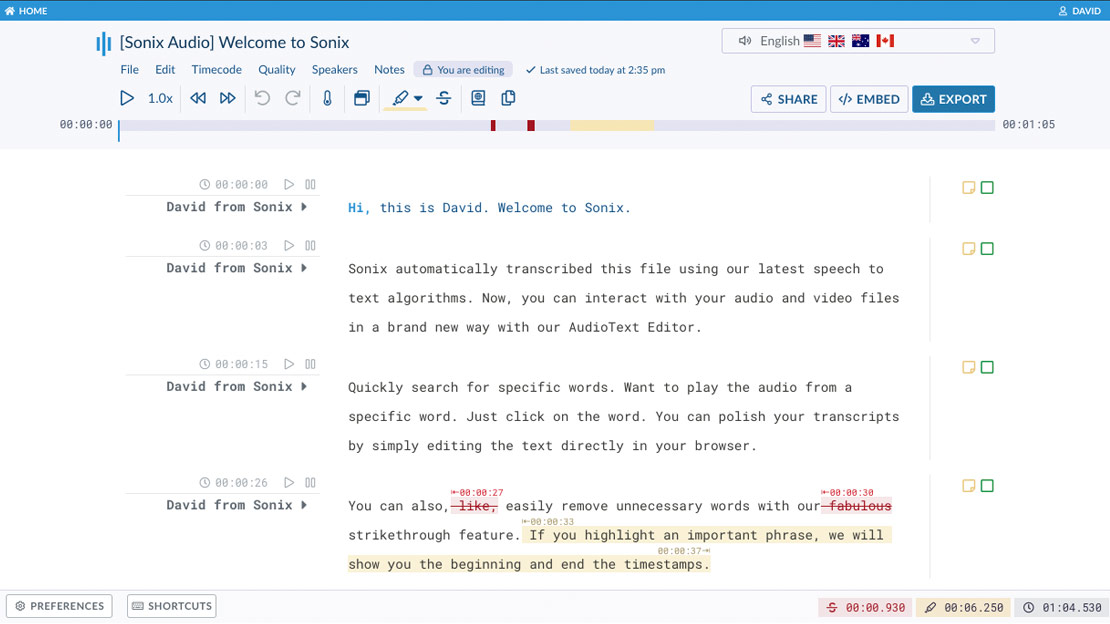
Sonix stands out by doing one thing extremely well: convert large volumes of audio and video into accurate, speaker-labelled transcripts in minutes.
It’s geared for law firms that handle frequent depositions, client interviews, or hearings and need reliable output without the wait.
Sonix's key features
Get transcripts of depositions, client meetings, or courtroom recordings almost immediately
Verbatim, speaker-labelled, and timestamped output help with redaction or inclusion in case-files
Powerful search and highlight functionality help you quickly locate key admissions or witness statements across files
Supports Word, PDF, TXT and blends into legal workflows/case-management systems
SOC 2 Type II certification and enterprise-grade encryption make it suitable for privileged legal data
Sonix's pricing
Standard (Pay-as-you-go): No monthly fee; $10 per audio/video hour
Premium: $16.50/month per seat plus $5 per audio/video hour
Enterprise: Custom pricing
Pros
✅ Excellent turnaround speed; ideal for firms that need transcripts fast
✅ Cost-efficient compared to human-only transcription, especially for high-volume work
✅ Built with legal-scale workflows in mind, with features like speaker labelling and support for multiple export formats
Cons
❌ While Sonix excels at transcription, it offers fewer specialized legal-workflow features compared to some tools built specifically for litigation workflows
❌ Accuracy may still require human review, especially for legal jargon or specialized terminology
Balancing Technology with Legal Integrity
AI note takers have moved far beyond simple convenience. They’re becoming trusted companions for lawyers who care about accuracy, confidentiality, convenience, and time.
Whether it’s documenting client calls or summarizing hours of case prep, the right AI assistant helps you stay focused on your job.
That said, technology should always serve the principles of law, not test them.
Before you bring any AI note taker into your workflow, look closely at where your data lives, who can access it, and whether the provider meets your firm’s ethical and compliance standards.
Download Jamie for free on desktop or get the iOS app!
Or if you’d like to see the tool in action before making a move, book a free demo.
Read More
Explore more about GDPR-compliant AI note takers built for European teams.
See the top AI meeting minutes tools designed for EU businesses.
Compare the leading AI transcription tools available in Europe.
Discover the best AI transcription software solutions tailored for EU markets.
Evaluate enterprise-ready AI meeting minutes tools for large European teams.
Get our full guide on AI note-taking tools built for Europe’s privacy standards.
Dive into our recommendations on secure transcription software for Europe-based teams.
FAQs
1. What are AI note takers for lawyers, and how do they work?
AI note takers for lawyers use artificial intelligence to record and transcribe client meetings, capturing every conversation accurately and organizing the meeting details into actionable summaries. They help lawyers move away from manual note taking or messy voice notes, and turn discussions into searchable, structured meeting notes.
Modern AI note taking apps like Jamie focus on accuracy and confidentiality, helping attorneys manage legal documents and follow up on key points without losing valuable time.
2. Why is confidentiality so important when using an AI note taking app in legal practice?
Tools used in law firms must respect attorney-client privilege and comply with the General Data Protection Regulation (GDPR), especially for firms operating in the European Union. Jamie, for example, processes and deletes recordings securely using strong encryption and EU-based hosting, ensuring sensitive information stays protected.
Quick tip: Before recording, always obtain consent from clients and verify that your tool implements reasonable measures for data protection.
3. How can AI note taking improve efficiency for law firms?
AI note taking can dramatically improve efficiency by turning meeting recordings into concise summaries and legal documents within minutes. It frees attorneys to focus on the client instead of typing, helps teams identify action items, and makes document organization effortless. Some tools, like Jamie, go further by offering searchable transcripts, AI-powered context recall, and structured meeting notes.
4. Are AI note taking apps secure enough for sensitive information?
Yes, but not all AI note taking apps meet the same security or privacy standards. Look for AI notetakers that operate in a compliant cloud environment, use end-to-end encryption, and never share or reuse your data for training.
Jamie, for instance, is built on European infrastructure, aligning with GDPR and attorney-client confidentiality principles. It’s an example of how AI-powered solutions can protect client confidentiality while helping lawyers work faster.
5. What features should lawyers look for in AI note taking apps?
The best note taking apps for lawyers combine simple transcription with intelligent organization. Look for basic features like multi-speaker identification, searchable meeting notes, and integration with your devices or collaboration tools.
A leading AI notetaker like Jamie offers structured summaries, automatic tagging of key points, and full data control, which help law firms maintain privacy while improving team collaboration.
6. Are there free or affordable AI note taking options for law firms?
Yes, many AI tools offer a free plan with essential capabilities; those are ideal for solo lawyers or small teams exploring AI for the first time. Jamie’s free tier, for example, includes AI-generated meeting notes, action item extraction, and integration with popular platforms. As firms grow, they can choose from flexible pricing options that align with their specific needs.