Plaud vs Jamie: Which One Is Better for You? [2026]
Sanduni
Growth Content Editor
![Plaud vs Jamie: Which One Is Better for You? [2026]](/api/media/library/1jj40bect7as.png)
Jamie uses the laptops and phones you currently use, on macOS, Windows, iOS, Android, and the web, to record meetings. Plaud has an additional item you will purchase; this item is the Plaud device, and you tie it to your account.
You choose between using a software-only tool (Jamie) that requires only one device you always carry (it could be your laptop or a mobile) that syncs automatically with all your other devices. Or another device (a recorder, Plaud) you have to buy separately, charge, and carry next to the phone already in your pocket. Meaning you have to bring two devices!
Plaud has its own set of perks. Speaker memory and the ability to record phone calls, for instance, are benefits users have mentioned.
Though I do wonder about recording phone calls, which carry far more sensitive conversations than in-person or online meetings, and how the person on the other end of the line is told they are being recorded.
To see which AI note taker truly matches your note-taking needs, let's break down the difference between Jamie and Plaud.
Meetings are more productive because we don’t have to pause for note-taking. Jamie became part of how we work faster than we expected. It never forgets a decision.
Tech & AI Coordinator
Draycott
Private Equity · 10-50 employees
Plaud and Jamie Both Generate AI Meeting Notes, and Jamie Records Them on the Devices You Already Own and Syncs across them
To use Plaud, you first buy a Plaud recorder and link it to your Plaud account. That link is what turns on your free monthly minutes and lets you move recordings into the app. It also turns on Plaud Desktop, the app that records your online meetings, unless your company is on Plaud Team, which works without a recorder. If your meetings happen wherever your clients are, you must always have the recorder charged and in your bag.
If you forget the recorder, you aren't forced back to manual note-taking, but you do have to record using your phone's native Voice Memos app and manually import the file into the Plaud app later. With Jamie, you open the phone or laptop you're already carrying and start recording, with no file exports or manual uploads required.
And Jamie syncs across all your other devices. You do not have to worry about a third recorder to bring in, charge, or the worry of being dependent on another device for things to work.
One device is all it takes for an entire meeting to be processed into notes, transcription, action items, and more. For online meetings, Plaud uses Plaud Desktop, which needs a linked Plaud recorder unless your company is on Plaud Team. Plaud's Note and Note Pro do record your normal phone calls, which Jamie does not.
Features: Plaud vs Jamie
Jamie's Features
Jamie is an AI note taker that captures your meetings both online and in person using the devices you currently use. Jamie then generates a synopsis of the meeting as well as a list of action items and a transcript of the meeting. In terms of grouping features into categories , we based the categories upon the questions users ask prior to making the switch from Plaud, so we began with the recorder.
Jamie Records the Meeting Held in a Room, With No Device on the Table
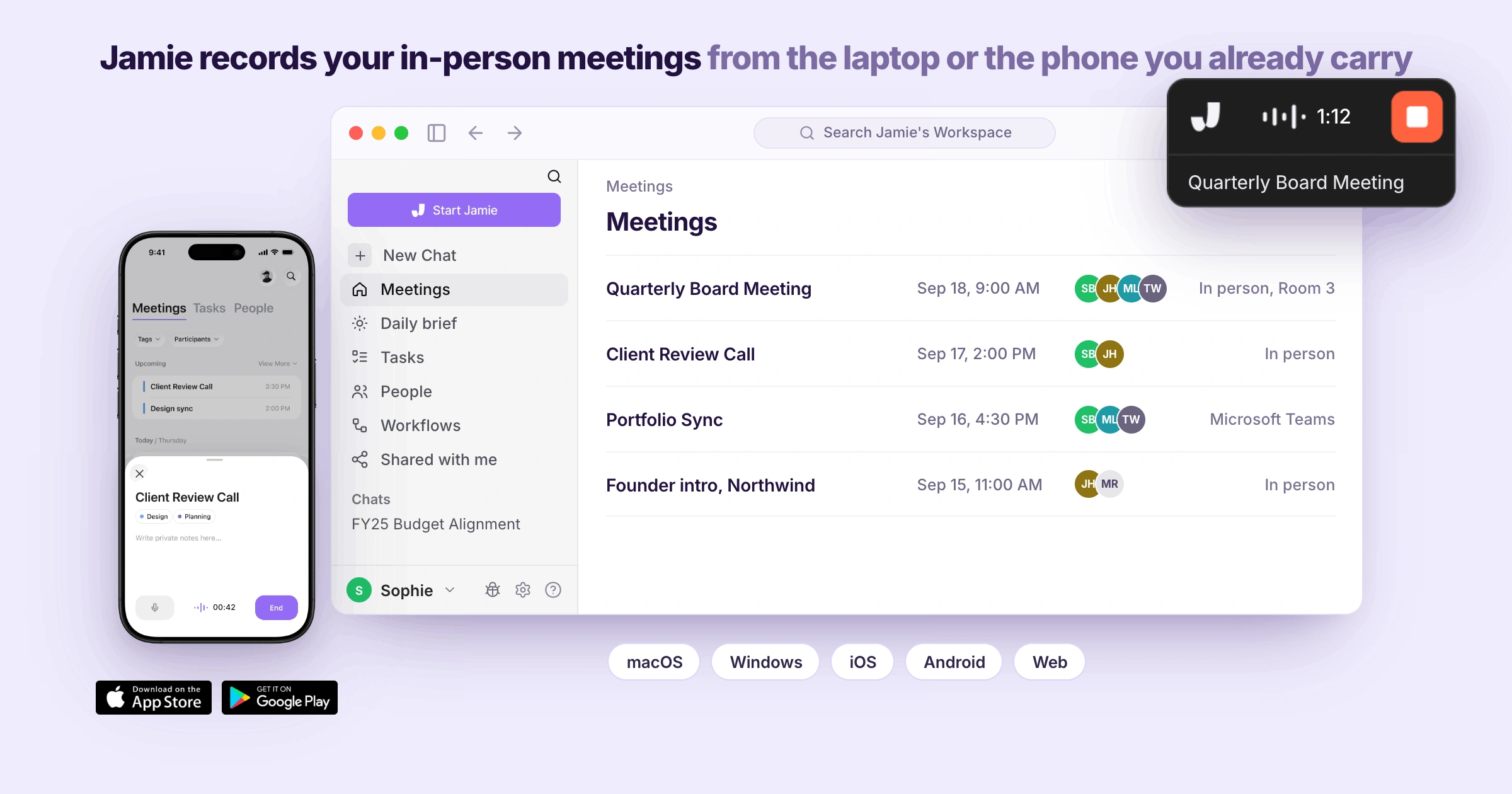
Jamie can record meetings in person using either the laptop or mobile phone that you are carrying at all times. This was done because there is rarely space or memory to pick up, for a second device for a conference when conducting a client meeting within another party's office.
Jamie works on macOS, Windows, iOS, Android, and the web. Once you picture walking in with only your laptop, you will want to know how Jamie records a room, if our mobile app works when the laptop stays shut, and how your notes reach your desk afterwards:
In-person meetings
You may open Jamie on your laptop, obtain verbal consent in your own words from all parties to being recorded, and begin recording; Jamie will capture the entire room using the laptop's internal microphone without requiring anything additional to sit atop the conference table.
Mobile app
You can use your mobile device to record meetings instead of your computer when the laptop remains unavailable. The Jamie app is available for download through the Apple App Store (iOS) or through Google Play (Android), which means Jamie also records conversations that may occur in a hallway or elsewhere after a meeting, but Jamie doesn't have the capability of recording telephone calls.
Sync across devices
With the Jamie app, all recordings made using the mobile device will automatically sync across all of your devices. This means you can access a recording you made on your cell phone while sitting at your desk, where you'll find that the recording has already synced to your desktop prior to you opening the laptop. As a result, there is no need to physically transfer files.
Jamie Generates the Executive Summary, the Full Summary, and Every Action Item With an Owner
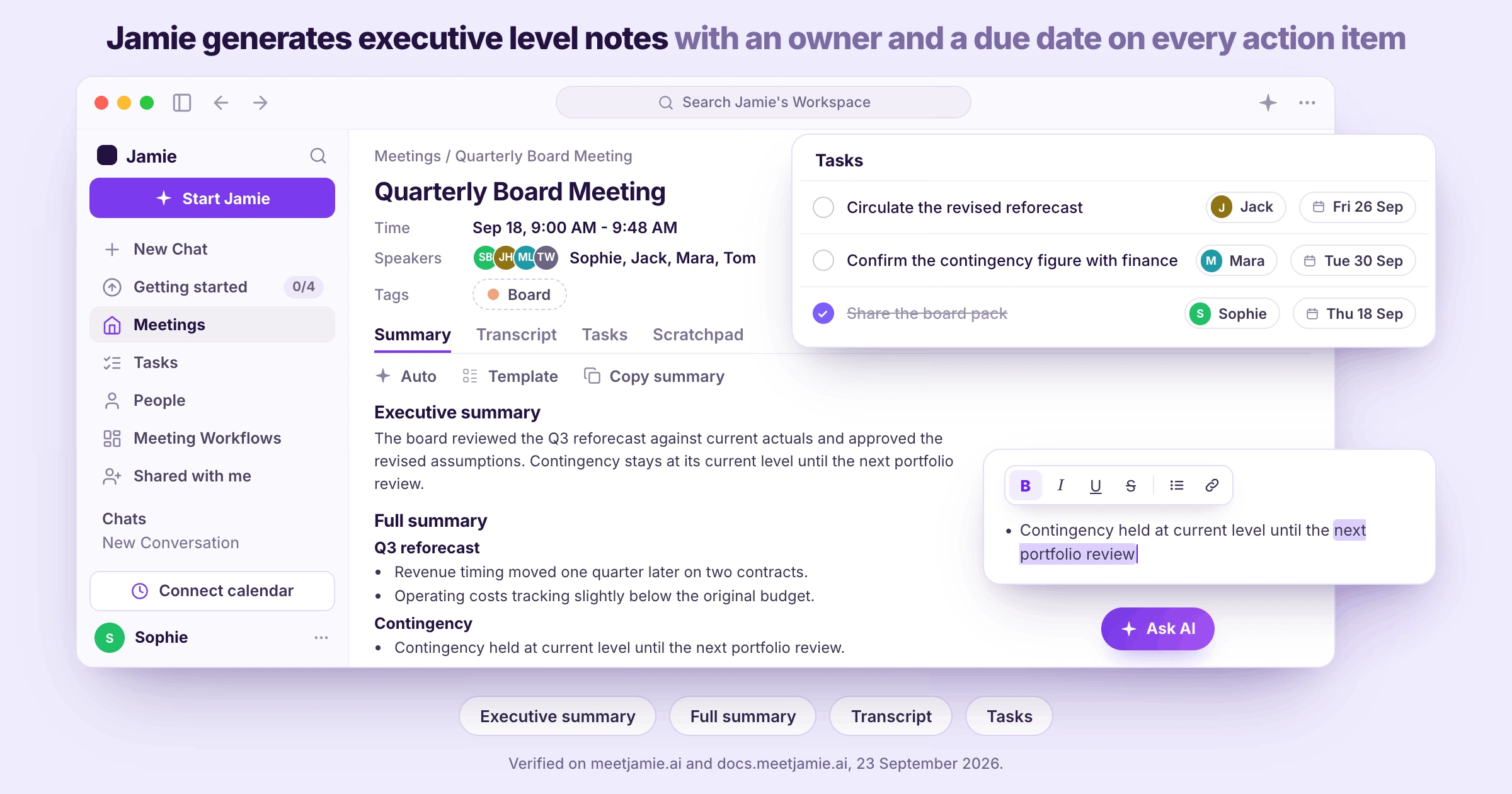
After you've stopped recording your meeting, Jamie will generate your meeting notes based on the content of your conversation and will organise those topics into categories. Jamie will also state what was decided upon during the meeting and assign an owner to each action item generated as a result of the meeting.
These types of meeting notes are called "Executive Level AI Notes." Once you've completed recording your meeting, your executive summary, full summary, transcript, and action items will be waiting in your Jamie workspace.
When a colleague who missed the meeting asks you what was decided, you will want to know about Jamie's executive summary, what the full summary includes, what the transcript keeps, how the action items are pulled out, and if you can change any of it:
Executive summary
You receive the shorter version first, as if a fellow worker had put together a summary of the topics, decisions, and the most important quotes from the meeting, which means someone who was unable to attend could quickly understand it without listening to anything.
Full summary by topic
Underneath this is the longer version of the meeting summary, organised by the topics the discussion actually covered (as opposed to the chronological order of events), with the quote that settled each topic underneath each corresponding section header.
Transcript
The verbatim transcript will be included next to your notes. This is where you go when someone questions a particular statistic or commitment; the transcript will always remain constant regardless of the template used for your summary.
Tasks
You receive your action items in a list of their own, complete with who is responsible for completing them and what date they need to be completed, and you can check one item off, reword another, or add something that came up after you have left the meeting room.
Edit notes
Since the notes are yours, you may also edit any line yourself, which makes a difference if a client's name was misspelled as it sounds as opposed to how your client spells it.
Jamie Identifies Each Speaker by Name and Asks Only When a Voice Is New
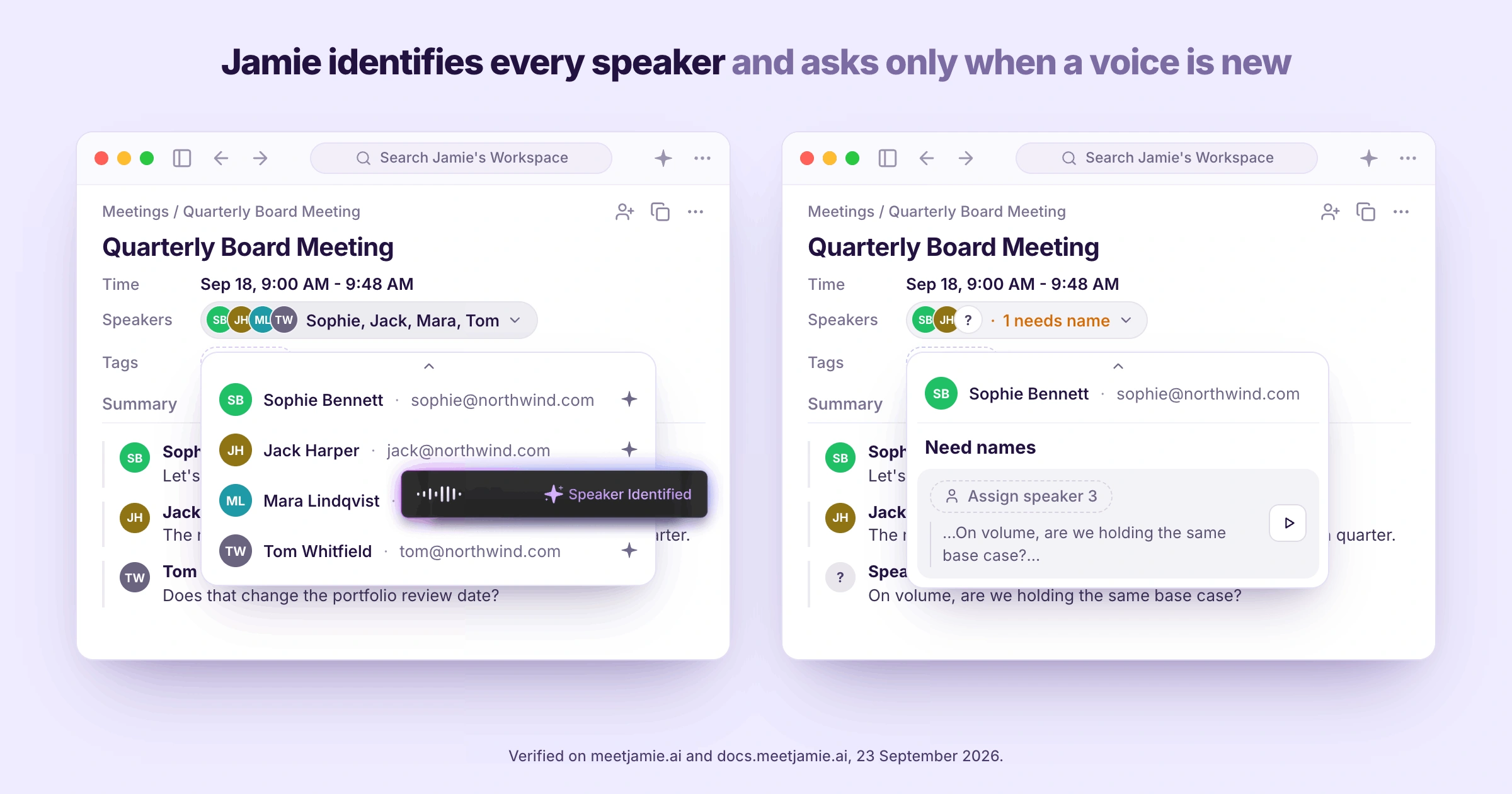
Jamie uses names to identify speakers in your transcripts, and sometimes, when Jamie could not identify a speaker, Jamie will name those speakers as "Speaker 1" and "Speaker 2". But don't worry; you can listen to a small voice clip and identify who the voice belongs to and manually identify yourself.
We developed speaker memory too, where Jamie remembers the speakers you identify for future meetings. You do not have to manually identify them again, saving you a lot of time for meetings with a lot of attendees.
Jamie received a score of 98 out of 100 for identifying speakers in our accuracy testing of AI note takers. If four people talk over each other in a client meeting, you will want to know how Jamie tells them apart, and what happens the next time you meet the same people:
Identify speakers
Instead of labelling your speakers with numbers along the side of your transcript, Jamie identifies them through the calendar integration of members connected to the meeting, or through meeting context that happens live, which includes in-person meetings. Jamie can identify speaker names even during in-person meetings if the meeting context contains the speaker names spoken out vividly. And if a speaker is new and unidentifiable by Jamie, you will name the speaker one time (from the transcript) after listening to a small voice clip, then Jamie will remember that voice for the next future meeting for you.
Speaker Memory
In addition, Speaker Memory remembers this new speaker in your subsequent meetings, which means the next time you speak with the same client, they have their name attached to their voice again; you do not need to rename anyone manually.
Jamie Answers Questions Across Every Meeting You Have Ever Recorded, Through Ask Jamie
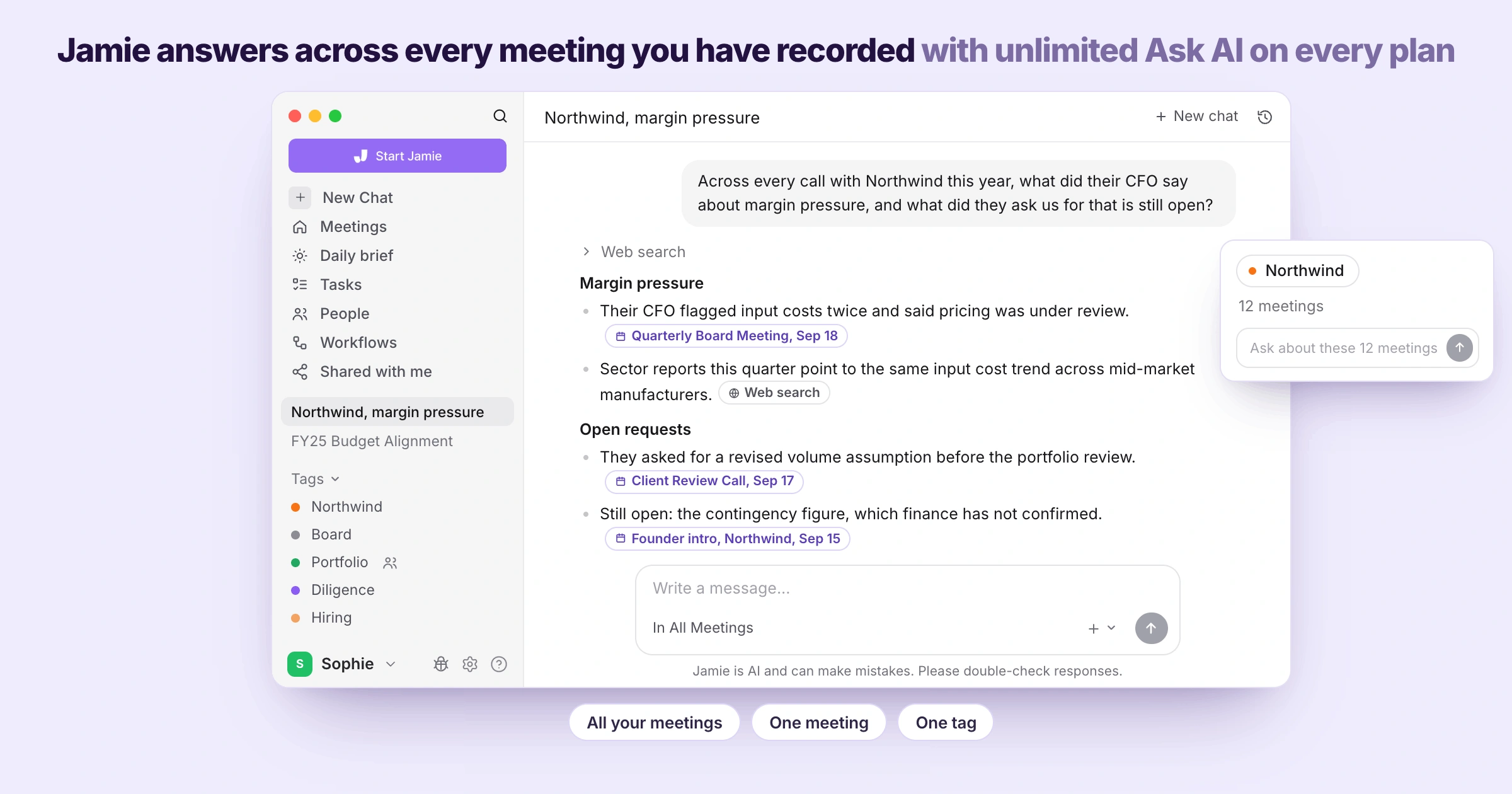
Jamie answers questions across all your past meetings at once using Ask Jamie. That's what we call Conversational Intelligence. Usually the answer to the question you are looking for is hidden somewhere in a call from last quarter. But you do not have enough time to scroll through an entire transcript to get to it. After a client asks you what you agreed back in the spring, you will want to know what Ask Jamie can answer, how tags narrow it down, and how far back your search reaches:
Ask Jamie
You type your query as if you were typing the same thing to a coworker (e.g., "what did the client talk about regarding their budget during every call with them this year? What was requested by the client that is still open"), and Ask Jamie will search for the relevant answer from your previous calls and show you links to each meeting behind the answer; there is no limit to how many times you use Ask Jamie regardless of whether you are paying for a subscription or not (even on our free plan); it's unlimited.
Tags
You will be able to associate a meeting with the name of the client or project it relates to. Then you are able to select Ask Jamie for that client or project tag. This causes all calls about that particular project to become one single set of notes from which you can ask questions.
Search across your meetings
And you can search through all the recordings you've made in the past and the meetings that have happened recently, because you get unlimited storage on every plan, which means if you're going to want information on that call from last February, then all you have to do is search for it or ask Jamie about it. It's easy to store your data and recall it with Jamie.
Jamie Logs the Meeting Notes Into Your CRM and Sends Them to the Tools Your Team Already Opens
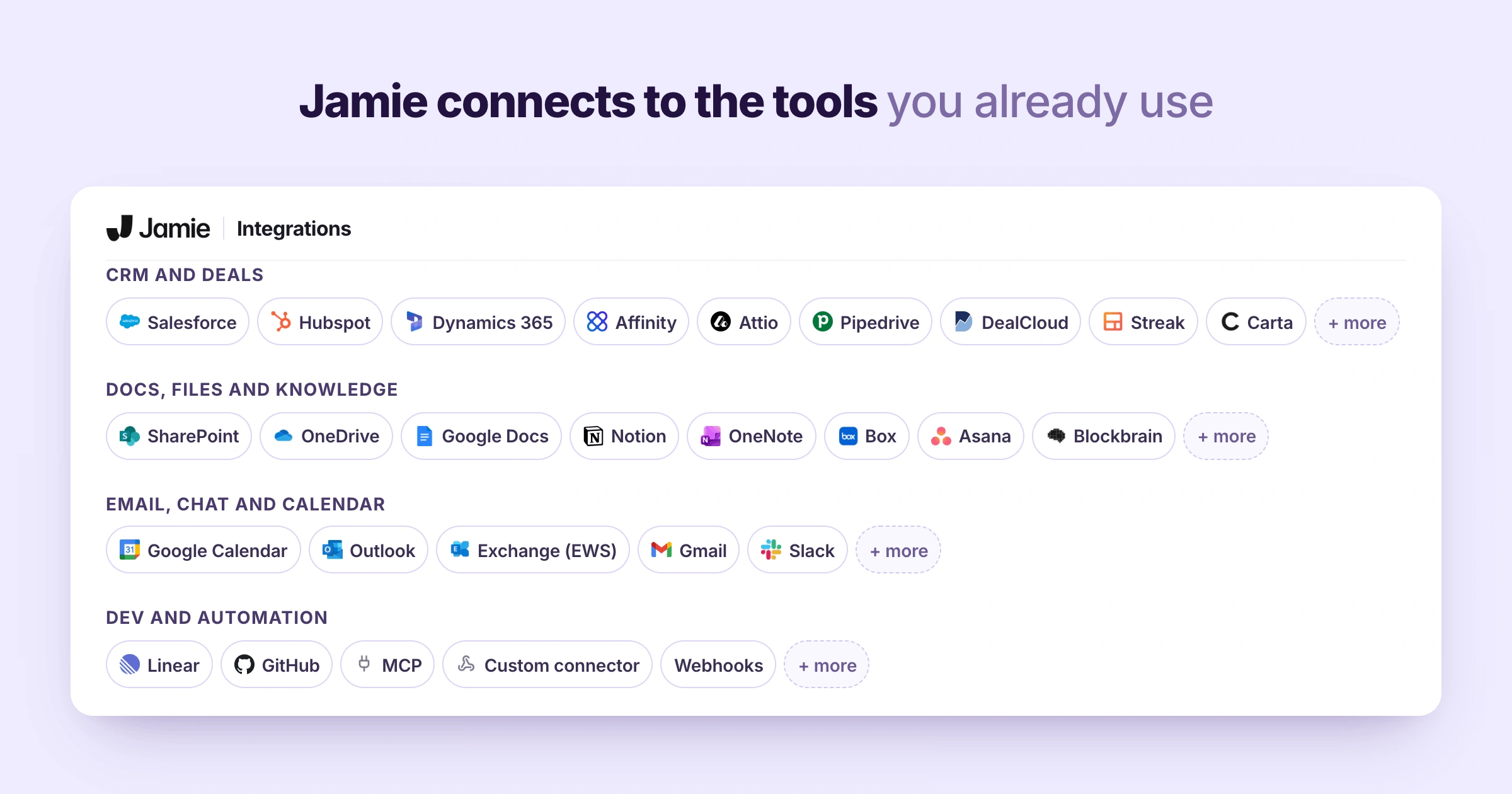
Jamie sends the notes of your meetings directly to the applications and CRMs your team uses daily. As soon as you plug an application into settings, the notes from your next meeting will show up automatically in the application without needing anyone to manually copy them over.
We call this Plug and Play Integrations. For sales teams and deal teams that run on a CRM, you will want to know which CRMs Jamie works with, where else your notes can go, how your own AI tools reach Jamie, and what you can build on top:
CRM logging
You plug in your CRM once, and after each call Jamie logs it to HubSpot, Microsoft Dynamics 365, DealCloud and Affinity, attaches it to Salesforce, and sends it to Attio and Pipedrive; your team does not have to log a single call into the CRM again, for Pro and above.
Docs and knowledge tools
In addition, you can send your notes directly into Notion, Google Docs, and OneNote, using an account that is connected (once) versus moving files manually each time, on all plans including the free plan.
MCP
Also, you can point Claude, ChatGPT, or Cursor at your Jamie meetings via MCP, which means the AI tool you are already using can pull information from those meetings as opposed to having to paste them in yourself, on plans from Pro onwards.
Webhooks and the API
Lastly, you can create your own exit routes with our API and webhooks as well; for when you will need to send your notes somewhere we currently don't connect to, on plans from Pro onwards.
Jamie Records Your Online Meetings From Your Own Machine, With No Bot Joining the Call
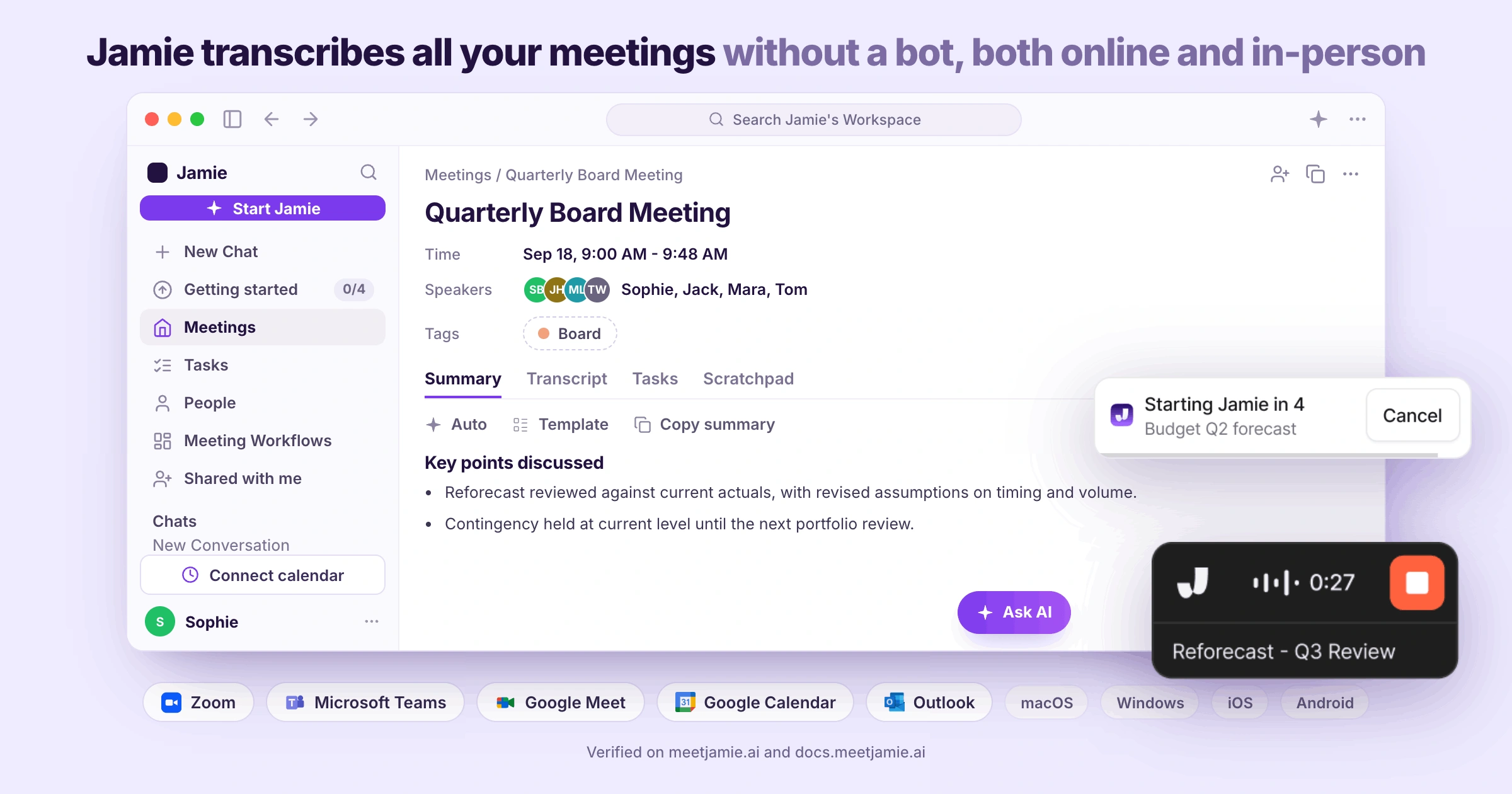
Jamie records via your personal computer and does not join the call as a visible participant. Jamie was designed to capture recordings like this because a bot participating on your behalf would be an outsider in the meeting, making both you and your attendees feel uneasy. And the person hosting the call would have to approve the "stranger" into the call.
Instead, you provide disclosure, obtaining verbal consent from the attendees, in your own words. In addition, if you wish, you may send the optional Automated Recording Notice email prior to the meeting. When you turn on the meeting chat notice during the call, it will post a disclaimer message inside the meeting chat box.
Whenever your first call of the day is on Teams or Zoom, you will want to know about Jamie's recorder, which meeting platforms we cover, if the recording can start and stop automatically, and how your calendar fits in:
Recorder
You access Jamie by opening up a small widget that floats above anything else you are viewing. You can move the widget around your screen. And when you switch your microphone midway, Jamie will automatically switch to that specific microphone; you won't have to lift a finger to manually change the microphone. And some users forget to switch and end up with a transcript where their version of the dialogue is halfway cut off due to poor audio capture quality, and with Mic Following, Jamie switches along with you, which means your transcript stays complete.
Online meeting platforms
You can use Jamie to capture and record all online meetings conducted using your device, whether it's for Microsoft Teams, Zoom, Google Meet, or Webex. Since Jamie captures system audio from your own computer, there is no need to review and verify a list of supported platforms before you join, on any of our plans, even our free plan.
Auto-start and auto-stop recording
You can have Jamie record your scheduled calls from the beginning of your meeting to its end. During Jamie's countdown, you can cancel before the recording starts or stops. The length of the countdown may be stretched to 30 sec. or 1 min., depending upon what you choose.
Calendar connection
Once connected via your Google Calendar or Outlook account, you are done. Jamie's automated process will name recordings as the corresponding event in your calendar, and also know who to send the Automated Recording Notice email (optional) to.
Jamie Builds the Live Transcript While the Meeting Runs, Beside Your Own Scratchpad Notes
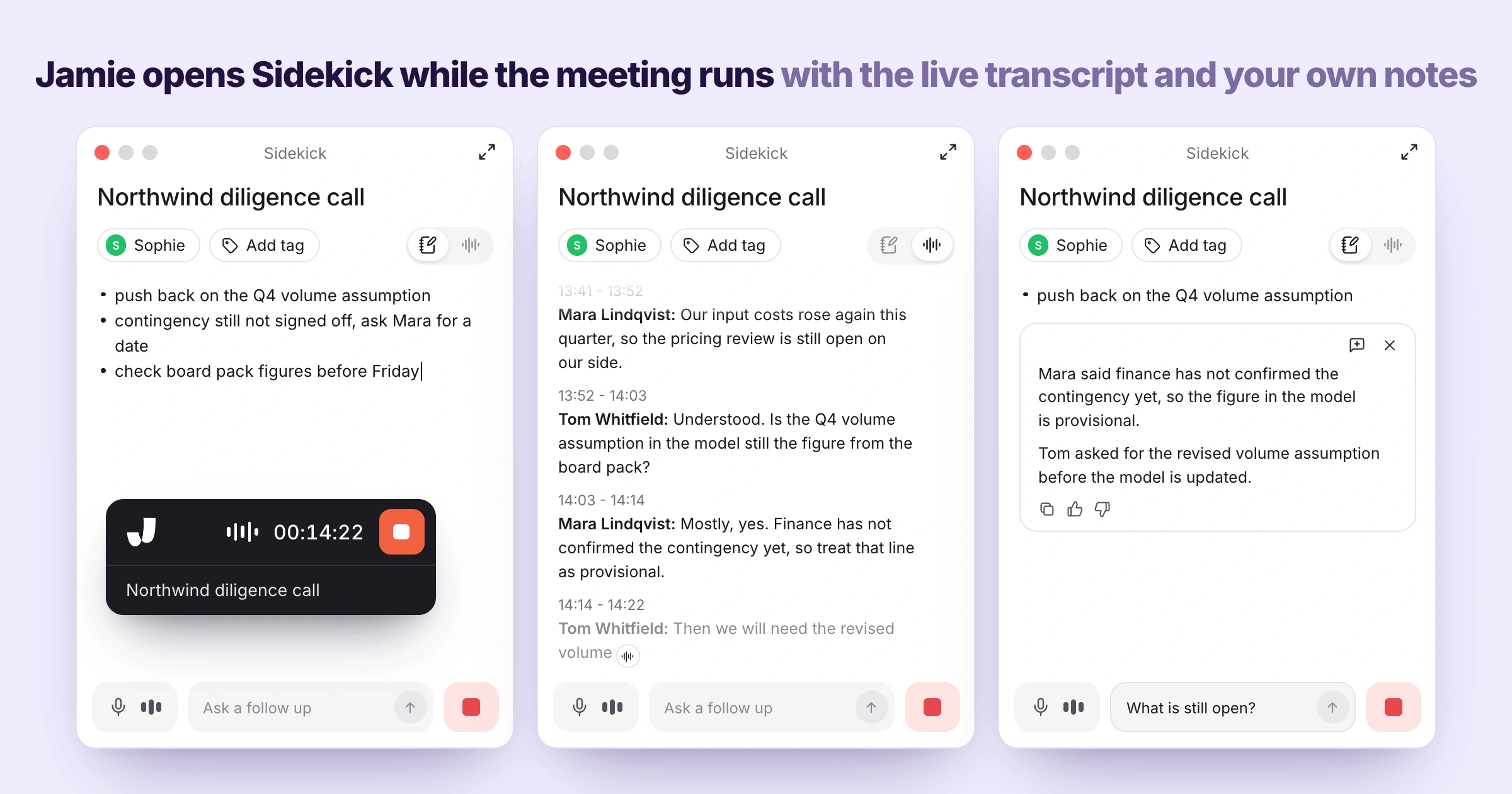
During your ongoing meeting, Jamie's Sidekick panel (a floating panel that sits next to your video call) displays a "live" transcription of your conversation and your Scratchpad notes, and you can access both simultaneously.
The panel also holds a box for Ask Jamie, for you to ask any follow-up question in real time. Plaud does not provide a "real-time" transcription option; the transcript comes after the recording ends. As the meeting moves on, you will want to know what Sidekick shows you, how the live transcript keeps up, where your own notes go, and if any of it gets in your way:
Sidekick
The Sidekick panel is where you see the live meeting transcript with space for your own notes, which means you can look at what was said a minute or two before and enter your comments about that part of the transcript on the scratch pad, or even ask a follow-up question if you didn't understand anything.
Live Transcript
As people continue speaking during the meeting, the transcript will grow. Each time someone speaks, Jamie identifies that person by their name, which means you can refer back to information provided 10 minutes prior without having to ask them to repeat it.
Scratchpad
Your private notes are entered into the Scratchpad, which opens as Notes inside Sidekick; these private notes stay private by default since they do not become a part of the meeting summary and therefore are not included in any meeting you share.
Jamie Transcribes Your Meetings in 100+ Languages and Generates the Notes in the Language People Spoke
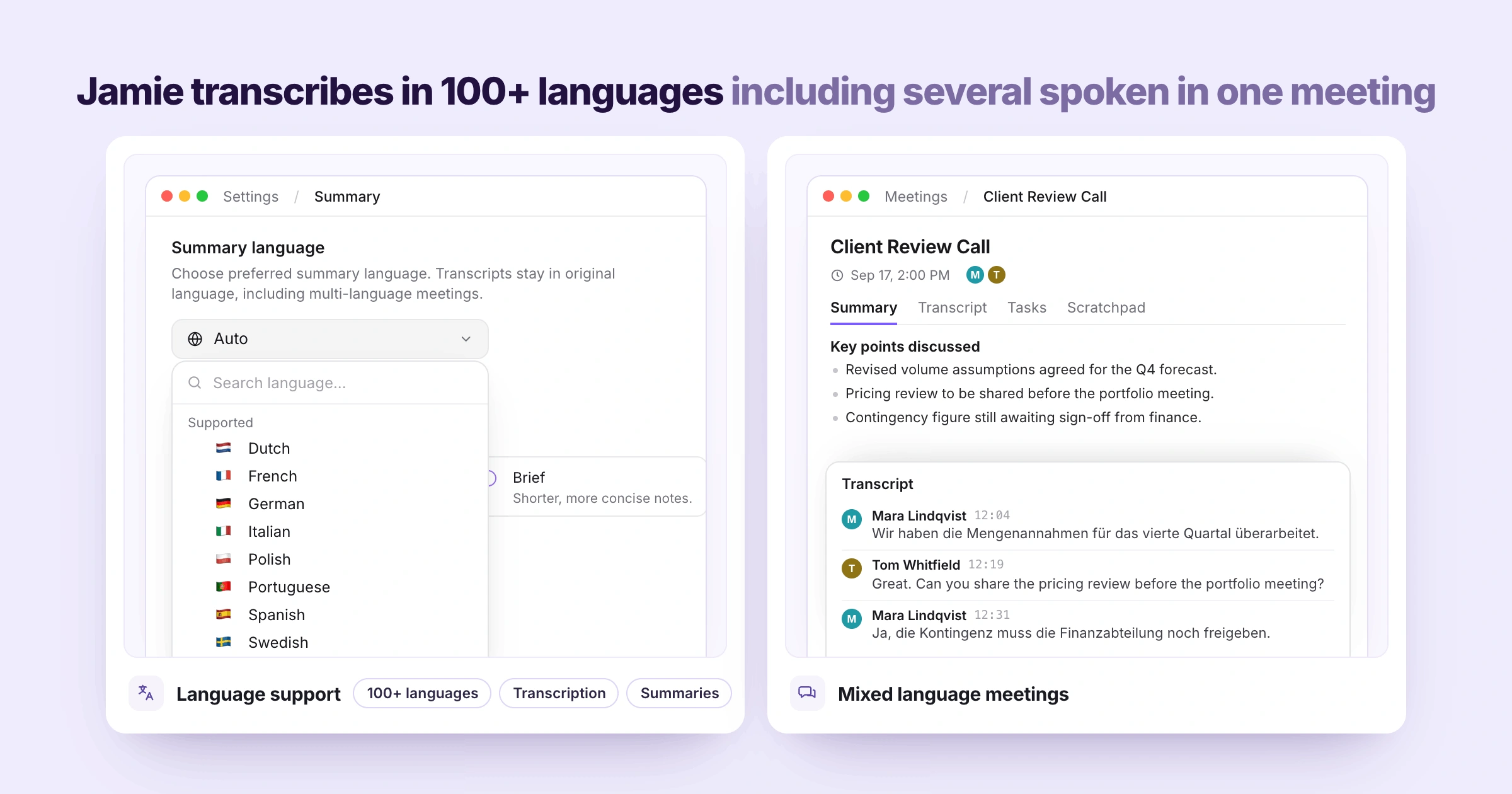
Jamie will automatically detect the language you are speaking, whether it's bilingual or multilingual, and transcribe your meetings in 100+ languages such as German, French, Spanish, Italian, Dutch, Portuguese, Polish, and Swedish.
Plaud does not transcribe two languages in one recording. Plaud transcribes each recording of your meetings into one language (that Plaud can also automatically identify). Meaning you have to record the meeting, making sure you strictly remain in one language.
With Jamie, if you want to be extra safe, you can specify your preferred language for the summaries once in settings. Say your client opens the call in German and moves into English halfway through, you will want to know if Jamie has your language and how Jamie handles a meeting where two languages are spoken:
Language support
Transcription and summaries are provided in 100+ languages, on every plan. Once you choose your default language for the summary, the actual transcript is always displayed in the same language as the meeting took place. And Jamie automatically detects the language you speak without you having to choose the default language as well, but if your day-to-day language is a different language, it is best to change the default summary accordingly.
Mixed language meetings
And you don't have to decide which language to start with; Jamie will transcribe everything that's spoken by everyone on the call in their native language, and send it back to you as such only on the transcription. The summary will only contain the most dominantly spoken language.
Jamie Discloses the Recording Three Ways: Verbal Consent, an Optional Email Notice and a Chat Notice
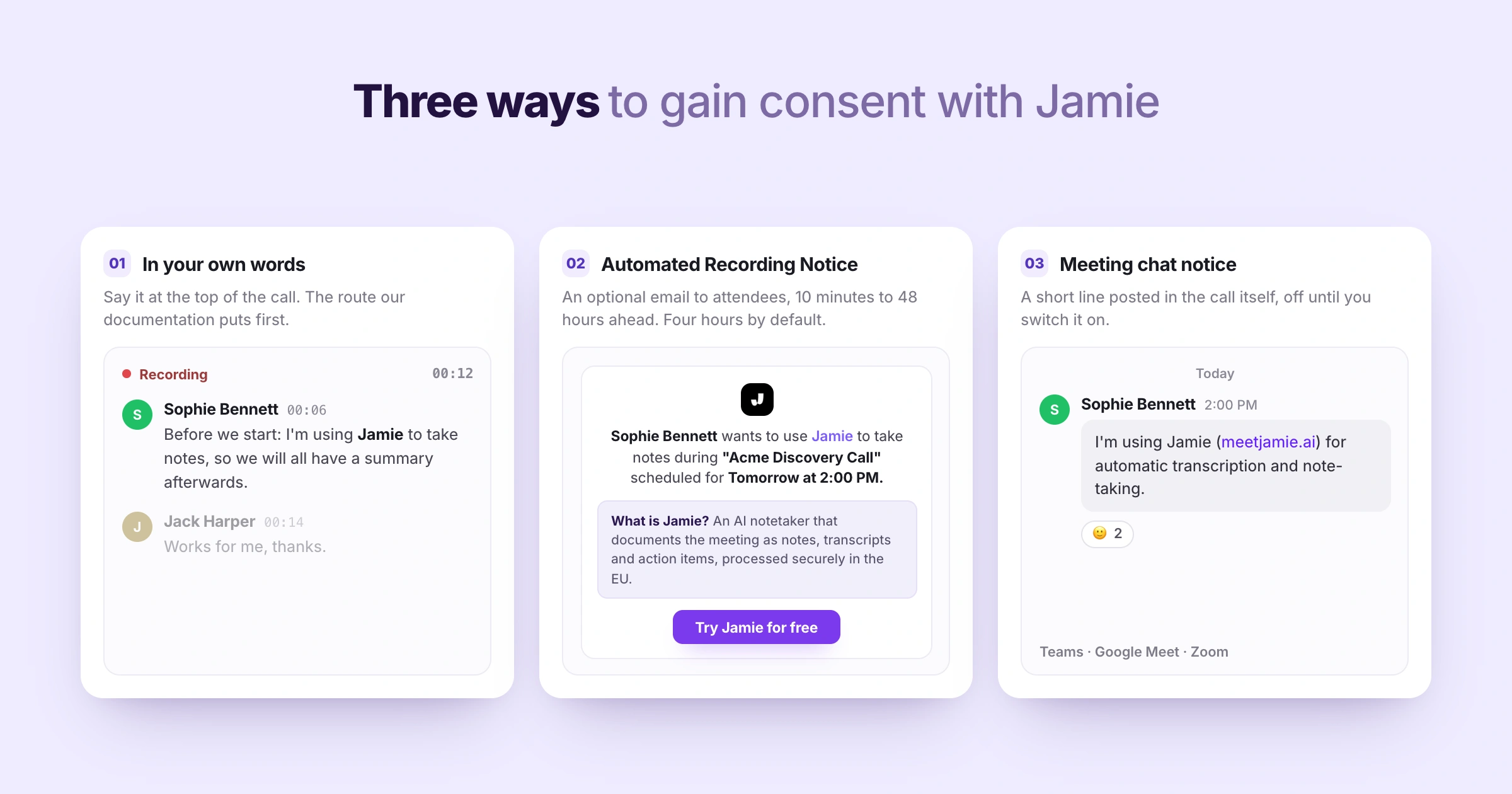
Jamie has created three different options for how you can let your attendees and clients know (on your call) that Jamie is taking down their conversation. Because of Jamie's bot free capture, the responsibility of the disclosure is entirely yours to make.
Plaud leaves consent to you, with guidance on what to tell participants, and Plaud NotePin shows a red light while it records.
The moment you are a guest in somebody else's meeting, you will want to know about verbal consent, what the optional email notice does and when it goes out, and what Jamie can post inside the call:
Recording consent
Because you're responsible for disclosing this information to all the multiple speakers on the call, you'll obtain verbal consent using your own words at the beginning of the call.
Automated Recording Notice
You can enable the optional Automated Recording Notice email feature, which sends an automatic notification to your invitees four hours prior to the start time by default (anywhere from 10 minutes to 48 hours) as soon as you connect your calendar and switch it on in your settings. Nothing is sent until you toggle it on
Meeting chat notice
Also, as soon as you have enabled this setting in the desktop application, Jamie will be able to send a quick announcement via meeting chat, within seconds of starting the recording (for Microsoft Teams, Google Meet, and Zoom). The meeting chat notice is off by default while it is still being rolled out.
Jamie Deletes the Meeting Audio Once the Transcript Exists and Trains No Model On It
[Image:
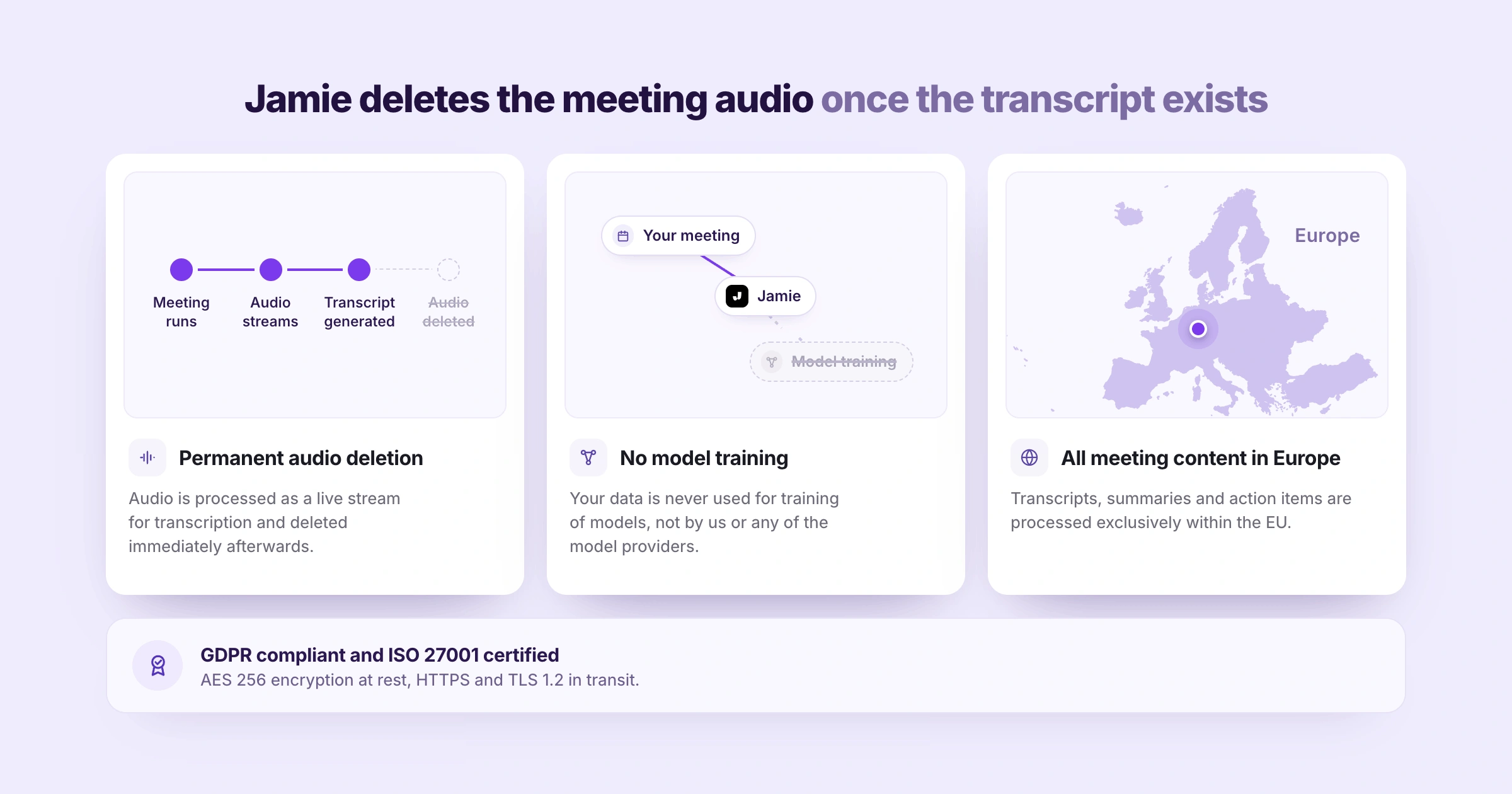
Once Jamie has created a transcript from the meeting audio, Jamie will delete that meeting's audio file permanently. Once cloud sync is on, Plaud stores meeting recordings in the Plaud cloud until you either delete the recording or close your Plaud account. We chose to delete the recording for security reasons. A recording of sensitive meetings becomes a larger risk over time, but the value lies in retaining the transcript. Where your client calls are covered by a confidentiality agreement, you will want to know what happens to the audio afterwards, whether we train our models with your data, and where your meeting content is processed:
Permanent audio deletion
Your meeting audio will be deleted immediately once transcribed; therefore, there can be no long-term retention of this meeting audio, regardless of the plan selected.
No model training
Jamie will never use your data, including your customer data, to train any AI or machine learning model (neither directly nor through our various model providers), regardless of the plan you select, including the free plan.
All meeting content in Europe
Finally, all of Jamie's transcript, summary, and action item processing occur within the EU. Jamie is GDPR compliant and ISO 27001 certified, which answers the real question when your compliance officer asks where the meeting data goes.
✅ Jamie Is for You If
You meet clients in person at their office and also via Teams or Zoom in the same week. And you want a single tool on the laptop and phone that you always carry.
Sometimes your calls will go back-and-forth between two languages, German and English, for example, and you would like both of those languages included in the transcript.
While the call is occurring, you would like to be able to review what has been said thus far during the call. Each speaker should be identified by name as they speak.
You would like to advise participants in your meeting that you are recording the conversation. That can be through verbal consent in your own words, the optional Automated Recording Notice email before the call, or the meeting chat notice within the meeting.
❌ Jamie Isn't for You If
You need your phone calls recorded, because Jamie does not record phone calls.
You would rather clip on a small recorder and forget about it, with no laptop or phone open in the meeting.
You want to keep the meeting audio, because Jamie deletes the audio once the transcript exists.
Plaud's Features
Plaud develops AI-based note-taking applications that work directly with its own dedicated hardware. In addition, Plaud's AI software takes what Plaud's recorders capture and produces summarized versions of the recordings, along with transcripts and answers based on your recordings.
Automated AI Notes
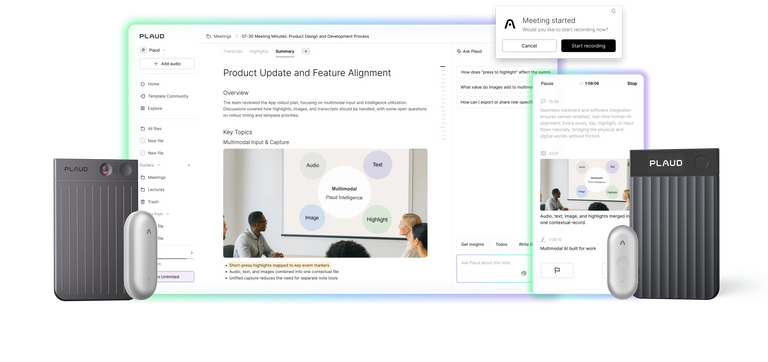
In addition to receiving a summary of all the recordings you have transcribed, there are over 10,000 pre-designed summary templates available for selection. Users can also create their own customised summary template by turning a short description or a photograph of an example into one of their own, currently in beta. Additionally, a mind map of the conversation is included with the application.
Rich Context Capture
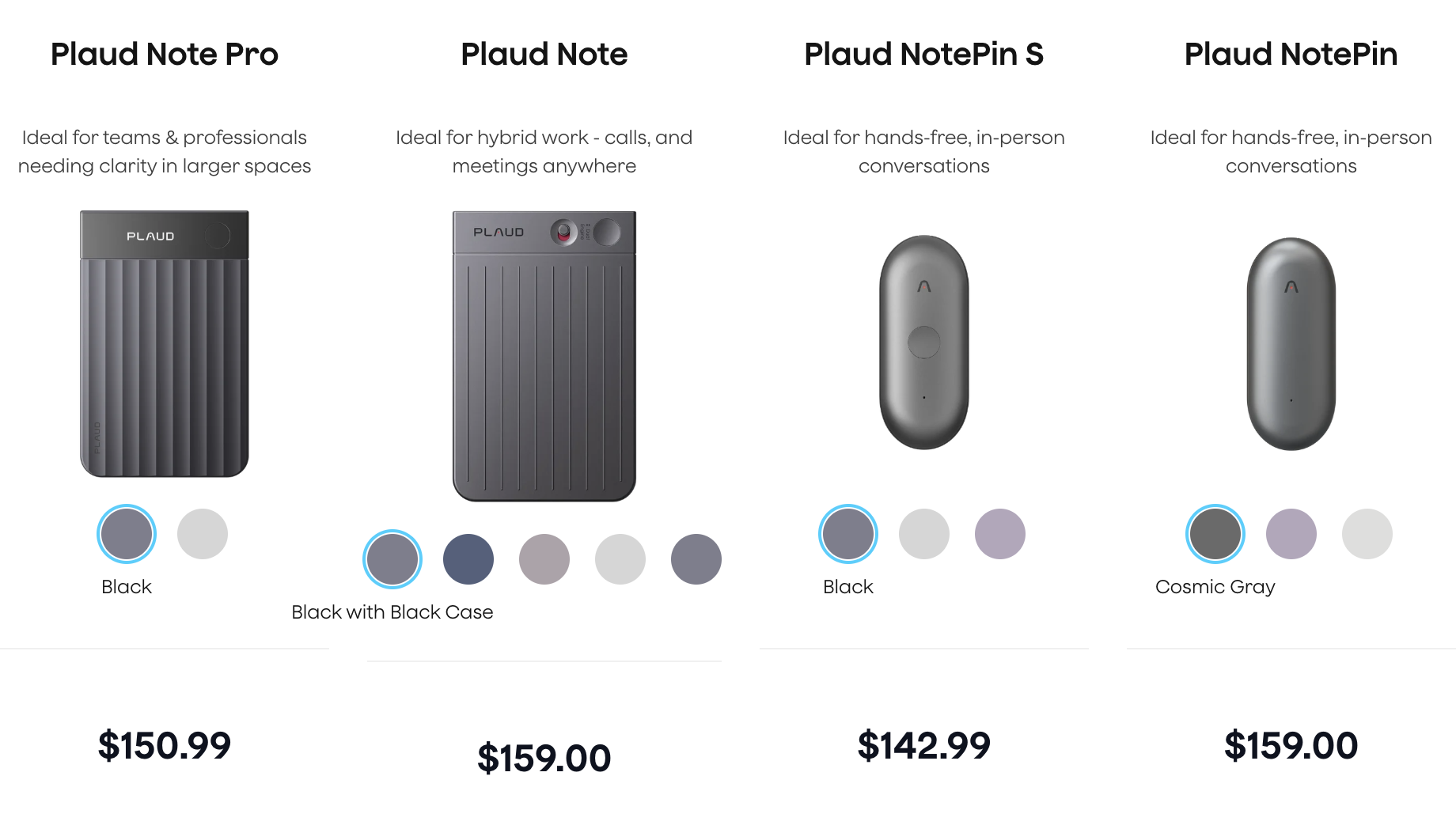
You wear either Plaud NotePin (or Plaud NotePin S) as a pin, clip, lanyard, necklace or band. Or you attach the Plaud Note (or Plaud Note Pro) magnetically to your phone or carry it on its own. The range of pickup for all of these devices varies from 9.8 ft. for the other recorders and up to 16.4 ft. for Plaud Note Pro. Furthermore, the Plaud Note Pro will provide continuous recording for up to 50 hours on one battery charge using the Endurance setting.
Phone Call Recording
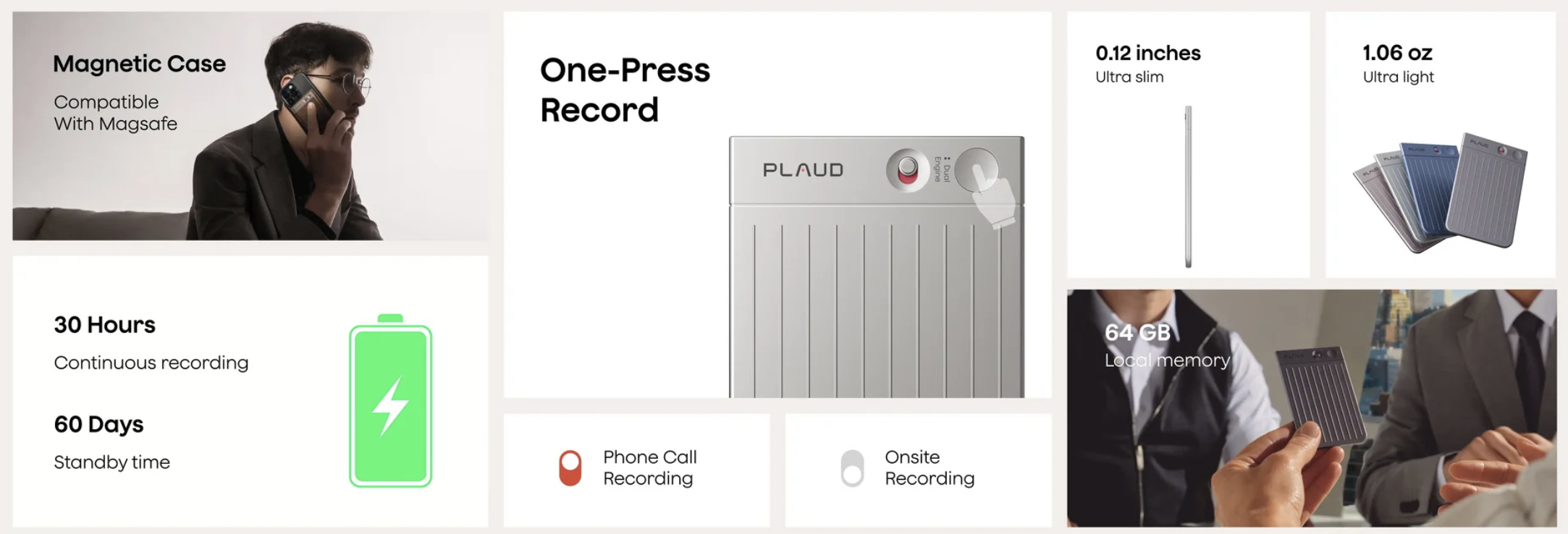
Plaud Note and Plaud Note Pro record hands-free audio by attaching the device to the back of your phone, which picks up the sound directly through the phone's speaker. The Plaud Note Pro will automatically switch to different modes (phone call vs. in-person), while the Plaud Note has an adjustable slider to move from one mode to another.
Ask Plaud
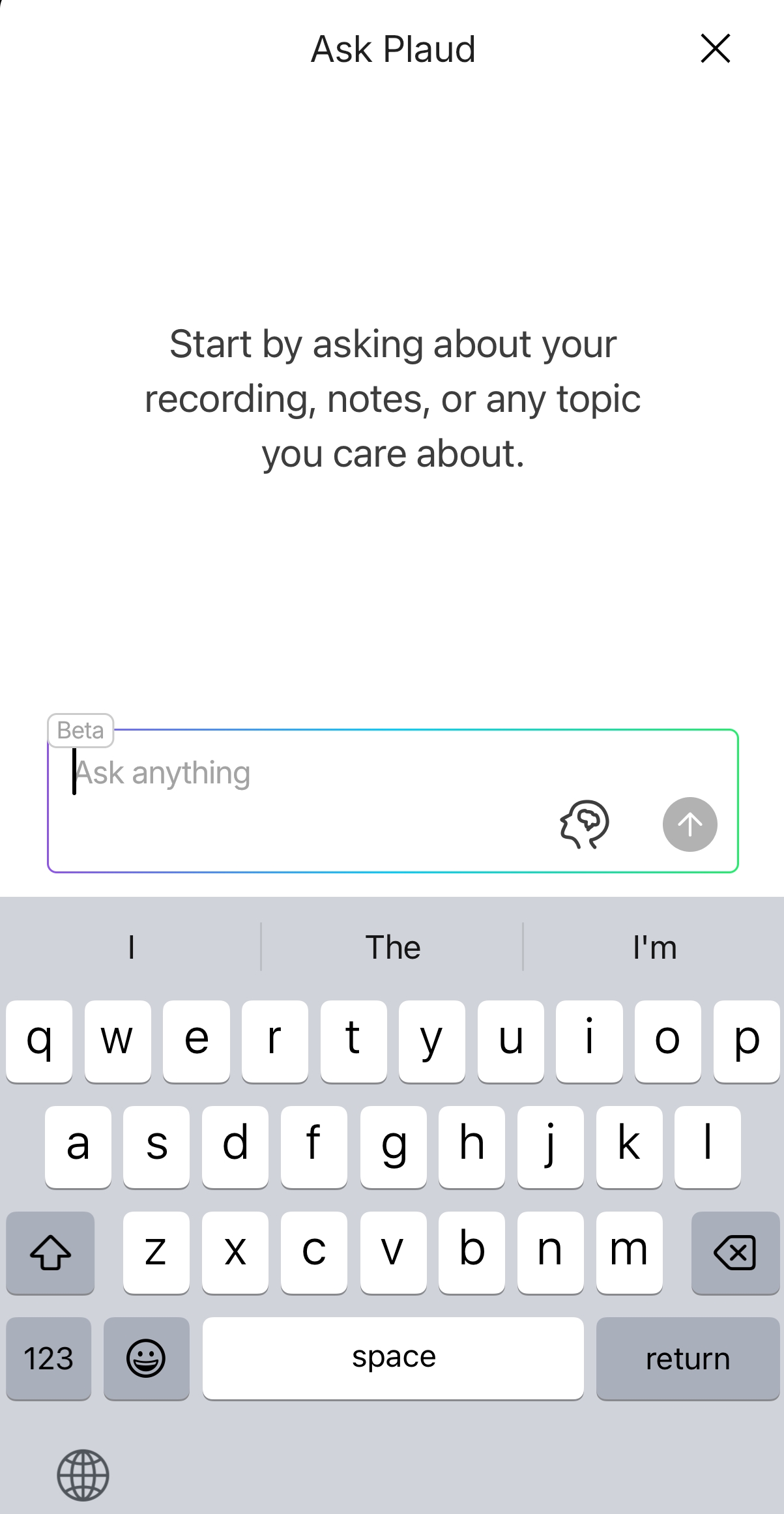
Ask Plaud answers questions that span across all of your recorded files. Ask Plaud gets its information from all of your transcripts and summaries from all of your recordings, including when your question may require data from multiple previous meetings. Ask Plaud is currently in Beta.
But Plaud does not support real-time transcription, which means you cannot ask questions while the recording is still ongoing.
Plaud works on the finished recording. You have to stop the recording and let the audio file sync to your app or computer before any of the AI features become available. Only after the transcription is fully generated can you use the Ask Plaud feature to query the transcript.
Skills and Memory
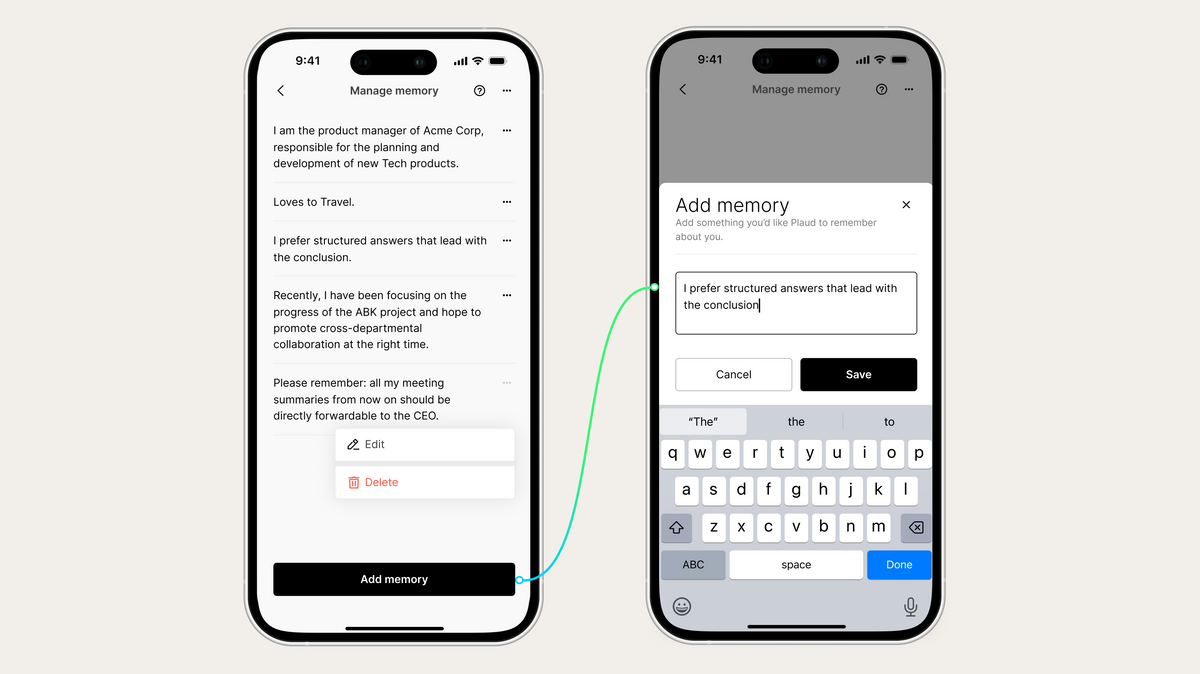
Ask Plaud has over 15 pre-made skills that you can select from, and you can also create up to 10 custom skills with specific prompts (in Beta). Memory is a feature that stores your job title, what type of business you work at, and how you like to have your responses formatted for Ask Plaud.
Auto Speaker Labeling
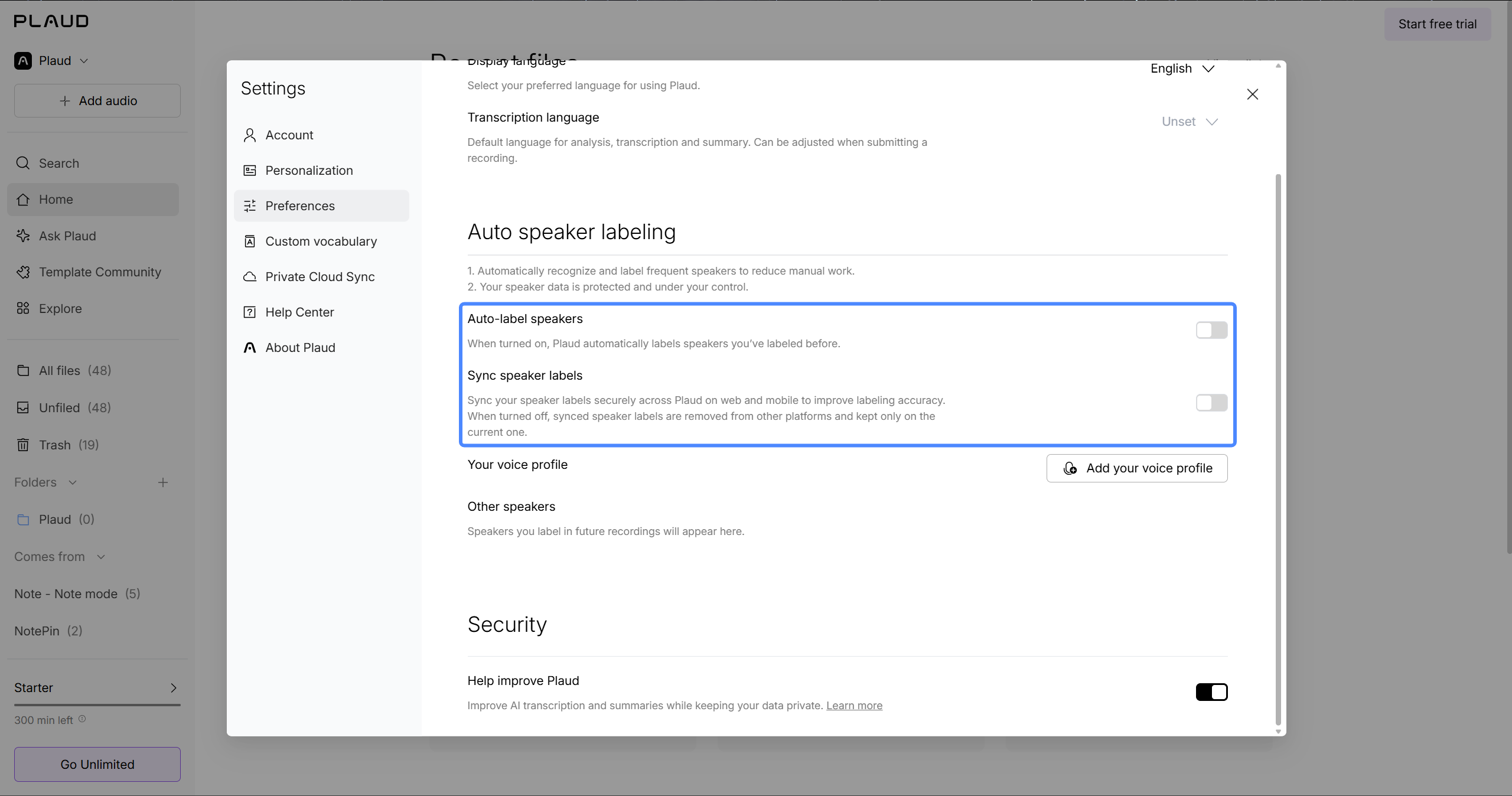
You can enable auto speaker labelling and record your own voice profile by speaking for 30 seconds, which identifies you to Plaud, and Plaud learns other speakers from the labels you assign.
Additionally, when you have enabled Sync speaker labels, the speaker(s) that you labeled during one of your recordings will be labeled for you in all subsequent recordings.
112+ Languages
[Screenshot: raw capture of support.plaud.ai, the transcription languages article]
Plaud supports transcription of spoken content in 112+ languages. Additionally, you can select the language used for each conversation or let Plaud determine the primary language automatically. Also, in Beta, you can customize your own vocabulary for names and technical terms.
Plaud Desktop
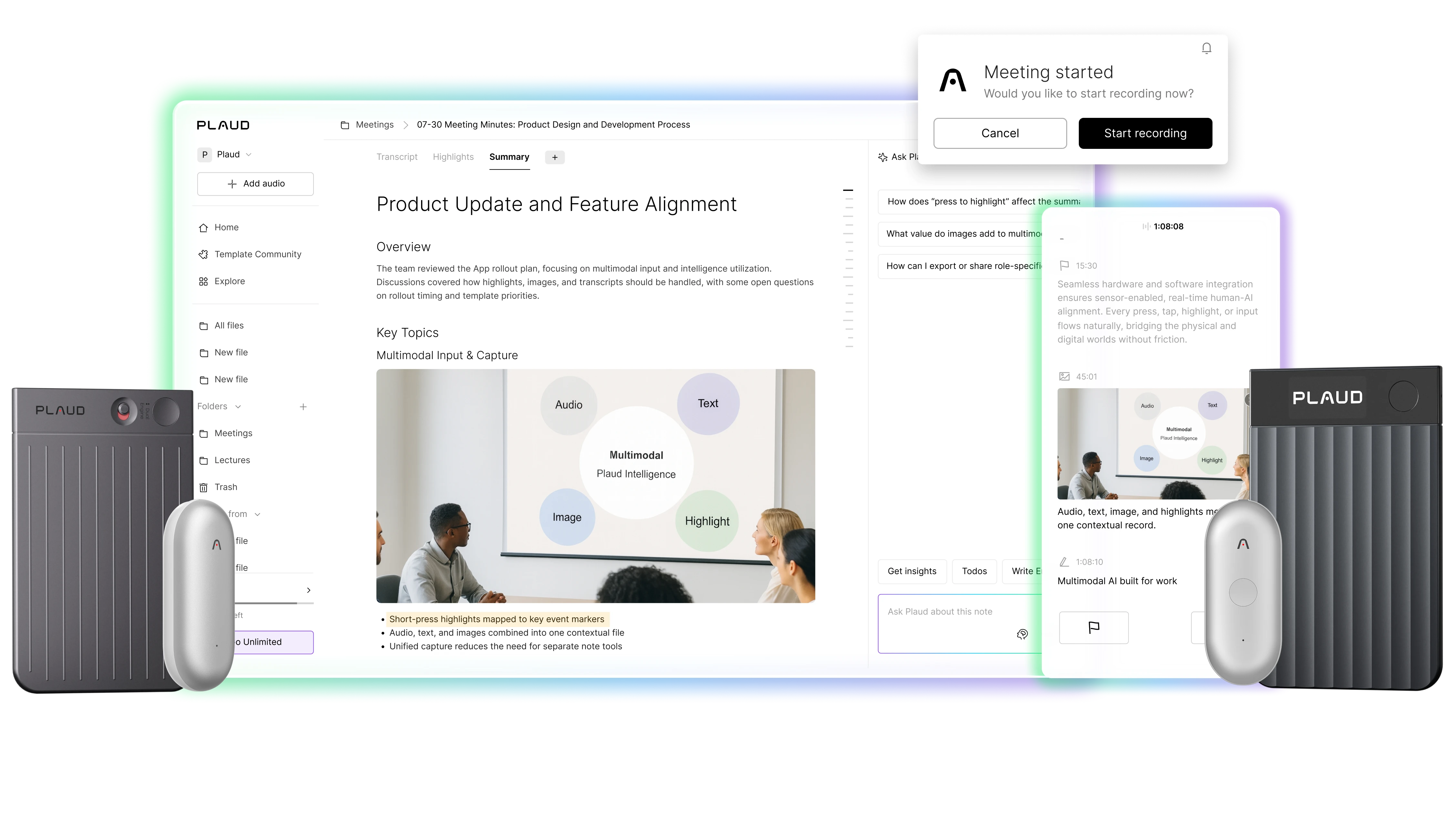
To record your remote online meeting sessions, you use Plaud Desktop (Beta) installed on either a macOS computer or a Windows-based PC. On Plaud's individual plans, you first have to link a Plaud recorder to your Plaud account.
Salesforce Integration and Plaud MCP
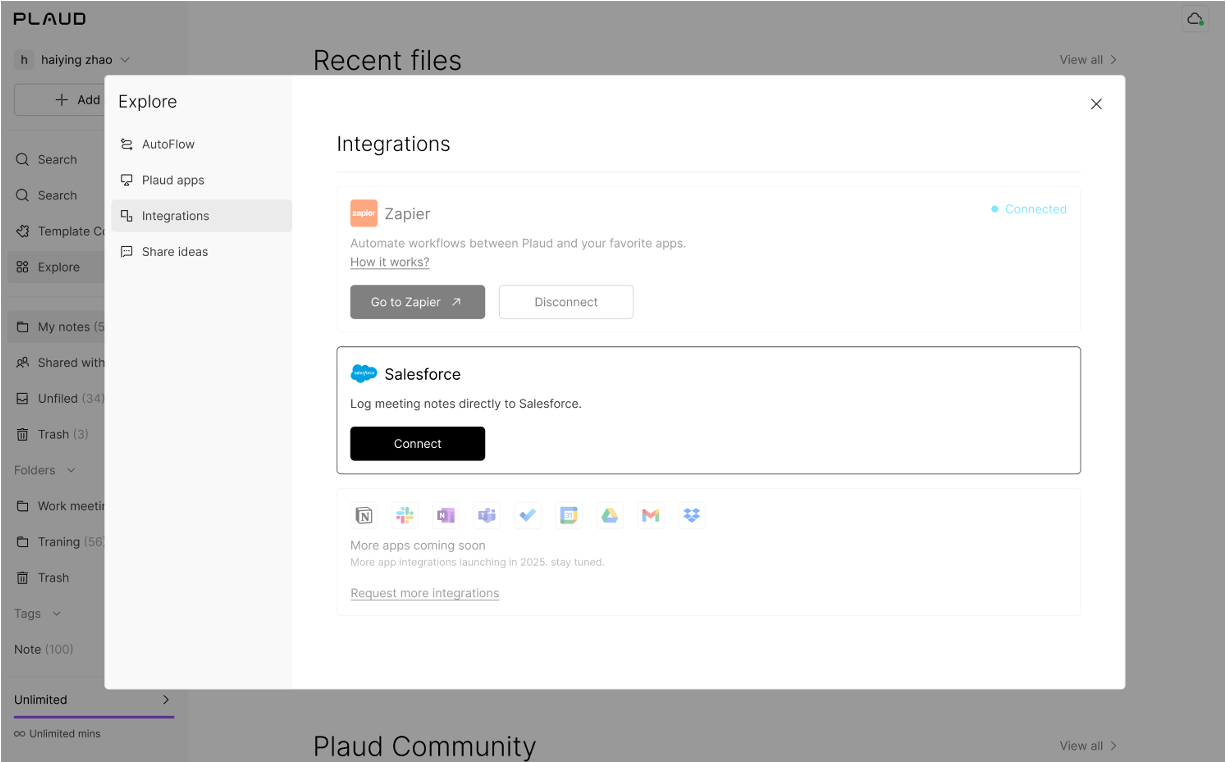
You can log a conversation as a task, and add a summary of that conversation to the appropriate Salesforce contact, opportunity, or account. That is in Plaud Team workspaces. Additionally, through Plaud MCP (in beta), you will be able to access your Plaud recordings, transcriptions, and notes from Claude, ChatGPT or Cursor. The Plaud system is additionally connected to Google Calendar and Zapier; however, Zapier is listed as coming soon within the Team plan.
Security and Compliance
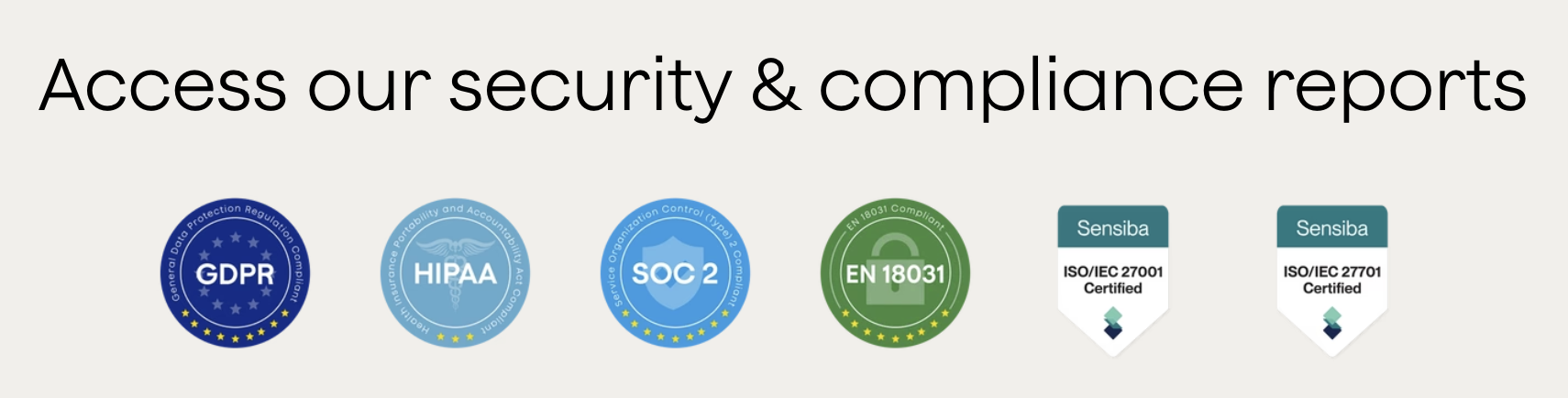
Plaud encrypts all of your data using AES-256 when it is at rest. Plaud holds ISO 27001, ISO 27701, and SOC 2 Type II certifications and complies with GDPR and HIPAA. For customers who have their accounts based out of the European Union or European Economic Area (EEA), those customer accounts are located in AWS Frankfurt. Outside a Plaud Team workspace, your audio recording will not be stored in Plaud's cloud unless you explicitly turn on cloud sync. Similarly, Plaud will not use your data for training purposes without explicit consent.
✅ Plaud Is for You If
You record a lot of phone calls that you would like all stored with your in-person conversation records.
You are happy to use a small clip-on recorder and prefer not to open your laptop during the meeting.
You often work long days away from your desk; therefore, you would like Plaud Note Pro to be able to capture up to 50 hours of recording time per battery charging cycle.
You like having over 10,000 pre-made summary templates available for selection to start from.
❌ Plaud Isn't for You If
You would like to try recording before you buy any hardware, because Plaud's app is built to work with a Plaud recorder linked to your account.
You would like to view a real-time transcription of what was being said in the meeting as it occurs, since Plaud will post the recorded transcript once the call has ended.
Your calls often go back and forth between two languages, since Plaud transcribes each recording in one language.
Pricing: Plaud vs Jamie
Jamie's pricing
Free: €0 per month
10 AI notes/month
30min meeting duration limit
Ask Jamie (Chat)
Plus: €25 per month
20 AI notes/month
2h meeting duration limit
Notion, Google Docs, OneNote
Pro: €47 per month
Everything in Plus and
Unlimited AI notes
5h meeting duration limit
Salesforce, HubSpot, Asana, etc.
MCP for AI tools
Team: €39 per seat per month
Everything in Pro and
Unlimited AI notes
5h meeting duration limit
Centralized billing
Advanced collaboration
Enterprise: Custom pricing
Everything in Team and
Volume-based discounts
SAML SSO, admin controls
SCIM provisioning
DPAs, ISO 27001
Personalised onboarding
See every plan on Jamie pricing.
Plaud's pricing
Starter: 0 dollars per month
300 Transcription Minutes/Month
Multidimensional Summaries (Beta)
10,000+ Professional Summary Templates
Plaud Desktop (Requires Device)
Export and Share
Custom Templates (Beta)
112+ Languages Supported
Ask Plaud (Beta)
Zapier Integration
Google Calendar Integration
Plaud MCP Server (Beta)
ISO 27001, ISO 27701, GDPR, SOC 2 Type II, HIPAA, and EN 18031 Compliant
Pro: 17.99 dollars per month
Everything in starter
1,200 Transcription Minutes/Month
Unlimited: 29.99 dollars per month
Everything in Pro
Unlimited Transcription Minutes (up to 24 hours/day)
Team: 35 dollars per user per month
Unlimited Transcription Minutes (up to 24 hours/day)
Everything in Unlimited
Centralized Billing
User & Device Management
Priority Support
Secure User Offboarding
Plaud Note Pro, one-time purchase: 189 dollars
Plaud NotePin S, one-time purchase: 179 dollars
Plaud Note or Plaud NotePin, one-time purchase: 159 dollars
What Are Customers Saying?
What Jamie Users Love
No meeting bot on the call
"I like Jamie because it's a bot-free AI note-taker that can take notes without an awkward bot on the call." Verified User in Design, G2
Accurate transcripts and well-organised summaries
"The transcription is also usually very accurate. I also like the AI summaries it generates after the call - they're well laid out and organized, especially compared to other AI note-takers." Verified User in Design, G2
What Jamie Users Flag
The free plan stops a meeting at thirty minutes
"The 30min meeting limit, but I understand that's the business model ;)" Charlotte Z., G2
Audio quality in the room changes what the notes come back like
"Jamies features are outstanding, sometimes I had the feeling that my audio quality heavily impacts the outcomes, which I need to adapt from my side." Verified User in Computer Software, G2
What Plaud Users Love
Clear summaries with the actions listed
"The output summaries are generally accurate with clear outlines of what was discussed and listing actions to be checked off at the bottom." Martine Santana, Trustpilot
Voices picked up over background noise
"Im amazed at what Plaud can do and how well it can pick up the voices over ambient noise." Stephen, Trustpilot
What Plaud Users Flag
A subscription on top of the device
"After paying +200$ for the Plaid note, i did not expect the subscription to use it." D J, Trustpilot
Transcripts that do not separate the speakers
"Poor speaker identification in transcripts. In some transcripts it is just one big run-on paragraph with no separation by speaker." Kevin Driscoll, Trustpilot
Final Verdict: Plaud vs Jamie
Jamie is an AI note taker to choose if you record meetings and would like executive summaries without purchasing a device: Jamie captures audio via your existing laptop or smartphone, displays real-time transcriptions as you speak, logs them to your CRM on Pro and up, and deletes the audio once your notes are complete. Jamie is also agentic, which means the Agent acts on your notes in the tools you connect.
Plaud is the AI note taker to choose if you prefer a dedicated physical recorder that operates completely hands-free and off-screen. Plaud’s hardware, whether worn as a pin or attached magnetically to your phone, excels at capturing direct phone calls, hallway conversations, and long in-person days without requiring you to keep a laptop or app open. It boasts massive battery life, offline recording capabilities, and gives you access to over 10,000 professional summary templates.
Choose Plaud when your day involves constant phone calls and away-from-desk conversations where a dedicated, wearable device is more practical than opening a software app.
Choose Jamie when you want powerful, real-time AI notes integrated directly into your business software, without the upfront cost of extra hardware to carry.
Jamie has removed note-taking from our meetings entirely. We can instantly share structured notes across the team, which makes it much easier to track performance, project updates, and key decisions across the portfolio — all in one place

German Sklyarsky
Elvaston
Private Equity · 11-15 employees
Read More
Still weighing other recorders? Read our guide to Plaud alternatives.
Most of your meetings happen in a room? Read about AI note takers for in-person meetings.
Your calls run on Microsoft Teams? Read about bot free note takers for Microsoft Teams.
Taking notes on your iPhone? Read about AI note takers for iPhone.
FAQs on Plaud vs Jamie
Does Plaud Work With Microsoft Teams?
Yes, Plaud Note records Microsoft Teams meetings attached to the back of your cell phone in call mode, or placed next to your computer's speaker. Plaud Desktop records online meetings once you have linked a Plaud recorder to your account, or if your company is on Plaud Team. Jamie records Teams, Zoom, and Google Meet without bots present. You use verbal consent, the optional Automated Recording Notice email, or the meeting chat notice.
Is Plaud Illegal?
No, Plaud is a lawful product for recording meetings. The legality of recordings for your meetings will depend upon both the location of you and all the other participants. In the US, the rules regarding valid consent vary from one state to another, as documented in the Reporter's Recording Guide. With Jamie, you have verbal consent, the optional Automated Recording Notice email, and the meeting chat notice.
Is Plaud Worth It?
Plaud is useful if you record your conversations by telephone or want a portable recorder. A unit costs $159. The unit will need to be kept charged and with you. If you forget the device at home, you aren't completely stuck; you can record the meeting using your phone's native Voice Memos app and manually import the audio file into the Plaud app later for transcription. Jamie is worth it if you want an instant, zero-hardware AI note-taker that integrates directly into your daily software workflow.
What Are Plaud AI's Main Competitors?
Jamie, HiDock, Notta, and Pocket are most often weighed against Plaud.
Especially because of Jamie's high security protocols, like the recordings being permanently deleted after your transcription. Jamie works by recording your meeting on your laptop or smartphone, and as you do, Jamie creates a real-time transcript for you to read. Real-time transcription is not a feature Plaud has.
Plaud transcribes each recording in one primary language, chosen by you or detected automatically. Jamie transcribes meetings that switch between languages, keeping each language as it was spoken.
Because Jamie is live, you can ask Jamie a question from the Sidekick panel while the meeting is still running. Ask Plaud only works after the meeting ends and the audio finishes processing.
Jamie includes optional automated email notices and in-meeting chat disclaimers (for Zoom, Microsoft Teams and Google Meet) to automatically notify participants they are being recorded. Plaud leaves consent to you, with guidance on what to tell participants and a red recording light on Plaud NotePin.
Jamie connects directly to Notion, OneNote and Google Docs, and to Salesforce, HubSpot and Asana on Pro and up. Plaud connects through Zapier, Google Calendar and Plaud MCP, with Salesforce on Plaud Team.
Jamie provides a side panel during your call where you can type your own private notes alongside the live transcript. Plaud also lets you type notes during a recording, in Plaud Desktop and in the Plaud app.
How Accurate Is Jamie's Transcription?
We tested Jamie against other AI note takers on the same recording to compare transcription accuracy. Jamie transcribed the call, scoring 90 of 100 points for transcription. Jamie also identified speakers as we switched back and forth between them throughout the call, at a score of 98 of 100 points for speaker identification. You get each speaker named in 100+ languages.
![5 Best Pocket Alternatives For Note Taking [2026]](/api/media/payload/5-best-pocket-alternatives-for-note-taking--2026-5374.png)
![Jamie vs Granola: Which One Is Better for Note Taking? [2026]](/api/media/payload/Jamie_vs_Granola_Which_One_Is_Better_for_Note_Taking-8bl592.png)