![5 Best Pocket Alternatives For Note Taking [2026]](/api/media/payload/5-best-pocket-alternatives-for-note-taking--2026-5374.png)
I compared five Pocket AI (owned by Heypocket) alternatives for note taking; Jamie, Plaud AI, Omi, Otter, and Bee Pioneer.
If most of your important conversations happen away from a laptop, Pocket looks like the easy answer. It’s a 52-gram recorder that attaches to your phone with MagSafe, captures room conversations and phone calls, and stores recordings on 64GB of internal storage.
Then you start using it across your meeting workflow, and you find that the $199 device includes unlimited transcription, summaries, and mind maps, but AI speaker labels, unlimited cloud history, and unlimited Ask Pocket sit behind Pocket Pro at $19.99 a month.
And while the hardware makes in-person capture easy and phone call capture easy, you still have to remember to carry and charge it when your meetings move between a client’s office, a phone call, and your laptop.
If you’ve hit one of those trade-offs, you’re probably wondering what else is out there.
We compared five Pocket alternatives from different angles. Jamie removes the dedicated hardware. Plaud keeps the recorder but takes a different approach to the software. Omi brings an open-source, offline option, Otter takes a software-first approach to meeting notes, and Bee offers a wearable approach to capturing conversations.
Jamie became part of how we work faster than we expected. What I love about Jamie is that it never forgets. Every decision, every idea, every follow-up is right there when we need it. Especially, the focus on data privacy is crucial for a company like ours.
Toni Stork
Founding Partner & CEO | OMMAX
Professional Services / Consulting · 250-500 employees
TL;DR: The 5 Best Pocket Alternatives For Note Taking
Jamie, best Pocket alternative for software-based meeting notes: bot-free notes from in-person and online meetings on Mac, Windows and iPhone, with structured AI notes, Ask AI, speaker identification, 100+ languages, and European data storage. GDPR compliant and ISO 27001 certified. Pro is €47/month; Free covers 10 meetings monthly.
Plaud, best AI voice recorder for phone calls and in-person conversations: dedicated hardware with dual-mode recording, 112+ languages, speaker labeling, AI summaries and action items. Note starts at $159 one-time, with transcription plans from 300 minutes/month.
Omi, best personal AI for searchable memory: a $179 wearable that turns everyday conversations into searchable memories, summaries, tasks and reminders. It also works without the device. Free includes unlimited on-phone transcription and 300 cloud minutes/month; paid plans start at $19/month.
Otter, best AI meeting assistant for live transcription: live transcription, speaker identification, AI summaries and collaboration across Zoom, Meet, Teams and in-person meetings. Free includes 300 minutes/month; Pro is $16.99/user/month.
Bee Pioneer, best wearable AI assistant for everyday conversations: a $49.99 wristband or clip for hands-free conversation capture, with automatic memories, summaries, actions and daily insights. It supports 40 languages and up to seven days of battery life.
What Are The Best Pocket Alternatives?
The best Pocket alternative tools are Jamie, Plaud AI, Otter, Omi, and BEE.
Here’s a breakdown of the 5 Pocket competitor tools that I researched:
Jamie: Best Pocket Alternative For Software-First Meeting Notes And Bot-Free Recording
Best for: Jamie is the AI note taking app for teams who want bot free notes from in-person and online meetings on your laptop and phone, 100+ languages, Ask AI, and meeting data in Europe.
Similar to: Granola, Otter.ai and Fathom.
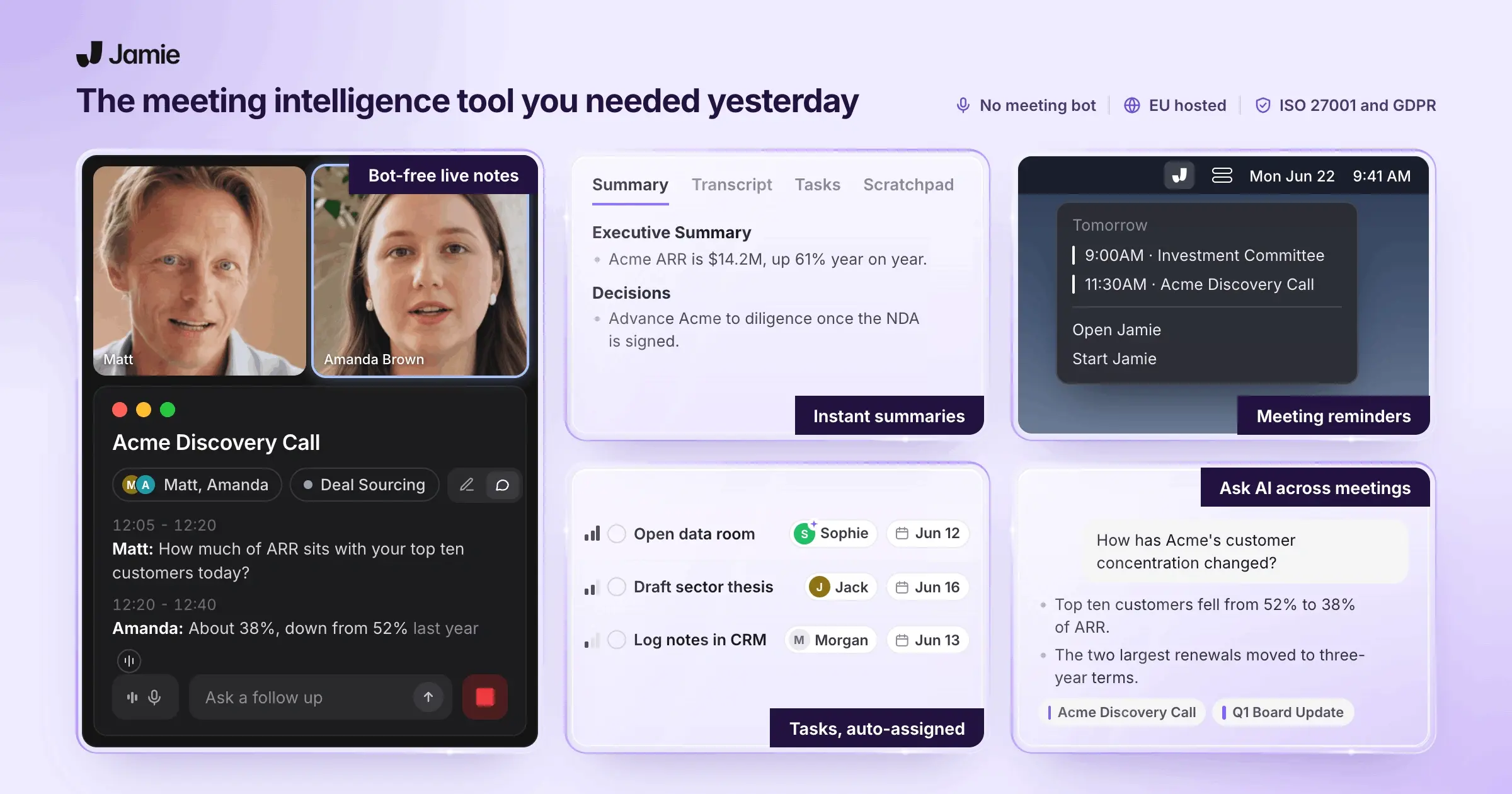
Jamie is an AI meeting assistant that turns online and in-person conversations into transcripts, structured notes and action items without requiring a dedicated recorder. Instead of attaching hardware to your phone, you use Jamie on your computer for online meetings or its mobile app for conversations away from your desk.
Instead of carrying a separate device, you can start Jamie from the app or use a connected Google or Outlook calendar to get reminders when a meeting is about to begin. Jamie works across online meeting platforms without joining the call as a participant, and it can also record in-person meetings.
After the meeting, Jamie produces the transcript, summary and action items. You can keep those notes in Jamie or send them to tools such as Notion, Google Docs and OneNote, with CRM, task-management and developer integrations available on higher plans.
That makes Jamie a different proposition from Pocket. Pocket's dedicated hardware is useful when you want independent, offline capture, including phone calls through its contact microphone. Jamie instead removes the dedicated recorder from the workflow. If that is the part of Pocket's approach you want to change, these are the areas where Jamie takes a different route.
Jamie captures meetings without dedicated hardware
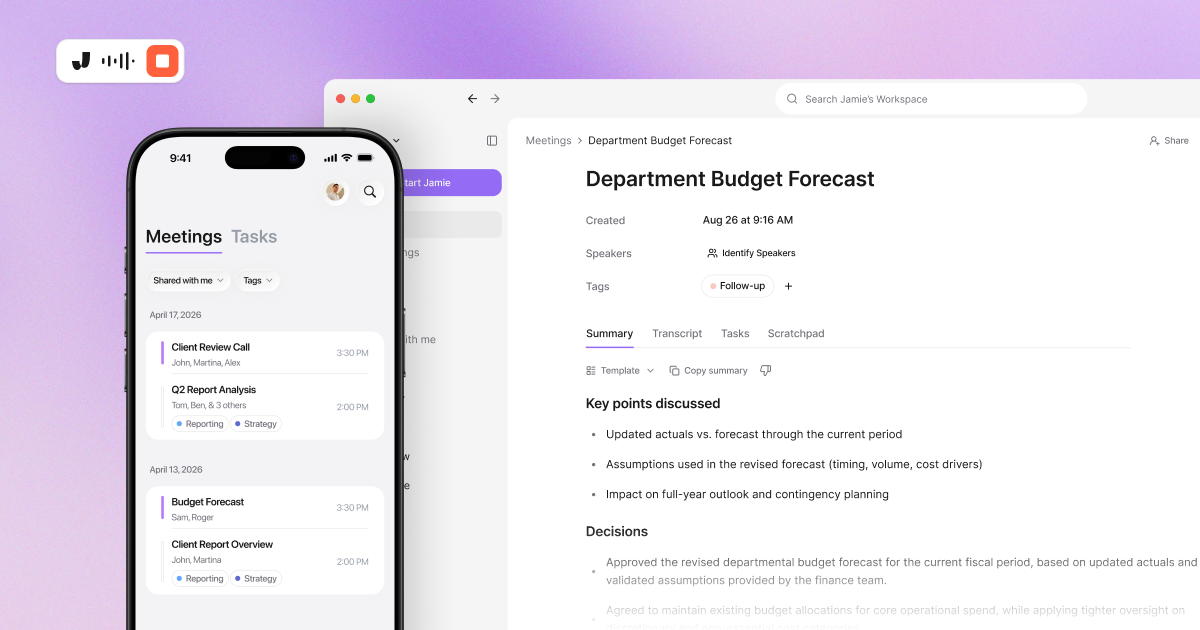
While Pocket's hardware gives it an advantage for independent in-person and phone-call capture, Jamie's recording workflow runs on devices you already use, which can make more sense when your meetings move between your laptop and your phone.
Desktop meeting capture: Jamie runs on your computer and records meetings from the device's audio, so online meetings do not require a separate recorder.
In-person recording: Jamie supports in-person meetings from its mobile app, giving you a way to capture conversations away from your laptop without adding a dedicated recorder to your setup.
No meeting bot: Jamie does not join online meetings as a participant. That means there is no additional attendee for the host to admit, unlike with bot-based note-takers.
Calendar reminders: Connecting Google Calendar or Outlook lets Jamie see upcoming meetings, set meeting titles, and send reminders when it is time to start recording.
Cross-device workflow: Jamie supports desktop and mobile recording, allowing online and in-person meetings to live in the same meeting-note workspace instead of being split between a recorder and a note-taking app.
Jamie keeps speaker recognition available on every plan
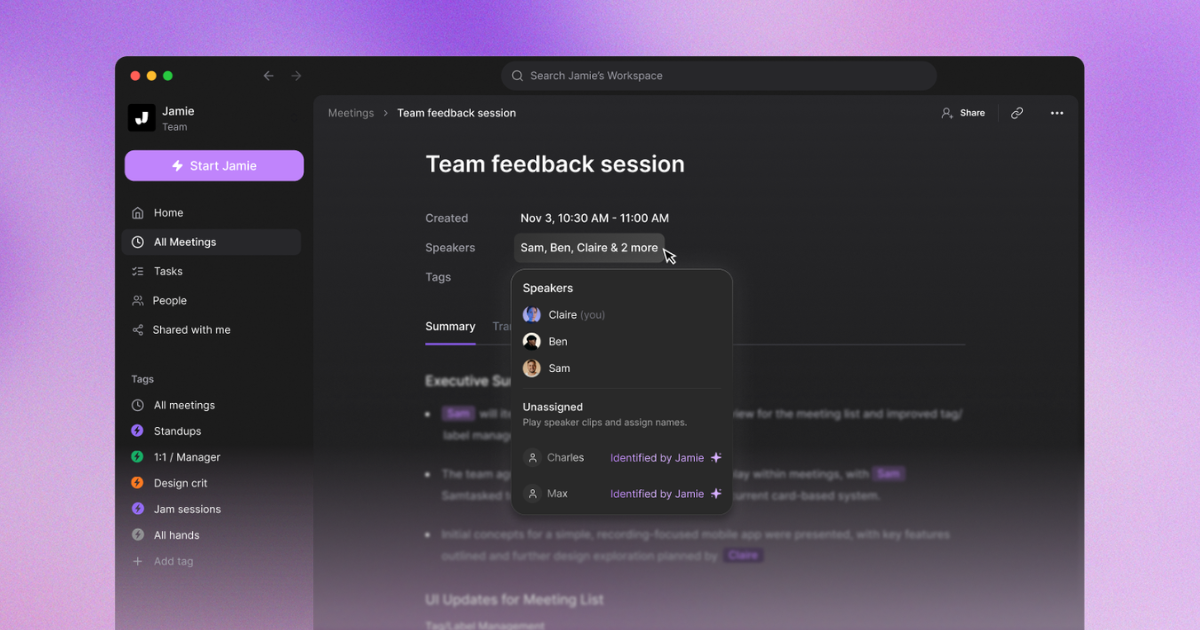
Pocket's core free offering includes unlimited transcription, but AI speaker labels and separation are part of Pocket Pro. Jamie includes speaker identification on its Free plan, while Speaker Memory can be activated to recognize recurring speakers across meetings.
Speaker recognition: Jamie identifies speakers in the transcript, making a multi-person conversation easier to follow than a transcript that uses generic speaker labels.
Speaker memory: Jamie can remember participants from previous meetings and recognize them again, which is useful when the same clients or colleagues appear across multiple conversations.
Calendar-assisted identification: Connecting a calendar provides Jamie with participant information that can improve speaker identification, giving the system more context than the audio alone.
In-person speaker recognition: Jamie's speaker recognition is available for both in-person and online meetings, so the feature does not rely solely on a digital attendee list.
Included on Free: Speaker recognition and memory are listed among Jamie's free-plan meeting-note features, so you do not need a paid subscription solely to unlock speaker identification.
Jamie turns conversations into structured meeting notes
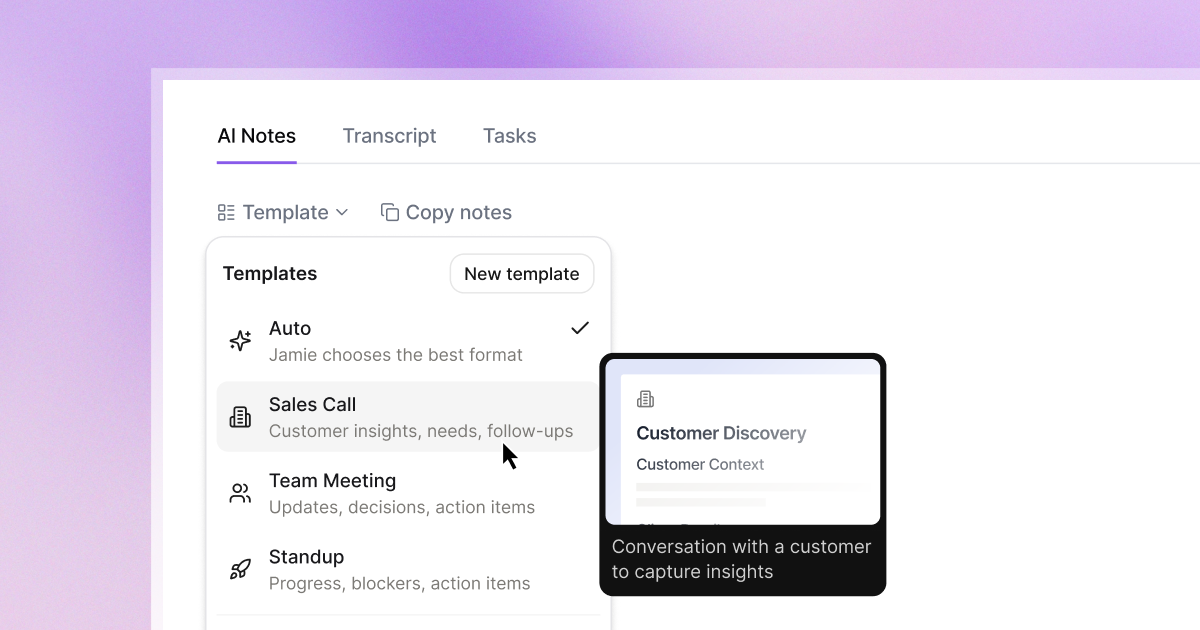
The transcript is only the raw record. Jamie adds summaries, action items, and templates so the output can be organized around the type of conversation you had. Its current plans include support for predefined and custom templates, with custom-template limits varying by plan.
Predefined templates: Jamie provides ready-made summary templates for different meeting formats, giving recurring conversations a more consistent output.
Custom templates: You can create your own template structure instead of accepting the same summary format for every meeting. The number of custom templates increases from Free to Plus and becomes unlimited on Pro and higher plans.
Automatic template matching: Jamie's current product documentation describes automatic template selection based on the meeting context, reducing the need to manually choose a format after every conversation.
Action-item detection: Jamie identifies tasks and decisions in meeting content and includes them in the generated notes, making follow-up easier after the meeting.
Retroactive template changes: Jamie's template system allows a different template to be applied after notes have been generated, so you can change the structure without having to record the meeting again.
Jamie puts meeting notes into the tools you already use
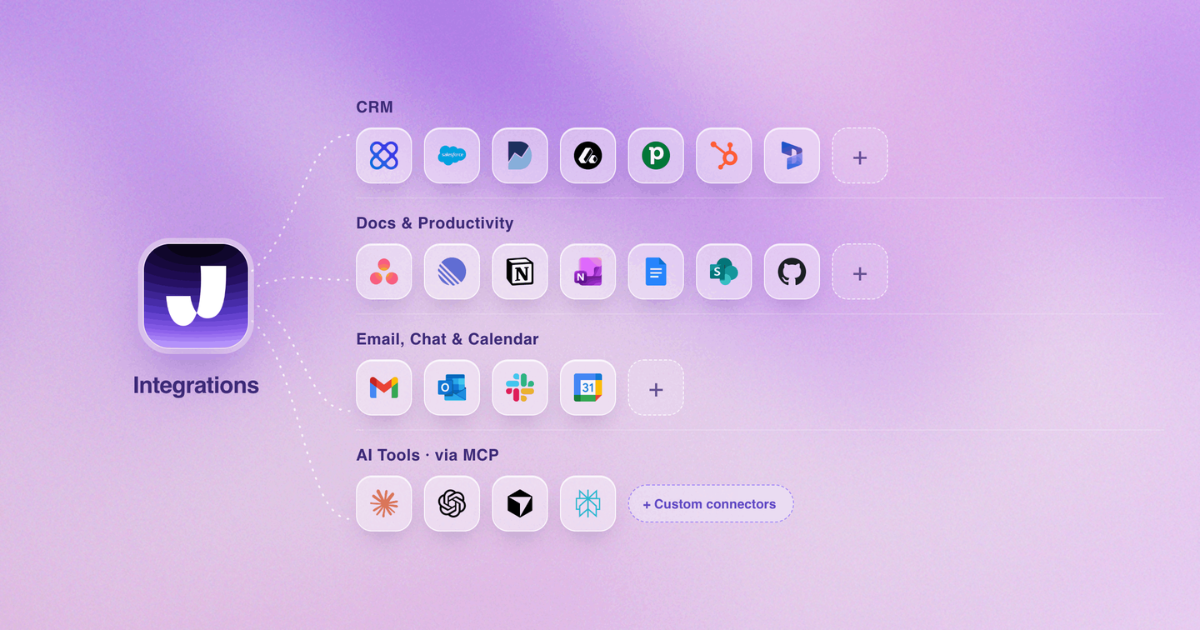
A meeting note becomes more useful when it reaches the system where the next piece of work happens. Jamie's current integrations cover documentation, task management, CRM systems and developer workflows, with availability depending on the plan.
Notion: Jamie can create Notion pages containing meeting summaries and transcripts, keeping the record alongside the rest of your project information.
Google Docs: Meeting notes can be exported to Google Docs for editing and collaboration, rather than remaining in the note-taking application.
OneNote: Jamie can save meeting notes directly to OneNote notebooks, giving teams another destination for their meeting records.
CRM and task integrations: Higher plans add integrations with HubSpot, Salesforce, Attio, Microsoft Dynamics 365, Pipedrive and Asana, allowing meeting information and action items to flow into customer or project workflows.
API, webhooks and MCP: Jamie also offers API, webhook, and MCP options for teams that need to connect meeting data with systems beyond its native integrations.
Jamie lets you search and question your meeting history
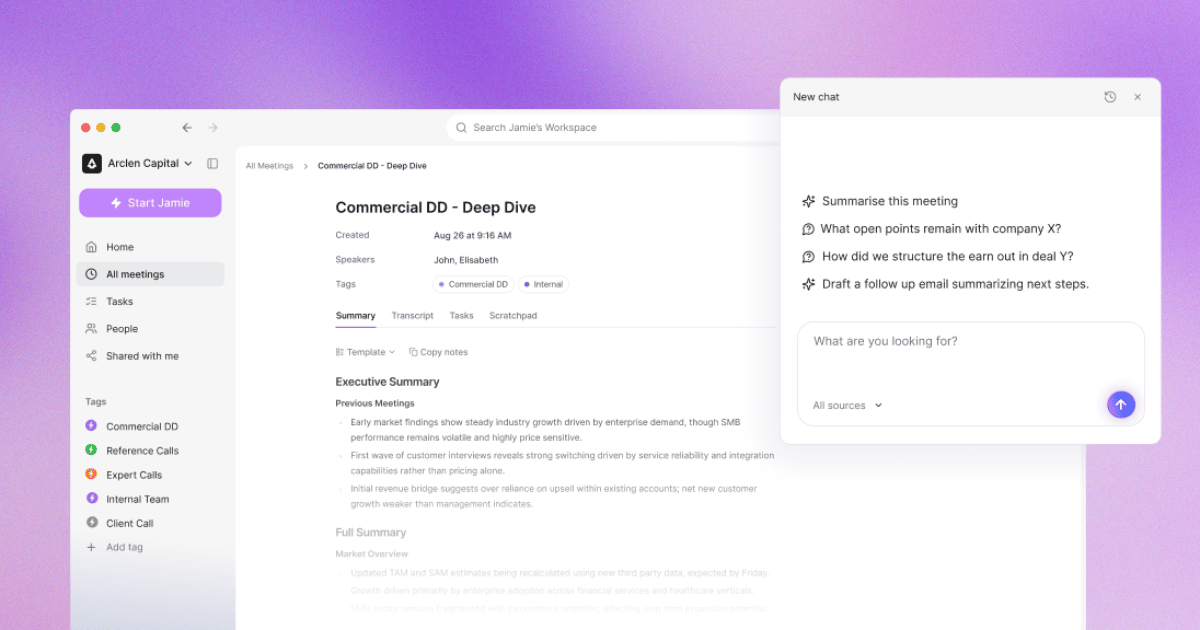
A growing meeting archive is only useful if you can retrieve something from it later. Jamie combines searchable meeting records with Ask AI, allowing you to query information from previous conversations instead of reopening individual transcripts.
Ask AI: Jamie lets you ask questions about your meeting history in natural language, helping you retrieve decisions, details and context from previous conversations.
Searchable transcripts: Each meeting includes a transcript, providing a searchable record you can use to find specific information rather than having to replay the conversation.
Tags and filters: Jamie supports tags to organize meetings by project, client, team or other categories, making larger archives easier to navigate.
Unlimited storage: Jamie's current pricing page lists unlimited storage across Free, Plus, Pro, Team and Enterprise, so storage capacity is not a paid-plan differentiator.
Custom vocabulary: Jamie supports custom vocabulary terms for names, acronyms and specialist language, with 50 terms on Free, Plus and Pro, 100 on Team and 250 on Enterprise.
Jamie keeps meeting data in Europe and does not store meeting audio
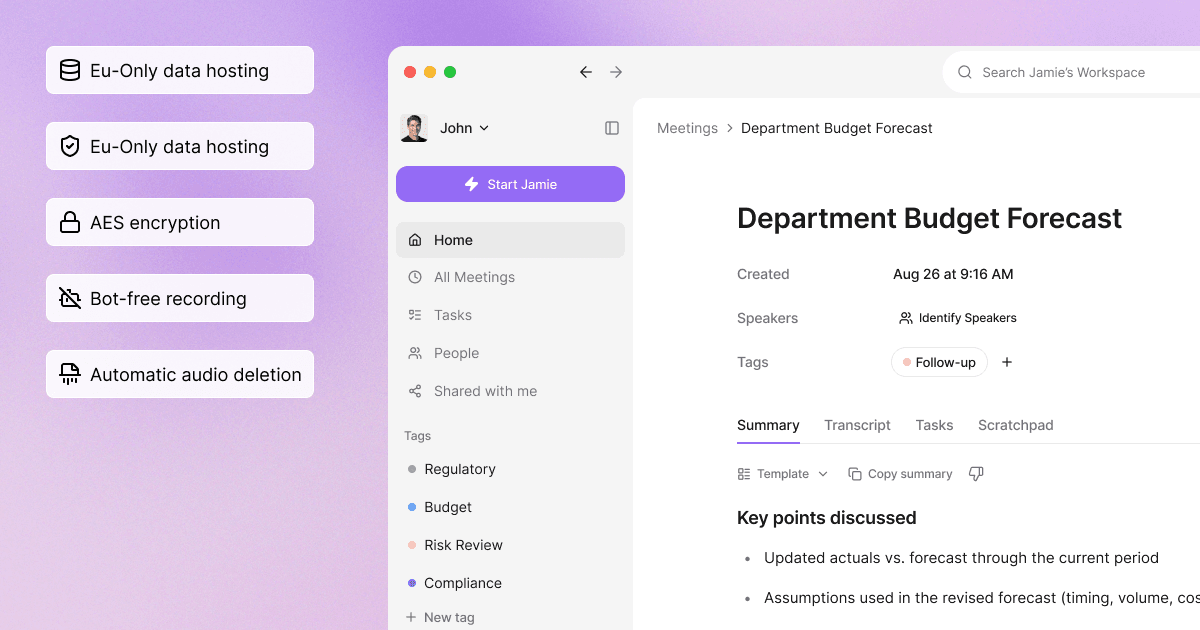
Privacy is another point of difference, although the two products take different approaches. Jamie says meeting data is stored and processed within the EEA, Switzerland and the UK, while Pocket says data can remain on-device or be stored on its US-based encrypted servers, with a local-only option available.
European hosting and processing: Jamie says all meeting data storage and processing remain within the EEA, Switzerland and the UK, which may matter for organizations with European data requirements.
Audio deleted after transcription: Jamie says meeting audio is deleted after transcription, leaving the resulting text records rather than retaining the original audio.
No model training: Jamie states that customer data is not used to train its models, including models provided by third parties.
ISO 27001: Jamie says it is independently audited and certified to ISO 27001, providing organizations with a recognized information-security standard for evaluation.
Enterprise controls: Enterprise customers can use features such as SAML SSO, SCIM provisioning, audit logs, custom retention rules, granular access controls, and DPAs.
Category | Jamie | Pocket |
|---|---|---|
Approach | Software-based or mobile based meeting capture | Dedicated 52g recorder |
Dedicated hardware | Not required | Required for Pocket's hardware recording workflow |
Free option | Free plan with 10 meetings/month and 30-minute meeting limit | Free core features after hardware purchase |
Paid plan | Plus from €25/month | Pro $19.99/month |
Online meetings | Desktop or mobile capture across online platforms | Pocket app/desktop ecosystem plus dedicated-device recording |
In-person meetings | Desktop or mobile recording | Dedicated hardware |
Speaker recognition | Included on Free with speaker memory | AI speaker labels on Pro |
Templates | Custom templates, with limits by plan | 100+ summary styles and advanced options on Pro |
Ask/query | Ask AI (unlimited queries) | Ask Pocket, with unlimited use on Pro |
Storage | Unlimited on all plans | 90 days of cloud history on Free; unlimited on Pro |
Integrations | Notion, Google Docs, OneNote and additional CRM/task/API integrations by plan | Export and Pocket ecosystem features |
Phone-call capture | Mobile recording workflow | Contact microphone captures both sides without speakerphone |
Offline recording | No offline recording | Dedicated device records to 64GB onboard storage |
Data handling | EU/EEA/Switzerland/UK hosting and processing; audio deleted after transcription | On-device or US-based encrypted servers; local-only mode available |
Jamie's Pricing Starts at EUR 25 Per Month
Free: EUR 0 per month
Plus: EUR 25 per month
Pro: EUR 47 per month
Team: EUR 39 per seat per month
Enterprise: Custom pricing
Source: meetjamie.ai/pricing, read on 25 August 2026 with the monthly toggle on.
Storage is unlimited on every plan.
What Jamie users love
Transcription accuracy and the layout of the AI summaries
"The transcription is also usually very accurate. I also like the AI summaries it generates after the call—they're well laid out and organized, especially compared to other AI note-takers." Verified User in Design, G2
Bot-free capture keeps the call free of an extra participant
"I like Jamie because it's a bot-free AI note-taker that can take notes without an awkward bot on the call." Verified User in Design, G2.
Multilingual meetings, including Hebrew, in person and online
"Finally an app that... Understands Hebrew. Jaime is also a life saver for: Multi lingual conversations [and] Offline and online meetings." Rachel C., G2
What Jamie users flag
Microphone setup was needed before an early update
"I had an issue before with recording the meeting notes because my microphone or something was not set up properly. But the latest update now grabs the meeting sounds with no extra configuration." Verified User in Design, G2
The reviewer identifies the fix in the same sentence: the current app captures meeting audio without any configuration steps.
Speaker identification benefits from a good microphone
"The speaker identification feature of Jamie, though very useful, isn't entirely reliable or infallible. In our experience, to get the most effective results from Jamie, it was necessary to invest in a good-quality microphone." Tom W., G2
In a boardroom with several people at a long table, a conference microphone raises the accuracy of the speaker labels
Some rough edges and missing integrations
"There are a few buggy things and missing integrations, but Jaime is young, and I have full confidence in what their future looks like. It's better than every other app I've tried." Rachel C., G2
If your own tool is not on our list, MCP, the API, and webhooks cover it on Pro and up.
Verdict: Jamie vs. Pocket
Jamie is the stronger choice if you want to remove dedicated recording hardware from your meeting workflow, switch between online and in-person meetings, and keep speaker recognition, searchable meeting history, and integrations in a single software workspace.
2. Plaud: Best AI Voice Recorder for Phone Calls and In-Person Conversations
Best for: Plaud is the AI voice recorder for people who want dedicated hardware for in-person conversations and phone calls, with 112+ languages, automatic speaker identification, AI summaries, action items, and a desktop workflow for online meetings.
Similar to: Pocket, Notta and HiDock
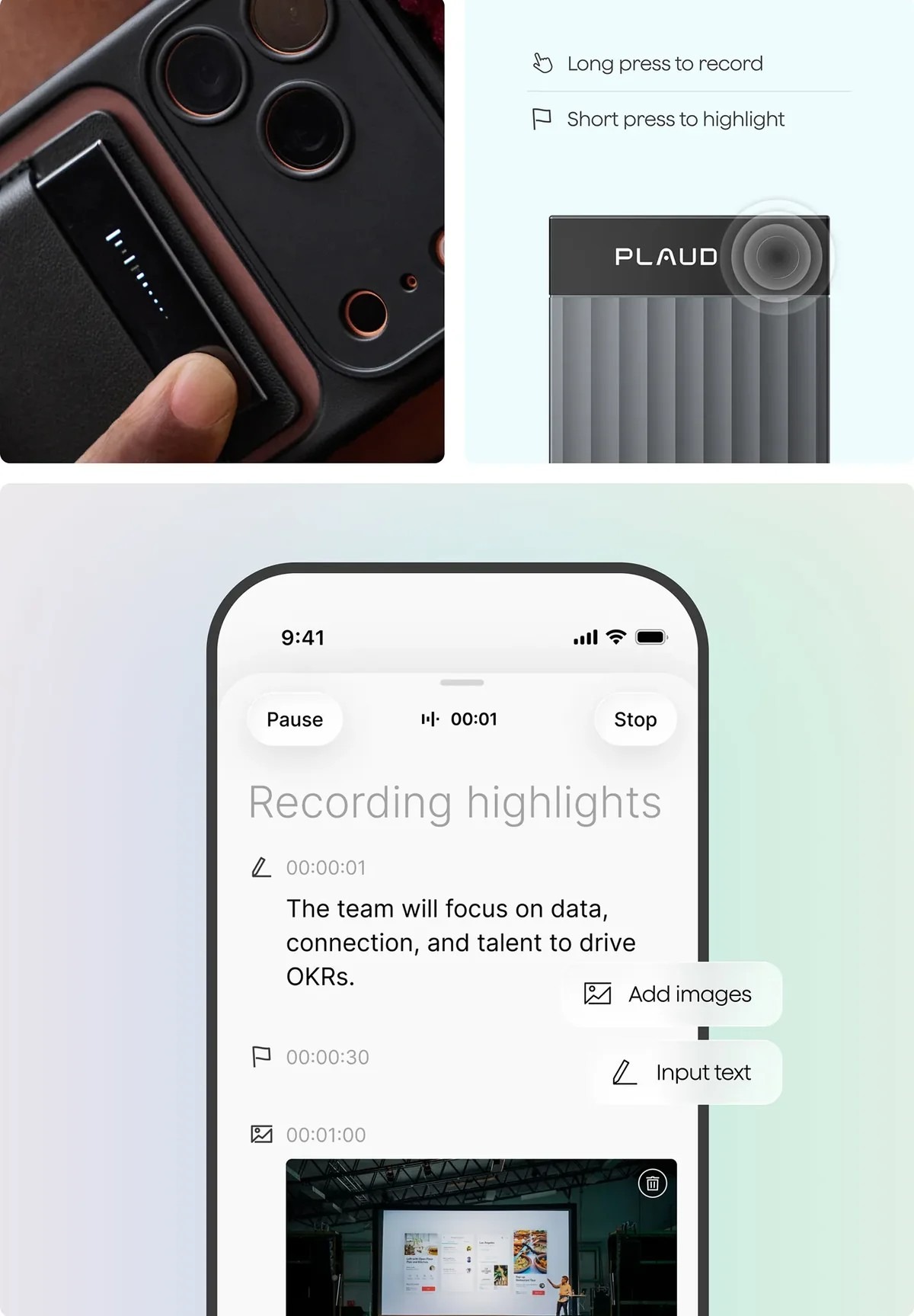
Source: Plaud
Plaud is a dedicated AI note-taking system built around physical recorders that capture calls and conversations, then turn them into transcripts, summaries, and structured notes. It makes the most sense if you like the convenience of dedicated hardware but also want one ecosystem that covers in-person conversations and meetings on your computer.
Compared with Pocket, Plaud's hardware is polished because its translation features are strong, and its longer track record gives it a deeper body of user reviews and feedback. Meanwhile, Pocket stands out for letting you choose the AI model behind your summaries, while both now offer official MCP servers for connecting captured conversations to tools such as Claude and other MCP clients.
Plaud covers phone calls, in-person meetings and online calls
Plaud's biggest advantage over Pocket is the way it connects its physical devices with Plaud Desktop, giving you one place for recordings captured away from your computer and those captured directly on it.
Smart Dual Mode: Note Pro automatically detects whether you are recording a phone call or an in-person conversation, so you do not have to switch recording modes manually.
Plaud Desktop: The desktop app captures online meetings on your computer and supports Google Meet, Zoom, Microsoft Teams, Slack Huddles, Cisco Webex, and Lark, with support varying by operating system and meeting setup.
Phone-call capture: Note Pro uses a contact sensor alongside its microphones for phone-call recording, while Plaud's documentation instructs users to attach the device to the phone before making the call.
Offline device recording: Plaud devices record locally before syncing recordings to the app, so the physical recorder does not require a live internet connection during capture.
One Plaud workspace: Recordings from the device and Plaud Desktop can be managed through the Plaud App and Plaud Web, providing a common archive for online and in-person conversations.
Plaud pricing: hardware comes with 300 minutes; heavy users need a plan
Plaud separates the recorder from its AI transcription allowance. Every Plaud note taker currently includes the free Starter plan, which offers 300 transcription minutes per month. If you need more, Pro provides 1,200 minutes per month, while Unlimited provides unlimited transcription subject to a 24-hour-per-user daily cap.
For a light user, Starter may be enough, as the hardware includes a monthly transcription allowance at no additional subscription cost. Someone recording well beyond 300 minutes a month, however, needs to factor in a paid plan as part of the ongoing cost.
Pocket takes a different approach: its hardware purchase includes unlimited core transcription, summaries and mind maps without requiring a subscription, while Pocket Pro adds advanced features for $19.99 per month.
Here's an overview of Plaud's pricing plans:
Starter: Free plan for 300 minutes/month, 112+ languages, AI summaries, templates, Ask Plaud and MCP.
Pro: $17.99/month for 1,200 minutes/month, custom templates, Ask Plaud, advanced summaries, industry glossary and MCP.
Unlimited: $29.99/month for Unlimited transcription, up to 24 hours/day, plus the advanced AI features available on paid plans.
Plaud Note: $159 one-time purchase (includes Starter plan with 300 minutes/month).
Plaud Note Pro: $189 one-time purchase (includes Starter plan, 300 minutes/month, speaker labels, 112 languages, AI summaries, and Plaud Desktop
Plaud adds a broader AI and compliance package
Plaud's current software goes beyond transcription and summaries. Its Plaud Intelligence system supports multiple leading AI models, while the company also publishes formal security and privacy certifications that can matter when a recorder is being evaluated for professional or regulated use.
Multiple AI models: Plaud says its intelligence system uses models including GPT-5.5, Gemini 3.1 Pro, and Claude Sonnet 4.6, rather than relying on a single named model.
10,000+ templates: Plaud's current product pages list more than 10,000 professional templates for turning conversations into different types of structured notes.
Ask Plaud: The platform lets you ask questions about your recorded conversations and provides referenced answers linked back to the original audio.
Multimodal input: Plaud's current system can combine audio with typed notes, images, and highlighted moments, giving the AI more context than the recording alone.
Published security certifications: Plaud says it holds ISO/IEC 27001:2022 and ISO/IEC 27701:2019 certifications and lists SOC 2 Type II, GDPR, HIPAA, and EN 18031 among its security and privacy standards.
What PLAUD users love
Sleek meeting recording and transcription
"It is amazing at recording meetings and transcribing them." Verified User in Consulting, G2
Staying focused while PLAUD handles the notes
"I use PLAUD AI mainly for capturing ideas on the fly, and I love how effortlessly it deciphers various languages as I move in a plurilingual environment." Alan M, G2
Time-saving and efficiency
"I like how quickly it summarizes a lot of data, which is really useful. I also appreciate that the recording device is small and discreet, making it convenient to use.." Fred G., G2
What PLAUD users flag
Starting a recording can be less obvious than it should be
"The recording device is difficult to activate and turn on when I need it." Fred, G, G2
Keeping the transcript while deleting the audio
"I would like to delete the audio and keep the transcript, that would be really beneficial to me." Verified User in Consulting, G2
Different AI models can produce different outputs
‘’I do prefer to select a model instead of choosing an auto model because it seems that I get a little bit of different output based on what model is used." Verified User in Mental Health Care’’, G2
Verdict: Plaud vs. Pocket
Choose Plaud if you want dedicated recording hardware but also need a desktop workflow for online meetings, automatic switching between phone calls and in-person conversations, and a broader AI ecosystem.
3. Omi: Best Personal AI for All-Day Memory
Best for: Omi is the personal AI for people who want to capture conversations throughout the day and turn them into searchable memories, summaries, tasks and reminders, with wearable or phone-only recording, real-time transcription, and connections to thousands of apps and tools.
Similar to: Limitless, Bee Pioneer and Rewind.
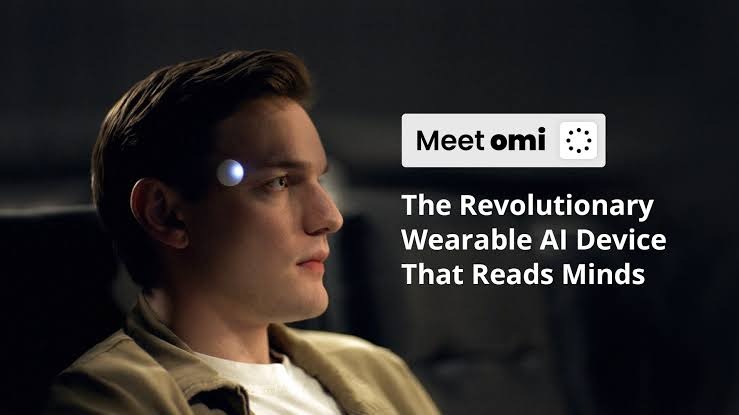
Source: Omi
Omi is a $179 wearable AI device designed to capture conversations throughout your day. The standard Omi is a small necklace-style device, and you can also attach it to an optional wristband; it connects to the Omi app on your phone, Mac, or browser.
Once it captures a conversation, Omi transcribes it and turns what you said and heard into summaries, memories, tasks, and reminders. You can then search those memories, ask Omi questions about past conversations, and connect the information to other apps.
You don't have to buy the wearable to use Omi. The iPhone, Android, and Mac apps can record directly, while the wearable simply gives you hands-free capture when you don't want to keep your phone out.
Omi turns conversations into searchable memories
Omi does more than keep a transcript of what was said. Its current product is built around turning conversations into memories, tasks, and other information that you can retrieve later.
Automatic memories: Omi turns recorded conversations into memories, along with summaries, key points, decisions, tasks, and reminders, so important information remains useful after the meeting ends.
Search by people and topics: Omi lets you search memories by people, topics, or phrases, making an old conversation easier to retrieve without manually opening recordings.
Ask Omi AI: You can ask Omi questions about what it knows from your conversations and memories, giving you a way to retrieve information in a conversational way.
Tasks and reminders: Omi identifies tasks and reminders from conversations and saves them alongside your other meeting information.
Daily use beyond meetings: Omi is designed for meetings, classes, and daily conversations rather than limiting capture to scheduled work calls.
Omi costs $19 per month for Plus or $29 for Unlimited
Omi lets you start without buying its wearable. The free Basic plan provides 300 cloud listening minutes per month, while Plus costs $19 per month for 1,500 listening minutes. Unlimited costs $29 per month and removes the monthly listening limit.
The Omi device itself costs $179 as a one-time purchase. You do not need the device to use Omi, because the app can record directly from your phone or Mac. The hardware is useful when you want hands-free capture instead.
Basic: Free, with 300 cloud listening minutes per month. Omi also provides unlimited free on-phone transcription.
Plus: $19 per month with 1,500 listening minutes, giving regular users five times the cloud processing allowance of Basic.
Unlimited: $29 per month with unlimited listening, so you do not have to ration which conversations receive Omi's cloud transcription and analysis.
Recording continues after the limit: Reaching the monthly listening allowance does not stop Omi from recording. The audio remains available to manage or export.
Omi device: $179 one-time, including the Omi device, protective case, neck lanyard, magnetic USB-C charging cable, and quick-start guide.
Omi is an open platform you can extend beyond its built-in features
Omi also takes a different approach to customization. Its hardware and software are open source, and the platform exposes an API and an MCP server, along with an app marketplace. That gives developers and technically minded users more ways to connect their conversations and memories to other tools.
Open-source hardware and software: Omi says its hardware, firmware, app, and backend are open source, allowing users to inspect and customize the platform.
API access: Omi's Developer API provides programmatic access to conversations, memories, and action items, allowing developers to build custom integrations and workflows around their data.
MCP server: Omi provides an MCP server to work with your Omi data using compatible AI tools and workflows.
Thousandas of apps: Omi's current product page lists more than 1,000 apps in its marketplace, extending what you can do with captured conversations and memories.
Third-party hardware: Omi can work with selected third-party AI wearables, including Plaud, Limitless Pendant and Friend and Bee, allowing those devices to serve as audio inputs while Omi handles transcription, memories, tasks and apps.
What Omi users love
Seamless Hands-free capture
Omi's wearable lets you capture conversations without reaching for your phone. You can also record through your phone, Mac or web.
Searchable memories
Omi turns conversations into searchable memories, summaries and tasks. You can later search or ask questions about what you've captured.
Open-source flexibility
Omi offers open-source hardware and software, alongside an API, MCP server and app marketplace. That gives developers plenty of ways to customize and extend it.
What Omi users flag
300 cloud minutes on Basic
The free Basic plan includes 300 cloud listening minutes each month. Recording can continue after the limit, but cloud processing stops.
Pricey cost
You can use Omi without buying its hardware. The Omi wearable itself costs $179.
Too many deliverables to explore
Omi offers a broad mix of apps, integrations, and developer tools. That flexibility can mean a more involved setup than a simple recorder.
Verdict: Omi vs. Pocket
Choose Omi if you want hands-free capture that can follow you through the day, then turn those conversations into a searchable memory of what you said, heard, and decided. Its wearable lets you record without reaching for your phone, while Omi can also capture through your phone or Mac and connect supported third-party devices to the same memory system.
4. Otter: Best AI Meeting Assistant for Live Transcription
Best for: Otter is the AI meeting assistant for teams who want live transcription, speaker identification, searchable meeting notes, AI summaries, and collaboration across Zoom, Google Meet, Microsoft Teams, and in-person meetings.
Similar to: Fireflies.ai, Fathom and Read AI.
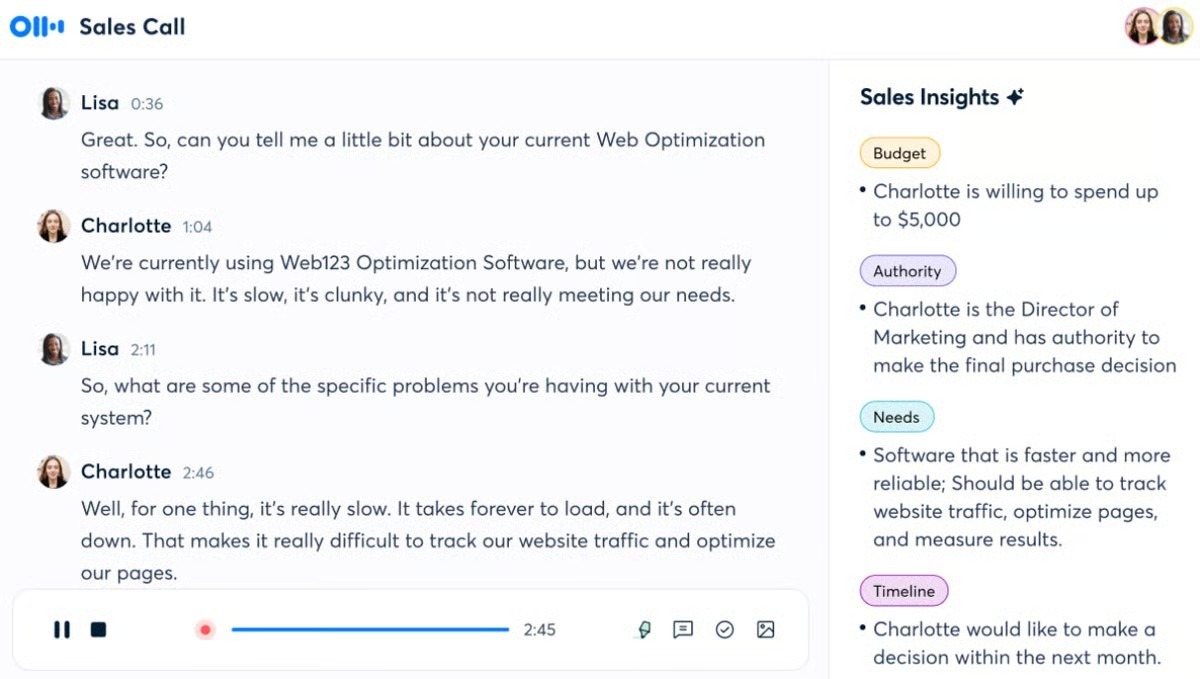
Source: Otter
Otter is an AI meeting workspace that turns conversations into live transcripts, summaries, action items, and searchable records. It makes the most sense for teams whose meetings already happen through Zoom, Google Meet, or Microsoft Teams and who want those conversations to become shared, searchable information rather than remain on a recording device.
Compared with Pocket, Otter puts the emphasis on what happens after the conversation is captured. Pocket gives you dedicated hardware for recording conversations wherever you are. Otter gives you a software workspace for capturing online meetings, collaborating on transcripts, asking questions across past conversations, and connecting meeting information to other tools. Otter and Pocket both record online meetings from a desktop app. Otter's difference is what happens afterwards: shared transcripts, comments and connections into Salesforce, HubSpot and Slack.
Otter turns online meetings into collaborative notes
Otter is designed around the meeting workspace. Its Notetaker can automatically join supported online meetings, while its desktop app can record without a separate Otter participant joining the call. The result is a live meeting record that people can review and work from together.
Calendar-connected recording: Connect Google or Microsoft Calendar, and Otter can automatically join scheduled Zoom, Google Meet, and Microsoft Teams meetings, so recurring calls can be captured without manually starting each one.
Botless desktop recording: Otter's Mac and Windows desktop app can capture meeting audio without its Notetaker joining the meeting as a participant. You can also wear headphones while recording.
Live transcription: Otter records and transcribes meetings in real time, providing a transcript as the conversation unfolds.
Collaborative meeting notes: Participants can comment, highlight important parts of the transcript, and assign action items, turning the meeting record into something the team can work from together.
Automated slide capture: Otter can capture presentation slides during supported meetings and include them with the meeting notes, preserving visual context alongside the transcript.
Otter costs $16.99 per user per month for Pro
Otter does not require a dedicated recorder. You can start with the free Basic plan and move to Pro or Business when you need more transcription capacity and additional features. For readers comparing ongoing costs, the relevant monthly prices are $16.99/user/month for Pro and $30/user/month for Business.
Basic: Free, with 300 transcription minutes per month, a 30-minute transcription limit per conversation, three lifetime audio/video imports, and access to the 25 most recent conversations.
Pro: $16.99 per user per month when billed monthly, with 1,200 transcription minutes per month, unlimited conversation history, and 10 file imports per month.
Business: $30 per user per month when billed monthly, with 6,000 transcription minutes per month, unlimited file uploads, up to three concurrent meetings, and additional administration features.
File imports: Basic allows 3 lifetime imports; Pro allows 10 per month; and Business allows unlimited imports within the plan's transcription capacity.
No hardware purchase required: Otter's software can record meetings without a Pocket-style dedicated recorder, so you can start without paying for a recording device.
Otter lets you question and organize your meeting history
The value of Otter extends beyond the live transcript. AI Chat can answer questions across your conversations, while speaker identification, search and integrations help turn a collection of meeting records into information you can actually retrieve and use.
AI Chat across meetings: Ask questions about your recorded conversations and retrieve information from your meeting history without manually opening transcripts one by one.
Speaker identification: Otter automatically groups speech by speaker and can identify people using speaker information already associated with your account or workspace.
Speaker management: You can tag speakers, rename them and merge duplicate speaker profiles, with changes applying across past and future conversations.
Searchable records: Otter's meeting archive provides a searchable archive of past conversations, allowing you to retrieve information after the meeting rather than relying on memory.
CRM and workflow integrations: Otter currently provides integrations including Salesforce, HubSpot, Zapier, Zoom, Slack and Dropbox, allowing meeting information to connect with other systems.
What Otter users love
Tags voices correctly even when half your team is in the conference room
"I like that I can record meetings where multiple participants are in a conference room and others are remote and it still tags each voice correctly." G2
Recurring Zoom meetings can be captured automatically
"I appreciate that Otter automatically connects with us for our content sprints every week via Zoom calls." (G2)
Meeting Agent stays in the call and writes the action items the moment it ends
"I love that it stays in the meeting as a participant, listens to all the conversations, and afterwards gives me a summary outline, which includes what to do and what not to do, along with the action items of the meeting." G2
What Otter users flag
Long recordings can take time to process
"Processing very long recordings can be slow. Faster handling of large files would improve efficiency." (G2)
The free plan limits conversations to 30 minutes
"With the free version, conversations are limited to 30 minutes." (G2)
Accents and overlapping voices make transcript accuracy slip in big calls
"Transcription accuracy drops when there is background noise, overlapping conversations, or strong accents, which means the notes still require some manual editing." G2
Verdict: Otter vs. Pocket
Choose Otter if your meetings are mainly online and you want the conversation to become searchable, collaborative team knowledge without buying dedicated recording hardware. Pocket is the better fit when you specifically want a physical recorder for conversations away from your computer, particularly when independent capture is the reason you want a hardware device in the first place.
5. Bee Pioneer: Best Wearable AI Assistant for Everyday Conversations
Best for: Bee Pioneer is the wearable AI assistant for people who want hands-free, everyday conversation capture through a wristband or clip, with automatic memories, summaries, actions, voice notes and daily insights without storing raw audio.
Similar to: Omi, Limitless and Plaud AI.
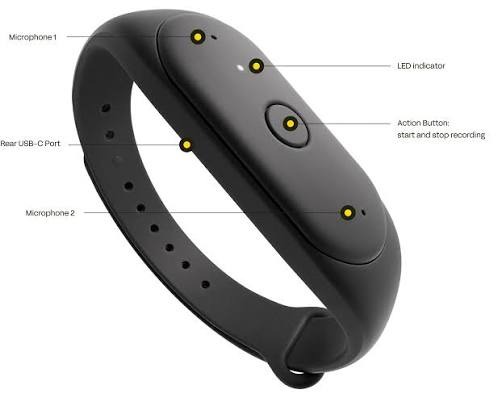
Source: Bee Pioneer
Most AI note takers wait for a meeting to happen. Bee Pioneer is designed to stay with you through the rest of the day.
The $49.99 wearable can be worn on your wrist or clipped to your clothing, then used to capture conversations and voice notes. Bee processes those conversations into summaries, tasks, reminders, and personal insights, with newer features such as Actions, Daily Insights, and Templates extending what it can do after capture.
That makes Bee a different proposition from Pocket. While Pocket pairs a recorder with a desktop app for online meetings, Bee is moving toward ambient personal AI.
Bee turns everyday conversations into a personal AI memory
Bee's appeal is not just that it records without requiring you to hold your phone. It takes the information it captures and uses it to build a more persistent layer of personal context.
Daily memories: Bee turns captured conversations into information you can revisit later, rather than leaving each conversation as an isolated recording.
Actions: Bee connects conversations with email and calendar workflows, allowing it to draft emails and create calendar events from relevant commitments.
Daily Insights: Bee looks across information collected over time to surface patterns and personalized insights, moving beyond the single-meeting summary.
Voice Notes: A dedicated Voice Notes feature lets you capture thoughts and ideas as they occur, giving Bee information that does not have to come from a conversation with someone else.
Templates: Bee has introduced templates to shape captured information for specific use cases, including meeting recaps and study-related notes.
Bee Pioneer costs $49.99, with no current Premium price published
Bee Pioneer currently sells for $49.99. That is the price worth putting in this article because it is confirmed by current Bee-related product information. Bee's current product direction also mentions Premium functionality, but I would not put a monthly figure next to it because the official Premium price is not published. The frequently quoted $19/month figure comes from earlier coverage.
$49.99 hardware: Bee Pioneer is currently listed at $49.99, making its upfront hardware cost substantially lower than many dedicated AI wearables.
Up to 7 days of battery life: Bee lists up to 7 days of battery life, or more than 160 hours of operation.
Wristband or clip: Pioneer can be worn on the wrist or attached to clothing, so you can choose the form that fits the conversation or activity.
Current U.S. availability: Bee Pioneer is currently sold in the United States, so availability matters for readers outside the U.S.
Current iOS support: The current Pioneer experience is iOS-focused, so Android users should check Bee's current compatibility before buying rather than assuming full platform parity.
Bee processes raw audio in real time instead of keeping an audio archive
This is one of Bee's most important differences from a conventional recorder. Bee says conversations are processed in real time, and raw audio is not stored. The useful output is therefore the information generated from those conversations, such as transcripts, summaries, and insights, rather than a permanent library of original audio files.
Real-time processing: Bee processes captured conversations in real time rather than treating raw audio as a permanent archive.
No stored raw audio: Bee says raw audio is not stored after processing, distinguishing it from recorders designed to keep the original audio for later playback.
Recording indicator: The Pioneer uses a visible green light to indicate when recording is active, signaling to nearby people that capture is taking place.
Physical capture control: The wearable has a physical button for controlling capture, so starting or stopping a recording does not require opening the phone app.
Derived data remains important: Not storing raw audio does not mean Bee stores nothing. Transcripts, summaries, memories, insights, and information from connected services can still form part of the user's account data.
What Bee Pioneer users love
All-day wearable capture
Pioneer can be worn on your wrist or clothing and offers up to seven days of battery life. It is designed to capture conversations throughout the day.
Personal AI memory
Bee turns captured conversations and moments into summaries, memories, tasks and insights. That makes it broader than a simple meeting recorder.
Everyday integrations
Bee connects with Gmail, Google Calendar and Google Contacts. Its Actions feature can also turn captured context into useful follow-ups.
What Bee Pioneer users flag
U.S.-only shipping
Bee currently ships Pioneer only within the United States. International customers cannot currently order it through the normal store.
iOS only
Pioneer currently supports iOS. Android users therefore cannot currently use the full Pioneer experience.
Premium pricing isn't published.
Pioneer costs $49.99 today. Bee has not yet published the monthly price for its future premium subscription.
Verdict: Bee Pioneer vs. Pocket
Choose Bee Pioneer if you want a low-cost wearable that turns everyday conversations into a broader personal AI system of memories, actions, and insights, rather than a traditional meeting archive. Pocket is the more straightforward choice if you primarily want dedicated recording hardware for capturing conversations and meetings and want the recorder itself to remain the center of
Bee is especially compelling for readers who want to experiment with ambient AI without spending hundreds of dollars on hardware. But its current U.S. availability and iOS-focused experience mean it is not the universal choice, and readers should check current compatibility before buying.
Final Verdict: What’s the Best Pocket Alternative for Note Taking?
The best Pocket alternative depends entirely on what you need right now. If you want to capture client meetings without remembering to carry another recorder, keep the original audio from outliving the transcript, and turn conversations into searchable work afterward, Jamie can be the strongest choice among the 5 Pocket alternatives for note-taking.
Pocket is genuinely good at what it was built to do because it is more extensible than its hardware-first design might suggest. Its official MCP server lets tools such as Claude and Cursor access Pocket recordings, search transcripts and meeting history, query conversations, and work with action items. Pocket also exposes a public API and webhooks for custom integrations.
Here’s where Jamie changes the equation:
Jamie does not require dedicated hardware: Your laptop handles online meetings, while your phone can handle in-person conversations. There is no recorder to remember, charge, attach to your phone, or leave sitting on a charger when you switch between different types of meetings.
Jamie does not require a meeting bot: It captures meetings without appearing as another participant, so there is no AI attendee waiting to be admitted into the call.
Jamie does not leave the original meeting audio sitting in your account: Once transcription is complete, Jamie deletes the meeting audio while keeping the transcript and notes. That creates a fundamentally different retention model from a recorder built around keeping the original recording.
Jamie does not make you choose between your laptop and your phone: You can move between online meetings and face-to-face conversations while keeping the resulting notes inside the same workflow.
Jamie does not lock speaker recognition behind a paid upgrade: Speaker Recognition and Speaker Memory are available on the Free plan, allowing Jamie to identify and remember recurring voices across meetings.
Jamie does not stop at transcription: It turns conversations into structured notes, summaries, and action items, with templates allowing the output to match the type of meeting you just had.
Jamie does not make your old meetings difficult to interrogate: Ask AI lets you question your meeting history and retrieve information from previous conversations without reopening every transcript.
Jamie does not keep the meeting trapped inside the note-taking app: Its integrations can move meeting information into tools such as Notion, Google Docs, OneNote, and supported CRM and task-management platforms.
Jamie does not leave every follow-up on your shoulders: Its agentic capabilities can use meeting context and connected tools to help turn what was discussed into the work that needs to happen next.
And this is where the Pocket comparison gets interesting.
Pocket's desktop app records Zoom, Microsoft Teams and Google Meet without the physical recorder. The gap is that the hardware is where Pocket's phone-call recording lives, so a client call on the move still depends on carrying and charging the device.
Pocket also has some limitations beyond the hardware. Some of the earlier app-related complaints, particularly around slow search and finding older summaries, were significant in the reviewer's earlier experience, although the 2026 rebuild addressed those problems.
You can also choose another Pocket alternative when the job is different:
Choose Plaud if you want dedicated recording hardware but a broader software ecosystem: Its physical recorders handle phone calls and in-person conversations, while Plaud Desktop extends the workflow to online meetings.
Choose Omi if you want your recorder to become a personal memory system: Its wearable gives you hands-free capture, while Omi turns conversations into searchable memories, tasks, and insights.
Choose Otter if your priority is live transcription and collaborative online meetings: Its software-first workflow is built around real-time transcripts, shared meeting knowledge, and integrations.
Choose Bee Pioneer if you want an AI that follows you beyond formal meetings: Its wearable approach focuses on everyday conversations, memories, actions, reminders, and daily insights.
Excellent experience and I save many hours to focus on what really matters.
Jean-Christophe Klarer
Head of Services | Nagarro
Professional Services / Consulting · 10.000+ employees
FAQs
What is the best Pocket alternative in 2026?
The best Pocket alternative depends on what you want to change. Jamie is the strongest fit if you want software-based recording without dedicated hardware, while Plaud suits users who still want a recorder, Omi adds wearable capture and searchable memory, Otter focuses on online meetings, and Bee Pioneer takes an ambient personal-AI approach.
Is Jamie better than Pocket?
Jamie can be the better choice if you do not want to carry, charge, or remember a separate recorder. Jamie records through the devices you already use, while Pocket combines desktop software capture with dedicated hardware for independent in-person and phone-call recording.
Does Jamie require a recording device?
No. Jamie can record from your computer and mobile devices, so you do not need to purchase dedicated recording hardware.
Does Jamie record meetings without a bot?
Yes. Jamie captures meeting audio from your own device instead of joining the call as an AI participant, so there is no meeting bot appearing in the attendee list.
How do the AI features compare across these tools?
The products take different approaches: Jamie focuses on structured notes, Ask AI, speaker memory and connected workflows. Pocket combines dedicated hardware with AI features and MCP; Plaud combines hardware with templates, multiple AI models and MCP. Omi turns conversations into searchable memories; Otter emphasizes live meeting intelligence; and Bee builds longer-term personal context.
Which Pocket alternative is best for in-person meetings?
Jamie, Plaud, Omi, and Bee Pioneer all support in-person capture, but they approach it differently. Jamie uses your existing phone, Plaud and Omi offer dedicated hardware, and Bee Pioneer is designed as a wearable personal AI device.
Which Pocket alternative is best if I don't want to carry hardware?
Jamie is the simplest choice because it does not require a dedicated recorder. Omi is another option because you can start with its phone or Mac apps and add its wearable when you want hands-free capture.
Is Plaud better than Pocket?
It depends on what you value. Plaud offers a broader hardware ecosystem, 112+ transcription languages, 10,000+ templates, Plaud Desktop, and MCP, while Pocket's appeal is its dedicated capture workflow and AI ecosystem.
Does Pocket connect to AI assistants through MCP?
Yes. Pocket can connect its captured information to compatible AI assistants through MCP, allowing external AI workflows to work with your Pocket data rather than keeping it entirely inside the Pocket interface.
Is Otter better than Pocket for online meetings?
Otter is generally the stronger fit if most of your conversations happen online. It offers live transcription and software-based recording, while Pocket is more compelling when you specifically want dedicated hardware for capturing conversations away from your computer.
Which Pocket alternative has the most generous free plan?
There is no single winner across every type of limit. Plaud's Starter plan provides 300 transcription minutes per month with an activated account; Omi provides 300 cloud listening minutes plus unlimited on-phone transcription, while Jamie uses meeting-count and meeting-length limits rather than a transcription-minute pool.
Which Pocket alternative allows the longest meetings?
Plaud's Unlimited plan has the clearest published allowance for very long recordings: up to 24 hours of transcription per user per day. Jamie allows up to 5 hours per meeting on its higher plans, while Otter's plans impose per-conversation limits.
Does Jamie support speaker recognition?
Yes. Jamie identifies speakers and offers speaker memory, allowing recurring voices to be recognized across meetings rather than treating every recording as a completely new conversation.
Can Jamie search and answer questions across past meetings?
Yes. Ask AI lets you ask questions about your recorded meetings and retrieve information from your meeting history without manually opening individual transcripts.
Does Jamie integrate with CRM and other work tools?
Yes. Jamie supports integrations and connected workflows for destinations such as Notion, Google Docs, and OneNote, with additional CRM, task-management, and developer capabilities available depending on the plan.
How does Jamie handle meeting audio and data privacy?
Jamie says meeting data is stored and processed in Europe, meeting audio is deleted after transcription, and customer meeting data is not used to train AI models. Jamie also publishes GDPR compliance and ISO 27001 certification as part of its security posture.