5 Best Plaud Alternatives for Note Taking [2026]
Sanduni
Growth Content Editor
![5 Best Plaud Alternatives for Note Taking [2026]](/api/media/payload/plaud-alternatives-5337.png)
I compared five Plaud alternatives for note taking; Jamie, Notta Memo, Granola, Pocket, and HiDock P1.
These alternative AI note takers to Plaud were compared on data security, transcription, speaker identification, hardware, free plans, and price.
Jamie was previously evaluated against four other famous AI note takers using two metrics that measure an AI note taker's performance during a meeting and Jamie scored, 98 out of 100 for speaker identification, and 90 for transcription.
Jamie performed better than Granola, Otter, Fireflies, and Fathom. You can see the receipts and proof to the test over at our AI note taker article.
Now before read this article, I need to give a quick reminder of how Plaud truly works.
Plaud has a desktop application called Plaud Desktop, and it does not work without the recorder. The Plaud Desktop app needs the recorder to work.
This requires carrying both devices in order to capture the same set of notes. This means the app won't work if you forget to bring the recorder that you left at home and vice versa.
Whether you already own a Plaud device or are still deciding, the question is the same: what is the best Plaud alternative for note-taking? In this article, we are going to show you 5 of them.
TL;DR: the 5 best Plaud alternatives for note taking
Jamie, best overall AI note taker: consent first, bot free notes from in-person and online meetings in 100+ languages, on Mac, Windows, iPhone and Android, with Scratchpad, live transcription, meeting data in Europe and permanent audio deletion. Jamie is GDPR compliant and ISO 27001 certified, with speaker identification and memory. Pro runs unlimited meetings at 5 hours each, with unlimited history, storage and unlimited Ask AI. Free covers ten meetings, Plus is 25 euros monthly.
Notta Memo, best for translation across 58 languages on a card-sized recorder. The Notta Memo 28g recorder is priced at $149 and can capture thirty (30) hours of recording time. The free web plan includes 120 minutes of transcription each month. For customers who purchase the recorder, Notta includes 300 minutes of transcription each month.
Granola, best for a bot free notepad on a Mac or a phone. Granola captures and transcribes on the user's computer and retains the transcript while deleting the recorded audio. The free plan costs nothing, and Granola's pricing page calls its meeting history limited. Granola holds SOC 2 Type II certification and complies with GDPR and UK GDPR, and Granola Chat drafts follow-up emails and sends Slack messages.
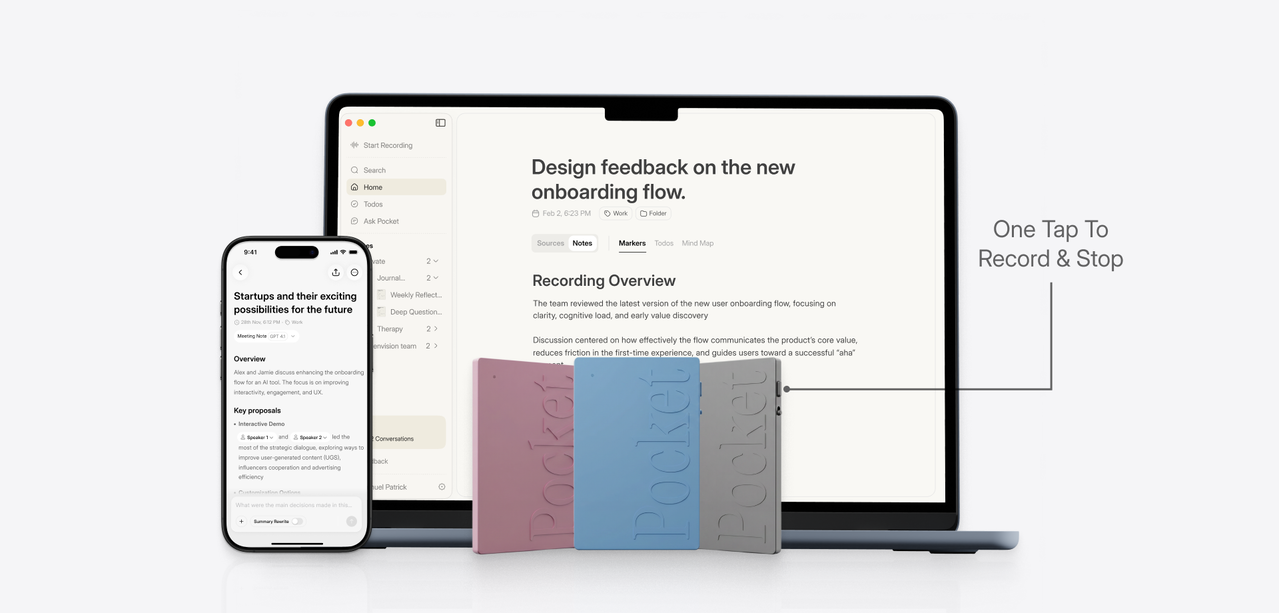
Pocket, best for people whose recording happens on the phone. The Pocket 52g recorder costs $129 and includes a MagSafe mount and a contact microphone for capturing phone conversations. There is a free plan, which does not charge anything but keeps summaries for thirty (30) days and limits Ask Pocket to two (2) messages per day.
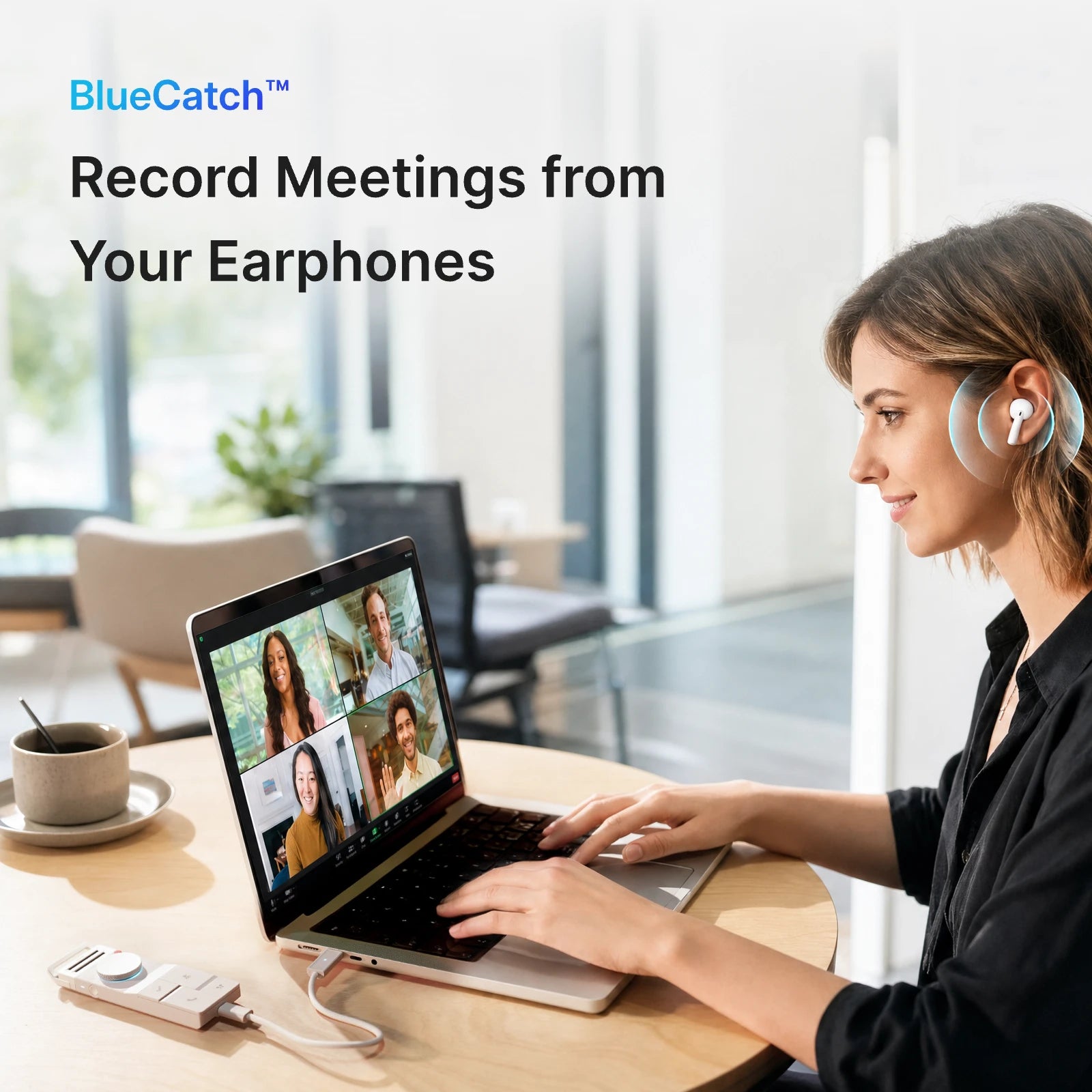
HiDock P1, best for calls taken on Bluetooth earphones. The HiDock aluminium P1 recorder weighs seventy-two (72) grams and has three (3) different recording modes. HiDock states that owners of the P1 receive free transcription for the life of the product, in seventy-five (75) languages. HiDock complies with GDPR, and the P1 holds 64GB of recordings and turns speeches of up to four hours into structured paragraphs.
What Are the Best Plaud Alternatives for Note Taking?
The top 5 Plaud alternatives to use for note-taking are Jamie, Notta Memo, Granola, Pocket, and HiDock P1. All of these AI note takers will capture a conversation and produce both a written summary and an actual transcript of what was said during the conversation. Jamie can capture either in-person or online meetings using a device that you already have, on every plan including our free plan. All meeting data is stored and processed in Europe.
Once the transcription has been completed, Jamie then deletes the recording of the meeting. Granola can also capture recordings without having to have a bot as part of the process, and Granola states that it does not store any audio. Notta is SOC 2 Type II and ISO 27001 certified.
Here is how Jamie, Notta Memo, Granola, Pocket and HiDock P1 compare on the things your team checks before a client call. Every cell opens up for the fuller answer.
1. Jamie: Best Plaud Alternative AI Note Taker on Every Device
Best for: Jamie is the AI note taking app for teams who want bot free notes from in-person and online meetings on your laptop and phone, 100+ languages, Ask AI, and meeting data in Europe.
Similar to: Granola, Otter.ai and Fathom.
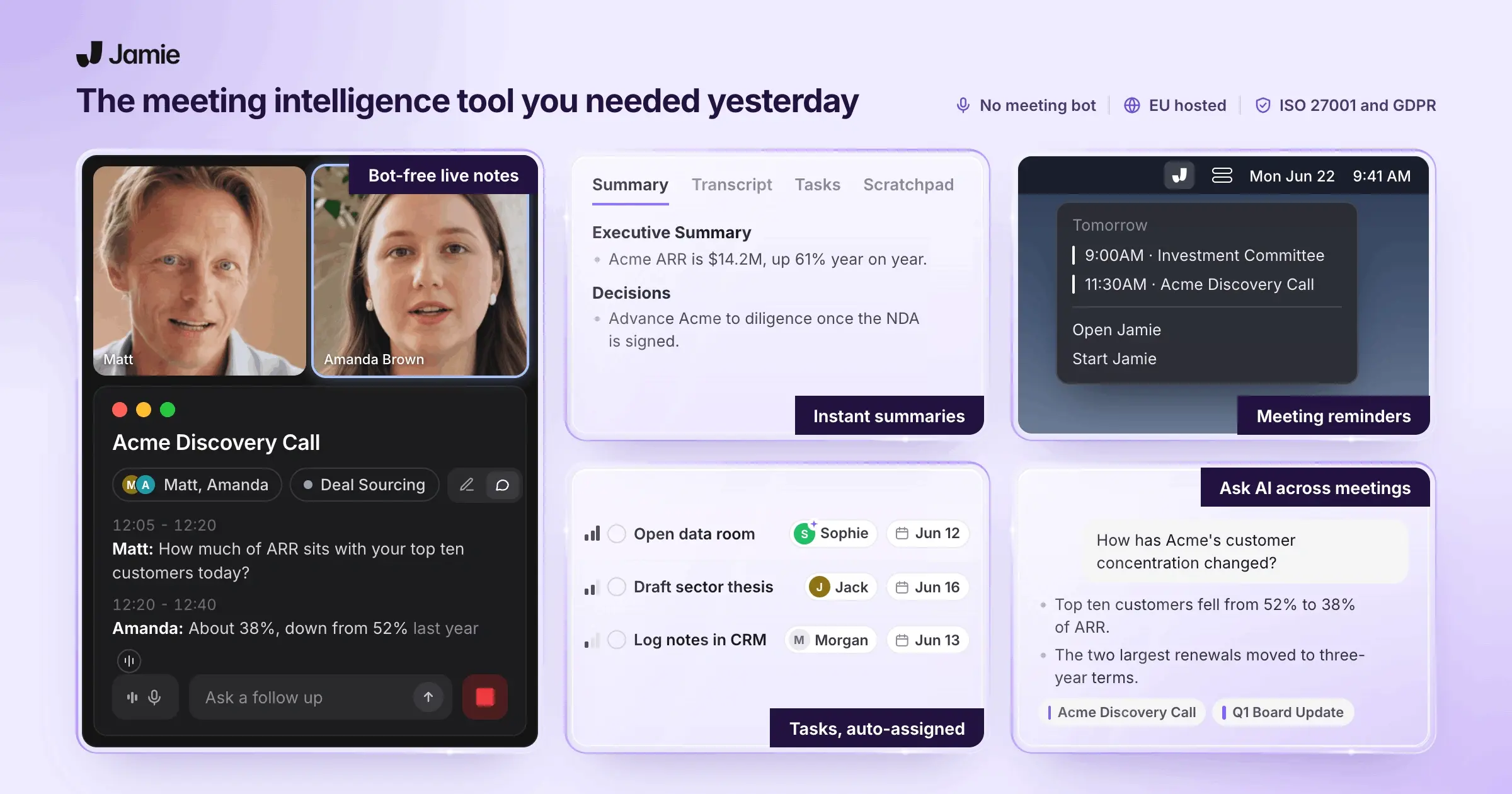
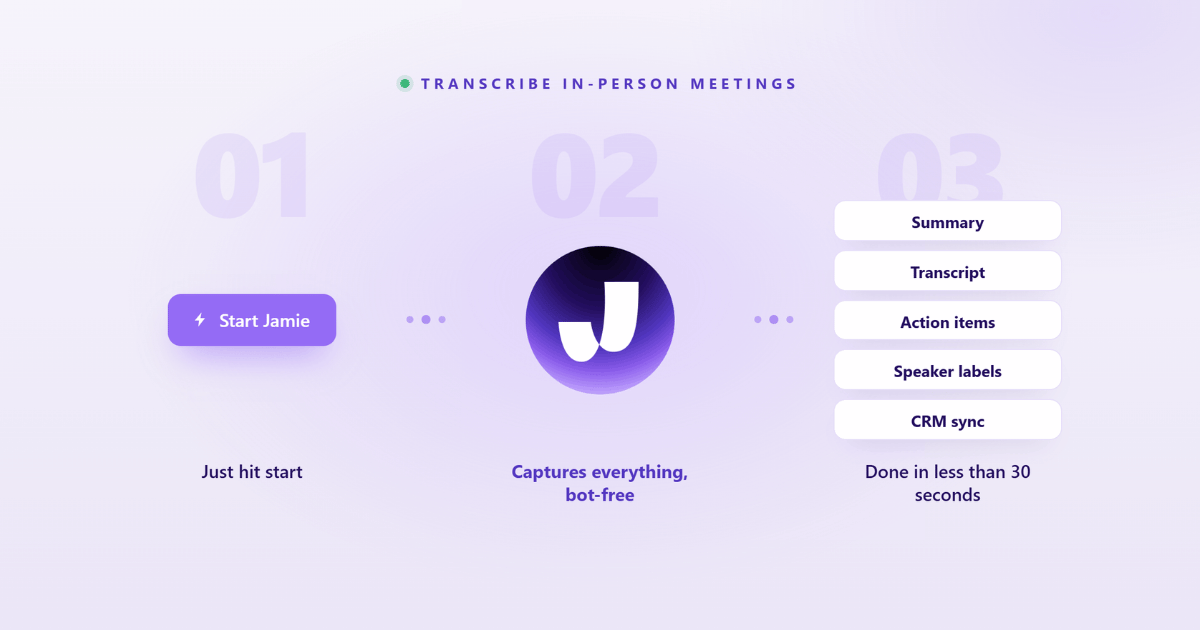
Jamie is a bot-free AI note taker that takes notes during in-person and online meetings. This is done via your own device (i.e., without any intrusive bot joining your meeting; no recorder sits at your counterparties' tables). We created Jamie for those conversations that remain between the individuals in the meeting room.
All meeting data is both stored and processed in Europe, and Jamie is GDPR compliant and ISO 27001 certified. Once the transcription is complete, Jamie permanently removes the recorded meeting audio. Your data will neither be used by Jamie to train models, nor by our model providers.
As for informing the parties within the meeting room, you inform them directly. Below are the three notices Jamie carries for it.
You obtain verbal consent in your own words.
Optional: the Automated Recording Notice email goes out prior to the meeting.
Once enabled, a notice post appears in the meeting chat.
Jamie generates Executive Level AI Notes with an executive summary, a full summary and the action items
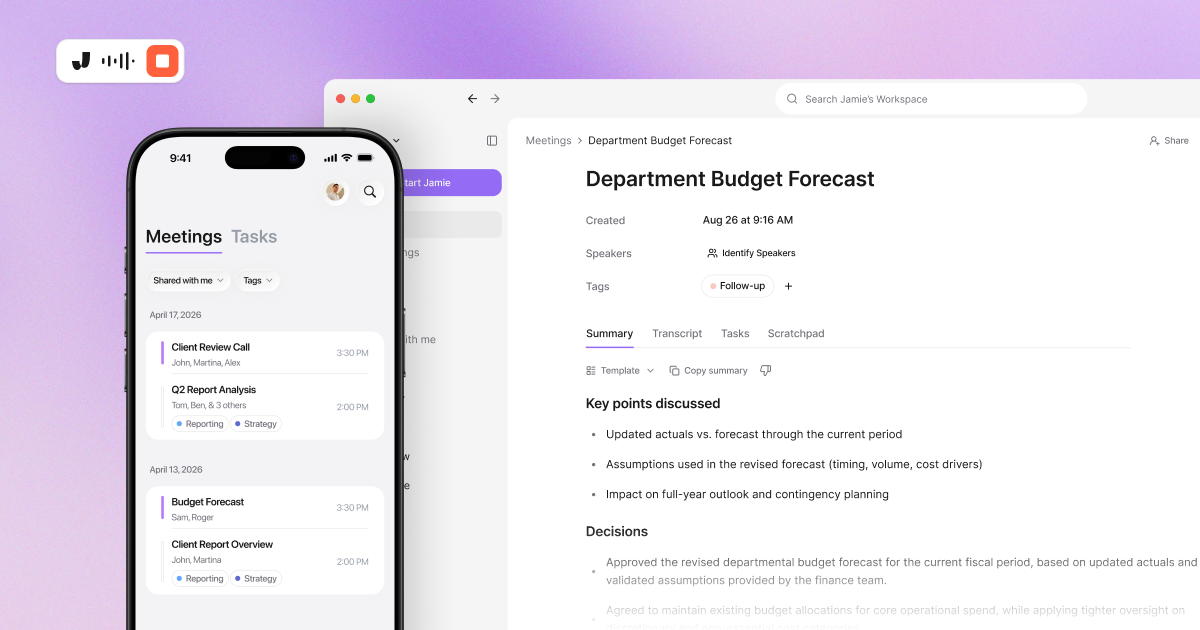
Once you click Stop Recording, Jamie will generate the meeting notes. The documentation outlines how Jamie does this in sequence, which is transcription, then speaker matching, then the summary, then the tasks, with a processing time of five to ten minutes. If you write up a client call before the next one starts, these four outputs are the ones you send on:
Executive Level AI Notes: The Write Up Is Already Done. Jamie organizes the notes as an executive summary and a full summary organized by topic, on every plan including our free plan. Instead of having to rebuild a meeting from a transcript, you forward the summary to the client.
Action Items With An Owner: You Stop Working Out Who Owes What. Jamie identifies the action items with assignees during the note generation process, on every plan. You do not need to work out who is responsible for each item after the call.
Live Transcript And Scratchpad: Live Transcription With Your Own Notes. During the meeting, Jamie will display the Live Transcript on your screen. Your private notes go in the Scratchpad beside it. None of your Scratchpad notes get lost between the call and the write up.
Fully Editable Output: You Fix A Name Without Starting Again. All parts of the meeting output, the notes, the transcript and the tasks, may be edited within Jamie, on every plan. A misheard company name is a two second edit rather than a rewrite.
30+ Summary Templates: The Format Your Firm Already Uses. Jamie includes a minimum of thirty plus different, pre-designed template options for each level of plan (including the free) with one customizable option available at the lowest tier, which is free. Three customizable options are available to the Plus tier, while unlimited customization options are available to those who purchase the Pro tier. You stop reshaping the same notes into your own format by hand..
Jamie records from your own laptop or mobile, with no additional device on your table
Jamie records the conversation using the laptop or mobile you already bring into the meeting room. Since there are no additional devices, you don't need to place anything on your table and nothing joins your call.
In addition, Jamie won't interrupt your meeting with something you didn't expect, like a recorder. Your relationship of trust with the person hosting it remains intact. If you are the associate who walks into a room somebody else owns, then these three answers cover the part you cannot control:
The diligence call you do not host: on a diligence call or a management presentation the target company hosts, the room, the table and the rules are your client's, not yours. A card sized recorder has to be placed somewhere on that table in front of them, and Jamie asks for nothing on it, because the recording runs on the laptop you brought with you.
The recording policy your compliance officer wrote: your compliance officer set out how a client conversation may be recorded, and Jamie follows it with your own disclosure rather than a device. You obtain verbal consent in your own words, the optional Automated Recording Notice email goes out before the meeting, and the meeting chat notice posts in the call once you switch it on.
Walk in, ask, record: you walk into your client's office, open the laptop you already brought, obtain verbal consent in your own words, and start the recording. Nobody has to explain a strange object to a founder before the meeting can start.
Jamie deletes the meeting audio once the transcription is finished
Jamie retains your notes and your transcript and permanently deletes the meeting audio once transcription has been completed. Therefore, when Jamie records a confidential conversation, nothing remains behind that could be forwarded, subpoenaed, or found in an account a year later.
If you record calls regarding unannounced deals, these three answers cover what happens to the recording:
The call about an unannounced acquisition: the most sensitive hour of a deal is the one nobody wants sitting in a vendor's storage. Jamie removes the audio for you rather than waiting for somebody to remember it.
The partner whose name is on the mandate: the partner running the mandate, and the compliance officer beside them, both answer for what was kept. Neither of them has to trust a person to press delete.
Nothing left to hand over: the call ends, the notes appear, and there is no audio file left to govern, share by accident or hand over. Jamie removes the audio once the transcript exists, while Plaud's own trust page states that data is kept for as long as the account remains active.
Jamie stores all meeting data in Europe and is GDPR compliant and ISO 27001 certified
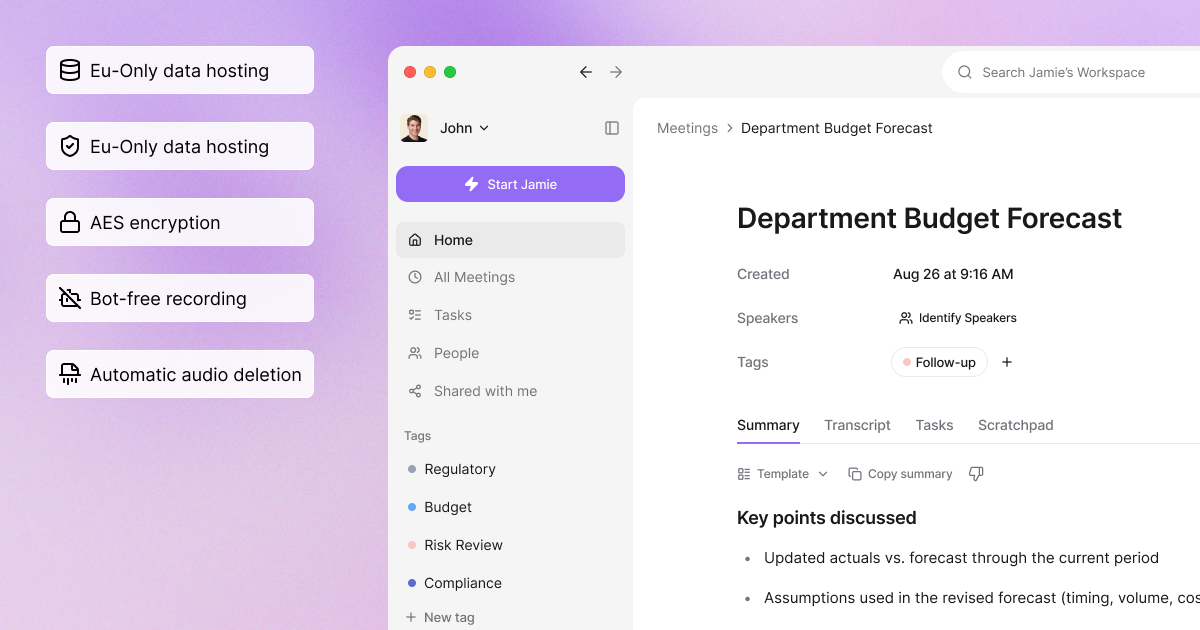
Regardless of plan, Jamie stores and processes all meeting data within Europe. Jamie also is GDPR compliant and ISO 27001 certified as a company, and Jamie is DORA-ready. If your legal or IT teams review Jamie before a client call, these three answers are the ones they ask for:
The security questionnaire before approval: the questionnaire arrives before any note taker is approved, and it asks for residency, certification and model training. Every one of those answers sits on our own security page, one line each, all meeting data in Europe, GDPR and ISO 27001, and no model training. Plaud runs data centres in the US, Europe with Frankfurt, Singapore and Japan, and does not train on your data by default.
The officer who signs Jamie off: your compliance, legal or IT officer is the person who has to defend the choice later. They answer the certification question from our own page, without waiting on a vendor to send evidence mid sign off.
No model training on your data: neither Jamie nor our model providers use your data to train models. That is the sentence a client asks for in writing before their own management team is recorded.
Jamie runs on macOS, Windows, iOS, Android and the web, with no second device to carry
Jamie records the audio on the device you already own and synchronizes all of your meetings across each of those devices from one account. There isn't a separate recorder to purchase, charge, keep tabs on or pass along. No 64GB of client conversation travels in a jacket pocket. If your week involves travel to multiple locations including a site visit, a portfolio company office, an airport, then these three answers cover what you need to carry:
The site visit and the airport: on a site visit, in a portfolio company office or between flights, you already carry a laptop and a phone. Jamie records on either one, and in-person meetings are covered on every plan, including our free plan. Plaud makes an app for your laptop, called Plaud Desktop, and their pricing page says it needs the recorder to work. The recorder travels with you.
The IT team that keeps the asset register: a recorder is an asset somebody has to inventory, insure and collect when a colleague leaves. Your IT team has nothing extra to track, because Jamie runs on the machines they already manage.
One account, every device: your meetings sync across macOS, Windows, iOS, Android and the web from a single account. Nobody copies files off a device before the notes are readable.
Jamie counts meetings rather than metered transcription minutes
Jamie sets how long a meeting can run and how many meetings you get on each plan, and does not sell a pool of transcribed minutes. Pro runs unlimited meetings at up to 5 hours each. Twenty calls a week at an hour each is eighty hours a month, and Jamie counts none of those hours against a quota. Thus there is no extra cost in the middle of a long week. If your diligence weeks run back to back, the three answers below cover all that you could possibly want to record:
The back to back diligence week: a diligence week is the week you least want to be rationing minutes. Jamie counts meetings instead of minutes, with 10 AI notes and transcripts a month on our free plan, 20 on Plus and unlimited from Pro upwards. Plaud's own pricing page caps its Pro plan at 1,200 transcription minutes a month for 17.99 USD, where Jamie's Pro plan has no monthly minute pool at all.
The associate and the budget holder: the associate running the calls never checks a remaining balance, and whoever owns the budget sees one price rather than a top up. Meeting length runs 30 minutes on Free, 2 hours on Plus and 5 hours from Pro.
Unlimited storage on every plan: storage is unlimited on all five plans, and Ask AI is unlimited too, including on our free plan. Nobody deletes last quarter's notes to make room for this quarter's.
One Transcription Quality On Every Plan: You Never Pay For Better Words. Jamie does not sell tiers that carry higher levels of accuracy than what is already provided in our base tier or free version. We have listed all pricing tiers on our pricing page and there are none that provide any higher level of accuracy. The only thing we change is the number of meetings you can hold, how long they last, what templates are included, and what type of integrations you will be able to use. You will never question if the paid plan could have captured the room better..
Jamie records every meeting platform on your device, plus in-person meetings
Jamie captures the audio during the meeting on your own device and does not join calls. That means Jamie captures the audio from all the online meeting platforms on that device, including Microsoft Teams, Google Meet and Zoom. Additionally, the same app records your in-person meetings. Therefore if half of your week is spent online and the other half is spent face-to-face in somebody's office, the three answers below cover both halves of your week:
Teams in the morning, a founder in the afternoon: a sourcing call on Microsoft Teams and a founder meeting in a room are the same job for Jamie. Nobody on your team works out which tool covers the call in front of them.
Nothing in your attendee list: nothing joins your call as a participant, and nothing appears in the attendee list your client is looking at. You are the one person from your side in that meeting.
In-person on every plan: in-person meetings are covered on every plan, including our free plan. You do not upgrade to record the conversation you had across a table.
Jamie displays a Live Transcript on your screen while the meeting is still running
Jamie generates the transcript in real time as opposed to generating it after the meeting has concluded. You read back what was discussed throughout the meeting without having to pause anyone or wait for an uploaded file. Once Live Transcript is started, it appears on your screen in real time as the meeting continues. Thus, if you sit through lengthy committee meetings, the three answers below cover the length of the wait:
The three hour investment committee: in a three hour investment committee the number you need is often an hour behind you. You can check it on your screen without stopping the room to ask.
The associate taking the notes: the associate keeping the record is the one person who cannot rewind the conversation. Live Transcript keeps the whole meeting in front of them as it runs.
No upload, no queue: nothing has to be transferred off a device and processed before you can read it. Jamie captures the audio on your own machine, and the text appears while people are still speaking.
Jamie identifies each speaker through speaker diarisation and matches voices with Speaker Memory
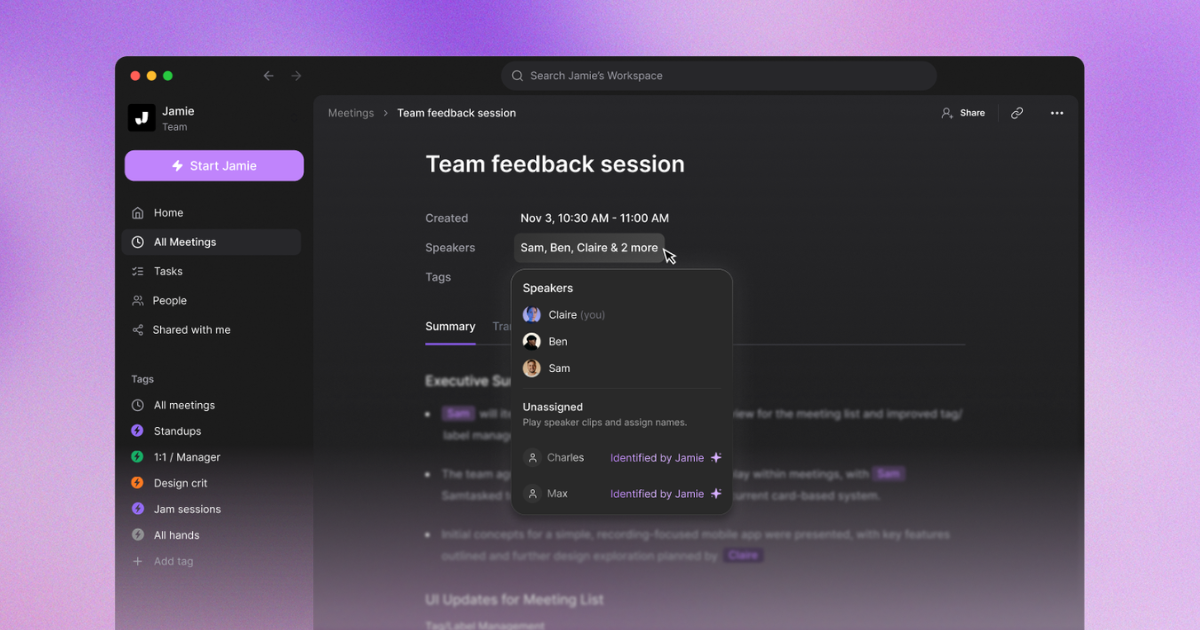
Jamie assigns a name to each speaker as opposed to assigning them a number. Speaker Memory then matches that same voice in future meetings, and thus the names remain intact from one call to another. If you write up meetings with several people in the room, the three answers below cover who spoke at various points throughout the meeting:
The four person management presentation: four people around a table usually come back as unnamed speakers. Jamie separates them through speaker diarisation and labels the transcript with real names.
Attributing a number to the CFO: the associate writing it up has to put a figure against the CFO, not against Speaker 2. The attribution is already on the page before they open it.
Speaker identification and memory: Jamie has the ability to remember voices between meetings. You are not renaming Speaker 1 and Speaker 2 by hand after every call.
Jamie logs meeting notes to DealCloud, Affinity, HubSpot and Dynamics 365
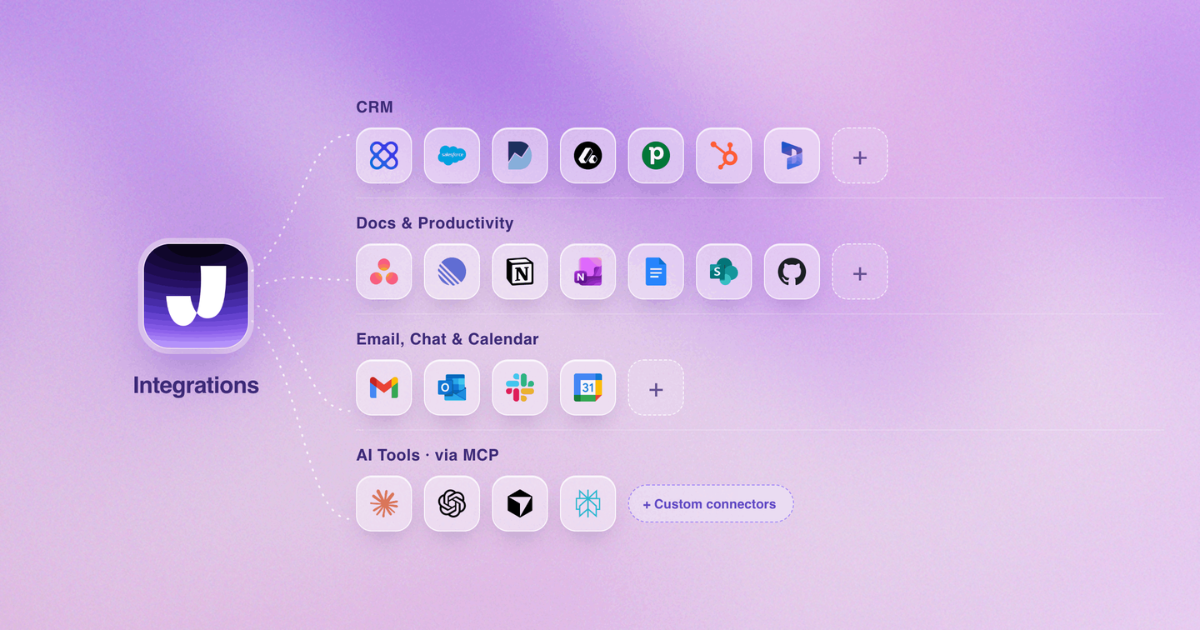
Jamie logs the meeting summary to the system your team already uses, once you enable syncing within Settings. This way, the note is logged where the next person will look for it. For example, if your company runs a customer relationship management (CRM) or deal tracking system, the three answers below cover the retyping:
The sourcing call and the company record: a sourcing call has to land against the right company record before the next call starts. Jamie logs it to DealCloud, Affinity, HubSpot and Dynamics 365, attaches it to Salesforce records and sends it to Attio, Notion, Google Docs, OneNote and Asana.
The head of platform who owns the CRM: the person who owns the CRM cares whether the data arrives without a person in the middle. The sync is set once in Settings and runs on every meeting after that.
MCP, API and webhooks: Jamie connects to Claude, ChatGPT and Cursor through MCP, with MCP on Pro and up, and our API and webhooks cover whatever else your firm runs. Nobody exports a transcript by hand.
Jamie answers questions across all of your meetings at once with Ask AI
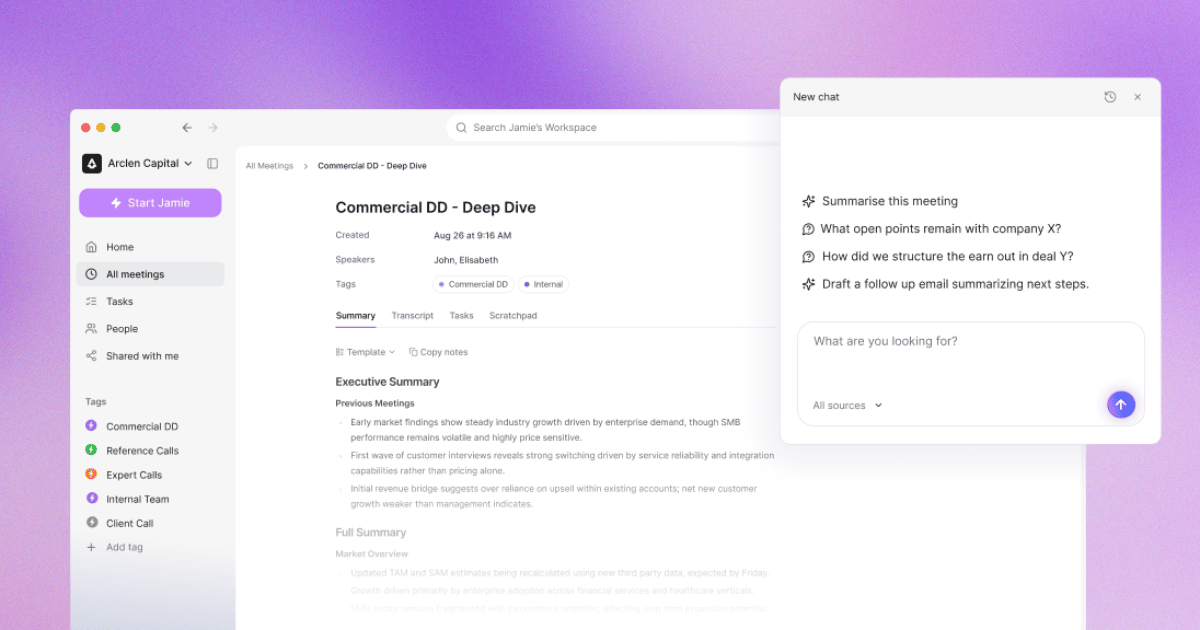
Conversational Intelligence in Jamie searches across all of your previously recorded meetings and answers in one place. As such, the hours you have recorded stay useful as opposed to sitting unopened. If your team records more meetings than it can ever listen to again, the three answers below cover the pile:
Three management teams, one question: an investment committee asks what three different management teams said about pricing. Ask AI returns the answer without anybody opening three transcripts.
The partner preparing for committee: the partner preparing the paper needs the quote, not the recording. Ask AI is unlimited on every plan, including our free plan.
Jamie is agentic: the Agent acts inside your connected tools, Agent Connectors authorise it with your own account, and Agent Skills carry the instructions you write once. The follow up happens in those tools instead of sitting on your desk until Friday.
Jamie Pricing
Free: EUR 0 per month
Plus: EUR 25 per month
Pro: EUR 47 per month
Team: EUR 39 per seat per month
Enterprise: Custom pricing
Source: meetjamie.ai/pricing, read on 25 August 2026 with the monthly toggle on.
Storage is unlimited on every plan.
What Jamie users love
Bot-free capture keeps the call free of an extra participant
"I like Jamie because it's a bot-free AI note-taker that can take notes without an awkward bot on the call." Verified User in Design, G2
Transcription accuracy and the layout of the AI summaries
"The transcription is also usually very accurate. I also like the AI summaries it generates after the call - they're well laid out and organized, especially compared to other AI note-takers." Verified User in Design, G2
Multilingual meetings, including Hebrew, in person and online
"Finally an app that... Understands Hebrew. Jaime is also a life saver for: Multi lingual conversations [and] Offline and online meetings." Rachel C., G2
What Jamie users flag
Microphone setup was needed before an early update
"I had an issue before with recording the meeting notes because my microphone or something was not set up properly. But the latest update now grabs the meeting sounds with no extra configuration." Verified User in Design, G2
The reviewer names the fix in the same sentence: the current app captures the meeting audio without any configuration step.
Speaker identification benefits from a good microphone
"The speaker identification feature of Jamie, though very useful, isn't entirely reliable or infallible. In our experience, to get the most effective results from Jamie, it was necessary to invest in a good quality microphone." Tom W., G2
In a board room with several people at a long table, a conference microphone raises the accuracy of the speaker labels.
Some rough edges and missing integrations
"There a few buggy things and missing integrations but Jaime is young and I have full confidence in what their future looks like. It's better than every other app I've tried." Rachel C., G2
If your own tool is not on our list, MCP, the API and webhooks cover it on Pro and up.
2. Notta Memo: Best AI Voice Recorder for 58 Language Translation
Best for: Notta Memo is an AI voice recorder for people who want a physical recorder on the table for in-person conversations, with transcription and translation across 58 languages.
Similar to: Plaud Note, HiDock P1 and Pocket.
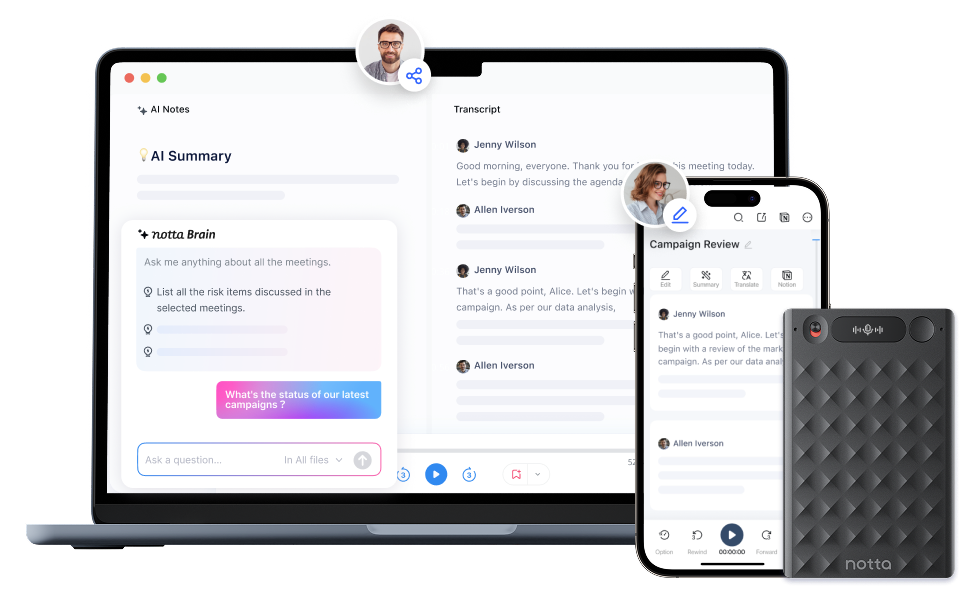
Source: Notta Memo
Notta Memo is a card sized AI voice recorder from Notta that captures meetings, calls and in-person conversations with one press, then transcribes them in the Notta app with AI summaries and translation. Notta's own shop lists the device at 0.35cm thick and 28g, with 30 hours of recording, 28 days of standby and 32GB of storage, which Notta describes as 144 hours of audio.
Notta Memo records with one press and transcribes in 58 languages
Notta splits the work between the recorder and the Notta app. The recorder holds the audio, and the Notta account does the transcription, the summary and the translation, which means the plan you are on decides how much of it you can process each month. If you are choosing between the card recorders, these five features are the ones Notta publishes:
One press recording: the device starts capturing with a single touch and shows the recording on an InstantView OLED display.
58 languages: Notta lists transcription, summary and real time translation across 58 languages.
30+ AI summary templates: Notta generates structured summaries from over 30 templates, including to-do lists and mind maps.
Battery and storage: 30 hours of recording, 28 days of standby and 32GB of onboard storage, which Notta counts as 144 hours of audio.
Notta Brain: Notta's AI assistant answers questions across your meetings, and their compare table gives every plan, including Free, 1,000 AI credits a month. The 12.99 USD add-on raises that to 8,000 credits.
Notta Memo costs 149 USD and the transcription minutes come from a Notta plan
Notta charges for the device once and for the transcription monthly. Buying the recorder includes what Notta calls the Starter allowance, and everything above that comes from a paid plan, which means the real monthly cost depends on how many hours your week actually runs:
The device: 149 USD on Notta's own shop, with the magnetic leather case, a one year warranty and a 30 day return window.
Starter: Notta's shop states that buyers get 300 minutes of free transcription each month as a benefit of the purchase.
Free: 0 USD, with 120 transcription minutes a month and a limit of 3 minutes per conversation on that plan.
Pro: 13.49 USD per month billed monthly, with 1,800 transcription minutes a month and up to 5 hours per recording.
Business: 27.99 USD per month billed monthly, with unlimited transcription and up to 5 hours per recording.
Enterprise: custom pricing, starting from 51 seats, with SAML SSO, audit logs and full data access control.
Notta holds SOC 2 Type II, ISO 27001, GDPR and HIPAA, and stores your data in a Tokyo data centre
On security, Notta's own help centre says Notta have obtained ISO 27001, SOC 2, CCPA, GDPR, SSL and APPI certifications, and their security page adds encryption in transit using TLS 1.2 and at rest using AES-256. The same help centre page says Notta use Amazon Web Services as their data center and your data is stored in a data center located in Tokyo. Where a client's meeting data physically sits is the question a European buyer usually asks first, and it is the same question we answer for AI note takers for remote teams in the EU.
What Notta users love
Going back to the written version of a recorded meeting
"The transcription is the part I use most, and I like being able to go back to the written version when I need to find a particular point." Muzammil M., G2
Fast transcription with summaries and action items
"What I like most about Notta is its fast, accurate transcription and AI-powered meeting summaries. It allows me to focus on conversations instead of taking notes, while automatically capturing key discussions and action items." Verified User in Oil & Energy, G2
Naming a voice once and having it applied to the rest
"The ability to add a name once to a voice and have it filter down to all the voices." Verified User in Financial Services, G2
What Notta users flag
Transcripts need a check after a noisy recording
"The transcription is useful, but it still needs a quick review when the recording has unclear speech, background noise, or unusual names." Muzammil M., G2
Technical terms and long meetings affect the speaker labels
"The biggest drawback is accuracy in technical discussions. In meetings involving APIs, code, or industry-specific terminology, I often need to review the transcript and correct a few terms before sharing it with the team. Speaker identification isn't always consistent during long meetings." Verified User in Oil & Energy, G2
No way to check that a named voice was matched correctly
"I've had it happen where there are mistakes" Verified User in Financial Services, G2
3. Granola: Best AI Notepad for Mac and Mobile Without Stored Audio
Best for: Granola is an AI notepad for people who want meeting notes from the laptop and phone they already own, plus an AI chat that reaches back across their past meetings.
Similar to: Jamie, Otter.ai and Fathom.
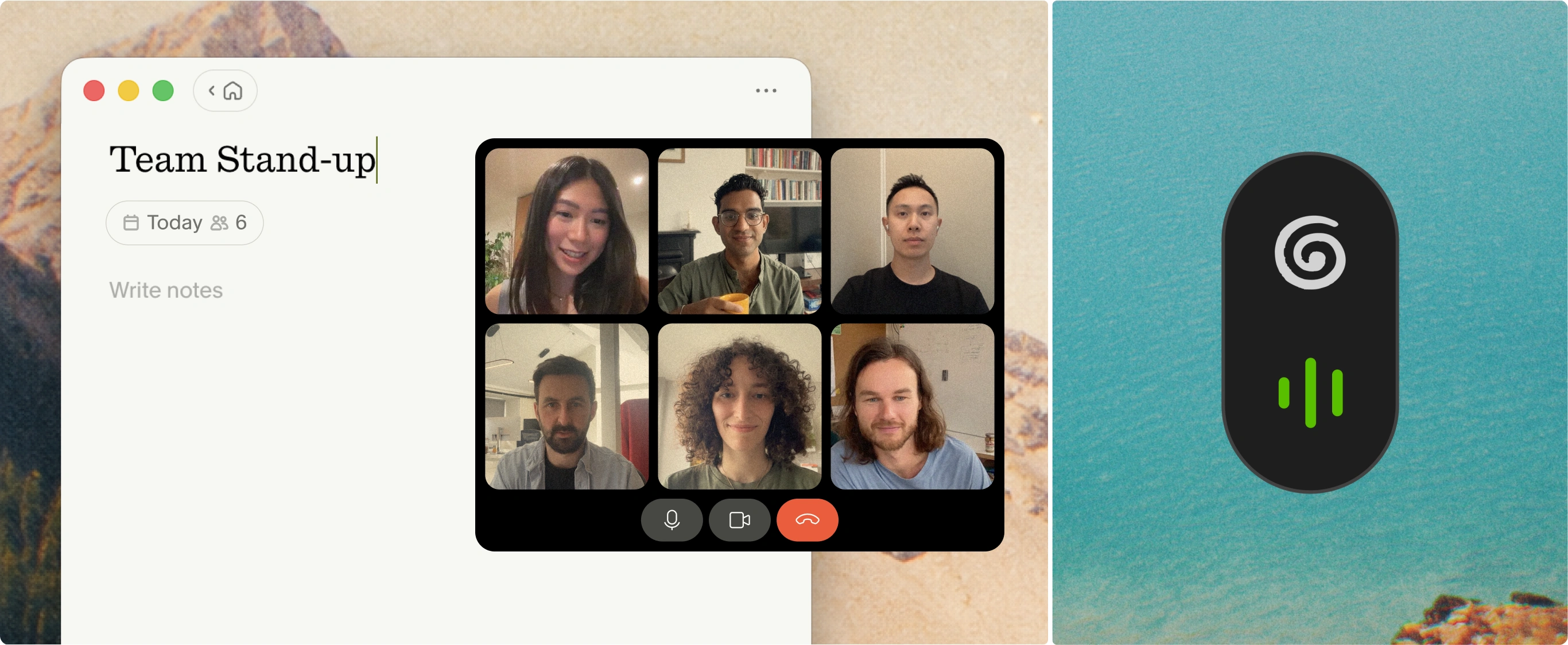
Source: Granola
Granola is an AI notepad that records the audio on your own computer or phone and turns it into notes, with no bot in the call. Granola's own security page states that you start Granola manually for a meeting, and that it will not auto-join or auto-record anything. Granola then accesses your microphone audio and your meeting audio on your computer, and transcribes it without adding a bot to your video call.
Granola records on your own device and keeps the transcript instead of the audio
Granola splits its work between the desktop app and the phone. Granola's own homepage says it works with Zoom, Google Meet, Teams and every other meeting app. Granola for mobile covers meetings on the go and phone calls, which is the pairing a reader leaving a recorder usually looks for. If you are weighing a recorder against software, these five facts all come from Granola's own security page:
No bot in the call: Granola states that it does not add a bot to your video call, and that you start it manually because it will not auto-join or auto-record anything.
Any meeting platform on the desktop: Granola's own homepage says it works with Zoom, Google Meet, Teams and every other meeting app, and captures conversations in-person and on the go. Granola runs on desktop, iPhone, Android and Apple Watch.
No stored recordings: Granola states that it does not store the audio from meetings. Granola transcribes in real time on macOS and Windows, or after the meeting from cached audio on mobile, and keeps only the transcript and your notes.
Model training: Granola states that third parties such as OpenAI and Anthropic are not allowed to train on your data. Granola itself trains on your anonymised data unless you opt out in Settings, and Enterprise accounts have training off by default.
Security: Granola holds SOC 2 Type II certification and complies with GDPR and UK GDPR, in the words of their own help centre, and their Data Processing Addendum sits at a public link. Granola stores all data on AWS servers in the United States, and ISO 27001 is not yet available, in their own words. This is the first question a European compliance officer asks for bot free AI note takers.
Granola costs 14 USD per user per month for unlimited meeting notes and history
Granola prices per user, and their free plan is a taste rather than a working tier. Their pricing page describes that plan as limited meeting history. The notes you took last quarter are the ones you may not be able to open, and the plan you need depends on how far back your work makes you look:
Basic: 0 USD per user per month, with AI meeting notes, AI chat within and across meetings, shared folders, custom templates and, in Granola's own words, "See limited meeting history".
Business: 14 USD per user per month, with unlimited meeting notes and history, advanced AI models, integrations with Attio, Notion, Slack, HubSpot, Affinity and Zapier, MCP and API access.
Enterprise: 35 USD per user per month. Enterprise includes single sign-on, org-wide auto-deletion periods, admin controls for sharing and API access, and training off for the whole team. Their page also lists an org-wide notice that Granola is being used, marked as a pilot.
Granola holds SOC 2 Type II and complies with GDPR, and stores all data on AWS servers in the United States
If you are signing a note taker off for European deal work, Granola's own security page answers two of the four questions a diligence review asks. Granola holds SOC 2 Type II certification and complies with GDPR and UK GDPR, in the words of their own help centre, and their Data Processing Addendum is published at a public link. Granola stores no audio, only the transcript and the notes you write. On model training, Granola states that third parties such as OpenAI and Anthropic may not train on your data. Granola itself trains on your anonymised data unless you opt out in Settings, and Enterprise accounts have training off by default. Their help centre says ISO 27001 is not yet available, and that all data sits on AWS servers in the United States with no EU or UK residency offered. That is the line a compliance officer needs before a client conversation is recorded.
What Granola users love
The conversation comes back as readable notes
"It records the conversation and turns it into readable notes, which is awesome." Shui H., G2
Notes from both the Mac and the iPhone
"It transcribes both on my Mac and iPhone, which is a game-changer for on-the-go catch-ups. The summaries it produces are actually good, not just a raw transcript dump, but key insights and actions." Aprielle D., G2
Asking the chat about an old meeting instead of searching for it
"I like the most the chat function with Granola itself. I can go back in history without having to search for the chat." Lisa K., G2
What Granola users flag
No way to open a note first and start recording later
"I'd love the ability to create a note and only start recording when I'm ready." Shui H., G2
A failed recording is lost with no second attempt
"There have also been times when something goes wrong and you lose the whole recording, instead of being able to simply try again." Shui H., G2
No one click send of a summary into Slack
"I'd like to have little buttons in Granola for automated actions, like a Slack button to generate a message or an email button for a formatted email. It'd be nice to connect directly to Slack for sending meeting summaries." Lisa K., G2
Need today's notes without buying anything first? Our free plan covers 10 meetings a month at 30 minutes each, with unlimited Ask AI across every meeting you record. There is no device to order and nothing to wait for.
4. Pocket: Best AI Recorder for Phone Calls in 120+ Languages
Best for: Pocket is an AI voice recorder for people whose recording happens with the phone already in their hand, on calls and in face to face conversations.
Similar to: Plaud Note, Notta Memo and HiDock P1.
Source: Pocket
Pocket is a card sized AI voice recorder that snaps onto the back of a phone with MagSafe and turns conversations into transcripts, summaries, action items and mind maps in 120+ languages. Pocket's own specification list names two studio microphones and one contact microphone. Their page describes that contact microphone as capturing phone calls without the speaker. The device holds 64GB onboard and runs for four days.
Pocket records with two studio microphones and a contact microphone for calls
Pocket is built around the phone rather than the laptop. The device holds the audio and the Pocket app writes the notes, which means most of what you get depends on the plan you are on rather than the hardware you bought. If you are choosing between the card recorders, these five specifications come from Pocket's own page:
Microphones: two studio microphones and one contact microphone, which Pocket describes as capturing phone calls without the speaker.
Recording range: Pocket lists a range of up to 15 metres, which is 49 feet.
Battery and storage: four days of active use, with 64GB on the device and cloud storage on top.
Languages: Pocket lists summaries, action items and mind maps in over 120 languages.
Size and mount: 52 grams, 0.2 inches thick, held on the back of the phone by MagSafe.
Pocket costs 129 USD and the accurate transcription sits on the Pro plan
Pocket sells the device once and puts the sharper features behind a yearly plan. Their free tier keeps recording and transcription open. The parts a professional usually needs, the highest accuracy and the speaker names, are the paid ones. That matters if you are deciding whether the device replaces a note taker or only records for you. This is what a client facing week costs on their published plans, and it is the same maths we run for AI note takers for private equity:
The device: 129 USD for one Pocket on their own site, down from a list price of 199 USD, with free shipping, a one year warranty and 30 day returns.
Free: 0 USD, with unlimited transcription at what Pocket calls standard accuracy, summaries kept for 30 days, mind maps, plain text exports and Ask Pocket limited to 2 messages a day.
Pro: 16.59 USD a month, billed yearly at 199 USD a year, which includes the highest accuracy transcription, automatic speaker names, unlimited Ask Pocket, summaries kept forever, custom templates and audio downloads. Their page publishes no monthly price.
Enterprise: custom pricing for larger teams.
Pocket names SOC 2 Type II, SOC 2 Type 1, HIPAA and GDPR on its trust page, and processes your recordings in the United States
If your firm reviews tools before they touch client conversations, Pocket's privacy page is the document you will be handed. Pocket states that it will not use your personal recordings to train its models without your consent, and that personal information is retained only for as long as it is necessary. Their separate trust page names SOC 2 Type 1, SOC 2 Type II, HIPAA and GDPR, and prints Processed in the United States. A European reviewer therefore gets the certifications there rather than in the privacy policy.
What Pocket users love
Site visits with trades and clients, with the to-do list emailed afterwards
"its the best for me, I am older in age 65 and it help me record all my site visits with trades and client, it does my to do list and send it into my emails, its a game changer for me, many thanks" andthe, Trustpilot
Easy to use day to day
"This little device has transformed my day to day business life, it is so easy to use and the results are outstanding." Nick Bailey, Trustpilot
The note taking and the summaries
"This pocket AI works better than I could ever have imagined. The note-taking and summarizing are excellent." Lindsay Thompson, Trustpilot
What Pocket users flag
The yearly plan came as a surprise after buying the device
"The subscription model is egregious. If I knew there was one I wouldn't have got it." Consumer, Trustpilot
Audio quality in a room with other conversations in it
"It says its great in environments with outside sound, however in multiple meetings ive had at both indoor and outdoor patios, with any kind of chatter (not even music), it captures audio horribly." Dave Woeckener, Trustpilot
Meetings that did not come back as recordings
"After today it was no better, recording the wrong things or I'm not able to follow the directions to record my meeting. I did get one meeting out of 4." Oakie Mitchell, Trustpilot
5. HiDock P1: Best AI Voice Recorder for Bluetooth Earphone Calls
Best for: HiDock P1 is an AI voice recorder for people who take most of their calls on Bluetooth earphones and want that audio captured without anything joining the meeting.
Similar to: Plaud Note, Notta Memo and Pocket.
Source: HiDock
HiDock P1 is an aluminium AI voice recorder that captures calls through your Bluetooth earphones and sends the audio to HiNotes, HiDock's own app, for transcription and summaries. HiDock's product page describes the feature as BlueCatch, capturing clear audio through your Bluetooth earphones without adding a bot to your meeting. HiDock lists three recording modes: Call Mode for private calls, Room Mode for meetings and interviews, and Whisper Mode for quick ideas.
HiDock P1 records through Bluetooth earphones and transcribes in 75 languages
HiDock built the P1 around the headset rather than the room. The recorder holds the audio, HiNotes writes the notes, and HiDock states that owners of the P1 keep the transcription for the life of the device rather than paying monthly for it. If your working day runs on calls, these five facts come from HiDock's own product and HiNotes pages:
BlueCatch: HiDock states that the P1 captures audio through your Bluetooth earphones, without adding a bot to your meeting.
Lifetime free transcription: HiDock's HiNotes page states that HiDock H1, H1E and P1 owners benefit from a lifetime free transcription service, in 75 languages.
Three recording modes: Call Mode for private calls, Room Mode for meetings and interviews, and Whisper Mode for quick ideas, with one touch to start, mute, highlight or stop.
Speaker Identification: HiNotes separates up to 10 voices in a meeting with colour markers and names each participant.
The hardware: 72 grams of aluminium at 126 by 38 by 15.8 millimetres, with dual studio level ECM microphones, 64GB of local storage, a 600mAh battery and USB-C transfer.
HiDock P1 costs 169 USD and the transcription is included with the device
HiDock prices the P1 as a one off purchase with the transcription attached to it, which is a different model from the card recorders that meter your minutes each month. On compliance, HiDock's own security page states GDPR compliance and says that no customer data is used to train the AI, with any metadata shared with OpenAI or Anthropic anonymised first. That page names no SOC 2 or ISO 27001 certificate and no European data region. Those are the first two things a compliance team asks about, and it is the question we work through for AI note takers for investment banks:
The device: 169 USD on HiDock's own store, in Space Gray or Star White, with the metal plate, touch control cable and quick start guide in the box.
HiNotes transcription: free for the life of the device for P1 owners, in HiDock's own words, covering audio of up to 4 hours per recording.
What it works with: HiDock lists compatibility with GPT-5.4, Claude 4.6 and Gemini 3.1 Pro for the summaries.
HiDock complies with GDPR, trains no AI on customer data, and runs HiNotes in Microsoft Azure data centres in the USA
If the recorder is going into client meetings, HiDock's own security page is where a European reviewer starts. That page states HiDock complies with the General Data Protection Regulation, that no customer data is used to train the AI, and that any metadata shared with OpenAI or Anthropic is anonymised first. HiDock also states that it runs HiNotes in Microsoft Azure data centres located in the USA, and names Azure's own SOC 1 to 3 and ISO/IEC 27001 certificates rather than certificates of its own. For a European reviewer, the data sits in the USA.
What HiDock users love
Accurate transcripts and summaries that carry the follow up
"The transcripts and AI-generated summaries are accurate, organized, and genuinely useful. At this point, they have become an essential part of how I manage follow-ups after meetings." Joe McDowell, Trustpilot
Small enough for the hand, with the battery to last the day
"The device itself is very easy to use, small enough to fit in the palm of your hand, and has excellent battery life." Joe McDowell, Trustpilot
Satisfied with the P1 and with the support behind it
"I bought the HiDock P1 and am very satisfied with its features. Customer service is excellent; they answered a question of mine quickly and efficiently." JOSé ANTONIO ROIG ROCHER, Trustpilot
What HiDock users flag
A P1 that stayed buggy after the firmware update
"it has never properly worked since receiving it, as it is so buggy!! Even after updating to the latest software and firmware." Frazer, Trustpilot
One buyer captured only their own side of an iPhone call
"its supposed to market itself as something that records calls using iphones and airpods. it only records you, not the person you are talking to" CN, Trustpilot
Help pages that had fallen behind the product
"If I had to point out one downside, it would be that some help resources are a bit outdated." JOSé ANTONIO ROIG ROCHER, Trustpilot
Is it legal to record a client meeting in Europe?
The recorder is legal to own. What the law governs is the recording, and that comes down to one thing: do the people in the room know, and have they agreed. Under GDPR you need a lawful basis before you record a conversation, and in a client meeting that usually means telling them and getting a yes. In parts of the United States every person on the call has to agree, including California, Florida and Pennsylvania. A call with a US counterparty therefore follows the stricter rule.
The EU AI Act added a second layer on 2 August 2026, the day its transparency rules started to apply. Article 50 is about telling people when they are dealing with an AI system, and when something has been generated by one. Whether it reaches your note taker depends on how your firm uses it, and that is a question for your own counsel rather than for a vendor. Consent is settled either way.
Every tool on this page leaves that job with you. Plaud's own trust page carries the line "If required by law, please obtain consent from all participants before recording." Jamie carries three notices for it. You obtain verbal consent in your own words at the start of the meeting. The optional Automated Recording Notice email goes out beforehand, 4 hours ahead by default and settable from 10 minutes to 48 hours. The meeting chat notice posts inside the call once you switch it on. This section is general information and not legal advice, and your compliance team has the final word.
Final Verdict on What's the Best 5 Plaud Alternatives for Note Taking?
The best Plaud alternative depends entirely on what you need right now. If it is recording client meetings without a second device, and knowing the audio does not outlive the transcript, then Jamie can be the best choice among the 5 Plaud alternatives for note taking. Let's do a quick recap of what Jamie does for you:
On Device Recording: No Recorder To Put On Their Table. Jamie records through the laptop you already carry, and the disclosure comes from you through verbal consent, the optional Automated Recording Notice email, and the meeting chat notice.
Audio Deletion: No Audio Left Behind After The Transcript. Jamie deletes the meeting audio once the transcription is finished, which is the answer a compliance team wants from any of the AI note takers for finance teams.
European Data Residency: GDPR Compliant And ISO 27001 Certified. Jamie stores and processes all meeting data in Europe, and Jamie is DORA-ready for the banks and funds that need it.
Speaker Memory: Speaker Names Identified And Remembered. Jamie has speaker identification and memory, on every plan including our free plan.
Plug and Play Integrations: Your Notes Land Where Your Team Already Works. Jamie logs your meeting notes to DealCloud, Affinity, HubSpot and Dynamics 365. Jamie also attaches them to Salesforce records, once you switch the sync on in Settings.
Agentic Intelligence: Your Follow Up Is Drafted Before The Next Call Starts. Jamie drafts the follow up email and raises the tasks from what was actually said, inside the tools you connect. Agent Connectors authorise it with your own account, and Agent Skills carry the instructions you write once.
Plaud built this category, and the hardware is genuinely good. Their own product page puts Plaud Note at 0.12 inches thin and 1.06 oz. The Plaud Note records for up to 30 hours, holds 60 days of standby, and stores 64 GB of audio on the device itself. The Plaud Note sells for 159 USD and includes 300 transcription minutes a month, alongside 112+ languages and a desktop app that records online meetings without a bot. Plaud Note Pro is 189 USD, and Plaud NotePin S, the wearable one, is 179 USD.
However, the trade-off with Plaud is that the record of a client conversation depends on a device you have to remember to bring. You must always remember to carry the recorder everywhere, because their laptop app does not run without it. If you even forget it once, the meeting is simply not recorded; you anyway have to resort to other means of note-taking, like your phone perhaps or another AI note taker.
You also have to keep your eye on the meter, because Plaud's Pro plan stops at 1,200 minutes a month. That is only twenty hours, which, if you count it, is only a week of client calls that eats it.
And if your company is privacy-conscious, this might be one thing to be worried about, your audio recordings stay in the account until somebody physically has to delete them, which means a private conversation outlives the meeting it belonged to.
You can also pick a different tool when the job is different.
Choose Notta Memo when you want a card sized recorder that translates across 58 languages.
Choose Granola when you want a bot free notepad on a Mac or a phone, and an AI chat over past meetings.
Choose Pocket when most of your recording happens with the phone in your hand, including phone calls.
Choose HiDock P1 when your day runs on Bluetooth earphones and you want transcription included with the device.
For everything else, Jamie records the meeting from the machine you already own; keeps the notes in Europe under GDPR and ISO 27001; and leaves no audio behind once the transcript exists.
.
Read more
Meetings all on Zoom? Read bot free notetakers for Zoom.
Running on Microsoft Teams instead? See Microsoft Teams note taker alternatives in Europe.
Most of your calls on Google Meet? Read European note takers for Google Meet.
Weighing Notta on its own? See the two side by side in Notta vs Jamie.
Leaning toward Granola? Read Granola vs Superpowered vs Krisp vs Jamie.
Billing your time to clients? Read note takers for consultants.
FAQS
Can I get the same notes without carrying a second device?
Yes. Jamie records in-person and online meetings from the laptop or phone you already own, on every plan including our free plan. Granola does the same from a Mac, a Windows machine or a phone. The three card recorders here, Notta Memo, Pocket and HiDock P1, all need their own hardware first, which means you must remember it, charge it, and account for it when somebody leaves the team.
Which of these records my online calls as well as the meetings in the room?
Jamie records the audio on your own device, which covers every meeting platform running on it, Microsoft Teams, Zoom and Google Meet included, plus in-person meetings on every plan. Granola says it works with Zoom, Google Meet, Teams and every other meeting app, in-person included, on desktop, iPhone and Android. Plaud Desktop also records online meetings without a bot. Their pricing page says it needs the recorder to work, which means the device travels with you even for a call at your own desk.
What happens to the recording after the meeting ends?
Jamie deletes the meeting audio once the transcription is finished, which means your notes and your transcript stay and the recording does not. Granola states that it does not store meeting audio at all. Plaud's trust page says data is kept for as long as the account remains active. And if your company is privacy-conscious, that is the line to read twice, because a private conversation then sits there until somebody physically deletes it.
Where is my meeting data stored, and which of these is certified?
Jamie stores and processes all meeting data in Europe, and Jamie is GDPR compliant and ISO 27001 certified, with DORA readiness for regulated firms. Notta is SOC 2 Type II and ISO 27001 certified. Granola holds SOC 2 Type II and complies with GDPR and UK GDPR, and HiDock complies with GDPR. Pocket's privacy page names no certification, which means your own security review has to ask them directly before anything is signed off.
Will the transcript still be readable when several people are in the room?
Jamie identifies each speaker through speaker diarisation, and scored 98 out of 100 for speaker identification in our own accuracy test. HiDock's HiNotes app separates up to 10 voices and names each one, on its Pro and Unlimited plans. A room with background chatter is the hard case for all of them. One Pocket reviewer on Trustpilot reports poor audio in exactly that setting, and you anyway end up checking the transcript line by line.
Which free plan actually covers a working week?
Jamie's free plan covers 10 meetings a month at 30 minutes each, with unlimited Ask AI. Pocket's free plan includes unlimited transcription at what it calls standard accuracy, with summaries kept for only 30 days, which means you must export anything you want to keep. HiDock includes transcription for the life of a P1. Notta's free web plan is 120 minutes a month, and Granola's free plan limits how far back your history goes.
Will the notes reach my CRM without anybody retyping them?
Jamie logs your meeting notes to DealCloud, Affinity, HubSpot and Dynamics 365, and attaches them to Salesforce records. Jamie also sends them to Attio, Notion, Google Docs, OneNote and Asana, once you switch the sync on in Settings. Granola includes integrations with Attio, Notion, Slack, HubSpot, Affinity and Zapier on its Business plan at 14 USD per user per month. The card recorders hand you a file instead, which means somebody on your team still opens the CRM and pastes it in.
Can I search across past meetings instead of listening again?
Ask AI answers questions across all of your meetings at once, and it is unlimited on every Jamie plan including our free plan. Granola includes AI chat within and across meetings on its free plan too. Pocket limits its own chat, Ask Pocket, to only 2 messages a day on the free plan, which means the third question of your morning waits until tomorrow.
Is it legal to record a client meeting, and who tells the room?
The recording is what the law governs, not the note taker, and under GDPR you need a lawful basis before you record. With Jamie the disclosure comes from you, in three ways. You obtain verbal consent in your own words. The optional Automated Recording Notice email goes out before the meeting, and the meeting chat notice posts inside the call once you switch it on. Plaud's own trust page carries the same instruction, to obtain consent from all participants. And if your compliance team has to sign the note taker off, this is the paragraph they will ask about first.
Does any of these record phone calls?
Granola's own pricing page names meeting notes on the go and for your phone calls, which makes their phone app the one to look at for call recording. Pocket's contact microphone captures phone calls without a speaker, in the words of their own site, and HiDock has a Call Mode for private calls. Jamie records in-person and online meetings rather than phone call capture, and the Jamie app on your phone is not a call recorder. If phone call recording is the job you are buying for, read those three pages before you read ours.
Which is the best AI voice recorder if you want the hardware?
If you want a dedicated recorder, the form factor is the first thing to settle. Notta Memo is a 28g card at 149 US dollars, Pocket is a 52g card at 129 dollars, and the HiDock P1 is a 72g aluminium AI recorder at 169 dollars. Pocket is the cheapest entry point of the three, and every one of them is a hardware purchase before you record anything at all. A portable recorder is a hardware device you have to charge and remember, which is the trade you take for the microphones. The original Plaud Note is the device the rest of them are answering. Jamie needs no separate device, because one device you already own does the whole job.
How do the AI features compare across these tools?
All five are AI software built on AI transcription rather than a plain dictaphone, and the AI tools underneath them differ by plan. Jamie does real time transcription on your screen and multilingual transcription in over 100 languages, with Ask AI unlimited on every plan including our free one. Notta Memo does real time transcription and translation across 58 languages, and Notta Brain gives every plan 1,000 AI credits a month, and a 12.99 US dollar add-on raises that to 8,000. Granola includes AI chat within and across meetings on their free plan, and the more advanced AI features come with Business at 14 dollars per user. Pocket names AI summaries, action items and mind maps, and HiDock names 39 summary templates, which means the advanced AI features there are about shaping the output.
What about video recording and audio playback?
Notta records video of web meetings on their Business plan, in the words of their own pricing page. Granola reads your microphone and your system audio on the computer and keeps no audio at all, which means there is nothing to play back afterwards. Jamie deletes the meeting audio once the transcript is finished, and the same is true with us. The card recorders hold the raw audio on the device instead, and Notta Memo names 30 hours of continuous recording on one charge. The app then has to process recordings into notes. Recording quality is where a device earns its price, because the other person's voice across a wide table is the hard case for every one of them.
Do you need an internet connection?
Granola caches your notes on your device, which means you open and edit them offline, in the words of their own help centre. The transcription itself needs an internet connection on the software tools, and the card recorders record to the device first and upload later. Jamie runs mobile apps on iOS and Android alongside macOS and Windows, and picks up your scheduled meetings from your calendar. On price, Pocket has the more generous free plan on transcription volume, because theirs is unlimited at what they call standard accuracy. Jamie's generous free plan covers 10 meetings a month at 30 minutes each with unlimited Ask AI, and a monthly subscription only starts when you outgrow it.
Who is each one actually for?
If you are looking for a Plaud AI alternative, the honest split is by where the recording happens. Jamie is the alternative to Plaud for teams who record in person conversations and online calls from one device, with no meeting bot in anybody's call. You obtain verbal consent in your own words, the optional Automated Recording Notice email goes out beforehand, and the meeting chat notice posts in the call once you switch it on. Notta Memo and the HiDock P1 are the closest Plaud Note alternative on hardware, because in person recording is what a card is built for. Pocket has a visible recording indicator, and their trust page says everyone in the conversation can see when Pocket is on. Sales teams who live in a CRM should read the integrations row first, and anyone comparing the Plaud app itself should start with what Plaud AI keeps after the meeting is over.
![11 Best AI Meeting Recorders for Sales [2026]](/api/media/payload/best-ai-meeting-recorders-for-sales-3931.png)
![Best 5 AI Transcription Tools in Europe [2026]](/api/media/payload/Best_5_AI_Transcription_Tools_in_Europe_2025-pj0028.png)