Best Note Takers for Consultants in 2025 is an increasingly common search as consultants grow weary of unreliable AI tools that jeopardize client trust. One of the most cited frustrations is “notes vanished or reverted” due to syncing failures, an issue that forces consultants to double-record notes across docs, emails, and paper just to feel safe.
AI summaries add little relief when they “miss major points,” pushing users to re-read entire transcripts to salvage decisions and next steps.
Others are unsettled by bots joining sensitive meetings or by tools that default to cloud storage, raising both client perception issues and compliance concerns. These pain points signal a deeper demand: note-taking tools must act as dependable systems of record, not just casual recording bots.
This guide explores 10 alternatives consultants are turning to, tools that aim to be more discreet, accurate, and organizationally sharp than the status quo.
TL;DR
Note takers for consultants are in demand because people are tired of lost or unstable notes, awkward meeting bots, and cloud only tools that put client trust and their own memory at risk.
People want tools that quietly capture every client conversation accurately, identify speakers and specialist terms, turn discussions into clear summaries with decisions and action items, respect privacy and compliance rules, work offline when needed, stay searchable later, and slot neatly into their existing calendars, CRMs and project workflows.
Jamie gives consultants reliable on device recording without bots, fast structured summaries with decisions and action items, accurate multilingual transcripts with speaker identification, privacy friendly EU hosting with encryption and audio deletion, offline iOS and desktop capture with meeting detection and calendar based reminders, rich tagging and search with Ask AI for querying and translating past meetings, templates and scratch pads to standardize and deepen notes, and direct integrations or webhooks to Notion, OneNote, HubSpot, Attio, Salesforce, Asana and other tools so meeting insights flow straight into the systems they already use.
MeetGeek, Fireflies, Otter.ai and Fathom focus on automated online recording, summaries and analytics, Fellow and Notion center on collaborative agendas and connected documentation, Krisp combines call cleanup with transcription and notes for noisy or accent heavy calls, and Evernote and Granola support people who prefer classic or live typed notes that AI can later organize into cleaner meeting records.
Why Are People Actively Searching for the Best Note Takers for Consultants?
Lost or unstable notes make the client's memory feel unreliable
“Syncing is a disaster. Notes vanished or reverted more than once, which is unforgivable.” – Reddit review of Evernote’s AI setup, 2025 (Reddit)
When you’re running lots of client calls, “notes vanished or reverted” is exactly the nightmare: you thought a workshop, scope discussion, or decision log was captured, then a sync bug or version issue wipes or rolls it back. Consultants in this situation end up double-writing notes (in a doc, in a notebook, in email) because they don’t trust the app, constantly hunting across tools to reconstruct what was agreed. That fragility pushes them to search specifically for “note takers for consultants” that behave like a dependable system of record, not a shaky consumer app.
AI meeting summaries miss key points and still require heavy cleanup
“Free minutes vanish fast. Sometimes missed major points in the summary.” – Reddit review of Notta AI meeting assistant, 2025 (Reddit)
For consultants, an AI meeting assistant that “missed major points in the summary” turns into extra work: after each client call, they have to read the full transcript, fix what the AI glossed over, and rewrite actions and decisions in consulting-grade language. They burn through free tiers, then still can’t trust the output alone, so they’re effectively paying in money and time. That frustration is what drives more targeted searches like “note takers for consultants”: they want tools tuned to capture decisions, risks, and next steps reliably, not just generic, half-usable summaries.
Bots in meetings and cloud storage feel wrong for sensitive client work
“I’ve been bouncing between different ‘AI note’ tools, and honestly most of them are kind of annoying, either a bot joins the call, or everything gets shipped off to the cloud. Not great if you’re on sensitive or client calls.” – Reddit user in r/LocalLLaMA, 2025 (Reddit)
This user is literally describing the consultant’s dilemma: meeting bots that pop into the Zoom/Teams grid and tools that “ship everything to the cloud” feel socially awkward with clients and risky for NDA-bound or regulated projects. Consultants worry about how clients perceive the bot, who can access the transcripts later, and whether they’re accidentally exposing confidential strategy or legal discussions. That mix of embarrassment and legal anxiety is why so many people now search for “note takers for consultants”, they’re actively hunting for options that respect sensitive client work (no intrusive bots, more control over data) instead of generic SaaS recorders designed for internal team calls.
What are the note takers for consultants?
The best note takers for consultants are Jamie with its bot-free on-device recording and fast, structured client-ready summaries with decisions and action items, MeetGeek, and Fellow.
Here’s a breakdown of the 10 consulting meeting note-taker tools that I researched:
💜 Gentle Reminder: Pricing may change; please double-check on each tool’s official site. Plans evolve, and enterprise tiers often require a quick chat with sales for accurate quotes.
Jamie
Best For: Consultants and strategy teams who live in back-to-back client meetings and want reliable, client-ready notes, action items, and decisions without babysitting yet another tool.
Similar To: MeetGeek, Fellow, Fireflies
Here's Jamie in action 👇
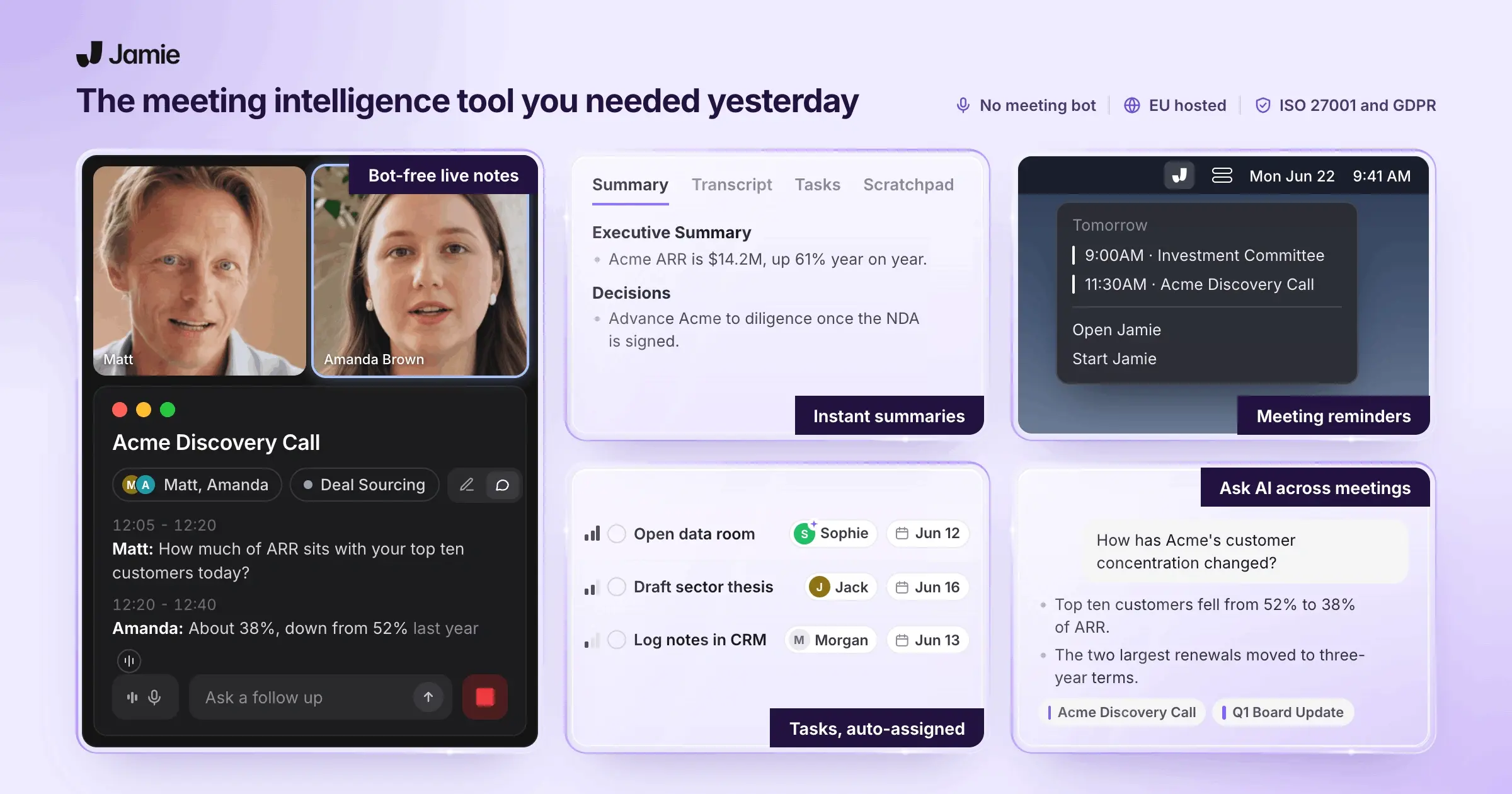
Jamie is a European AI meeting assistant that records your conversations on macOS, Windows, and iOS, then turns them into structured notes, action items, and transcripts, without sending a bot into your calls. It’s GDPR-first, EU-hosted, and works with any online meeting platform, plus offline and in-person sessions.
Full feature list at a glance:
AI-generated meeting notes from recorded audio (typically within minutes).
Automatic action items & task management with checkboxes, assignees, and links back to the source meeting.
Instant transcripts are available alongside every summary, fully editable.
Topic-based summaries with extracted speaker quotes and chapters.
Bot-free native recorder that captures system audio on macOS and Windows, compatible with any online meeting platform.
Automatic meeting detection & reminders based on microphone activity, so you start recordings on time.
Calendar integration (Google & Outlook) to pull meeting names, participants, and trigger smart notifications.
Tagging & organisation for meetings (projects, clients, teams, etc.) with filters by tag.
Search through your meetings, including on iOS.
Multilingual support for 100+ languages, including mixed-language calls and regional languages.
Ask AI to translate meetings, chat with a single meeting, summarise multiple recent meetings, retrieve information by time range, and store AI chat history.
iOS app for in-person meetings, offline recording, and sync with desktop.
Offline recording on mobile (and offline desktop capture documented via marketing copy).
Workspace model for individual accounts and team workspaces with controlled sharing.
Rich editing tools for summaries, tasks, and transcripts (headings, lists, links, bold/italic, find & replace).
Scratch Pad for quick, ad-hoc notes attached to the meeting.
Templates to re-generate meeting notes in predefined structures (e.g., customer calls, interviews).
Speaker memory to map voices to names (with the option to disable it at the user or workspace level).
Automatic meeting titles for non-calendar calls.
Copy-paste integration with tools like Notion, Linear, Todoist, Bear, Typora, and Ulysses.
Direct CRM/task integrations: HubSpot, Attio, Asana, Salesforce.
Notion integration with a dedicated Jamie database, automatic or manual syncing.
OneNote integration creating a “My Jamie Notes” notebook with a “Meeting Notes” section and one page per meeting.
Webhooks for building custom integrations via tools like Zapier or Make.
Privacy & security: GDPR-compliant, EU-hosted (Frankfurt), AES encryption, audio deletion after transcription, no third-party model training.
Cross-platform desktop support (macOS 13.1+ and Windows).
➡️ From all of these, three features map most directly to your everyday consulting pains, missing decisions, messy notes, and multi-client chaos. Those are the ones we’ll unpack next.
Get client-ready meeting notes, decisions, and action items in under 5 minutes without rewriting messy transcripts
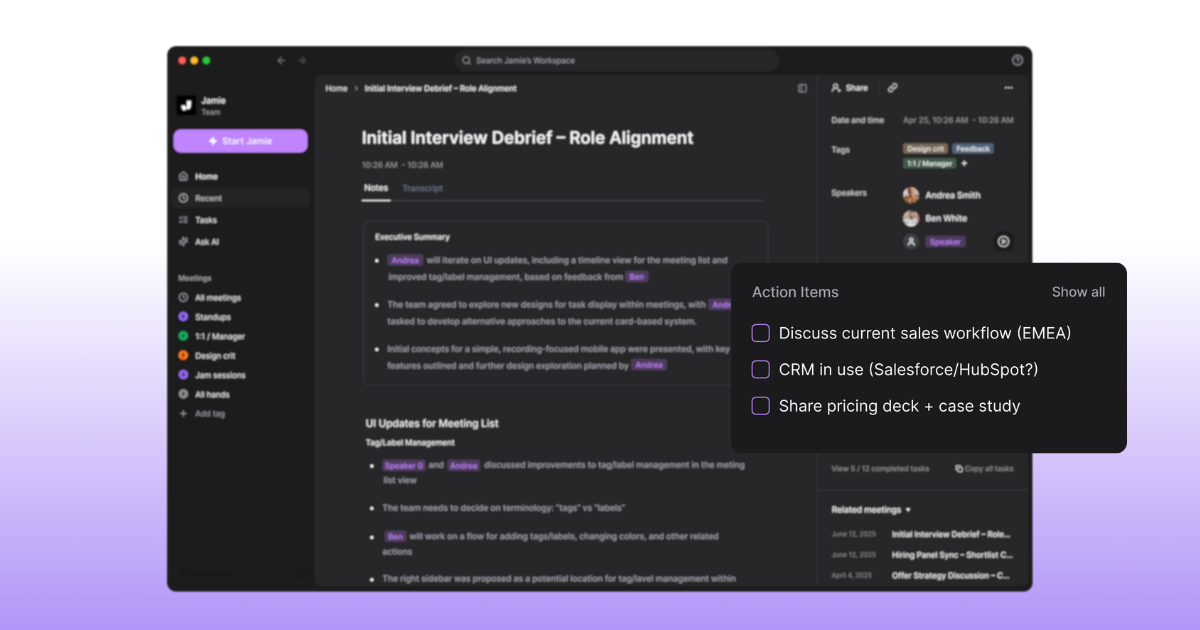
Jamie’s core is AI meeting notes plus tasks: it takes the audio of your meeting and auto-generates three linked artifacts, a structured summary, a list of action items, and a full transcript.
The summary is not just one big blob of text. It’s broken into topics/chapters with relevant speaker quotes pulled out under each section, so you can skim like you would a well-structured client memo.
Alongside that, Jamie automatically extracts tasks and decisions as checkable items, with owners that you can reassign by clicking on assignees. You can also manually add tasks inline in the summary using a simple “/” shortcut.
Once notes are generated, you can edit everything in place: change wording, tweak the structure with headings and lists, insert links, or use find-and-replace to clean up repeated terms—without jumping to another tool.
How It Helps You
Primary pain this is solving:
“I need my notes to turn into a client-ready summary in like 5 minutes, not an hour.”
Here’s what that looks like in practice:
During the call, Jamie records the audio (online or in-person) and starts preparing your transcript and notes in the background.
Right after the call (1–5 minutes) – you get:
A chaptered summary of the discussion.
A task list with checkboxes and owners.
A transcript ready to skim or search.
In the next 5 minutes, you:
Clean up wording, add context, and drop in links to decks or Jira/Asana using the editor toolbar.
Use find & replace for quick terminology fixes (e.g., change “program” → “programme” for a UK client).
Copy the summary into your slide outline, Notion doc, or email body with formatting preserved.
End result: instead of staring at an hour-long raw transcript, you’re editing something that already looks close to a client-ready write-up. This directly attacks:
Losing decisions or action items buried in notes.
Post-meeting clean-up time eats an hour of your day.
The mental overhead of “how do I structure this debrief?”
Reliably capture every client conversation across Zoom, Teams, offline workshops and site visits without awkward AI bots
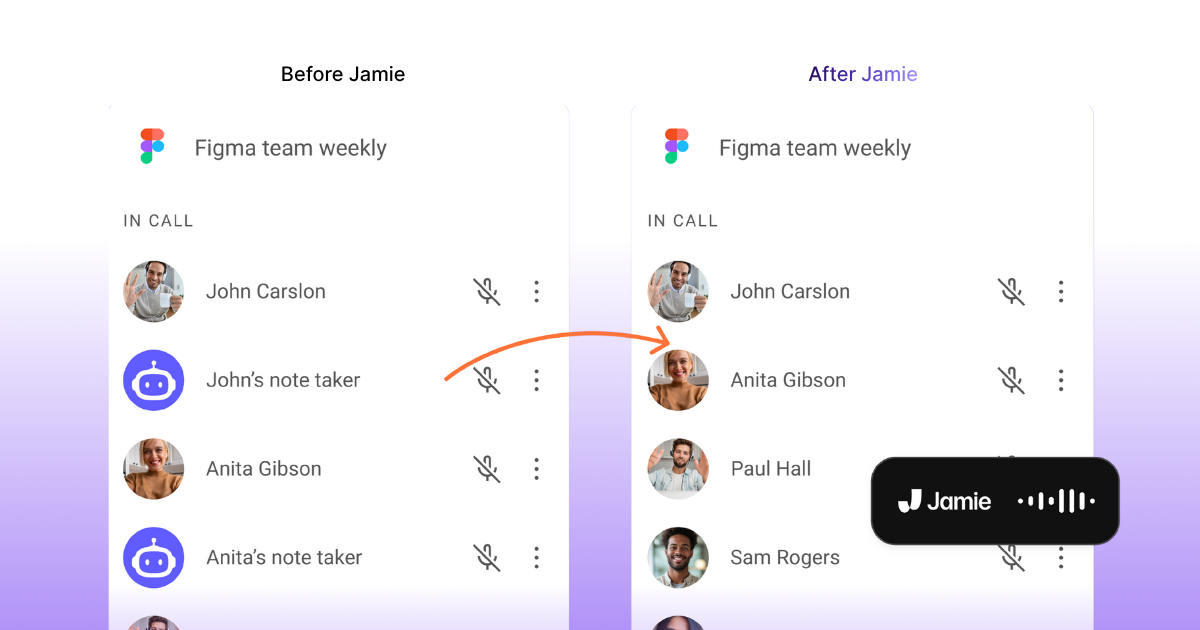
Jamie emphasises reliable capture over fancy join messages. It’s a native recorder on your machine that captures system audio, no virtual bot needs to join the call, so it works with any meeting platform you’re using (Zoom, Meet, Teams, Webex, browser-based tools, etc.).
To reduce “oh no, I forgot to hit record” moments, Jamie:
Watches your microphone status; when it sees you’re in a call, it pops up and asks if you want to start recording and taking notes.
Integrates with Google and Outlook calendars to use meeting start times and titles as additional context and reminders.
For in-person consulting work, workshops, stakeholder interviews, site visits, Jamie’s iOS app lets you:
Record in-person conversations from your phone’s microphone.
Pause and resume mid-session.
Get transcripts and summaries on the same account as your desktop.
The iOS app is also explicitly documented as working offline, syncing your meetings and notes back to the desktop when you’re online again.
How It Helps You
This feature cluster hits several recurring frustrations:
“I’m in back-to-back client calls all day, I need a note-taking setup that just works without me thinking about it.”
“If I leave this firm, I want my note system to come with me, not be locked in their stack.”
Concretely:
Any platform, any client: Because Jamie captures system audio instead of relying on joinable bots, it covers internal tools, client-preferred platforms, and niche webinar software without extra setup.
Fewer misses: Mic-based detection and calendar nudges mean you’re less likely to forget to start the recorder during a hectic day of context-switching.
Field-friendly: Offline iOS capture lets you walk into a workshop or plant tour and still come back with structured notes, not just a notebook full of shorthand you can’t decode later.
No bot awkwardness: Some clients dislike bot joiners or block them entirely. Jamie avoids that social and technical friction by staying on your device.
If your main anxiety is “did someone capture this properly?”, this is the feature that calms that down.
Keep notes for five clients organised by project, stakeholder and decision so nothing gets lost when I switch contexts all day
Jamie gives you a structured workspace for multi-client, multi-project life:
Workspaces: individual accounts for solo use and team workspaces for shared projects, with explicit sharing rather than auto-sharing.
Tagging: create custom tags for clients, projects, teams, or workstreams, and filter meetings by tag.
Search across meetings: quickly look up past meetings from your desktop or iOS app.
Templates: re-generate notes into a standardised structure (e.g. discovery call, steering committee, retro), so each meeting of that type looks familiar.
Scratch Pad: capture follow-ups, ideas and observations during the meeting without leaving Jamie; everything stays attached to that specific meeting.
How It Helps You
Primary pain here:
“My notes are all over the place, Google Docs, OneNote, random PDFs…it’s a mess.”
“I’m juggling five clients; I need a way to see all notes by client, by project, and by meeting.”
Jamie doesn’t try to become your entire knowledge base; instead, it becomes the single place where meeting-born information lives in a structured way:
Every meeting lands in the same workspace, with a clear title (or an auto-generated one if there was no calendar event).
You tag the meeting by client, project, or phase. Later, filtering by that tag instantly surfaces the right set of meetings, useful when preparing an SOW, change order, or end-of-engagement review.
Templates keep similar meetings looking the same, which is gold when you onboard a new team member and want them to “speed-read” the history.
The Scratch Pad stops back-channel notes (parking lots, side comments, “check this with legal”) from drifting into a separate notebook or app, they remain anchored to the exact meeting.
This strongly reduces:
The “where did that client requirement go?” scramble.
Time spent reassembling context before a check-in.
The risk that key decisions live only in someone’s personal notebook or a random doc.
Use Jamie's Ask AI feature to interrogate past meetings, translate discussions and prep follow-ups without rereading hour-long transcripts
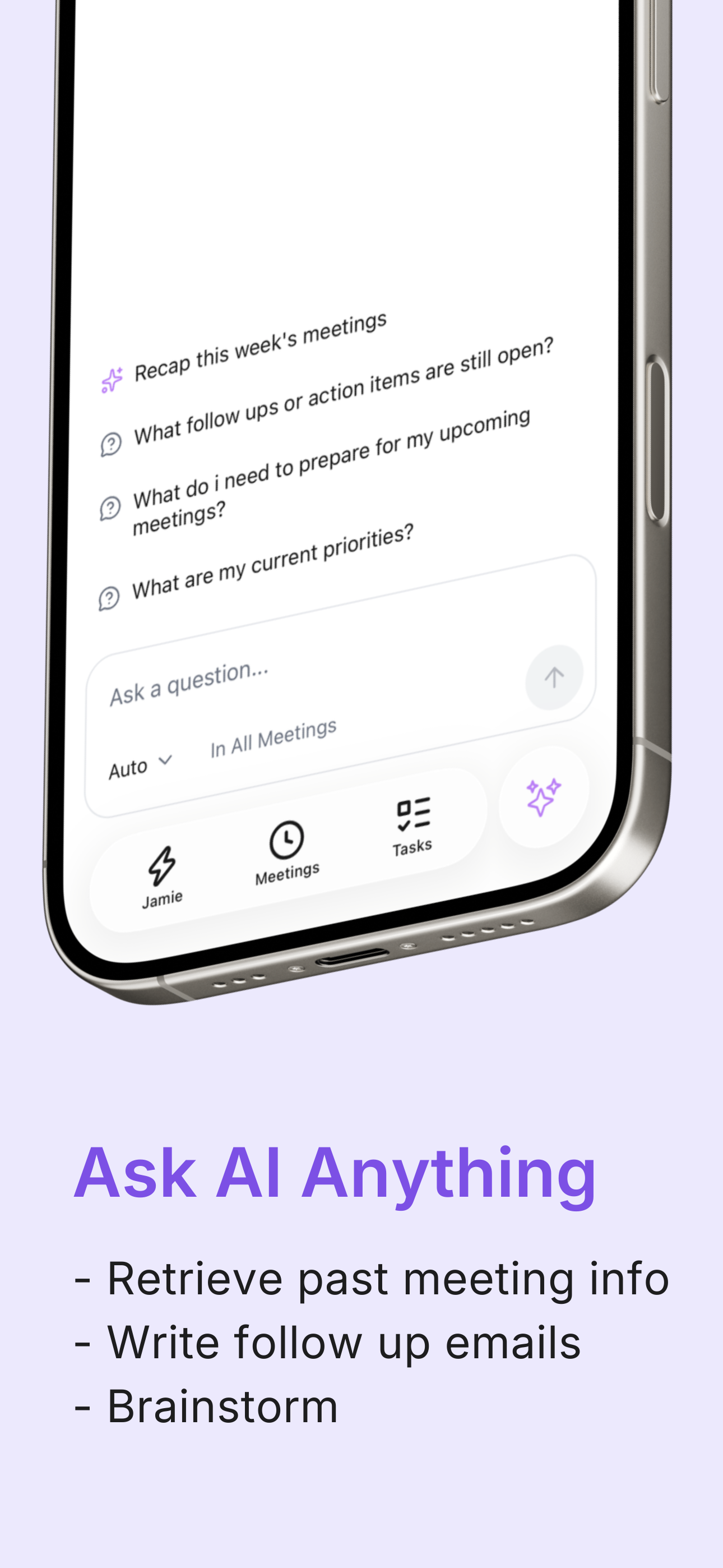
Jamie’s Ask AI sits on top of your meeting archive and gives you ways to query and reuse what was said:
Translate a meeting by prompting: “Can you translate this meeting for me in ___?” and get your notes in the language you need.
Chat with a meeting live: after a call, you can open Ask AI on that meeting, ask follow-up questions, and resume that chat later from the main Ask AI page.
Summarise across meetings: Ask AI can summarise all your latest meetings from the last day, week, or two weeks.
Control the time window when retrieving information (All meetings, last 30 days, or last week).
Streaming responses show you partial answers as they’re generated, with faster first-token times.
History & feedback: Ask AI keeps a history of past chats, and each response can receive a thumbs up/down plus a written comment.
How It Helps You
This directly supports:
“Can I quickly search ‘pricing discussion’ across all my client notes and find the exact meeting?”
“I want AI to pull out action items and risks from my notes, not just transcribe everything.”
In practice, Ask AI becomes your “analysis buddy” for:
Follow-up emails: ask the meeting, “Draft an internal recap email highlighting decisions and risks,” then paste and lightly edit instead of writing from scratch.
Cross-meeting themes: have it summarise everything from the past week for one client before you build a steering-committee deck.
Language bridges: when parts of a workshop slip into another language, you can translate the notes later without interrupting the flow in the room.
The value isn’t just “chatting with AI”—it’s that Ask AI is grounded in your actual meeting transcripts and notes, filtered by time windows you control, with history you can revisit.
Jamie plug into Notion, CRM and task tools so your meeting notes reach your favourite tools
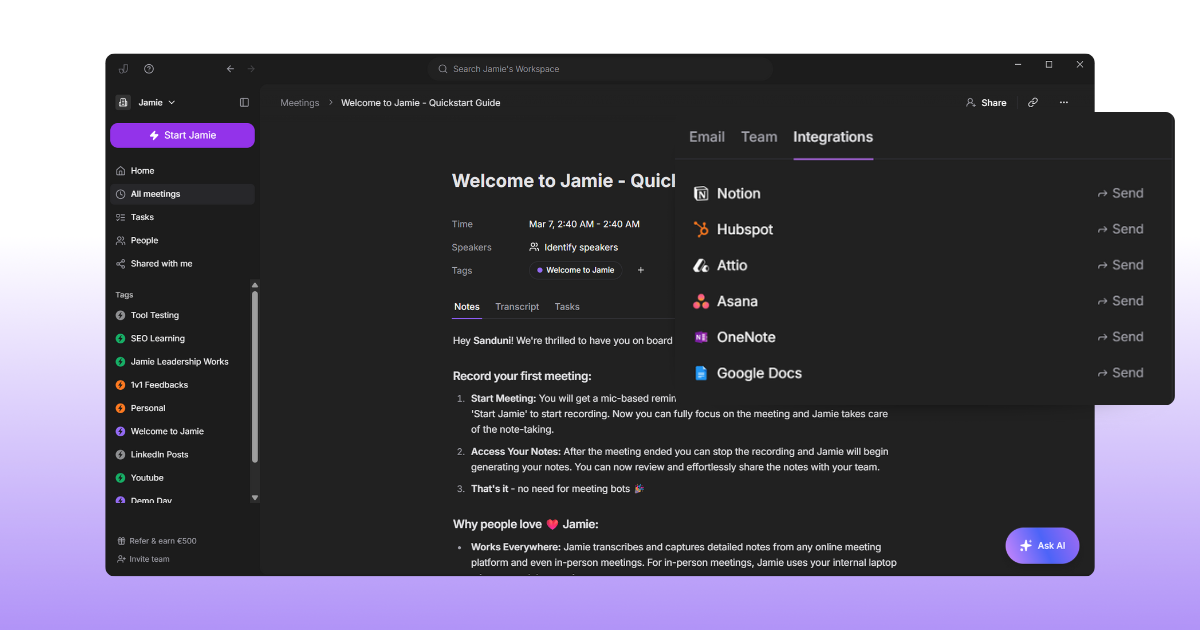
Jamie offers a mix of direct integrations and smart copy-paste compatibility:
Docs & note tools
Notion integration: connects from Jamie’s Integration settings, creates a “Jamie notes” database in your workspace, and can either auto-sync notes after summaries are ready or sync manually from the Share card.
OneNote integration: creates a “My Jamie Notes” notebook with a “Meeting Notes” section; each meeting becomes a page, and updates sync as notes change.
Copy-paste compatibility with Notion, Linear, Todoist, Bear, Typora, and Ulysses while preserving formatting and, in some apps, task completion state.
CRM and relationship tools
HubSpot: send summaries or transcripts as notes into a selected Contact, Deal, or Company record (manual selection; auto-sync is intentionally not shipped yet).
Attio: push summaries/transcripts as notes to selected person/company records; available on Pro, Team, and Enterprise.
Salesforce: send summaries/transcripts as notes to leads, opportunities, contacts, or accounts.
Task and project tools
Asana: sync Jamie tasks into to-dos inside a selected project (currently without assignees), plus attach notes/transcripts as a PDF.
Generic task export via copy-paste into tools like Todoist, Linear and others.
Custom workflows
Webhooks at the workspace level so admins can trigger automations for every new meeting—this is how you’d wire Jamie into automation platforms such as Zapier or Make.
How It Helps You
This is where Jamie helps you bridge the gap from meeting → system of record → deliverable:
If your firm runs CRM-driven account management, you can keep all call notes attached to deals and accounts in HubSpot, Attio, or Salesforce instead of scattered PDFs.
Notes can land automatically or with one click in Notion or OneNote, which are often where consulting teams keep their shared engagement wikis and decision logs.
Tasks extracted in Jamie can flow into Asana projects so that follow-ups don’t die in the recap email.
Webhooks give ops-minded teams room to build custom routing—for example, pushing notes into your own data warehouse or ticketing system.
For someone thinking in terms of “single source of truth”, this is the connective tissue that stops meeting insights from staying trapped in yet another silo.
Jamie Pricing
FREE Plan (€0/month)
10 meeting credits per month
30-minute meeting duration limit
Automatic action item extraction
Complete meeting transcripts
Speaker identification
Calendar integration (Google & Outlook)
Tag system
Task management
Advanced text editing
Copy-paste integration
Team workspace sharing
No meeting bots required
100+ languages support
PLUS Plan (€25/month)
20 meeting credits per month
2-hour meeting duration limit
Includes everything in the FREE plan
PRO Plan (€47/month)
Unlimited meeting credits
3-hour meeting duration limit
Includes everything in the PLUS plan
Team & Enterprise Plans
Custom pricing
Custom solutions
Contact required for details
Pros and Cons of Jamie
Pros
No meeting bots, captures audio locally on your device.
Works with any platform, online or offline.
Fast, accurate summaries and transcripts.
Auto-detects tasks and decisions.
Automatic topic detection.
AI chat lets you search notes instantly.
CRM integrations to your favourite tools
100+ languages are supported.
Cons
Manual speaker tagging is required at first.
No real-time transcription notes during meetings.
No sales coaching and sentiment analysis.
MeetGeek
Best for: Teams and organizations looking to capture and analyze meeting content
Similar to: Fireflies, Otter.ai, Avoma
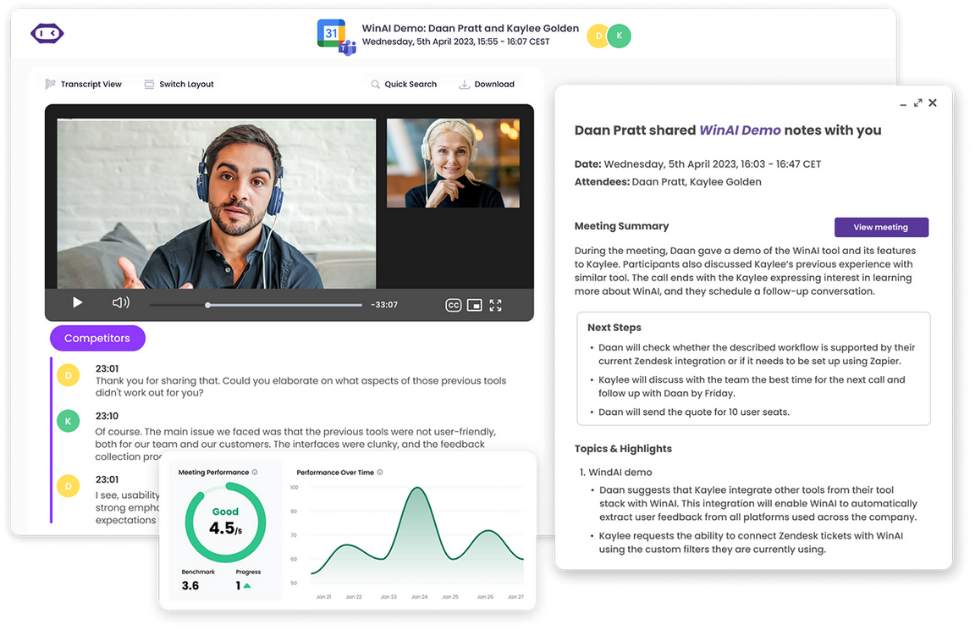
MeetGeek is an AI meeting assistant that automatically records, transcribes, and summarizes your virtual meetings. It works with popular platforms like Zoom, Microsoft Teams, and Google Meet, using either a bot that joins your call or a no-bot option via browser extension or mobile app.
It tracks discussion topics and action items, and can integrate with Slack, CRMs, Notion, and more to automate your meeting workflow. It also supports over 50 languages for transcription and provides tailored summary templates based on meeting type.
Below, we break down its key details.
Who is it for?
Designed for business teams (sales, HR, project teams) that need to document meetings and follow-ups. It’s useful for any group that wants searchable meeting records, department-specific insights, and integration with work tools for follow-ups.
Key Features
Auto Recording & Notes: Automatically joins scheduled calls to record, transcribe, and produce meeting notes
Bot or No-Bot Options: Can send an AI bot to meetings or use a browser plugin/mobile app to capture audio without a bot
Integrations Hub: Connects with Slack, HubSpot, Notion, ClickUp, Zapier, etc., to send summaries and create tasks from meetings
Multi-Language Transcription: Supports transcription in 50+ languages for global meeting coverage
AI Summaries & Templates: Detects the type of meeting (sales call, interview, etc.) and applies custom summary templates with key points and action items
Pricing
Basic: $0 per user/month
Pro: $19 per user/month
Business: $39 per user/month
Enterprise: $59 per user/month
Pros and Cons
Pros
Summaries are detailed, well-written, and include conversation dynamics.
It auto-records and categorises meetings into actionable sections.
Integrates with platforms like HubSpot, Notion, and multiple meeting tools.
Highlights, keyword detection, and email delivery of notes support quick reviews.
No software installation is needed, and setup is fast with just an email.
Cons
Real-time joining for instant calls isn't reliable or intuitive.
Video recordings may become corrupted or unavailable on some plans.
Customised summary templates don’t always generate consistently.
It struggles with certain speaker accents and mislabels names at times.
No mobile app support limits use in informal or on-the-go meetings.
Source: G2
Fellow
Best for: Managers and teams focused on meeting agendas and secure note-taking
Similar to: Otter.ai, Hypercontext, Hugo
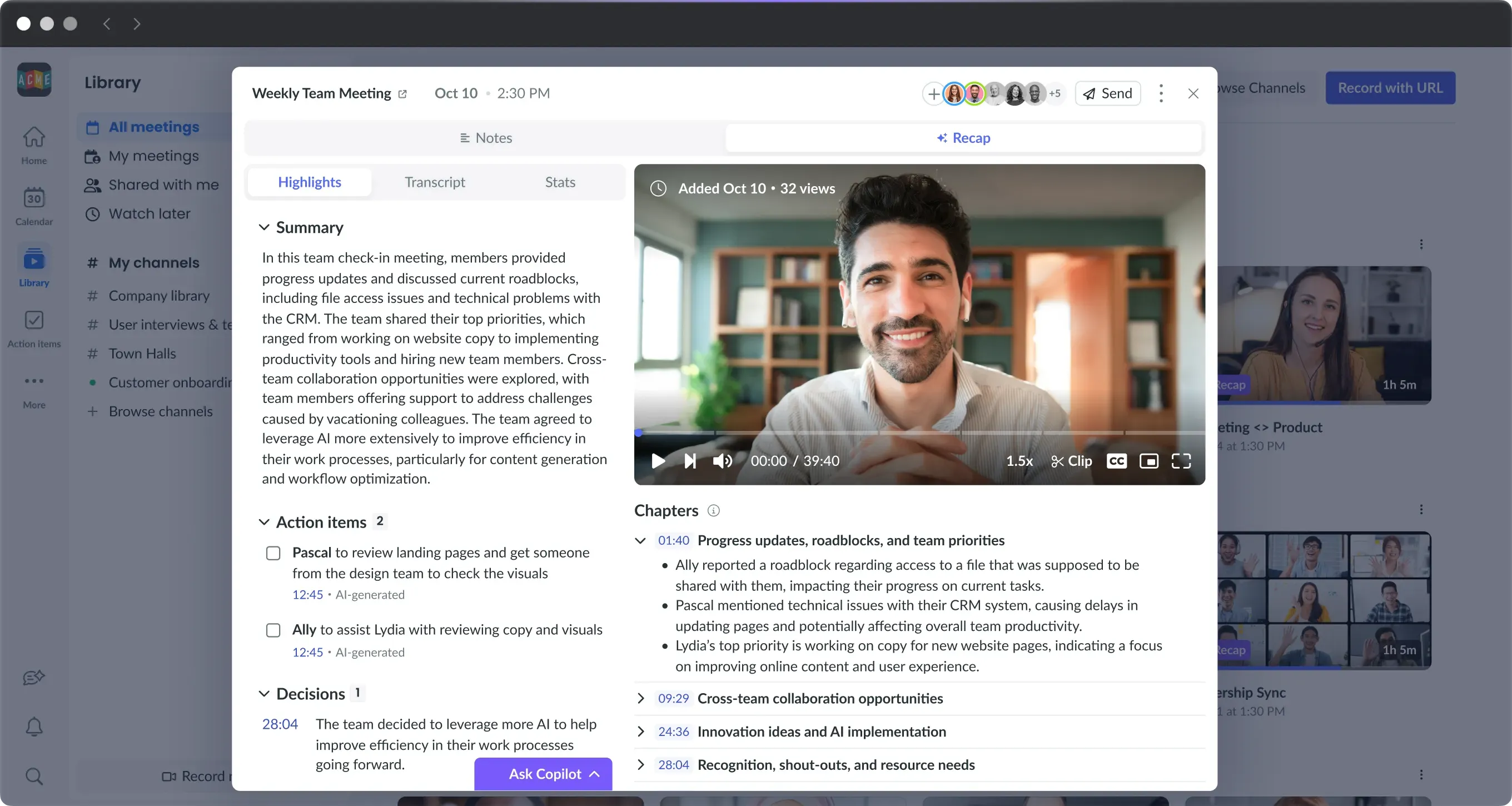
Fellow is a meeting productivity app with an AI assistant that transcribes and summarizes your meetings.It works across Zoom, Google Meet, Microsoft Teams, and even Slack huddles, capturing everything discussed into organized notes.
It emphasizes privacy and security – your meeting data stays private (no AI model training on your notes) and the tool is SOC 2 and HIPAA compliant. Fellow also includes an “Ask Fellow” chatbot that lets you query your past meeting notes and get insights or follow-up email drafts from the discussions.
Let’s look at its specifics below.
Who is it for?
Meant for team leads and organizations that want structured meeting agendas and secure note storage. It’s useful if you run a lot of recurring meetings or 1-on-1s and need a collaborative agenda, while also having AI-generated transcripts and insights in a controlled, private environment.
Key Features
AI Meeting Notetaker: Records and transcribes meetings across Zoom, Teams, Google Meet, and Slack with high accuracy
Automatic Summaries: Provides AI-generated summaries, capturing decisions and action items from each meeting
Privacy-Focused: Ensures notes are private (no data used to train AI) and offers enterprise-grade security (SOC 2, GDPR, HIPAA compliance)
Meeting Agendas & Templates: Integrates AI note-taking with collaborative agenda templates and action item tracking for meetings
“Ask Fellow” Insights: AI chatbot to search your meetings, catch you up on missed discussions, or draft follow-up emails based on meeting content
Pricing
Free: Offer 5 meeting notes and AI recordings per user
Team: $11/month per user.
Business: $23/month per user.
Enterprise: $25/month per user (billed annually).
Pros and Cons
Pros
It records meetings, transcribes them, and highlights key moments automatically.
Meeting summaries are detailed and often capture conversation flow well.
You can use it without installing software on your device.
The tool integrates well with platforms like HubSpot and Notion.
It auto-categorizes meeting sections for better organization.
Cons
Transcripts may struggle with accents, especially from some Asian speakers.
Instant meeting joins aren't reliable and feel unintuitive.
Summary customization templates may not consistently apply.
Chrome extension can freeze your computer during use.
Corrupted video recordings have caused full data loss in some sessions.
Source: G2
Fireflies
Best for: Teams needing transcriptions and AI insights from calls
Similar to: Otter.ai, Avoma, Chorus.ai
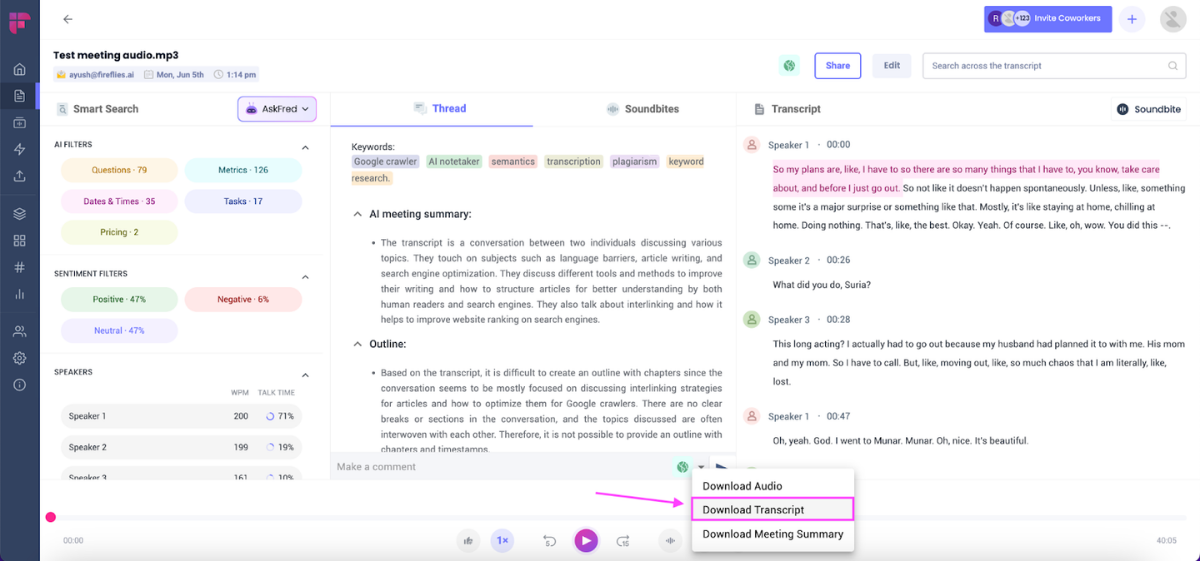
Fireflies is an AI notetaker for meetings that transcribes, summarizes, searches, and analyzes all your team’s conversations.
It can auto-join online meetings (via a bot named Fred) or work through a Chrome extension or mobile app to capture calls on platforms like Zoom, Google Meet, Microsoft Teams, and more. Fireflies produces detailed notes and action item summaries after each call, supporting over 100 languages with about 95% transcription accuracy.
It also offers conversational intelligence features (like speaker talk-time, sentiment analysis) and an “AskFred” AI assistant that answers questions about your meetings from the transcripts.
Here’s a closer look at its features.
Who is it for?
Ideal for distributed teams, sales or recruiting staff, and anyone who wants every call documented. Fireflies suits organizations that want to turn meeting talk into searchable knowledge – for example, pulling up what was said in a client call or analyzing team call metrics – without taking notes manually.
Key Features
Meeting Transcripts: Automatically records and transcribes meetings with ~95% accuracy, supporting 100+ languages
AI Summaries: Generates instant bullet-point summaries and highlights action items right after each meeting
AskFred Q&A: AI assistant that lets you query your meeting content (“What issues were mentioned?”) and get answers from the transcript
Conversation Analytics: Tracks speaking time per participant, sentiment, topics, and other insights across conversations
Tool Integrations: Connects with CRM, project management, and Slack – e.g., auto-fill CRM call logs, create tasks in Asana, or send summaries to Slack channels
Pricing
Free: $0 per user/month
Pro: $18 per user/month
Business: $29 per user/month
Enterprise: $39 per user/month (no monthly option; billed annually)
Pros and Cons
Pros
You can receive instant, high-quality meeting summaries right after each call.
Uploading your own recordings still gives you full access to summaries and features.
The Slack integration makes it easy to share meeting notes with others.
You can search transcripts and rewatch call segments with synced captions.
Accurate transcripts include speaker talk time and sentiment detection.
Cons
It struggles to accurately transcribe meetings in languages like Hindi.
Meeting summaries sometimes misidentify names or miss discussion accuracy.
It may be slow to join meetings if not invited in advance.
Zoom integration feels intrusive and is not intuitive to disable mid-call.
The interface feed looks cluttered and could be more minimal.
Source: G2
Otter.ai
Best for: Professionals who want real-time transcription and summaries
Similar to: Fireflies, Microsoft Teams Premium (Intelligent Recap)
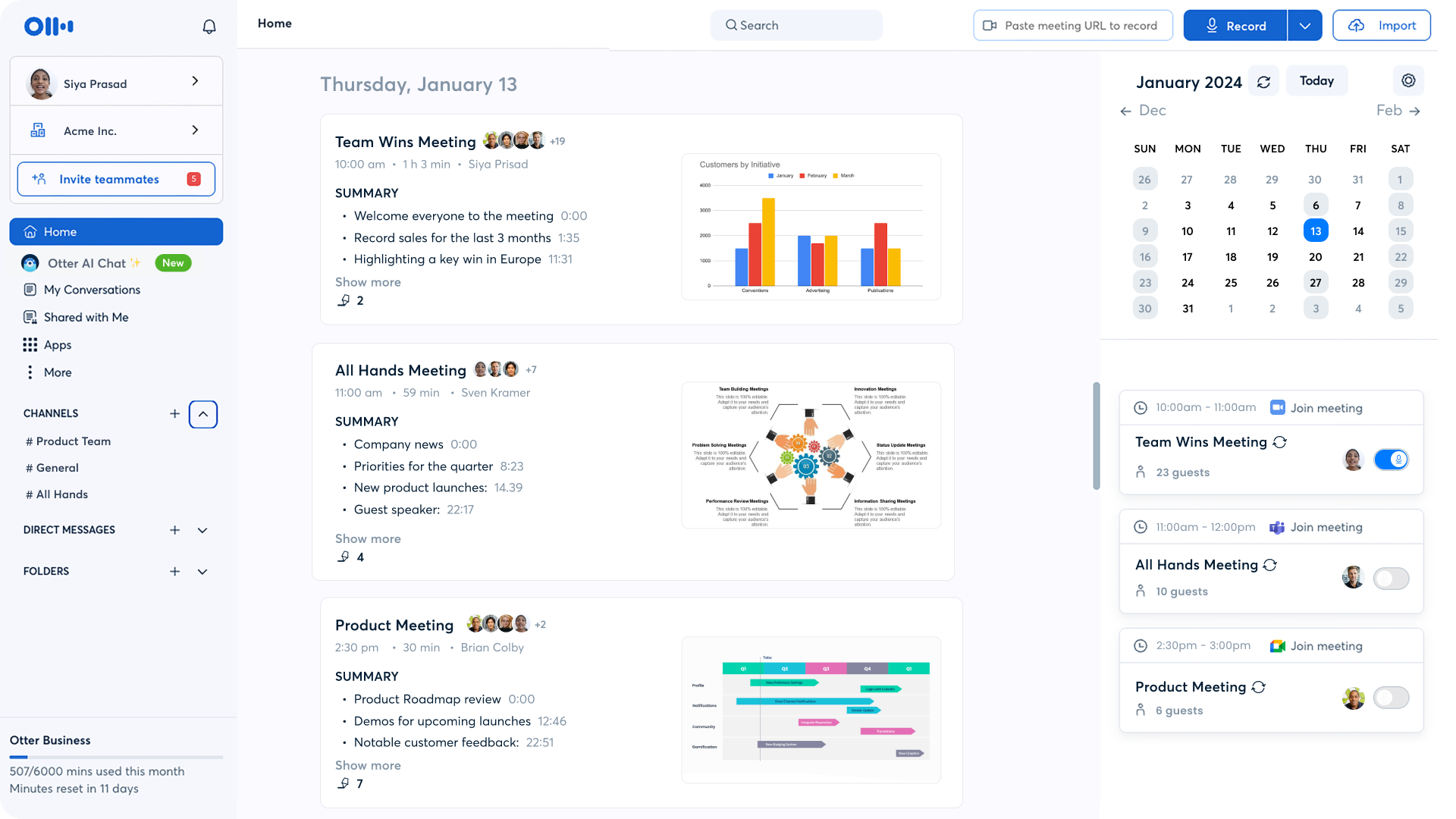
Otter.ai is an AI-powered meeting notetaker that turns your conversations into live transcripts and summaries. It works in real time – as you talk on a call, Otter generates a shared live transcript that participants can see and highlight. After the meeting, it produces an automated summary of key points and action items.
Otter’s AI Meeting Agent can be invited to meetings (or set via your calendar) to join and take notes for you, so you can focus on the discussion. It also offers an AI chat feature allowing you to ask questions about any past meeting (“Hey Otter, what did we decide about Project X?”) and get instant answers from your notes.
We break down more details below.
Who is it for?
Great for consultants, students, or teams that need detailed records of meetings and lectures. Otter is used by anyone who wants to capture meeting content verbatim and quickly share or review it later. It’s especially helpful if you frequently refer back to what was said, assign follow-ups, or need to include people who missed the meeting via shareable notes.
Key Features
Real-Time Transcription: Provides live transcription during meetings with up to ~95% accuracy, so participants can follow and search notes as you speak
Automated Summaries: Generates an easy-to-read summary after each meeting, regardless of length, condensing the main points and decisions
AI Meeting Agent: A virtual note-taker that you can send to meetings to record audio, identify takeaways, and even automatically capture and assign action items
AI Q&A Assistant: “Hey Otter” voice commands or chat let you query your meeting notes and get answers or draft content (plans, emails) based on the discussion
Cross-Platform & Sync: Works with Zoom, Microsoft Teams, Google Meet (via integrations or the Otter Assistant) and syncs notes across web and mobile apps for easy sharing
Pricing
Basic: $0 per user/month
Pro: $16.99 per user/month
Business: $30 per user/month
Enterprise: Contact sales
Pros and Cons
Pros
Generates summaries that outline decisions and discussion points by speaker.
Accurately captures notes in real-time, even during multi-speaker meetings.
Syncs with calendars to auto-join and transcribe meetings without manual setup.
Chrome extension enables transcription without needing a desktop install.
Meeting notes are categorized and can be used as formal minutes.
Cons
You can't export notes in multiple file formats.
Transcripts may struggle with accents, leading to name errors and unclear phrases.
Simultaneous speakers can cause messy and less usable transcripts.
Occasional interruptions during live calls have been reported.
Exported summaries don’t always follow customized formatting templates.
Source: G2
Fathom
Best for: Sales and customer-facing teams wanting integrated call summaries
Similar to: Fireflies, Gong, Avoma
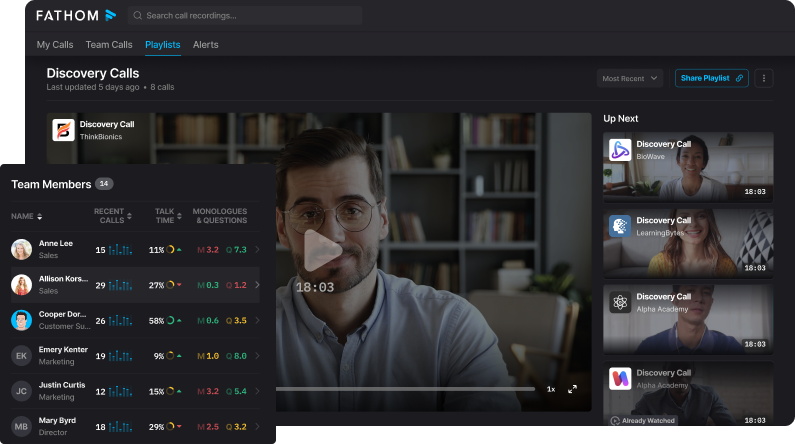
Fathom is an AI meeting assistant that records your calls and delivers instant transcripts and summaries when the meeting ends. It produces shockingly accurate transcripts, even handling multiple speakers or heavy jargon by letting you add custom vocabulary (so it “learns” your company’s terms).
Right after each call, Fathom emails you a polished summary and identified action items, so you can move forward without writing minutes.
It also has an “Ask Fathom” feature – a search/chat tool where you can ask any question about your meetings (e.g., “What did the client say about pricing?”) and get an answer from the notes.
Below are its key features and target users.
Who is it for?
Ideal for teams in sales, customer success, or product research who have many calls and want to focus on the conversation rather than note-taking. Fathom is useful if you need to quickly share call insights (e.g., send a summary to CRM, or coach a rep), and if you use tools like Salesforce, Slack, or Asana – since Fathom syncs notes and tasks into those systems automatically.
Key Features
Instant Meeting Summaries: Provides an AI-written summary email with key points and action items moments after each call ends
Accurate Transcriptions: Generates word-perfect transcripts with support for different accents and speakers, plus allows custom dictionaries for jargon/acronyms
“Ask Fathom” Search: AI chat that lets you query your meeting archive in natural language (e.g., ask about a decision from Q3 meetings and get an answer from the transcripts)
Workflow Integrations: Syncs notes and highlights automatically to tools like Slack, Salesforce, HubSpot, Notion, Asana, and more, fitting into your team’s existing workflow
Custom Templates: Offers customizable summary templates for different meeting types (sales call, stand-up, interview) so the notes are formatted to your team’s preferred structure
Pricing
FREE: $0 per user/month
Premium: $19 per user/month
Team Edition: $29 per user/month
Team Edition Pro: $39 per user/month
Pros and Cons
Pros
Generates clear, actionable meeting summaries and task lists automatically.
Provides multiple format templates to suit different meeting styles.
Lets you ask questions about meetings and get topic-specific responses.
Seamless Zoom integration makes setup and use fast and easy.
Saves time by automatically highlighting key points and decisions.
Cons
Some summaries miss small nuances or details.
Transcriptions can be inaccurate when multiple people speak or in some meetings.
No support yet for capturing standard phone calls.
The notetaker is always visible in meetings, with no option to hide it.
Attempts to transcribe even meetings without a video link.
Source: G2
Notion
Best for: Individuals and teams needing an all-in-one notes and knowledge hub
Similar to: Evernote, OneNote, Coda
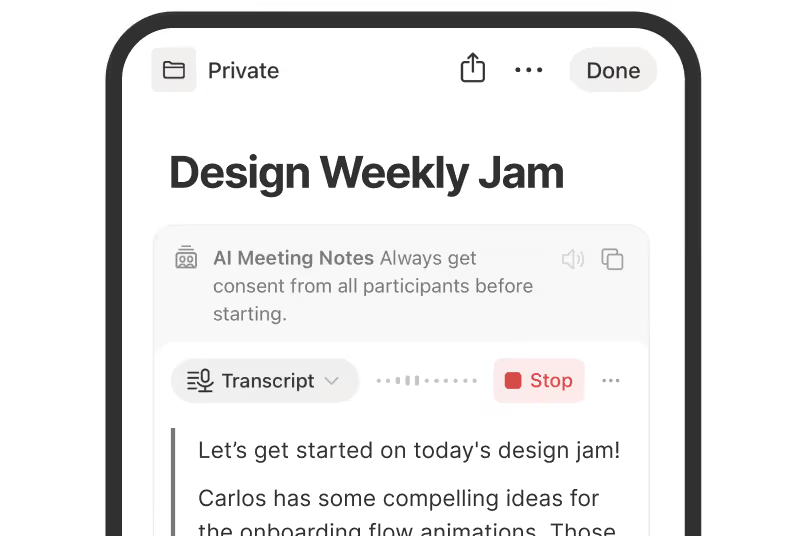
Notion is an all-in-one workspace app for note-taking, documentation, and project management.
It lets you capture notes, organize them in a highly customizable way (pages, tables, databases), and collaborate in real time. You can write to-do lists, manage projects, or build a wiki – all in one place.
Notion’s powerful search and organization tools help you find information quickly, and it supports embedding images, files, code, and more in your notes. It also features a Web Clipper to save articles or webpages directly into your notebooks.
Recently, Notion has integrated AI features: for example, an AI Meeting Notes tool can transcribe and summarize meetings right inside Notion, and a writing assistant can draft or improve content on any page.
Here’s who it’s for and what it offers.
Who is it for?
Suited for consultants, project managers, or any professionals who juggle notes, documents, and tasks. Notion works well if you need a single hub to plan work, take notes, track tasks, and collaborate with others. It’s flexible for personal use (meal plans, class notes) and powerful for team use (shared wikis, project roadmaps) – essentially for anyone who wants to customize how they organize information.
Key Features
All-in-One Notes & Docs: Create notes, documents, to-do lists, and wikis in one place – with text, images, tables, checklists, and more in a flexible page format
Database Organization: Organize notes into databases with custom properties (like tags, dates, owners) and view them as tables, boards, or calendars for project management
Real-Time Collaboration: Share pages with your team for live editing, comments, and @mentions. Changes sync across devices (web, desktop, mobile) instantly
Integrations & Clipper: Connects with apps (Google Drive, Slack, etc.) and includes a Web Clipper to save webpages and PDFs directly into Notion for reference
Built-in AI Assistant: Notion AI can summarize content on a page, generate text (like meeting summaries or brainstorming ideas), and even handle transcribing meetings with the AI Meeting Notes feature
Pricing
Free: $0 per user/month
Plus: $12 per user/month
Business: $24 per user/month
Enterprise: Contact sales
Pros and Cons
Pros
Lets you organize notes, tasks, and projects flexibly in one workspace.
Templates and linked pages help you build custom systems easily.
The AI feature assists with summarizing meetings and offering guidance.
Supports diverse content formats and customization for various workflows.
Works smoothly with a simple, user-friendly interface across devices.
Cons
Complex setups and databases have a steep learning curve.
Pages can become cluttered or overly nested, reducing usability.
Excess customization may lead to distraction or inefficiency.
Project structures can get messy without careful planning.
Lacks deeper email integration or rule-based email sorting.
Source: G2
Krisp
Best for: Remote professionals needing clear calls and automatic notes
Similar to: Otter.ai, Fireflies (plus unique noise cancellation)
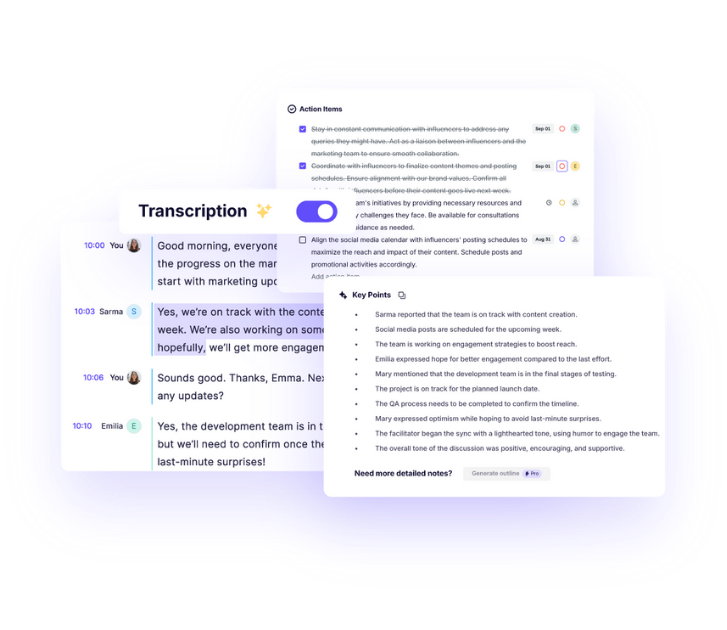
Krisp is an AI meeting assistant app known for its industry-leading noise cancellation, now combined with note-taking features.
It records and transcribes your online or in-person meetings, then summarizes them into notes so you can focus on talking instead of typing.
What sets Krisp apart is its real-time audio processing: it removes background noises, echo, and even other voices from your calls, giving crystal-clear sound on both ends while it captures the conversation.
Krisp’s AI notetaker works with any conferencing platform (Zoom, Teams, Webex, etc.) and can join calls without a bot by capturing system audio directly. It supports 16+ languages for transcription and even offers an accent translation feature for call centers.
Below is more on its target users and features.
Who is it for?
Great for remote workers, call center agents, or anyone who often communicates over messy audio channels. If you’re a consultant taking calls from anywhere, Krisp ensures your voice is clear and your meeting notes are handled. It’s particularly useful in noisy environments or when meeting participants have heavy accents – the app will clean up audio and provide you with a written record and summary of the call.
Key Features
Noise Cancellation: Eliminates background sounds, echoes, and unwanted voices in real time, making call audio extremely clear.
AI Note Taker: Automatically transcribes meetings (with ~96% accuracy) and generates summaries and action items after each call.
Universal Compatibility: Works with any meeting platform (Zoom, Teams, Google Meet, etc.) and can capture audio without needing a bot in the meeting.
Task & Action Item Capture: Identifies speakers and can assign tasks or highlight action items discussed, helping teams follow up consistently.
Mobile & Accent Support: Offers mobile apps to record in-person meetings or voice notes, and even an accent conversion feature to make speech more understandable on calls.
Pricing
Free Trial: $0 per user/month
Pro: $16 per user/month
Business: $30 per user/month
Pros and Cons
Pros
Effectively removes background noise without distorting your voice.
Transcribes meetings accurately and identifies key action items.
Easy to set up and works across multiple platforms.
Filters noise from both your side and other speakers on calls.
Captures meeting content clearly, even in low-volume environments.
Cons
Transcripts may miss multiple speakers or struggle with multilingual meetings.
Softer voice segments can occasionally be cut off during calls.
Live recording on iOS may crash or fail to upload properly.
Lacks ability to tag or organize recordings into folders.
No support for transcribing uploaded video files like .mp4.
Source: G2
Evernote
Best for: Individuals who need to capture and organize various notes
Similar to: Notion, OneNote, Google Keep
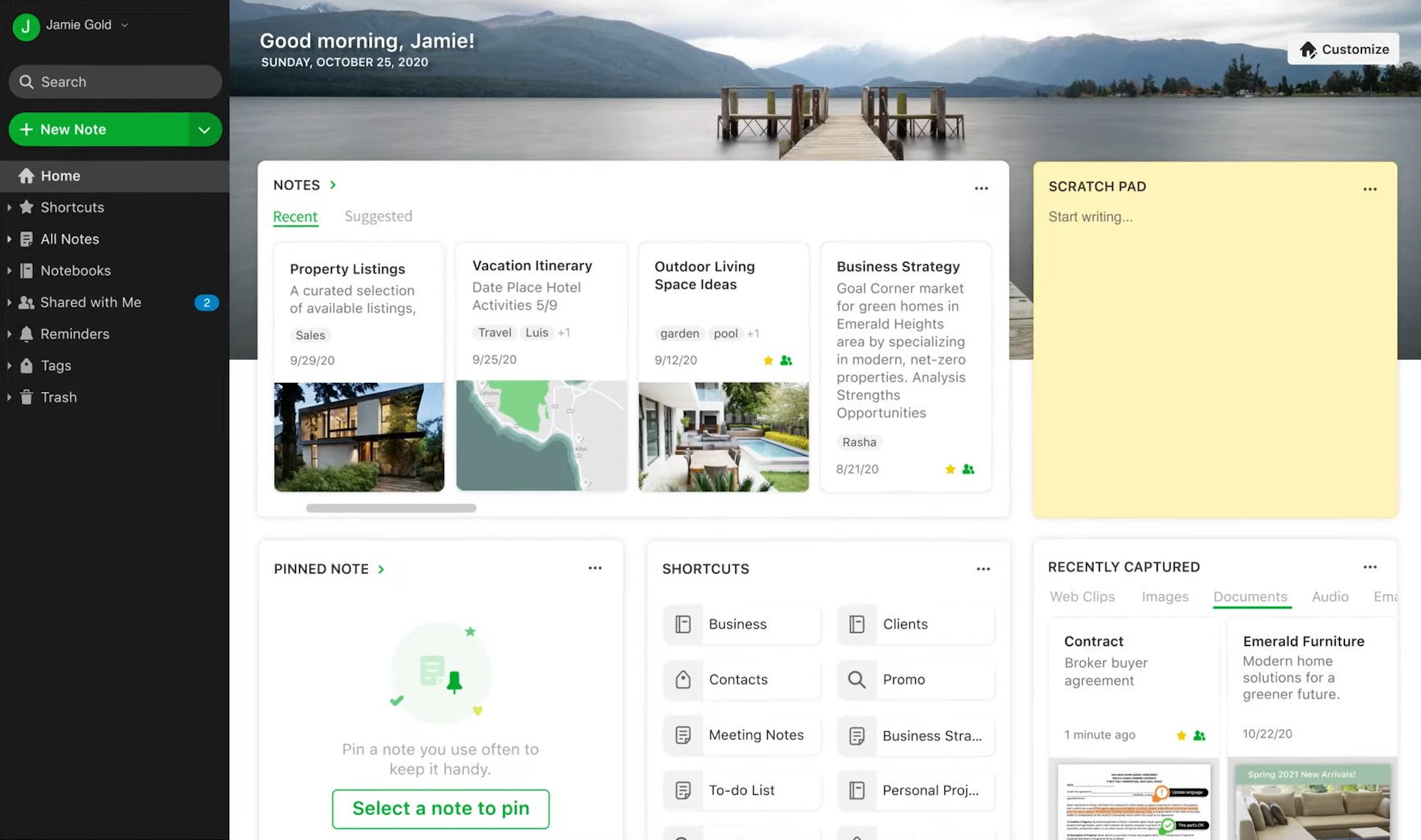
Evernote is a veteran note-taking application for organizing your ideas, projects, and to-dos in one place. It allows you to create rich notes with text, images, PDFs, and audio clips, then organize them into notebooks and tags so nothing falls through the cracks.
Evernote syncs across your devices (phone, tablet, computer), enabling you to access your notes anywhere. It has powerful search that even finds text inside images and scanned documents.
Recently, Evernote has been adding AI capabilities – for example, a new AI Meeting Note-taker can capture and transcribe discussions from your microphone or a virtual meeting, and automatically recognize different speakers in the transcript. Here’s an overview of who uses it and its key features.
Who is it for?
Evernote is for anyone juggling a lot of information – entrepreneurs, students, or consultants managing multiple projects. If you need a reliable system to store notes, web clippings, and reminders and retrieve them easily later, Evernote fits the bill. It’s popular for personal knowledge bases and small team collaboration on notes, meeting minutes, or research, especially among users who have used it for years to “remember everything.”
Key Features
Cross-Device Note Capture: Create notes with text, checklists, photos, PDFs, or voice memos and have them sync automatically to all your devices
Notebook & Tag Organization: Organize notes into notebooks and sub-notebooks, and label them with tags for flexible categorization and easy retrieval
Powerful Search: Search through all your notes by keyword – Evernote’s search can even detect text inside images or handwritten scans you’ve added
Tasks and Calendar: Built-in to-do list management and the ability to link notes to your Google Calendar events, so meeting notes and tasks stay connected
AI Meeting Note-Taker: (New) AI feature to record and transcribe meetings directly in Evernote, with automatic speaker recognition for turning conversations into organized notes
Pricing
Free: $0/month
Starter: $14.99/month
Advanced: $24.99/month
Enterprise: Custom Pricing
Pros and Cons
Pros
Lets you save a wide range of content types including notes, PDFs, clippings, and images.
The tagging and notebook system helps keep notes searchable and organized.
Syncs seamlessly across devices so you can access notes anywhere.
Offers customizable templates and dashboards to fit your workflow.
Web Clipper and email-to-Inbox tools simplify content capture from other sources.
Cons
Transferring data to other tools like Notion can fail due to formatting issues.
Complex sync delays can occur, especially with larger accounts or mobile use.
Mobile or desktop app may experience occasional slow loading or glitches.
Lacks a smooth data export experience, making migration feel restrictive.
Free version limits device syncing and usable features.
Source: G2
Granola
Best for: People with back-to-back meetings who take live notes
Similar to: Jamie, Fathom, Fireflies
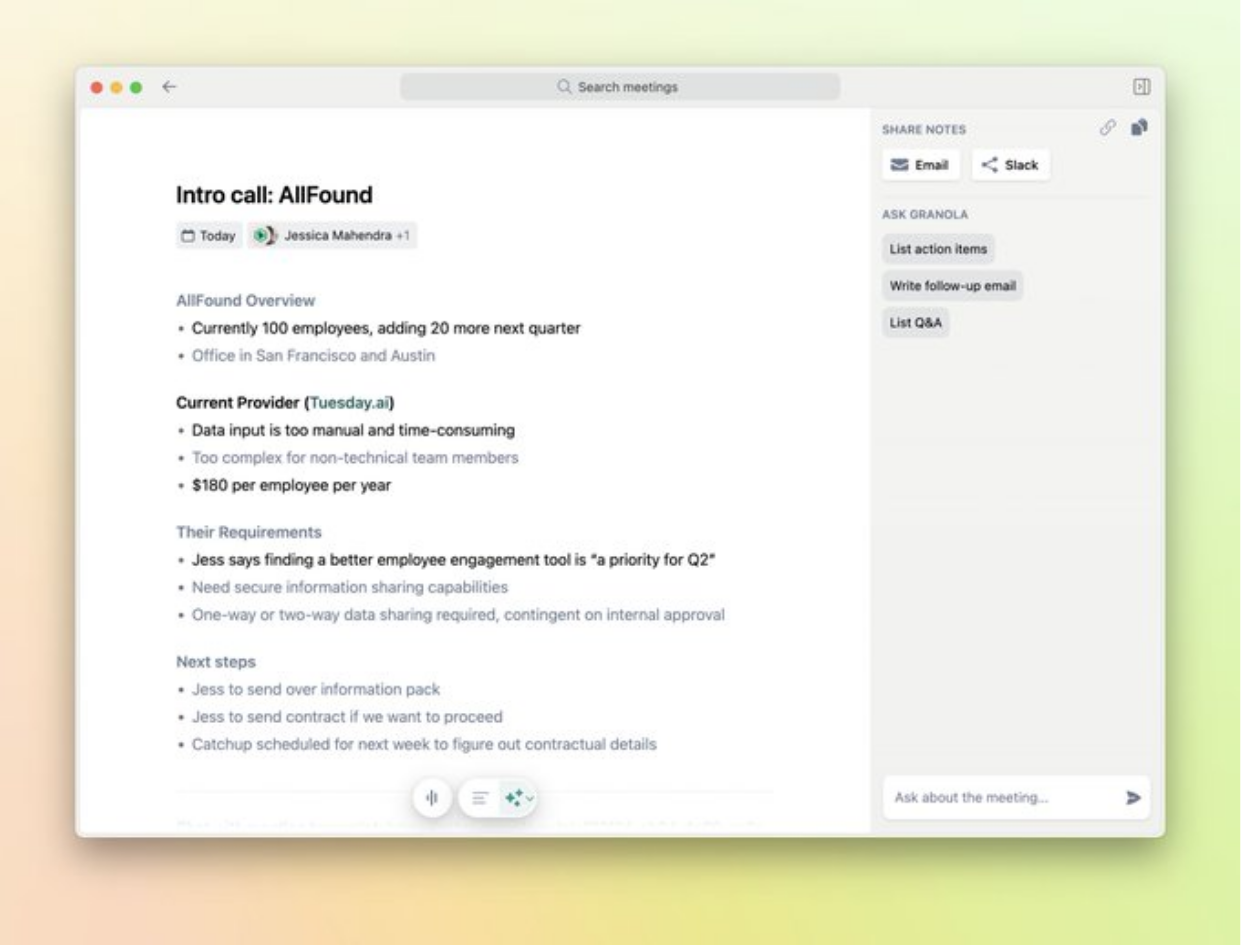
Granola is an AI notepad designed for those in constant meetings – it transcribes your discussions and enhances the notes you write, turning raw notes into polished summaries. Unlike some auto-notetakers, Granola encourages you to jot down notes during the meeting; meanwhile, it captures the meeting audio from your device (no bots needed in the call) and aligns the transcript with your notes.
When the meeting ends, Granola’s AI instantly refines and structures your rough notes, producing a clean meeting report with key sections (using templates you can customize)
It also has an AI chat assistant built-in, so after a call you can ask follow-up questions like “What are the next steps?” or “List all the concerns mentioned,” and Granola will answer from the meeting content
Here’s more on who uses it and its features.
Who is it for?
Made for professionals who are in back-to-back meetings (like consultants, recruiters, product managers) and prefer to take some notes themselves but want those notes automatically fleshed out. If you like to keep your own outline during a meeting, Granola acts as a smart assistant that fills in details, ensures nothing is missed, and formats the outcome. It’s especially handy for those who hate having a bot in calls – Granola works quietly on your laptop’s audio, then helps produce shareable notes afterward
Key Features
Live Transcription: Listens to your meeting through your computer audio (no bot required) and creates a time-stamped transcript of the conversation
AI Note Enhancement: You take brief notes during the meeting, and when it ends Granola’s AI expands and organizes them into a detailed summary with headings (using your chosen template)
Custom Templates: Provides editable templates for different meeting types (sales call, 1-on-1, interview, etc.), so the AI outputs notes in the format that suits your team
Post-Meeting Q&A: “Ask Granola anything” feature lets you query the meeting notes/transcript (e.g., “What questions did the client ask?”) and it will answer or generate outputs like follow-up emails
Easy Sharing: With one click, you can share the enhanced notes to other platforms or with your team, using integrations or by copying a web link for others to read
Pricing
Free trial: $0/month (25 free meetings).
Individual: $18/month.
Business: $14/user/month.
Enterprise: from $35/user/month.
Pros and Cons
Pros
Transcribes meetings directly from device audio without needing a bot to join.
Summaries include action items, decisions, and key points in structured formats.
Setup is quick and automatic, with real-time meeting detection.
Note styles can be customized post-call to fit different meeting types.
You can ask follow-up questions or clarify items directly in the notes.
Cons
Does not record audio or video, limiting review options for misheard content.
Speaker identification can be inconsistent in larger group meetings.
No fully functional web version restricts access on locked-down devices.
Lacks seamless export or deep integration with external tools like Drive.
Doesn’t support Spanish or uploaded video/audio files for transcription.
Source: G2
Final verdict: what is the best note takers for consultants?
The best note takers for consultants are Jamie, MeetGeek, and Fellow.
If you’re running client-heavy days, I’d lean on Jamie as your main “brain” for meetings, and treat tools like MeetGeek and Fellow as strong alternatives if you prefer bot-based capture or more traditional agenda workflows. The key is that you end up with notes you can actually trust, share, and reuse across projects—without spending your evenings rewriting transcripts.
quick recap of the best note takers for consultants
Jamie: My top pick if you live in client calls and want fast, structured, client-ready notes without bots, plus strong privacy and EU hosting so you can feel safe even on sensitive projects.
MeetGeek: A friendly choice if you like automated recording and rich analytics across your team’s meetings, with solid summaries and plenty of integrations to keep everyone aligned.
Fellow: Great if you care about agendas, recurring rituals, and secure note storage, so your 1:1s and leadership meetings stay structured and your data stays protected.
Fireflies: A powerful fit if you want conversation intelligence at scale, with searchable transcripts and call insights that help you and your team stay on top of details.
Otter.ai: A good option when you want dependable live transcription and quick summaries you can share with clients or colleagues who couldn’t join the call.
Fathom: Ideal if you’re in sales or customer-facing roles and want instant post-call summaries and action items that slide neatly into your CRM and team tools.
Notion: Lovely as your all-in-one workspace, where you can turn meeting notes into living project hubs, wikis, and roadmaps for each client.
Krisp: A smart pick if your calls are often noisy; it cleans up audio and captures notes so you don’t have to worry about “Can they even hear me?” while you consult.
Evernote: Comforting if you like a classic note app with new AI meeting features, so you can keep long-running client notebooks and find old decisions quickly.
Granola: Perfect if you enjoy typing your own notes but want AI to tidy them up into clear summaries after each meeting, without ever inviting a bot into the call.
Howeverrrr... If you're considering Jamie, you can download it for free on desktop or get the iOS app!
We know how much it matters to have tools that actually help you get things done while keeping your privacy intact. That’s why we truly recommend giving Jamie a try—risk-free.
You’re welcome to book a free demo if you'd like to see it in action first. We're always here to support you on your journey to better, simpler meetings and note-taking.
adoption across client calls (internal + external)


Read More
Want to know the best AI note taker apps for iPhone for in-person meetings?
Explore the full comparison of AI note takers that work best on mobile phones.
Learn how to choose an AI note taker that suits your workflow and privacy needs.
See the best AI meeting notes apps for productivity in 2025.
Understand how AI meeting note takers are changing the way we work.
Discover the benefits of a bot-free AI meeting assistant for private, secure note-taking.
Read our hands-on Granola AI notetaker review and feature breakdown.
Dive into how No Apple Intelligence in EU: What’s Next?.
FAQs on Note Takers for Consultants
What is the best AI note-taking tool for client meetings as a consultant?
You can use an AI meeting assistant like Jamie as one of the best options for client meetings as a consultant, because it captures discussions from multiple meetings, turns them into structured summaries, and keeps searchable transcripts so you never lose critical information. You can lean on it to stay present with the client while the AI system pulls out action items and actionable insights, which is reassuring when client relationships are your top priority. You can also explore other AI tools like Fireflies or Otter if you prefer bot-based workflows, but many consulting firms find Jamie’s simple note taking and device-based recording a strong balance of control and ease.
Which meeting notetaker works best with Zoom, Teams, and Google Meet for consulting calls?
You can cover Zoom, Microsoft Teams, Google Meet, and almost any other platform with Jamie, because it records audio directly from your device instead of relying on a visible bot in each automated meeting. You can appreciate this if you run client calls across different tools and just want one setup that quietly captures discussions and produces clean meeting notes. You can still consider MeetGeek, Fireflies, or Fathom for more traditional bot joiners, but Jamie’s approach helps you stay focused while keeping your team aligned and able to share notes quickly.
How can I automatically record, transcribe, and summarize my consulting meetings?
You can automatically record, transcribe, and summarize consulting meetings by running an AI meeting assistant like Jamie on your laptop or phone so it captures audio, generates searchable transcripts, and produces structured summaries with action items. You can let it handle repetitive tasks like tagging meetings, extracting decisions, and syncing to external systems such as CRM or project tools, which reduces errors compared with manual note taking. You can still try alternatives like Otter or Fathom for similar workflows, but Jamie’s focus on consultants and multiple meetings in a day makes it a calm, reliable way to keep everything in one place.
What note-taking apps are best for organizing client projects and meeting minutes?
You can organize client projects and meeting minutes with a combination of Jamie for meeting capture and tools like Notion or OneNote for broader knowledge management. You can have Jamie automatically turn each call into structured notes with tags per client or project, then sync or copy those into your favorite tools so everyone stays on the same page. You can also look at Fellow for collaborative agendas, but Jamie’s tagging, templates, and integrations help consulting firms keep client work, meeting history, and follow-ups connected without sacrificing simple note taking.
Is there a secure note-taking app for confidential client work and meeting notes?
You can choose a security-focused AI meeting assistant like Jamie if you handle confidential client work and need data security to be a top priority. You can rely on its GDPR-first, EU-hosted setup, encryption, and clear controls over what is shared so automated meeting notes do not feel risky with sensitive discussions. You can also evaluate tools like Fellow, which emphasizes compliance for private notes, but Jamie’s emphasis on on-device recording and strict handling of audio gives many consultants confidence about the future of AI tools in regulated environments.