
This article covers the best AI meeting tools for investment banks. We focus on platforms with bot-free meeting capture, automatic CRM sync, compliance features, and centralized relationship intelligence.
Enjoy!
TL;DR
Jamie, AlphaSense, and Hebbia lead the category. Each addresses different needs from client call capture to market research and document analysis.
Top features include bot-free recording, automatic Salesforce sync, and enterprise-grade compliance with GDPR and AES encryption.
Teams can choose between generalist tools like Jamie for cross-platform capture and specialized platforms like Aiera for live earnings calls or Zocks for wealth management workflows.
Why Are Investment Banking Professionals Actively Searching for AI Meeting Tools?
Getting Stuck as the “Notes + Calendar Invites” Layer While the Deal Moves Without You
“Admin tasks like notes and calendar invites, client email…” (Wall Street Oasis)
You join a client call to learn about deal structures and valuations. But instead of listening, you're typing everything down as fast as possible.
The call ends. Now you need to format those messy notes into something readable, send them to everyone, create the next meeting invite, and follow up with the client. Meanwhile, your actual job (building financial models) is sitting there waiting.
This is why banks need AI meeting tools. The tool records and organizes everything automatically. You can actually pay attention during the call. The notes write themselves. You get to do your real work instead of spending 30 minutes after every meeting cleaning up notes.
Diligence Tracker Version Hell: Internal vs External vs “Lawyers Are Notorious”
“It’s 2024 and we’re sending excel spreadsheets around to 10 different diligence parties… everyone seems to be out of date (lawyers are notorious).” (Wall Street Oasis)
Every deal has a tracker that shows what questions were asked, what answers came back, and what's still missing. Ten people need this information, so everyone gets their own Excel file.
Person A edits their version. Person B updates their version. The lawyers change their copy but forget to send it back. Now you have ten different files and zero idea which one is correct.
This is why AI meeting tools for investment banks matter. When the tool captures decisions and action items from every call automatically, everyone sees the same information. No more version control nightmares. No more wasting an hour before meetings just figuring out what's actually updated.
“Notes on Every Call” Across Multiple Workstreams Means the Details Scatter Immediately
“Responsibilities as a MM M&A An 1: … Notes on every call” (Wall Street Oasis)
You're working on three deals at once. Each deal has multiple calls every day. You take notes during a client call on Monday. Then a lawyer call on Tuesday. Then an internal meeting on Wednesday.
Two weeks later, your boss asks: "What did the client say about timeline?" You have no idea which document has that information. (Was it in the Google Doc? The email? Your notebook?)
This is exactly why banks want AI meeting tools. The tool keeps every conversation in one searchable place. You type "client timeline" and instantly find the exact moment when it was discussed. No more digging through fifteen different files to find one sentence.
Compliance-Filtered Meeting Outputs: “Drafts an Email”… But Someone Still Has to Sign Off
“The tool takes notes on a meeting and drafts an email which an individual has to sign off on before it sends.” (Wall Street Oasis)
Regular AI note-takers automatically send summaries to everyone after meetings. That's fine for normal companies.
But banks can't do that. Some information is confidential. Some can only go to certain people. Some needs senior approval before anyone sees it. If the AI just sends notes to everyone automatically, that's a compliance problem.
This is why banks need specialised AI meeting tools. The right tools let someone review and approve notes before they go out. They understand that banks have rules about who sees what. (Regular consumer tools don't care about this stuff, but banks absolutely do.)
What are the best AI meeting tools for investment banks?
The best AI meeting tools for investment banks are Jamie with its bot-free meeting capture and automatic CRM sync, AlphaSense for combining meeting context with market intelligence, and Aiera for live earnings and corporate event coverage.
Here’s a breakdown of the 5 AI meeting tools for investment banks that I researched:
💜 Gentle Reminder: Pricing may change; please double-check on each tool’s official site. Plans evolve, and enterprise tiers often require a quick chat with sales for accurate quotes.
1. Jamie
Best For: Investment bankers who need client call notes synced to Salesforce without scrambling across spreadsheets and Word docs
Similar To: Zocks, Jump AI, Focal
Here's Jamie in action 👇
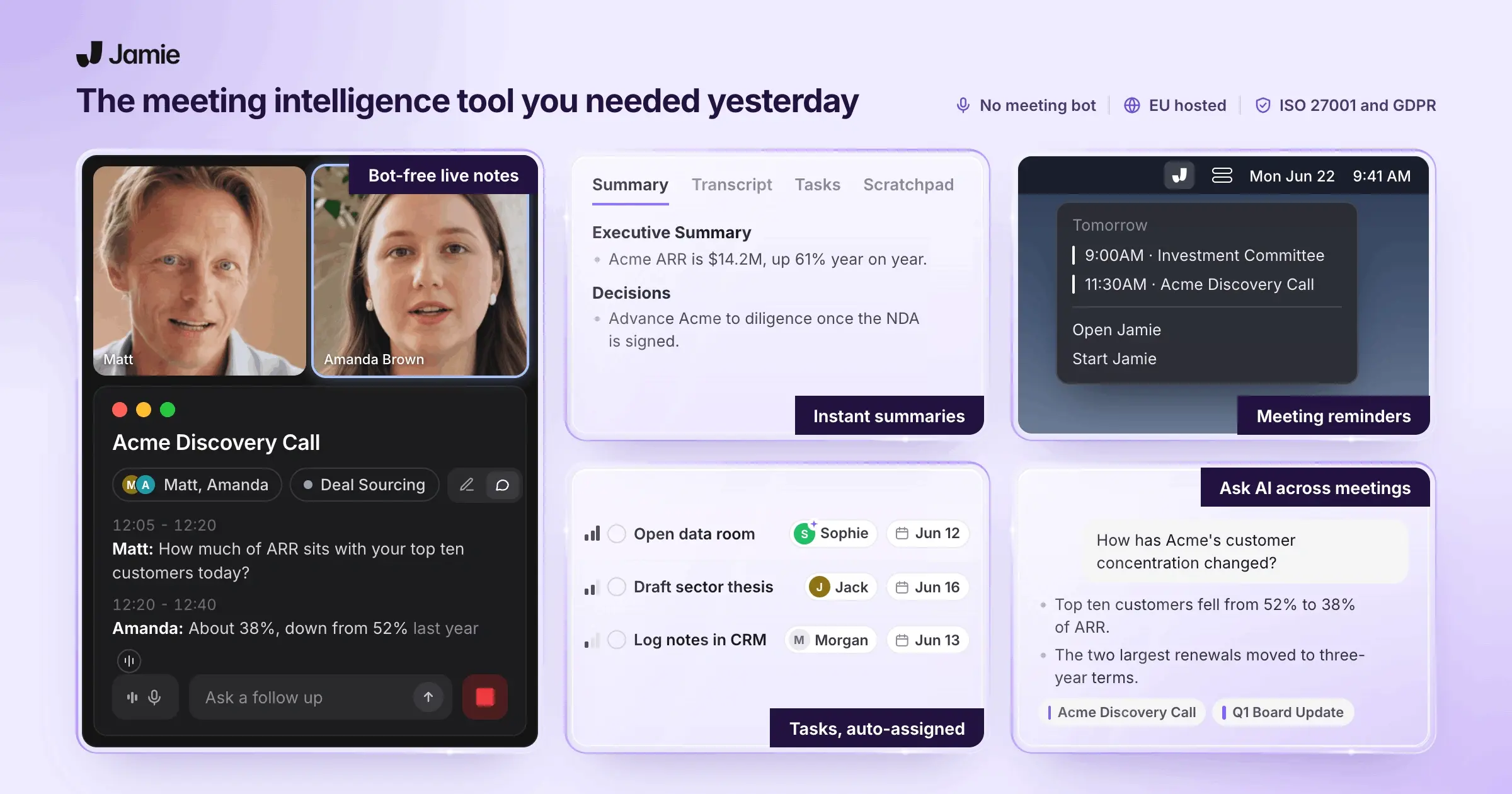
Jamie captures every client call, pitch meeting, and internal huddle without visible bots or fire drills afterward. You get structured meeting notes with action items automatically synced to Salesforce, so relationship intelligence stops walking out the door when bankers leave.
The tool works across all platforms and in-person meetings, keeps you compliant with GDPR and AES encryption, and handles 100+ languages for global deals.
Full feature list at a glance:
Transcription, meeting notes, action items, editing, tagging
Speaker identification, speaker memory, calendar integration, automatic meeting titles, consent emails
Bot-free operation, cross-platform (macOS/Windows/iOS), works online/offline/in-person, 100+ languages, GDPR-compliant with AES encryption
CRM integrations (Salesforce, HubSpot, Attio, Asana, Notion, OneNote), webhooks, copy-paste compatibility
Ask AI, Scratch Pad, Templates, Search across meetings
Who is it for?
Investment banking analysts, associates, and managing directors handle client calls and deal documentation. Also serves venture capital investors, private equity professionals, and M&A teams who need meeting capture without visible recording bots.
Stop Losing Deal Details in Word Docs and Scattered Spreadsheets
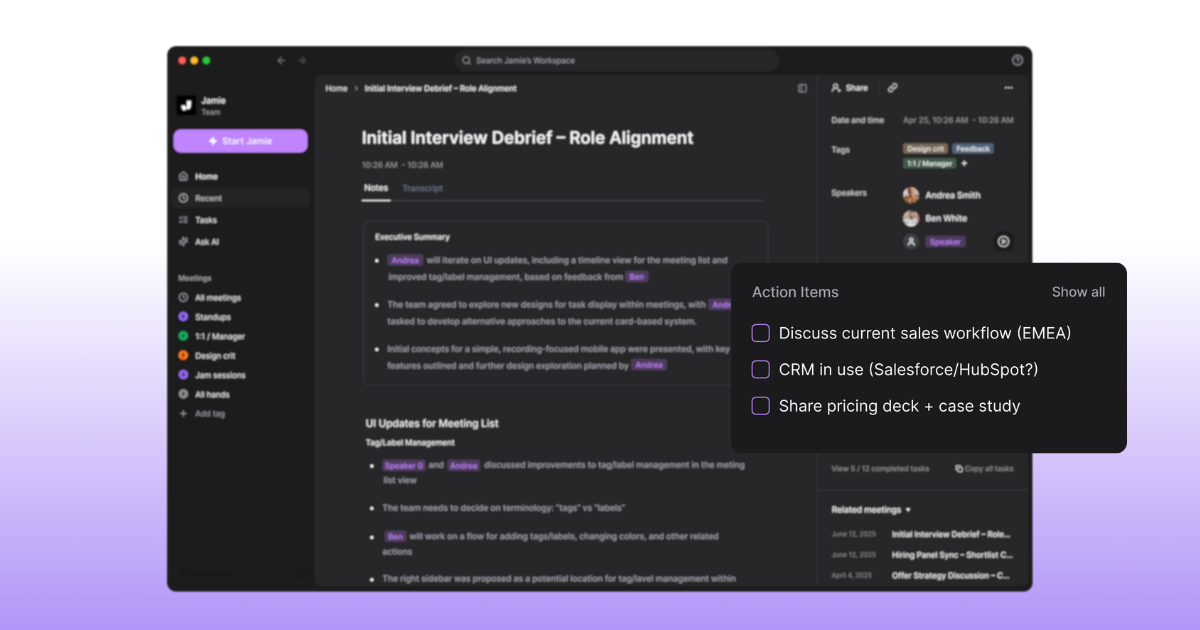
You're not logging meeting notes into your CRM because manually typing up client calls and pitch meetings after working 80-hour weeks isn't happening. Jamie captures transcripts, structured notes, and tasks automatically so nothing gets lost.
Meeting notes: Get structured summaries organized by topics with speaker quotes automatically tagged
Transcription: Receive instant readable transcripts instead of messy audio files you'll never review
Action items: Capture decisions and tasks with assignees clearly identified so follow-ups actually happen
Editing: Make quick changes with find-replace, headings, and formatting before sharing with your team
Tagging: Organize notes by client, deal, or sector so you can find relationship intelligence
Remember Who Said What Without Replaying Hour-Long Client Calls
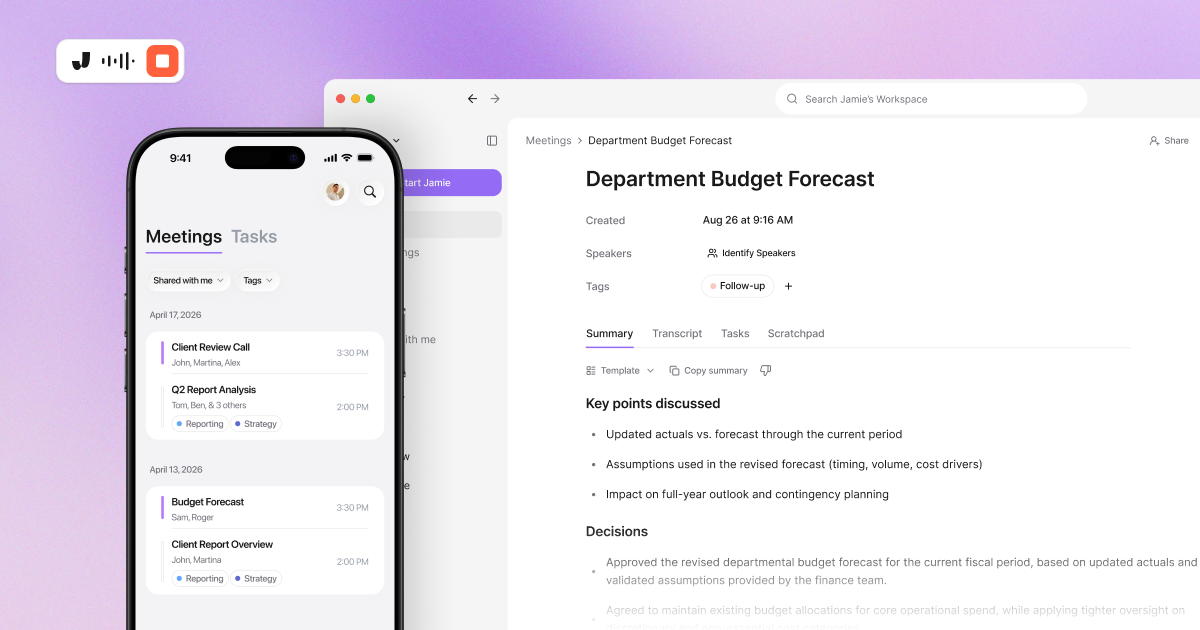
When deal cycles run 12+ months, you need to recall specific client statements from meetings six months ago. Jamie identifies speakers and remembers voices so you can reference exact quotes without guesswork.
Speaker identification: Labels each person's comments automatically so you know which stakeholder raised concerns
Speaker memory: Remembers names linked to voices across meetings so recurring clients are always tagged correctly
Calendar integration: Auto-fetches meeting names from Google or Outlook and provides reminders to start recording
Automatic meeting titles: Generates meaningful titles like "Q3 Financing Discussion: Series B Terms" instead of generic names
Consent emails: Sends automatic notifications 24 hours before meetings informing attendees about recording for compliance
Work Anywhere Without Bots That Make Clients Uncomfortable
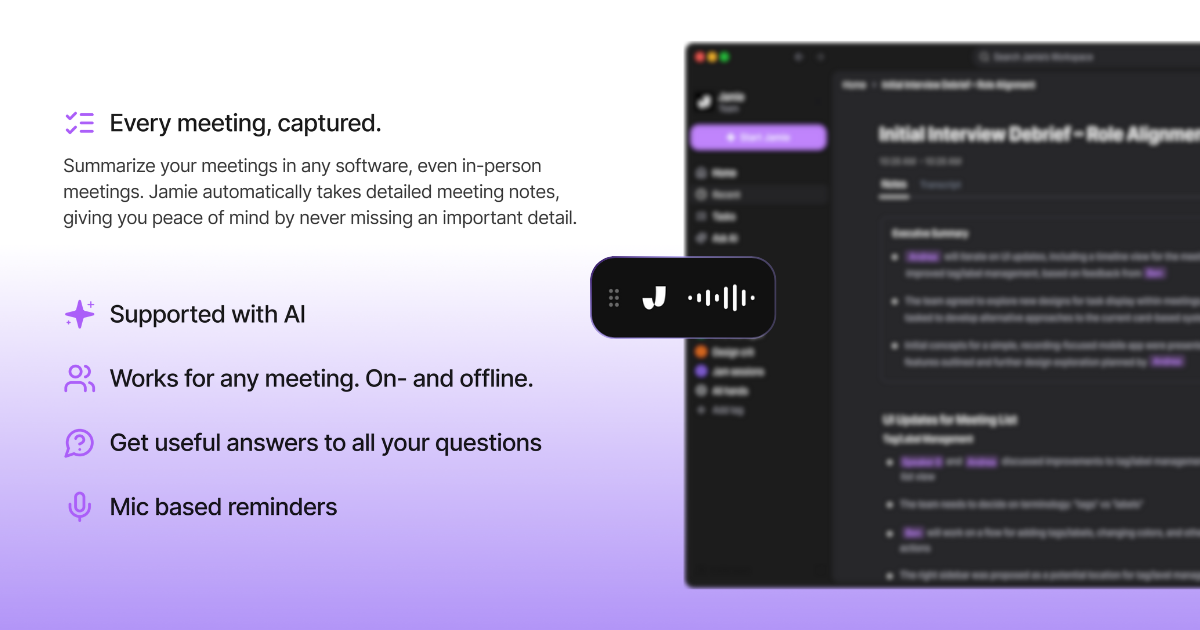
You meet clients in-person, take pitch calls from airports, and join virtual meetings from multiple platforms. Jamie works everywhere without visible meeting bots that clients question.
Bot-free operation: Captures audio directly from your device so clients never see a virtual participant
Cross-platform support: Works on macOS, Windows, and iOS so you're covered across all devices
Works online/offline/in-person: Captures notes whether you're in a conference room or on Zoom
GDPR compliance with AES encryption: Keeps Material Non-Public Information secure with German data protection standards
100+ languages: Handles global deals when clients switch between English and local languages mid-call
iOS mobile app: Record and review meetings on your phone when traveling between client sites
Sync Meeting Intelligence to Salesforce Before Your MD Asks for Updates
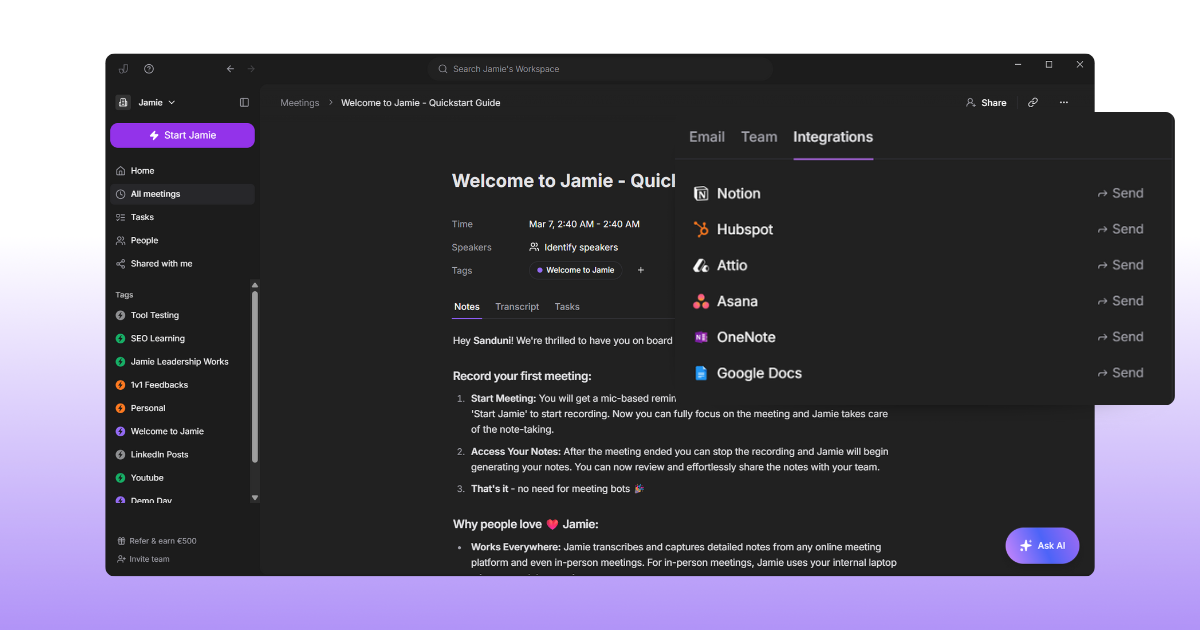
You're scrambling to piece together buyer engagement details and client priorities from emails, half-filled CRM records, and memory. Jamie syncs structured notes directly to Salesforce, so relationship data lives in one place.
Salesforce integration: Send meeting notes to any Lead, Opportunity, Contact, or Account record automatically
HubSpot integration: Push summaries to Contact, Deal, or Company entities as notes for client tracking
Attio integration: Sync meeting intelligence to person or company records for relationship management
Asana integration: Convert action items into project tasks with meeting notes attached as reference PDFs
Webhooks: Build custom integrations via Zapier or Make to connect your unique tech stack
Extract Deal Intelligence Without Re-Reading Every Meeting Transcript
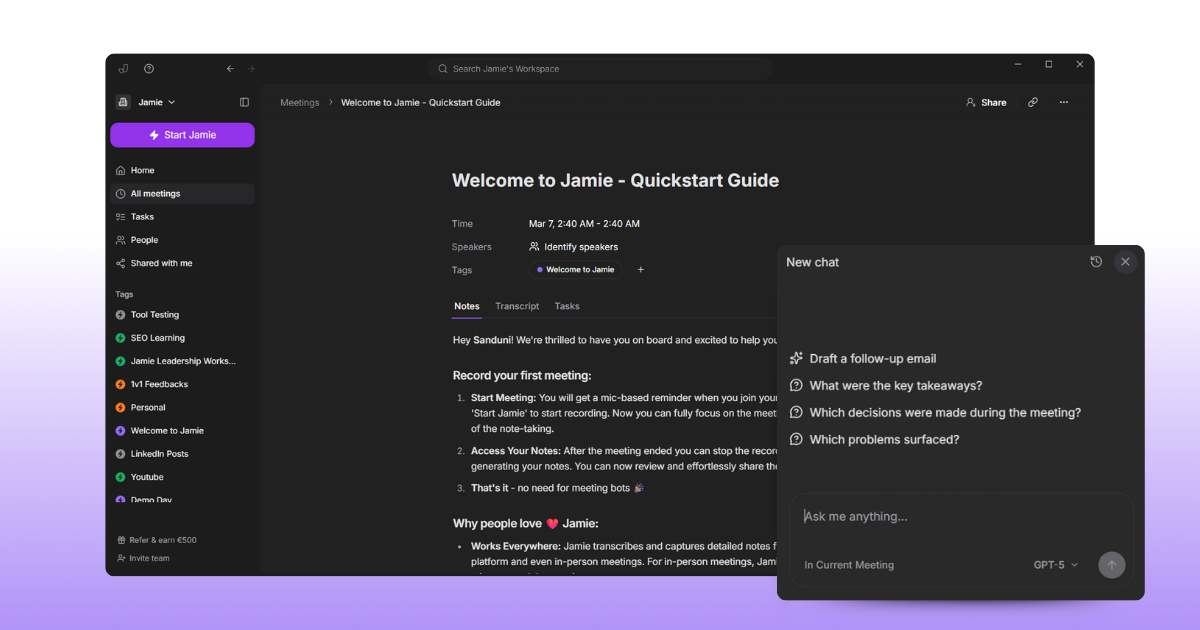
You need specific client objections or pricing discussions from last quarter's meetings but don't have hours to review transcripts. Jamie's AI finds details in seconds.
Ask AI: Query your meeting history to extract specific client statements or deal terms instantly
Scratch Pad: Capture follow-up ideas during calls without switching tabs or losing your train of thought
Templates: Structure client calls, IC meetings, or pitch debriefs consistently so teams find information fast
Search: Find meetings by client name, deal type, or discussion topic across your entire history
Pricing
Personal Plans:
Free: €0/month: 0 meetings/month, 30-min max duration, 20 AI messages/day
Plus: €25/month: 20 meetings/month, 2-hour max duration, 40 AI messages/day
Pro: €47/month: Unlimited meetings, 3-hour max duration, 100 AI messages/day
Business Plans:
Team (2+ users): €39/seat/month: Unlimited meetings, centralized billing, encryption
Enterprise (10+ users): Custom pricing: SSO, admin controls, EU data residency, DPAs, volume discounts
Annual billing offers 17% discount. Source: Jamie Pricing Page
Pros and Cons
Pros
"I tried a dozen AI tools for meeting note taking. Most of them were crap, except one: Jamie"
"After researching and downloading different tools to generate meeting summaries, I decided to keep only this one. Why? Because it can transcribe, summarize, and detect action items with way more accuracy than the rest."
"I really appreciate Jamie for its simplicity and standalone functionality. It's incredibly easy to use without the need to join conferencing meetings or video calls."
"Jamie is the first tool I've tried that doesn't [require a bot]. It captures your notes without appearing as a meeting guest, handles both online and offline conversations." -
"Saved me a lot of time. Surprisingly also performed well in meetings with multiple languages (Japanese and English) used."
Source: G2, Product Hunt (Julia Hollnagel), MakeUseOf, LinkedIn (Tim Schumacher)
Cons
"I think overall the Ask AI feature can still be improved a little bit and the amount of integrations."
"The speaker identification feature of Jamie, though very useful, isn't entirely reliable or infallible. In our experience, to get the most effective results from Jamie, it was necessary to invest in a good quality microphone."
"There a few buggy things and missing integrations but Jaime is young and I have full confidence in what their future looks like. It's better than every other app I've tried, and I can guarantee you that I've deep researched and checked out a million.."
"Slow Note Generation: Processing can take several minutes, which may delay access to critical information in real time."
"Jamie's features are outstanding, sometimes I had the feeling that my audio quality heavily impacts the outcomes, which I need to adapt from my side."
Source: G2
2. Hebbia
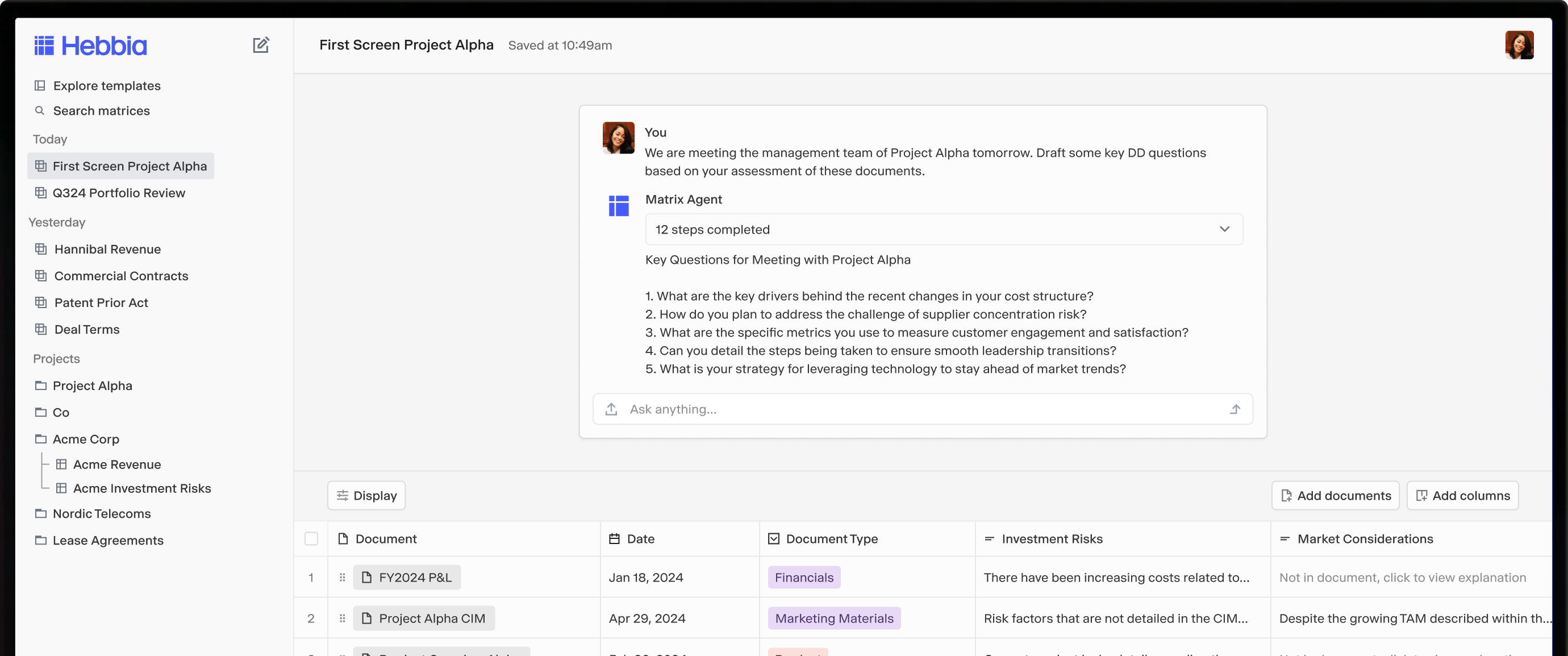
Hebbia is an AI-powered document analysis platform designed for extracting insights from large volumes of unstructured documents. The flagship product, Matrix, presents answers in a spreadsheet-like interface where documents populate rows, questions become columns, and AI-generated answers fill cells with hyperlinked citations to source material.
The platform processes PDFs, contracts, SEC filings, transcripts, and spreadsheets using what the company calls an "infinite effective context window" for reasoning across millions of pages. Hebbia serves 33% of the top 50 global asset managers by AUM. Below is the full breakdown.
Who is it for?
Investment banking analysts, private equity professionals, credit analysts, due diligence teams, M&A attorneys, and corporate development professionals. The platform serves firms including Centerview Partners, Charlesbank Capital Partners, Oak Hill Advisors, and Gunderson Dettmer.
Key Features
Matrix interface displays AI answers in spreadsheet format with page-level source citations
Processes thousands of PDFs, contracts, filings, and transcripts without token limits
Integrates with SharePoint, VDRs, S&P Capital IQ, PitchBook, and SEC EDGAR
Multi-model orchestration routes queries to OpenAI o1, GPT-4o, or vision models
SOC2 Type I & II certified with end-to-end encryption; no training on customer data
Pricing
Professional: $10,000/seat/year, Unlimited reasoning, agent building, advanced integrations
Lite: $3,000–$3,500/seat/year, Consume outputs, run predefined agents, deep search
Enterprise-only sales; no self-serve option. Pricing described as "comparable to Bloomberg Terminal subscriptions." Source: Sacra Research (June 2025)
Pros and Cons
Pros
"Hebbia can save you time in pulling key asset information from OMs; I use it to extract things like address, size, amenities/specs, and market statistics." - G2 Review
"Hebbia is extremely useful and saves hours of work every week, especially working in the financial sector. Having access to all earnings calls and public filings makes it very easy to conduct extensive market research." - G2 Review
"The ability to cite sources is critical for our purposes -- that's something that is severely lacking in open source LLMs. Without this feature, I'm not sure we'd be able to use Hebbia." - G2 Review
"If data is the gold of the digital age, getting a tool like Hebbia for extracting data from legal documents is like goldminers going from pickaxes to jackhammers." - Gunderson Dettmer (via Hebbia)
"Several customers indicated analyses that used to take 2-3 hours were now taking 2-3 minutes, and can produce new outputs they would not have previously imagined." - Andreessen Horowitz
Cons
"The least helpful thing about Hebbia is that, given the niche aspect of our industry, it is difficult for the AI to understand our searches and prompts." - G2 Review
"When using Matrix, if the format is identical across time for a regular document, the function will work but variations in form can cause the wrong data to be pulled." - G2 Review
"Inability to export as Word or PDF format" - G2 Review
"Hebbia does not have such monitoring tools, as there is no built-in external content. This means you can only search through and query content that you upload yourself." - AlphaSense Comparison
"Limited collaboration features: Hebbia excels at individual research but doesn't offer robust tools for team knowledge sharing or collaboration." - Guru Comparison Guide
3. Aiera
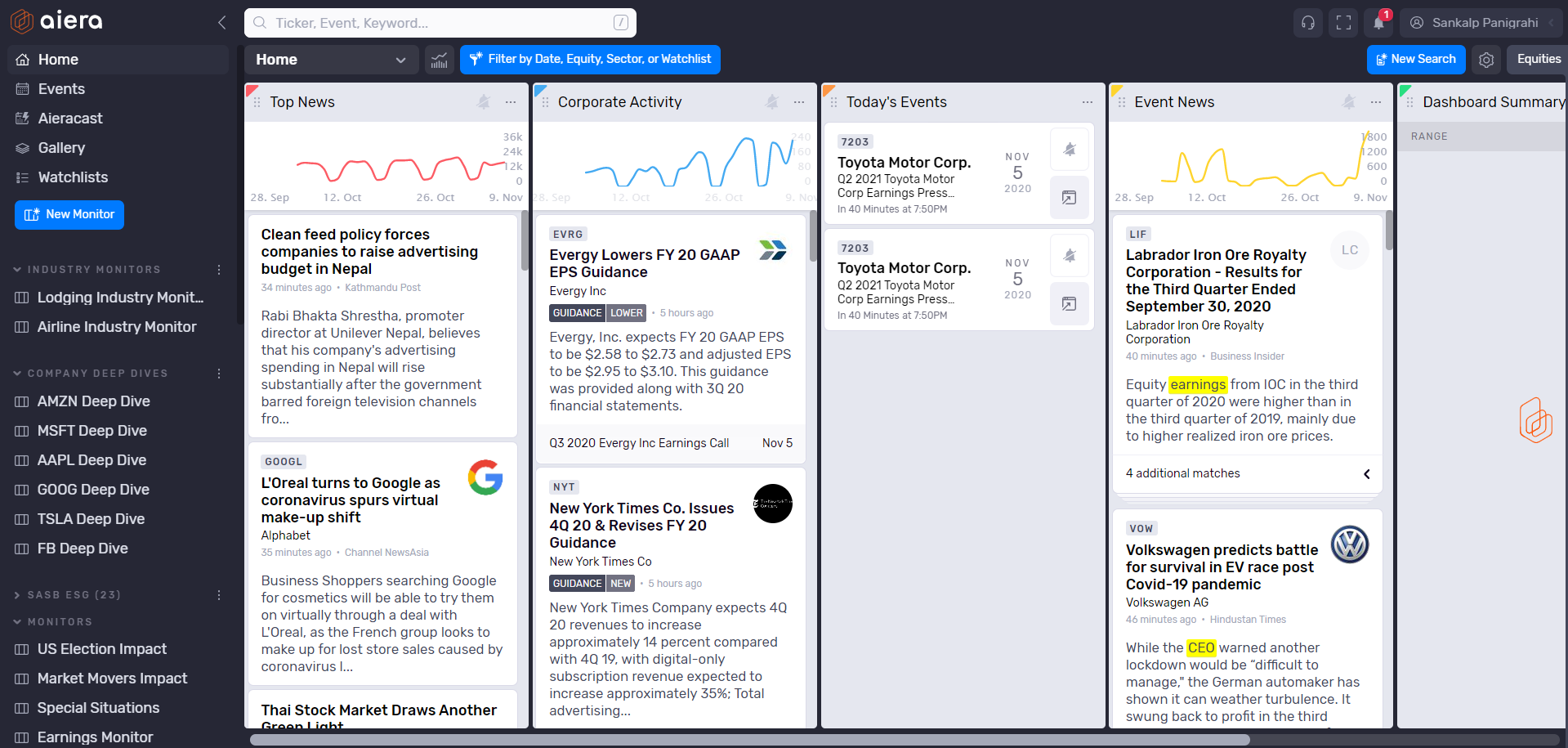
Aiera is a financial event intelligence platform providing real-time access to earnings calls, investor days, and corporate events with live transcription.
Users join calls with one click (no dial-in codes), stream multiple events simultaneously, and receive AI-generated summaries within minutes.
Who is it for?
Equity research analysts, portfolio managers, traders, and investment professionals at institutional investors, hedge funds, asset managers, and investment banks.
Key Features
One-click live audio access to earnings calls without dial-in numbers or PINs
Real-time AI transcription with less than 0.5-second delay and 97% accuracy
Human-reviewed transcripts available within 1–3 hours at 99.9% accuracy
Cross-transcript search by company, topic, or speaker with keyword alerts
API and Model Context Protocol integration for quantitative workflows
Pricing
Pricing not publicly available, contact vendor for quote.
Pros and Cons
Pros
"I consider Aiera an absolute mandate for me and my team's operations. Aiera has saved me more times than I can count, especially during earnings season, as I'm able to read live transcripts when I have 3 calls at once." - Aiera Marketing
"Aiera shines during busy earnings seasons. When analysts are juggling multiple calls at once, it's a lifesaver." - Focal
"This focus on owning and customizing data makes Aiera stand out. Companies can tailor the AI to fit their needs." - Focal
"Aiera is the only LIVE event monitoring and search platform covering all available Wall Street events, providing real-time transcription and one-click audio." - G2 Product Overview
"My friends at Aiera just announced a $25M Series B funding round with participation from TEN (yes, you read that correct) Wall Street banks and research firms." - LinkedIn (Dan Entrup)
Cons
"For users who require deep qualitative research and broad content coverage beyond public company events, Aiera may fall short." - AlphaSense
"Content breadth is narrow compared to complete investment research platforms. Coverage of premium, proprietary content is conditional and entitlement-aware." - AlphaSense
"Aiera's AI is optimized around public company disclosures and may lack depth across broker research, expert calls, private company data, etc." - AlphaSense
"Aiera does not publicly disclose its pricing information." - AlphaSense
"It wasn't enough to just make a report with good investment recommendations, because no matter how good the recommendations were, there was a perception that any alpha generated would be immediately absorbed by the market." - HBS Case Study (CEO Ken Sena)
4. AlphaSense
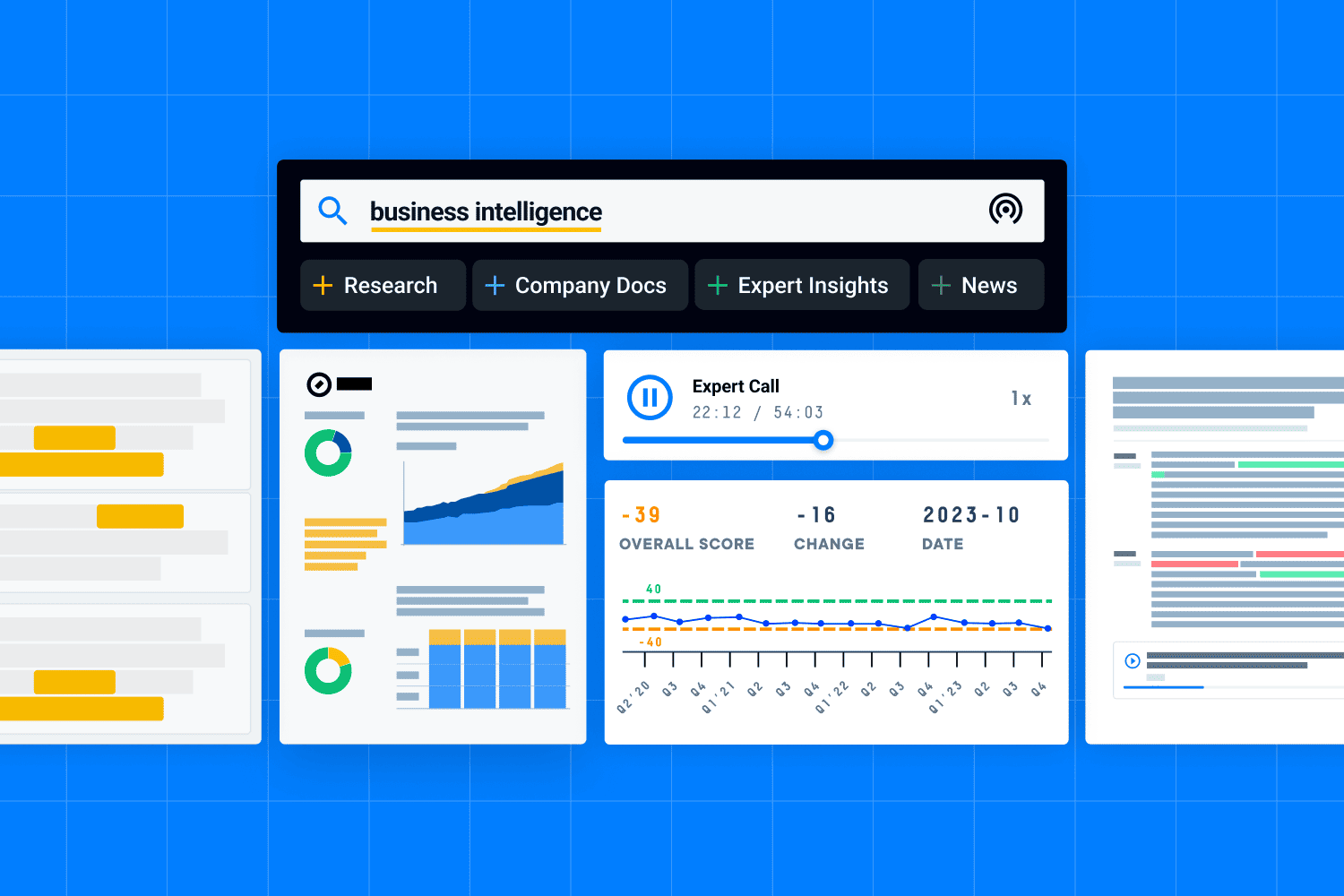
AlphaSense is an AI-powered market intelligence and search platform. The platform's proprietary Smart Synonyms technology interprets business language variations and retrieves contextually relevant results across documents.
AlphaSense serves 88% of the S&P 100 and 80% of top global investment banks. The company acquired Tegus in 2024, adding expert network capabilities. Below is the full breakdown.
Who is it for?
Investment banking analysts, equity researchers, portfolio managers, M&A teams, due diligence specialists, competitive intelligence professionals, and corporate strategists.
Key Features
Smart Synonyms™ semantic search understands business language without exact keywords
240,000+ expert interview transcripts with audio from industry insiders and executives
Real-time earnings call transcripts with AI-generated summaries and Q&A search
Generative search produces research reports with sentence-level source citations
Connects internal documents (SharePoint, Google Drive) with external premium content
Pricing
Annual SaaS subscription with custom pricing based on users, features, and content access.
Estimated ranges from third-party sources:
$10,000–$100,000+ per year, depending on organisation size
$10,000–$20,000 per user annually (institutional pricing)
Minimum 2-year commitment may apply at renewal
No public pricing page; quotes provided through sales. Sources: AIRefinder, Expert Network Calls
Pros and Cons
Pros
"I love the semantic search in AlphaSense. It understands intent, not just keywords, which saves me a lot of time compared to manual or Boolean-heavy searches." - G2 Review
"The combination of research, filing, web search, and expert transcripts with the LLM / generative search capability is a solution unlike any other available in the market." - G2 Review
"Alphasense is a great tool for our investor relations department. We use it to receive advanced notices of any kind of keywords related to our business and operations." - Gartner Peer Insights
"By far the most powerful aftermarket research tool on the market. AlphaSense's smart search function is like doing a CTRL+F on every corporate document ever published." - G2 Review
"AlphaSense is the primary research portal for us. We find search function of AlphaSense better than similar other tools and portals." - TrustRadius
Cons
"It's not always easy to navigate the different sources and set up alerts. And sometimes setting up alerts just results in a lot of noise. Given the cost structure, we may have to switch back to another provider." - G2 Review
"Even though they have query expansion, their search quality still sucks from my perspective." - Reddit (via Copy.ai)
"The platform has good features and insights, but pricing could be better and I don't necessarily find the UI of the platform easy to use." - Gartner Peer Insights
"Given its high price point, it will only be typically suitable for professional investors who run funds or a minimum size to take advantage of it." - TrustRadius
"Dashboard often doesn't load correctly or doesn't show all sources that appear in email alerts. Transcript recordings are hard to navigate - I often don't bother and just go to the original source." - Gartner Peer Insights
5. Zocks
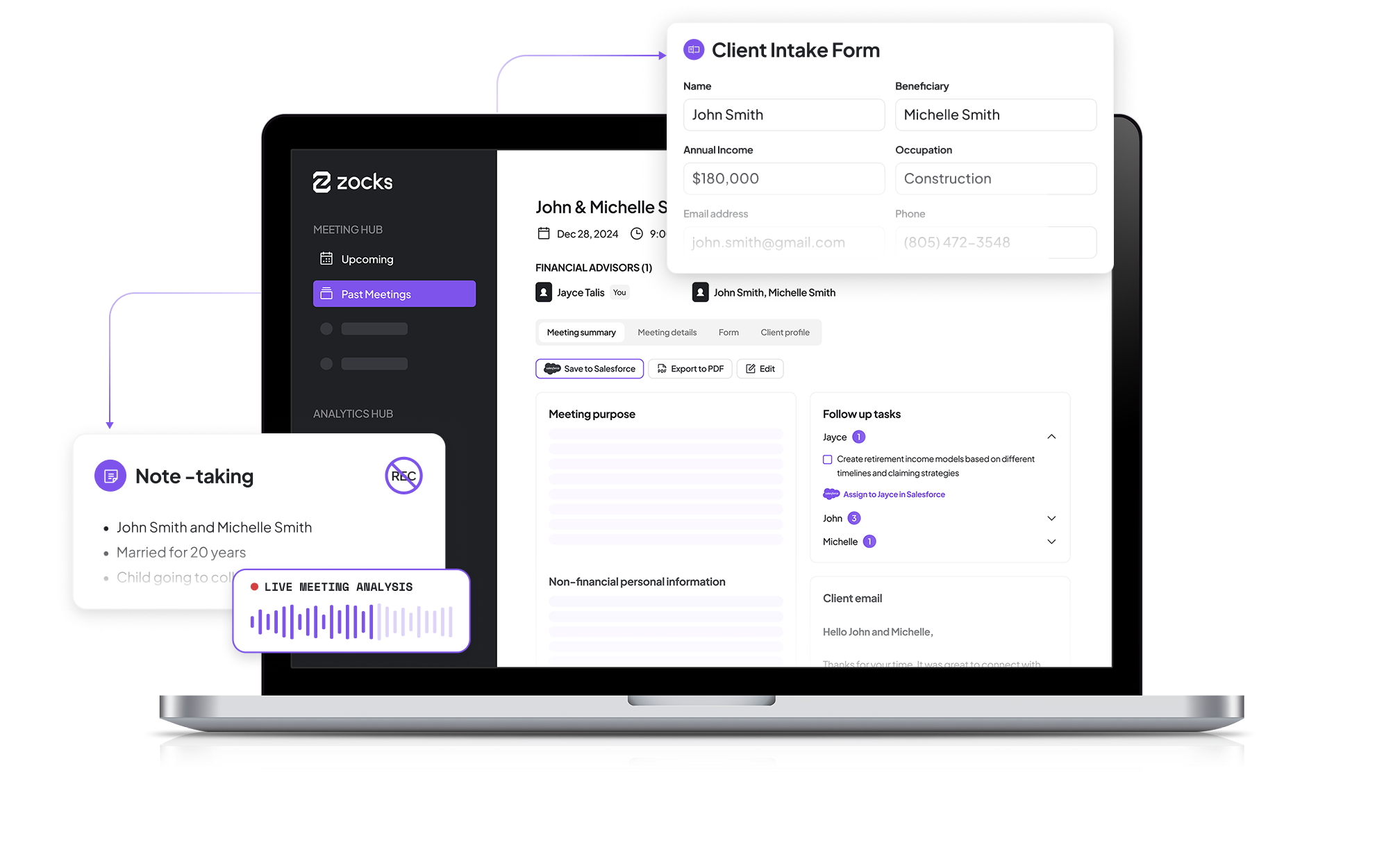
Zocks is a privacy-first AI meeting assistant built specifically for financial advisors and wealth managers. The platform captures meeting notes in real-time without recording or storing audio or video, a key differentiator in regulated financial services. Zocks integrates bidirectionally with CRMs (Wealthbox, Salesforce, Redtail) and financial planning software (eMoney, Orion, RightCapital) to auto-populate client profiles, fill forms, and draft follow-up emails.
The platform is SOC 2 Type II certified and integrates with compliance archives.
Below is the detailed breakdown.
Who is it for?
Financial advisors (RIAs, independent advisors), wealth managers, financial planners (CFP®), life insurance agents, and advisory firm operations staff.
Key Features
Transcribes meetings in real-time without storing audio or video recordings
Bi-directional CRM sync updates client profiles, tasks, and notes automatically
Auto-fills intake forms and fact finders from conversation data
Generates pre-meeting prep summaries from CRM, email, and calendar data
SOC 2 Type II certified with compliance archive integration (Smarsh, Global Relay)
Pricing
Annual Billing (2 months free):
Essentials: $67/user/month
Professional: $117/user/month
Ultimate: $184/user/month
Monthly Billing:
Essentials: $80/user/month
Professional: $140/user/month
Ultimate: $220/user/month
Enterprise: Custom pricing for large-scale deployments. Source: Zocks Pricing Page
Pros and Cons
Pros
"When it comes to ease of use, integration, and ROI, you will NOT find a better piece of tech out there for an advisory practice. Out of all the tools in our tech stack, Zocks is the one that I can't praise enough." - Zocks Website (Michael Kelly, CFA, CFP®)
"We have drastically cut down on data entry by the advisor. Prior to using Zocks, meeting notes, follow-ups, and recaps would take anywhere from 15-30 minutes. Now, when I leave a meeting, my assistant has everything she needs almost instantaneously." - Zocks Website
"Zocks has been a 'game changer'... We no longer need to rely on writing all the notes from the conversations we have with the families we serve, and [that allows us to] truly pay attention to everything they are saying." - Financial Planning Magazine
"We had 400 advisors up and running within about a month. They required almost no training. Zocks is incredibly intuitive." - Zocks Customers Page
"I've used other AI tools and I can confidently say Zocks saves me at least twice as much time." - Zocks Website
Cons
"When I first reached out for help setting up my template, I was told I would receive a phone call, but that call never came. I ended up having to contact support again after trying to figure things out on my own." - G2 Review
"As with any addition to my tech stack, learning to use new tools requires time and effort." - G2 Review
"I'm not yet taking full advantage of all its features, as there are additional integrations—such as with my custodian and planning software—that I haven't set up or used so far." - G2 Review
"The minutes' caps may be a hindrance at the lower subscription levels for some advisors, though the price point makes it worthwhile to upgrade to the higher package. The lack of summary customization options compared to other systems may be a barrier." - XYPN Comparison
"Zocks does the job, but its steep price and limited flexibility make it hard to justify." - FinScribe Blog
Final Verdict: What Is the Best AI Meeting Tool for Investment Banks?
Jamie is built for investment bankers. With Jamie, you can finish a client call about deal structure and timeline, and it syncs the structured notes straight to the right Salesforce with speaker quotes and decisions tagged, and you're back to your actual work instead of spending 30 minutes cleaning up notes while the details scatter across fifteen different files.
AlphaSense and Hebbia work well too with semantic search across earnings transcripts and expert interviews, and AI-powered document analysis for extracting insights from large volumes of filings.
Quick Recap
Jamie: Finish calls and Salesforce updates automatically
Hebbia: Document analysis with spreadsheet-like AI answers
Aiera: One-click live earnings call access with real-time transcription
AlphaSense: Market intelligence with 240,000+ expert interviews
Zocks: Privacy-first meeting assistant for wealth management workflows
Download Jamie. You'll notice the notes write themselves and CRM updates happen without you touching anything. Book a demo if your team wants to see it first.
during sensitive client conversations


Read More
Explore our guide to AI note-taking tools for private equity firms and how they support IC memo creation.
Check out our best 5 AI tools for private equity investment memos.
Learn how venture capital teams use note-takers to streamline founder calls.
See how Wenvest Capital leverages AI meeting tools in diligence workflows.
Discover the top AI-powered note-takers for financial teams, driving memo-ready outputs.
Understand how consultants are capturing insights with AI note-taking platforms.
FAQs on AI Meeting Tools for Investment Banks
How do I capture client meetings without adding bots that change the conversation dynamic?
You can transcribe client meetings while preserving natural conversation with Jamie, which operates from your device without adding a bot participant to the call, maintaining the human interaction clients expect in financial services firms while generating structured data with speaker identification, key insights, and action items after you inform participants you're transcribing and send consent emails 24 hours in advance. Your client relationships stay genuine as Jamie handles meeting preparation and documentation from your system audio, while enterprise grade security through GDPR compliance and AES encryption protects client data, and alternatives like Fireflies.ai work well if you prefer a bot-based workflow for internal team meetings where natural conversation flow is less critical.
What's the fastest way to sync deal meeting notes directly into Salesforce without manual data entry?
You can automate client meeting documentation and sync notes directly to Salesforce Leads, Opportunities, Contacts, or Accounts with Jamie's CRM systems integration, which captures client conversations including pricing discussions, objections, and next steps and pushes structured summaries to the right record automatically, eliminating the automating routine tasks of copying notes between platforms while you focus on financial analysis and client needs. Your crm systems stay updated with client communication and key points from every interaction, while competitors like FinMate AI offer solid financial advisory firms-focused features if you need deeper integration with wealth management platforms like Wealthbox beyond standard CRM sync.
How do I ensure meeting transcription tools meet enterprise grade compliance requirements for investment banking?
You can meet regulatory standards with Jamie's enterprise grade compliance architecture built specifically for financial professionals handling Material Non-Public Information, featuring AES encryption for data in transit and at rest, German GDPR compliance with EU data hosting in Frankfurt, automatic audio deletion after transcription, and consent workflows that send notification emails 24 hours before meetings to satisfy recording disclosure requirements. Your client data never leaves secure European servers, giving you the enterprise grade security and compliance controls needed for SEC, FINRA, and MiFID II adherence, while tools like Fellow enforce strict access controls if you need additional role-based permissions for deal team confidentiality beyond what standard meeting tools provide.
What's the best way to track action items and decisions across multiple simultaneous deal workstreams?
You can organize client meetings, diligence sessions, and internal reviews across multiple documents and deal tracks with Jamie's tagging and search capabilities, which let you categorize notes by client, sector, or deal stage and instantly retrieve specific discussions, decisions, or stakeholder commitments from weeks of prior client conversations using natural language queries. Your workflow automation improves as Jamie converts meeting notes into actionable insights with automatic task identification and assignment, while data integration with productivity tools through webhooks or copy-paste compatibility keeps your entire tech stack synchronised, and Read AI offers complementary features if you need to link meeting decisions to related emails and project tasks for even more comprehensive context-switching reduction.
How can I accelerate deep research and financial analysis without spending hours reviewing meeting transcripts?
You can extract deep analysis from client meetings, management calls, and diligence sessions with Jamie's Ask AI feature, which enables deep research by querying your entire meeting history to surface specific financial statements discussions, market data mentions, competitor insights, or valuation assumptions instantly without reading transcripts line-by-line. Your financial analysis benefits from instant access to historical context as Jamie's machine learning processes large unstructured datasets from multiple sources and surfaces actionable insights on demand, letting you focus on strategic thinking while AI tools significantly accelerate financial research by automating routine tasks and enhancing the quality of analysis, and AlphaSense provides excellent semantic search across earnings transcripts and expert interviews if you need to combine your internal meeting intelligence with broader market analytics.