
I compared 5 AI tools for investment banks: Jamie, Hebbia, S&P Capital IQ Pro, Rogo, and AlphaSense. I compared them on data security, data residency, meeting documentation, document analysis, market research, integrations, and price.
You might be here because compliance has shut down every AI tool you have tried, or you are still deciding what to put in front of a client.
Whatever the case may be, the question remains the same: "What are the best AI tools for investment banks?" In this article, we are going to show you 5 of them.
Meetings are more productive because we don’t have to pause for note-taking. The time we used to spend organizing notes and writing emails is now spent on higher-value work.

Tech & AI Coordinator
Draycott
Private Equity · 10-50 employees
TL;DR
Jamie, best overall AI meeting tool for investment banks: made specifically for deal teams at banks, private equity firms and law firms. Bot-free executive-level notes are generated on your laptop and phone, and all meeting data is stored in Europe. The platform is GDPR compliant and ISO 27001 certified, is DORA-ready, and all audio is permanently deleted upon completion of transcription. Conversational Intelligence answers across each of your meetings via Ask AI, and Jamie is also agentic. Agent Connectors reach Carta, Affinity, Attio, Streak and Blockbrain. Your meeting notes log into DealCloud, Salesforce or HubSpot (Pro and up). There is a free plan for 10 meetings per month; thereafter it costs 25 euro per month.
Hebbia, best for document heavy due diligence: Their always-on analyst is Max. What Hebbia refers to as a near-unlimited corpus of documents is being analyzed using large language models by Matrix, with complete traceability back to every finding. A central orchestrator splits the work between specialised subagents. Excel cell citations mark the specific source of the information contained within those cells. Customers of Hebbia include investment banks, private equity firms, private credit funds, hedge funds and law firms. There is neither a cost nor free trial period listed on the website.
S&P Capital IQ Pro, best for company research: With ChatIQ you interact with up to 20 different documents at the same time across supported content sets. The AI-Assisted Screener converts a simple English language question into screening criteria. With Office Tools you can pull Capital IQ data into Microsoft Excel, PowerPoint and Word, with pre-made templates you can update with the touch of a button. Their research library carries The Wall Street Journal, Barron's, MarketWatch, Dow Jones Newswires, The Nikkei and Nikkei Asia. Licences are agreed in a client agreement, with no publicly disclosed price.
Rogo, best for finished deal work: Using a single prompt, Rogo's agents will deliver a completed Excel model, PowerPoint presentation or Word document addressing topics related to DCFs, LBOs, comps and precedent transactions. Additionally, Rogo trains its own finance models on professionally labelled data. They list several granular permission controls including role-based access, audit trails and single-tenant deployment. Rogo reports over 50,000 bankers and investors across 350+ institutions, and acquired the AI meeting assistant Arvo on 1 September 2026. There is neither pricing information nor a free plan published on their website.
AlphaSense, best for market intelligence: Search across more than 500 million business documents, with an expert transcript library of more than 300,000 investor led insights across more than 29,000 companies. Smart Synonyms expands a query to find contextual matches beyond exact keywords, sentiment analysis flags positive and negative language in earnings calls, and Smart Summaries generates cited summaries of earnings calls and broker research. Their users include investment banks, hedge funds, asset managers, and corporate strategy teams. No public price.
What are the best AI tools for investment banks?
Jamie, Hebbia, S&P Capital IQ Pro, Rogo and AlphaSense are the best AI tools for investment banks. Jamie records your meetings from your own laptop and phone, as there is no bot in the call, and all your meeting data is stored in Europe under GDPR, on every plan, including the free plan.
Jamie, Hebbia, S&P Capital IQ Pro, Rogo and AlphaSense are shown side by side in the table below; click on each cell to read further details.
1. Jamie: Best AI Tool for Investment Banks for Bot-Free Notes
Best For: Jamie is the best AI tool for investment banks, with bot-free notes for junior bankers on M&A calls and all meeting data stored in Europe.
Similar to Otter.ai, Fireflies.ai, Granola, and Fathom.
Jamie is an AI note taker for investment banks that records your client and diligence calls from the laptop you already carry, with consent first and with no bot in the meeting.
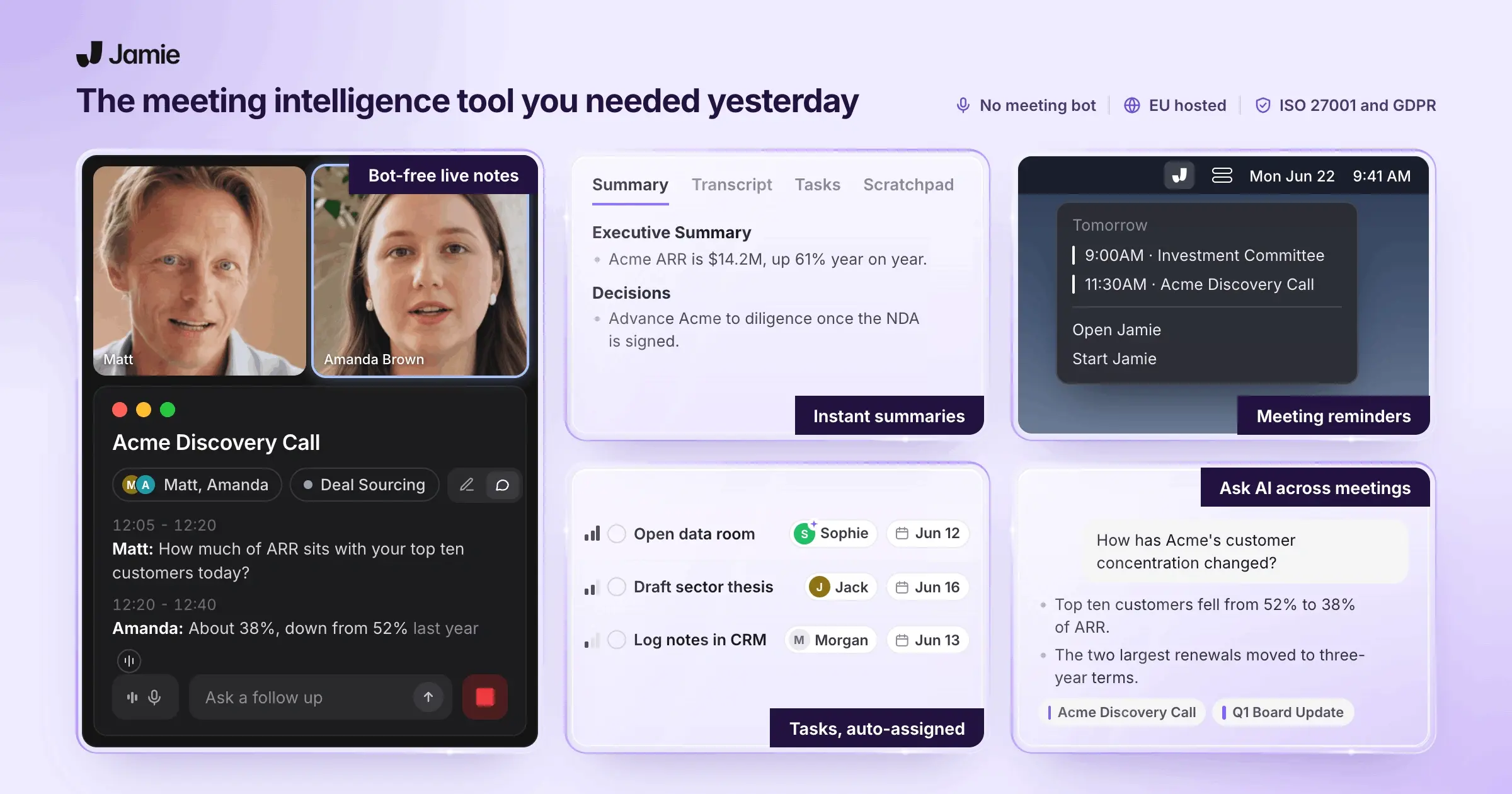
Compliance teams at banks often refuse a third-party AI note taker because the tool stores confidential M&A work on servers the bank does not control. Jamie runs on your own machine instead, which means we do not send a bot to your meetings, preserving the natural conversation and maintaining the privacy of your clients.
Jamie uses AES-256 encryption; all of the meeting data collected through Jamie is stored within Europe; Jamie complies with GDPR and holds an ISO 27001 certification; and Jamie is DORA-ready. Let's look at more key features in detail.
Get Meeting Records Without Info Security Problems on Confidential Deals
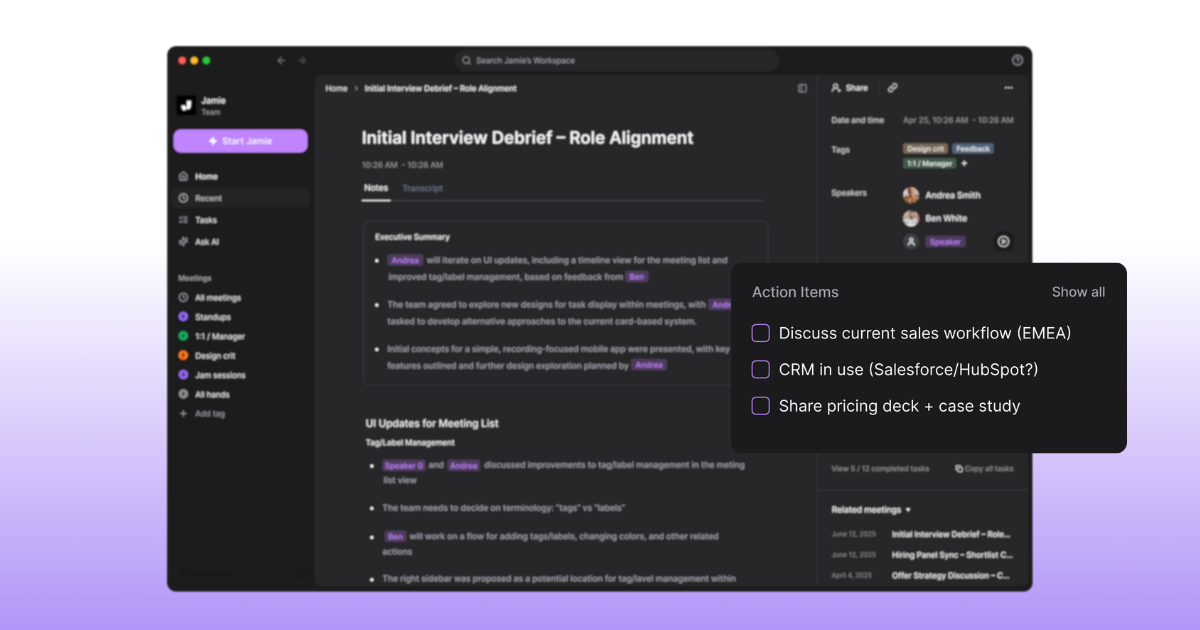
The time spent taking notes by hand during client calls results in lost action items and critical details regarding deals that could have resulted in better execution. Upon completion of recording, Jamie generates automatic meeting notes, transcripts, and action items. Depending upon the length of the meeting, this may take anywhere from approximately 5 to 10 minutes. If your deal team runs client calls back to back, these five note taking features take that job off your desk:
Meeting notes: These meeting notes and transcripts generated by Jamie include structured summaries along with actual quotes from speakers. You can then quickly review these documents and distribute them to your team. All of this is on every plan, including the free plan.
Transcription: You also receive the ability to convert spoken words into searchable text that accompanies the meeting notes. This allows you to locate specific client statements that could be used for compliance records.
Action items: In addition, Jamie automatically produces task and decision checklists with assigned checkboxes. Therefore, you do not need to create separate lists to track the progress of a particular deal.
Editing: You can make direct changes to both summaries and transcripts using find and replace and formatting tools. Therefore, you can correct errors prior to distribution.
Tagging: You can categorize your meeting notes by client, deal type or department. You can then filter meetings based on a specific M&A transaction.
Label Client Responses Without Visible Bots That Damage Professionalism
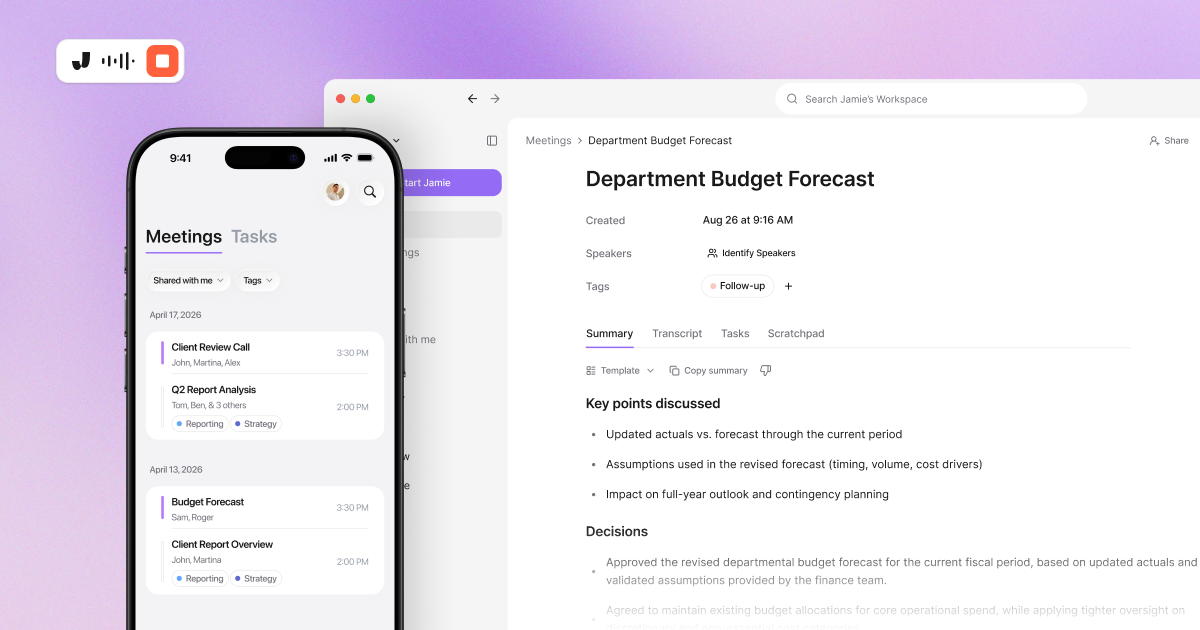
When a managing director sees a bot listed in the attendee list during a client call, they will most likely ask you to remove that bot. However, since no bot is added to a meeting using Jamie, this issue does not arise. Jamie identifies each speaker by name, and Jamie matches the same voice in later meetings. If you run diligence calls with the same counterparties week after week, these five speaker features put real names on the page:
Speaker identification: As Jamie labels who spoke what in the transcript, you can now reference a client concern back to the decision maker responsible for addressing such concerns.
Speaker memory: Since Jamie remembers voices across multiple meetings and automatically matches names from calendars, you do not have to tag these individuals repeatedly.
Calendar integration: Meeting names are pulled from Google Calendar and Outlook to populate the title of meeting notes as well as provide reminders. Therefore, you will never forget to record an important call.
Automatic meeting titles: Additionally, rather than providing generic default names for meetings, Jamie will generate meaningful names for each meeting. As such, if you need to recall a previous meeting with a client months down the road, you can easily identify that particular call again.
Automated Recording Notice: Jamie has an optional email that tells your client before the meeting that you will be using Jamie. Sent 4 hours ahead by default, but settable from 10 minutes to 48 hours. And nothing will reach your client until you switch it on yourself from Settings.
If you are comparing the whole bot free category, our round up of bot free AI note takers covers five of them.
Capture Calls on Any Platform Without External Data Storage That Gets You Fired
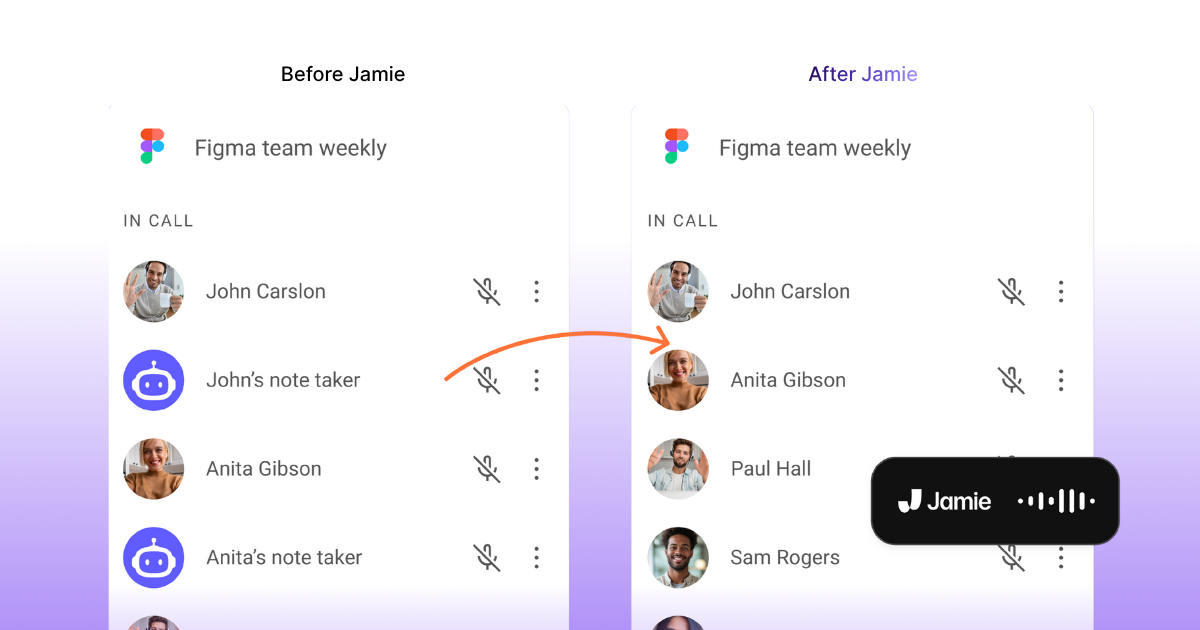
The old way, traditional AI note takers put your confidential M&A files on third party servers, where they become an information security risk. Jamie is installed natively on your computer, macOS or Windows, and saves all meeting data encrypted in Europe with AES 256 encryption, complies with GDPR and is ISO 27001 certified. If your IT team has to approve the recorder before a diligence call, these six capture and security answers are the ones they ask for:
Bot-free recording: Jamie captures system audio through your macOS or Windows computer and does not have virtual bots join the meeting. Jamie also will never show up as a participant on your client's attendee list.
macOS and Windows support: Jamie works on both operating systems with dedicated installers. This means your entire deal team runs the same approved software.
iOS and Android apps: Jamie records from the phone you already carry and syncs across all devices from one account. A site visit or a dinner meeting with a client can now be captured without having to bring a laptop to the table.
Every meeting platform on your device: Jamie records meetings from Microsoft Teams, Zoom, and Google Meet calls. Jamie also records in-person meetings within a client's office. Jamie records the audio from the computer that you are sitting at during the call, which means no platform is left behind.
99+ languages: Jamie transcribes into English, German, French, Spanish, Japanese, Chinese, and regional dialects, which means international M&A deals get documented properly.
GDPR compliant, ISO 27001 certified and DORA-ready: Jamie saves all meeting data in Europe with AES 256 encryption at rest and TLS 1.2 in transit. Once Jamie completes the transcription of the meeting record, Jamie deletes the meeting audio. Neither Jamie nor our model providers use your data to train a model. Your compliance officer reads the answer on our own security page instead of waiting for vendors to send evidence mid sign off.
Jamie Runs Multi-Step Jobs Across Carta, Affinity, Attio and Streak Under Your Own Account
An hour before a diligence call, you ask the agent for a briefing on the counterparty, and it comes back before you open the laptop. If your IT department wants to define what an AI agent can reach before a live mandate, these four controls are the ones they ask about:
Agent Connectors: You create connections to Carta, Affinity, Attio, Streak and Blockbrain, the applications a deal desk would normally use. You can also add connectors to Notion, Linear, Slack, GitHub, Gmail and OneDrive. Rather than giving Jamie your login credentials, you log into each application individually yourself. Once logged in, Jamie can then perform any actions that are allowed with your authenticated account. Like add tasks, sending notes, etc.
Workspace connectors: Some of these applications also need administrative configuration to work across the workspace once, rather than each user configuring them individually. Currently, Affinity and Blockbrain do this. Streak and Blockbrain can be configured by copying and pasting an API key. Additionally, administrators can remove any connector for their entire workspace.
Agent Skills: You can set up one-time standing rules for when and how often, and where to retrieve information from Slack, Attio, and Gmail, as part of each request for a briefing on a specific counterparty. Thereafter, the agent will automatically continue to follow the exact same standing rules over and over again, without needing you to instruct the agent again.
Workflows: In plain words, you indicate what should happen next after a meeting occurs, create a log entry in the CRM for key discussion topics covered in the meeting, or send the meeting summary to the deal channel. Jamie will draft it as indicated, determine which connector to use, and test it against a prior meeting before activating it. Workflows are rolling out workspace by workspace, which means Workflows may not be switched on for your workspace yet.
If the job you want the agent to run is the sourcing pipeline, our guide to AI deal sourcing walks through the whole sequence.
Jamie Sets How Long Meeting Data Is Kept and Deletes the Audio After Transcription
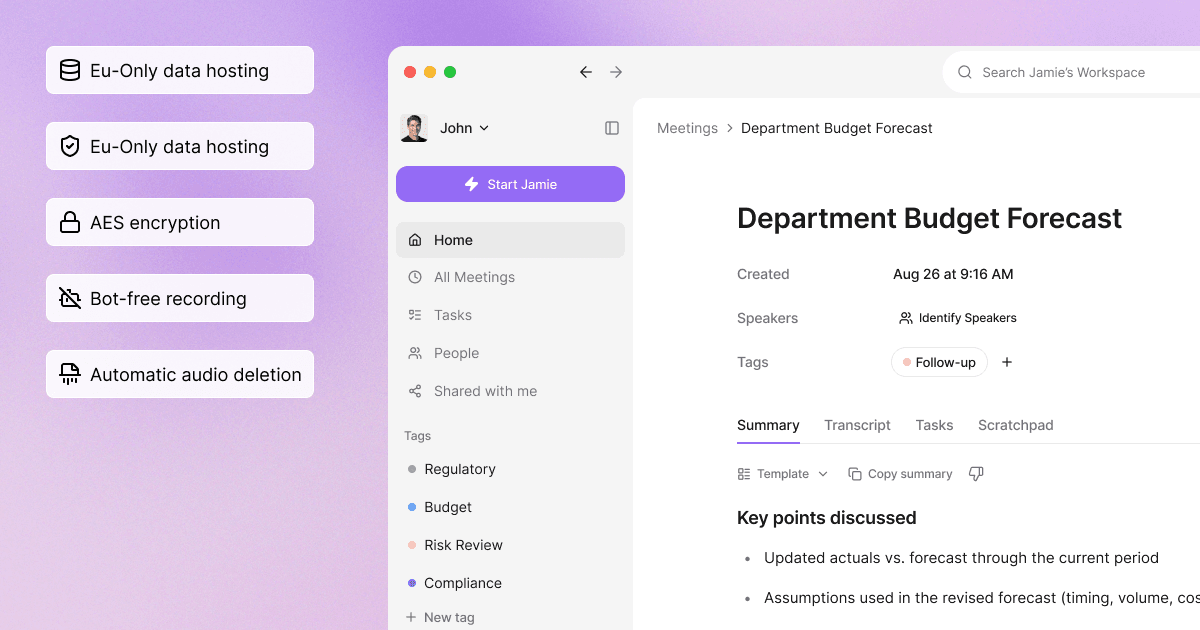
You have the ability to manage retention, access, and deletion of data in your workspace admin area. The meeting audio will be deleted after transcription is complete regardless of the plan you are on. On Enterprise plans, you will also be able to create custom data retention policies, audit logs, granular access controls, SAML single sign-on, and SCIM provisioning, all managed from Settings. If your compliance officer has to produce a six-year record and show who reached it, these five governance answers are the ones they would ask for:
Custom data retention policies: On Enterprise plans, you can set how long meeting data is retained and when it is deleted for the entire workspace. That is the control needed to enforce a six-year retention policy.
Audit logs: On Enterprise plans, you are able to track who has done what inside your workspace. This is what a compliance officer wants instead of an assurance, and it is how they prove they have provided an audit trail.
SAML SSO and SCIM provisioning: With SAML 2.0 identity providers like Okta and Azure AD, you can use your existing identity provider with Jamie. As users join or leave the desk, their accounts will be added and removed automatically via SCIM on Enterprise.
Granular access controls and IP allowlist: Using your Enterprise account, you can restrict which users can open the workspace and which networks they can do this from.
Audio not stored: You retain the notes and the transcript while the meeting audio is deleted once transcription is complete. A private client conversation does not outlive the deal it belonged to, on all plans, even our free plan.
Push Notes into Salesforce Without Manual CRM Updates That Waste Hours Daily
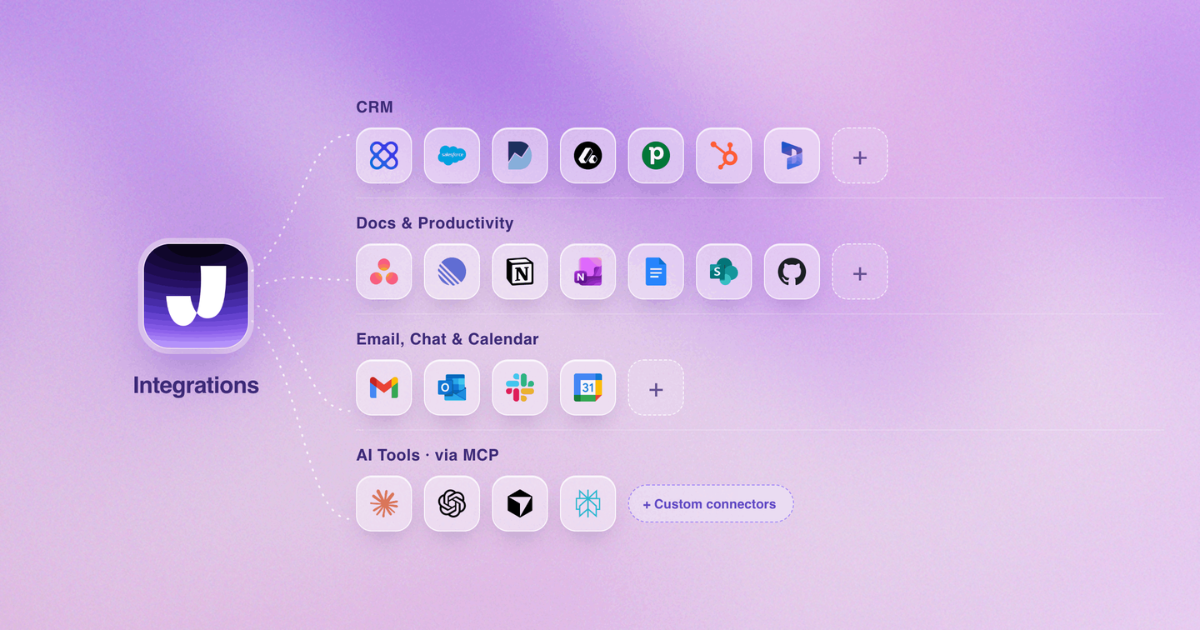
Jamie will put meeting summaries into your deal pipeline automatically. You connect the tool once, and after that Jamie adds each meeting to the records you have chosen with absolutely nothing else required. If your team members continue typing call notes back into the CRM on Fridays, these eleven integrations are the place they can stop retyping:
Salesforce integration: Jamie saves the summary and the transcription of the meeting to either a lead, opportunity, contact or account in Salesforce, on Pro and above, so that your pipeline is always current before you even open your computer.
HubSpot integration: In addition, Jamie stores the meeting notes in the HubSpot contact, deal or company of your choice, on Pro and above. Therefore, the client's history is building itself while you are still attending the next meeting with the client.
Attio integration: Finally, Jamie can send a summary from a meeting to an Attio person or company record as a note, on Pro and above. A modern CRM used by a small boutique business has the same automation capabilities as those available on a bulge bracket desk.
Asana integration: Jamie takes your meetings and sends them into an Asana project as tasks and attaches the meeting PDF, on Pro and above. Therefore, there is no reason for anyone to enter follow-up action items after a due diligence call.
Notion and OneNote: Lastly, Jamie places your meetings into a Notion database or OneNote notebook, on every plan including our free plan. Therefore, now you do not have to search through your email inbox looking for that old conversation regarding a previous client.
Webhooks: You may utilize webhooks, as well as Jamie's API within your custom integration configuration, using a documented Make.com route, on Pro and above, therefore providing immediate input into internal banking systems for those meeting notes.
Copy-paste compatibility: Your content will retain its format as it enters Linear, Todoist, Bear, Typora, or Ulysses via Jamie. Therefore, you have the option to select whichever task management platform works best for you.
DealCloud: On both Team and Enterprise levels, Jamie will log the meeting notes to DealCloud interactions. Therefore, each deal record will include the actual topics that were covered in the meeting and will not be subject to somebody recreating this from memory prior to the end of a Friday.
Affinity: At the Enterprise level, Jamie logs the meeting notes to Affinity interactions and notes. Thus, all relationship history over your coverage list will remain current without manual updates by associates.
Microsoft Dynamics 365: On Pro and above, Jamie logs the meeting notes to the respective Dynamics 365 Sales records and meetings. If a bank uses Microsoft products and has standardised on their usage, they now have one system of record.
MCP for Claude, ChatGPT and Cursor: Additionally, on Pro and above, Jamie creates the linkages between your meeting notes and the AI tools your team is currently using. You can then ask questions regarding previous client calls with Claude, ChatGPT, or Cursor.
Extract Deal Insights and Follow-Ups Without Reviewing Hour-Long Transcripts
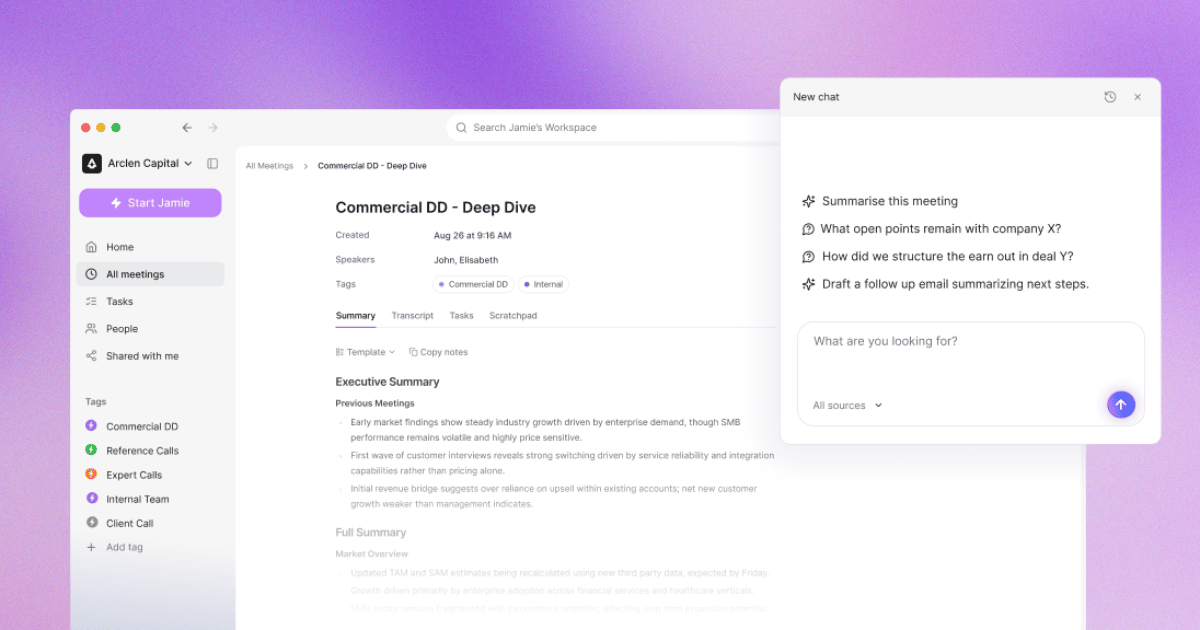
When you have spoken with multiple clients over the course of a single day, reading through a complete transcription of each meeting to locate an individual client objection will consume the time you cannot afford. Jamie answers your questions across your meetings instantly and organizes your meeting records by type of deal. If you are searching for what was said by a counterparty months after that meeting, these four features will help retrieve the response:
Ask AI: If you need to know what a client said on a previous call, ask Jamie any question about a particular meeting, across all meetings within a designated tag, or across all of the meetings you have ever recorded, on every plan including our free plan. Using these features, you will be able to pull a client objection out of a call from four months prior, without having to reopen the associated transcript.
Scratchpad: You capture your own thoughts while participating in a live call, without losing focus on the conversation taking place. As such, a deal idea captured during the live call remains tied to the corresponding meeting record.
Templates: You can use Jamie's pre-formatted summary templates to organize meeting summaries for client calls, due diligence sessions, or even internal team standup meetings. The organized meeting summaries include customized section headers, which means the notes are ready to forward to senior bankers.
Search: Using Jamie's search feature, you may now quickly access any meeting record across your entire history. This enables you to reference past conversations with clients when similar opportunities arise months later.
Jamie Pricing
Free: €0 per month
Plus: €25 per month
Pro: €47 per month
Team: €39 per seat per month
Enterprise: Custom pricing
Annual billing offers 17% discount. Source: Jamie Pricing Page
What Jamie users love
Voice and speaker recognition work with no bot in the meeting
"Extremely good voice recognition, convenient UI, stability, speaker recognition, a bot is not in the meeting" Vitalii R., G2
Summaries hold up in board meetings and interviews, online and in person
"It can be used both online and in person using the phone app and its ability to understand the context of the meetings and produce accurate and well structured summaries is great. These need minimal adjustment. I have used it for interviews, board meetings and general discussions and it has worked well in all contexts" Rod S., Partner, G2
Language detection handles a call that switches between English and German
"I value the language detection ability since I work in both English and German and sometimes switch between the languages within a meeting depending on who is attending. This feature is exceptionally good compared to other similar tools which often struggle with language changes." Verified User, G2
Pleasing UI/UX and organized notes compared to other AI note takers.
"I like Jamie because it’s a bot-free AI note-taker that can take notes without an awkward bot on the call. The transcription is also usually very accurate. I also like the AI summaries it generates after the call - they’re well laid out and organized, especially compared to other AI note-takers. I also love the design and UX of the app - it's just easy and pleasing to the eyes." Verified User in Design, G2
Transcripts and summaries export to Google Docs
"The quality of the transcripts and summaries is great and exporting to Google Docs also works nicely which saves hours." Alberto A., Program Manager, G2
What Jamie users flag
The free plan stops a meeting at 30 minutes
"The 30min meeting limit, but I understand that's the business model ;)" Charlotte Z., Founder, G2
Audio quality in the room changes what the notes come back like
"Jamies features are outstanding, sometimes I had the feeling that my audio quality heavily impacts the outcomes, which I need to adapt from my side." Verified User in Computer Software, G2
Speaker identification is not infallible, and a good microphone helps
"The speaker identification feature of Jamie, though very useful, isn't entirely reliable or infallible. In our experience, to get the most effective results from Jamie, it was necessary to invest in a good quality microphone." Tom W., G2
A reviewer who went looking for downsides did not find one
"There are no obvious downsides to Jamie - its performance has always been good (even in some difficult environments it has recorded well)." Rod S., Partner, G2
Some things are still buggy and some integrations are missing
"There a few buggy things and missing integrations but Jaime is young and I have full confidence in what their future looks like. It's better than every other app I've tried, and I can guarantee you that I've deep researched and checked out a million." Rachel C., G2
2. Hebbia: Best AI Tool for Investment Banks for Document Diligence
Best for: Hebbia is the AI tool for investment banks running data extraction across client documents in heavy due diligence and research.
Similar to: Kira Systems, Luminance, Harvey, AlphaSense.
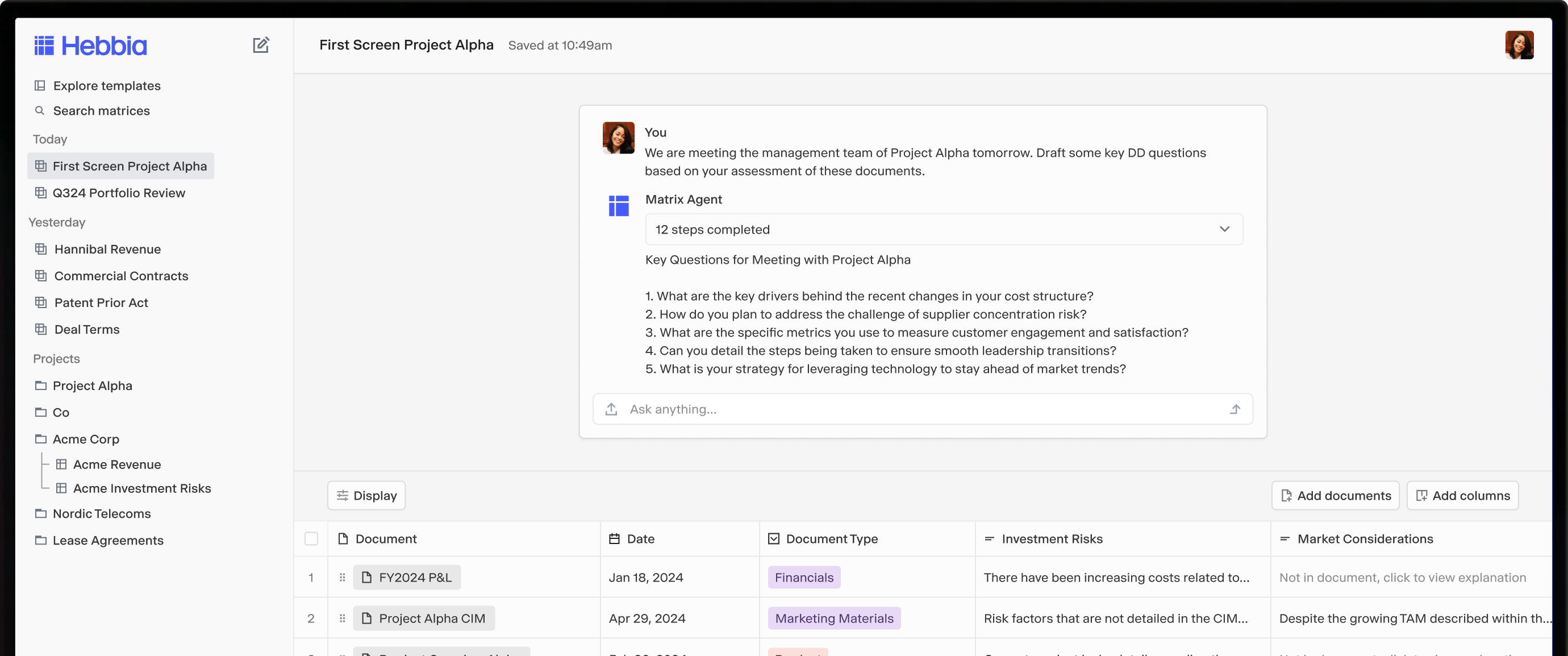
Hebbia is a platform for analyzing documents using artificial intelligence, and Hebbia says it is trusted by investors, bankers, lawyers, consultants, and Fortune 500 companies. Today, their flagship product is called Max, and Hebbia refers to it as an always-on analyst, while Matrix is described by Hebbia as a spreadsheet-style interface that uses large language models over what Hebbia calls a near-unlimited corpus of documents.
The platform can process PDFs, contracts, data rooms, and transcripts with full citation traceability. A central orchestrator divides up the work among specialized subagents, and Matrix routes dynamically between text and vision models so the best model is used for each task. Below is a summary of the capabilities and limitations of Hebbia's products for investment banking workflows.
Hebbia Analyses an Entire Data Room, Contracts and Transcripts With Citation Traceability
Matrix interface: a tabular grid for querying multiple documents and performing multi-step AI reasoning.
Multi-agent orchestration: a central orchestrator divides up the work between specialized subagents.
Near-unlimited corpus: Matrix runs large language models over what Hebbia calls a near-unlimited corpus of documents.
Citation-linked outputs: every response from the AI is traced to exact document passages.
Excel cell citations: inline citations on individual cells surfaced as Microsoft Office notes.
Hebbia Pricing
Hebbia agrees to fees in an order form under its Main Services Agreement, and Hebbia publishes no price, no plan name, and no tier on its own pricing page.
What Hebbia users love
Answers across many documents come back with citations
"It's fantastic to ask questions and have it compile pertinent information with citations, which significantly reduces the tediousness of research." Juhi P., Software Developer, G2
Finding one fact across a pile of files is fast
"What I like most about Hebbia is how quickly I can find the information I need without having to manually go through multiple documents" Kajal J., Accounts Receivable and Payable Specialist, G2
Document analysis is quick to pick up
"Easy to use and saves a lot of time when analyzing documents." Aniruddh S., Managing Director, G2
Key facts come out of an offering memorandum into a summary
"Hebbia can save you time in pulling key asset information from OMs; I use it to extract things like address, size, amenities/specs, and market statistics. I use this regularly during early stages of underwriting to share quick summaries of key facts on an asset..." Verified User in Financial Services, G2
Access to earnings calls and public filings makes the research easy
"Hebbia is extremely useful and saves hours of work every week, especially working in the financial sector. Having access to all earnings calls and public filings makes it very easy to conduct extensive market research, conduct due diligence on public companies..." Verified User in Financial Services, G2
What Hebbia users flag
The learning curve is the main thing reviewers would improve
"Learning curve: The workflow is more powerful than a typical chat interface, but that extra capability can make it feel less intuitive for new users." Nehal G., Customer Success Advisor, G2
A reviewer in a niche industry found the searches harder to get right
"The least helpful thing about Hebbia is that, given the niche aspect of our industry, it is difficult for the AI to understand our searches and prompts." Verified User in Financial Services, G2
Uploading and managing a large number of files is awkward
"My biggest gripe is probably the UI for uploading and managing files is not the easiest/straightforward to use, especially when dealing with a large number of files and folders." Verified User in Financial Services, G2
A document whose format varies between periods can return the wrong data
"When using Matrix, if the format is identical across time for a regular document, the function will work but variations in form can cause the wrong data to be pulled." Verified User in Financial Services, G2
Very large documents can slow the platform down
"The main issue is that the platform can feel slow or heavy when working with very large documents." Harshul S., Sr tech support, G2
3. S&P Capital IQ Pro: Best AI Tool for Company Research
Best for: S&P Capital IQ Pro is the AI tool for investment banks doing company research on financial statements and company financials.
Similar to: Bloomberg Terminal, FactSet, Refinitiv Eikon, and PitchBook.
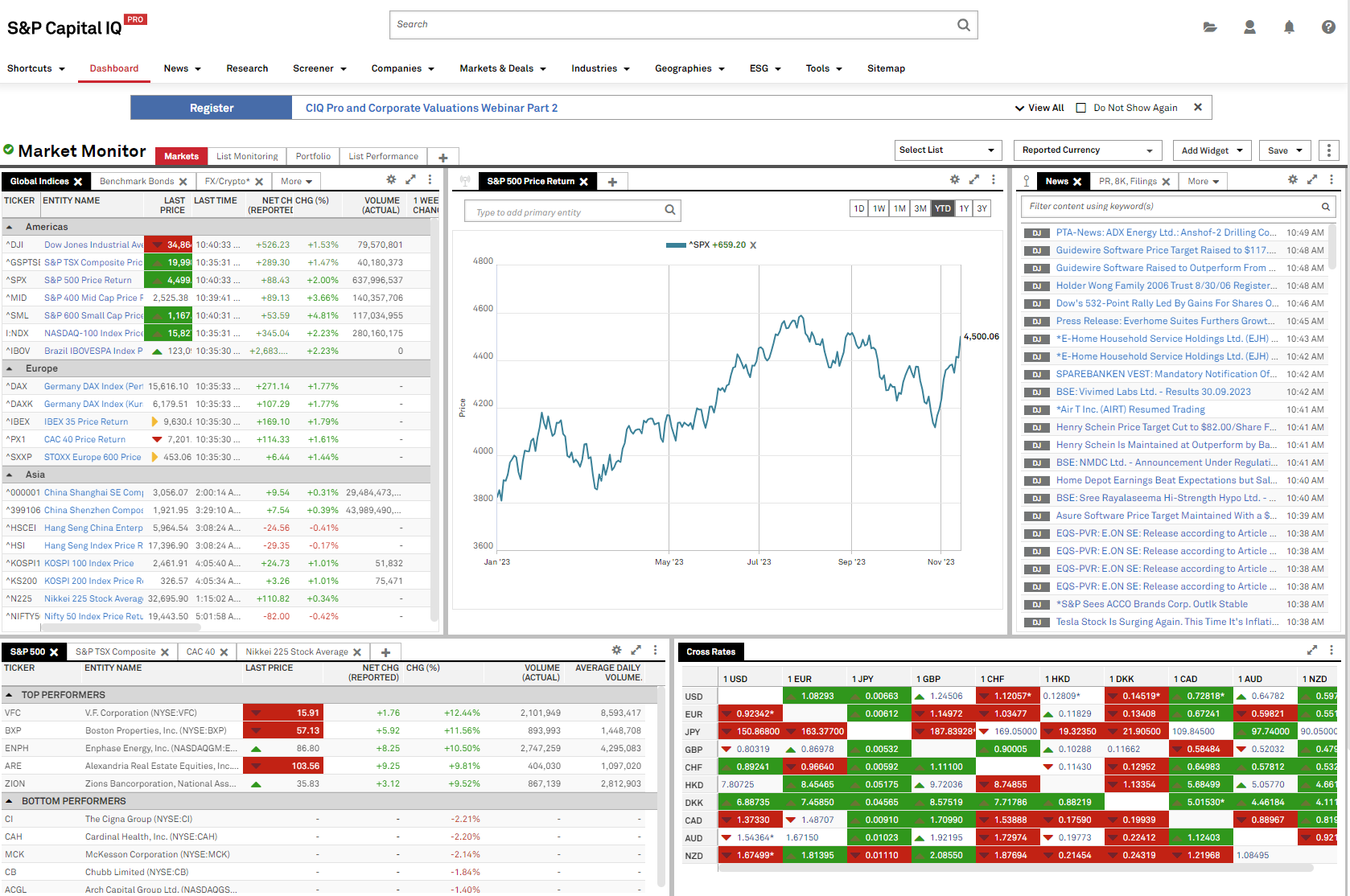
In addition to its ability to be used by multiple different types of users, not just investment bankers, S&P Capital IQ Pro is a complete market intelligence and financial research product that brings company data, documents, news and analytics into a single interface. These five features are those that will be most useful if you have an analyst who is pulling together data for a pitch presentation late at night:
S&P Capital IQ Pro Screens Companies and Runs Document Review With ChatIQ
Multi-Document ChatIQ: The ability to analyze and compare up to 20 separate documents simultaneously using artificial intelligence, with links to the source document when the answer is provided.
AI Document Intelligence: A search feature that searches large amounts of text such as filings, transcripts and presentations, generates a summary, and includes sentiment analysis and key phrases based on earnings calls.
AI-Assisted Screener: The capability to screen companies using natural language, which screens companies based on plain English query statements automatically translated into screening criteria.
Office Tools Integration: An add-in suite that retrieves Capital IQ data directly into Microsoft Excel, PowerPoint and Word, has pre-built templates, and automatically updates any data retrieved.
Real-Time News and Research: A fully integrated news feed and research library that is updated in real time. S&P Capital IQ Pro redistributes news from The Nikkei and Nikkei Asia, and carries Dow Jones and Wall Street Journal content through a strategic partnership.
S&P Capital IQ Pro Pricing
Enterprise subscription (Custom Quote): S&P Global does not publish pricing. Licences are agreed in a client agreement and vary by the modules and data you need, and access to Visible Alpha estimates data needs a separate subscription.
What S&P Capital IQ Pro users love
Market data coverage runs across sectors
"It is very powerful and provides market data regarding everything, nowadays we need quick and deep update regarding financial bodies, health sector etc. It's all there." Sonal B., Senior Associate, G2
Pulling a large data set is easy
"Easy to pull large data set; sector wise template" Abhishek S., Associate, G2
The interface carries what a financial analyst needs
"The platform has become more intuitive with an easy user interface packed with essential features necessary for any financial analysis, and it also has a great customer support team..." Verified User in Financial Services, G2
Private company coverage is better than on the older platform
"Capital IQ Pro has a very great coverage of public companies and much better coverage of private companies as compared to Capital IQ platform" Abhinav S., Associate, in a review G2 invited and rewarded with a gift card, G2
Financials come standardised across every company
"Standardized financials for all companies" Verified User in Management Consulting, in a review G2 invited and rewarded with a gift card, G2
What S&P Capital IQ Pro users flag
The licence is expensive and has to be renewed
"It is expensive and you have to keep renewing your license to be a part of it." Sonal B., Senior Associate, G2
A figure sometimes differs from the reported one
"Sometimes the value is different from the reported figures" Verified User in Accounting, G2
Private company coverage still has gaps
"The coverage for private companies can still be better." Abhinav S., Associate, G2
Coverage outside the United States is thinner
"Coverage outside the US is not soo good." Verified User in Management Consulting, G2
The page layout gets cluttered with the volume of information
"The page layout can get cluttered with the sheer volume of information available. Narrowing in on exactly what you're looking for can take some time, but overall not a big issue once you get used to it." Brian N., Enterprise Sales, G2
4. Rogo: Best AI Tool for Investment Banks for Deal Workflows
Best for: Rogo is the AI tool for investment banks that want deal materials, models, and comps for deal execution from one prompt.
Similar to: Hebbia, AlphaSense, FactSet, Bloomberg Terminal.
Source: Rogo
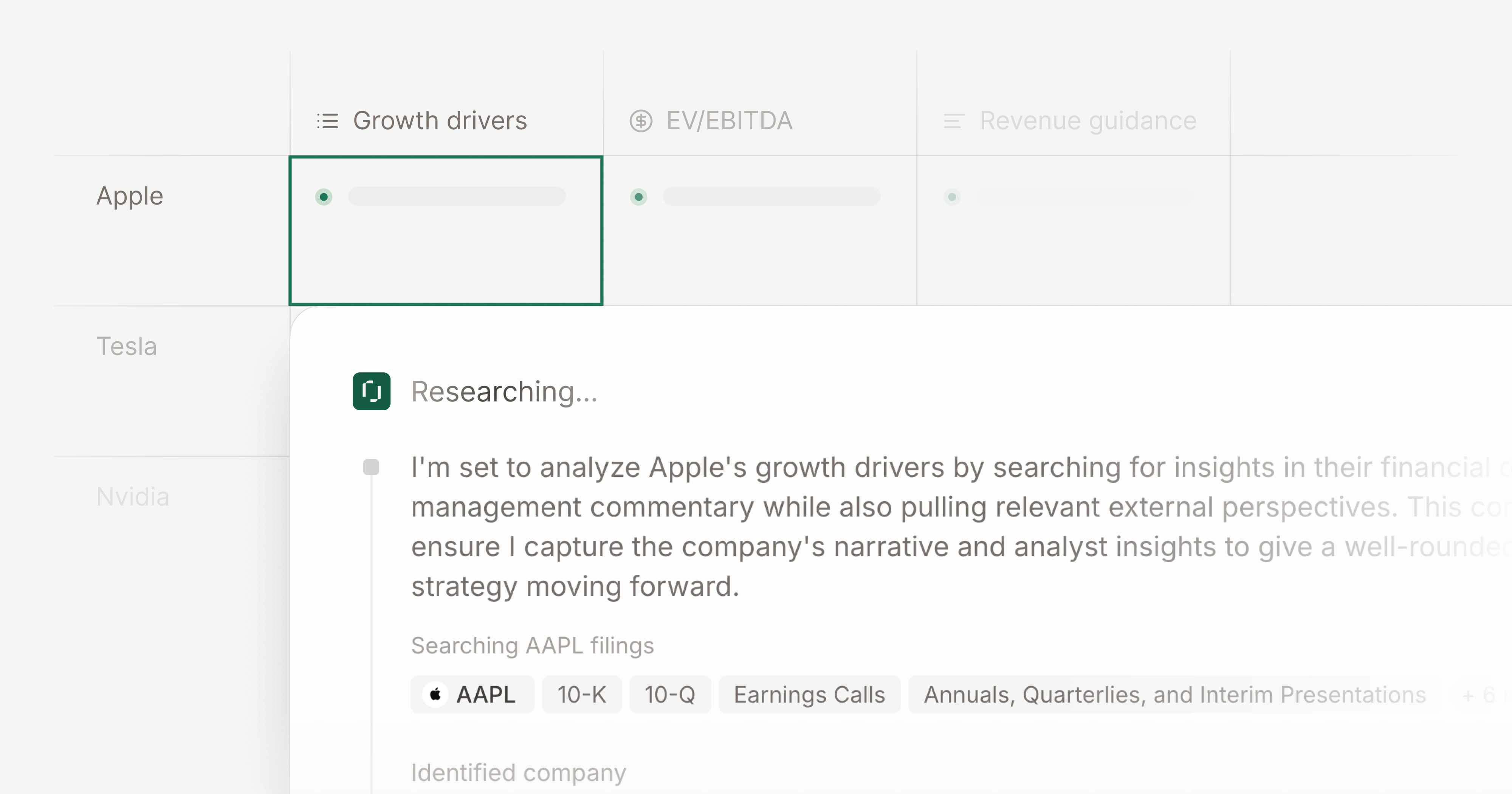
Rogo is an artificial intelligence platform that serves the needs of finance and describes itself as the trusted AI partner to the world's leading financial institutions. The Agent Library by Rogo operates an end-to-end workflow from a single prompt and produces a completed Excel model, PowerPoint presentation or Word document. The company also states that this library has operated over 430,000 times. Felix is a personal agent you can send emails to, and Felix works within an email client, messaging application, spreadsheet software and terminal applications.
On 1 September 2026 Rogo acquired Arvo. Arvo is an AI meeting assistant designed specifically for use with financial institutions. According to Rogo, Arvo is deployed across blue chip financial institutions and has already powered thousands of their meetings. However, neither the method Arvo uses to record meetings, nor where Arvo stores meeting data, nor how much Arvo costs are listed on Rogo's website today. Therefore, there are no comparisons available for the questions compliance officers ask about those issues.
Rogo Returns Financial Models, Decks and Memos From a Single Prompt
Agent Library: Each agent performs an end-to-end workflow on a single prompt and generates a completed Excel model, PowerPoint presentation or Word document, covering DCFs, LBOs, public comps, precedent transactions, CIM analysis, and PIBs.
Felix: A personal agent that you may email similar to a colleague, performing tasks within an email client, messaging app, spreadsheet software and data terminal, with named jobs such as shell the deck, build the model, spread the comps, and draft the memo.
Custom trained models: Rogo trains its agents on professionally labelled data that was specifically developed to address the workflow and standards of precision for investment banking.
Governance and permissions: Rogo provides granular permission controls, role-based access management, auditing, customisable governance policies, and single-tenant deployment.
Certifications: Rogo is ISO/IEC 27001 certified as well as being SOC 2 Type II certified. Rogo also holds ISO/IEC 42001 for Artificial Intelligence Management Systems. Additionally, Rogo states they have aligned their practice with the European Union Artificial Intelligence Act.
Rogo Pricing
Rogo does not publish a price, a plan name, or a tier. Rogo agrees on pricing in a commercial agreement with each firm. There is no free plan and no free trial, and the routes on the site are Request Demo and Request Access.
What Rogo Users Say on the App Store
Rogo AI holds 4.3 out of 5 from 12 ratings on the App Store, with three written reviews. All three are five-star, and all three sit on the United States storefront.
One reviewer calls Rogo a must-have in a finance tech stack
"Must have in every finance professionals tech stack" Felix Roythan, App Store
Another reviewer values the shortcuts away from the desk
"Shortcuts on the go are invaluable" Blakestrrr, App Store
A third reviewer rates Rogo the best AI app for finance professionals
"No doubt the best AI app for finance professionals" jamescf123, App Store
How Rogo Compares With the Other AI Tools for Investment Banks on This Page
G2 lists Rogo and shows no reviews at all, and Capterra, Trustpilot and Product Hunt carry no Rogo listing. The three App Store reviews above are the only user words we found, and all three are five star. This section is therefore a comparison of what Rogo states about itself with what the other four vendors state:
A thin pool to read before you buy: Rogo AI carries 12 ratings and three written reviews on the App Store, and G2 lists Rogo with no reviews at all. You may read the Hebbia, S&P Capital IQ Pro and AlphaSense review pools tonight; with three short reviews to go on, you would still ring other firms to find out how it went for them.
No published price: There is no pricing displayed by Rogo, nor a specific plan name or tier. Similarly, there is no pricing information published by either Hebbia or AlphaSense. Therefore, the first opportunity to place a figure into a budget line occurs after a demonstration, and until then your budget discussion is delayed. Jamie publishes the names of all five plans along with their prices.
No free plan and no way in without sales: Rogo does not offer a free version of their software, and they do not offer a free trial. There are only two options on their website: Request Demo and Request Access. If you wished to test their software using actual client calls before paying, you would need to speak to their sales department first. Jamie offers a completely free version which includes ten monthly meetings of up to thirty minutes per meeting.
Where Rogo is ahead: Rogo holds ISO/IEC 42001, an international standard for the evaluation of management systems related to artificial intelligence. Rogo also indicates it has been designed in accordance with the European Union AI Act. Neither Jamie nor any of the other tools on this page publish that certification.
5. AlphaSense: Best AI Tool for Investment Banks for Market Intelligence
Best for: AlphaSense is the AI tool for investment banks tracking market trends with market analytics.
Similar to: Hebbia, Rogo, Bloomberg Terminal, and FactSet.
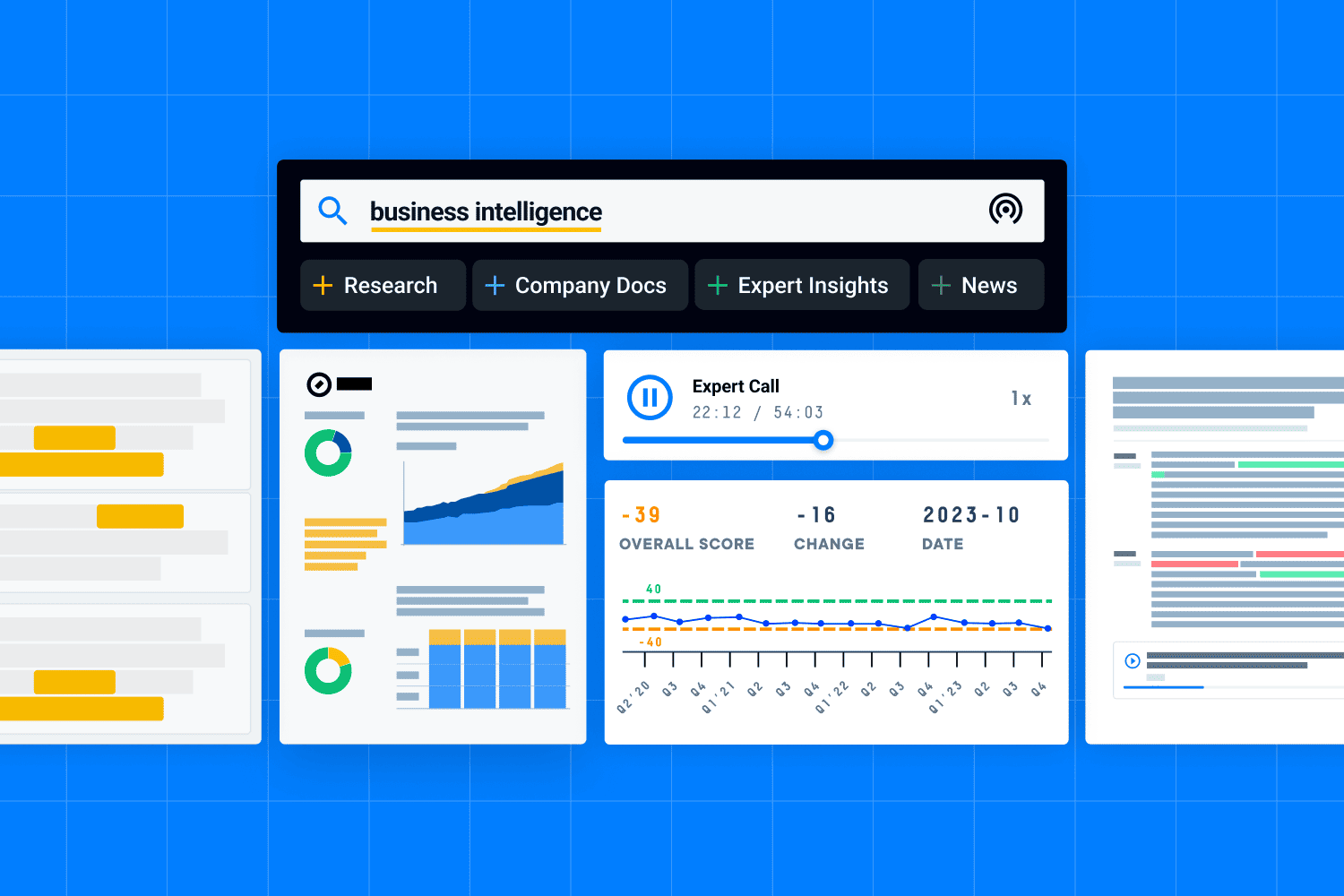
AlphaSense is an artificial intelligence-based market intelligence platform which searches and analyzes data contained within 500+ million premium documents. Additionally, AlphaSense indexes news articles, financial reports, expert interviews, broker research, as well as SEC filings and earnings transcripts into a single search interface.
AlphaSense utilizes Smart Synonyms to extend the context of a user's search and return relevant contextual results outside of the exact keywords. The AlphaSense Expert Transcript Library contains greater than 300,000 investor-led insights, adding more than 8,000 new insights each month, covering more than 29,000 companies. If your associate is building a market map before a pitch, these five capabilities are the ones they use:
AlphaSense Searches 500+ Million Premium Documents With Smart Synonyms
Smart Synonyms: utilizes natural language processing to generate contextual synonyms from a user's search term without them needing to manually input synonyms as part of their search query.
Sentiment analysis: identifies positive or negative tone within an earnings call and also highlights this through visual aids.
Unified document search: includes all SEC filings, global regulatory documents, and company presentations in one search function.
Expert Transcript Library: contains over 300,000 investor-led insights on over 29,000 companies.
Smart Summaries: generates cited summaries of earnings calls and broker research.
AlphaSense Pricing
AlphaSense provides annual subscriptions for all team sizes, ranging from enterprise packages to per seat options.
AlphaSense quotes pricing per customer through its sales team, on annual subscriptions. AlphaSense sells subscriptions that run from enterprise-wide solutions to per-seat pricing. AlphaSense also runs a free trial, requested from their own trial request page.
What AlphaSense users love
Smart Synonyms finds a mention you did not phrase exactly
"I really like how the smart synonyms feature works. Even if I don't type the exact phrasing, it still finds all the relevant mentions in broker research and financial reports." ARPIT M., Vice President, G2
Filings, earnings calls and broker research sit in one place
"Huge content library brings filings, earnings calls, expert transcripts, broker research, news and financial data into one platform." Udit P., G2
It is the first stop for market intelligence research
"Alphasense is our go to tool for deep research for market intelligence, interface and summary are really helpful for making a sense of the data." Anuj Sant T., Material Buyer, G2
One database aggregates the research sources
"It is an amazingly comprehensive research platform that aggregates near-infinite resources into one central database." Jacob M., Senior Market Research Analyst, G2
Relevant information surfaces out of large volumes of documents
"AlphaSense stands out for its ability to quickly surface relevant information from large volumes of both structured and unstructured data." Ritvik M., Application Development Associate, G2
What AlphaSense users flag
The advanced search filters take time to learn
"The platform is really powerful, but the learning curve is pretty steep. It takes a good chunk of time for new users to get used to the advanced search filters..." ARPIT M., Vice President, G2
Real-time financial data coverage could be better
"Real-time financial data coverage could be better, particularly compared with specialized financial-data platforms." Udit P., G2
Some answers still need checking and going back over
"I don't like how much we rely on AlphaSense, because there are often grey areas that still need updates and additional input." Verified User in Program Development, G2
The enterprise price puts it out of reach for a smaller team
"Despite its power, AlphaSense comes with notable downsides, most prominently a steep, enterprise-tier price tag that makes it cost-prohibitive for smaller teams or individual analysts." Sriprada B., eTMF Specialist, G2
The volume of information and features can feel overwhelming
"One area I find challenging is that the platform can sometimes feel overwhelming because of the large amount of information and features available." Jat G., Senior Lead Software Engineer, G2
Final Verdict: What Are the Best AI Tools for Investment Banks?
Jamie is the most suitable AI based product for investment banking if you are fed up with compliance shutting down every AI product you test. The privacy centred design of Jamie means that no bots will attend your meetings. As a convenience option, you may choose to send an optional Automated Recording Notice email to clients four hours prior to their meeting. Meeting audio is automatically deleted after completion of transcription. After finishing a confidential M&A meeting call without having a recording bot listed as an attendee, you will be able to distribute the summary via your preferred medium.
Additionally, all meeting data collected during use of Jamie is stored and processed within Europe, and thus complies with GDPR. Also, Jamie has been certified under ISO 27001 standards for information security management systems and is DORA-ready, as this is typically the first item a bank's compliance officer asks about. As well, you can push the call notes directly into your CRM at the touch of a button to keep all of your tools and systems current and in sync with your daily workflow.
Hebbia, S&P Capital IQ Pro, Rogo, and AlphaSense are other strong alternative products available.
Quick Recap
Jamie: Call summaries completed prior to taking your morning coffee, no bots involved, high levels of user privacy.
Hebbia: Performs heavy financial document analysis and extraction from data rooms.
S&P Capital IQ Pro: Provides multi-document analysis and natural language company screening.
Rogo: Completes end-to-end deal workflows, returning a finished model, deck, or memo.
AlphaSense: Provides semantic search capabilities across earnings calls and expert transcripts.
What actually makes a difference is that meeting notes from six months ago are still there when they become relevant.

Fritz Simons
General Partner | Aven Capital Partners
Private Equity · 2-11 employees
Read More
Running a private equity fund rather than a bank? Read our guide to AI note takers for private equity.
Writing the investment committee memo yourself? See the AI tools for private equity investment memos.
Most of your calls with founders? See the AI note takers for venture capital.
Want a fund that already runs this? Read how Wenvest Capital uses Jamie through diligence.
Sitting in the finance function rather than on a deal desk? See the AI note takers for finance teams.
Advising rather than investing? See the AI note takers for consultants.
FAQs on AI Tools for Investment Banking
How do I capture client call notes without bots showing up that damage deal professionalism?
You capture client call notes without a bot by running Jamie on the machine you already brought, because Jamie records the audio on your own device and never joins the meeting as a participant.
On device recording: You start the recording yourself on macOS, Windows, iOS or Android, and nothing joins your client call and nothing appears in their attendee list, on every plan including the free plan.
Every meeting platform, and the room as well: You record a Microsoft Teams call your client hosts, a Zoom management presentation, a Google Meet diligence session, or an in-person meeting in the client's own boardroom with no additional device like a recorder on their table, on every plan including the free plan.
Verbal consent: You obtain verbal consent in your own words at the top of the call, which is the route most deal teams use, because informing participants remains your responsibility.
The optional Automated Recording Notice email: You can switch on an email that reaches each attendee before the meeting, 4 hours ahead by default and settable anywhere from 10 minutes to 48 hours, and nothing is sent to your client until you turn it on.
The meeting chat notice: You can have Jamie post the notice inside the call itself on Microsoft Teams, Google Meet and Zoom, once you switch it on.
Speaker identification and memory: You get each speaker named in the transcript, and Jamie matches the same voice in your later calls with that counterparty.
All meeting data is stored and processed in Europe, GDPR compliant and ISO 27001 certified.
What's the fastest way to update Salesforce after discovery calls without manual CRM entry?
The fastest way to update Salesforce after a discovery call is to switch the Salesforce integration on once in Jamie, because Jamie then attaches the summary and the transcript to the Salesforce record after every meeting with nobody doing anything.
Salesforce: You connect Salesforce to Jamie once, and after that the summary and the full transcript attach to the Salesforce record after each discovery call, on Pro and up.
The deal software your desk actually runs: You get the same automatic sync into DealCloud interactions, Affinity interactions and notes, HubSpot, Dynamics 365 and Attio, on Pro and up.
Action items: You get the tasks out of the call with an owner against each one, sent to Asana, on Pro and up.
Workflows: You can set one job to run automatically after every meeting, for example, logging the CRM activity and updating the record in your own format, and Workflows are rolling out workspace by workspace, which means Workflows may not be switched on for your workspace yet.
Webhooks, MCP and the API: You can send the meeting anywhere your team already builds, through webhooks, Make.com, the MCP connection that reaches Claude, ChatGPT and Cursor, or the API.
All meeting data is stored and processed in Europe, GDPR compliant and ISO 27001 certified.
How do I ensure AI tools meet compliance requirements for confidential M&A work?
You ensure an AI tool meets your compliance requirements for confidential M&A work by asking it five questions before the first diligence call, and Jamie answers all five on our own pages rather than in a sales call.
Where the meeting data is stored: You get all meeting data stored and processed inside the EEA, Switzerland and the UK, on every plan including the free plan, and the audio is uploaded to a server in Frankfurt.
GDPR and ISO 27001: You get a vendor that is GDPR compliant and ISO 27001 certified as a company, which your compliance officer reads off our own security page without waiting for evidence mid sign off.
DORA: You get a vendor that is DORA-ready, which matters because DORA binds your firm rather than us, and a bank or fund under DORA can use Jamie.
Permanent audio deletion: You get the audio deleted permanently once the transcript is ready, and the transcript stays on a server in Frankfurt so you can still read it.
No model training on your data: You get a written no on training, for Jamie models and for any third party model, and no data is stored at Anthropic or OpenAI.
Admin control on Enterprise: You get SAML 2.0 single sign on, SCIM directory sync, IP allowlisting and immutable audit logs of administrative and security activity, on Enterprise.
What AI tools reduce document preparation time for pitchbooks and CIM creation?
Three of the AI tools in this article cut document preparation time for a pitchbook or a CIM, and each one takes a different part. Jamie writes up the meetings, Rogo builds the deliverable, and Hebbia reads the data room.
Jamie: You get the pitch preparation call written up the moment it ends, in a template you built with the sections your pitch needs, the client stated expectation, the open items and the next steps, 30+ pre built templates on all plans, 1 custom template on Free, 3 on Plus and unlimited from Pro.
Rogo: Rogo returns financial models, decks and memos from a single prompt.
Hebbia: Hebbia analyses an entire data room, contracts and transcripts in the Matrix interface, with complete traceability back to every finding.
The pitch is agreed in a meeting before any of it is written, and that meeting is the part Jamie writes down.
How do I track deal stages and manage tasks efficiently across multiple mandates?
You track deal stages and manage tasks across several mandates by tagging each mandate in Jamie, because every meeting on that mandate then sits under one tag and Jamie generates the tasks out of each call for you.
Tags: You group the meetings for one mandate or one client under a tag, and you can share that tag with the colleagues working the same deal, on Team and Enterprise.
Action items: You get the tasks generated from the call with a tick box against each one and an owner assigned automatically, and you do not have to work out who is responsible to do what.
Ask AI inside a tag: You can ask "what is still open on this mandate, and who owes it", and Jamie answers from the tagged meetings only, on every plan including the free plan.
Asana: You get the action items sent into Asana as tasks, on Pro and up.
Deal CRM logging: You get the notes logged into DealCloud, Affinity, HubSpot and Dynamics 365, and attached in Salesforce, on Pro and up.
Agent Skills: You can write the instruction once in your own words, pull the open items and the next steps from every meeting on this mandate, and Jamie runs it agentically after each call.
How Do AI Tools for Investment Banks Pull Together Data From Multiple Sources?
AI tools for investment banks reach three different kinds of source. Jamie reaches the meetings, AlphaSense reaches the published research, and S&P Capital IQ Pro reaches the company data.
Jamie: You get every meeting turned into something your other tools can read, the summary, the action items and the full transcript, and MCP connects Claude, ChatGPT or Cursor straight to those notes, with an API and webhooks for whatever your team builds, on every plan including the free plan.
AlphaSense: AlphaSense searches over 500 million premium documents, covering broker research, expert transcripts, company filings, earnings transcripts and market news.
S&P Capital IQ Pro: S&P Capital IQ Pro screens companies and runs document review with ChatIQ.
All meeting data is stored and processed in Europe, GDPR compliant and ISO 27001 certified.
Do AI Tools for Investment Banks Fit Into Existing Workflows?
Yes. Jamie fits the workflow your desk already runs, because Plug and Play Integrations sends the notes into the tools on your screen today, and each tool is a one time connection.
The deal software a deal desk runs: You get meeting notes logged into DealCloud interactions, Affinity interactions and notes, and Attio, on Pro and up.
The CRMs: You get notes logged to HubSpot and Dynamics 365, attached to Salesforce records, and sent to Pipedrive, on Pro and up.
The document and task tools: You get the meeting into Notion, Google Docs, OneNote, Asana and Slack, on Pro and up.
Workflows: You can set one job to run automatically after every meeting instead of clicking anything, and Workflows are rolling out workspace by workspace, which means Workflows may not be switched on for your workspace yet.
MCP, webhooks, Make.com and the API: You can wire Jamie into anything your team builds, including Claude, ChatGPT and Cursor through MCP.
Enterprise rollout: You get SAML 2.0 single sign on, SCIM directory sync and a per machine MSI you can push through Microsoft Intune, on Enterprise.
How Do AI Tools Help With Deal Preparation and Pitch Work?
AI tools help with deal preparation and pitch work by splitting the job. Jamie takes the conversations, Rogo takes the deliverable, and S&P Capital IQ Pro takes the company research.
Jamie: Before the nine o'clock with a founder you met once in March, you will get a Briefing, a digest of your meetings plus a summary of the company you are about to meet, and after the call you get the summary, the action items and the full transcript, on every plan including the free plan.
Rogo: Rogo returns financial models, decks and memos from a single prompt.
S&P Capital IQ Pro: S&P Capital IQ Pro screens companies and runs document review with ChatIQ.
The heavier work stays yours. You build the financial model, you set the valuation, and you decide what the pitch argues.
Can AI Tools for Investment Banks Draft an Investment Memo From a Meeting?
Yes, in part, and it takes more than one tool. Jamie drafts the meeting record the memo is built from, and the document platforms draft from the filings and the data room.
Jamie: Ask AI generates the quick summaries you build the memo out of, and you can type "summarise what the founder said about churn, pricing and the pipeline, and quote the exact words on the churn number", with every line of the answer naming the meeting it came from, on every plan including the free plan.
Rogo: Rogo returns financial models, decks and memos from a single prompt.
Hebbia: Hebbia analyses an entire data room, contracts and transcripts in the Matrix interface, with complete traceability back to every finding.
The memo itself stays yours. You still take the numbers from your model and the wording from your investment committee.
Do AI Tools for Investment Banks Read Unstructured Documents Like a Scanned CIM?
No for Jamie, and yes for the document platforms. Jamie generates your notes from the audio of the meeting, and the tools built for files are the ones that read a scanned CIM.
Jamie: You get the conversation around those documents, the summary, the action items and the full transcript of the diligence call where your counterparty explained the working capital adjustment, with speaker identification and memory, on every plan including the free plan.
Hebbia: Hebbia analyses an entire data room, contracts and transcripts in the Matrix interface, with complete traceability back to every finding.
AlphaSense: AlphaSense searches over 500 million premium documents, covering broker research, expert transcripts, company filings, earnings transcripts and market news.
If your analyst needs the fields pulled out of a scanned CIM, that is a job for one of those two, and the meeting around it is ours.
How Does Jamie for Investment Banks Give Them Personalized Client Insights?
Jamie gives investment banks personalized client insights by recording every client meeting, generating the notes in the format your team chose, then answering your own questions across all of those meetings.
Briefings: Before the nine o'clock with a founder you met once in March, you will get a digest of your meetings plus a summary of the company you are about to meet.
Ask AI: You can type the question an associate would actually ask, "Across every call with this client this year, what did the CFO say about margin pressure, and what did they ask us for that is still open?", and every line of the answer names the meeting it came from, unlimited on every plan including the free plan.
Templates: You can build the template your notes come back in, with the sections an investment committee update needs, the client's stated valuation expectation, the open diligence items and the next steps, 30+ pre built templates on all plans, 1 custom template on Free, 3 on Plus and unlimited from Pro.
Workflows: You can set one job to run automatically after every meeting, for example that same client update in your own format, and Workflows are rolling out workspace by workspace, which means Workflows may not be switched on for your workspace yet.
Agent Skills: You can write the instruction once in your own words, pull the earn out discussion and the open items from every meeting on this mandate, and Jamie runs it agentically after each call.
All meeting data is stored and processed in Europe, GDPR compliant and ISO 27001 certified.