11 Best AI Lecture Note Takers in 2026
Sanduni
Growth Content Editor

In this article I am going to be looking at 11 AI lecture note takers: Jamie, Aiko, Otter, PLAUD AI, Jamworks, Knowt AI, Gemini Notebook, Granola, Fathom, Notta and Genio Notes.
I have ranked these 11 AI lecture note takers on their ability to take notes during online lectures and in-person lectures, additional educational features like flashcards, conversational intelligence, uploading features, data security, data residency, transcription, speaker identification, hardware, free plans, price, etc.
For an additional test to determine accuracy, we tested Jamie against 4 other AI note takers using the same speech data. Jamie scored 98 out of 100 for speaker identification and 90 out of 100 for transcription, ranking number one of the five against Granola, Fireflies, Otter and Fathom.
Regardless if your lectures are conducted in a classroom or on your university's own Zoom account, and regardless of the uncertainty you may be experiencing about which product to buy, the question remains the same: what is the best AI lecture note taker? In this article I am going to show you 11 of them.
Jamie became part of how we work faster than we expected. What I love about Jamie is that it never forgets. Every decision, every idea, every follow-up is right there when we need it. Especially, the focus on data privacy is crucial for a company like ours.

Toni Stork
Founding Partner & CEO at OMMAX
Professional Services / Consulting · 250-500 employees
TL;DR
- Jamie, best overall AI lecture note taker: Jamie captures lecture notes on macOS, Windows, iOS and Android, identifies speakers and remembers your lecturer's voice/speaker ID in future meetings and works both online and on in-person lectures. Jamie works in 100+ languages, has a live transcript, executive-level notes with customisable templates, action items, and a scratchpad (to jot down your own notes), unlimited storage, unlimited history and unlimited Ask AI (chat) on free and paid plans, all with data stored in Europe, GDPR compliance, and ISO 27001 certification; deletes the audio once the transcription is finished; does not use your recorded lectures for AI training; and includes the first 10 meetings a month at 30 minutes for completely free, then Plus at 25 euro a month.
- Aiko, best for transcription that happens on the device itself: Aiko uses the actual device to transcribe. A single 24 dollar Universal Purchase provides the application across macOS, iPhone, iPad and Apple Vision. The application supports 100 languages and uses OpenAI's Whisper running on the device, and Apple records the app as collecting no data. The application exports subtitles, and it provides a fully functional trial version for 14 days with no limits. As of now, Aiko indicates that live transcription is not currently available.
- Otter, best for live captions in the lecture theatre: Otter joins Zoom, Microsoft Teams and Google Meet, and creates live captions on Google Meet, creates speaker identifiers that are labelled with names and carry those names over to subsequent conversations on the free plan, a desktop application that does not use bots and support for six languages. Otter is SOC 2 Type 2 certified and certified to the EU-U.S. Data Privacy Framework and the UK Extension, does not use customer data to train its providers' AI models, stores data in AWS US West, and gives 300 free minutes a month at 30 minutes a conversation, with Otter AI Chat capped at 20 queries a month on Basic.
- PLAUD AI, best for a recorder you clip to your collar: Plaud is a recorder you attach to your shirt like a lapel mic. It supports 112 languages, and the speaker labelling transfers to subsequent recordings once you switch Sync speaker labels on. It meets the standards of ISO/IEC 27001, ISO 27701, SOC 2, HIPAA and EN 18031. Its data centres are located in the United States, Europe in Frankfurt, Singapore and Japan. Plaud will not train on your data unless you explicitly opt in. Plaud sells four recorders for 159 dollars, and the free Starter plan gives 300 transcription minutes a month, which do not roll over.
- Jamworks, best for auto-chapters, flashcards and a personal study tutor: Jamworks can work as cross-library chat, a connection to Panopto which is set up by your university, capture on macOS, Windows, Android and iOS and on Chromebooks through a widget, a DSA approved product, and it stores customer data in the United States for US customers, the United Kingdom for UK customers and the EEA. 14.99 pounds monthly, with a 14 day trial period and no free plan.
- Knowt AI, best for test preparation directly from a recording: an AI summarizer of a lecture recording and an AI summarizer of PowerPoint files on Ultra, unlimited files can be created, collaborated and stored free with 1 AI summary a month, and student access to AI features is free when the student uses materials shared by the teacher, as well as the AI voice tutor and full AP, SAT and ACT prep on Ultra. Knowt AI uses data centres in the United States, and Ultra is priced at 24.99 dollars a month.
- Gemini Notebook, formerly NotebookLM, best to create study guides from anything you have uploaded: Audio Overviews, Deep Dive discussions via audio, Video Overviews, Mind Maps, citations that link to specific pages, support for 80+ languages, SOC 1, SOC 2, SOC 3, ISO/IEC 27001, ISO 27017, ISO 27018, ISO 27701, ISO 9001 and BSI C5 compliance, and free with a Google account and 50 sources per notebook. An audio file you import into a notebook is transcribed and saved as a source.
- Granola, best to write and capture notes alongside listening to lectures: it is free to capture for macOS, Windows, iPhone, Android and Apple Watch with the mobile apps free, AI-enhanced notes during in-person meetings on mobile, speaker tags include actual names, 31 desktop languages, SOC 2 Type 2, and notes are stored within a US-hosted AWS Virtual Private Cloud. No daily limit to transcribe on the free plan, and only the last 30 days of notes are visible in the app. Older notes are stored rather than deleted, with a CSV export in Settings.
- Fathom, best for unlimited recordings on the free option: unlimited recordings and transcriptions in 38 languages, five advanced summaries per month and then either the General or Enhanced template. Choose between bot free capture, which their pricing page marks as in beta on Mac, or bot capture. SOC 2 Type II audited, HIPAA compliance and GDPR alignment in its own words. All data stored by Fathom is located in the United States.
- Notta, best for long recordings and a pocket recorder: 58 languages, up to 5 hours per recording on Pro and beyond, bot free Notta Desktop available on all plans, in beta on Mac and Windows across 40+ meeting apps, recording in person available on the free plan, the 28g Notta Memo, and 120 free minutes a month at 3 minutes a conversation.
- Genio Notes, best for recording while you mark the moments that matter as the class runs: iOS and Android apps, end-user content stored in UK data centres, SOC 2 Type II audited annually by A-LIGN and TX-RAMP Level 2 certified, and trusted by more than 1,000 higher education institutions. Eligible UK students get it free through the Disabled Students' Allowance or an institutional licence. Otherwise, 12 pounds monthly, and there is a 30-day trial which does not require any card or payment details.
What Are the Best AI Lecture Note Takers?
The 11 best AI lecture note takers according to my research are Jamie, Aiko, Otter, PLAUD AI, Jamworks, Knowt AI, Gemini Notebook, Granola, Fathom, Notta and Genio Notes. Each one converts your lecture into readable and executable text, whether you record the class itself or bring a recording you made another way.
Jamie will record both in-person lectures and online classes from the laptop or phone you already use, on all plans, including our free plan, with speaker identification and 100+ languages. All meeting data will be stored and processed in Europe; Jamie is GDPR compliant and ISO 27001 certified; meeting audio will be deleted after the transcript is complete.
PLAUD AI stores in Europe too and holds ISO 27001; however, you will need to buy one of their recorders for 159 dollars. Granola also captures without a bot. Otter also has a botless desktop app. Both Notta and Fathom offer a bot free version that their own pages mark as a beta; however, Fathom limits this to Mac computers and to English only.
To give you a better idea of how Jamie, Aiko, Otter, PLAUD AI, Jamworks, Knowt AI, Gemini Notebook, Granola, Fathom, Notta and Genio Notes differ, you can click any cell to see the longer response:
Universities Are Blocking AI Note Taker Bots From Zoom and Microsoft Teams
Four universities issued guidance regarding AI note-taker bots in their own meetings in 2026.
Each of the four decisions has the same shape. The block sits on the university's own Zoom or Microsoft Teams account. A bot based tool that works on your personal account can still be turned away from a class.
If your seminars run on your university's own Zoom or Teams accounts, then the following four published decisions determine whether a bot based tool will work for you:
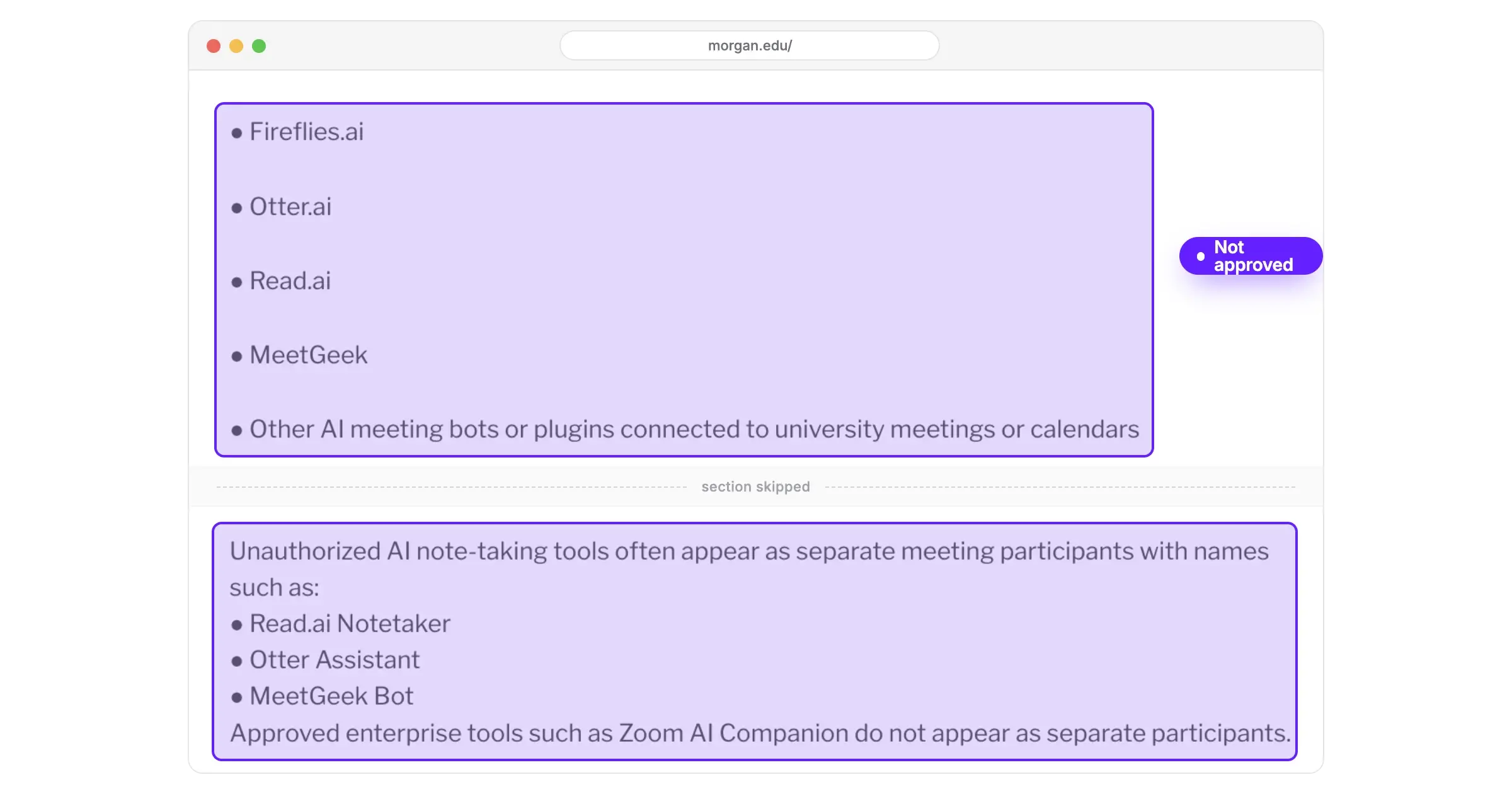
Morgan State University
Source: Morgan State University
As of 10 June 2026, Morgan State has blocked unauthorized third party AI meeting note taking bots from university hosted Zoom meetings, and lists Fireflies.ai, Otter.ai, Read.ai and MeetGeek as unapproved tools.
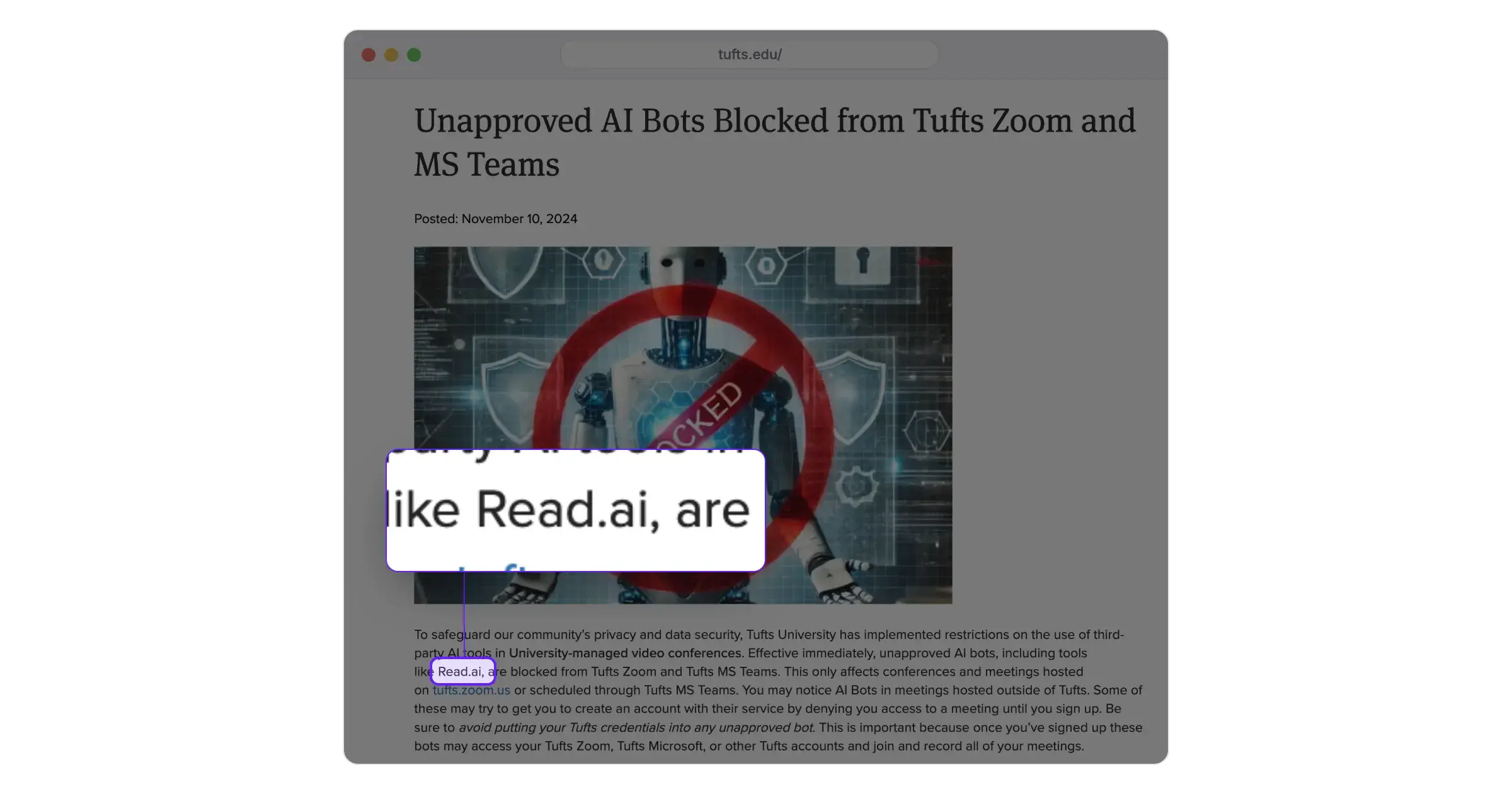
Tufts University
Source: Tufts University
Tufts bans unapproved AI bots, including Read.ai, from Tufts Zoom meetings and Tufts MS Teams meetings. The ban relates to meetings hosted on tufts.zoom.us or scheduled through Tufts MS Teams.
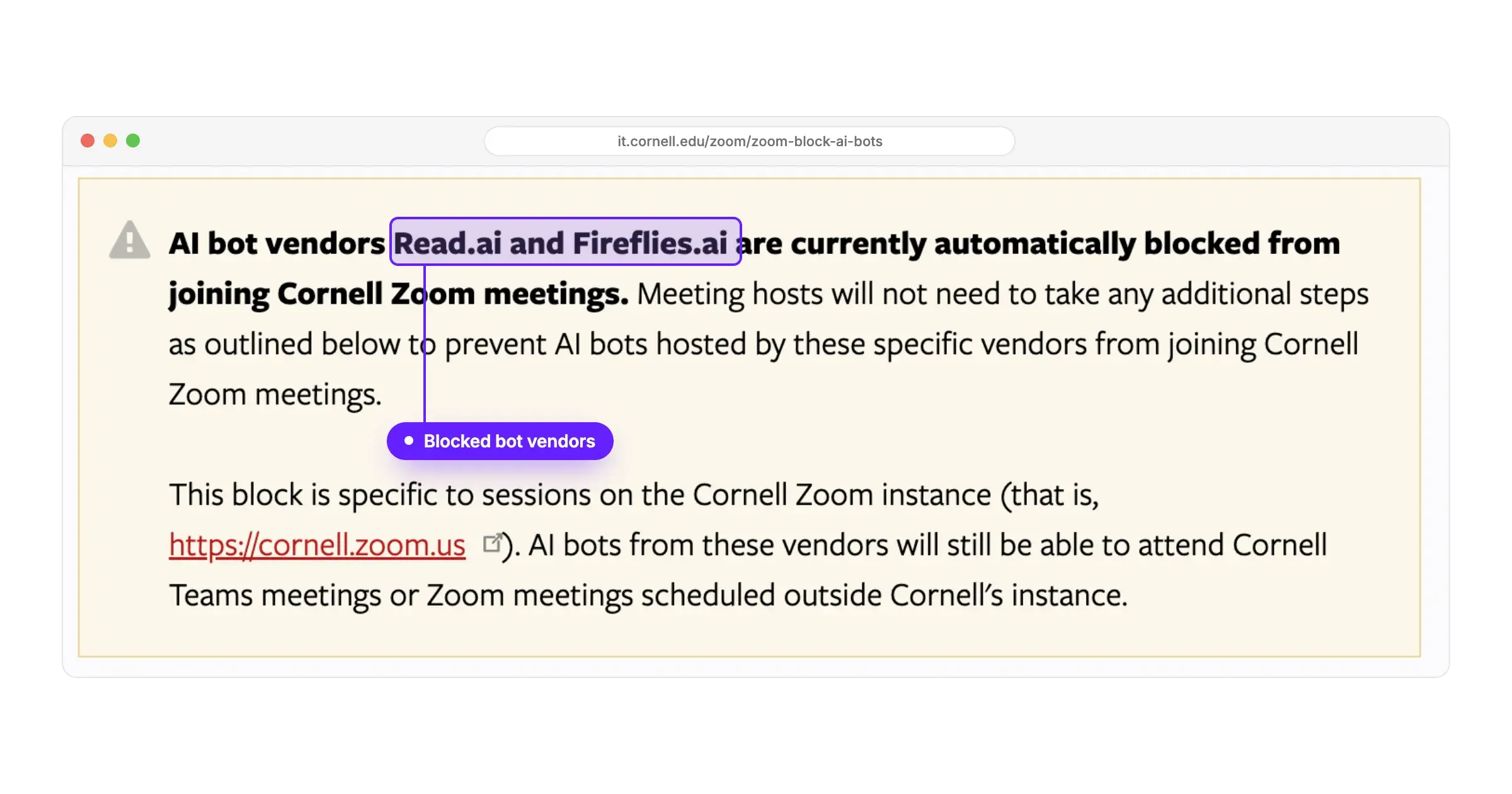
Cornell
Source: Cornell
Cornell automatically prohibits the AI bot vendors Read.ai and Fireflies.ai from joining Cornell Zoom meetings. The prohibition is limited to Cornell's own Zoom account rather than to Zoom everywhere.
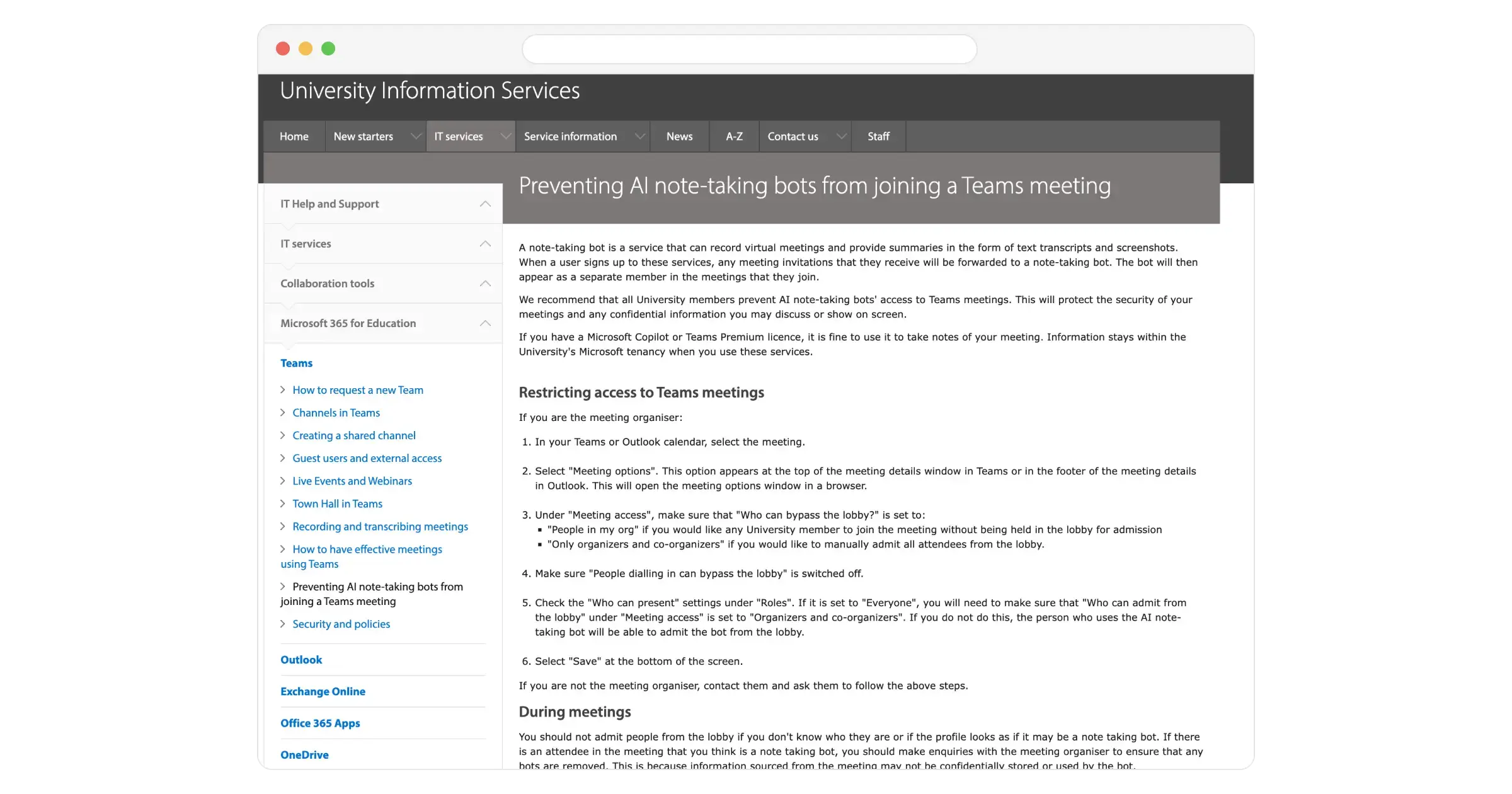
University of Cambridge
Source: University of Cambridge
Staff can find out how to keep AI note-taking bots out of a Teams meeting through a how-to titled Preventing AI note-taking bots from joining a Teams meeting, which works through the lobby setting under Meeting access. Thus, the organiser decides who gets in.
None of these universities quite mention a recording device on a student's own computer, because a recorder that never joins, bothers, or becomes intrusive to another lecture as a second participant that throws off the actual number of participants, or a bot the organiser has to admit or refuse, doesn't truly seem to bother them.
Consent is of utmost importance even though you are choosing a bot-free AI note taker; that's why Jamie has provided you with three ways to get consent from the lecturers.
- You can send a recording consent email 24 hours, 4 hours, or even 10 minutes before a lecture.
- Verbal consent: "Can I please transcribe this lecture for my studies? It helps me listen to the lecture better" (transcribe is the keyword because we don't store audio for utmost privacy reasons).
- Automated chat notifications: Jamie will send a message, for example, in a Zoom chat or in a Google chat, about the fact that Jamie is currently being used to take notes. It's as simple as that.
We make it easy to take notes for you without sending bots to your online lectures and making it awkward between lecturers or universities that go a step further and ban your entire note taker publicly.
Let's take a look at what Jamie offers in a little bit more detail, and what other AI lecture note takers' provide you too.
1. Jamie: Best AI Lecture Note Taker for Bot Free Capture
Best for: students recording lectures and seminars using the laptop and phone they already carry, with live transcription, speaker identification and Ask AI across every lecture, available in 100+ languages; all meeting data is stored and processed in Europe, GDPR compliant and ISO 27001 certified; meeting audio is permanently deleted once the transcription is finished.
Similar to: Otter, Granola, Notta and Fathom.
Jamie is a bot free AI lecture note taker. Jamie takes in person lecture notes and online class notes from any device you use, and generates a written version of the notes, the transcript and the action items.
We record the audio locally on whatever device you are already using, thus nothing joins your professor's call, nothing is displayed in the attendee list, and all meeting data is stored and processed in Europe.
Jamie generates Executive Level AI Notes from your lectures on macOS, Windows, iOS and Android
The Executive Level AI Notes generated by Jamie include an executive summary of the lecture, the order of the topics, quotes, and action items assigned to people with deadlines. These are created from the transcript itself, and you may select one of many different templates for your notes to display. If you find yourself needing to review your lecture six weeks later, these three revision answers are the ones you want:
- Executive Level AI Notes: You will receive an executive summary of what was covered in the lecture, a listing of the topics in order, quotes, action items assigned to individuals with deadlines, and each speaker identified by name. This will happen whether you subscribe to a paid plan or use the free plan.
- Templates: You may use one of the 30+ pre-built templates available on all plans. On the free plan, you may create 1 custom template. With Plus, you may create 3 custom templates. With Pro, you may create as many as you want.
- Live Transcript and Scratchpad: You are able to view what your lecturer is saying while typing your own notes next to their spoken words in the same window, on all plans, including the free plan.
Jamie records your lecture from your own device, with no bot in your professor's call

Jamie will record your lecturer's class using either your computer or phone, and will never participate in the call. We capture the audio locally on whichever device you are using, and the recording starts when you press start in Jamie, on every plan. If your seminar runs on your university's own Zoom or Teams account, these three capture answers are exactly what your IT team wants to know:
- On device recording: You will get the audio recorded on your own device, with nothing joining the call and no additional name displayed in your professor's attendee list.
- Every meeting platform: Whatever platform carries your lectures, Microsoft Teams, Zoom, Google Meet or any other, Jamie captures the audio from any platform running on the machine, because Jamie records on the device itself.
- Verbal consent, the Automated Recording Notice email and the meeting chat notice: You can obtain verbal consent in your own words, send the optional Automated Recording Notice email before the lecture, or switch on the meeting chat notice inside the meeting itself, on all plans.
Jamie transcribes your lecture and identifies each speaker by name
Jamie builds the transcript of your lecture from the audio on your own device during class, and Speaker Memory matches that same voice in your later lectures. If you are in an eight person seminar where everyone talks at the same time, these three transcript answers decide whether the notes are usable:
- Live Transcript: You can read the words being said as your professor says them, on any of the plans offered, including the free option.
- Speaker identification and memory: Each speaker is identified by their name and not a number. Jamie also has the ability to remember voices between lectures, which our own accuracy test scored 98 out of 100 for.
- 100+ languages: Whatever language is spoken, English, Spanish, Chinese or even a combination of languages, you can record a lecture delivered in German, or half in English and half in German, and the notes come back in the language people spoke.
Jamie answers questions across every lecture you have recorded with Ask AI
Jamie's ability to answer questions across every lecture you have recorded is unlimited, whatever plan you are on. Ask AI in Jamie reviews every lecture in your Jamie account when you enter a question. Ask AI and AI usage are unlimited on our free plan as well as the paid ones. If you are revising a whole module, these three answers cover what conversational intelligence finds for you:
- Ask AI: When you ask a question such as what did the lecturer say about elasticity in week three, you will get the answer along with the specific lecture it was found in.
- Cross-lecture search: Instead of having to open up each individual lecture and searching for what you are looking for, you can search across all of the lectures in your account.
- Unlimited on every plan: However many questions you ask, you will not hit a limit, because Ask AI and AI usage are unlimited on our paid plans and on our free plan.
Jamie exports your lecture notes to Google Docs, OneNote and Notion

Jamie sends your lecture notes to Google Docs, OneNote and Notion for completely free. Once you have connected each app through Plug and Play Integrations in Jamie, your notes are sent to those apps after every lecture, and you connect each tool once in Settings. If you share notes with a study group or a disability adviser, these three sharing answers are the ones they ask for:
- Plug and Play Integrations: Once you have connected Google Docs, OneNote, Notion, Slack and Asana through Plug and Play Integrations in Jamie, your lecture notes will arrive in those apps after every lecture.
- Link sharing: On every plan, including the free plan, you can generate a public link that anyone you send it to can open.
- Email sharing: With Jamie, you can also send a copy of the summary of a lecture by email after the lecture, on every plan including the free plan.
Jamie records in-person lectures and online classes on macOS, Windows, iOS and Android
Jamie records live lectures, seminars and online classes using the device you are already using to take notes.
Jamie uses the device you are currently using to capture the audio. Any application capable of playing sound on that device (Microsoft Teams, Zoom or Google Meet) is captured identically. Your recorded meetings will then synchronize across your macOS, Windows, iOS and Android devices from one account.
If you only bring your phone into the lecture hall, these three capture answers are the ones that decide whether you get the recording:
- In-person recording: You can still record a lecture sitting in a hall full of students using only your phone, with nothing on the table except the phone or laptop you already brought. In-person meetings work on every plan, including the free plan.
- Every meeting platform: Because Jamie captures the audio from the device and does not sit inside the meeting as a participant, you can record a seminar on Microsoft Teams, Zoom or Google Meet with nothing joining the call.
- macOS, Windows, iOS and Android: Since Jamie captures the recording from whatever device you are using at the time, the laptop in the morning and the phone in the afternoon, both recordings end up in the same Jamie account.
Jamie stores all meeting data in Europe and is GDPR compliant and ISO 27001 certified

All the meeting data is stored and processed in Europe by Jamie.
We are ISO 27001 certified as a company as opposed to a hosting provider's certification. Jamie is GDPR compliant and DORA-ready, and after each meeting, we delete the meeting audio once the transcription is complete.
If your university has provided guidelines concerning which AI transcription tools staff and students may use, these are the four answers they might be seeking:
- Meeting data in Europe: All recordings, transcripts and sets of notes are stored and processed solely within the EEA, Switzerland or the UK, and our security page states that no data will ever be transferred beyond those jurisdictions, regardless of the plan you are on, including free.
- GDPR and ISO 27001: Instead of having your department send email requests to vendors for evidence of compliance with regulatory bodies, you can reference one page for evidence of certification, since Jamie is GDPR compliant and independently audited and certified to ISO 27001, and Jamie is DORA-ready as well.
- Permanent audio deletion: The audio of your professor is deleted once the transcription is complete, which means it is not still sitting in an account when your degree is over, and only the notes and the transcript remain.
- No model training: Your lectures are never used for training models, neither by us nor by any of our model providers, which is the statement that a university data protection officer will look for.
Jamie carries three disclosure routes for telling the room that the lecture is being recorded
There are three disclosure routes for a recorded lecture in Jamie.
We leave this one with you, as our documentation says that notifying participants remains your responsibility, and the two options we include in Jamie are toggles that you switch on yourself.
To tell your lecturer once in week one and never think about it again, these three routes are the ones you have:
- Verbal consent: You obtain verbal consent for recording your lectures in your own words at the start of the course, which is indicated in our documentation, and one sentence covers it: "May I record this for my own study, because I use an app that transcribes it and I can follow the lecture better."
- The optional Automated Recording Notice email: You can elect to activate the optional Automated Recording Notice email feature, which sends a notification prior to the meeting, 4 hours by default but adjustable from 10 minutes to 48 hours, and no communication is transmitted until you enable this toggle.
- The meeting chat notice: You can have a notice posted in the meeting chat once you switch it on, on Microsoft Teams, Google Meet and Zoom from the desktop application.
Jamie's pricing
- Free: €0 per month
- Plus: €25 per month
- Pro: €47 per month
- Team: €39 per seat per month
- Enterprise: Custom pricing
Source: Jamie pricing,
What Jamie users love
Bot free capture, with no bot on the call
"I like Jamie because it's a bot-free AI note-taker that can take notes without an awkward bot on the call." Verified User in Design, G2
A lifesaver for multilingual meetings, even Hebrew
"Finally an app that... Understands Hebrew. Jaime is also a life saver for: Multi lingual conversations [and] Offline and online meetings." Rachel C., G2
Speaker differentiation through a single microphone
"I really appreciate Jamie for its simplicity and standalone functionality... how effectively Jamie differentiates between speakers, identifying different voices speaking through the same microphone." Tom W., G2
What Jamie users flag
The free plan stops a meeting at thirty minutes
"The 30min meeting limit, but I understand that's the business model ;)" Charlotte Z., G2
Audio quality in the room changes what the notes come back like
"Jamies features are outstanding, sometimes I had the feeling that my audio quality heavily impacts the outcomes, which I need to adapt from my side." Verified User in Computer Software, G2
One reviewer is waiting on a ClickUp integration
"I feel Jamie could improve by offering more integrations with other software. I'm mainly missing a ClickUp integration." Alberto A., G2
2. Aiko: Best On Device AI Lecture Transcription for Mac and iPhone
Best for: Aiko is the on device AI lecture transcription app for macOS, iOS and visionOS, with 100 languages and a one time purchase model rather than a subscription model.
Similar to: Otter, Notta and Granola.

Source: Aiko
Aiko is an on-device transcription tool that quickly converts your lectures into written text. Powered by OpenAI's Whisper model, it runs locally on your Apple devices for fast and reliable transcription.
Aiko's key features
- On device transcription: Aiko runs OpenAI's Whisper on your own device, which means nothing ever leaves your phone or Mac.
- 100 languages: Aiko transcribes your audio in 100 different languages, which is enough for a lecture in another language.
- Subtitle export: Aiko exports your transcription as subtitles next to the recording, ready to read them together.
- Word replacement: Aiko replaces a repeated term with the correct one, which fixes a misheard technical word.
- Apple only, bought once: Aiko covers iPhone, iPad, Mac and Apple Vision for a one time fee of 24 dollars.
Aiko's pricing
- One time purchase: 24 dollars
- Free trial: 14 days on TestFlight
Source: Aiko on the App Store.
What Aiko users love
Transcription quality with no setup
"The transcription quality is excellent, setup is effortless, and the app stays out of the way so I can focus on my work." NotTodayEris, App Store
It handled Sanskrit words inside English notes
"I have been using it to transcribe some notes that are in English with Sanskrit words. After many pages, I have so far only found one mistake, and, surprisingly, none were in the Sanskrit." Somagiri, App Store
What Aiko users flag
Four reviewers in four countries report a transcript that repeats one phrase
"It's a great and simple software, and when it works, it produces excellent results. But often wise it will just keep repeating the same phrase over and over for the whole transcription." Jaojao Johnson, Spanish App Store
Every sentence on its own line made a long transcript slow to fix
"It gave me a 95 pages transcript that took me nearly as long to fix as it would have taken me to transcribe it myself." Katlus, Canadian App Store
3. Otter: Best AI Lecture Note Taker for Live Captions
Best for: Otter is the AI lecture note taker for live captioning on Google Meet on every plan, and on Zoom from Business, with speaker identification by name on every plan, a botless desktop app, six supported languages, and 300 transcription minutes per month on the free Basic plan.
Similar to: Fathom, Notta and Granola.

Source: Otter
Otter's key features
- Live captions in class: Otter joins Zoom, Microsoft Teams and Google Meet, and creates live captions on Google Meet.
- Speaker identification that carries forward: Otter identifies a speaker by name if they speak again in a future conversation.
- Botless desktop app: Otter records from your computer without Notetaker joining the call as a separate participant.
- Six languages: Otter currently supports English, Spanish, French, German, Japanese and Chinese (Simplified).
- 20 percent student discount: Otter cuts Otter Pro by 20 percent on a .edu email address.
Otter's pricing
- Basic: 0 dollars per month
- Pro: 16.99 dollars per user per month
- Business: 30 dollars per user per month
- Enterprise: Custom pricing
Source: Otter pricing
What Otter users love
One reviewer saves three hours a week pulling quotes
"I can extract verbatim quotes for LinkedIn carousels and TikTok scripts without having to re-watch. This saves me an average of three hours per week with a searchable transcript." Anders C., G2
The free version met one reviewer's expectations
"The capture of conversations and video calls is very comprehensive, and it makes few capture errors. I use the free version and it still meets expectations." Verified User in Hospital & Health Care, G2
What Otter users flag
Speakers got mixed up at conference talks
"I’ve noticed that when I use Otter.ai during conference talks, it doesn’t always distinguish clearly between different speakers. It also frequently assigns the wrong name to a voice, so I end up spending more time than I’d like going back and editing the transcript." Jay G., G2
One reviewer found it works almost only in English
"I find Otter.ai has limitations with language support, as it operates almost exclusively in English, which makes it struggle with non-English conversations, code-switching, or multilingual team meetings." Khalid s., G2
Also read: 10 Best Otter AI Alternatives & Competitors
4. PLAUD AI: Best AI Lecture Recorder for a Pocket Device
Best for: PLAUD AI is the AI lecture recorder built upon a handheld device, with 112+ languages, four recorders priced from 159 dollars, and 300 transcription minutes per month on the free Starter plan.
Similar to: Otter, Notta and Aiko.

Source: PLAUD AI
PLAUD AI is a voice recording and transcription system designed to simplify note-taking and information management. , . Both the devices capture audio and convert it into organized and searchable notes.
PLAUD AI's key features
- 112 languages with speaker labels: Plaud transcribes 112 languages and labels who spoke, with custom vocabulary for your subject matter.
- 10,000+ summary templates: Plaud has over 10,000 pre-written professional summary templates on every plan.
- No meeting bot: Plaud Desktop, labelled Beta, records an online lecture without joining the call, and needs a Plaud recorder.
- Meeting auto detect: Plaud Desktop can auto detect when a meeting starts, once you switch it on.
- Mind map: Plaud organises a recording into a mind map for revision.
PLAUD AI's pricing
- Starter: 0 dollars per month
- Pro: 17.99 dollars per month
- Unlimited: 29.99 dollars per month
- The recorder, one time purchase: from 159 dollars
Source: PLAUD AI plan pricing
What PLAUD AI users love
Clear recordings, and you can stay in the conversation
"It's easy to use, the recordings are clear, and the AI transcription and summaries are surprisingly accurate. What I like most is being able to stay focused on the conversation instead of constantly taking notes." Michael Collins, Trustpilot
It handled a multilingual environment
"I use PLAUD AI mainly for capturing ideas on the fly, and I love how effortlessly it deciphers various languages as I move in a plurilingual environment." alan m., G2
What PLAUD AI users flag
One reviewer got a transcript with no speaker breaks
"Good audio quality. Poor speaker identification in transcripts. In some transcripts it is just one big run-on paragraph with no separation by speaker." Kevin Driscoll, Trustpilot
A Portuguese speaker found information missing from transcripts
"The transcripts recurrently miss information or are not able to understand what was said. I'm speaking mainly in Portuguese of Portugal" Pedro Pestana, Trustpilot
5. Jamworks: Best AI Lecture Note Taker Built for Students
Best for: Jamworks is the AI lecture note taker for students; the company provides one pricing plan called Student Pricing at 14.99 pounds a month for students and a 14 day free trial.
Similar to: Knowt AI, Gemini Notebook and Otter.

Source: Jamworks
Jamworks is an AI lecture note taker built for students. Jamworks records the class and returns the entire recording transcribed alongside your own highlights, plus AI flashcards through JamQuiz and answers from JamAI Personal Tutor. Jamworks runs as a layer on top of any video conferencing platform, and it also works on a Chromebook through their Web Widget.
Jamworks' key features
- Audio Transcription: Jamworks transcribes the entire recording and your highlights, and you toggle between Transcript and Highlights.
- Live Captions: Jamworks shows live subtitles during the lecture, on a DSA or institutional licence.
- AI Highlights: Jamworks tags the important content; therefore, you do not need to read the entire transcript.
- JamQuiz: Jamworks generates AI flashcards from your own lecture for revision.
- JamAI Personal Tutor: JamAI answers your questions using your lecture transcripts as its source of truth, and cites its sources.
Jamworks' pricing
- Student Pricing: 14.99 pounds per month
Source: Jamworks pricing, read with monthly billing selected.
Funded route: Jamworks is a DSA-approved product, which means a UK student funded by the Disabled Students' Allowance pays nothing. If you do not meet the requirements, you will have to pay the 14.99 pounds a month yourself. They also ask for your card before the 14 day free trial starts.
What Jamworks users love
It keeps up with a lecturer who talks fast
"I love that it takes notes for me because some of my lecturers talk quite fast so it's hard to keep up with them and get all the notes down." Tr1T0n, App Store
A student with ADHD said it covered lapses in concentration
"As a uni student with ADHD this app is amazing. Any lapses in concentration are covered by the app. It's reliable, accurate. And provides ample support for disabled students." morganw1738, App Store
What Jamworks users flag
One reviewer lost recordings that looked like they were recording
"This app didnt record 3 of my last 4 recordings- but it looked like it was recording them at the time." Caroline Ashurst, App Store
The phone app does less than the web version
"The app is missing tons of features compared to the web version. You can't view the summary or key points, nor can you import slides." tnowoefko, App Store
6. Knowt AI: Best AI Lecture Note Taker for Exam Prep
Best for: Knowt AI is the AI lecture note taker for exam prep; it offers an AI lecture recording summarizer, a PowerPoint summarizer and unlimited file creation and storage on the free Basic plan that allows for one AI summary per month.
Similar to: Jamworks, Gemini Notebook and Notta.

Source: Knowt AI
Knowt AI lets you record or upload your lectures, and within seconds, Kai (your AI assistant) turns them into automated notes and flashcards. Stuck with something?
Knowt AI's key features
- Live Lecture Note Taker: Knowt starts a recording of your class and returns study materials including notes and flashcards.
- AI Video Summarizer: Knowt automatically converts an uploaded lecture video into study materials, notes and flashcards.
- AI PDF Summarizer: Knowt automatically converts a lecture PDF into study materials, notes and flashcards, in one upload.
- Kai explains and quizzes: Knowt lets you ask Kai to explain a concept, then test you on it.
- Practice tests and podcasts: Knowt turns an uploaded file into practice tests and podcasts as well as notes.
Knowt AI's pricing
- Basic: 0 dollars per month
- Ultra: 24.99 dollars per month
Source: Knowt plans, read with monthly billing selected.
Free for material a teacher shares: Knowt says AI features on teacher-shared materials are free for students, which means the 1 AI summary a month cap does not cover work set in class. If your lecturer shares nothing through Knowt, that single summary is your whole month; you then pick which lecture deserves it, and you write the rest up by hand.
What Knowt users love
The free plan carries features Quizlet charges for
"Not only does Knowt have many free features that are unavailable with the free version of Quizlet, but I also find it to be as user-friendly as Quizlet." Jack tate, Trustpilot
A paying subscriber records her lectures and studies from the notes
"I use it to record my lectures and it makes them into notes for me that I use to study!" Star Haley, Trustpilot
What Knowt users flag
One reviewer found the AI marked a right answer wrong
"sometimes it marks the answer "Kinetic" wrong because it isn`t "Kinetic Energy" or something stupid" Prithvi Gopi, Trustpilot
Free practice questions moved behind the paywall after ten days
"Now, everything except for the flash cards are locked behind a paywall without warning." No_Sound9091, r/APStudents
7. Gemini Notebook: Best for Turning Lecture Recordings Into Study Guides
Best for: Gemini Notebook, formerly NotebookLM, transforms lecture recordings and slides into study guides, with Audio Overview Deep Dive discussions and citations to the specific quotes referenced from your sources.
Similar to: Knowt AI and Jamworks.

Source: Gemini Notebook
Gemini Notebook, formerly NotebookLM, is your personal research assistant. Upload anything from PDFs and Google Docs to YouTube videos and audio files, and Gemini Notebook will summarize them, surface smart connections between ideas, and answer your questions related to those materials.
Gemini Notebook's key features
- Audio Overview: Gemini Notebook transforms the sources you uploaded into a Deep Dive discussion that you can listen to.
- Video Overviews: Gemini Notebook produces a video walkthrough of the sources you uploaded.
- Mind Maps: Gemini Notebook formats your sources as a mind map for revision.
- Citations for every answer: Gemini Notebook references each answer back to the source it came from.
- 50 sources free: On the free tier, Gemini Notebook supports up to 50 sources per notebook.
Gemini Notebook's pricing
- Free: 0 dollars per month with a Google account
What Gemini Notebook users love
A student used it on lecture materials and research papers
"It can summarize PDFs, Notes, youtube videos, research papers, and lecture materials and convert them into consise short notes." Saumy V., G2
It shows which page an answer came from
"It doesn't make stuff up: Most AI "hallucinates" (lies), but this one is forced to stick to the facts in your specific files. It even shows you exactly which page it got its answer from." Andrea W., G2
What Gemini Notebook users flag
One reviewer hit the source limit on a big research project
"Each notebook supports a finite number of sources, and for large-scale research projects involving dozens of documents, this ceiling forces me to either split my research across multiple notebooks" Luca P., G2
Answers can run short on technical material
"Sometimes the answers feel a bit too brief or surface-level, especially when the material is technical." Raunak J., G2
8. Granola: Best Bot Free AI Lecture Note Taker for Mac
Best for: Granola is the bot free AI lecture note taker available for Mac, Windows, iOS and Android; it offers AI chat capabilities across your meetings, with note templates and multi-language support, on the free Basic plan.
Similar to: Jamie, Fathom and Otter.

Source: Granola
Granola is a note-taking application designed to enhance the notes you type while attending a lecture. Granola passes the audio it records to its transcription service, rather than transcribing it locally on your computer.
Granola's key features
- The AI notepad: Granola enhances the notes you type yourself during multiple classes in a row.
- No bot in the call: Granola does not add a bot to your video call.
- Any meeting platform: Granola for Desktop works with Zoom, Google Meet, Microsoft Teams and the others.
- Granola for Mobile: Granola supports in-person classes on both iOS and Android, in addition to phone calls on iOS.
- AI chat across your notes: Granola finds answers within the meetings you have already recorded.
Granola's pricing
- Basic: 0 dollars per user per month
- Business: 14 dollars per user per month
- Enterprise: 35 dollars per user per month
Source: Granola pricing
What Granola users love
Nothing joins the meeting, which means the flow is not broken
"It’s so much better than the AI notetakers that just join a meeting, because it doesn’t disrupt the flow at all. I can keep taking my own notes, and I never have to worry about missing anything important." Verified User in Computer Software, G2
A simple interface that connects to the calendar
"I like Granola’s UI, it’s simple and clear. It also integrates smoothly with my calendar, which makes it easy to stay organized." Kiran D., G2
What Granola users flag
One reviewer could not open notes after thirty days on the free version
"The free version of Granola is extremely limited and you can’t access meeting notes after 30 days." Verified User in Higher Education, G2
Names in the transcript needed correcting
"The accuracy of transcripts, specifically names, is something that needs work." Verified User, G2
9. Fathom: Best Free AI Lecture Note Taker for Online Classes
Best for: Fathom is the free AI lecture note taker for online classes; it provides unlimited recordings and transcriptions on the free plan; users may choose whether they want bot free capture or bot capture; however, the bot free option is currently in beta on Mac and limited to English only.
Similar to: Otter, Granola and Jamie.

Source: Fathom
Fathom is an AI note taker that records an online class, turning it into a transcript and a summary. On their pricing page, you select how Fathom captures calls. One option inserts a bot into the meeting. The other captures calls without inserting a bot, and Fathom labels that option as currently in beta.
Fathom's key features
- Unlimited recordings and transcriptions: Fathom lists an unlimited number of recordings and transcriptions on their free plan.
- Choice of bot free or bot capture: Fathom offers both on every plan, with bot free on Mac in beta.
- Instant AI call summaries: Fathom generates a summary of each recording and lists it on the free plan.
- Clips, playlists and search: Fathom clips sections of your recordings and performs keyword searches, on the free plan.
- Advanced summaries: Fathom offers unlimited advanced summaries a month on Premium, and 5 a month on the free plan.
Fathom's pricing
- Free: 0 dollars per month
- Team: 19 dollars per user per month
- Premium: 20 dollars per user per month
- Business: 34 dollars per user per month
Source: Fathom pricing
What Fathom users love
A clean interface, with calls organised by month
"What I like most about Fathom is how straightforward and clean the UI/UX is. Everything is easy to find without feeling overwhelming." Emmanuel b., G2
The free tier is enough to trial the whole product
"That it works reliably and accurately. It's pretty quick to get started and learn how to use, and the free tier allows you to properly trial the product in full, including their AI summary." Michael A., G2
What Fathom users flag
Taking the notetaker back out of a meeting is an extra step
"Sometimes when you don't want the notetaker in, it can be confusing to take it out. It automatically comes in, and if you don't want notes taken, then you have to take an extra step to take it out of the meeting." Makenna C., G2
Accuracy drops when people talk over each other
"Sometimes the transcript isn't completely accurate, especially when people talk over each other or the audio isn't clear." Mia C., G2
10. Notta: Best AI Lecture Note Taker for Long Recordings
Best for: Notta is the AI lecture note taker that can record both in-person lectures and online classes; it features a bot free desktop application for both Mac and Windows computers; it uses speaker identification; supports 58 different languages; and has a limit of 120 transcription minutes per month on the free plan, capped at 3 minutes per conversation.
Similar to: Otter, Fathom and Granola.

Source: Notta
Notta is a transcription application that records a lecture and turns it into a transcript, a summary of the content and a list of action items. Notta's web app uses a bot to participate visibly in your online classes, whereas Notta Desktop records lectures on your own computer, and Notta labels it as a beta on both Mac and Windows.
Notta's key features
- Bot free Notta Desktop: Notta Desktop records your computer audio with nothing joining the meeting, and it is in beta.
- 40+ meeting apps: Notta Desktop records system audio from Zoom, Google Meet, Microsoft Teams and more.
- In person recording: Notta records a face to face class from a calendar event, on Notta Web, on all plans.
- 58 languages: Notta transcribes lectures in any one of 58 languages.
- Notta Memo: Notta sells a pocket recorder that weighs 28 grams and records for up to 30 hours.
Notta's pricing
- Free: 0 dollars per month
- Pro: 13.49 dollars per month
- Business: 27.99 dollars per month
- Enterprise: Custom pricing
Source: Notta pricing, read with monthly billing selected.
What Notta users love
Accuracy held up across different accents
"Accurate Transcriptions: The app converts speech to text with high accuracy, even with different accents." Sushmita S., G2
Two languages can be picked for one meeting
"Can select 2 languages, so single meeting can be done in 2 languages." Verified User in Logistics and Supply Chain, G2
What Notta users flag
One reviewer found speaker changes went to the wrong person
"It is also awful at detecting speaker changes and frequently assigns dialogue to the wrong person or fails to recognize a new speaker altogether." Verified User in Non-Profit Organization Management, G2
Recording on the phone asks for approval first, unlike the desktop app
"for phone, it always have to get approval to record the meeting (not like desktop can record without approval)" Verified User in Financial Services, G2
11. Genio Notes: Best AI Lecture Note Taker for the UK DSA
Best for: Genio Notes, formerly Glean, is the AI lecture note taker funded for disabled students in the UK through the Disabled Students' Allowance; it provides a 30 day free trial and charges from 12 pounds per month, and you can cancel anytime.
Similar to: Jamworks, Otter and Knowt AI.
Source: Genio
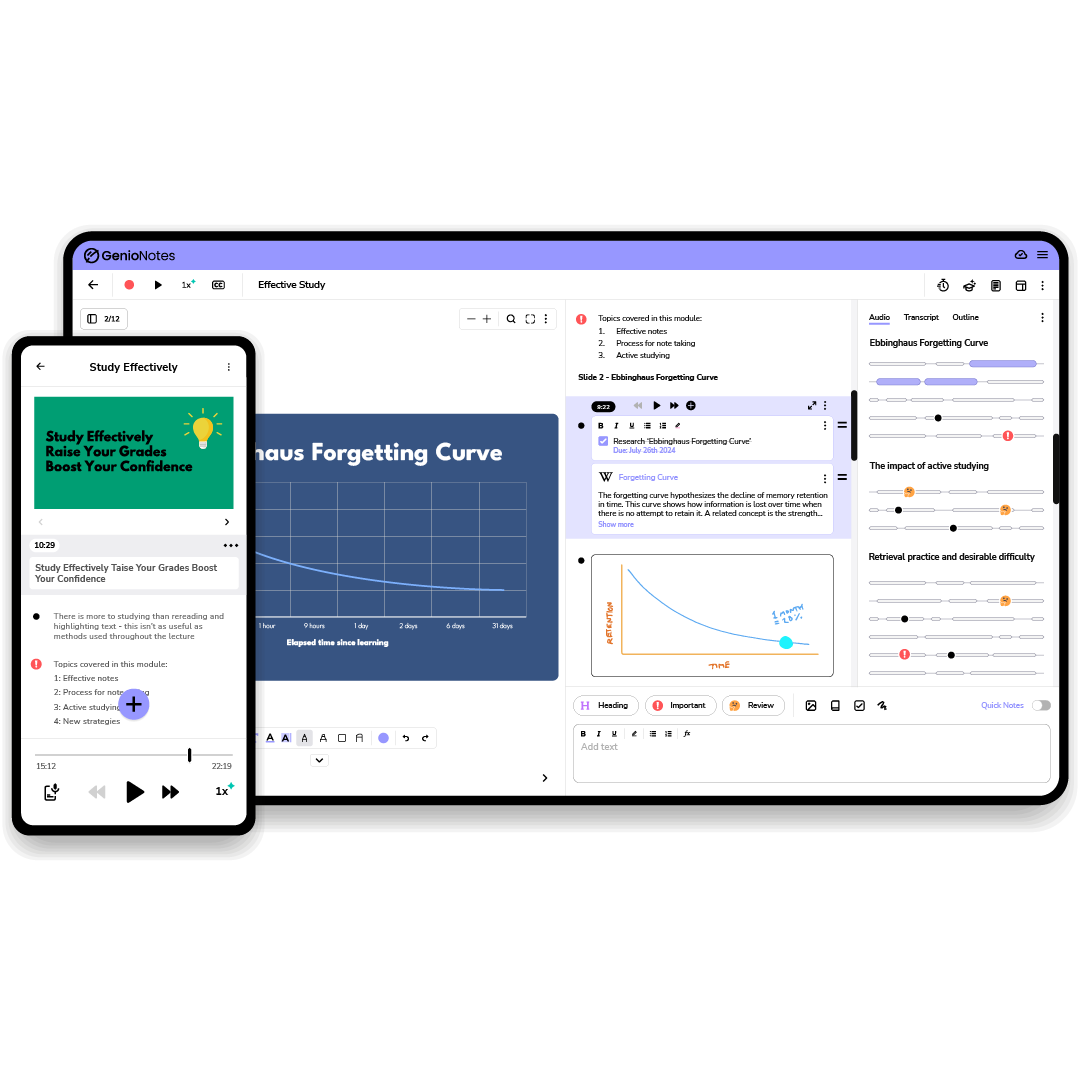
Genio Notes is a note-taking application for students that records a class and enables you to highlight parts of the recording during live lectures. Genio Notes was previously known as Glean, and before that Sonocent. In the UK, students qualifying for the Disabled Students' Allowance can obtain Genio Notes free of charge. So can students whose universities hold licences for Genio.
Genio Notes' key features
- Recording with live marking: Genio records every word said during class while you mark the important moments.
- Free through the UK DSA: Genio Notes is provided at no charge for eligible UK students or institutional licensees.
- 30 day trial with no card: Genio gives unlimited access for 30 days with no payment details required.
- iOS and Android apps: Genio lets you listen back to the lecture on the walk to your next class.
- Live Captions on an institutional licence: Live Captions are not included on an individual Genio subscription plan.
Genio Notes' pricing
- Annual licence: 144 pounds, or from 152 dollars
- Free trial: 30 days, with no payment details
- Through the UK DSA or an institutional licence: no cost
Source: Genio pricing for individuals. Genio prices individuals from 12 pounds a month, with annual licences at 144, 258, 360 and 450 pounds.
What Genio Notes users love
It caught a lecturer whose pace was hard to follow
"Helped take notes when it was difficult to understand instructor with tempo of their speech. Great was to validate I did not miss any concepts." tv, September 2023, Trustpilot
A university disability office calls it a cornerstone of what they offer
"I'm in charge of finding accessible technologies for students with disabilities, and Glean has become a cornerstone of our offerings. It does an excellent job of simplifying notetaking. Students can rest assured that they can easily refer back to anything spoken in class." Vanderbilt Student Access, April 2022, Trustpilot
What Genio Notes users flag
Right now, the trend among those reviewing Genio Notes is the 2026 mobile rebuild. Reviewers on both the App Store and Google Play state Genio's newer version freezes or loses recorded parts of a class mid-recording. Here are two reviews from July and September 2026 respectively.
One student lost recordings part way through a lecture after the update
"I use this app to help with my notes for uni but since the latest update it keeps crashing and just finishing the recording part way through a lecture! It's literally not usable now!" KT_Kiki, July 2026, App Store
Another found it froze while recording, on an app they rely on as an accommodation
"Completely freezes during recording and becomes unresponsive. Can't leave notes during recording, rendering the app useless." TheSlicingSword, September 2026, Google Play
Final Verdict on What's the Best 11 AI Lecture Note Takers?
In order to find the most appropriate AI lecture note taker, it will depend on your specific needs. If you require a recording that begins directly on the laptop you are currently carrying, and meeting data that stays in Europe, then Jamie could be the top choice among the AI lecture note takers. To provide some background information as to why this is so, let's quickly summarise.
- Privacy and Preserving Natural Conversation: Jamie records using the laptop or phone you already use, and therefore does not join your professor's call as a participant. The disclosure comes from you, via either verbal consent in your own words during the session, the optional Automated Recording Notice email sent before the session begins, or the meeting chat notice once you switch it on.
- Advanced Technology Used For Speaker Diarization: In our own accuracy test, Jamie scored 98 out of 100 for speaker identification against four other AI note takers, and Speaker Memory matches that same voice within your subsequent lectures.
- Rooted Privacy Laws and Highest Security: All meeting data from Jamie is processed and stored within the EEA, Switzerland or the UK. Jamie is both GDPR compliant and ISO 27001 certified. This is exactly what a university requires in terms of compliance before it agrees to sign a tool off, and we wrote separately about AI note takers in Europe.
- Values One's Privacy and Keeps AI Training Out of It: Once Jamie has completed generating the transcription from the recorded meeting audio, the meeting audio is automatically deleted. Your lectures are not ever used for training of models, not by us and not by any of our model providers.
- Built to Be More Than A Lecture Recorder: Jamie generates Executive Level AI Notes that include action items, and Conversational Intelligence answers your questions across each of your recorded lectures through Ask AI. Unlimited access exists under all plans, including our free plan.
And when the job is different, choose another tool.
- Choose Aiko when you desire that the transcription occurs on your personal device without leaving it, and you prefer paying 24 dollars once instead of subscribing.
- Choose Otter when your lectures take place using Zoom, Microsoft Teams or Google Meet in one of Otter's six languages, and real-time captions are important to you more than where the data resides.
- Choose PLAUD AI when you wish for a recorder attached to your collar, and you are prepared to purchase the hardware from 159 dollars in order to receive Frankfurt storage and 112 languages.
- Choose Jamworks when you are a STEM student and you want automatic chaptering, flashcards and a study tutor, and your university already supports a Panopto integration.
- Choose Knowt AI when you are taking a memorisation based exam and you want flashcards, an AI voice tutor, and prep materials for the AP, SAT and ACT exams based on the same recording.
- Choose Gemini Notebook when you already have the recording available and you want study guides, an Audio Overview discussion, and citations back to the exact page in your sources.
- Choose Granola when you would like to enter your own notes while a bot free recorder completes filling in the rest of them, on a Mac, a Windows laptop, a phone or an Apple Watch.
- Choose Fathom when a free plan must support you throughout the entire term because Fathom places no limits on recordings or transcriptions whatsoever.
- Choose Notta when you need to transcribe up to five hours of continuous recording time using Pro, and you want a bot free desktop application across more than forty different meeting applications or the 28 gram Notta Memo.
- Choose Genio Notes when your university is already paying for it or you meet the requirements to apply for funding through the UK Disabled Students' Allowance.
For everything else, Jamie records your lectures from the laptop or phone you are already carrying and never puts a guest in your professor's call; all meeting data is stored in Europe and is both GDPR compliant and ISO 27001 certified; Jamie deletes the meeting audio once the transcription is finished; and ten meetings per month are provided for free before upgrading to Plus at 25 euro a month.
Even when discussions become dynamic or jump between topics, Jamie manages to structure and organize everything clearly.

Kliniken Schmieder
Healthcare · 1.001-10.000 employees
Frequently Asked Questions About AI Lecture Note Takers
Is it legal to record a lecture?
It depends where you are, and there are three separate things to check. In the United States, federal law grants permission to make a recording where you were participating in the conversation being recorded. 18 U.S.C. 2511 says so, and you are a party when you sit in the lecture. However, some states impose an obligation on each party to give their consent, and both California and Washington are examples of those states. The Reporter's Recording Guide sets out the rule state by state. On top of that sit your university policy and your lecturer's own view, and under UK GDPR your university may also have a position on where the recording is stored.
Do universities allow AI note takers?
Yes, often, but increasingly subject to conditions. Generally, students may record lectures for their own study. What changed in 2026 is the bot. Morgan State University, Tufts and Cornell have all blocked third party AI note taking bots from their own Zoom or Microsoft Teams meetings. A fourth university publishes a how to for staff on keeping them out of Teams. A tool that records on your own device is not a bot the institution has to admit, which means those decisions do not cover it.
How do AI lecture note takers work?
AI lecture note takers work by capturing the audio of the class, converting it into a transcript with speech recognition, and then generating a summary and a set of action items from that transcript. There are two capture routes. In one, a bot based tool such as Otter joins your online class as a visible participant in the attendee list. In the other, a device based tool such as Jamie records the audio on your own laptop or phone, which means nothing joins the call, and an in-person lecture works exactly the same way. Most AI lecture note takers follow a multi step workflow. The audio is captured, then converted into a transcript with speech recognition, then a summary is created from that transcript. After the summary you can query your notes in natural language to retrieve one definition or one date. Supervised review of AI generated summaries, meaning you read them against the recording rather than trusting them unread, is what turns them into revision material. Many of these tools also support a variety of learning styles through flexible content formats such as flashcards and quizzes. That lets you focus on understanding the lecture without writing every detail down.
What is the most accurate AI lecture note taker?
We ran our own accuracy test on Jamie against four other apps on one recording, and Jamie scored 98 out of 100 for speaker identification and 90 out of 100 for transcription. Within this category, clear single speaker audio results in scores around the mid nineties, while a room with several people speaking at once usually scores 85 to 90. The two things that move accuracy most are the microphone you record with and the accent of the speaker.
Which AI lecture note taker has the best free plan?
If you are a first year student with no budget, use Fathom when the free plan has to carry an entire term. Fathom offers limitless recordings and transcriptions without restrictions, and stores them indefinitely. Granola does not restrict daily transcriptions on its free version; however, it only displays notes for the past 30 days. Jamie records ten meetings a month at up to 30 minutes each on the free plan, with unlimited Ask AI, and all meeting data is stored in Europe. However, Granola's free plan only displays the last 30 days worth of notes. Thus, you must download any notes you wish to save; otherwise, the lecture is not there in revision week.
Where is my lecture recording stored?
Where your lecture recording is stored depends completely on which application you choose, and it is typically the first question a UK or EU university asks. Jamie stores and processes all meeting data inside the EEA, Switzerland or the UK. PLAUD AI routes EU accounts to Frankfurt. Otter stores in AWS US West, Granola and Fathom in the United States, Knowt in the United States, and Notta in Tokyo. Jamworks names US, UK and EEA regions on its privacy policy.
Can an AI note taker record an in-person lecture?
Yes, many do; however, it is the major difference on this page. Jamie, Otter, Granola, Notta, Knowt AI, Jamworks and Genio Notes all record a conversation in a room. PLAUD AI does it through a recorder you buy first, from 159 dollars. Gemini Notebook records nothing and works based upon files you upload, and Fathom says in-person capture is coming to an iOS app that is not released yet.
How do I ask my lecturer if I can record?
For consent, ask early in the term. Verbal consent is enough and one sentence works: may I record this for my own studying, because I use an app that records the audio for me and it helps me take better notes. Jamie carries two further routes for people who want them. There is an optional email called the Automated Recording Notice. It goes out 4 hours before the meeting by default, and it is settable from 10 minutes to 48 hours. There is also a meeting chat notice posted within the meeting itself. That notice posts once you switch it on.
What other AI note takers do students mention?
Some students also name tools for studying recorded content versus attending class. Mindgrasp creates notes, flashcards and quizzes from lectures, PDFs, slide shows, YouTube videos and audio files. Studley converts recordings, YouTube videos and articles into flashcards, quizzes and written tests. tl;dv integrates with Google Meet, Zoom and Microsoft Teams and produces a summary following each meeting. The eleven above are the ones we compared on capture, storage and price, because those three answer the questions a university asks.
Read More
Are you attending lectures solely over Zoom? Read best AI note takers for Zoom.
Do your seminars take place using Google Meet? See AI note takers for Google Meet.
Is your university blocking bot activity on Microsoft Teams? Read bot free AI note takers.
Studying within the EU or the UK? Start with AI note takers in Europe.
Have you considered using Otter? See the alternatives in Otter AI alternatives.
Would you like the wider student toolkit? Read best AI tools for students.

