How to Turn Sourcing Calls into a Structured Deal Pipeline with AI
Sanduni
Growth Content Editor

Sourcing calls in private equity move fast under the weight of dry powder, with almost no structure around them. A typical PE firm goes through 80 opportunities to land one investment, with no system to capture what worked.
The things that slip out of your hands are the most preventable:
- pricing signals,
- competitor mentions,
- commercial follow-up milestones,
- underlying sector themes.
If you have run more than a dozen sourcing calls this quarter, you have felt every single one of these slip away. That gap costs deal velocity, IC prep time, and your confidence when walking into the partners' room.
At Jamie, we've watched deal teams walk out of strong calls only to lose half the intelligence within hours.
AI-powered deal sourcing closes that gap because effectively converting sourcing calls into a structured deal pipeline relies on conversation intelligence, a dedicated AI note taker, and CRM automation to eliminate tedious manual research.
Adopting AI here provides the asymmetric operational leverage that moves you away from traditional sourcing, letting artificial intelligence handle the busywork so the analyst handles the thesis.
In this brief, we'll cover the eight steps that close one crucial bottleneck: raw call intelligence with no system to hold it.
By the end, you'll have a complete AI deal sourcing stack running from longlist to screening one-pager, plus the key benefits over traditional methods every PE firm still defaults to.
Still typing up your sourcing calls after they end?
Jamie records the call bot-free and syncs structured notes straight into your CRM, DealCloud, Salesforce, or HubSpot, so the deal record updates itself.
The 8-Step AI Sourcing Pipeline at a Glance
The Sourcing Tech Stack
To execute this workflow, you need the following pipeline tools:
- Data & Screening: Gain.pro / Sourcescrub / Dealroom / PitchBook
- Enrichment & CRM: Clay + Sales Navigator, Affinity / DealCloud
- Call Capture & Structuring: Jamie
- LLM / Synthesis: Claude, ChatGPT, or Perplexity
How to do sourcing from scratch?
These eight steps cover sourcing for analysts, associates, VPs, and principals on a private equity desk.
The same playbook adapts cleanly for corporate development groups running M&A, and for sales teams, sales managers, sales reps, and sales professionals in adjacent BD functions who want to integrate AI tools (call capture, agentic search, MCP-piped LLMs, predictive AI agents) into a sourcing-style pipeline or AI sales pipeline workflow. Whether you're testing AI solutions or full AI systems for AI in deal sourcing, the operational backbone is the same.
Of the eight, Step 4 carries the asymmetric value most PE teams underprice: running the call itself, and capturing what the founder actually said.
We will walk you through the live setup at Step 4, where Jamie holds the intelligence that closes deals instead of dying on the call. Here is how it begins, with Step 1.
Step 1: Build your target longlist
TL;DR: Tool Breakdown
- Gain.pro: Drop thesis in plain English to screen asset context fast.
- Sourcescrub: Build custom screens to keep busted deals out of reviews.
- Clay: Run spreadsheet through enrichment to dedupe legal names.
- Affinity: Scan firm email history to map the warmest path to a founder.
▸ 1.1 Start with the sector thesis and filter criteria
Your partner sends a thematic mandate like "healthcare SaaS, mid-market, longlist by Friday." Traditional methods stall here.
AI in deal sourcing automates discovery by using web scraping and predictive analytics to scan the market continuously for targets. The software processes massive volumes of unstructured data and evaluates millions of companies quickly, accelerating how you identify potential acquisition targets before the Monday review hits.
The brief stays at the thesis level. Anything outside the mandate is a waste of cycles, so the fine-tuning is your first step.
You have to tighten the micro-verticals, otherwise you're screening garbage and you'll never identify targets that match the partner's average deal size band.
If you leave "Healthcare SaaS" as it is, you'll catch every localized RCM vendor and glorified IT consulting shop in the country. Translate the brief into something the database can actually screen on.
Typical LMM HCIT screen:
- Sector, Healthcare IT, drill into the sub-vertical (not "healthcare")
- Ownership, Founder-owned/bootstrapped for fresh platforms, or sponsor-backed (exclude VC/seed) for secondary buyouts
- Revenue, $10M to $50M (read the partner's prior deals to see the exact band she plays in)
- Geography, US-based, optionally Canada
- Growth, 20-30%+ organic topline
Every major platform now has AI search. PitchBook Navigator, CapIQ ChatIQ, Sourcescrub, Gain.pro.
Natural language processing parses your thesis in plain English, and the machine learning algorithms underneath reconcile firmographics against current market trends and live market data. The differentiator is what comes back.
Deploying predictive models behind the platform handles your predictive lead scoring under the hood, using machine learning to rank leads based on likelihood to convert and potential value across hundreds of signals simultaneously to improve accuracy over traditional methods. This data-driven analysis reduces human error by evaluating factors such as financial stability, market positioning, and growth potential, cutting hours of manual input the longlist used to demand.
One of the main challenges in implementing AI is the need for high-quality data, as poor data can lead to inaccurate predictions and flawed decisions. You protect the pipeline early, stopping the messy handling data entry that usually buries a longlist before the partner ever sees it.

Source: Gain.pro
Drop your thesis into Gain's AI search, "bootstrapped healthcare SaaS platforms operating in the US." It parses the intent, carves the sub-vertical, and returns a target list with a custom Motivation column explaining exactly why each asset made the cut.
That column is the reason analysts pull HCIT longlists from Gain. You skim the why instead of re-screening each name yourself.
Sponsor mapping helps avoid overlap. Every company comes pre-attached with the current investor context, so if a target's already inside a competitor's portfolio, you strip it from your Friday longlist and keep junk out of the Monday pipeline review.
Set up the watchlist now. The partner will tweak this mandate next quarter, and you don't want to rebuild from scratch.
Choosing whether to rely on those native platform filters or pivot immediately to a custom screen depends entirely on how complex your partner's mandate gets.
▸ 1.2 Platform filters or a custom screen
Native filters are fine when the brief fits perfectly into the platform's standard buckets. When the sub-vertical is cleanly tagged and the revenue bands are obvious, you can lock down a qualified longlist before lunch without fighting the database interface.
But once the mandate gets complicated, native filters just break. Say they want LMM Healthcare IT, but it has to be strictly bootstrapped, engineering headcount is up 20% in the last six months, and you need to exclude anything already sponsor-backed. You hit a wall and end up with a list full of false positives.
That's when you build a custom screen.
Sourcescrub is great for this. You can layer the sub-vertical, headcount signals, and exclusions without having to write a Boolean string the length of your arm. Because they scrape conference exhibitor lists and trade-show floor maps, you actually catch those bootstrapped, sub-$10M ARR targets that CapIQ lazily drops into generic "Business Services."

Source: Sourcescrub
The other reason you have to go custom is the CRM scrub. Every firm has a DNC list. Competitor portcos, busted deals, and recent passes sitting in DealCloud or Affinity. Native filters won't catch those. You have to run your screen against your CRM's suppression list so you don't pitch the partner a deal they killed six months ago.
Once you get it right, save the search. The partner is going to tweak this mandate next week, and you don't want to rebuild it from scratch.
Don't overcomplicate the tools either. PitchBook is fine for sponsor-backed M&A. If you're chasing Seed or Series A, look at Dealroom. If you're in the LMM bootstrapped lane looking at software and services, use Grata. Pick the platform that actually fits the mandate.
Once the target universe is locked, pivot immediately to pulling and cleaning the raw data layer.
▸ 1.3 Pull and clean the list
Before you hit sync-to-CRM, pull your raw screen into a spreadsheet first, because dumping an uncleaned list straight into DealCloud or Affinity creates a mess of duplicate accounts and the CRM admin will breathe down your neck for a week.
Poor data quality at this stage poisons every downstream pull, so build the data foundation here, not after manual data entry has already buried the pipeline.

Illustrative example, not real firm data
Start by deduping the legal names because every data provider returns them slightly differently, so Gain might give you "Acme Health Inc.", PitchBook says "Acme Health, Inc.", and Sourcescrub leaves the period off entirely, which means the same target sits on three rows pretending to be three different deals. Run a fuzzy-match in Clay or Excel's Power Query to collapse the variants, because the partner will spot it the second she scrolls through.
Source: Clay
Then enrich with the signals that make the partner look smart like a fifteen-year bootstrapped founder, a VP of Sales poached from a competitor four months ago, or an engineering headcount up 30% on LinkedIn since January. Clay's enrichment waterfall handles most of this, and Sales Nav fills the gaps Clay misses.
While you're enriching, weed out the stale rows because databases lag, and you'll find dead websites or founders who quietly exited a year ago. Highlight anything that smells wrong in yellow before the Monday pipeline review hits.
When the list is finally tight, save it in Drive because the partner will open this on her phone between meetings, and Sheets renders cleanly on iOS, where a clunky XLSX blows up the columns.
Push to the CRM only when it's genuinely clean data. Then you're ready for the hard part. Deciding who actually deserves the partner's time.
▸ What makes a target worth a sourcing call
Nobody has the time to manually audit a 1,000-name list every Monday morning, which is why you set up Affinity (or DealCloud if your firm runs Intapp) to run the background monitoring on your watchlist for you.
By the time you log in, Affinity has already flagged the targets that moved overnight and surfaced who on your team can make the warmest intro.
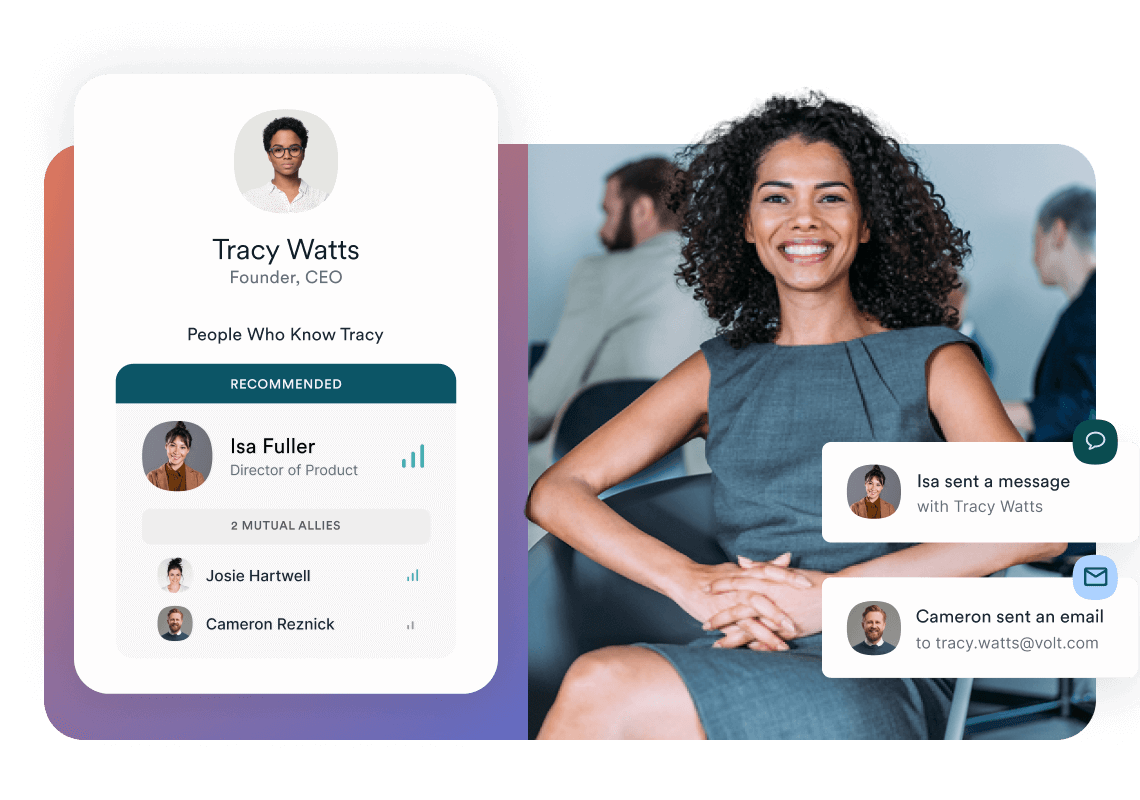
The feature you want to live in is Relationship Intelligence (Affinity's "People Who Know [target]" panel). Predictive analytics scan your firm's entire email and calendar history, rank every connection your team has to a target's founder or CFO by introduction strength, and surface mutual allies who can vouch for you.
That's the competitive edge: relationship building backed by the firm's own data, not cold outreach into a void.
When the partner asks "who do we know at Acme Health?", this panel is where you land before you answer. Affinity claims warm intros close 25% faster, and after a quarter of using it you stop doubting the number.
But before you get to that panel, you run the company list through three filters at the firmographic level to decide which targets even deserve the relationship hunt:
- Thesis fit: sub-vertical, revenue, ownership, and geography all match the partner's mandate. "Kind of yes" gets cut.
- Signal momentum: something happened in the last 90 days, like funding, a key hire, or competitor moves. If there's no signal last quarter, you are just cold emailing into a pitch void.
- Ownership willingness: founder-owned with fifteen years of tenure is brutal to crack, while a sponsor-backed asset six years into hold, where the fund is desperate for liquidity, is almost asking you to call.
Once the CRM locks in those call-worthy companies, you flip over to the People view to find your actual entry point.
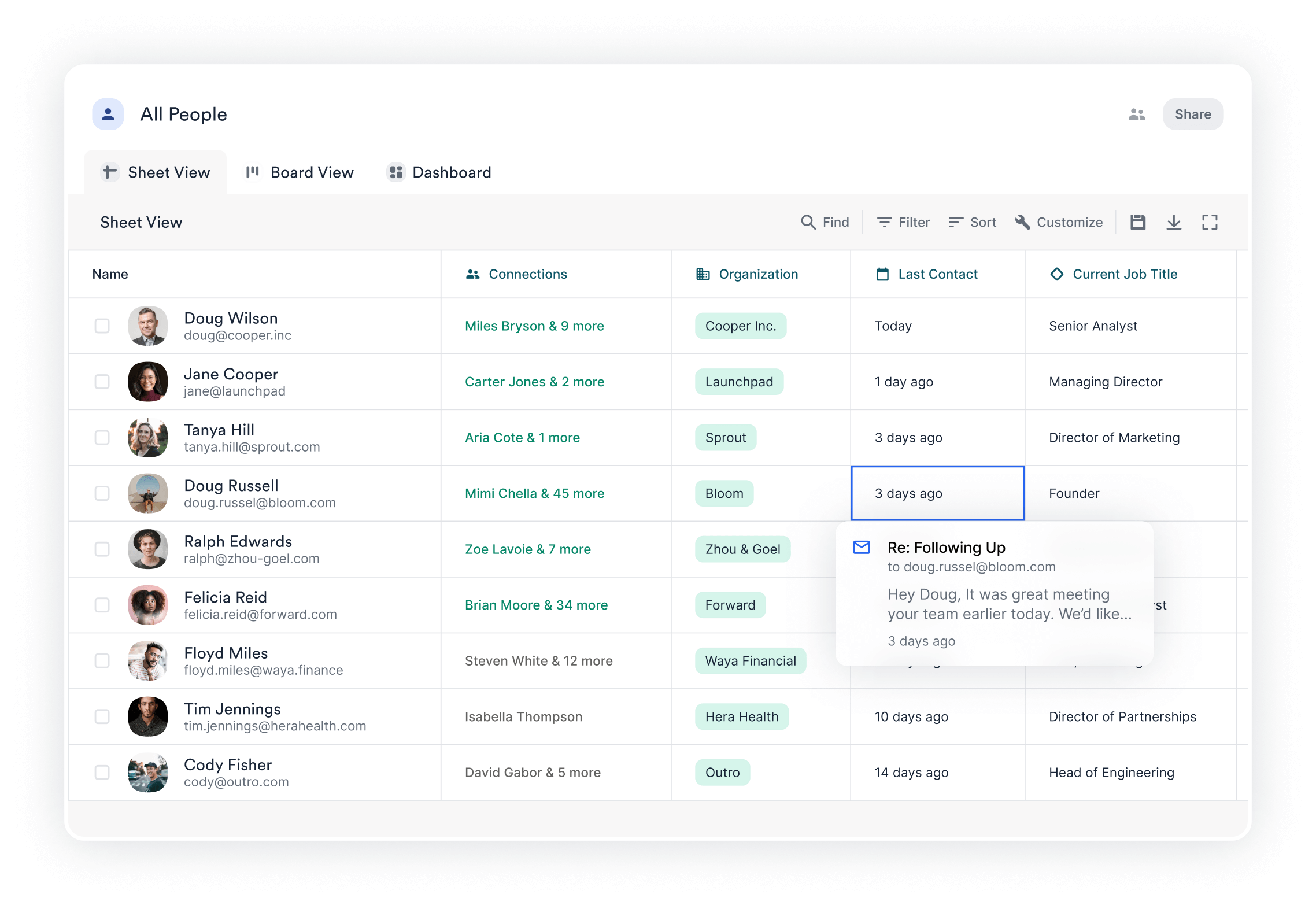
The view to keep open is the All People Sheet View. The green-highlighted Connections column ("Miles Bryson & 9 more" / "Carter Jones & 2 more" / "Mimi Chella & 45 more") tells you how strong each relationship is at a glance; the deeper the green the warmer the path.
The Last Contact column flags anything stale, so if Cody Fisher at Outro reads "14 days ago" you ping him before the partner asks why nobody's followed up. And the Current Job Title column is your tripwire for the four market signals that actually get a founder on the phone:
- Leadership Shift: when the Current Job Title column flips overnight (Doug Russell goes from "Founder" to "former Founder", Jane Cooper steps in as Managing Director), that's a new exec hunting for platforms to make their mark.
- Warm Path: the green Connections column shows your two-degrees connection, click "Miles Bryson & 9 more" and you've got the mutual advisor or portco operator who can make the intro.
- Liquidity Event: the news breaks that a founder took chips off via secondary or the board is pushing for an exit, you open this sheet to find who on your team needs to call them.
- Comp Shock: a direct competitor in the micro-vertical just sold rich, you open this sheet to map alternative targets in the space before their founders stop taking cold calls.
Aim for 100-300 names in the call-worthy bucket. The key benefits stack here: warm-intro decision making before the partner asks, and a relationship layer the firm already owns.
Then the next move is the pre-call research that turns 45 minutes of homework into an eight-minute sprint.
Step 2: Research targets before outreach
TL;DR: Tool Breakdown
- Grata: Pull company context fast to verify financial profiles instantly.
- Sales Nav (Account IQ): Drop target in summary pane to map org structure.
▸ 2.1 Pull the company context fast
Nobody has time to read a 100-page sector report at 6 AM right after the partner sends you a raw target list. The ultimate rookie trap is going down a Google rabbit hole and resurfacing 90 minutes later with an unscannable essay.
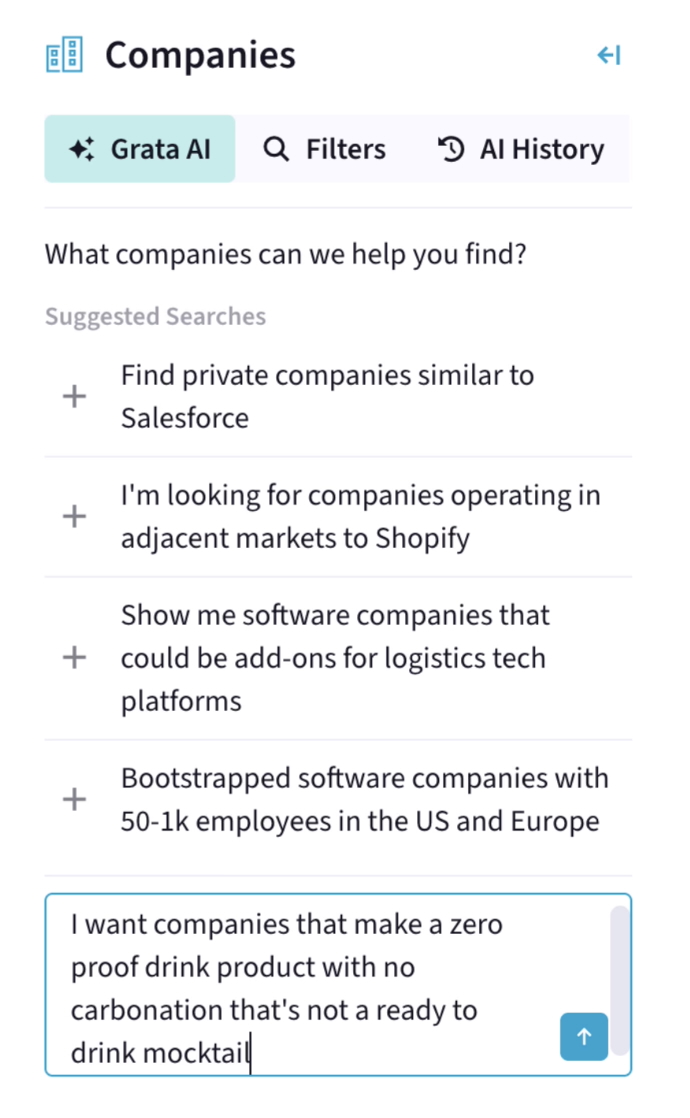
Drop the raw company name into Grata's agentic search, and because the engine parses the site and normalises headcount against government filings, the baseline financial profile loads without forcing you to click a single external link.
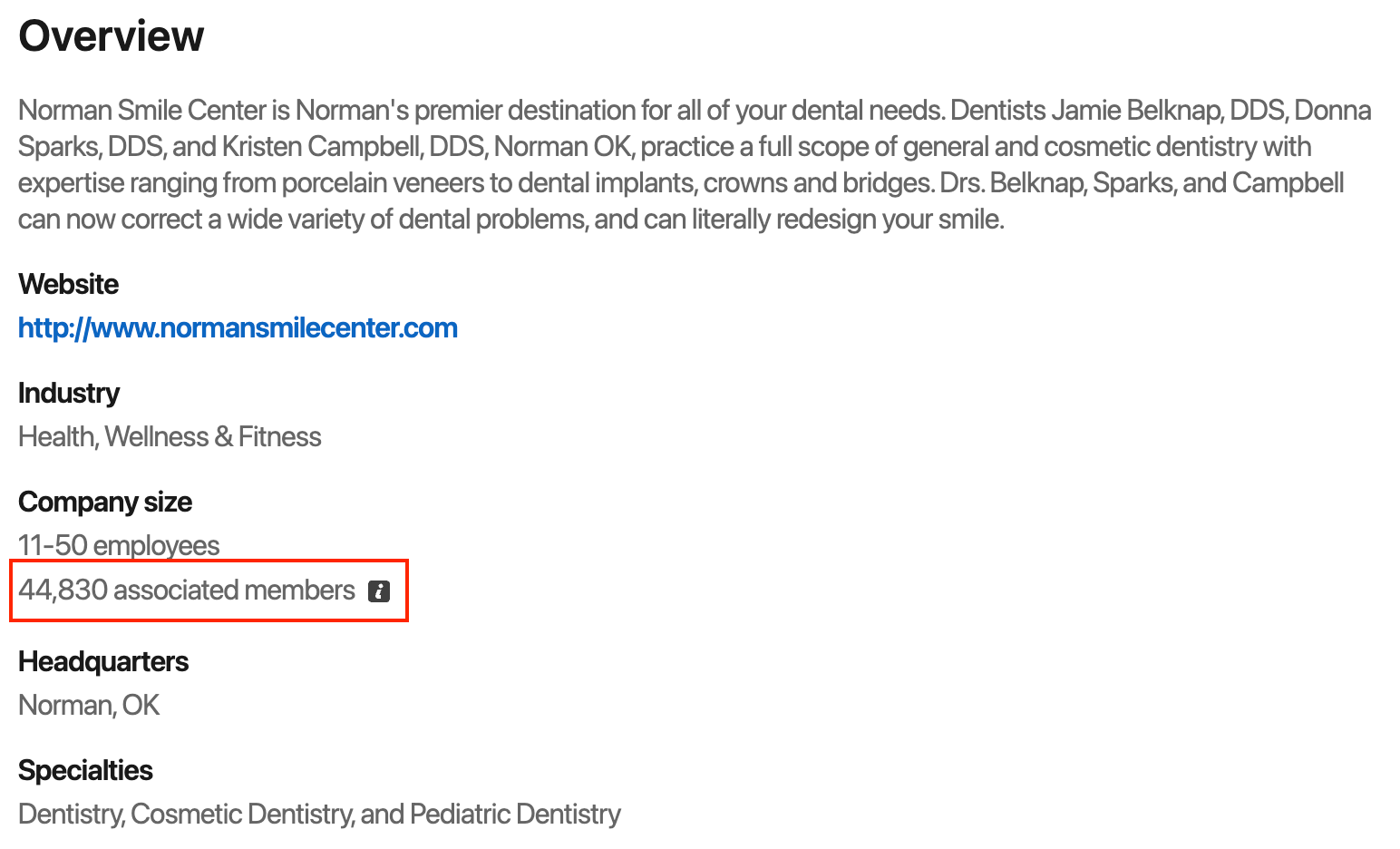
The real edge comes from how Grata reconciles its data sources. Take Norman Smile Center: LinkedIn shows 45K "associated members," but the Financial Profile applies government loan data to normalise that down to the right operating headcount.
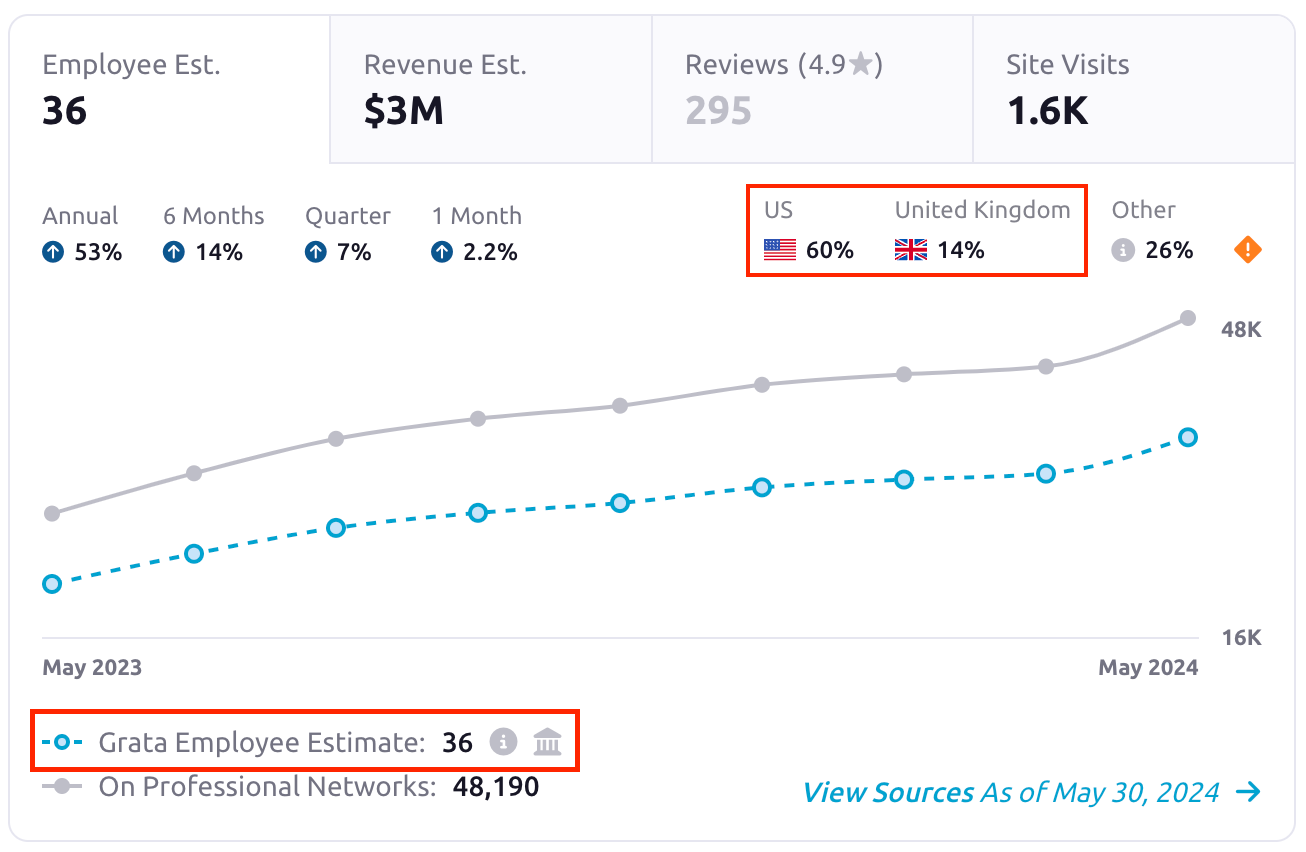
That kind of anomaly-detection is the difference between calling the partner with a $5M lifestyle business or a $40M scaling platform.
The point of this pass is calibration, not deep due diligence. You're stress-testing the business model against historical data, not poring through full financial statements or third-party industry reports yet.
AI can analyze entire industries and reveal how markets are structured, fragmented, and evolving, providing dealmakers with a comprehensive view of their market.
AI-driven market mapping is dynamic, continuously updating target universes as companies grow or trigger transaction signals, ensuring real-time awareness of relevant markets.
By the time you stand up to grab a coffee, you know whether this is real or noise, and the partner stops asking "is this deal real?"
Once you confirm the asset justifies the firm's hours, you immediately pivot to mapping the org chart to find the specific thesis angle that actually gets a veteran founder to reply.
▸ 2.2 Map the org, then find the entry point
Grata confirmed the company. Now you need a name and an angle that fits the thesis.
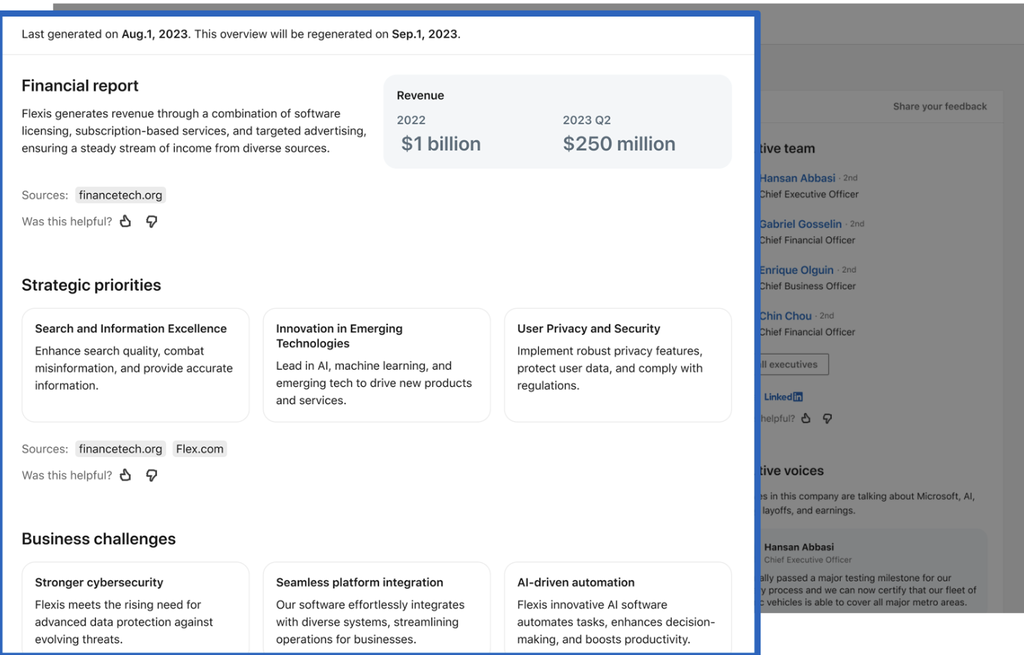
Drop the target into Sales Nav's Account IQ so the engine immediately surfaces the C-suite, recent filings, and strategic priorities in one pass, letting you map the org structure and bypass the blank-page friction before you even draft your outreach.

Jump straight to Executive Voices and check the workforce planning data right below it. The CEO, Hansan, just posted that their electric fleet passed testing for major metros.
Pair that post with the engineering headcount up 138%, and you've got a verified capacity-expansion signal, not marketing noise.
Tie that metro coverage directly to the firm's logistics thesis. Fold the contact data, the executive angle, and the Grata financials into a single briefing note.
If you dial into a scheduled call, scrambling through browser tabs, you lose your credibility in the first sixty seconds.
That consolidated prep doc packs the prospect data the partner expects to see before the founder hits any of the live deal stages or downstream pipeline stages. It's exactly what Step 3 runs on.
Step 3: Personalised outreach and scheduling
TL;DR: Tool Breakdown
• Claude for Outlook: Stage calendar invites with pre-mapped agendas.
The prep doc is built, so you turn it into a three-sentence email and get the ask out in one motion.
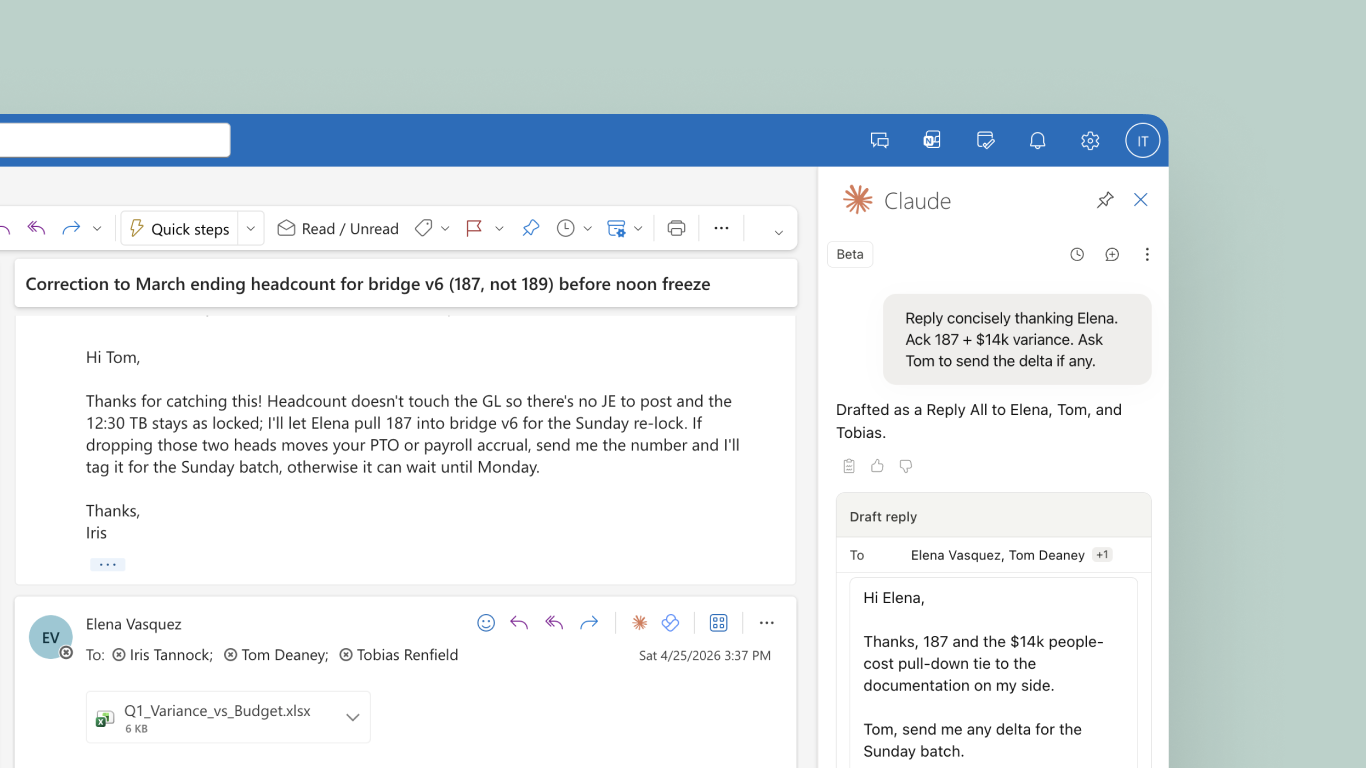
Feed your prep doc directly into Claude's Outlook integration to force a strict three-sentence intro draft. The software instantly generates context-aware next action suggestions based on past interactions and engagement signals.
Claude stages personalized follow-up messages that recap discussions and detail agreed-upon next steps, ensuring no opportunity slips through the cracks while you stop wasting cycles translating raw notes into copy.
Claude drafts it unsent, so you reread every word before it leaves the firm's server. No autonomous send.
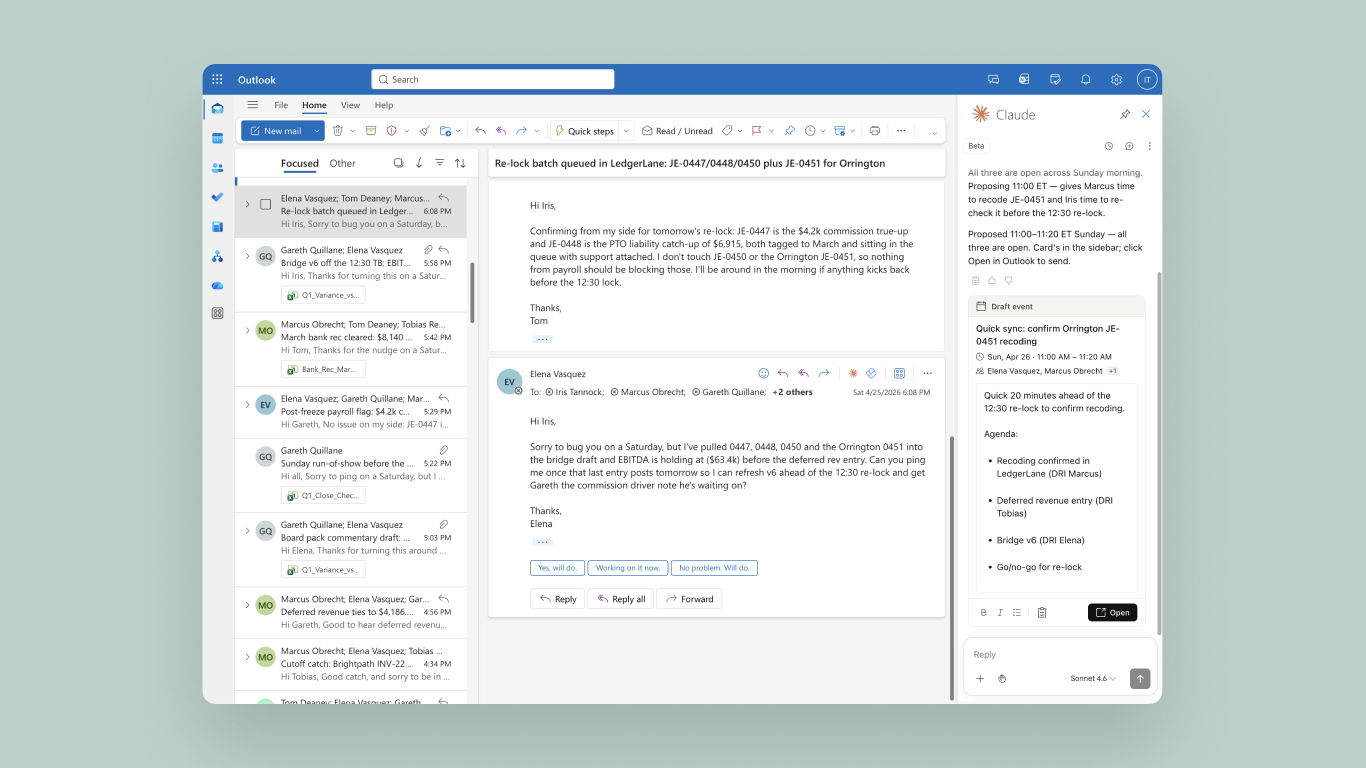
Let Claude work as an AI scheduling assistant, reading your availability to stage a specific calendar window right inside the sidebar layout, generating an institutional invite with the thesis agenda pre-mapped so you aren't sending unprofessional scheduling links to a veteran founder.
Once the note is locked, hit send. The invite stays queued up, and the moment the founder bites on the angle, it goes out. Now you prep to run the actual call.
Step 4: Run the call and capture it
TL;DR: Tool Breakdown
- Jamie: Capture raw calls as one of the leading bot-free notetakers and meeting transcription software options with background speaker ID.
▸ 4.1 Set the consent posture before the call
Once the call hits the calendar, open Jamie's settings and toggle the recording-notice email so the 24-hour consent ping fires before anyone dials in, getting that privacy heads-up out of the way before the founder even joins.

Founders running a discreet process appreciate the email notification, but verbal consent in the call is still mandatory, otherwise the founder discovers the transcript afterwards and kills the deal.
If you forgot to toggle the email notification beforehand, that's not a dealbreaker, so just lead with the verbal ask the second the call connects.
Introduce yourself and tell the founder you're running an AI note taker called Jamie to take notes, so you can actually focus on the conversation instead of staring at a notepad. Then reassure them that Jamie only captures audio to transcribe the call, deletes that audio the second the transcript is done, never records video, and none of it is ever used to train AI models.
If there are co-investors or board members on the line, name them in the ask too, since a silent board member will just blow up the deal later. If they object, pause Jamie and revert to manual notes. Preserving the quality of the conversation matters more than a complete transcript.
The decision to keep recording stays with you, not Jamie. The moment the founder hesitates, you trust your own judgment and act on it.
AI only earns its keep when you stop treating it like autopilot. A sourcing call isn't a sales call, and the bar you're held to is higher.
The second they agree, you launch straight into the thesis.
▸ 4.2 Open Jamie and join the call bot-free
Founders often run behind, and platforms change at the last minute, so have your setup ready before the call starts.
On a scheduled Zoom or Teams call, Jamie, one of the best AI note takers for Zoom, detects the meeting when you join and sends a notification asking if you want to record. Click Start Jamie, and it begins capturing.
If your calendar is connected, Jamie reminds you at meeting time. You just click to start it.
For an unannounced inbound call, open the Jamie app and click the Start Jamie button in the top-left of the menu bar.

However you start it, Jamie records through your computer's microphone, so it never joins the video call as a participant. Unlike most other AI note takers, Jamie is among the tools that do not use bots to join video calls, so your attendee list stays clean and the call stays a private deal conversation.
Once you start it, Jamie captures the call in the background while you focus on the founder, so you are not splitting attention between the conversation and a notepad.
Automated transcription and data capture speed up qualification times. High-value opportunities stop slipping while you protect sensitive deal context from hitting raw transcripts.
On the compliance side, your audio is processed on EU servers, encrypted in transit and at rest, and permanently deleted once the transcript is ready. The notes stay inside a GDPR-compliant system, so sensitive deal intel never lingers on your machine.
For anything Jamie can't transcribe, like non-verbal cues or IC follow-ups, drop a private note into the Scratchpad tab so it sits next to the transcript without bleeding into the IC export.
Let Jamie identify speakers and translate any language switches in the background, so you aren't untangling who said what for the IC memo later.
▸ 4.3 Let speaker ID and language switches run in the background
Because Jamie distinguishes each voice on the call and tags every line in the transcript to the right person, the names thread automatically through the summary, so when IC asks "who actually raised the customer-concentration concern," you can point straight to the named speaker instead of guessing from a wall of text.
Speaker profiles carry over from prior calls too, so you're not re-training Jamie on the same VP from a Series B follow-up.
That's the continuous learning layer working in the background: every assignment compounds into a permanent relationship history the firm owns. When the founder brings someone new onto the line, you assign them once in the dropdown, and they're tagged for every future call.
Because your output language is set in Jamie's settings, the summary and action items come back in that language no matter which language was spoken on the call. So even if the founder moves into German for a local comp comparison or into Spanish during the pitch, you walk into IC prep with your notes already in your language instead of re-translating by hand.
▸ 4.4 Pull the 30-second AI summary
Hit stop, and because Jamie turns the summary around in thirty seconds, you can scrub the notes before your next call connects.

Because the engine automatically pulls the title from your calendar or the raw dialogue into the generated summary, you never end up pushing an "Untitled" meeting to the CRM right before the partner demands a brief.
Jamie also auto-picks the template that matches the call, so for a sourcing conversation, it'll lock onto PE Discovery and structure the bullets around Customer Context, growth signals, and follow-ups, all matching what the partner expects to read.
Verify the founder's exact phrasing directly in the generated transcript before syncing to DealCloud, so you never misquote a margin profile or a busted covenant to the IC.

Apply sector tags immediately post-call, so when the partner asks for every healthcare SaaS conversation from the last thirty days, you filter the exact mandate instead of scrolling blindly through forty raw meetings.
AI instantly transcribes conversations into AI meeting minutes, creating structured summaries that highlight budget, decision-makers, timelines, and next steps.
Jamie transforms unstructured voice data into actionable intelligence, capturing lead intent and automatically populating CRM systems.
The period immediately following a sourcing call is critical for trust-building with prospects, so Jamie should serve as a pipeline accelerator and not replace human relationship-building efforts.
Ten seconds on the way out of the call saves an hour at the Monday pipeline review.
▸ 4.5 Switch templates per call type and lock the follow-up tasks
If the auto-detect misses the mark, force the template to match the call type, so a management presentation outputs strictly as customer insights and follow-ups, while your weekly deal review drops directly into a pipeline-update format.

Jamie automatically strips operational action items into the Tasks tab, like chasing the founder for Q3 numbers, and because deal momentum dies when follow-ups go cold, each task gets assigned automatically to the specific speaker who promised the deliverable on the live wire.
AI tools work best when they support a clearly defined pipeline based on buyer commitment rather than arbitrary sales stages. Defining clear stages in the sales pipeline and integrating AI infrastructure allows for tracking the time leads spend in each stage and identifying pipeline leaks. AI can assign the correct deal stage based on call outcomes and automatically push call metrics and qualification data into CRM fields.
Step 5: Push structured notes to CRM
TL;DR: Tool Breakdown
- Jamie: Push structured, speaker-attributed bullets natively to logs.
Your Monday pipeline call is where pipeline-data hygiene gets tested under the VP's microscope, and if last week's sourcing notes are still sitting in your laptop instead of DealCloud, the VP will tear you apart for running a hidden pipeline.
Workflow automation handles the administrative tasks that used to eat your Friday afternoons, so CRM data lands clean without anyone re-keying a thing.

Push every meeting note directly from Jamie into the CRM automatically the moment the summary clears, because the manual copy-paste tax is exactly the friction that makes analysts stop logging calls altogether.
Sync the note natively to your CRM, and because the speaker-attributed bullets and the auto-detected template already match what the partnership expects, the intelligence lands in the deal record fully structured instead of a wall of raw text.
Structured data routing uses purpose-built tools to parse unstructured call transcripts into structured CRM fields such as "Next Steps," "Budget," or "Timeline."
That eliminates the manual formatting loop entirely, so you stop wasting Friday afternoons inventing field names or translating scribbles.
For PE workflows specifically, push to DealCloud for pipeline tracking and route to Notion as your core meeting minutes software for IC memo prep.
The same Jamie summary feeds both destinations without you running the meeting view twice, so when the partner asks why three deals are missing from Monday's pull, the answer is never "I hadn't gotten around to logging them."
The same architecture works for adjacent BD functions running sales pipeline management: clean pipeline stages drop straight into the sales pipeline view without anyone re-keying notes.
Step 6: Analyse patterns across 20 to 50 calls
TL;DR: Tool Breakdown
- Jamie (Ask AI): Run aggregate corpus sweeps to pull pricing and CFO quotes.
Leverage live deal data to build true AI powered pipeline management. AI can improve forecast accuracy by analyzing thousands of past deals, leading to a reduction in errors by 10-15% compared to traditional methods.
Firms adopting these models often see up to a 5% reduction in costs and a 10-15% boost in sales, while outperforming competitors by 20-25% in revenue and market share. This automated tracking secures consistent deal flow, instantly scaling your raw sourcing volume into a searchable proprietary database built on proprietary deal flow.
When the partner suddenly demands to know what founders are saying about mid-market pricing across the sub-vertical, telling them you need to dig through individual files is the fastest way to lose credibility before an IC meeting.
Run a semantic query across the entire captured meeting corpus, and because the speaker-attributed transcripts already sit in one searchable layer as proprietary market data, you pull the mid-market pricing pattern, the recurring objection, and the consolidation signal in the time it takes to refill your coffee.
Treat the query as an aggregate sweep of your own proprietary database, because when you ask where customer-concentration concerns popped up across the quarter, Jamie pulls the raw CFO quotes verbatim.
Run a sweep for every mention of a specific sponsor, competitor or margin compression signal across the sub-vertical, and the answer comes back mapped to the exact meetings and timestamps so you can verify the metrics before you step into the partner's office.
When the thesis hits the IC table, the proprietary data backing it is already built from your own sourcing volume, not borrowed from PitchBook.
Step 7: Build a sector sourcing brief
TL;DR: Tool Breakdown
- Jamie (MCP): Pipe your 30-call corpus directly into an LLM with zero copy-paste.
- Claude: Execute structured prompts against raw data to build a target matrix.
The queryable corpus you just built is what feeds the sector brief, because thirty calls of proprietary intelligence sitting in one searchable layer is the asymmetric advantage every junior analyst lacks when they hand the partner secondary research from PitchBook.
Pipe the Jamie data straight into Claude, ChatGPT or Perplexity through Jamie's MCP connection, skipping the manual copy-paste loop that breaks text editors and truncates the transcripts halfway through.
Once the LLM has the full call corpus, knowing how to use Claude for structured prompts becomes the difference between a 3-page memo and a junk dump. Run a prompt like:
Across these 30 sourcing calls in [sub-vertical]:- Surface the most common valuation benchmarks founders cited- Map the recurring growth signals and customer-concentration concerns- Rank the top 8 assets by thesis fit and signal momentum- Flag every mention of a consolidation play or sponsor competitor- Pull verbatim quotes that support a roll-up thesis
Executing this yields a 3-to-5 page memo grounded entirely in primary field intelligence, giving the sector lead an ironclad target matrix before the firm commits formal diligence hours.
AI generates and delegates follow-up emails and tasks automatically, enhancing pipeline coaching through data-driven insights.
Step 8: Draft screening one-pagers for top targets
TL;DR: Tool Breakdown
- Jamie (MCP): Feed target-specific transcripts and financials straight to LLMs.
- Claude: Generate an 80% baseline brief to focus entirely on deal nuance.
The target matrix from that brief is what you turn into screening one-pagers, because the partner won't greenlight diligence dollars based on a ranking table alone, since she wants a one-page brief per target before she picks up the phone to the founder herself.
Pipe each top-eight target's call transcript, Grata financials, and your sub-vertical thesis context into Claude through Jamie's MCP, and the LLM spits out an 80% baseline brief for every target before the partner even finishes her afternoon calendar run.
That 80% is the structural skeleton: company snapshot, thesis fit, financial profile, founder background, recent signals, and the open questions you still need answered.
The final 20% is yours to layer on: the partner's specific hot buttons, the key underwriting risks, and the commercial nuance the AI can't see, and because Claude already drafted the boilerplate, every minute you reclaim from blank-page friction goes into sharpening the thesis instead of formatting headers.
By the time the partner asks for the screening stack, eight structured briefs are sitting in the shared drive, staged and ready for her sign-off. Deploying these models transitions underwriting metrics from subjective assessments to data-driven predictions. The platform automatically evaluates historical patterns, deal velocity, and portfolio engagement signals to generate reliable forecasts before your firm commits formal diligence hours.
That's the compounding competitive advantage of running the full stack: deal teams ship more deals per quarter because the AI workflows already drafted the boilerplate. As markets evolve and revenue growth gets harder to find, the firms that win are the ones whose sourcing engine learned fastest.
Deploy Jamie to Build Your AI Sourcing Pipeline
Alright, that's the complete blueprint from longlist to screening one-pager, so we're finally done with the operational setup. Traditional sourcing leaks half the founder's signal within hours of the call, but adopting AI resolves this structural bottleneck entirely, capturing every raw quote and commercial milestone to secure clean deal flow before your next calendar run.
Shifting this administrative tax to Jamie reclaims vital hours for the junior desk. Live deal data compounds across dozens of calls, transforming your raw sourcing volume into a searchable proprietary database built on proprietary deal flow.
The Sourcing Reality Check: Manual Administrative Burn vs. Automated Leverage
What you're comparing | Old-school manual sourcing | With Jamie as your AI Meeting Assistant |
|---|---|---|
How calls get captured | Manual scribbles, half the signal gone within hours | Bot-free background capture with speaker ID, no third bot in the invite |
How fast you get the notes | 30 to 60 minutes typing up after the call | 30-second auto-generated summary, auto-locked to the PE Discovery template |
What carries across calls | Re-identifying the same VP every Series B follow-up, language switches lost | Persistent speaker memory + on-the-fly translation across 100+ languages, all landing in your default output |
Consent and compliance | Verbal-only ask, no documented privacy trail | Optional 24-hour consent emails, GDPR-firewalled transcripts, audio deletion the second transcription wraps |
Pushing notes to CRM | Friday afternoon copy-paste tax into DealCloud or Affinity | Native sync to DealCloud, HubSpot, Salesforce, Attio, Pipedrive, and Notion with speaker-attributed bullets |
Tagging and finding old calls | Blind scrolling through forty raw meeting files | Sector tags applied in ten seconds post-call, Ask AI for semantic sweeps across the full corpus |
Locking the follow-ups | Action items lost in your notebook | Tasks tab auto-strips operational items and assigns each one to the speaker who promised it |
Building the screening brief | Blank-page header formatting friction | 80% skeleton briefs auto-generated via Jamie's MCP pipe into Claude, ChatGPT, or Perplexity |
Protect Your Deal Intelligence Ahead of the Next Pipeline Review
If the next pipeline review hits before you've cleaned up last week's calls, the partner will spot the gap before you do. Run Jamie bot-free on your next sourcing call and lock down the deal intelligence before it dies on the wire.
Can't remember which call the founder said that on?
Ask AI searches every call at once, pulls the exact quote, and tells you which meeting it came from. Just ask.
Read More
The whole pipeline rises or falls on how cleanly you capture each call. If you want to go deeper on the note-taking layer before you build your stack, these guides break down the tools, formats, and bot-free options worth knowing.
- Compare the leading AI note taker tools by features, pricing, and fit.
- See how the best meeting transcription software compares on accuracy and price.
- Turn raw calls into AI meeting minutes that capture decisions and steps.
- Keep calls natural with bot-free AI note takers that never join meetings.
- Explore the top AI meeting assistant tools ranked for privacy and output.
Frequently Asked Questions on AI Deal Sourcing
Is there a legitimate use for AI to manage all of the administrative tasks of managing deals?
Yes, and this is where AI first starts to earn its money. AI can automate some of the mundane paperwork, such as Non-Disclosure Agreements (NDAs), and track pipeline activity in near real-time, which lets the deal team focus on strategy and execution. Beyond that administrative support, AI helps identify bottleneck issues in the deal-making process, predicts where deals are likely to stall, and recommends the best course of action to move things forward. AI also schedules meetings at times convenient to both parties, sends reminders and automated follow-ups, and compiles updates and progress reports for stakeholders. That means no opportunity ever slips through the cracks while the deal team is heads-down on other deals.
What kinds of benefits have deal teams experienced after implementing AI into the deal-making process?
Deal teams that implement AI throughout the deal-making process have experienced cost savings of up to 5% and a 10 to 15% increase in sales. Additionally, many studies indicate that these same teams see revenue and market-share gains of 20 to 25% above teams that do not use AI. As noted earlier, much of this advantage compounds over time, because these tools keep improving and evolving as they collect data. The benefit therefore tends to keep growing year after year rather than reaching a plateau.
How does AI determine which targets are worthy of investment?
AI lead scoring represents a fundamental shift in the way a target is evaluated. Rather than relying on subjective opinion or gut feeling about a target's viability, AI uses objective, fact-based criteria, weighing factors such as financial health, position within the market, and potential for future growth. These weighted factors let AI lead scoring rank and prioritize the prospects that offer the greatest potential for success. By using data-driven decision-making, AI removes much of the subjective bias that comes with evaluating targets by hand. As AI keeps developing and learning from prior wins, it becomes increasingly effective at qualifying prospects over time. AI also gathers information from multiple sources on each lead, giving the deal team real context on every person and organization in the pipeline without requiring extensive manual research.
What happens to all of the conversations that occur during a sourcing call?
This is arguably the area where teams lose the most value, and a platform such as Jamie helps fill that gap. Once a sourcing call happens, Jamie takes the unstructured voice data from the conversation and converts it into structured, actionable intelligence. Jamie captures what the founder said during the call, including the objections they raise and their buying intent, and then feeds that into your Customer Relationship Management (CRM) system. After you give verbal consent, Jamie begins recording the call, and no bot ever shows up in the invitation. Jamie identifies each speaker, provides clean meeting notes, and supplies a comprehensive transcript of the call. Because Jamie records automatically, your team can stay engaged in the conversation without worrying about note-taking. If you later need to recall how a prospect felt or whether a competitor came up, you can simply check the transcript instead of relying on your memory.
Can AI be utilized to perform the follow-up activities after a call?
While AI cannot fully replace the follow-up yet, it can significantly reduce the effort it takes. AI can generate a customized follow-up email right after the call that summarizes the discussion points and outlines the agreed next steps. Based on previous interaction history and what has worked before, AI can also suggest context-aware next actions. With Jamie specifically, you can ask Jamie's Ask AI to create a follow-up email directly from the call you just captured. The summary in that email is therefore drawn straight from the actual transcript Jamie generated rather than from an empty template. If you need heavier synthesis beyond simple drafting, you can pipe the call into Claude through Jamie's Model Context Protocol (MCP) connection and have Claude build the email and the next-step list directly from the conversation.
In what ways does AI enhance reliability in pipeline forecasting?
Forecasting is the point where AI moves your deal team away from instinctive thinking and toward data-driven prediction. AI-powered pipeline management evaluates thousands of past deals to find the patterns that historically led to successful closes, then uses deal velocity and engagement signals to produce forecasts you can defend in front of your partners. Along the way, it logs the communication and engagement data tied to each stage of the pipeline, building a complete record rather than relying on whatever got typed in by hand. Your forecast is therefore developed using all of the available evidence, including the recorded calls captured through platforms such as Jamie.
.png%3Fprefix%3Dpayload%262026-06-03T16%253A17%253A14.961Z&w=3840&q=75)

