I evaluated seven possible alternatives to Minutes AI for taking your meeting notes and AI meeting minutes, and they are Jamie, Otter.ai, Notta, Granola, Fathom, Happy Scribe and TurboScribe.
In evaluating these options, I considered three things your compliance team or your colleagues would typically be asking about their meeting data post-meeting. Those include how my meeting data gets stored under GDPR, which certifications back up the meeting data, and whether a bot will participate in our meeting.
I also wanted to know if my notes could go into Notion, Google Docs or my CRM without me having to manually enter them. Then I wanted to know if an agent could perform actions based on the information contained within the meeting notes.
Finally, I wanted to evaluate the cost of each option and see how much each plan costs per month.
It may have worked well for you using Minutes AI until your team needed something else (or more!) out of it, or it may be that you are currently considering subscribing to Minutes AI. In either case, the common thread here is the same question. What is the best Minutes AI note taker alternative? Here are seven answers.
Even when discussions become dynamic or jump between topics, Jamie manages to structure and organize everything clearly.

Lisa Blawert
Head of Corporate Development | Kliniken Schmieder
Healthcare
TL;DR
Jamie: Best Minutes AI Alternative With High-Quality Notes, Agents and Conversation Intelligence
Otter.ai: Best Minutes AI Alternative for Pre-Call Briefings on Every Device
Notta: Best Minutes AI Alternative for Bilingual Meetings in Real Time
Granola: Best Minutes AI Alternative for Outbound Phone Calls From Your Phone
Fathom: Best Minutes AI Alternative for Recording Video of Your Online Calls
Happy Scribe: Best Minutes AI Alternative for Transcribing Files in 150+ Languages
TurboScribe: Best Minutes AI Alternative for Unlimited File Transcription
What Are the Best Alternatives to Minutes AI?
The 7 best Minutes AI alternatives for converting a voice recording into a searchable written transcript are Jamie, Otter.ai, Notta, Granola, Fathom, Happy Scribe and TurboScribe. All 7 will convert your voice recordings into written records that you may search later.
Jamie stores and processes all meeting data in Europe, and Jamie is GDPR compliant and ISO 27001 certified. Jamie will sync your meeting notes automatically with your preferred productivity tools, like Notion, Google Docs, or OneNote.
Happy Scribe also stores files within the EU, and Notta also connects to Notion on every plan, and Otter.ai and Granola do on higher plans. For comparison purposes, each alternative has been placed side by side in a table for you to compare them. If you would like to see more about an individual alternative, click on any cell and it will be expanded.
1. Jamie: Best Minutes AI Alternative With High-Quality Notes, Agents and Conversational Intelligence
Best for: Jamie is the best Minutes AI alternative for people who wish to have their meeting data located in Europe, and their meeting notes integrated into the tools their team uses every day.
Similar to: Otter.ai, Notta, Granola
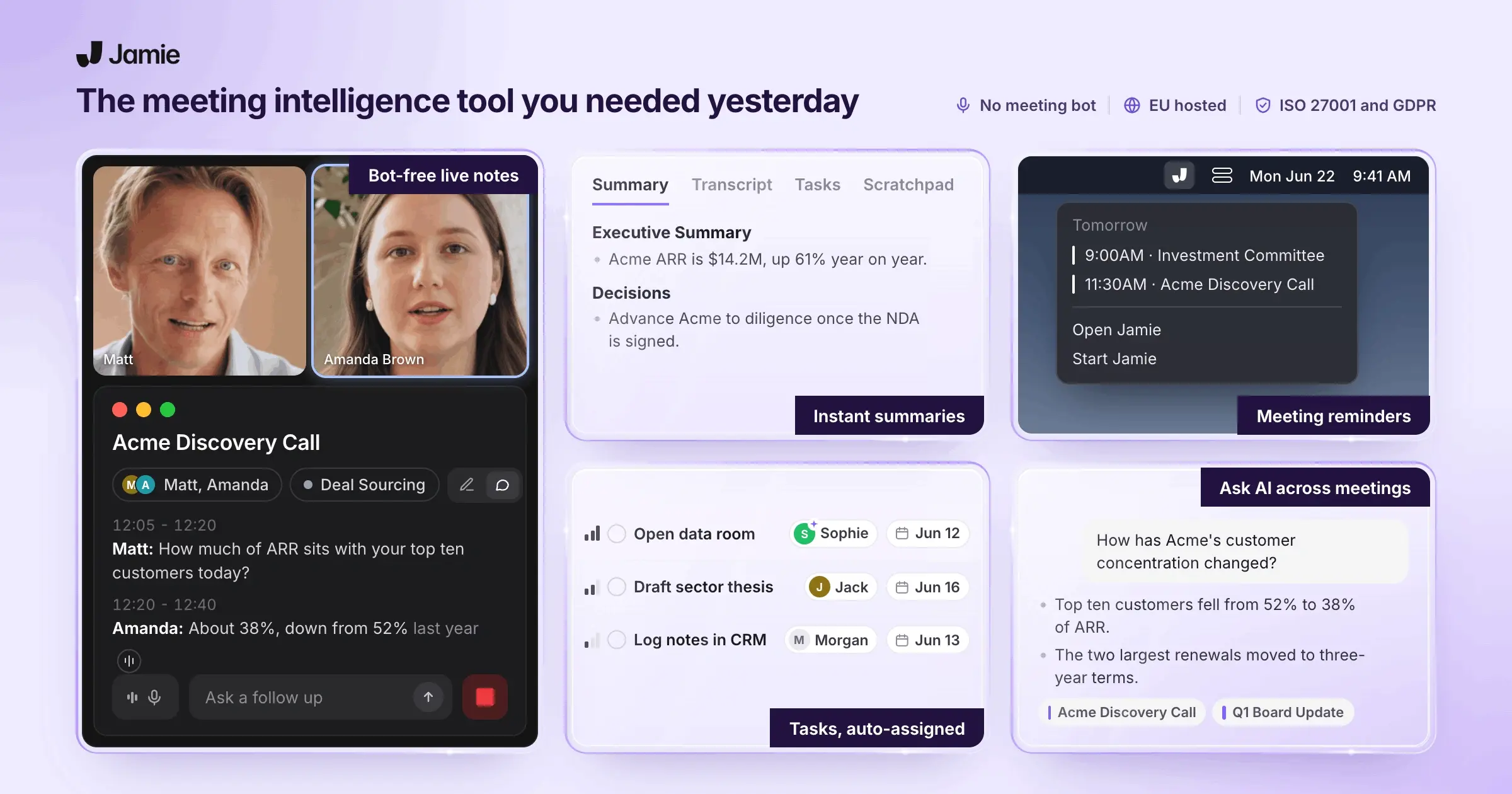
Jamie is a bot-free AI note taker, and all of your meeting data is both stored and processed in Europe. Jamie is GDPR compliant and has been ISO 27001 certified. Your meeting information is never used to train models.
For the sake of your privacy, no bots join your calls, which means it's a conversation between you and others on the call. While getting consent remains your obligation, verbal consent in your own words is the most professional way to start a meeting.
Jamie also sends the optional Recording notice email before each meeting and posts the meeting chat notice within the call. After each meeting, Jamie automatically syncs your meeting notes into Notion, Google Docs or OneNote.
"Ask Jamie" can answer any question across every meeting, and the Agent and Workflows can update records in Salesforce, HubSpot, and many other apps. Below are some of the first features I would consider reviewing:
Jamie Stores and Processes All Meeting Data in Europe, GDPR Compliant and ISO 27001 Certified
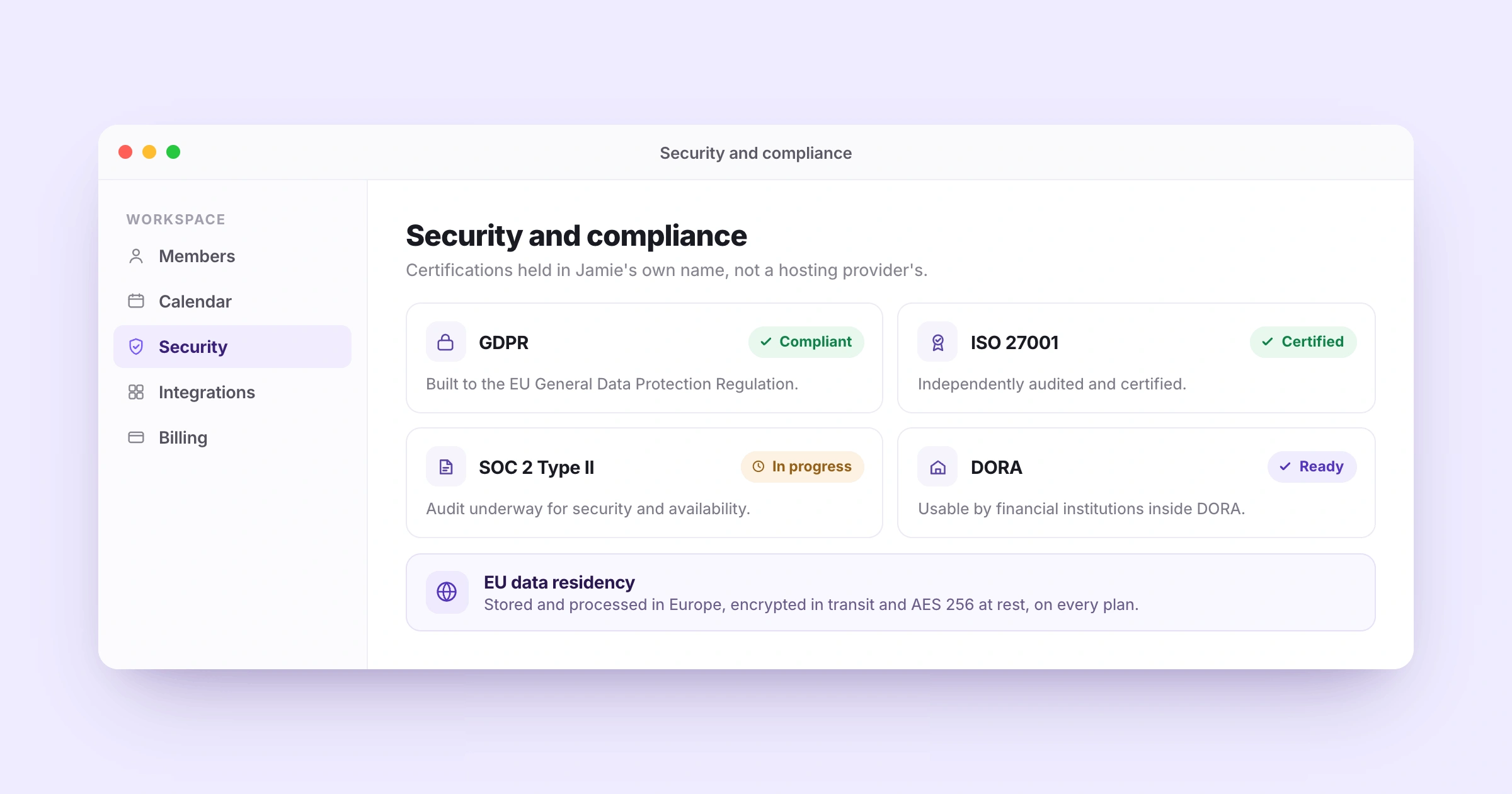
All of your meeting data is stored and processed in Europe, and Jamie is GDPR compliant and ISO 27001 certified. The meeting audio is streamed for transcribing purposes and is not stored. Before you sign off on a tool, your legal or IT department will typically review whether they can find answers to the following items:
Feature | Description |
|---|---|
GDPR and ISO 27001 | Jamie is GDPR compliant and ISO 27001 certified, and is also DORA ready for use with financial organizations. Your compliance officer can read this in one line on our security page. |
Audio deletion | There are no recordings of your conversations with clients. The meeting audio is streamed for transcription and is not stored on servers. |
No model training | Neither we nor any of our third party model providers use your meeting data to build or update machine learning models. All third-party contracts require this commitment. |
Data retention | On Enterprise, administrators can control the amount of time Jamie retains both meeting information and transcription records, from immediate deletion up to two years. |
Jamie's Agent Acts on Your Meetings in Salesforce, HubSpot, Microsoft 365, Box and More
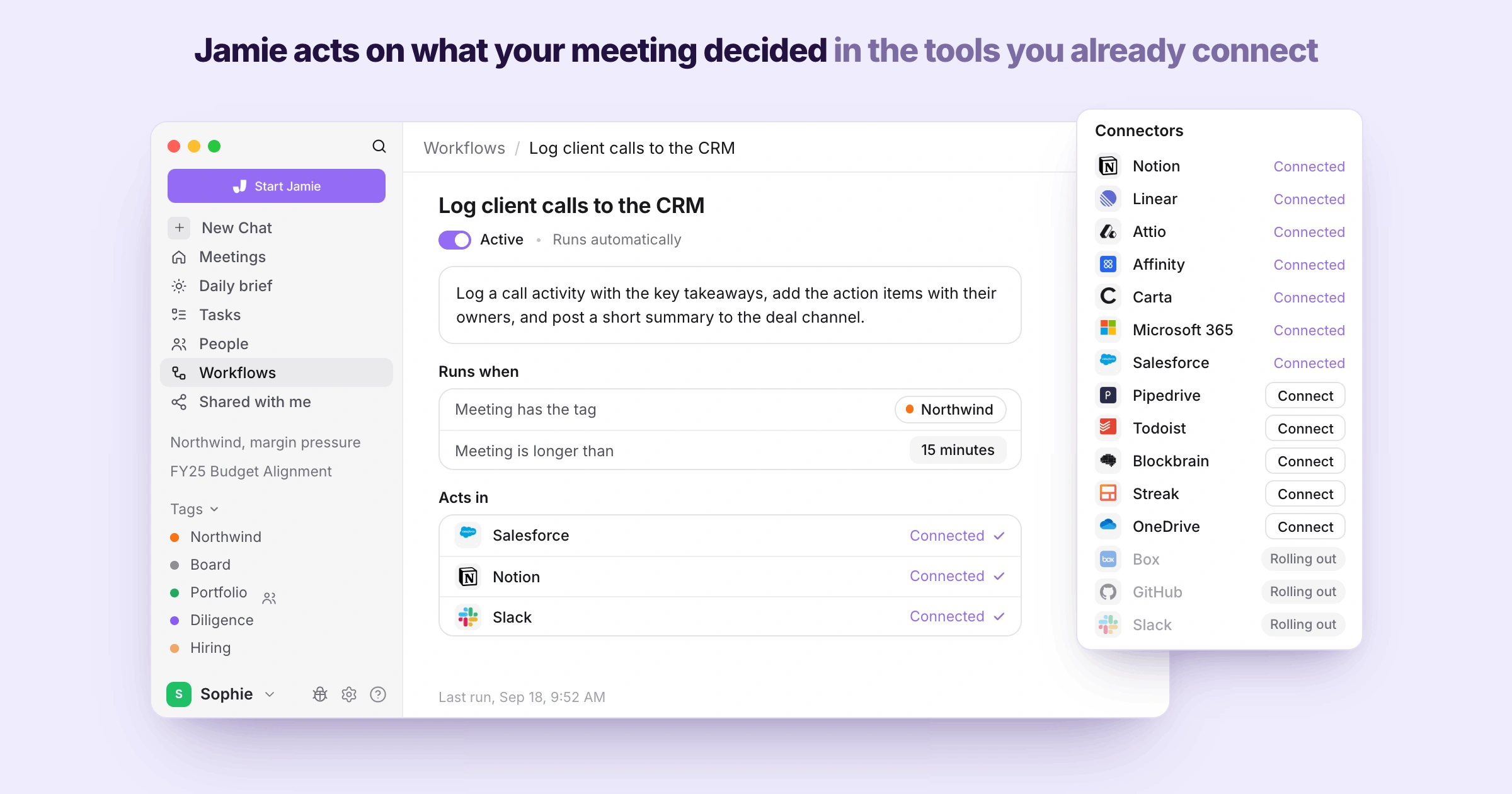
Jamie's Agent works directly from your meeting notes and updates records in Salesforce, HubSpot, Attio, Microsoft 365, Box and many other apps. When you connect a tool, you use your own account. Workflows run automatically after each meeting based on the criteria set by you. After connecting your tools, Jamie handles post meeting tasks through the Agent, Workflows and Connectors:
Feature | Description |
|---|---|
Agent | Jamie will go through your records in Salesforce, HubSpot, Box and many more apps, and update them based on the meeting notes you have. If you say something like "Log this meeting on the Acme deal in HubSpot", Jamie will do it for you. |
Workflows | A workflow runs automatically after your meetings, on every meeting that matches its conditions. Once you have defined the job (like adding a HubSpot call activity), it will be done for you by Jamie. |
Connectors | When you connect an application (such as Salesforce, HubSpot, Attio, Microsoft 365, Box and many more) with your own sign-in, Jamie is able to access nothing beyond what your account can open. |
Jamie Shows the Live Transcript on Your Phone While the Meeting Is Still Running
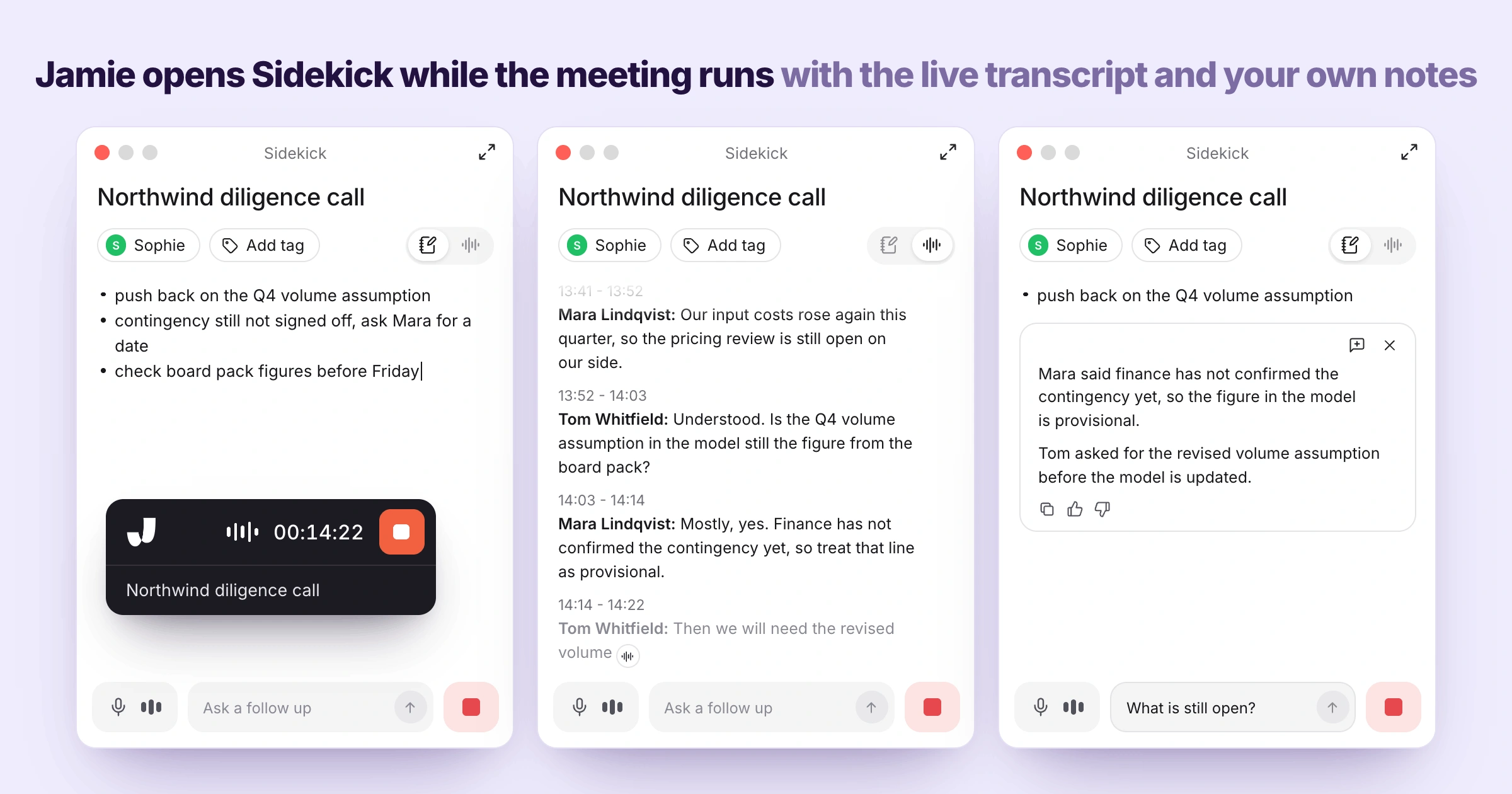
Your personal live transcript is active throughout your meeting and available on your desktop, iPhone or Android phone at the same time as the meeting. And when you want to take notes yourself, they are always one tap away from being added to the Scratchpad. As long as Jamie is recording, you will enjoy these options on your phone:
Feature | Description |
|---|---|
Live transcript | Each person's live spoken words are displayed in the live transcript along with timestamped lines of their speech. Scroll up to review a figure, then tap back to get to the most current line. |
Scratchpad | Your personal meeting notes will be saved under the "Notes" tab in the Scratchpad. Write down your follow up questions here and they will save with that meeting. |
Briefings | You can review Briefings about 30 min prior to the start of a scheduled meeting. It includes the purpose of the meeting, what happened at the last meeting and open tasks. This way, when you arrive you know exactly where you left off. |
Sync across devices | Because Jamie is cross platform and syncs both devices (your phone and computer) from one account, meetings recorded on your phone will appear on your laptop instantly. That means you stop organizing recordings by hand. |
Jamie Generates Meeting Notes With Action Items and Your Own Custom Vocabulary
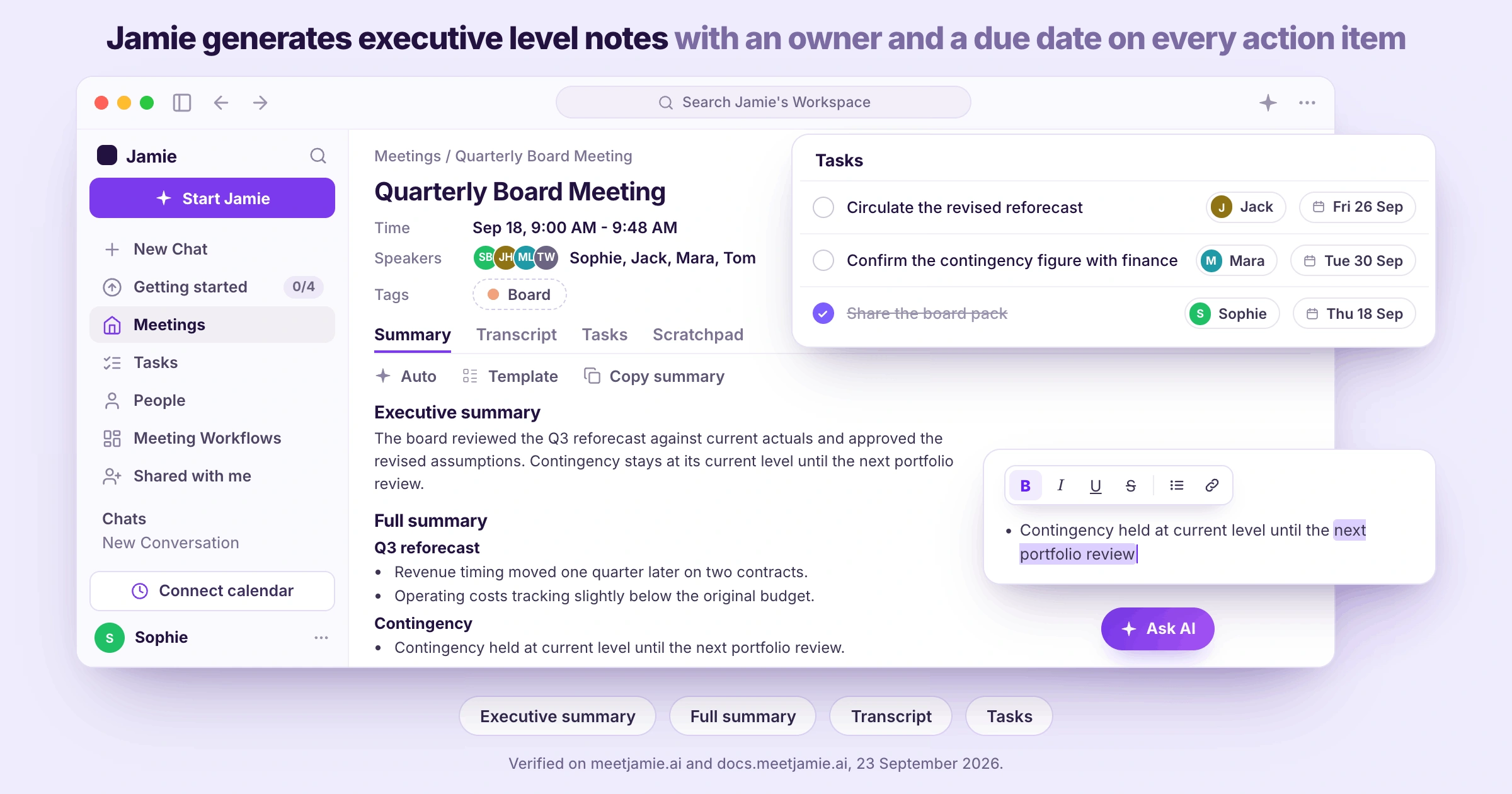
Jamie generates an executive summary, a structured summary based upon topics, and action items for each item discussed in the meeting. Custom vocabulary also spells your industry's terms correctly. After the meeting ends, Jamie generates this documentation for you:
Feature | Description |
|---|---|
Executive summary | The executive summary covers the key points of the entire meeting. Within about a minute, you can bring yourself up to date with a one hour meeting. |
Action items | Jamie will automatically pull all action items out of the transcript and assign them to the person who stated them. No more manually figuring out who owns which. |
Custom vocabulary | Add client names, product names, and acronyms as part of your custom vocabulary (on either your phone or laptop). Each time the terms appear in transcripts or summaries they'll be spelled correctly. |
Speaker Memory | Once you've named a voice, Speaker Memory will remember that voice. Jamie will then identify that person by name throughout future meetings, rather than using "Speaker 1". |
Templates | You have templates for structuring notes for each meeting type. Choose from 8 built-in templates or 30 more in our template library, and free users get 1 custom template. |
Jamie Records Every Meeting Platform on Your Laptop and In-Person Meetings on Your Phone
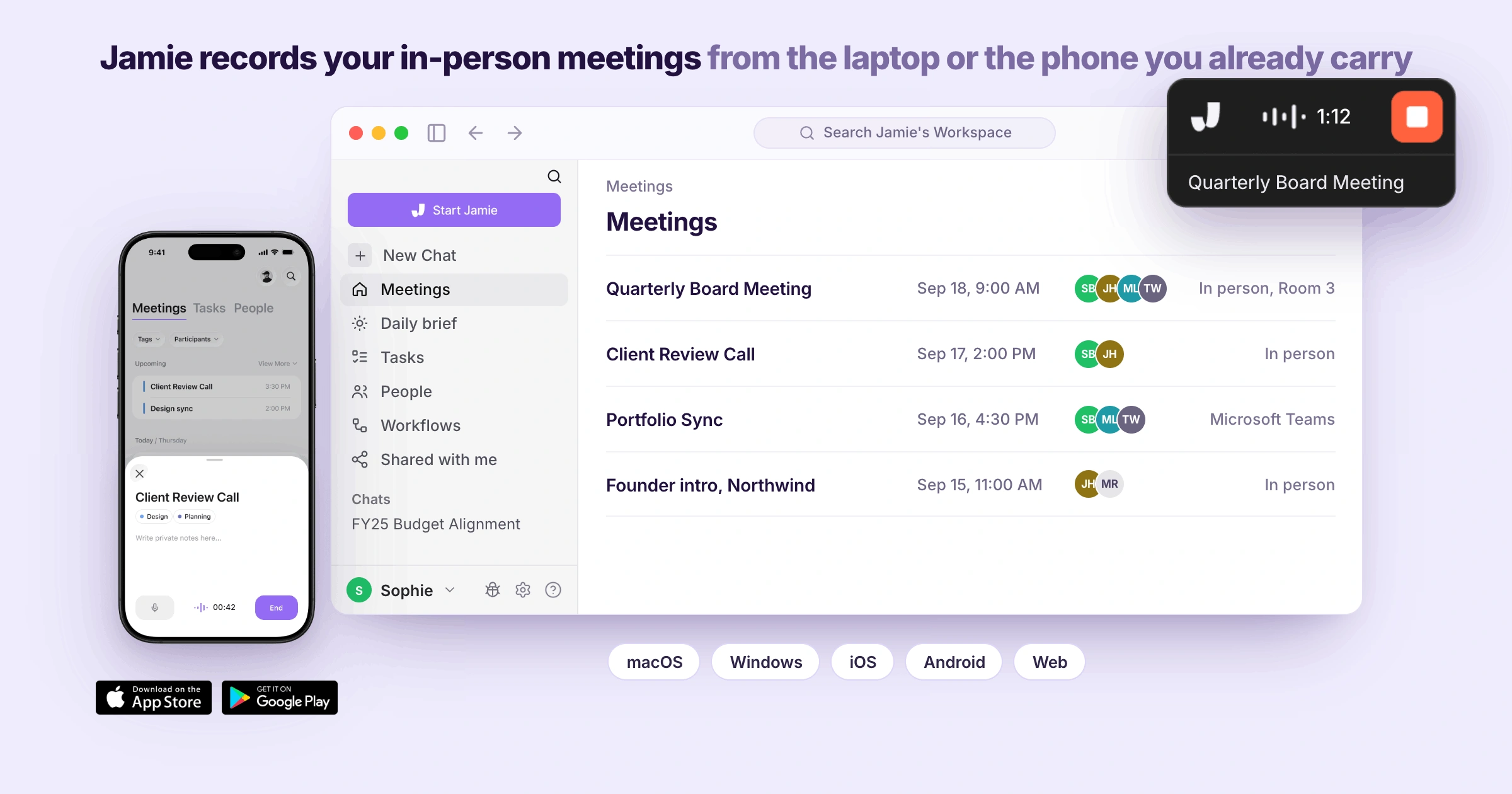
On your Mac or Windows computer, Jamie captures all meeting platforms including Zoom, Microsoft Teams and Google Meet. On desktop, iPhone and Android phones, Jamie records in-person meetings. Jamie can not capture phone calls. Regardless of how you conduct a meeting, whether in person or through video conferencing software, Jamie captures them with these options:
Feature | Description |
|---|---|
Desktop app | You can record online meetings on every meeting platform on your Mac or Windows laptop with Jamie. This is bot free, and your client will see no additional names added to their attendee list. |
In-person meetings | You can capture in-person meetings using your desktop, iPhone or Android phone. There are no additional items you need to bring to record. |
100+ languages | Jamie transcribes your meetings in over 100 languages. Even if the language switches mid-meeting, from German to English for example, the entire conversation is captured in one transcript. |
"Ask Jamie" Searches Every Meeting You Recorded, and Jamie Shares the Notes With Your Team
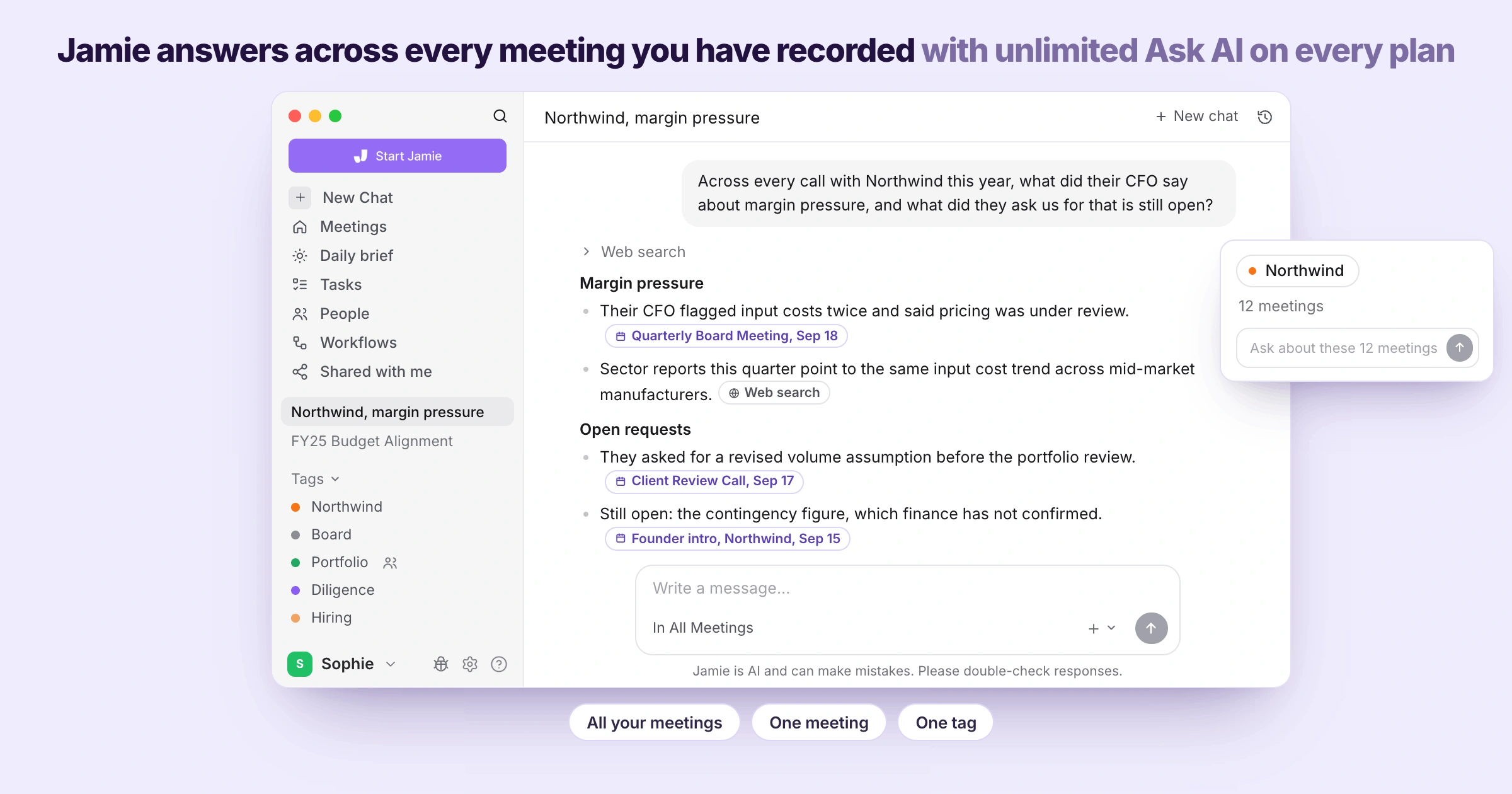
Each time you record a meeting, it will be available to question using "Ask Jamie" as many times as you need, no matter which plan you are in. All of the notes sent by Jamie have the ability to go directly into whatever tools your team already uses. With your meetings now located inside Jamie, you'll also gain access to the following capabilities:
Feature | Description |
|---|---|
"Ask Jamie" | "Ask Jamie" answers any question from any meeting you have, as often as needed, on each of our plans (including the free plan). When you want to know what a client said in their previous month's meeting, you will receive that answer along with the meeting it came from. |
Share link | You can choose which parts of the meeting (Summary, Transcript, Tasks, or Scratchpad) are included in a share link. This allows you to send only one targeted follow-up, rather than sending multiple separate files. |
Integrations | Jamie automatically syncs meeting notes to Notion, Google Docs, and OneNote, as well as shares those notes to Slack, HubSpot, Salesforce and many other apps. Your notes are delivered directly into an app where your team is likely reading them. |
Jamie's pricing
Free: €0 per month
Plus: €25 per month
Pro: €47 per month
Team: €39 per seat per month
Enterprise: Custom pricing
Source: meetjamie.ai/pricing, monthly billing.
Taking client meetings in the room? Read our guide to the best AI notetakers for in-person meetings.
What Jamie Users Love
Jamie Takes Notes Without a Bot on the Call
"I like Jamie because it's a bot-free AI note-taker that can take notes without an awkward bot on the call." Verified User in Design, G2
Jamie Generates Accurate Transcripts and Organised AI Summaries
"The transcription is also usually very accurate. I also like the AI summaries it generates after the call - they're well laid out and organized, especially compared to other AI note-takers." Verified User in Design, G2
What Jamie Users Flag
Jamie's Free Plan Notes Past 30 Minutes Need a Paid Plan
"The 30min meeting limit, but I understand that's the business model ;)" Charlotte Z., G2
One Jamie Reviewer Is Waiting on a ClickUp Integration
"I feel Jamie could improve by offering more integrations with other software. I'm mainly missing a ClickUp integration." Alberto A., G2
2. Otter.ai: Best Minutes AI Alternative for Pre-Call Briefings on Every Device
Best for: Otter.ai is the best Minutes AI alternative for those who wish to use one AI notetaker in all three places, a Mac or Windows desktop, a mobile device and a web browser.
Similar to: Jamie, Fathom, Notta
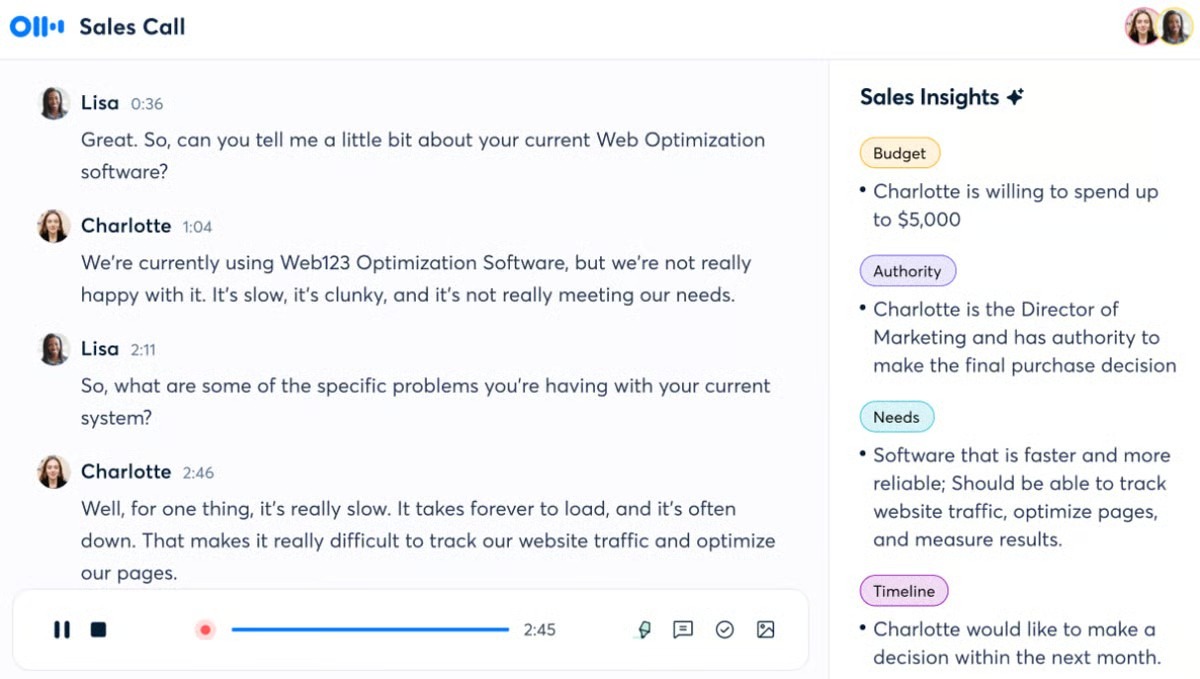
Otter.ai is an artificial intelligence (AI) meeting assistant that can record from your Mac or Windows desktop, phone, or browser. Otter.ai describes itself as a "Conversational Knowledge Engine", meaning all recorded transcriptions are searchable by your entire team.
Otter.ai's key features
Desktop recording: Meetings can be recorded with Otter.ai's desktop app on Mac or Windows.
Mobile and browser: You can also record on Otter.ai's mobile app or the web.
Live transcription: When people speak, Otter.ai captures what was said in real-time transcription.
Automatic action items: Captures and assigns next steps after each call, automatically.
AI summaries: Provides a brief summary of decisions, actions and other insights.
Searchable knowledge: Your company's whole library of Otter.ai meetings becomes searchable for employees.
Pre-call briefings: Before an upcoming call, Otter.ai sends you a briefing document.
Longer meetings: Business plans allow recording meetings lasting up to 4 hours.
CRM sync: Pushes key deal elements and next steps into your CRM.
Encryption: At rest, Otter.ai protects your sensitive data with AES-256 encryption.
Otter.ai's pricing
Basic: 0 dollars per month
Pro: 16.99 dollars per user per month
Business: 30 dollars per user per month
Enterprise: Contact sales
Leaning toward Otter.ai? Read our full Otter AI review.
What Otter.ai Users Love
Otter.ai Lets You Stay Focused on the Conversation
"I don't have to take notes during calls, so I can stay focused on the conversation." Abhishek Y., G2
Otter.ai Summarises a Meeting Into a Detailed Recap
"I love the recap after a meeting and how Otter.ai summarizes it." Nikki B., G2
What Otter.ai Users Flag
Otter.ai Transcripts Need Correcting With Heavy Accents or Jargon
"I sometimes have to correct transcription errors when there are heavy accents, background noise, overlapping speakers, or technical jargon." Abhishek Y., G2
One Otter.ai Reviewer Wants More Recording Time on the Free Plan
"I wish the free version offered more recording time." Nikki B., G2
3. Notta: Best Minutes AI Alternative for Bilingual Meetings in Real Time
Best for: Notta is the best Minutes AI alternative for people who conduct meetings in two languages and require real-time transcripts from an AI.
Similar to: Jamie, Otter.ai, Happy Scribe
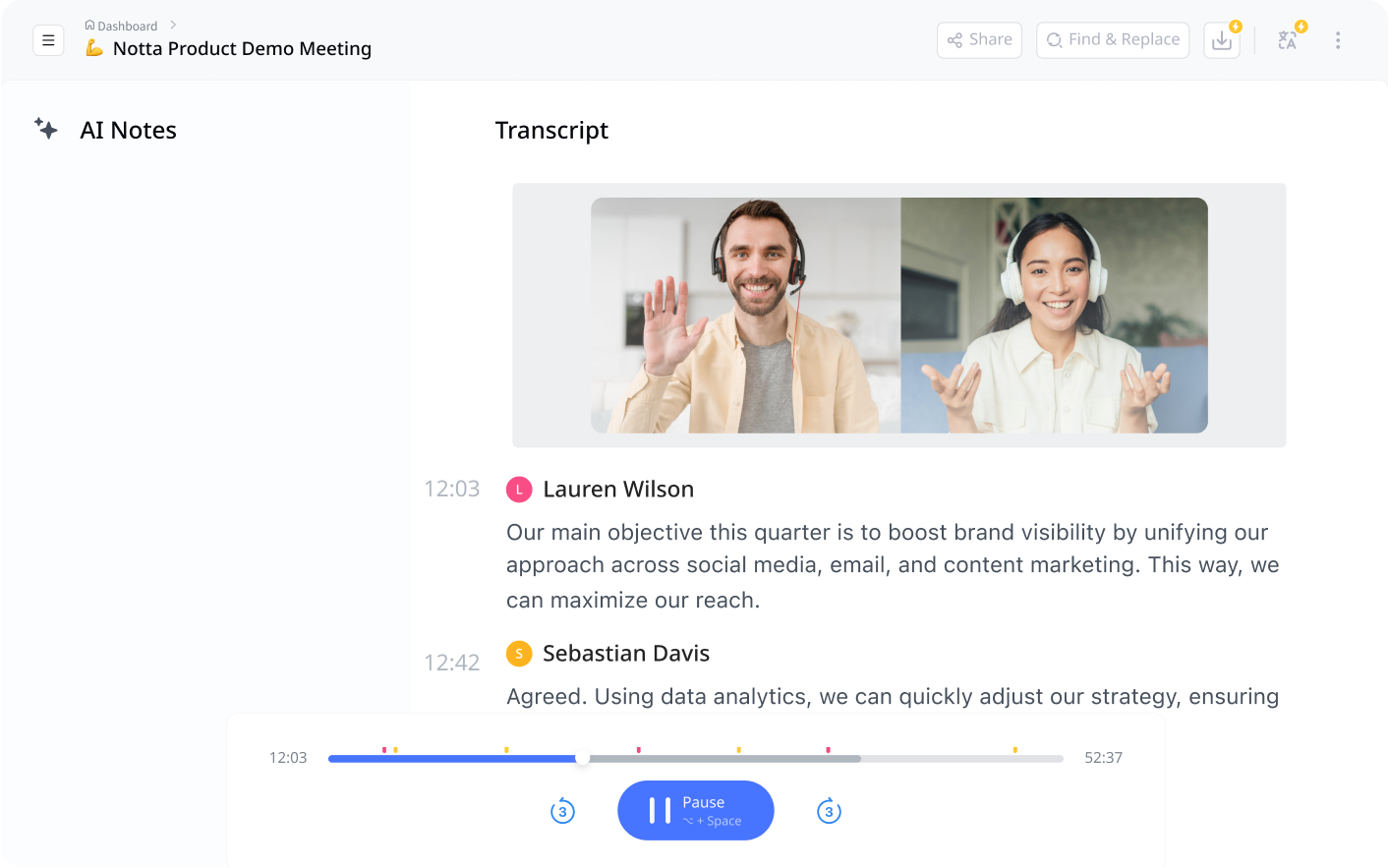
Notta is an AI meeting and transcription tool for capturing online and in-person meetings, telephone calls (with the Notta Memo device) and existing audio or video files. Notta has an Apple Watch app which means you can capture a meeting by pressing start from your wrist.
Notta's key features
65 languages: Transcribes meetings in 65 languages.
Bilingual transcription: Transcribes two languages in the same call, in real time.
Notta Desktop: Desktop records Mac and Windows meetings without a bot, in Beta.
Mobile app: Records and transcribes your in-person conversations on iOS and Android.
Apple Watch app: Starts a recording straight from your wrist on Apple Watch.
Privacy Mode: Desktop Pro users can transcribe offline with a local model.
Live translation: Translates live meeting audio into 80 languages during recording.
Long recordings: Paid plans record up to 5 hours per recording.
Integrations: Connects to Zoom, Teams, Webex, Slack, Notion, Salesforce and HubSpot.
Certifications: Notta is SOC 2 Type II and ISO 27001 certified, and HIPAA compliant.
Notta's pricing
Free: 0 dollars per month
Pro: 13.49 dollars per month
Business: 27.99 dollars per seat per month
Enterprise: Custom pricing
Comparing more tools that transcribe live? See our list of the best meeting transcription software.
What Notta Users Love
Notta Records and Transcribes Meeting Text Quickly
"Save and record, quickly and accurately transcribe meeting text" Verified User in Primary/Secondary Education, G2
Notta Is Easy to Navigate and Handles Accents Well
"It's easy to navigate and good with accents" Verified User in Media Production, G2
What Notta Users Flag
Notta Can Take Time to Transcribe and Upload
"The time it takes to transcribe and upload" Verified User in Media Production, G2
One Notta Reviewer Found Chilean Dialect Transcripts Less Accurate
"Not accuratle transcriptions with chilean dialect" Verified User in Consulting, G2
4. Granola: Best Minutes AI Alternative for Outbound Phone Calls From Your Phone
Best for: Granola is the best Minutes AI alternative for those in back-to-back meetings who benefit from typing their own meeting notes and having them augmented by AI.
Similar to: Jamie, Otter.ai, Fathom
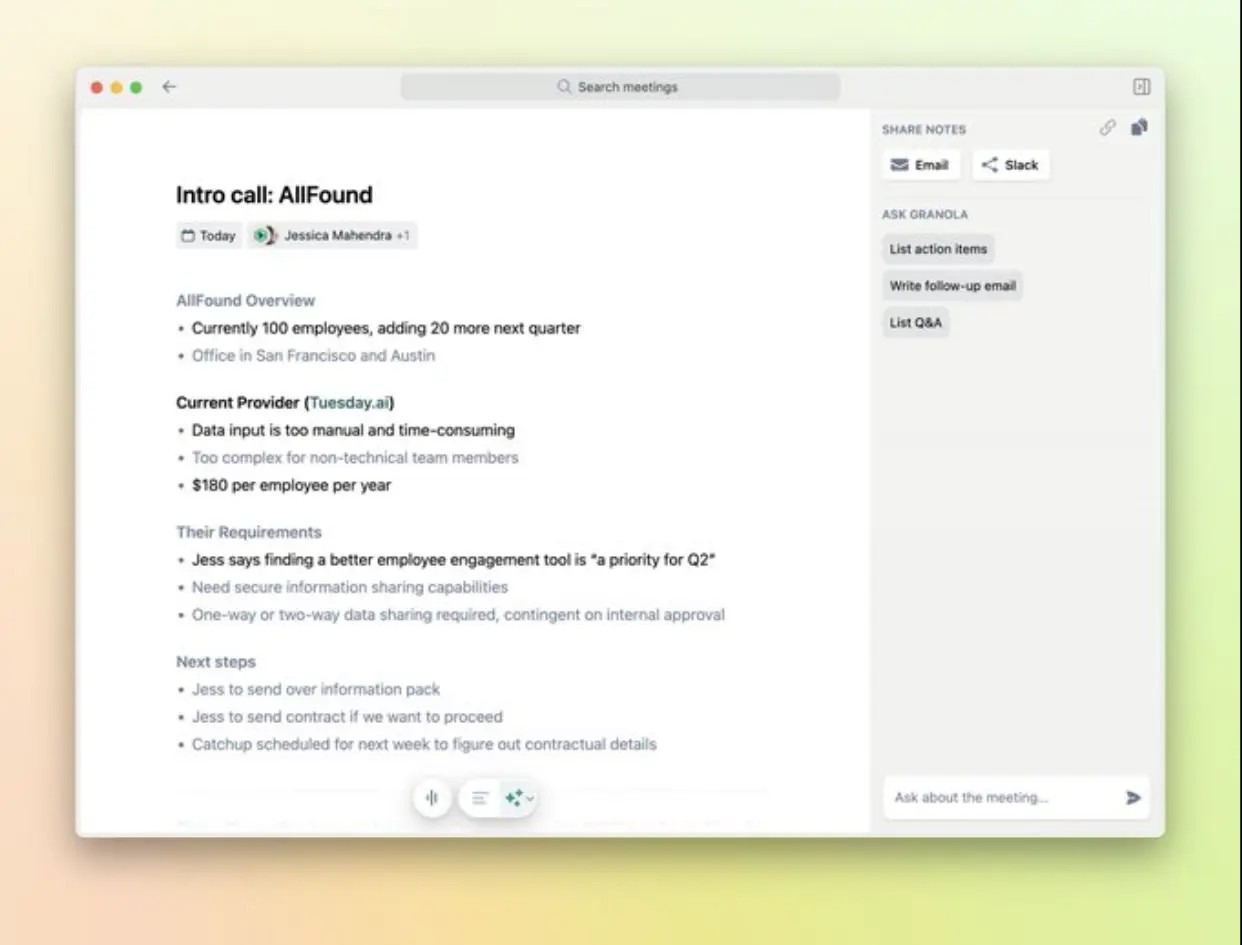
Granola is a note-taking app (an "AI notepad") for users who attend back-to-back meetings. Available on macOS, Windows, iOS and Android, Granola lets you capture computer audio as you take your own meeting notes, without a meeting bot. In addition to capturing your computer audio on a desktop or laptop, the mobile version of Granola will also take your notes on outgoing telephone calls.
Granola's key features
Desktop capture: Captures your system audio on macOS and Windows, bot free.
Mobile apps: Takes notes on in-person meetings with its iOS and Android apps.
Outbound phone calls: Takes AI-enhanced notes on outbound phone calls from your phone.
Watch app: Includes an Apple Watch app on every plan, including Basic.
31 languages: Transcribes 31 languages on desktop and 17 on mobile.
AI chat: Answers questions within and across your meetings with AI chat.
Custom templates: Shapes your notes with customised templates on the desktop app.
Speaker tags: Names speakers in Zoom, Google Meet and Microsoft Teams.
Integrations: Connects to Slack on all plans, plus Notion and HubSpot on Business.
Audio deletion: Deletes the audio from its systems once transcription completes.
Granola's pricing
Basic: 0 dollars per user per month
Business: 14 dollars per user per month
Enterprise: 35 dollars per user per month
Deciding between Granola and Jamie? See the two side by side in Jamie vs Granola.
What Granola Users Love
Granola Builds On Your Own Notes With No Bot on the Call
"No bot joins the call, which I appreciate. I add a few quick notes during the meeting, and Granola builds on them using the transcript." Cecilia C., G2
Granola Identifies Voices and Makes Past Meetings Searchable
"It automatically records conversations, recognizes voices accurately, and makes it easy to revisit past discussions and search through them." Verified User in Computer Software, G2
What Granola Users Flag
Granola's Free Plan Keeps 30 Days of Meeting History
"The free plan is very limited, it only saves 30 days of history so you can't really go back and check on old meeting notes unless you upgrade." Tania M., G2
One Granola Reviewer Wants the Other Speakers Identified
"I wish Granola could identify who the other speakers are. It doesn't do diarization, so the transcript just shows me and the other people in the room." Matthew S., G2
5. Fathom: Best Minutes AI Alternative for Recording Video of Your Online Calls
Best for: Fathom is the best Minutes AI alternative for people who want to record video of each Zoom, Google Meet and Microsoft Teams call and also receive a searchable transcript.
Similar to: Jamie, Otter.ai, Granola
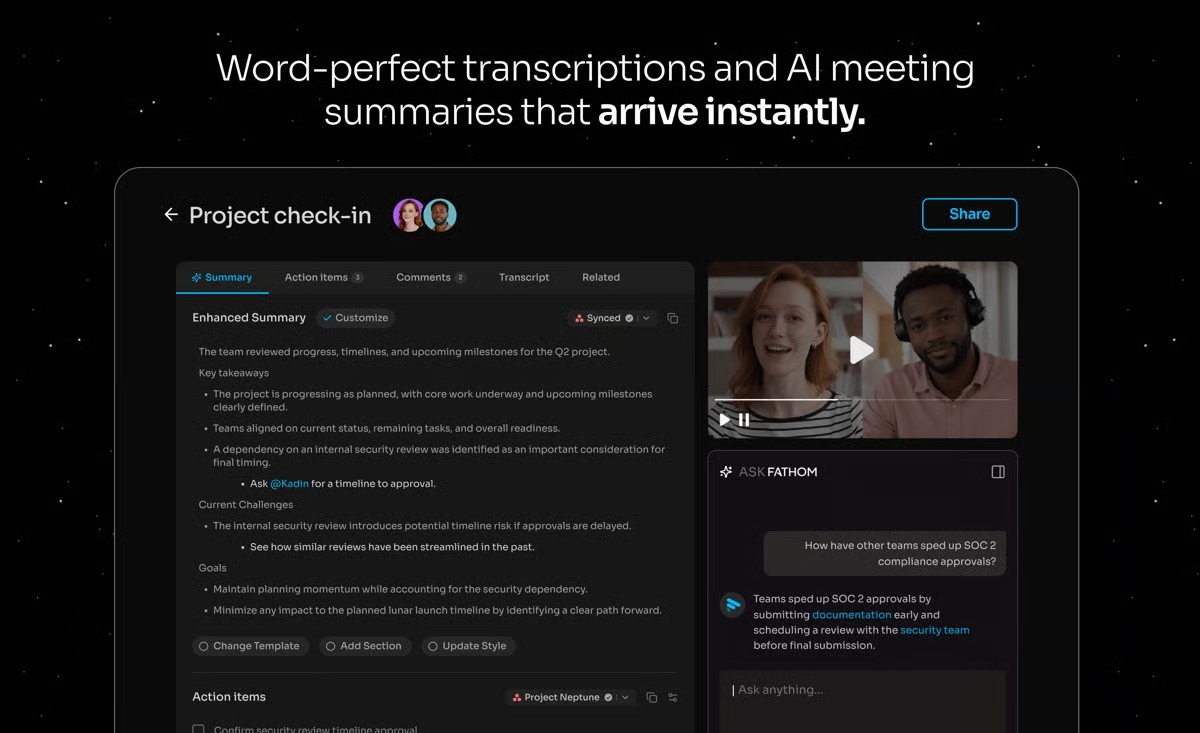
Fathom is an artificial intelligence based notetaking service. Fathom's meeting recording captures the full video, audio and a searchable transcript of your Zoom, Google Meet or Microsoft Teams meeting. The Fathom app for iPhone will also record your in-person meetings and one-on-one conversations.
Fathom's key features
Video recording: Captures full video, audio and a searchable transcript of your call.
Mac recording: Records Zoom, Google Meet and Slack Huddles bot free, in beta.
iPhone app: Records your in-person meetings and one-on-ones on your iPhone.
Live summary: Shows a live summary during English meetings on the Mac app.
Ask Fathom: Answers questions about your calls with Ask Fathom, fully from Premium.
Action items: Generates AI action items and follow-up emails from the Premium plan.
Meeting templates: Offers over 15 expert meeting templates for your call summaries.
CRM sync: Syncs your call notes to HubSpot, Salesforce and Close CRMs.
Consent tools: Sends a recording consent request and posts a consent chat message.
Compliance: HIPAA and SOC 2 Type II compliant, and GDPR-aligned.
Fathom's pricing
Free: 0 dollars per month
Premium: 20 dollars per user per month
Team: 19 dollars per user per month, 2 user minimum
Business: 34 dollars per user per month, 2 user minimum
Enterprise: 35 dollars per user per month, billed annually only
Still weighing Fathom? Compare our Fathom AI alternatives.
What Fathom Users Love
Fathom's Recaps and Video Recordings Make Follow-Ups Easy
"The post-meeting recap and video recording are great. They make it really easy to send follow-up emails and stay on top of action items." Rohit G., G2
Fathom Becomes an Everyday Tool for Client Meetings
"Fathom is one of the tools I use every day, and one I really notice when it's missing." Yolizmar, G2
What Fathom Users Flag
One Fathom Reviewer Needs to Record Meetings They Don't Own
"We often need to record meetings we don't own." Yolizmar, G2
One Fathom Reviewer Has to Log In Again on Different Days
"I keep having to log in again when I access meetings on a different day." Verified User in Education Management, G2
6. Happy Scribe: Best Minutes AI Alternative for Transcribing Files in 150+ Languages
Best for: Happy Scribe is the best Minutes AI alternative for those who mostly upload pre-recorded audio files and need the transcripts in numerous languages.
Similar to: TurboScribe, Notta, Otter.ai
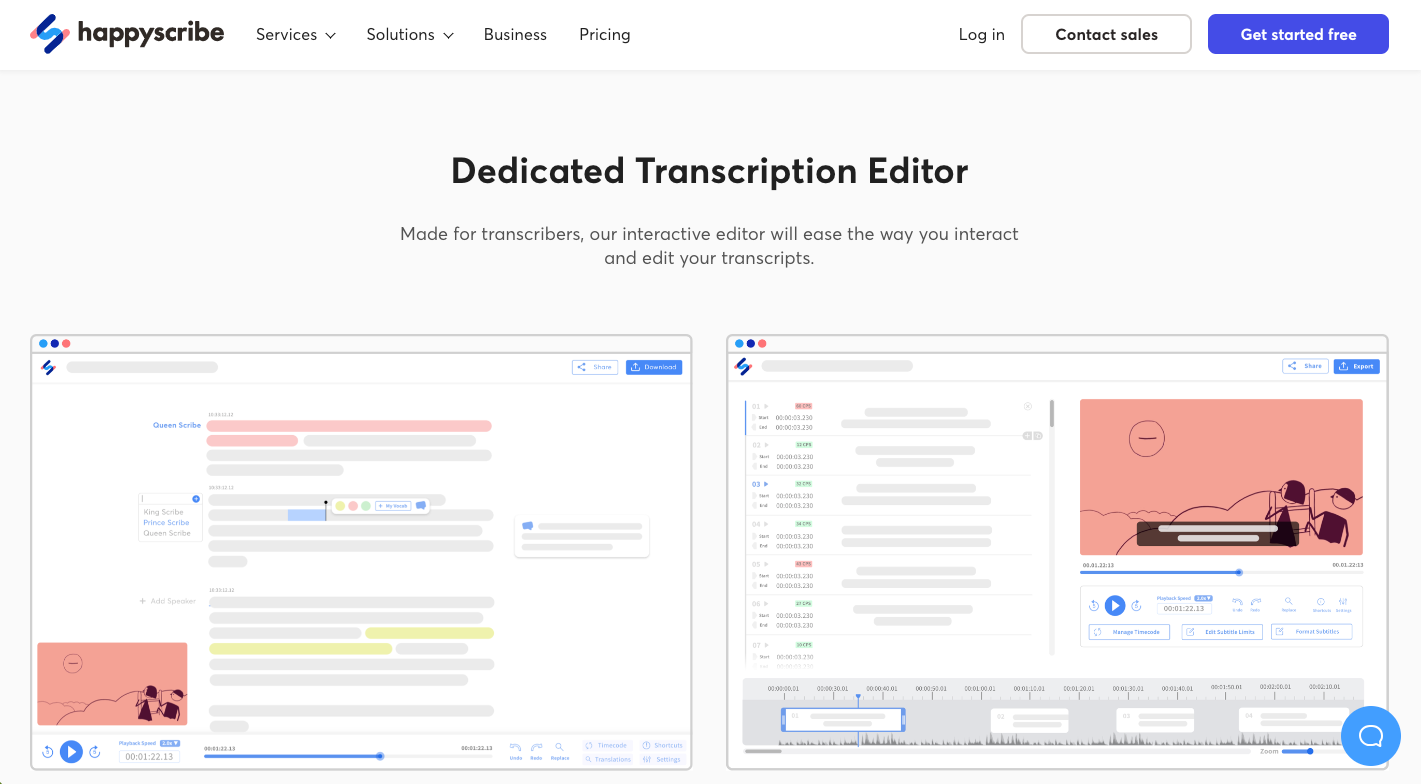
Happy Scribe is a European developed AI note-taking and transcription software. Happy Scribe transcribes both audio and video in 150+ languages. The Happy Scribe notetaker can connect into your meetings such as Zoom, Google Meet and Microsoft Teams.
Happy Scribe's key features
150+ languages: Audio and video transcription is available in 150+ languages using Happy Scribe.
Meeting notetaker: Joins Zoom, Google Meet and Teams calls to send notes.
Mobile apps: Runs its AI note-taking app on both iPhone and Android.
File imports: Users upload files to Happy Scribe directly from Google Drive or Dropbox.
Speaker detection: Detects speakers automatically on all plans, including a free option.
Custom glossaries: Set the spelling of product names and acronyms once in Happy Scribe.
AI translation: Using AI translation, Happy Scribe translates your transcripts into more than 80 languages.
Subtitle exports: Exports .txt and .srt files as part of every plan.
Human transcription: For files requiring 99% accuracy, Happy Scribe provides human transcription services.
EU storage: Stores your files in the EU and adheres to GDPR.
Happy Scribe's pricing
Free: 0 dollars per month
Basic: 17 dollars per month
Pro: 29 dollars per month
Business: 89 dollars per month
Enterprise: Contact sales
Keeping transcripts in Europe? See the best transcription software in Europe.
What Happy Scribe Users Love
Happy Scribe Works Well With European Portuguese
"What I like most is that it works really well with European Portuguese." Pedro M., G2
Happy Scribe Handles Danish and English Client Calls
"We run client calls in both Danish and English, and HappyScribe handles both well enough that we can rely on the transcripts afterwards." Ari M., G2
What Happy Scribe Users Flag
Happy Scribe Can Mix Up Speakers in a Summary
"Sometimes it misunderstands who's talking, so the summaries can end up a bit wrong." Aku S., G2
Happy Scribe Latvian Transcripts Still Need Fixing
"Latvian accuracy is noticeably lower than English. It is usable and better than most alternatives, but names, sales jargon and mixed Latvian-English sentences often need fixing" Raivis V., G2
7. TurboScribe: Best Minutes AI Alternative for Unlimited File Transcription
Best for: TurboScribe is the best Minutes AI alternative for those who have lengthy recorded sessions to transcribe but do not need a meeting application.
Similar to: Happy Scribe, Notta, Otter.ai
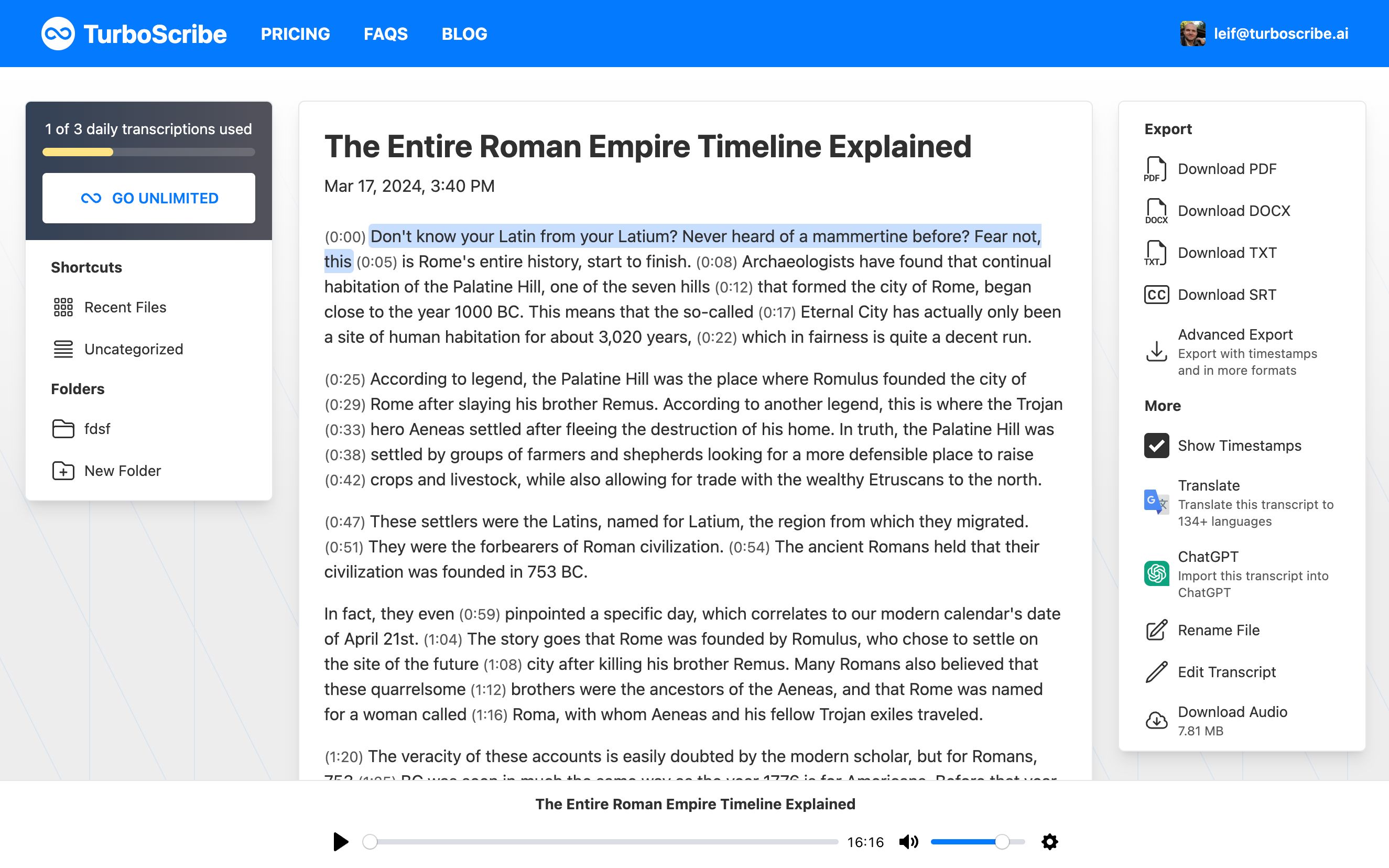
TurboScribe is an artificial intelligence (AI) based transcription service that provides unlimited transcriptions from audio and video. TurboScribe works directly in your web browser, and their website has been designed to be fully functional from your mobile phone as well.
TurboScribe's key features
Unlimited transcription: Unlimited sets no cap on how many hours you transcribe.
Long files: Paid plans accept files up to 10 hours or 5 GB.
Bulk uploads: Takes up to 50 files at a time on paid plans.
98+ languages: Converts speech to text in over 98 languages.
Translation: Translates your transcripts or subtitles into more than 134 languages.
Speaker recognition: Speaker Recognition labels each section of the transcript by speaker.
YouTube links: Transcribes a YouTube video as well as your uploaded files.
Restore Audio: Uses AI to remove background noise and enhance speech.
Exports: Exports PDF, DOCX, SRT, VTT, CSV and TXT, several files at once.
Free plan: Transcribes three files a day free, up to 30 minutes each.
TurboScribe's pricing
Free: 0 dollars per month
Unlimited: 20 dollars per month
Teams: 120 dollars per user per year, billed annually only
Source: turboscribe.ai/pricing, monthly billing.
Want a free transcript of a file? Read our test of the best free transcription software.
What TurboScribe Users Love
TurboScribe Cuts the Manual Typing From Your Transcripts
"TurboScribe makes it much easier to turn audio content into written text without spending a lot of time on manual typing." Ishan S., G2
TurboScribe Transcribes Online With No Software to Install
"Able to transcribe audiofiles/videos online without installing software and for free with limitations." Gerwin S., G2
What TurboScribe Users Flag
TurboScribe Transcripts Need Review With Background Music
"The platform works well for clear recordings, but when a recording includes background music or mixed audio, I sometimes review the transcript more carefully before using it in educational material or subtitles." Ishan S., G2
One TurboScribe Reviewer Wants Free Plan Limits Shown at Upload
"Having limitations in free version and not stating them when uploading a file." Gerwin S., G2
Final Verdict on What's the Best 7 Minutes AI Note Taker Alternatives?
If you are looking for a way to keep your client meetings private, Jamie is the best Minutes AI note taker alternative. Meeting data is stored and processed within Europe and is subject to GDPR. Client meeting notes will automatically sync with Google Docs, Notion or OneNote. The Agent and Workflows also update records in Salesforce, HubSpot and many more apps.
Jamie captures your in-person client meeting using an iPhone or Android device. Jamie displays the live transcript as clients talk, and your own meeting notes are located in the Scratchpad adjacent to it. Briefings prepare you 30 minutes before the next meeting.
Once you have named each speaker, Speaker Memory remembers that person by their voice. When you get back to your desk, the meeting is already on your laptop, where Jamie records every meeting platform, such as Zoom, Microsoft Teams and Google Meet. You can ask "Ask Jamie" anything about any meeting, unlimited on every plan.
As far as building trust with clients goes, it is short with Jamie. First, Jamie does not send a bot into your call, for privacy. Second, consent stays your responsibility, and verbal consent comes first. Third, Jamie has the optional Recording notice email and the meeting chat notice to let the client know when they are being recorded. Jamie complies with GDPR and is ISO 27001 certified. After Jamie transcribes the recording, the meeting audio is not stored.
You can also pick a different tool when the job is different:
Choose Otter.ai when you need to import recordings you already have.
Choose Notta when you want offline transcription on your own computer.
Choose Granola when you take outbound phone calls on your phone.
Choose Fathom when you want a video recording of every call.
Choose Happy Scribe when a file needs human transcription and subtitles.
Choose TurboScribe when you have hours of recordings to upload.
Our Picks for the Best Minutes AI Note Taker Alternatives
Jamie is our pick when your team does a lot of their work across both their phones and laptops. I do believe that the other two tools are well suited to what each was designed to accomplish.
Jamie, the meeting intelligence platform:
Jamie captures your in-person meetings on your desktop, iPhone, or Android phone. On your Mac or Windows laptop, Jamie also captures every meeting platform you use to have a meeting. Your live transcript runs in real time as the other party speaks. Custom vocabulary tells Jamie how to spell your clients' names, and Speaker Memory remembers each voice once it is named. All of the meeting data is stored and processed in Europe. Jamie complies with GDPR and is ISO 27001 certified. After the meeting has been transcribed, Jamie does not store your meeting audio.
Fathom, the AI notetaker for video calls:
Fathom will capture all video and audio and include a fully searchable transcript of your Zoom, Google Meet or Microsoft Teams call. Your recordings and transcriptions have no limits when using the free version. On Mac, a live meeting summary will run automatically for English language meetings. Bot-free recording is currently available as a beta feature from within Fathom's Mac application. In addition, Fathom provides an iPhone app that lets you capture your in-person meetings and 1-on-1 sessions. Fathom is also HIPAA-compliant, meets SOC 2 Type II standards and is GDPR-aligned.
Happy Scribe, the AI notetaker and transcription platform made in Europe:
The Happy Scribe platform can generate transcripts of any type of media, including video and audio files, in over 150 different languages. Happy Scribe can also translate those transcripts into more than 80 languages. For companies with their own product names and acronyms, Happy Scribe will allow you to create a custom glossary, which will ensure these words appear properly. If you ever need to know that a specific file is accurate, Happy Scribe offers a 99% accurate human-generated transcription service. The Happy Scribe iPhone and Android applications let you record your meetings, and your files are hosted in the European Union in compliance with GDPR.
Jamie makes capturing and sharing meeting insights effortless and fast.

Francesca Sant
Data Analyst & Developer | Oney Insurance PCC Ltd.
Insurance
Frequently Asked Questions About Minutes AI Alternatives
Is there a free alternative to Minutes AI?
Yes, several. Jamie's free plan includes 10 AI notes each month, and "Ask Jamie" is unlimited. Every meeting is recorded from beginning to end, though if your client meetings run past 30 minutes, your notes require one of our paid plans to unlock.
Otter.ai has a free Basic plan including 300 minutes of transcription per month; however, it limits conversations to 30 minutes. Fathom has no limit on how many recordings or transcripts you may generate on its free plan. But Fathom has its own limits; though it provides unlimited AI notes, even basic functionality like auto-generated action items sits behind a paid plan.
Can a Minutes AI alternative send my meeting notes to HubSpot or Salesforce?
Yes. Jamie sends your meeting notes to HubSpot, Salesforce, Attio, Affinity, DealCloud and many more CRMs when you click the "Share" button. HubSpot, Salesforce and Attio begin on the Pro plan, DealCloud begins on the Team plan and Affinity on the Enterprise plan. You can also use "Ask Jamie" to enter the meeting information onto a deal record, and Jamie will update that record. On paid plans, Otter.ai will take deal details and next steps and push them to your CRM. Fathom will sync notes with HubSpot, Salesforce and Close. Minutes AI shares notes as a PDF, an email or a text.
Which Minutes AI alternatives show a live transcript during the meeting?
Jamie shows the live transcript on your iPhone, Android phone, and laptop during meetings, with each line showing a timestamp on your phone. Similarly, Otter.ai and Notta both transcribe live. Also, Granola will show the live transcript in its desktop application. Otter.ai identifies speakers in the recorded meeting once the recording stops, or in the case of Zoom, when using Otter Notetaker for real-time identification. Fathom shows a live summary on your Mac computer, but the full transcript arrives after the call. Minutes AI will also display a live transcript as you are recording. A live transcript lets you quickly verify a number someone recently stated, rather than having to ask them to state it again in front of the client.
Do I still need a Minutes AI alternative if my company has Microsoft 365 Copilot?
No, not always. Jamie records your Microsoft Teams meetings and every other meeting platform on your laptop. Jamie also records in-person meetings on your mobile device. The Microsoft 365 connector links Jamie to your Outlook, Teams, OneNote and file locations. Jamie can then store a copy of your meeting summary in a SharePoint folder. Microsoft's intelligent recap works within Teams meetings and calls, and Microsoft says it needs a Teams Premium or Microsoft Copilot license. If all of your meetings are internal Microsoft Teams calls and you have that license, Copilot may cover you. When you also meet clients on Zoom, Google Meet or in person, Jamie records those too.
Read More
Meetings all on Microsoft Teams? Read our list of bot-free notetakers for Microsoft Teams.
Need your meeting notes stored in Europe? See the best GDPR note takers in Europe.
Recording meetings on your iPhone? Read our picks for the best AI notetakers for iPhone.
Writing formal minutes after every meeting? Try Jamie's free AI meeting minutes.
Leaving Otter.ai instead? Compare the best Otter AI alternatives.