Best 10 AI Tools for Venture Capital [2026]
Sanduni
Growth Content Editor
![Best 10 AI Tools for Venture Capital [2026]](/api/media/payload/best-10-ai-tools-for-venture-capital-5021.png)
We went through the 10 best AI tools in venture capital that teams are actually using in 2026, tools like Jamie, PitchBook, Affinity, Carta, Fathom, and a few more. We analysed real user reviews from G2 and Capterra, checked their current pricing, and broke down who each one is actually built for so you can apply your own human judgment to which ones belong in your stack.
TL;DR
10 AI tools for venture capital teams are compared in this article. We have covered deal intelligence capture (Jamie, Fathom, Granola), deal sourcing (PitchBook, SourceScrub, Tracxn), relationship intelligence (Affinity), fund admin (Carta), market intelligence (AlphaSense), and portfolio management and reporting (Visible.vc)
Jamie and Granola capture deal meetings without a visible bot, so founders and LPs talk freely and safely. Jamie goes further with speaker identification that remembers speakers across future meetings, EU data residency with GDPR-grade privacy, and CRM sync across HubSpot, Salesforce, Attio, Dynamics 365, and Pipedrive.
Pricing ranges from free to six figures. Jamie, Fathom and Granola offer free tiers; Jamie starts at €25/month, and enterprise AI platforms like PitchBook and AlphaSense use custom pricing.
What are the best AI tools for venture capital in 2026?
The best AI Tools for venture capital are: Jamie, PitchBook, Affinity, AlphaSense, Carta, Fathom, SourceScrub, Visible.vc, Granola, and Tracxn.
We went through 10 tools and broke down what each one actually does, who it is built for, and what it costs, so here is the full comparison.
💜 Gentle Reminder: Pricing may change; please double-check on each tool's official site. Plans evolve, and enterprise tiers often require a quick chat with sales for accurate quotes.
Jamie
Best for: VC teams that need meeting notes without a bot on confidential calls.
Similar to: Fathom, Fireflies, Otter.ai
Here's Jamie in action 👇
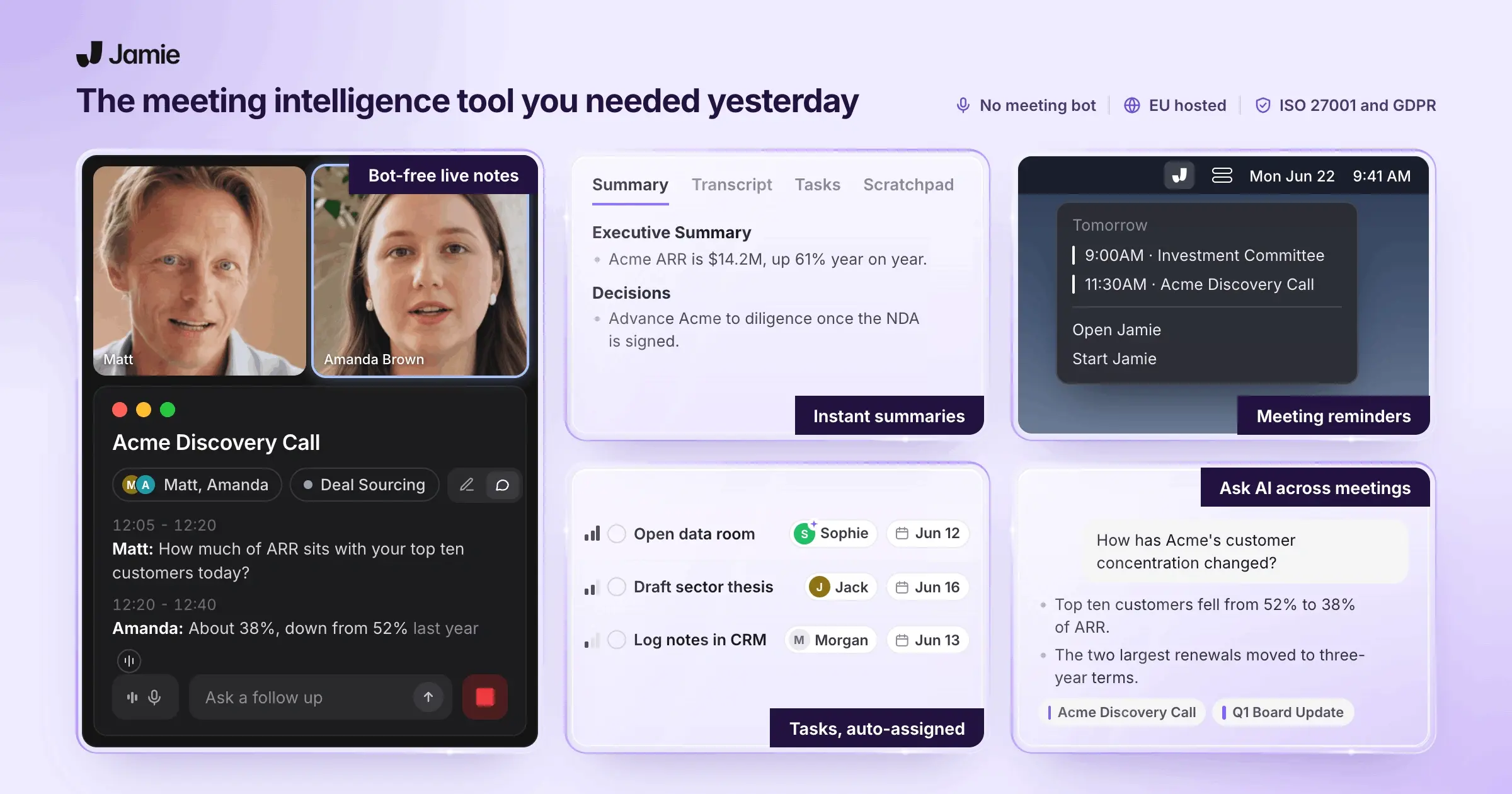
Jamie is a versatile AI tool for VC teams that captures meeting notes, transcripts, and action items without a bot joining the call, on any platform, in 100+ languages.
Jamie also has a mobile iOS app, so you can record in-person meetings on your phone at a fund dinner, a conference, or a boardroom, and everything syncs back to your desktop.
You also never even have to think about what language you or your client speaks during the fund meeting. If your founder switches from English to Portuguese mid-call, Jamie picks that up and transcribes it as spoken. And if you ever want all your summaries in one language, regardless of what was spoken, you can set that once in settings and forget about it.
Your meeting data is encrypted with AES 256-bit, stored entirely in the EU, and your audio is permanently deleted the moment your transcript is ready. Jamie is ISO 27001 certified, fully GDPR compliant, and your data is never used to train AI models, not by us, not by any provider we work with.
Once your meeting ends, Jamie gives you a structured summary, a full transcript tagged by speaker, and a list of action items ready to assign, all within a couple of minutes.
Who is it for?
VC partners and associates who sit in back-to-back founder calls, deal meetings, and portfolio reviews and need clean, structured notes without disrupting the conversation.
Investment teams that handle sensitive deal data and need GDPR-grade privacy, EU data residency, and CRM integrations that sync notes directly into their deal management workflow.
Key Features
Capture every founder call and deal meeting without a bot joining
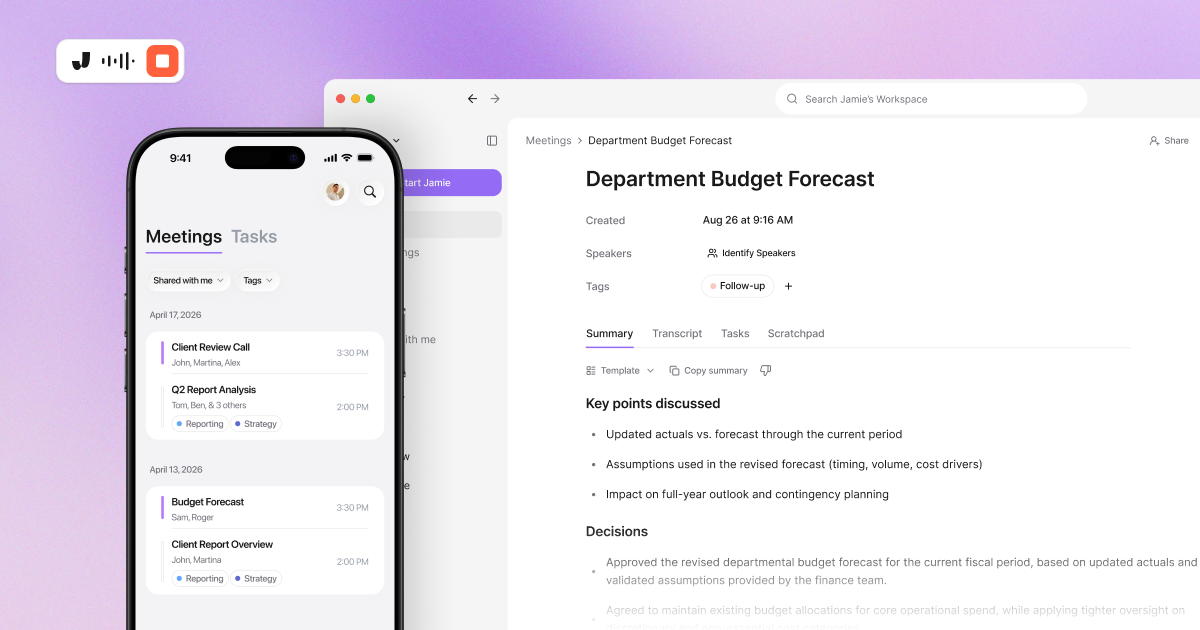
Jamie records straight from your device's microphone, so it works on any platform your founder is on, Zoom, Teams, Meet, or pretty much anything else with audio. There's no bot that joins the call, and no one sees anything in the participant list. You just press start and let Jamie pick up everything through your mic and system sound.
Once your meeting ends, Jamie gives you a structured summary organised by topics, a full word-for-word transcript tagged by speaker, and a list of action items pulled out and ready to assign. All of that within a couple of minutes, which saves time on every single call.
And there's a lot Jamie gives you right out of the box to keep every deal call covered.
Bot-free recording: Records from your device's mic, so no bot joins your founder calls.
Meeting detection: Asks to record when you join a call, so no deal meeting slips by (optional).
Summary: Structured notes ready for your IC memo, organised by topic and key decisions.
Transcript: Full word-for-word record of your meeting, organised by each speaker.
Tasks: Pulls out action items from every call with assignment and tracking built in.
Speaker identification: Labels who said what and remembers them for your next call (optional).
Scratchpad: Private notes you jot during a pitch, kept separate from the summary.
Keep every deal conversation private from recording to deletion
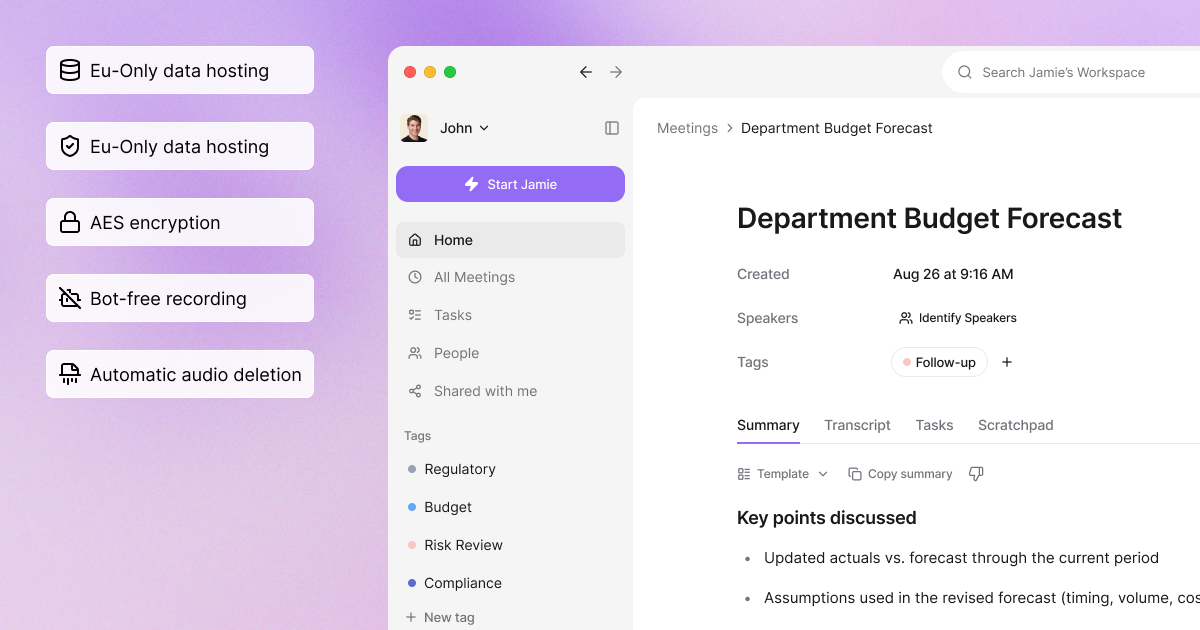
Jamie deletes your audio permanently the moment your transcript is ready, so there's no recording of your deal call sitting on a server somewhere. Everything is encrypted with AES 256-bit at rest and TLS 1.2 in transit, all of it stored and processed in the EU, and none of it is ever used to train AI models, not by us, not by any of the providers we work with.
We built Jamie with the kind of privacy your deal conversations need, and you can see exactly where that shows up.
Audio deletion: Permanently removes call recordings once your transcript is ready.
Encryption: Your data is encrypted with AES 256-bit at rest and TLS 1.2 in transit.
EU data residency: Your meeting data is stored and processed entirely within the EU.
No AI training: Your data is never used to train AI models by us or any provider.
Recording consent: Sends attendees an automated email 24 hours before your meeting (optional).
ISO 27001: Certified for information security, backed by regular external audits.
Data retention: Your meeting data auto-deletes on a timeline you set for compliance.
Send your deal notes to HubSpot, Salesforce, Notion, and the rest of your stack
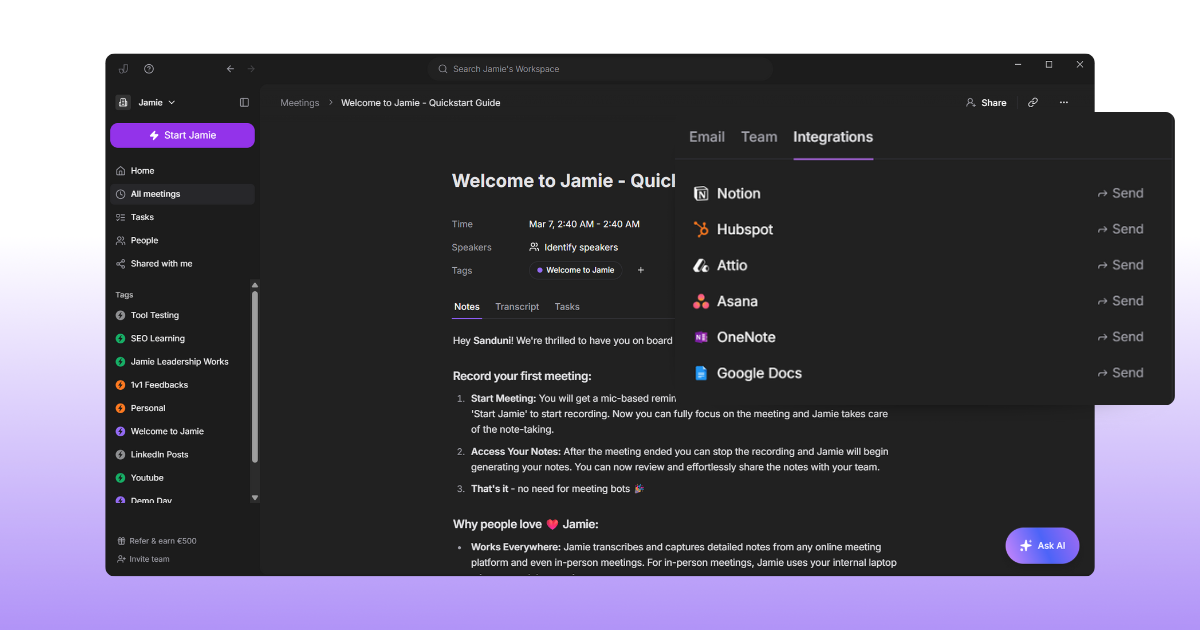
Jamie connects to five CRMs, HubSpot, Salesforce, Attio, Dynamics 365 Sales, and Pipedrive, plus note-taking tools like Notion, Google Docs, and OneNote, and task management through Asana. When a call ends, your notes and deal context go straight into the right record or workspace without you copying and pasting anything.
You can set it to sync automatically after every meeting, or send notes manually when you want to choose where they go.
HubSpot: Syncs your notes and tasks to contacts, companies, or deals in your CRM.
Salesforce: Attaches your notes to leads, contacts, opportunities, or accounts.
Attio: Sends your meeting notes to people and company records in your workspace.
Notion: Creates a Notion database and auto-syncs your notes after every meeting.
Asana: Turns your meeting action items into project tasks with notes attached as PDF.
Search across every founder call and get accurate notes in any language
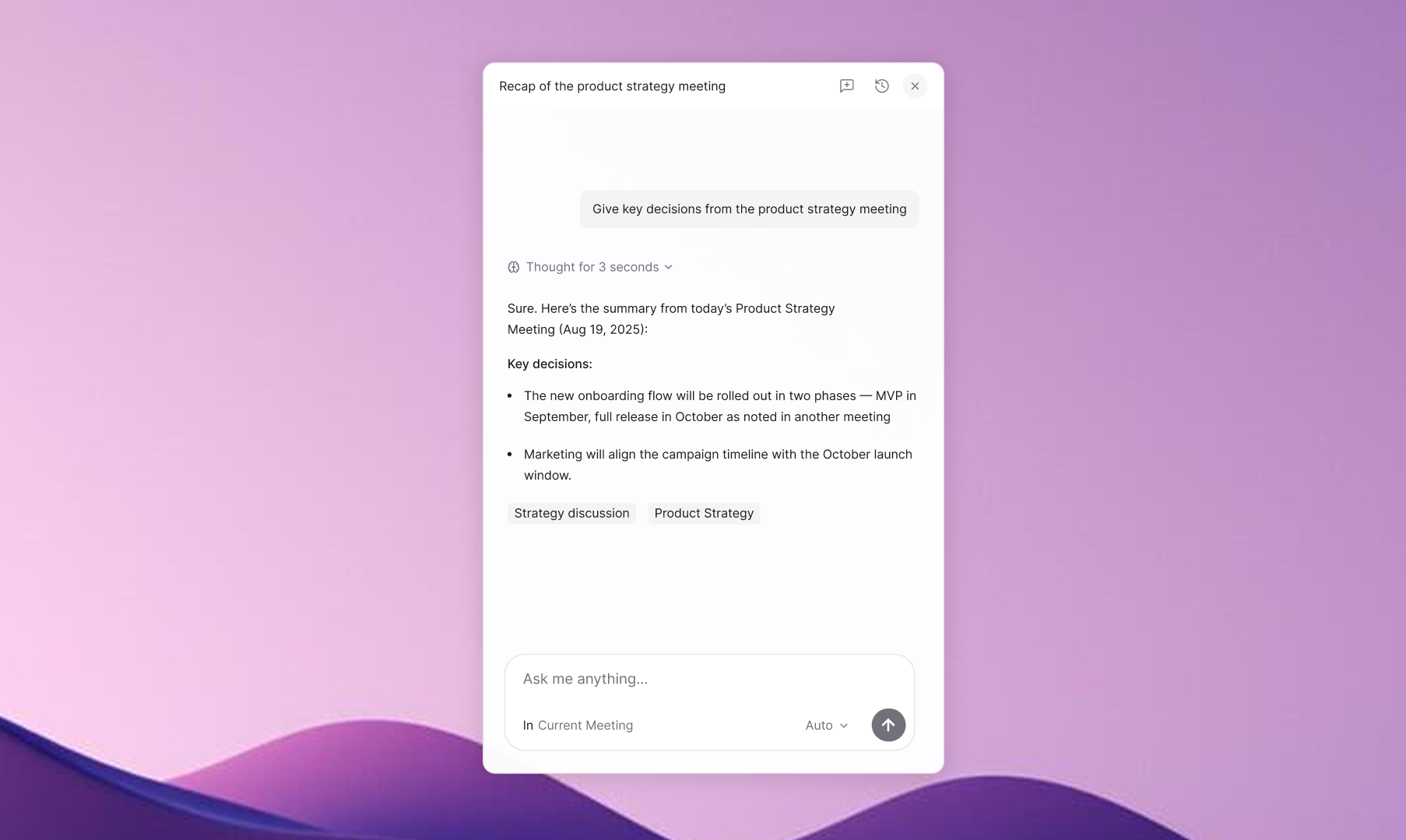
Jamie's Ask AI uses natural language processing to let you ask questions about a single meeting or search across all of them at once, and it shows you exactly which meetings it pulled the answer from.
So when you're prepping for IC and need to find what a founder said about their runway three calls ago, you don't have to scroll through transcripts; you just ask.
Jamie also auto-detects the meeting language, so if your founder is speaking Portuguese, everything comes out in Portuguese by default. But if you'd rather have your summaries in English every time, you can set that in settings before the call, Jamie generates the summary and action items in your language, and the transcript stays in whatever was actually spoken.
You can also teach it your fund's vocabulary so your portfolio company names, deal terms, and internal shorthand always show up correctly.
Ask AI: Ask about a single meeting or search across every call, showing its sources.
Language: Detects your meeting language automatically and transcribes in 100+ languages.
Custom Words: Teach Jamie your fund's terminology so names and terms come out right.
Templates: Build a custom summary format and auto-apply it to the right meetings.
Tags: Organise your meetings by deal name, fund, or stage and filter with one click.
Share deal notes with your team, record in-person meetings, and sync with your calendar
Jamie never sends your notes out automatically; you decide who sees what, and when. You can share full meeting content with your partners through your workspace, email summaries to co-investors who don't use Jamie, or generate a read-only link for anyone who needs a quick look.
And when you need to capture a meeting that's not on a screen, like an LP dinner, a conference, or a boardroom, Jamie's mobile app records in-person audio from your phone and syncs everything to your desktop. Connect your Google Calendar or Outlook, and Jamie auto-titles your meetings and reminds you to record, so nothing slips on back-to-back days.
Here's what Jamie gives you to keep your notes moving and your meetings covered wherever they happen.
Team sharing: Give your partners full access to meeting content in your shared workspace (Team/Enterprise).
Mobile app: Record in-person meetings from your phone at LP dinners or conferences.
Google Calendar: Auto-titles your meetings and reminds you when it's time to record.
Edit notes: Refine your summary, transcript, or tasks before sharing with your team.
Email sharing: Email your meeting summary to co-investors, no Jamie account needed.
Pricing
Personal Plans:
Free: €0/month: 10 meetings/month, 30-min max duration
Plus: €25/month: 20 meetings/month, 2-hour max duration
Pro: €47/month: Unlimited meetings, 3-hour max duration
Business Plans:
Team (2+ users): €39/seat/month: Unlimited meetings, centralized billing, encryption
Enterprise (10+ users): Custom pricing: SSO, admin controls, EU data residency, DPAs, volume discounts
Annual billing offers 17% discount. Source: Jamie Pricing Page
Pros and Cons
Pros
"I tried a dozen AI tools for meeting note taking. Most of them were crap, except one: Jamie"
"After researching and downloading different tools to generate meeting summaries, I decided to keep only this one. Why? Because it can transcribe, summarize, and detect action items with way more accuracy than the rest."
"I really appreciate Jamie for its simplicity and standalone functionality. It's incredibly easy to use without the need to join conferencing meetings or video calls."
"Jamie is the first tool I've tried that doesn't [require a bot]. It captures your notes without appearing as a meeting guest, handles both online and offline conversations." -
"Saved me a lot of time. Surprisingly also performed well in meetings with multiple languages (Japanese and English) used."
Source: G2, Product Hunt (Julia Hollnagel), MakeUseOf, LinkedIn (Tim Schumacher)
Cons
"I think overall the Ask AI feature can still be improved a little bit and the amount of integrations."
"The speaker identification feature of Jamie, though very useful, isn't entirely reliable or infallible. In our experience, to get the most effective results from Jamie, it was necessary to invest in a good quality microphone."
"There a few buggy things and missing integrations but Jaime is young and I have full confidence in what their future looks like. It's better than every other app I've tried, and I can guarantee you that I've deep researched and checked out a million.."
"Slow Note Generation: Processing can take several minutes, which may delay access to critical information in real time."
"Jamie's features are outstanding, sometimes I had the feeling that my audio quality heavily impacts the outcomes, which I need to adapt from my side."
Source: G2
PitchBook
Best for: The database most VC teams already use for deal research and comps.
Similar to: CB Insights, AlphaSense, Crunchbase
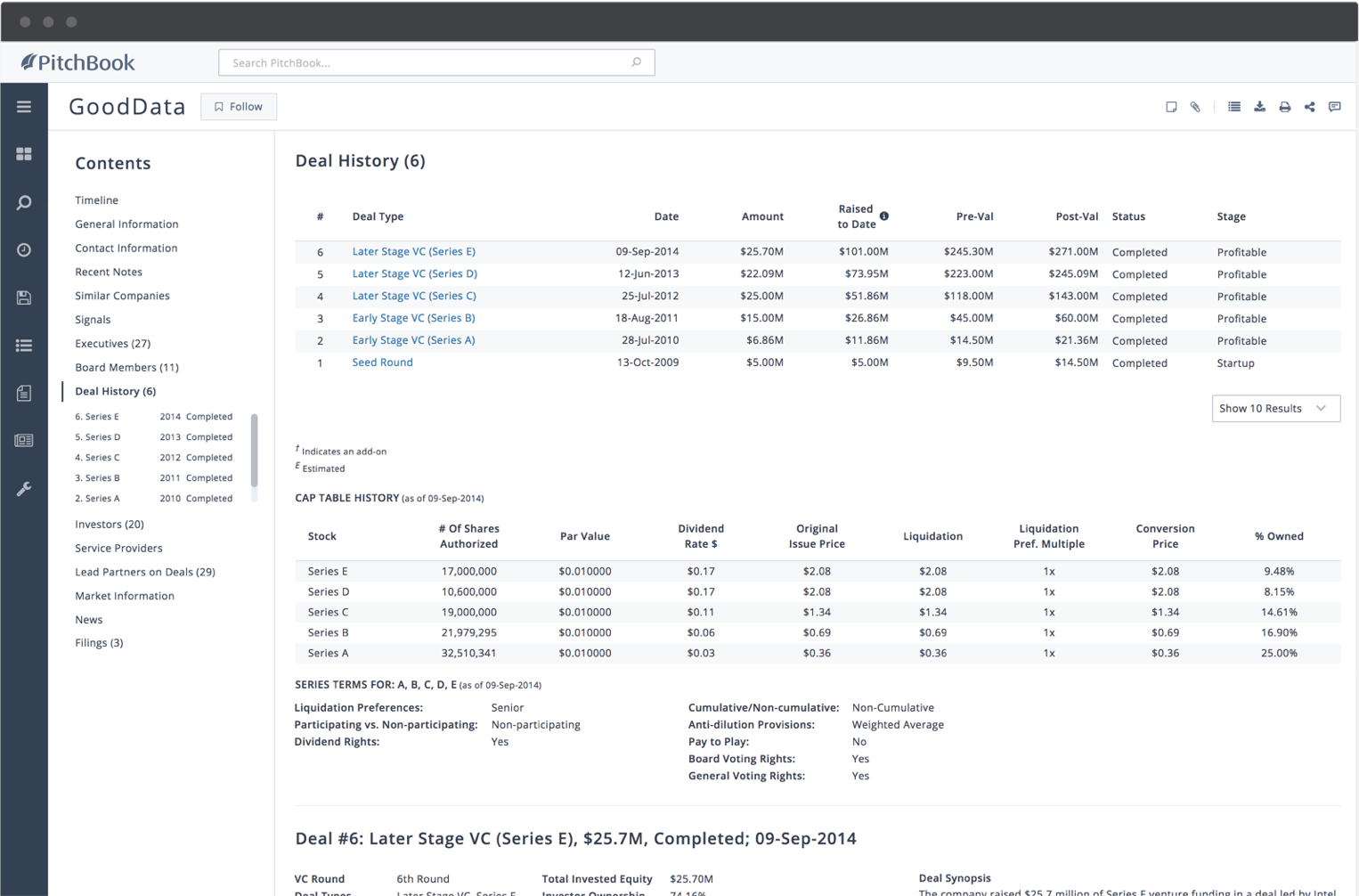
PitchBook is one of the core AI tools for venture capital. It's a huge library that consists of information on private companies, deals and investors. As a VC like yourself, you can search and filter by industry, location, company size, deal size, investor type and more to find what you need. Some filters also use machine learning that suggests similar companies.
PitchBook also launched an ai assistant named Navigator in November 2025. If you type a phrase like "biggest fintech deals this year," Navigator gives you an answer built from PitchBook's own data using natural language search. This information is a combination of their AI and their human analyst research.
PitchBook also launched a separate ChatGPT integration around the same time, so if you prefer working inside ChatGPT, you can pull their data in there too.
According to a G2 reviewer, PitchBook seems to have
"The proprietary data on private companies is unmatched."
So I'd say it's best for institutional VC funds and growth-stage investors. PitchBook also has a whole in-house analyst team with CFA, CAIA and PhD credentials. They publish original research across VC, PE, M&A, fundraising and emerging tech. And every single day, you get dozens of reports published daily across their verticals.
Which brings me to the other crucial point, the pricing of PitchBook, and why it might not be ideal for pre-seed funds and solo GPs on a tight budget, in my opinion. A Capterra reviewer said:
"data for early-stage companies can be missing...frustrating for pre-seed due diligence"
PitchBook pricing can be quite expensive, but it's not publicly listed. PitchBook requires a sales call for a quote. But from a recent ITQlick PitchBook pricing breakdown, it was reported that prices could range from $12K to $40K per user per year.
Yet PitchBook can be great for VCs with a bigger budget. It also has a pull system. You use their Formula Builder to pull PitchBook data directly into your Excel cells, and you work with your model in your Excel as normal. It then bridges your linked Excel file. When your Excel data refreshes from PitchBook, you can click refresh in your PowerPoint, and voilà, your slide gets updates. It's nice to have, and the choice is yours, truly.
Who is it for?
VC partners, analysts, and associates who need comprehensive private market data for deal sourcing, due diligence, and benchmarking, and LP teams tracking fund performance across their portfolio.
Key features
Screening capabilities: Filter companies by sector, geography, deal size, and stage.
AI-integrated search: Find comps, precedent deals, and analyze market trends without digging
Fund analysis: Benchmark fund performance across stages with LP and GP visibility.
Market analysis: Analyst-curated vertical research, trend reports, and sector data.
Plugins and integrations: Pull live data into Excel, PowerPoint, and Chrome workflows.
Pricing
PitchBook does not list pricing publicly. All plans require a custom quote.
Contact PitchBook's sales team for pricing.
Source: PitchBook Pricing
Pros and cons
Pros
The depth of private market data is hard to match anywhere else
"Deep market research, investor database and updated modelling." - Capterra, Anthony P., June 2025
Market reports and newsletters help you stay ahead of emerging trends
"Newsletter and investment market reports are informative and useful." - Capterra, Thomas K., July 2025
Research and investor intelligence all in one comprehensive place
"Great analysis about Industry, great research reports, investor's intelligence." - Capterra, Zain J., July 2025
Finding contact details for investor outreach is genuinely handy
"I like how you can find peoples emails. Very handy for investor outreach." - Capterra, William B., June 2025
A crucial part of the VC workflow for growth-stage deal sourcing
"PitchBook has a good range of data, especially for growth-stage private companies and it has become a crucial part of our VC workflow." - Capterra, Adam P., July 2025
Cons
The cost is steep and there is no option to pay monthly at all
"The fees are bit opaque and inability to pay monthly." - Capterra, Anthony P., June 2025
Early-stage company data can be missing which slows due diligence
"High cost of a database subscription for small early stage companies or individuals is a roadblock to progress." - Capterra, Thomas K., July 2025
An AI chatbot to summarise research documents would help a lot
"Maybe it will be helpful to include an Ai chatbot that can summarize 20-25 research documents in one page." - Capterra, Zain J., July 2025
Download limits and screening filters need more flexibility now
"Let me download the full screen list because it is capped at the moment. Also let me do AND screens." - Capterra, William B., June 2025
The interface can feel clunky and early-stage data has some gaps
"The UI can be a bit clunky at times and so some training is needed. Some of the data for early stage companies can be missing." - Capterra, Adam P., July 2025
Affinity
Best for: The relationship CRM most VC firms use to manage their deal pipeline.
Similar to: HubSpot, Salesforce, 4Degrees
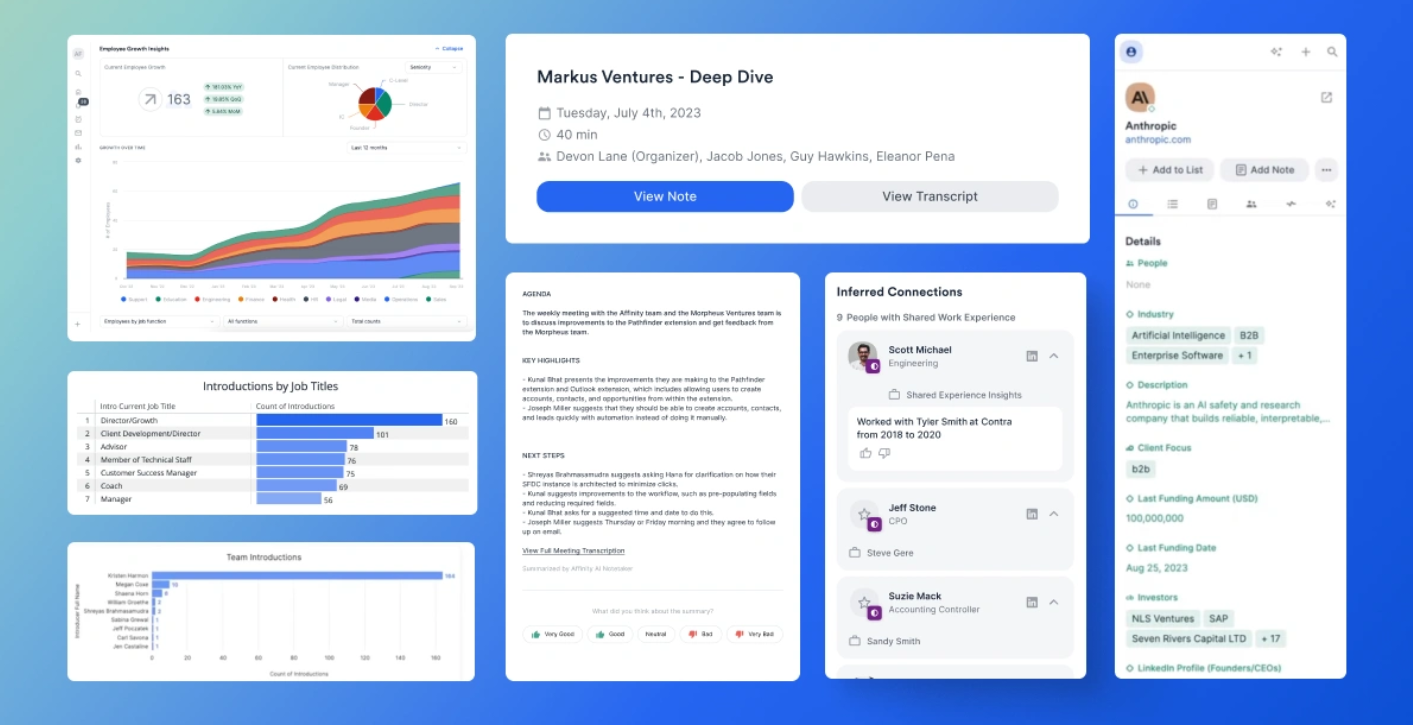
Affinity is a relationship intelligence CRM. It continuously syncs with your Gmail and calendar to create contact/company profiles with no manual entries. For VC teams this helps because Affinity scores the relationship strength by how recent and frequently you're in touch, and shows intro paths across your firm's network. As a G2 reviewer said,
"it's built specifically for the use cases of a venture investor."
VC and PE firms' sourcing runs on relationship capital, and Affinity is purpose-built for private capital. Many firms across VC and PE use it for exactly this reason.
Affinity also launched an AI Chat this year, and they've got a live demo webinar on 23 April 2026 if you want to see it. You type something like "show me all deals from Q1" and it pulls them up. Jamie has Ask AI for the same job on your deal conversations.
Ask "what did this founder say about burn rate in our last call?" and Jamie pulls it straight from your transcripts. Free plan included.
Affinity also has a meeting preparation feature. Before you head into a meeting, it pulls together the deal history, the relationship context, the key contacts, and any warm intro paths, all generated automatically for you. Jamie also captures every partner question and founder answer in the conversation, all searchable later when you're pulling the deal memo together.
And the biggest 2026 story for Affinity is their hosted MCP server. Launched this spring, it connects Affinity's deal intelligence to AI assistants like Claude, Gemini, and Copilot. Jamie has an MCP integration for your meeting notes, which means all your founder calls, IC discussions, and LP conversations plug into the AI tools you already use.
However, I wouldn't suggest Affinity for emerging managers or teams with tighter budgets. A G2 reviewer in October 2025 gave it 0.5 out of 5 and put it plainly:
"Not meant for emerging managers: high costs and outdated collaboration make it not worth it."
Who is it for?
VC partners and associates managing hundreds of founder relationships and LP communications who need a CRM that fits into their investor workflows and captures everything automatically without manual data entry.
Key features
CRM: Captures data from email, calendar, and meetings to keep your pipeline current.
Relationship Intelligence: Shows who on your team has connections at target companies.
AI & Automation: Enriches profiles, surfaces opportunities, and automates workflows.
Analytics & Reporting: Tracks dealflow and team performance with pipeline visibility.
Affinity Notetaker: Records calls and generates AI summaries on the Advanced plan.
Pricing
Essential: $2,000/user/year
Scale: $2,300/user/year
Advanced: $2,700/user/year
Enterprise: Custom pricing
No monthly billing option shown. All plans require contacting sales. Source: Affinity Pricing
Pros and cons
Pros
Tracks thousands of investment opportunities without duplicate entry
"Affinity makes it easy to track thousands of prospective investment opportunities, and does so without requiring duplicate data entry." - G2, Eric E., November 2025
Built specifically for venture investors with deep email integration
"It's built specifically for the use cases of a venture investor. Integrates really well with your email and calendar." - G2, Luis A., September 2025
The source of truth for firm communications and deal flow management
"It is the source of truth for our firm around communications and deal flow." - G2, Annie G., April 2026
Email ingestion captures your real-world interactions automatically
"Affinity's ingestion of email data allows for very efficient capture of our universe of real world interactions." - G2, Zack M., June 2025
Easy for non-technical team members to pick up and start using fast
"Ease of use for the wider team, especially for non-technical team members and those not familiar with CRM structures." - G2, Verified User in VC/PE, April 2025
Cons
A direct LinkedIn integration for company research is still missing
"I would like a direct LinkedIn integration so that I could research companies and pull in profiles of key management team members." - G2, Eric E., November 2025
The mobile app needs work and the search function could be stronger
"The mobile app is not very useful. The search function it needs more improvement." - G2, Luis A., September 2025
Reporting and analytics feel clunky and the UX needs an update soon
"UX needs an update. Reporting and analytics are still clunky." - G2, Annie G., April 2026
Pricing is high relative to the feature set for emerging fund managers
"Extremely high cost relative to the feature set. Many of the forced 'premium features' are commoditized and not worth the investment." - G2, Verified User in VC/PE, October 2025
Customisation options are limited and CRM automations are still basic
"Lack of customization options, and current lack of automations in the CRM." - G2, Verified User in VC/PE, April 2025
AlphaSense
Best for: The research platform VC teams use for deep analysis, due diligence, and comps
Similar to: PitchBook, CB Insights, S&P Capital IQ
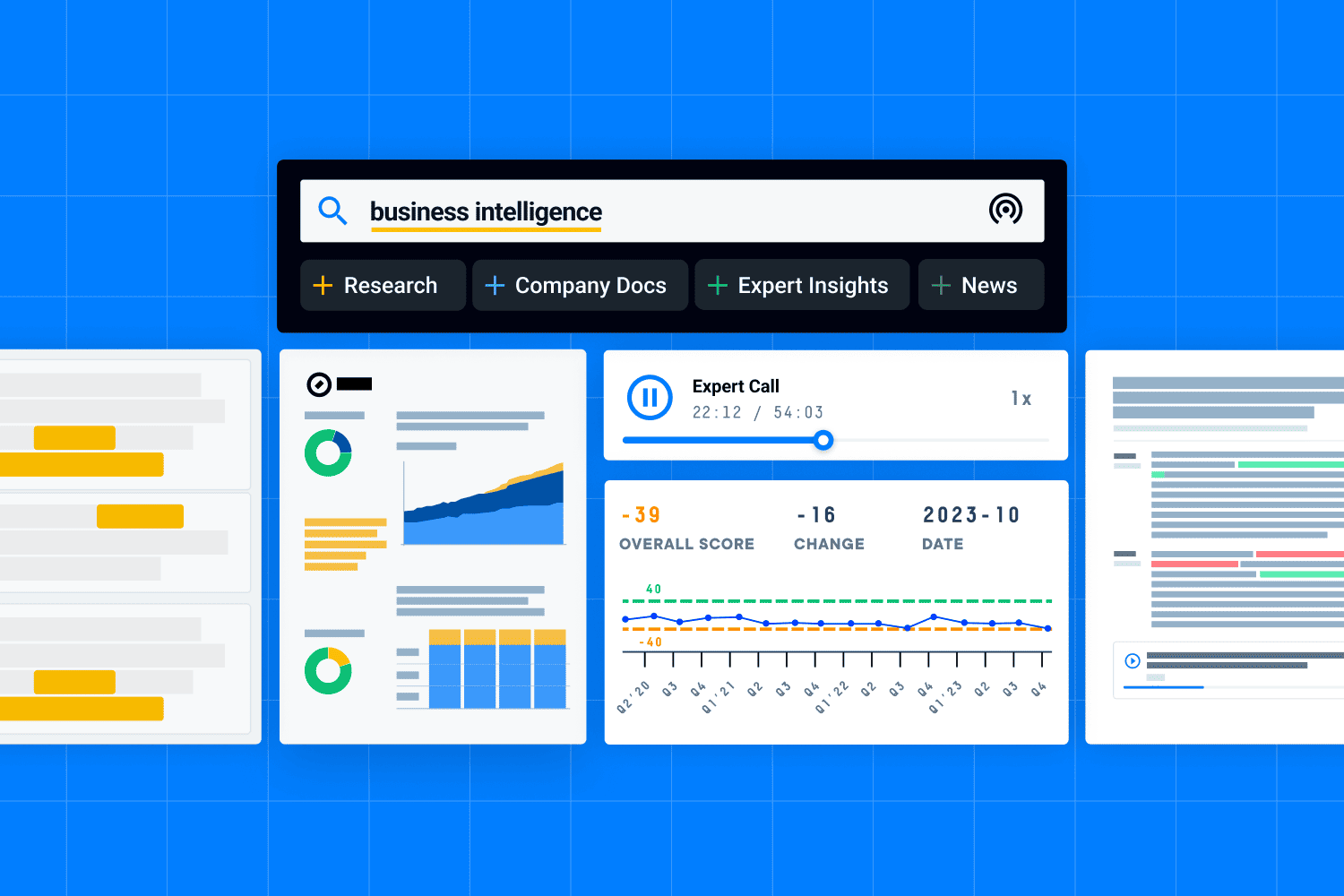
AlphaSense is an AI-powered market intelligence platform that indexes vast amounts of financial and business documents, which include earnings calls, analyst reports, SEC filings, and expert call transcripts, so your VC teams can search and analyze which companies to invest in or make deals with wisely.
AlphaSense has a feature called Generative Search with Deep Research. It's generative AI that lets you search across documents and get answers with sentence-level citations, pulled from years of historical data. Every earnings call you had, you get an AI Smart Summary of it, with bullet points, Q&A topics, and key takeaways within hours.
Jamie has a similar feature on the free plan called Ask AI. You just have a casual conversation with it. Ask something like "what did every partner say about this company's Series B in our IC?" and Jamie pulls the answer from any deal conversation you ever had.
AlphaSense is great for hedge funds, corporate dev teams, and investment banks doing market dynamics research, competitive positioning analysis, and public-market intelligence. As a reviewer on TrustRadius put it,
"Has streamlined my company monitoring with great, custom dashboards which enable me to focus on just the info I need."
However, I wouldn't say it's ideal for teams whose primary research lives in their own conversations, documents, and private meetings. AlphaSense indexes its corpus, not yours. As Tim Beyers, Senior Analyst and Lead Advisor at The Motley Fool, said on TrustRadius:
"There's no mechanism for uploading documents."
Which brings me to the pricing, which again is not listed publicly. According to Vendr's data from 34 purchases, the median contract is around $18,375 per year, with a range from $12,000 to $51,000. Per-seat pricing typically falls between $10K and $20K a year.
And the prices have been climbing, SMB pricing jumped about 18% year over year and enterprise closer to 48%. Jamie sits on a different layer. It's meeting intelligence, not public-document search. And its free plan gets you Ask AI without a $12K+ commitment.
Who is it for?
VC analysts and partners running due diligence on potential investments who need to pull insights from earnings calls, filings, financial projections, broker research, and expert transcripts quickly and in one place.
Key features
Generative Search: Reasons across financial data and qualitative insights at once.
Deep Research: An AI agent that handles large-scale document processing and generates comprehensive research outputs in minutes
Monitoring: Customised dashboards delivering real time insights, with alerts that track competitors and market trends
Enterprise Intelligence: Turns your unstructured data, including internal memos and slide decks, into searchable insights with AI
Financial Data: Screening tools, comparables, M&A transactions, and Excel integration.
Pricing
AlphaSense does not list pricing publicly. They offer annual subscriptions ranging from per-seat options to enterprise packages.
Contact AlphaSense's sales team for pricing.
Source: AlphaSense Pricing
Pros and cons
Pros
Concentrates information from thousands of companies in one platform
"It concentrates a lot of information from a lot of companies, but it is easy to navigate and find the information you're looking for." - G2, Aldo M., February 2026
Keyword search brings up high-quality articles and research quickly
"I really like the ease of use with AlphaSense and how it allows me to search for keywords quickly. It brings up very good and high-quality articles." - G2, Eddie H., February 2026
Expert calls with industry professionals add depth to the research
"I like AlphaSense's integrative platform, which provides exclusive insights and expert calls with industry professionals." - G2, Gary L., March 2026
AI summarises and answers business questions without scanning docs
"I appreciate that the AI tool is advanced enough to not only tag documents of interest but also summarize and address questions, saving me time." - G2, Lisa C., December 2025
Premium content library is exceptionally large and well organised
"It brings together an exceptionally large library of premium financial, corporate, and industry content with advanced, context-aware AI search that surfaces highly relevant insights in seconds." - G2, Verified User in Pharmaceuticals, January 2026
Cons
The new interface can be difficult to use and takes time to learn
"Sometimes the new user interface is difficult to use. What else that could be improved is to ensure that searches come up with high quality articles." - G2, Eddie H., February 2026
No Excel plug-in so exporting data requires extra manual steps now
"It doesn't have an Excel plug-in like S&P has, so I can't export data from Alphasense directly into Excel." - G2, Aldo M., February 2026
Setting up alerts can result in a lot of noise and takes patience
"It's not always easy to navigate the different sources and set up alerts. And sometimes setting up alerts just results in a lot of noise." - G2, Lisa C., December 2025
A premium high-cost solution that may not suit smaller VC teams
"It is a premium, high-cost solution, which can make it less accessible for smaller teams or organizations with tight budgets." - G2, Verified User in Pharmaceuticals, January 2026
Coverage gaps exist for certain regions like Asia and CIS markets
"There is limited data and information on CIS (Russian) and Asian companies." - G2, Verified User in Pharmaceuticals, January 2026
Carta
Best for: The cap table platform most startups and VC funds already run on.
Similar to: Pulley, AngelList, Shareworks
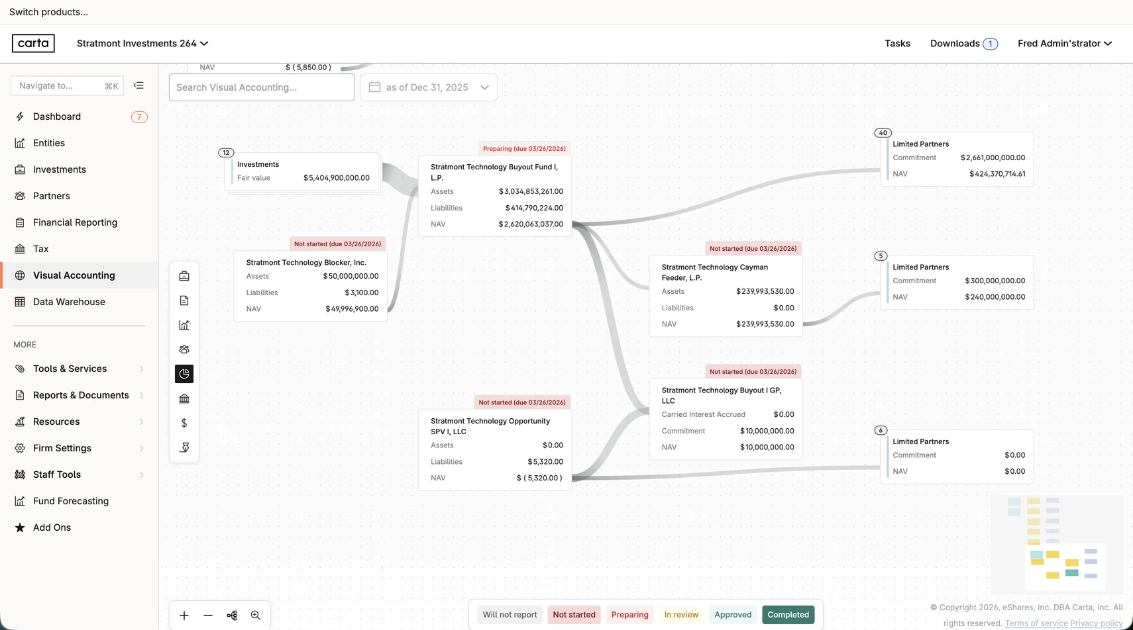
Carta is a cap table management and fund administration platform for private capital. As a VC, Carta shows you how much you own of each company you've invested in, all on one screen. You can track the equity and stakeholders across all your portfolio companies.
Carta handles all three parts of a VC's paperwork, from capital calls going out to LPs, distributions going back to LPs, and the quarterly LP reports. The entire loop of paperwork flow, money moving between LPs and the VC fund, is handled by Carta.
Carta now also has an agentic AI which does all the boring paperwork automatically. This means matching cash transactions and flagging tax issues automatically, and it's one of the practical AI applications in private capital right now.
It replaces the manual processes that used to take, more like "eat," a whole workday. Not only that, but in March 2026, Carta launched a Fund of Funds solution. VCs like yourself who run a Fund of Funds can now see every VC fund you've invested in, along with the underlying portfolio companies those funds hold, all in one dashboard. It also automates the LP reporting you send to your own backers.
Carta would work best for institutional VCs whose portfolio companies are already on Carta, because you automatically get a dashboard of your ownership in each one, which helps you make informed decisions about each of your portfolio companies.
As a TrustRadius reviewer put it in November 2025,
"Clear display of ownership / stock options."
That single dashboard view is honestly the biggest appeal for firms with a lot of portfolio companies to track.
Yet Carta isn't ideal for angel investors or solo GPs, the people investing smaller amounts in just a few companies each. Carta's pricing scales with how many people hold stock in each portfolio company, so all those per-stakeholder fees, add-ons, and annual renewal increases aren't really worth it at that scale.
And even for bigger setups, the platform has a learning curve. As Sarah K, a People Ops Manager, put it on Capterra in July 2025:
'Equity administration can be very confusing, and I sometimes find myself getting lost in the admin portal.'
In my personal opinion, Carta is good for huge investors, as there can be loads of fees within the platform. According to Costbench data from April 2026, Carta runs $3K to $12K per month, which works out to about $36K to $144K a year depending on the tier.
So unless you have a big budget that's ready to pay for Carta, I wouldn't suggest it if you're an angel investor, solo GP, or someone investing smaller amounts in just a few companies each.
Who is it for?
VC fund managers who need fund administration, LP reporting, and carry tracking in one place, and the startups in their portfolio who need cap table management, 409A valuations, and equity issuance.
Key features
Cap Table Management: Tracks equity, vesting schedules, and ownership in real time.
Fund Admin Portal: Shows fund IRR, gross returns, and overall performance in one view.
409A Valuations: Delivers audit-ready valuations customised to stage and industry.
Total Compensation: Benchmarks salary and equity to help forecast, hire, and retain.
Liquidity: Runs secondary tender offers on your terms with dashboards and estimates.
Pricing
Carta offers four equity management plans (Launch, Build, Grow, Scale) priced by stakeholder count. No dollar amounts are shown publicly.
Launch: Free for companies with up to 25 stakeholders and up to $1M raised.
Build, Grow, Scale: Contact sales for pricing.
Fund Administration: Contact sales for pricing.
Source: Carta Pricing
Pros and cons
Pros
Centralises equity information so vesting and grants are visible fast
"The platform centralizes equity information in one place, which is convenient for viewing your current grant balances and upcoming vesting schedules at a glance." - G2, Tian P., March 2026
Intuitive and easy with more detail on stocks than other platforms
"I use Carta for equity management, and I love how intuitive and easy it is. It provides way more details about my stocks and exercises than other platforms." - G2, Govind S., March 2026
Manages equity, cap tables, and option grants all in one clean place
"Carta makes it simple to manage our equity, cap tables, and employee option grants in one place." - G2, Zak S., December 2025
Makes managing equity and ownership structures smooth and simple
"Carta makes managing equity and ownership structures smooth and straightforward." - G2, Nijat I., November 2025
Simple to use with clear steps and minimal back-and-forth over email
"Carta is simple to use and easy to navigate, with clear steps and minimal back-and-forth over email." - G2, Daniel B., October 2025
Cons
The interface can feel slow and finding historical records is tricky
"The UI is noticeably slow. Finding historical transaction records is unnecessarily difficult." - G2, Tian P., March 2026
More education around taxation and exercises would be really helpful
"Maybe more education about the taxation and exercises would be helpful." - G2, Govind S., March 2026
Loading speed is slow especially when switching between client views
"I find the loading speed to be slow, particularly when the dashboard takes time to refresh while switching between clients." - G2, Nijat I., November 2025
Some workflows feel less automated than they could be at this stage
"There are times when certain workflows feel less automated than they could be, and support responses vary depending on complexity." - G2, Zak S., December 2025
International bank connections can cause avoidable payment friction
"My Portuguese bank had difficulties connecting to Carta's payment system, leading to some avoidable extra costs on my end." - G2, Daniel B., October 2025
Fathom
Best for: The free AI meeting notetaker for Zoom, Meet, and Teams, now with bot-free capture.
Similar to: Otter.ai, Fireflies, tl;dv
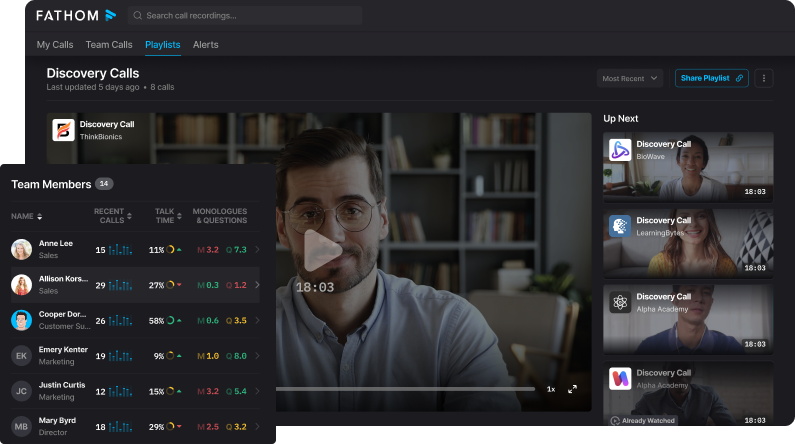
Fathom is an AI meeting assistant that works across Zoom, Google Meet, Microsoft Teams, and Gmail too. Its core features include transcription, instant summaries, action items, and a feature similar to Jamie's Ask AI called Ask Fathom. It lets you query your meeting library in plain English. There's also an AI Scorecard which gives you real-time coaching metrics.
Fathom is best for small-to-medium teams wanting a free, reliable meeting recorder, people who value staying present in conversations without the distraction of taking notes all the time.
As a G2 reviewer put it,
"The AI summaries are incredibly accurate, and I love that I can stay fully present in the conversation without worrying about missing a detail."
That said, as a VC team, I'm not sure if Fathom would be the ideal pick for you, as privacy is highly critical if you're residing in Europe.
European VCs need data sovereignty, and teams with high-stakes confidential deal calls need to know exactly where their data lives. Fathom does now offer a bot-free meeting option.
Still, as one G2 reviewer put it,
"The only downside is the desktop banner that appears at the start of every meeting. It feels a bit intrusive."
The deeper issue, though, is where your data actually goes afterwards. According to Fathom's own privacy policy, their services are hosted in the United States. Their policy also allows AI training on de-identified meeting data unless you opt out.
Jamie covers that angle differently: Jamie's data lives on EU servers in Germany, audio gets deleted right after transcription, and no third-party AI is trained on your meeting content. If your fund needs EU data residency for GDPR-sensitive LPs or simply for compliance peace of mind, that's where Jamie's setup fits.
When it comes to Fathom's pricing, it's refreshingly public on their site. There's a free forever tier with unlimited recordings and transcriptions, so you can handle large volumes of meeting data without paying anything.
Who is it for?
VC associates and partners who take back-to-back calls on Zoom, Meet, or Teams and want free, accurate meeting notes without having to write anything down.
Key features
AI meeting summaries: Structured notes and action items delivered after every call.
Word-perfect transcriptions: Handles multiple speakers and accents across languages.
Ask Fathom: Search across all your meetings and get AI-powered answers in seconds.
Global search across teams: Find past decisions across your entire meeting library.
Custom summary templates: Tailor your meeting notes to match your team workflow.
Pricing
Free: $0/month forever, unlimited recordings, transcriptions, and basic summaries.
Premium: $20/month per user, advanced summaries, AI action items, custom bot.
Team: $19/month per user (2 user min), global search, collaboration, SSO.
Business: $34/month per user (2 user min), CRM field sync, Deal View, AI scorecards.
Source: Fathom Pricing
Pros and cons
Pros
Tried everything on the market and Fathom wins on accuracy and speed
"I've tried practically everything on the market: Otter.ai, tl;dv, and even Notion's recorder, and Fathom wins." - G2, Vladislav M., April 2026
Automatically prepares you for the next meeting with zero setup needed
"I really love how the app automatically prepares me for my next meeting. The initial setup is very easy." - G2, Derwin V., April 2026
Turns daily meetings into actionable task-driven recaps every time
"Fathom turns what would otherwise be a slog of daily meetings into actionable, task-driven recaps. The AI transcription is the best I've seen to date." - G2, Raymond F., March 2026
No manual note-taking means fewer mistakes and full meeting focus
"No manual note-taking is needed, which means I don't make mistakes, and I can refer back to my notes at a later date." - G2, Adam H., March 2026
Captures meetings clearly and organises everything for easy review
"It does an excellent job of capturing meetings clearly and organizing everything in a way that is easy to review afterward." - G2, Mark P., March 2026
Cons
Some native integrations like Monday.com are missing for now
"The lack of a direct native connection with Monday.com. Currently, I solve it by combining it with a bit of external automation." - G2, Vladislav M., April 2026
The Ask Fathom feature does not feel very intuitive to use yet
"The only thing I'm not that fond of is the 'Ask Fathom' option. For some reason, it doesn't feel very intuitive to me." - G2, Derwin V., April 2026
Permissions setup across multiple accounts can be a bit of a chore
"Getting permissions setup across multiple accounts can be a bit of a chore, as well as occasional hiccups when attending meetings outside your professional network." - G2, Raymond F., March 2026
No mobile app yet so recording in-person meetings needs a laptop
"There is no app version of this AI Notetaker. An app version would make it easier to record in-person meetings without a PC present." - Capterra, Verified Reviewer, August 2025
The bot can sometimes join meetings even when you prefer it not to
"Sometimes you can't NOT add Fathom to your meetings. That is, sometimes I don't open the Fathom app, or specifically request that it not join a meeting." - Capterra, Capterra Reviewer
SourceScrub
Best for: The deal sourcing platform private equity firms use to find companies first
Similar to: Grata, PitchBook, Harmonic
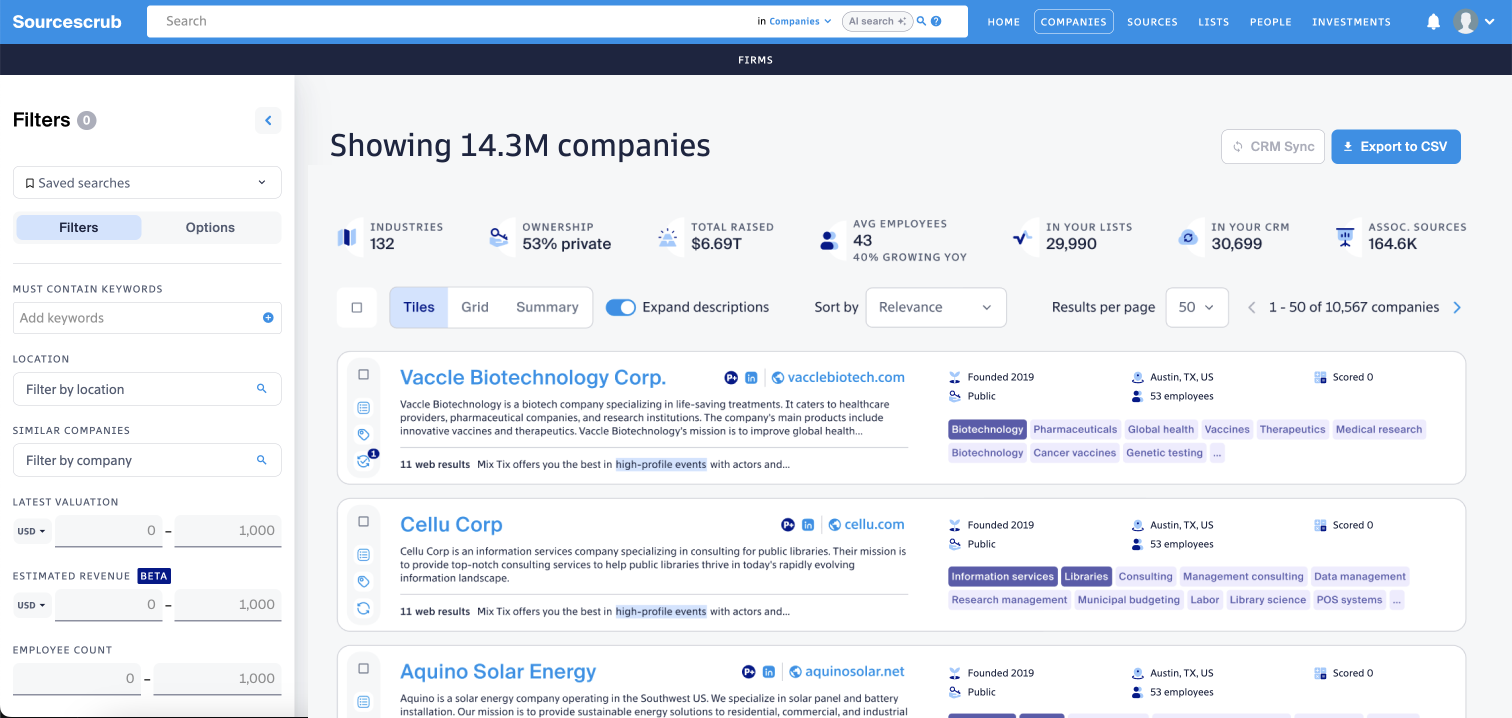
SourceScrub is a deal-sourcing platform used mostly by PE firms and investment banks to find profitable bootstrapped companies that normally fly under the radar of unicorn-focused databases, but useful for VCs too, especially if you are researching profitable private companies that don't always show up in VC-focused databases. It works by combining artificial intelligence, of course, with expert researchers and over 290,000 data sources to help you discover small-to-mid-size private companies that aren't publicly known yet.
What makes SourceScrub different is that it surfaces hidden companies that haven't yet reached the bigger VC and PE databases.
SourceScrub scans for signals and clues from unusual sources like award-winning lists, conference attendees, and industry market maps. Their AI then does the filtering and gives you companies that actually fit your investment criteria. That way, you might spot a promising company before it ends up in every VC's inbox. That is what SourceScrub truly does.
If you are a VC team doing heavy deal sourcing at scale and looking to invest in profitable bootstrapped companies rather than early-stage unicorn hunting, then yes, SourceScrub fits that profile.
That use case is captured well by Chris S., an Enterprise Account Manager, who wrote on G2 in March 2025:
"Sourcescrub is a powerful deal-sourcing platform that provides insights within private company intelligence and market insights. It excels at identifying bootstrapped, founder-owned, and private companies, making it an excellent tool for sales, private equity firms, venture capitalists, and M&A professionals."
One thing to flag though, SourceScrub can be pricy for smaller firms and the platform takes some time to learn. Tulsi R., working in Business Development at a small business, wrote on G2 in March 2025:
"Well it is a powerful tool, but it can be pricy for smaller firms. The platform's learning curve can be steep, and sometimes data accuracy or depth varies across industries. More advanced filtering and customisation options would enhance the experience for power users."
Jamie doesn't compete with SourceScrub on deal sourcing. Different layers entirely. But if cost is the hurdle, Jamie's meeting-intelligence layer is free to start and doesn't need training beyond recording your first meeting.
Who is it for?
PE and VC deal teams focused on proprietary sourcing who need to find founder-owned, bootstrapped, and private companies before competitors do, and investment bankers building market maps and target lists.
Key features
Sources-First Data: 17M companies connected to 290,000 sources and conference lists.
On-Demand Data Operations: Instant resources for data extraction, list building, and enrichment
AI-Driven Platform: Purpose-built tools that drive deals from discovery to diligence.
Profile+ Quality Standard: Deep company profiles validated across multiple sources.
Conference Planning: Match attendee lists against your criteria before you walk in.
Pricing
SourceScrub does not list pricing publicly. Three plan tiers are available, all requiring a custom quote.
Essentials: Core tools and data for private market discovery.
Plus: Additional trend and signal data for sophisticated tracking.
Professional: Data and resources for scaling cross-functional teams.
Source: SourceScrub Pricing
Pros and cons
Pros
Extensive private company data with AI-driven insights for sourcing
"The best thing about Sourcescrub is its extensive private company data and AI driven insights, making deal sourcing seamless." - G2, Tulsi R., March 2025
Real-time updates and CRM integration uncover hidden opportunities
"The platform's real-time updates, CRM integration, and niche data from trade shows help uncover hidden opportunities." - G2, Tulsi R., March 2025
A great daily addition that provides useful functionality for sourcing
"It has been a great addition to my daily tasks. Provides very useful functionality which I use daily." - G2, Verified User in Financial Services, March 2025
Organises data into sources that surface companies search misses
"It organizes data into sources vs. just using keyword matching, which allows me to identify more similar companies that may not appear similar on the surface." - G2, Verified User in VC/PE, March 2024
Tagging, list saving, and boolean search narrow down quality prospects
"I appreciate the tagging/list saving and boolean search terms. Being able to search for companies based on employee size, location, etc. are great at narrowing down quality prospects." - G2, Michelle K., September 2023
Cons
The learning curve can be a bit challenging when you first get started
"Some users might find the learning curve a bit challenging at first." - G2, Chris S., March 2025
Sometimes a company website is missing but you can request it be added
"Sometimes they do not have a website in their database, but you can always request it to be added at a later date." - G2, Verified User in Financial Services, March 2025
Contact email bounce rates can still be as high as fifteen per cent
"There are still some issues with emails bouncing. Bounce rates can be as high as 15%." - G2, Michelle K., September 2023
The interface can feel clunky though improvements come out frequently
"UI is sometimes a bit clunky, but improvements are made here frequently." - G2, Verified User in VC/PE, March 2024
Pricing is on the higher side for smaller firms just getting started
"It is a pretty robust tool and can be a bit pricey." - G2, Tulsi R., March 2025
Visible.vc
Best for: The investor update platform founders use to keep VCs in the loop.
Similar to: Carta (LP reporting), Standard Metrics, Foundersuite
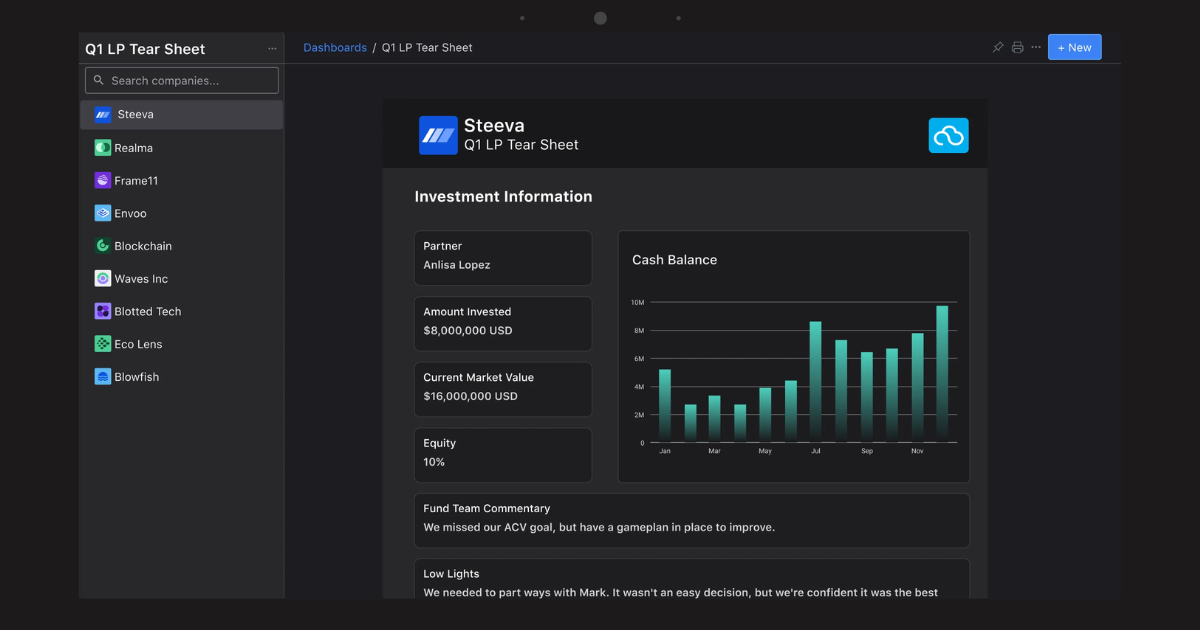
Visible.vc is a portfolio monitoring and LP reporting platform for VCs. It sits on both sides of the investor relationship, so founders use it to send updates to their VCs, and VCs use it to track how their portfolio companies are doing and send clean quarterly reports to their own LPs.
In 2026, Visible rolled out a suite of AI features aimed at cutting the manual work VCs do. Their AI Inbox parses financials, decks, and emails from your portfolio companies automatically. AI Docs turns deal documents into structured decisions, and their MCP server connects Visible's portfolio data to your LLM of choice.
Visible is a good fit for both sides of the investor relationship. Founders who want to send clean, timely updates to their investors, and VCs who are actively monitoring their portfolio companies and sending regular updates to their own LPs.
Especially if you've got enough touchpoints that tracking everything in a spreadsheet is starting to feel messy.
As Kyle H., Co-Founder & CEO at a software startup, wrote on G2 in July 2025:
"I would say my top feature is the investor updates. Being able to quickly write, manage, and send my investor updates on a timely basis has been clutch."
Price-wise though, Visible can feel expensive. As Guise B., Co-Founder and CEO of a small business, put it on G2 in July 2024:
"Price point, I have often thoughts it too expensive, but then when you compare it to any other tools you can rent to do the same job, and consider the invaluable role it plays in your raise, Visible does deliver value for money."
Who is it for?
Startup founders sending monthly investor updates and managing their fundraise, and VC fund managers who want portfolio monitoring, LP reporting, and a founder-friendly way to collect portfolio company data.
Key features
Updates: Investor updates that track opens, clicks, and engagement per recipient.
Dashboards: Visualise and share specific metrics with key stakeholders.
Pipelines: Investor pipelines that track the full activity of your capital raise.
Data Rooms: Securely share documents with advanced permissions and watermarking.
Connect: An enriched investor database integrated directly with your deal pipelines.
Pricing
Starter: $0/month (free, up to 100 investors, 2 pipelines, 2 decks)
Base: $69/month (250 investors, unlimited pipelines, 1 data room)
Core: $149/month (500 investors, 3 data rooms, per slide analytics)
Growth: $249/month (1,000 investors, 5 data rooms, dedicated CS manager)
Source: Visible.vc Pricing
Pros and cons
Pros
Easy and fun to use with a clean UI that is simple to move through
"I find Visible easy and fun to use. The UI and UX is easy to understand and move through, which makes the experience enjoyable." - G2, Omar A., March 2026
Tracks financial metrics and makes them available to share live
"Visible is a great tool to use for tracking financial metrics and making them readily available to be shared and viewed in live time." - G2, Michael M., September 2025
Seamless with all the tools a founder needs in one clean location
"It's seamless and has all of the tools I need in one clean location. It's easy to use, access, view metrics and share." - G2, Courtney W., August 2025
The deck sharing platform tracks who is seeing your slides and when
"The slide deck and doc sharing platform is amazing to track who is seeing your deck and examining what slides they're viewing and gathering other insights." - G2, Courtney W., August 2025
An easy and clean CRM that tracks everybody you talk to and update
"One of the most beneficial things for me was having an extremely easy and clean CRM solution inside Visible that allowed me to track everybody that I talked to." - G2, Kyle H., July 2025
Cons
More widgets and image options would make the dashboards even better
"I could use more widgets, I think. I'd love to have a mermaid block, maybe more options for images?" - G2, Cibby P., March 2026
Could integrate better with other data sources beyond what is built in
"Could integrate better with other data sources." - G2, Michael P., March 2025
The price point can feel high but it delivers value compared to others
"Price point, I have often thoughts it too expensive, but then when you compare it to any other tools you can rent to do the same job, Visible does deliver value for money." - G2, Guise B., July 2024
The Notion-like interface is great but limits some layout options
"It looks great, easy to use, very intuitive interface. It helps that the interface is very similar to Notion." - G2, Cibby P., March 2026
More people should use it because more users make it more helpful
"That more people don't use it. The more people use it, the more helpful the product is!" - G2, Michael M., September 2025
Granola
Best for: The AI notepad for back-to-back meetings that works without a bot.
Similar to: Jamie, Fathom, Otter.ai
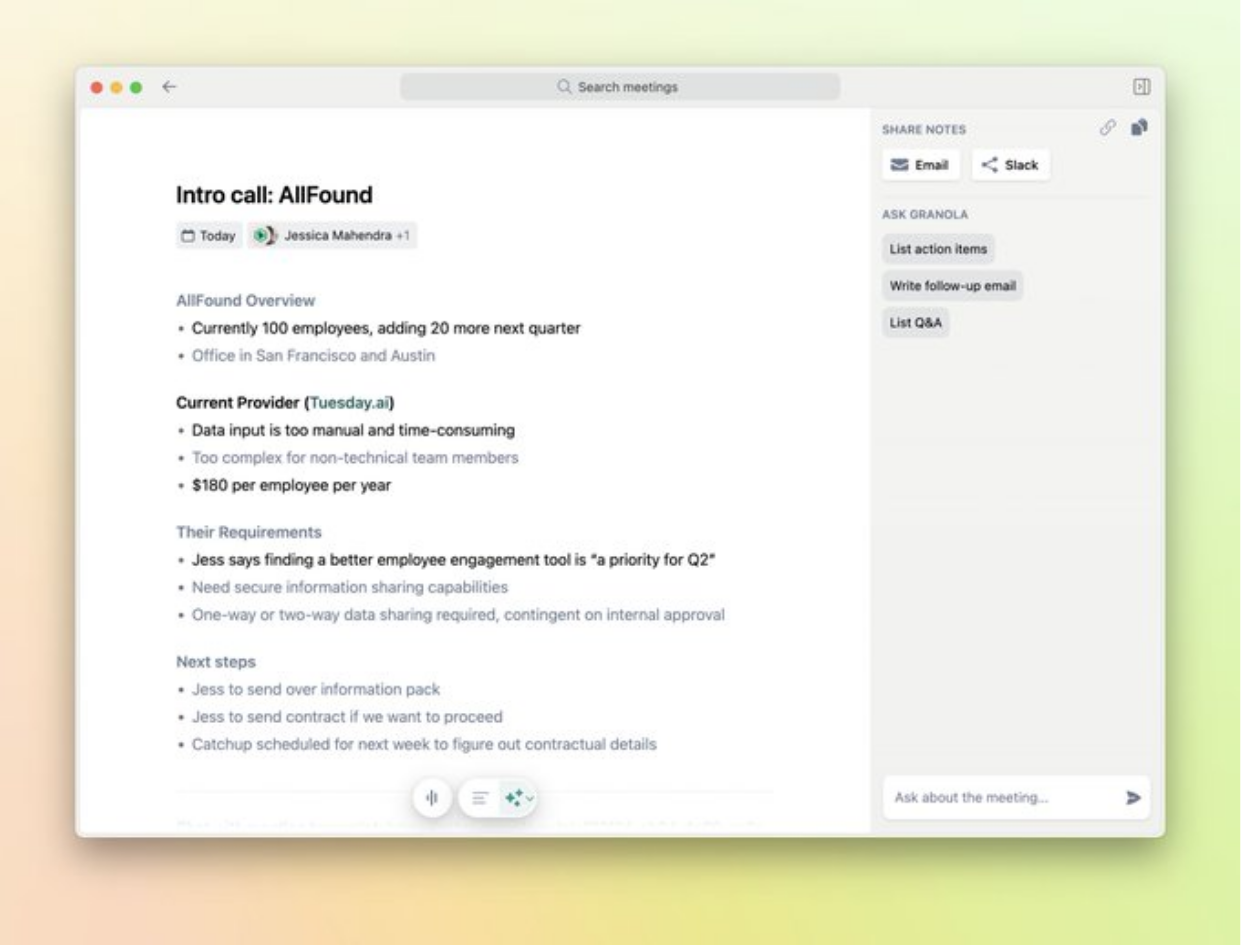
Granola is an AI meeting note-taker that's like Jamie, it's a native desktop app as well, and a bot-free AI note-taker too. It transcribes your audio on your computer and writes notes for you.
Granola too has an AI chat over your notes, so you can ask "what did the founder say about ARR" and it answers directly from your notes library. Your whole fund can share notes in one workspace, meaning if your partner took the first meeting, you can read their notes before the second one. You can also make custom templates for different types of meetings you might have, for example, pitch calls, LP updates, or portfolio reviews. And Granola structures notes to match.
As VCs, you would like a meeting tool like Granola, as it's a tool without an intrusive bot jumping into a call that would make your teams uncomfortable. Confirmed by a verified G2 user in April 2026, who wrote:
"It's so much better than the AI notetakers that just join a meeting, because it doesn't disrupt the flow at all."
That said, Granola has its cracks. The same verified G2 user in April 2026 flagged:
"The only thing I dislike about Granola is that, occasionally, I've noticed the transcript isn't completely accurate. It also doesn't always distinguish between different voices, so it can be unclear who is speaking."
And that speaker confusion is documented. Granola's own docs acknowledge that on desktop, their models "don't yet support live diarization," so every transcript just shows "Me" and "Them." Jamie, on the other hand, identifies each speaker by name and remembers them across future meetings, so six months later when that founder pitches you again, the transcript auto-tags them.
Who is it for?
VC partners and associates who want meeting notes without a bot joining their founder calls, and anyone in back-to-back meetings who wants to stay present in the conversation without worrying about note-taking.
Key features
Notepad: AI-enhanced meeting notes that combine your own notes with the transcript.
Chat: AI chat that already knows what happened across your meetings and your work.
Granola for iPhone: Record your meetings and phone calls on the go from your phone.
Customised note templates: Tailor meeting summaries to match your team workflow.
Multi-language support: Transcribes and summarises meetings in multiple languages.
Pricing
Basic: $0/month (free, AI meeting notes, limited meeting history)
Business: $14/month per user (unlimited history, advanced integrations, Attio/Notion/Slack/HubSpot/Affinity)
Enterprise: $35/month per user (SSO, admin controls, priority support, org-wide auto-deletion)
Source: Granola Pricing
Pros and cons
Pros
No bot joins the call so it does not disrupt the flow of the meeting
"It's so much better than the AI notetakers that just join a meeting, because it doesn't disrupt the flow at all." - G2, Verified User, April 2026
Works for everything from video calls to courses to phone chats
"I love that I can use Granola for absolutely everything: every single conversation I have, every course I listen to." - G2, Christel C., April 2026
Simple and clean with no unnecessary features and easy first setup
"I find Granola very easy to use. I appreciate the very simple and clean usage without many unnecessary features." - G2, Johannes E., February 2026
Seamless connection with Google and Zoom with no manual steps involved
"Extremely easy to use, especially with its seamless connection with Google and Zoom. The fact that there are no manual steps involved and I can just jump right into a meeting is a huge plus." - G2, David T., March 2026
Recording in the background is possible without anyone else noticing
"Background without joining as a bot or recording audio means I can actually be present in conversations. No awkward 'there's a bot in this call' energy." - G2, Aprielle D., March 2026
Cons
Transcripts are not always completely accurate
"Occasionally, I've noticed the transcript isn't completely accurate." - G2, Verified User, April 2026
Speaker recognition can struggle to tell apart who said what at times
"It also doesn't always distinguish between different voices, so it can be unclear who is speaking." - G2, Verified User, April 2026
No way to send AI chat output directly into the notes without copying
"The only improvement I'd love to see is an option in the chat to send what the AI just wrote directly into the notes, without having to copy and paste it manually." - G2, Christel C., April 2026
Granola doesn't save audio or video so you can't replay a missed moment
"The biggest gap is that it doesn't record audio or video it only transcribes the device output which means I can't go back and replay parts of a meeting if something was misheard or misattributed." - G2, Brahmatheja Reddy M., November 2025
No steady web version so you can't always use Granola on locked-down work laptops
"I dislike that Granola doesn't have a steady web version. This is particularly challenging for me as sometimes I can't always install software on my work computer, especially my work MacBook." - G2, Dean M., November 2025
Tracxn
Best for: The affordable startup database VC teams use alongside PitchBook.
Similar to: PitchBook, Crunchbase, Dealroom
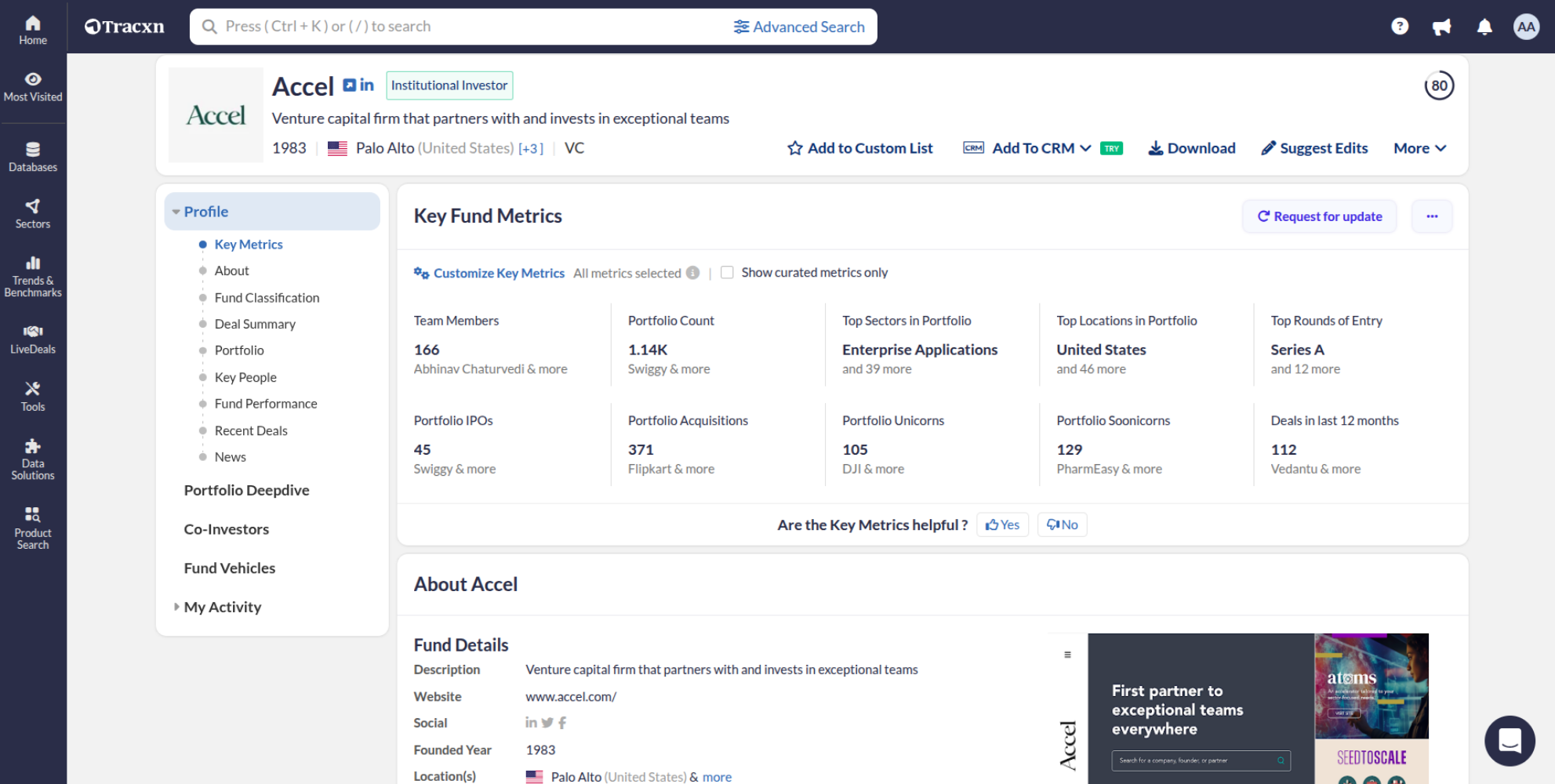
Tracxn is a company intelligence platform for the VC world. It combines both AI and expert human analysts. There's always a human in the loop, so as a VC you would be more comfortable knowing that real humans check and clean the data.
Tracxn consists of a huge library of private companies, starting from tiny startups to massive unicorns. What Tracxn can do for you VCs is organise them into specific industry sectors using AI, so you can literally pull up a visual 'map' of every company space that YOU specifically care about.
This kind of sector mapping is part of the broader AI adoption in VC research. Tracxn also tracks acquisitions across the market, which helps you see how things are consolidating.
Tracxn makes perfect sense for big established investment firms and corporate dev teams at Fortune 500 companies. It's built for VC firms, PE firms, investment banks, and M&A teams to do market research at such a big scale, not for casual or occasional use.
As a G2 reviewer wrote back in 2020,
"We've been users of Tracxn for 4+ years now, and I'd say most of the team would utilize Tracxn for various reasons once every day. We use it for sourcing new deals, conducting diligence as well as to support portfolio''
Where Tracxn falls short is the pricing and some data gaps. Based on SaaSworthy's pricing data, Tracxn starts around $550 per user per month on annual-only contracts. And while the database is massive, I'd say you might find that some smaller or newer startups aren't always captured yet. Not a great fit for leaner funds or anyone who needs month-to-month flexibility.
Jamie sits on a different layer from Tracxn. Tracxn helps you find the companies; Jamie captures what was said when you actually meet those founders. For leaner teams who can't justify $550 a seat, Jamie's free plan gives you the meeting-intelligence side without the annual contract.
Who is it for?
VC analysts and associates who need a startup database for sourcing and screening deals, especially teams that want PitchBook-level coverage at a lower price point, and corporate development teams tracking innovation and M&A targets.
Key features
Company deep-dive: In-depth profiles with funding, financials, and cap table data.
Sourcing new deals: Discover startups across trending sectors and geographies daily.
Deal Flow CRM: Track and manage your deal pipeline from sourcing through to close.
Sector Coverage: Browse 3,000+ feeds and 55,300+ taxonomies across every industry.
LiveDeals: See real-time deal activity and funding rounds as they happen worldwide.
Pricing
Lite: Free (personal use, full database access with usage limits)
Premium: Contact sales (unrestricted access, Deal Flow CRM, LiveDeals, 24/7 support)
Source: Tracxn Pricing
Pros and cons
Pros
An extensive database of companies from all sectors updated daily
"The platform offers a very extensive database of companies from all sectors, which is consistently updated." - G2, Cem K., January 2026
The interface is intuitive and easy to navigate for the whole team
"The interface is very intuitive and easy to navigate. Additionally, the Tracxn team is highly responsive and quick to assist with any clarifications." - G2, Verified User, December 2025
Speed of results and range of filters make research incredibly fast
"I really appreciate the speed at which Tracxn delivers results and the range of filters available. They make it incredibly easy to narrow down to exactly what I'm looking for." - G2, Verified User in Healthcare, December 2025
Tracks almost all private companies at multiple stages with financials
"Tracking almost all private companies at multiple stages. Provides financials directly from gov entities." - G2, Verified User in Retail, November 2025
User-friendly interface along with reliable data for large datasets
"User friendly interface along with reliable data." - G2, Dhananjay B., August 2025
Cons
Not all investment information may be fully up to date at all times
"Not all the investment information may be up to date, but this is not the dedicated scope of the platform." - G2, Cem K., January 2026
Cross-sectional analysis is strong but trend analysis could improve
"It is excellent for cross-sectional analysis, but conducting trend or longitudinal analysis could be improved." - G2, Verified User, December 2025
Sets high expectations that other research tools struggle to match
"The platform delivers results so quickly and the filters are so precise that it sometimes sets high expectations for how fast other research tools should work too." - G2, Verified User in Healthcare, December 2025
US financials are not available since private companies do not report
"US financials are not available. But that's normal since private companies in the USA do not report their financials." - G2, Verified User in Retail, November 2025
Login issues and OTP concepts across multiple devices can be annoying
"Login issues and OTP concepts of multiple devices logged." - G2, Dhananjay B., August 2025
Final verdict | What is the best AI tool for venture capital?
If your week is back-to-back founder pitches, due diligence calls, and portfolio reviews, and you need every one of those conversations captured, searchable across months of deal flow, and private enough for term sheet discussions, Jamie might be worth a look. It records from your device on any platform or in person, identifies every speaker, transcribes in 100+ languages, syncs your notes straight to your CRM, and permanently deletes your audio the moment your transcript is ready.
But the right tool really depends on what your team needs most right now.
If you are looking for:
Meeting notes without a bot disrupting your founder calls, Jamie captures your conversations from your device so your meetings stay between the people in the room, and you can send attendees a consent email 24 hours before if you want everyone informed.
Privacy your LPs and co-investors can actually trust, Jamie encrypts everything with AES 256-bit, stores your data in the EU, permanently deletes your audio after transcription, and is GDPR compliant and ISO 27001 certified. Your deal conversations are never used to train AI models.
Deal notes that reach your pipeline without you copying anything, Jamie syncs directly with HubSpot, Salesforce, Attio, Dynamics 365 Sales, and Pipedrive, and you can set custom templates so your board meeting notes look different from your founder pitch notes and your IC prep looks different from your LP update. Your fund's terminology is always spelled right.
The ability to search across every founder conversation you have ever had, Jamie's Ask AI lets you ask a question about any meeting or search across all of them at once, and it shows you exactly which conversation the answer came from. You can also connect Jamie to Claude or ChatGPT through MCP, so your entire meeting history becomes part of your AI workflow.
Here is what every tool in this article brings to the table:
Jamie: Search every founder call from your venture capital workflow in seconds, captured bot-free anywhere or in person in 100+ languages, speakers labelled, your fund's terms right, and notes straight in your CRM. Audio permanently deleted. GDPR and ISO 27001 certified.
PitchBook: The deepest private market database most VC teams already rely on for deal research, comps, and fund benchmarking.
Affinity: A relationship CRM that captures every email and meeting automatically and maps who on your team has the warmest intro path.
AlphaSense: A research platform that searches across millions of financial documents and surfaces insights with AI-powered citations.
Carta: The cap table and fund administration platform that most startups and VC funds already run their equity management on.
Fathom: A free AI meeting notetaker for Zoom, Meet, and Teams that gives you transcripts and summaries with no meeting limits, now with an optional bot-free capture mode.
SourceScrub: A deal sourcing platform that connects private companies to trade shows, conferences, and award lists so you find targets first.
Visible.vc: An investor update platform that tracks deck engagement, manages data rooms, and gives founders and VCs a clean reporting workflow.
Granola: An AI notepad that runs in the background on Mac and iPhone, combining your own notes with the transcript for a more personal output.
Tracxn: An affordable startup database with 7.1 million companies and deep sector coverage that works well alongside PitchBook.
You have seen what each of these tools does and where it fits into a venture capital workflow. If you want to try Jamie on your next founder call, you can start here. And if you would rather see it in action first, you can book a quick demo and we will walk you through it.
FAQs on AI tools for venture capital firms
Can one AI tool handle both fund stages?
Both fund stages run through conversations; this could mean you're pitching LPs or catching up with portfolio founders, and Jamie captures all of them, turning each one into searchable notes you can actually act on.
You can go back through months of calls to find that one thing a founder said weeks ago, and Ask AI drafts your follow-up emails from what was actually said, not what you half-remember afterwards. Your notes sync to HubSpot, Salesforce, Attio, Dynamics 365 Sales, or Pipedrive, and you can set up templates for due diligence calls versus LP updates so everything lands in the right format without you reorganising it later. Jamie records from your device so your meetings stay natural, you can toggle on a consent email beforehand if you want to, and your audio is deleted permanently once transcription is done. It works in person too, just open it on your phone (or your laptop) and it handles over 100 languages, so talk freely on your own language.