Jamie co-pilot
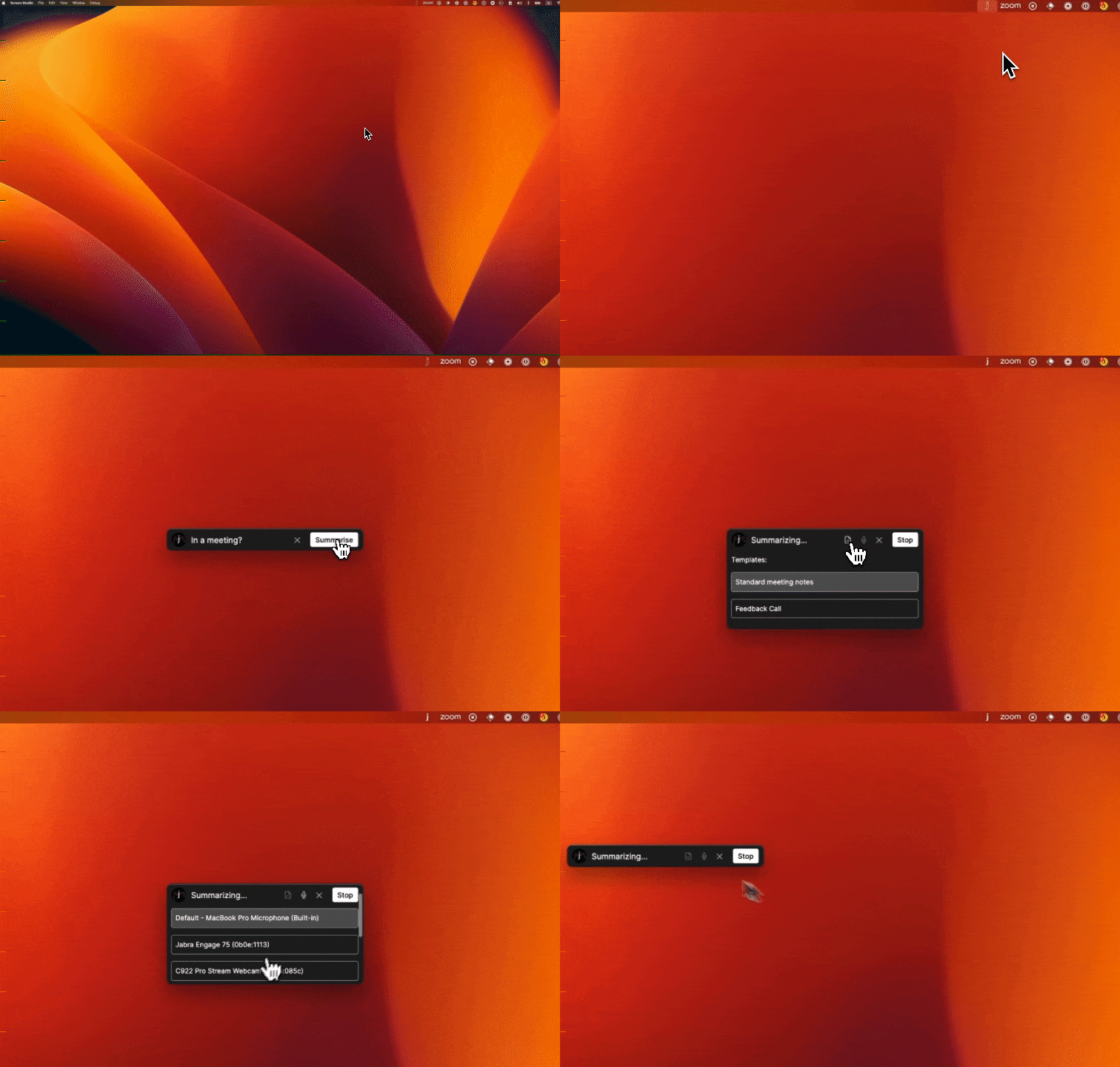
How can we best assist you in your day without distracting you too much? The answer is our new co-pilot interface 👀. You can enable this new interface in your account settings. It is not intrusive, yet always there for you when you need it. Adjust mic input, select custom note templates, or finish a meeting with one click. Drag & drop it like there’s no tomorrow - the position is saved 🧭. We are looking for feedback to perfect this neat and helpful interface over the coming weeks.
🎧 Improved Headphone Mode on macOS (beta)
One of the biggest frustrations that our customers on macOS were still experiencing was the difficult to use headphone mode. Luckily, this struggle should come to an end very soon. jamie now automatically detects whether you are using headphones and adjusts the required system settings if needed. Once you stop jamie, everything goes back to normal. You also are reminded to adjust the output device in the meeting software you are using. Usually, this should always happen automatically. But just in case you need to jump in, you are reminded to do so.
💎 Improvements
Added option to select language of transcriptions for better accuracy
Improved speed of loading calendar events on cold-opens of application
Added back button to identification screen
Faster loading of calendar events in todays view
Remember last choice of meeting language in summarizing view
Added exec summary option to custom notes templates
🐞 Fixes
Fixed issue resulting in some summary outputs being German instead of English